
Why the WRX90 WS EVO Is Trending for AI + Multi-GPU Workstations (And What to Know Before You Buy)
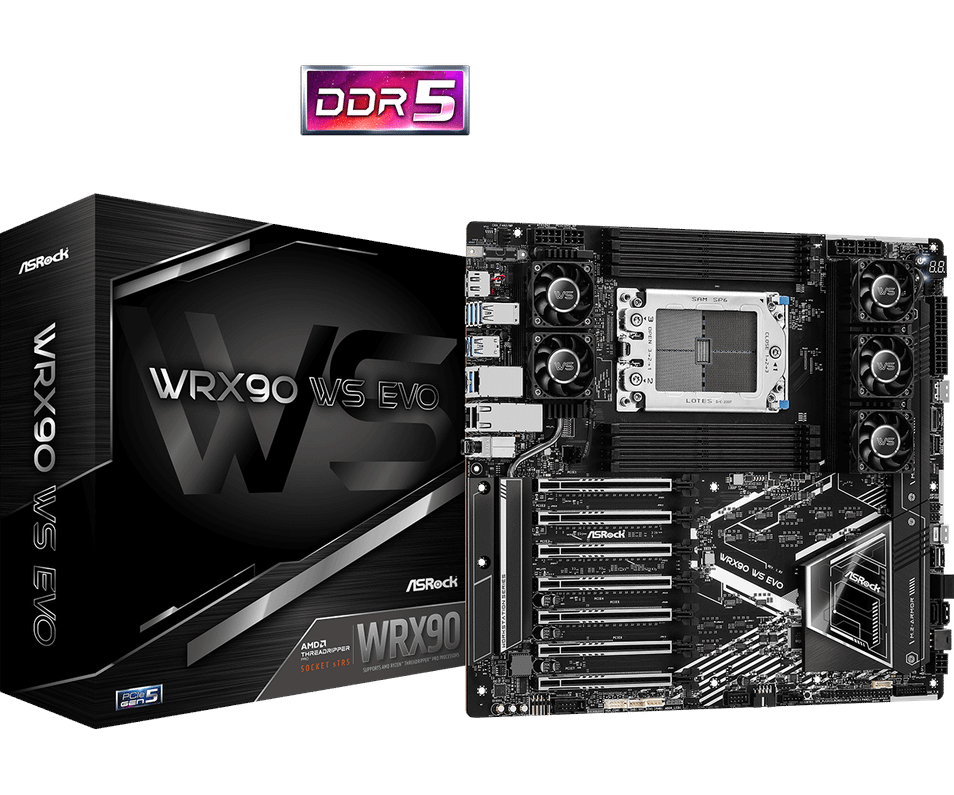
Table of Contents
- The trend in one sentence: expansion is the new performance
- A quick story: the “second GPU” moment that changes everything
- What the WRX90 WS EVO is (and who it’s for)
- Why the WRX90 WS EVO is built for AI + multi-GPU rigs
- What to know before you buy (save yourself expensive mistakes)
- Where the WRX90 WS EVO fits best in the real world
- Ready to build your WRX90 WS EVO workstation with the right parts?
- FAQs
Picture this: your model finally trains… but your single GPU is pinned at 100% for days. Your render queue grows faster than you can clear it. Your “workstation” starts acting like a bottleneck instead of a tool. And then you discover there’s a class of motherboards built for one job: feeding ridiculous amounts of compute without flinching.
That’s the lane the ASRock WRX90 WS EVO was built for.
If you’re seeing it pop up everywhere in AI build threads, multi-GPU render rigs, and workstation forums, it’s because the WRX90 WS EVO hits a rare combination: massive PCIe 5.0 expansion, workstation-grade memory support, pro networking, and server-style management features—without forcing you into an actual rack server.
So here’s the real question: are you building a “fast PC,” or are you building a machine that scales with your workload for the next 3–5 years?
The trend in one sentence: expansion is the new performance
A lot of people used to chase only CPU clocks and GPU tiers. But today’s AI + creation workloads are often limited by platform constraints:
-
“I need another GPU… but I’m out of lanes/slots.”
-
“My storage can’t feed my dataset fast enough.”
-
“I need 10GbE for the NAS, but I also need remote management.”
-
“I need stable memory at scale, not just ‘gaming RAM.’”
The WRX90 WS EVO is trending because it’s designed around those constraints—especially expansion. On ASRock’s own spec sheet, the headline is hard to miss: 7× PCIe 5.0 x16-length slots plus a workstation feature set built for Threadripper PRO.
A quick story: the “second GPU” moment that changes everything
A builder starts with one GPU for AI experiments. It’s fine—until the backlog hits. They add a second GPU and suddenly realize the real pain isn’t “power.” It’s platform:
-
Slot spacing becomes a problem.
-
Lanes become a problem.
-
Cooling becomes a problem.
-
Stable storage becomes a problem.
-
Fast networking becomes a problem.
That’s when workstation boards like WRX90 WS EVO start making sense—because they’re built for the second, third, fourth upgrade… not just day one.
What the WRX90 WS EVO is (and who it’s for)
The ASRock WRX90 WS EVO is a workstation motherboard for the AMD WRX90 platform using sTR5, targeting AMD Ryzen™ Threadripper™ PRO 9000/7000 WX-Series processors.
This board is for you if you’re building:
-
AI / ML workstations (multi-GPU, huge datasets, fast scratch storage)
-
3D rendering / VFX (multi-GPU, large memory, heavy I/O)
-
simulation / engineering (memory bandwidth + stability)
-
virtualization / homelab-pro (IPMI/BMC management, multi-NIC workflows)
If you’re building a typical gaming PC, it’s overkill. If you’re building something that needs to scale like a small compute node sitting under your desk… it’s exactly the kind of platform that reduces future rebuilds.
Why the WRX90 WS EVO is built for AI + multi-GPU rigs
Let’s unpack the “why it’s trending” pieces you’ll see referenced in reviews and community builds.
1) WRX90 WS EVO PCIe 5.0 expansion: the main character
This is the feature that drives the hype: 7× PCIe 5.0 x16-length slots.
For AI and multi-GPU:
-
More GPUs / accelerators without compromising the whole build
-
Space for high-end NICs, capture cards, RAID/HBA cards
-
Room to grow as your workflow grows
2) Pro networking that matches the workloads
The WRX90 WS EVO is commonly listed with dual 10GbE (Intel X710-AT2)—a big deal for AI and studios pulling assets from NAS or shared storage.
3) Workstation management: IPMI/BMC isn’t “nice to have”
A lot of workstation builders discover the value of remote management the first time a long job hangs at 2 a.m. The WRX90 WS EVO is positioned with dedicated management features (often discussed as IPMI/BMC) alongside workstation performance, which is why homelab and studio users talk about it like a “server-workstation hybrid.”
4) Storage that isn’t just “two M.2 slots and hope”
From the official spec list: you’re looking at Gen5 M.2 + Gen4 M.2 plus MCIO and SlimSAS connectors for more advanced storage expansion paths.
What to know before you buy (save yourself expensive mistakes)
Here’s a practical checklist—because the WRX90 WS EVO isn’t “plug and play like a gaming board.” It’s a platform.
Before-you-buy checklist for WRX90 WS EVO builds
-
Case size matters: this board is sold as EEB/SSI-EEB class—choose a compatible chassis.
-
Plan power properly: multi-GPU rigs can exceed what people assume; spec your PSU for sustained loads (not just peak marketing numbers).
-
Expect memory training: first boot can take longer on high-capacity workstation memory setups—don’t panic if initial POST isn’t instant.
-
Know your networking environment: 10GbE can be flawless, but you’ll want the right switch/cables and drivers.
-
Decide your storage topology early: Gen5 NVMe for scratch + expandable storage via SlimSAS/MCIO is where workstation builds win.
Where the WRX90 WS EVO fits best in the real world
If your workflow looks like any of these, the WRX90 WS EVO trend makes sense:
-
AI training/inference workstation with 2–4 GPUs and fast local scratch
-
3D/VFX box with multi-GPU rendering + high-capacity memory
-
Studio workstation pulling assets from NAS over 10GbE
-
Hybrid workstation/homelab where IPMI-style management saves time
Ready to build your WRX90 WS EVO workstation with the right parts?
If you’re planning an AI or multi-GPU workstation, Memox can help you spec the full setup around the WRX90 WS EVO—CPU, compatible memory, storage topology, PSU sizing, and case fit—so you don’t waste money on mismatched parts or avoidable “first boot” headaches.
Browse the board here and reach out if you want a tailored parts list for your workload: Memox.co.uk.
FAQs
More from MemoX
View all articles-
 3000VA UPS
VIDA Armour 3000VA UPS Review: Is It Worth It for Gaming PCs, NAS & Servers?
3rd Oct 2026 -
 Announcements
ASRock A520M-HVS: The Budget AM4 Motherboard Still Worth Buying for Ryzen Builds
1st Oct 2026 -

-
 Storage & Memory Guides
How to Check the SSD Health Before It’s Too Late (And Save Your Data)
1st Oct 2026 -
 Announcements
Why the WRX90 WS EVO Is Trending for AI + Multi-GPU Workstations (And What to Know Before You Buy)
1st Oct 2026 -
 Announcements
The Best Micro SD Express Cards for Nintendo Switch 2: Speed Now, Future-Proofed For Tomorrow
1st Oct 2026