
ASRock A520M-HVS: The Budget AM4 Motherboard Still Worth Buying for Ryzen Builds
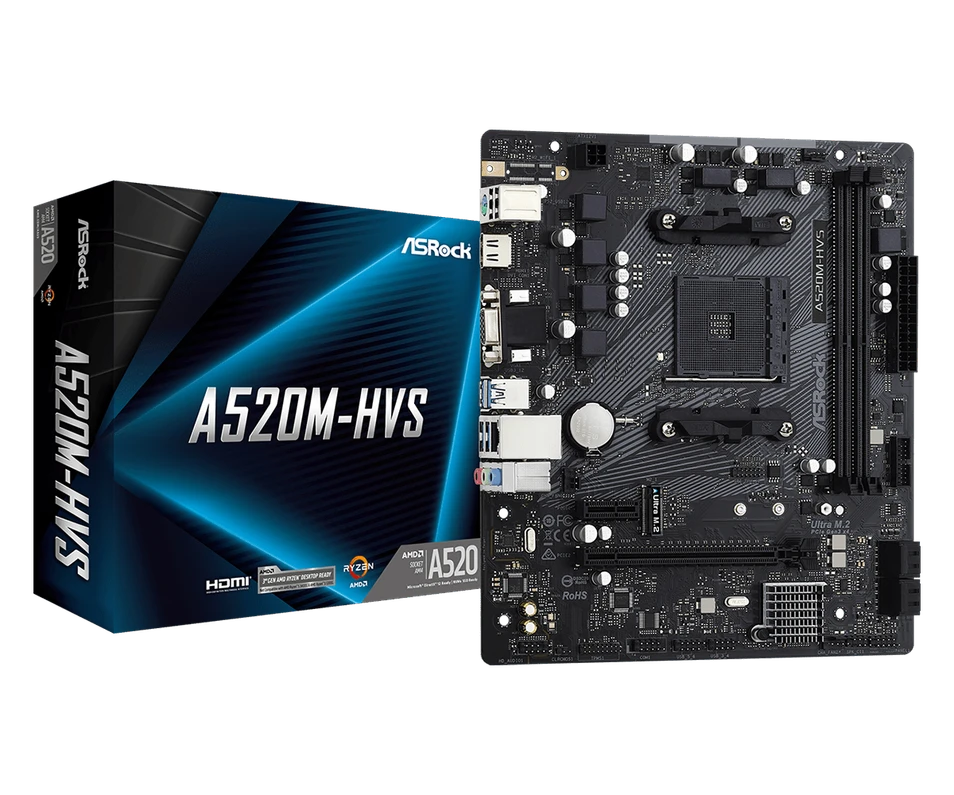
Table of Contents
- Why the ASRock A520M-HVS Still Gets Attention from Budget PC Builders
- What Is the ASRock A520M-HVS?
- The Big Value: A Budget AM4 Motherboard That Covers the Essentials
- A Quick Story: The Buyer Who Did Not Need a Premium Motherboard
- ASRock A520M-HVS for Ryzen Builds: Who Is It Best For?
- ASRock A520M-HVS and M.2 SSD Support: Why It Matters
- ASRock A520M-HVS vs B550: Which One Should You Choose?
- The Important No-Display Issue: HDMI and VGA Explained
- Can the ASRock A520M-HVS Work with RTX Graphics Cards?
- ASRock A520M-HVS for Gaming: Good Enough or Too Basic?
- Common Problems and Simple Solutions with the ASRock A520M-HVS
- Final Verdict: The Budget AM4 Motherboard That Still Makes Sense
- FAQs
Not every great PC build starts with an expensive motherboard. Sometimes, the smartest build starts with a board that keeps things simple, practical and affordable.
That is exactly why the Asrock A520M-HVS still deserves attention.
In a world full of premium gaming motherboards, RGB lighting, oversized heatsinks and features many everyday users never touch, the Asrock A520M-HVS takes a different approach. It focuses on what budget PC builders actually need: AMD AM4 Ryzen support, DDR4 memory, M.2 SSD storage, micro-ATX sizing, HDMI and VGA output, Gigabit LAN and a simple layout that makes sense for affordable home, office and gaming PCs.
But here is the important question: is the ASRock A520M-HVS still worth buying for Ryzen builds today?
For many people, the answer is yes — as long as they understand what this motherboard is designed for, what it supports, and what its limitations are.
This guide explains what the Asrock A520M-HVS is, how it works, where it fits best, why it remains useful for AM4 builds, and what common problems buyers should know before installing it.
Why the ASRock A520M-HVS Still Gets Attention from Budget PC Builders
The Asrock A520M-HVS is not a motherboard designed to impress extreme gamers or overclocking enthusiasts. It is a value-focused AMD A520 motherboard made for practical Ryzen builds.
That is exactly why people still search for it.
Many PC builders are not looking for the most expensive option. They are looking for a motherboard that can handle everyday tasks, support compatible Ryzen processors, run DDR4 RAM, connect a fast SSD, and fit into a compact case. For that type of build, the Asrock A520M-HVS can be a smart choice.
The biggest online conversations around this board are not about hype. They are about real buying questions:
- Does the Asrock A520M-HVS support Ryzen 5000?
- Can it work with RTX graphics cards?
- Why is there no display from HDMI?
- Does it need a BIOS update?
- Is A520 good enough, or should I buy B550?
- Can I use 32GB or 64GB RAM?
- Does it support an M.2 SSD?
- Is it good for a cheap gaming PC?
These are the questions real customers ask before buying. That makes this motherboard a strong topic for anyone building an affordable AMD Ryzen system.
What Is the ASRock A520M-HVS?
The Asrock A520M-HVS is a micro-ATX motherboard based on the AMD A520 chipset. It uses the AMD AM4 socket, which means it supports selected AMD Ryzen desktop processors, depending on the exact CPU model and BIOS version.
It is designed for simple and affordable PC builds. It includes two DDR4 RAM slots, one PCIe x16 slot for a graphics card, one PCIe x1 slot, one Ultra M.2 slot for fast SSD storage, four SATA ports, HDMI and VGA display outputs, Gigabit LAN and onboard audio.
In simple terms, the motherboard is the central connection point of your PC. Your processor, RAM, SSD, graphics card, power supply and case all connect through it.
The Asrock A520M-HVS is especially useful for:
- Home office computers
- Student PCs
- Budget gaming builds
- Small business workstations
- Family computers
- PC repair and replacement builds
- Compact micro-ATX systems
- Affordable Ryzen 3 and Ryzen 5 builds
- Low-cost systems using Ryzen G-Series processors
It is not a luxury motherboard. It is a practical one.
The Big Value: A Budget AM4 Motherboard That Covers the Essentials
The strongest reason to consider the Asrock A520M-HVS is value. It gives you the key features needed for a capable Ryzen PC without pushing the price higher with extras you may not use.
Here are the core features that matter most:
- AMD AM4 socket
- AMD A520 chipset
- Micro-ATX form factor
- 2 x DDR4 memory slots
- Up to 64GB memory support
- Ultra M.2 slot for fast SSD storage
- 4 x SATA3 ports for extra drives
- PCIe x16 slot for graphics cards
- HDMI and VGA display outputs
- Gigabit LAN
- Onboard HD audio
- USB connectivity
- Compact and simple layout
For many everyday users, this is enough. A motherboard does not need to be expensive to be useful. It needs to match the purpose of the build.
A Quick Story: The Buyer Who Did Not Need a Premium Motherboard
Imagine a customer building a PC for work, study and light gaming. They need something that opens websites quickly, handles documents, runs video calls, stores files and maybe plays some games after work.
They start looking at motherboards and quickly become overwhelmed. Some boards advertise PCIe 4.0, built-in Wi-Fi, multiple M.2 slots, RGB lighting, heavy heatsinks and premium audio. The prices climb quickly.
But this customer only needs a reliable system with a Ryzen processor, 16GB RAM and an SSD.
That is where the Asrock A520M-HVS makes sense. It gives them a practical AM4 base without forcing them to pay for features they do not need.
This is why the Asrock A520M-HVS remains relevant. It is not trying to be everything. It is trying to be enough for the right build.
ASRock A520M-HVS for Ryzen Builds: Who Is It Best For?
The Asrock A520M-HVS motherboard is best for users who want a simple, affordable and reliable AMD Ryzen system.
It is a good choice for:
Home Office PCs
For emails, spreadsheets, invoicing, stock systems, browsing, printing, cloud apps and video meetings, the Asrock A520M-HVS can be a strong base when paired with the right Ryzen CPU, RAM and SSD.
Student Computers
Students need a reliable PC for research, assignments, online learning, presentations and streaming. A budget Ryzen build using the Asrock A520M-HVS can offer good value.
Budget Gaming PCs
The board can be used for gaming when paired with a suitable Ryzen CPU and dedicated graphics card. It is not aimed at extreme gaming builds, but it can work well for entry-level and mid-range budget systems.
Small Business Computers
For small businesses that need affordable desktops, this board can help keep costs under control while still supporting fast SSD storage and modern Ryzen processors.
PC Repair and Replacement Builds
If someone has an older AM4 system and needs a replacement motherboard, the Asrock A520M-HVS may be a cost-effective option, provided CPU compatibility is checked first.
ASRock A520M-HVS and M.2 SSD Support: Why It Matters
One of the best features of the Asrock A520M-HVS is its Ultra M.2 slot.
For everyday users, an M.2 SSD can make a bigger difference than many people expect. A system with an SSD can boot faster, open apps quicker, copy files faster and feel more responsive.
A practical build could include:
- Asrock A520M-HVS motherboard
- Compatible AMD Ryzen processor
- 16GB DDR4 RAM
- M.2 NVMe SSD
- Reliable power supply
- Micro-ATX case
This kind of setup can be excellent for office work, school work, browsing, media streaming and general daily use.
The M.2 slot helps the Asrock A520M-HVS feel more modern, even though it is a budget motherboard.
ASRock A520M-HVS vs B550: Which One Should You Choose?
One of the most common questions around this board is whether buyers should choose A520 or B550.
The answer depends on your build.
The Asrock A520M-HVS is better if you want a low-cost, simple AM4 system. It is ideal when you do not need advanced features and want to keep the total build price down.
A B550 motherboard may be better if you want more features, such as PCIe 4.0, more M.2 slots, stronger upgrade options, better power delivery or more USB connections.
Choose the Asrock A520M-HVS if:
- You want a budget AM4 motherboard
- You are building an everyday PC
- You do not need PCIe 4.0
- You do not plan heavy overclocking
- You only need two RAM slots
- You only need one M.2 SSD slot
- You want a compact micro-ATX board
- You are building a Ryzen 3 or Ryzen 5 value system
Choose B550 if:
- You want PCIe 4.0
- You need more expansion options
- You want multiple M.2 drives
- You are building a higher-end gaming PC
- You want stronger future upgrade potential
- You are using a more powerful Ryzen CPU for heavy workloads
The Asrock A520M-HVS is not better than B550 in features. But it can be better value for the right user.
The Important No-Display Issue: HDMI and VGA Explained
One of the most common problems people ask about is no display from the Asrock A520M-HVS HDMI or VGA port.
This is very important:
The HDMI and VGA ports on the motherboard only work if your Ryzen processor has integrated graphics.
The motherboard itself does not create the graphics signal. If you install a Ryzen CPU without built-in graphics, the HDMI and VGA ports will not show anything. In that situation, you need a dedicated graphics card and must connect your monitor to the graphics card instead.
This issue can make people think the motherboard is faulty, but often it is simply a CPU graphics compatibility issue.
For example, many Ryzen processors without a “G” in the model name do not include integrated graphics. Ryzen G-Series processors are usually the models buyers consider when they want display output from the motherboard ports.
Before buying, ask yourself: will I use a dedicated graphics card, or do I need a Ryzen CPU with integrated graphics?
Can the ASRock A520M-HVS Work with RTX Graphics Cards?
Yes, the Asrock A520M-HVS has a PCIe x16 slot, so it can work with many graphics cards, including many NVIDIA RTX models.
However, motherboard compatibility is only one part of the question. When upgrading to a graphics card such as an RTX 3060, RTX 4060 or RTX 4070, you must also check:
- Power supply wattage
- PCIe power connectors
- Case space
- CPU performance
- Airflow
- BIOS compatibility
- Monitor connection
For many GPU upgrades, the power supply and case size are more important than the motherboard itself.
The Asrock A520M-HVS can be part of a budget gaming system, but it should be matched with sensible components.
ASRock A520M-HVS for Gaming: Good Enough or Too Basic?
The Asrock A520M-HVS can be good enough for budget gaming, but it is not designed for high-end gaming systems.
It works best for:
- Entry-level gaming
- 1080p budget gaming
- Esports games
- Casual gaming
- Older titles
- Ryzen 3 and Ryzen 5 gaming builds
- Builds using a dedicated GPU
It is less suitable for:
- Extreme gaming builds
- Ryzen 9 systems under heavy load
- Overclocking-focused builds
- Multi-drive premium gaming PCs
- Users wanting PCIe 4.0 performance features
For a sensible budget gaming build, the Asrock A520M-HVS can do the job. For a premium gaming build, you may want a stronger board.
Common Problems and Simple Solutions with the ASRock A520M-HVS
Problem: No display from HDMI or VGA
Use a Ryzen CPU with integrated graphics or install a dedicated graphics card. If your CPU does not have built-in graphics, the motherboard display ports will not work.
Problem: PC turns on but does not boot
Check the RAM is fully seated, the CPU is compatible, the 24-pin motherboard cable is connected, the CPU power cable is connected and the BIOS supports your processor.
Problem: M.2 SSD is not detected
Check that the M.2 SSD is properly installed and screwed down. Also check BIOS storage settings and confirm the SSD type is compatible.
Problem: Graphics card not working
Check the GPU is fully seated, the power supply is strong enough, PCIe power cables are connected and the monitor is plugged into the graphics card, not the motherboard.
Problem: No Wi-Fi
The Asrock A520M-HVS does not include built-in Wi-Fi. You can add Wi-Fi using a USB Wi-Fi adapter or PCIe Wi-Fi card.
Problem: RAM running slower than expected
Enable the memory profile in BIOS if supported. Memory speed depends on the CPU, RAM kit and motherboard compatibility.
Problem: Ryzen 5000 CPU does not boot
The motherboard may need a compatible BIOS version. Always check CPU support and BIOS version before installation.
Final Verdict: The Budget AM4 Motherboard That Still Makes Sense
The Asrock A520M-HVS is not trying to be the most advanced motherboard on the market. It is trying to be useful, affordable and simple.
That is why it still makes sense for many Ryzen builds.
For home office users, students, small businesses, family PCs and budget gamers, this board provides the core features needed to build a capable system without overspending. You get AM4 Ryzen support, DDR4 memory, M.2 SSD compatibility, graphics card support, Gigabit LAN and a compact micro-ATX layout.
The key is understanding what it is good at. The Asrock A520M-HVS is best for practical budget builds. It is not ideal for extreme overclocking or premium gaming PCs, but for sensible everyday systems, it can be a smart choice.
If you are building a budget AMD Ryzen PC and want a motherboard that covers the essentials, the Asrock A520M-HVS is still worth considering.
Ready to start your next affordable Ryzen build? Visit Memox.co.uk to explore the Asrock A520M-HVS and find compatible PC components, memory, SSDs, graphics cards and accessories.
Need help choosing the right parts? Connect with Memox today and make your next PC upgrade simple, affordable and stress-free.
FAQs
More from MemoX
View all articles-
 3000VA UPS
VIDA Armour 3000VA UPS Review: Is It Worth It for Gaming PCs, NAS & Servers?
3rd Oct 2026 -
 Announcements
ASRock A520M-HVS: The Budget AM4 Motherboard Still Worth Buying for Ryzen Builds
1st Oct 2026 -
-
 Storage & Memory Guides
How to Check the SSD Health Before It’s Too Late (And Save Your Data)
1st Oct 2026 -
 Announcements
Why the WRX90 WS EVO Is Trending for AI + Multi-GPU Workstations (And What to Know Before You Buy)
1st Oct 2026 -
 Announcements
The Best Micro SD Express Cards for Nintendo Switch 2: Speed Now, Future-Proofed For Tomorrow
1st Oct 2026