
The Best Micro SD Express Cards for Nintendo Switch 2: Speed Now, Future-Proofed For Tomorrow
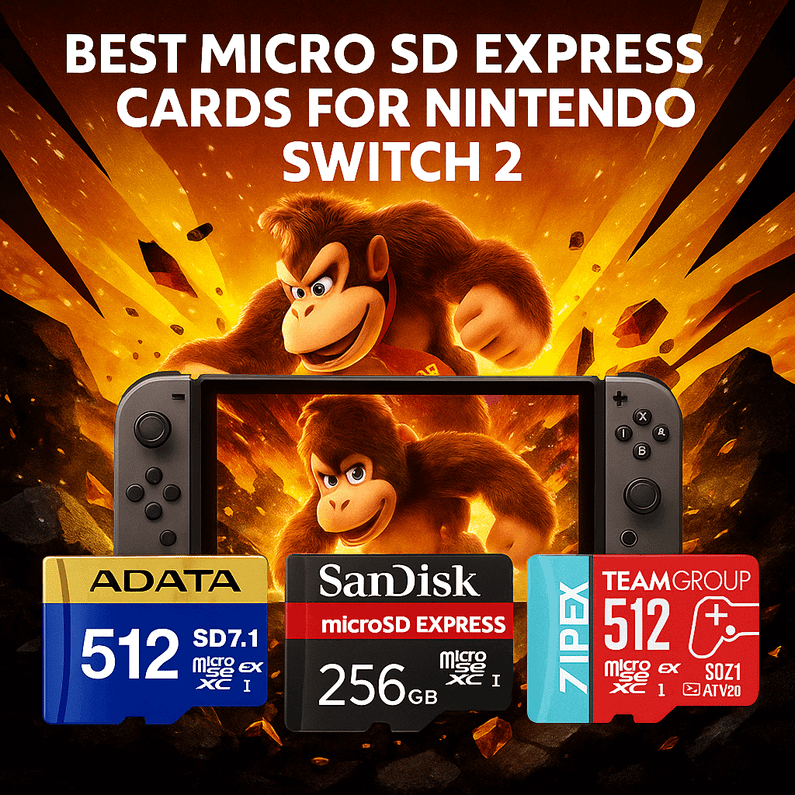
Table of Contents
- Why Micro SD Express Matters for Nintendo’s Next-Gen (and Your Current Switch)
- The Line-Up: 5 “Switch 2 Ready” Micro SD Express Picks
- Comparison Table: Specs & Use-Case Fit
- Story Time: The “Digital-Only” Gamer in Peterborough
- What / How / Where / Why — The Micro SD Express Playbook
- Mini Buyer’s Checklist (So You Don’t Overthink It)
- Head-to-Head: Fast Takes & Use-Case Advice
- How to Install & Format (and Avoid Headaches)
- A Quick Reality Check on Speeds
- Which One Should You Choose?
- The Bottom Line
- Talk to Memox (We’re Real, Friendly, and in the UK)
- FAQs
You boot up your Switch, tap “Continue”, and—bam—your load screen flies by like a cutscene on fast-forward. That’s the promise of Micro SD Express: PC-grade storage tech squeezed into a microSD card. If you’re hunting for the Best Micro SD Express cards for Nintendo Switch 2, you’re in the right place—because we’ve hand-picked five “Switch 2 Ready” options we stock at Memox, compared them side-by-side, and wrapped everything in plain-English buying advice you can actually use.
Quick thought: would shaving seconds off every load screen change how (and what) you play?
Why Micro SD Express Matters for Nintendo’s Next-Gen (and Your Current Switch)
Micro SD Express (part of the SD 7.x standard) uses a PCIe Gen3 x1 link and NVMe protocol—the same fundamentals that make NVMe SSDs feel snappy on PCs. If Nintendo’s next-gen Switch enables SD Express, these cards can unlock dramatically faster sequential and random speeds compared to traditional UHS-I microSD.
-
Today: They remain backward-compatible with UHS-I devices (like the current Switch), so you can buy once and use now.
-
Tomorrow: Switch 2 supports SD Express, you’ll be positioned to take advantage of much higher throughput without buying again and new devices the will coming in the future supporting express card
That’s why we picked these five as the Best Micro SD Express cards for Nintendo Switch 2—they’re smart buys today and safe bets for tomorrow.
The Line-Up: 5 “Switch 2 Ready” Micro SD Express Picks
-
ADATA Premier Extreme 512GB (SD7.1, up to 800MB/s)
Future-proof capacity without going overboard; great for big libraries and frequent eShop sales. -
ADATA Premier Extreme 256GB (SD7.1, up to 800MB/s)
A sweet-spot size if you rotate games and don’t hoard huge downloads. -
SanDisk 256GB microSD Express, “Works with Nintendo Switch 2”
The SanDisk name many gamers trust, with SD Express readiness. -
TEAMGROUP APEX 512GB (SD7.1, up to 800MB/s)
Big capacity, SD Express performance, strong value-per-GB. -
TEAMGROUP APEX 256GB (SD7.1, up to 800MB/s)
Budget-friendly entry to SD Express with room for a sizeable library.
Note: “Up to 800MB/s” is the typical SD Express read headline for SD7.1 cards. Actual speeds depend on device support (UHS-I vs SD Express), firmware, and workload. The current Switch runs UHS-I; The Nintendo Switch 2 can read microSD Express cards at speeds up to approximately 985MB/s read for PCIe 3.0x1 and 650MB/s write.
Comparison Table: Specs & Use-Case Fit
| Card | Capacity | SD Standard / Interface | Headline Read Speed | Ideal For | Memox Link |
|---|---|---|---|---|---|
| ADATA Premier Extreme | 512GB | SD 7.1 / microSD Express (PCIe Gen3 x1, NVMe) | Up to 800MB/s (device-dependent) | Large libraries, digital-only collections | Product page |
| ADATA Premier Extreme | 256GB | SD 7.1 / microSD Express (PCIe Gen3 x1, NVMe) | Up to 800MB/s (device-dependent) | Balanced capacity at a friendlier price | Product page |
| SanDisk microSD Express | 256GB | SD 7.x / microSD Express (PCIe Gen3 x1, NVMe) | Up to 800MB/s (device-dependent) | Brand assurance, Switch gamers who prefer SanDisk | Product page |
| TEAMGROUP APEX | 512GB | SD 7.1 / microSD Express (PCIe Gen3 x1, NVMe) | Up to 800MB/s (device-dependent) | Big capacity value build | Product page |
| TEAMGROUP APEX | 256GB | SD 7.1 / microSD Express (PCIe Gen3 x1, NVMe) | Up to 800MB/s (device-dependent) | Entry-level SD Express upgrade | Product page |
How to read this table:
-
If you want maximum library size on a single card: pick 512GB (ADATA Premier Extreme or TEAMGROUP APEX).
-
If you want best price-to-performance without over-buying: pick 256GB.
-
If you strongly prefer a household brand, the SanDisk 256GB microSD Express is the familiar flag.
Story Time: The “Digital-Only” Gamer in Peterborough
Callum, a friend from Peterborough, was tired of deleting games every time a new patch dropped. He grabbed the TEAMGROUP APEX 512GB from Memox as a stop-gap—“I’ll upgrade again when i buy the Switch 2” he said. A week later, he wasn’t thinking about space at all; everything lived on one card, and he stopped micromanaging storage. Now he’s just waiting to save some money to upgrade to Switch 2.He’s already holding a compatible card. He’s still sorted till get new switch 2. Either way, he bought himself time and peace of mind.
What / How / Where / Why — The Micro SD Express Playbook
What is Micro SD Express (for Switch owners)?
A microSD form factor card that speaks NVMe over PCIe Gen3 x1 (SD 7.1). In supported devices, it offers a huge jump in sequential throughput and, more importantly, random I/O responsiveness—the kind that helps with lots of little reads during game loads.
How does it work with Switch and Switch 2?
-
Current Switch: Treats these cards as UHS-I microSD, so they run at UHS-I speeds today.
-
Switch 2: It unlock the higher SD Express performance.
Where do you see the biggest benefit?
-
Faster game loads (especially for titles that stream assets constantly).
-
Patches and downloads feel snappier when the device can write/verify faster.
-
Library management is easier when you can go bigger on capacity without sacrificing responsiveness.
Why buy now rather than later?
-
Backwards-compatible today, forward-ready for tomorrow.
-
Price volatility is real—buying during a good promo beats panic-buying on launch hype.
-
Convenience—migrate once, stop juggling your library.
Mini Buyer’s Checklist (So You Don’t Overthink It)
-
Pick your capacity first:
-
256GB if you rotate games.
-
512GB if you’re digital-only or love big AAAs.
-
-
Choose your brand preference: SanDisk for brand comfort, ADATA/TEAMGROUP for value builds with similar headline specs.
-
Plan your migration: Back up → format in Switch → copy back → test a few loads.
-
Future-proof factor: SD Express gives you the best chance of tapping next-gen speeds.
Head-to-Head: Fast Takes & Use-Case Advice
-
Best All-Rounder (256GB):
ADATA Premier Extreme 256GB—great price/performance balance and SD7.1 readiness.
? Check ADATA 256GB Premier Extreme -
Best for Big Libraries:
TEAMGROUP APEX 512GB—cost-effective, generous capacity for digital collectors.
? Check TEAMGROUP 512GB APEX -
Brand-Loyal Gamer Pick:
SanDisk 256GB microSD Express—if you’ve always bought SanDisk, you’ll feel right at home.
? Check SanDisk 256GB microSD Express -
Maximum Room Without Overspend:
ADATA Premier Extreme 512GB—tons of space; buy once, relax.
? Check ADATA 512GB Premier Extreme -
Budget-Friendly Entry to SD Express:
TEAMGROUP APEX 256GB—future-ready without the premium price tag.
? Check TEAMGROUP 256GB APEX
How to Install & Format (and Avoid Headaches)
-
Back up saves (cloud save via Switch Online, where supported).
-
Power off the console completely.
-
Insert the new card and power on.
-
Format in the console when prompted (the Switch uses exFAT for large files; if you don’t get the prompt, go to System Settings → System → Formatting Options).
-
Redownload or copy data from your backup.
-
Test by launching 2–3 games you play often to confirm everything feels smooth.
A Quick Reality Check on Speeds
Even the Best Micro SD Express cards for Nintendo Switch 2 will only go as fast as the device allows. Think of your card like a sports car and your console like the road—if the road’s capped at 60mph, a 200mph supercar won’t change the limit. The upside is that SD Express cards are dual-mode: they perform like great UHS-I cards today and can sprint on an SD Express-enabled road tomorrow.
Which One Should You Choose?
-
I want the best value today & future-readiness:
ADATA Premier Extreme 256GB or TEAMGROUP APEX 256GB. -
I hate deleting games:
TEAMGROUP APEX 512GB or ADATA Premier Extreme 512GB. -
I always buy SanDisk:
SanDisk 256GB microSD Express—simple, trusted, done.
If you’re still torn, ask yourself: Will I download a lot of big first-party titles and expansions? If yes, jump to 512GB. If not, 256GB is the sensible sweet spot.
The Bottom Line
If you want the Best Micro SD Express cards for Nintendo Switch 2, pick an SD7.1 microSD Express model now so you’re ready for whatever Nintendo announces next. You’ll get reliable UHS-I performance today and the chance to tap SD Express speeds tomorrow—no second purchase required.
-
? All-round pick (256GB): TEAMGROUP APEX 256GB
-
? Best capacity value (512GB): ADATA Premier extreme 512GB
-
⭐ Brand-comfort choice: SanDisk 256GB microSD Express
Talk to Memox (We’re Real, Friendly, and in the UK)
Got a unique setup, parental controls to juggle, or a library you want to move over safely? Message Memox—we’ll help you pick the right card, migrate without headaches, and find the best price available today. Whether you’re in Peterborough or elsewhere in the UK, we’ve got your back.
Ready to upgrade? Add your card to basket from the links above—or reach out and we’ll recommend one for your exact gaming habits.
FAQs
More from MemoX
View all articles-
 3000VA UPS
VIDA Armour 3000VA UPS Review: Is It Worth It for Gaming PCs, NAS & Servers?
3rd Oct 2026 -
 Announcements
ASRock A520M-HVS: The Budget AM4 Motherboard Still Worth Buying for Ryzen Builds
1st Oct 2026 -
-
 Storage & Memory Guides
How to Check the SSD Health Before It’s Too Late (And Save Your Data)
1st Oct 2026 -
 Announcements
Why the WRX90 WS EVO Is Trending for AI + Multi-GPU Workstations (And What to Know Before You Buy)
1st Oct 2026 -
 Announcements
The Best Micro SD Express Cards for Nintendo Switch 2: Speed Now, Future-Proofed For Tomorrow
1st Oct 2026