
The £ Value Champion CPU You’ve Been Waiting For: AMD Ryzen 5 5600 (AM4, 6-Core Zen 3 Power)
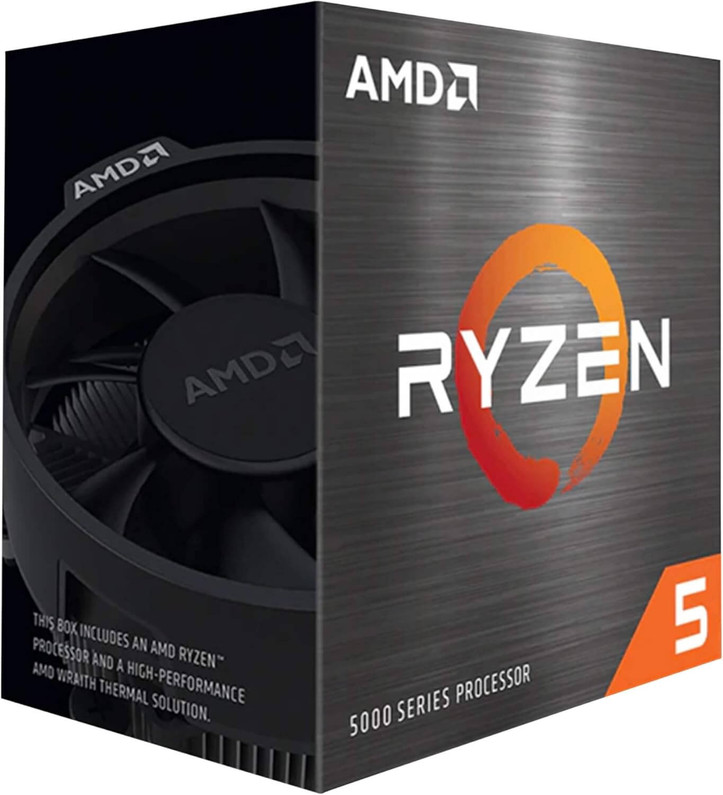
Table of Contents
- A Quick Story: “Weekend Beast” — From Stutter to Smooth in One Drop-In
- What Is the AMD Ryzen 5 5600? (Specs That Matter)
- Why Choose the 5600 Over Flashier Chips? (The “Why” that Saves You Money)
- How to Get the Most Out of Ryzen 5 5600 (Step-by-Step)
- Where the Ryzen 5 5600 Shines (Use-Cases You’ll Feel)
- Build Recipes That Love the 5600
- Common Mistakes to Avoid (So You Don’t Leave Performance on the Table)
- Practical Checklist Before You Hit “Buy”
- The “What / How / Where / Why” Recap (Fast and Clear)
- FAQs
You press the power button. Windows appears in seconds. Your favourite game loads while Chrome, Discord, and a music app hum along in the background. No drama, no upgrade tax—just smooth speed on sensible money. That’s the everyday magic of the AMD Ryzen 5 5600: 6 Zen 3 cores, 12 threads, and the kind of efficiency that makes a mid-range build feel premium without a premium price.
Ready to spec or upgrade right now?
A Quick Story: “Weekend Beast” — From Stutter to Smooth in One Drop-In
Lucas had a three-year-old AM4 rig that felt tired. Rather than binning the platform, he dropped in a Ryzen 5 5600, enabled XMP for his DDR4, and moved Windows onto a fresh NVMe SSD. That was it.
-
Boot time: slashed.
-
1080p gaming: consistent high FPS, no weird stutters.
-
Multitasking: browser tabs, chat, and a clip recorder running without a hiccup.
Total time invested: one weekend afternoon. Total satisfaction: daily.
Moral: the 5600 is the most “feel-good per pound” upgrade for countless AM4 systems. It’s not about chasing flashy peak numbers—it’s about smoothness you notice every time you sit down.
What Is the AMD Ryzen 5 5600? (Specs That Matter)
-
Architecture: Zen 3
-
Cores/Threads: 6 / 12
-
Clocks: 3.5 GHz base, up to 4.4 GHz boost
-
TDP: 65 W (efficient and case-friendly)
-
Cache: 35 MB combined for snappy response and steady frametimes
-
Socket: AM4 (huge ecosystem, affordable boards)
-
Cooler: Includes the Wraith Stealth stock cooler
Why this combo works: Zen 3 delivers excellent single-thread and per-watt performance. Pair it with sensible DDR4 and an NVMe SSD and you’ll feel like you bought an entirely new PC—without replacing everything.
Why Choose the 5600 Over Flashier Chips? (The “Why” that Saves You Money)
-
Price-to-performance sweet spot: Each pound buys speed you can actually feel.
-
Platform value: AM4 motherboards and DDR4 memory are abundant, proven, and inexpensive.
-
Smooth frame pacing: Not just big averages—consistent frametimes that make games feel fluid.
-
Low power, low noise: 65 W TDP keeps thermals and acoustics under control in compact cases.
-
Upgrade flexibility: Start balanced today; add a stronger GPU tomorrow without rebuilding from scratch.
How to Get the Most Out of Ryzen 5 5600 (Step-by-Step)
-
Check motherboard support & update BIOS
Most B450/B550/X470/X570 boards support the 5600 with the right BIOS. Update first—before swapping CPUs. -
Enable dual-channel RAM
Use 2×8 GB or 2×16 GB DDR4 at 3200–3600 MT/s. Turn on XMP/DOCP in BIOS. One stick works, two sticks fly. -
Install Windows on NVMe
Put OS and your top apps/games on an NVMe M.2 drive. The “new PC” feel mostly comes from storage. -
Tune fan curves
Even with the stock cooler, custom curves mean quieter, cooler sessions. Free comfort. -
Pair a balanced GPU
Aim for a mid-range card for high-refresh 1080p or clean 1440p. Don’t overspend where you won’t notice it. -
Driver hygiene & quick OS tweaks
Update AMD chipset + GPU drivers, enable Game Mode, and disable unnecessary startup apps. -
Optional: power/perf tuning
Light PBO or Eco Mode can optimise perf-per-watt. GPU undervolting lowers noise and temps.
Question for you: What’s the first game or app you’ll install on the NVMe once you upgrade?
Where the Ryzen 5 5600 Shines (Use-Cases You’ll Feel)
-
Esports & AAA at 1080p/1440p: High, stable FPS without flagship pricing.
-
Creator on a budget: Photo, design, and light video edits—smooth and responsive.
-
AM4 refresh builds: Give an older rig a second life with minimal spend.
-
Quiet compact PCs: Efficient 65 W TDP suits Micro-ATX and airflow-limited cases.
Build Recipes That Love the 5600
1) Competitive 1080p Value
-
Ryzen 5 5600 + Wraith Stealth
-
16 GB (2×8) DDR4 3200–3600
-
1 TB NVMe + 2 TB SATA SSD
-
Mid-range GPU (1080p high with high refresh)
-
Case with two quality 120 mm fans
2) Quiet Creator / Streamer
-
Ryzen 5 5600 + compact tower air cooler
-
32 GB (2×16) DDR4
-
1 TB NVMe (OS/apps) + 4 TB SATA SSD (media)
-
Colour-accurate 1440p monitor
-
USB mic + modest capture card
3) The “AM4 Refresh”
-
Swap in 5600 on existing AM4 board
-
BIOS update, enable XMP
-
Add NVMe, tidy cables, done
-
Optional: GPU undervolt for silence
Common Mistakes to Avoid (So You Don’t Leave Performance on the Table)
-
Single-stick RAM: You lose dual-channel bandwidth; always go 2-stick.
-
Skipping the BIOS update: Don’t spend hours troubleshooting what a 5-minute update fixes.
-
Installing Windows on a hard drive: It’ll run—but feel slow. NVMe or bust.
-
Ignoring airflow: Cable-manage and set fan curves; your temps (and ears) will thank you.
-
Overspending on the motherboard: AM4 has plenty of good, affordable boards. Save your budget for GPU and SSD.
Practical Checklist Before You Hit “Buy”
-
Confirm your motherboard’s CPU support list and update BIOS
-
Plan dual-channel DDR4 (2 sticks)
-
Add an NVMe M.2 for OS + favourites
-
Enable XMP/DOCP and set fan curves
-
Choose a balanced GPU for your resolution
-
Back up old data before the swap
The “What / How / Where / Why” Recap (Fast and Clear)
-
What: AMD Ryzen 5 5600 — 6c/12t Zen 3 CPU with Wraith Stealth, AM4 socket.
-
How: Update BIOS, use dual-channel DDR4, install Windows on NVMe, tune fan curves, pair a balanced GPU.
-
Where it fits: Esports/AAA at 1080p–1440p, budget creator rigs, compact/quiet builds, AM4 refreshes.
-
Why now: Best £-for--performance on AM4, great smoothness, huge ecosystem, easy upgrade path.
FAQs
More from MemoX
View all articles-
 3000VA UPS
VIDA Armour 3000VA UPS Review: Is It Worth It for Gaming PCs, NAS & Servers?
3rd Oct 2026 -
 Announcements
ASRock A520M-HVS: The Budget AM4 Motherboard Still Worth Buying for Ryzen Builds
1st Oct 2026 -

-
 Storage & Memory Guides
How to Check the SSD Health Before It’s Too Late (And Save Your Data)
1st Oct 2026 -
 Announcements
Why the WRX90 WS EVO Is Trending for AI + Multi-GPU Workstations (And What to Know Before You Buy)
1st Oct 2026 -
 Announcements
The Best Micro SD Express Cards for Nintendo Switch 2: Speed Now, Future-Proofed For Tomorrow
1st Oct 2026