
The Tiny Board with Big Ambitions: Why the ASRock B450M-HDV R4.0 Still Wins in 2025
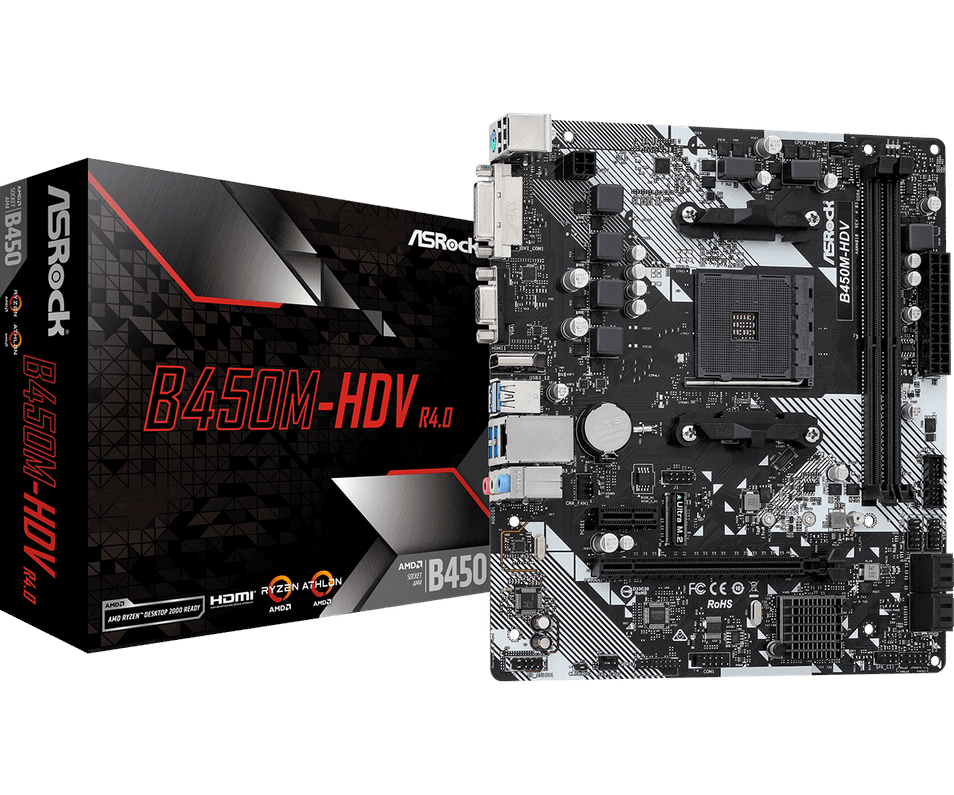
Table of Contents
- A Real-World Story: “From Dusty Desk PC to Daily Driver”
- What Exactly Is the ASRock B450M-HDV R4.0?
- Why Builders Choose It: The Why That Saves Your Budget
- How to Build Smart on the ASRock B450M-HDV R4.0 (Step-by-Step)
- Where This Board Shines (Use-Cases)
- “What vs How vs Where vs Why” in One Glance
- Feature Snapshot: ASRock B450M-HDV R4.0 at a Glance
- Build Recipes That Love This Board
- Common Mistakes (And Easy Fixes)
- Troubleshooting Fast: BIOS & M.2 Pitfalls New Builders Hit
- Quick Builder’s Checklist
- Ready to Build or Refresh? Talk to Memox
- FAQs
You hit the power button. The system springs to life. Apps snap open, games load faster than your coffee brews, and your fans stay whisper-quiet. No drama, no overspend—just a compact, capable PC that feels brand new. That’s the promise of the ASRock B450M-HDV R4.0: a Micro-ATX motherboard that funnels your budget into parts you feel—CPU, GPU, and NVMe speed—while staying rock-solid at the core.
Product page (for specs, stock and bundles):
ASRock B450M-HDV R4.0 →
A Real-World Story: “From Dusty Desk PC to Daily Driver”
Tom’s PC was the definition of “fine”: old AM4 chip, creaky hard drive, and a graphics card rescued from a friend’s upgrade. He didn’t want to rebuild from scratch—he wanted value. We recommended the ASRock B450M-HDV R4.0, a Ryzen 5 drop-in, and a 1TB NVMe.
Saturday: BIOS updated, CPU swapped, NVMe cloned, cables tidied.
Sunday: Tom played Apex at 1080p high, streamed music, and kept 20 Chrome tabs open—without a single stutter.
The surprise? The motherboard stayed completely in the background—exactly what a good board should do—while Tom felt the gains in boot time, frame pacing, and noise.
What Exactly Is the ASRock B450M-HDV R4.0?
A Micro-ATX motherboard based on AMD’s proven B450 chipset, designed for AM4 processors. It focuses on essentials that matter day-to-day:
-
AM4 socket for a wide range of Ryzen CPUs (APUs supported too)
-
2× DDR4 DIMM slots for a simple, stable dual-channel setup
-
Ultra M.2 slot for fast NVMe SSDs (your “new PC” feel)
-
Triple video outputs (HDMI / DVI / VGA) when using a Ryzen APU
-
Clean I/O with the ports people actually use—no gimmicks
-
Micro-ATX size for more case options and easier airflow
In short: the ASRock B450M-HDV R4.0 gives you everything you need to build a responsive PC without paying for things you’ll never touch.
Why Builders Choose It: The Why That Saves Your Budget
-
Value you can feel: Put more pounds into your CPU/GPU/NVMe, not cosmetics.
-
Stability first: A mature chipset with plenty of community knowledge and guides.
-
Flexible path: Start with an APU and add a discrete GPU later, or go straight to a mid-range graphics card.
-
Compact, cool, quiet: Micro-ATX cases are affordable and airflow-friendly.
-
AM4 ecosystem: Parts are abundant and reasonably priced—perfect for cost-effective refreshes.
Engage: What would you rather spend on—RGB overload or a bigger NVMe and better GPU?
How to Build Smart on the ASRock B450M-HDV R4.0 (Step-by-Step)
-
Check CPU support & update BIOS
Before swapping to newer Ryzen chips, confirm support on the board’s CPU list and apply the recommended BIOS. -
Use dual-channel memory
Two sticks (e.g., 2×8GB or 2×16GB) beat one—enable XMP/DOCP in BIOS for rated speeds. -
Install an NVMe in the M.2 slot
Put Windows and your top apps/games here. This single step is the biggest day-to-day upgrade. -
Plan storage tiers
Keep mass storage (games/media) on a 2.5" SSD or HDD. NVMe stays for “speed-critical” stuff. -
Tidy cables & set fan curves
Better airflow, lower temps, less noise. Even the stock coolers behave nicely with smart curves. -
Drivers & housekeeping
Update AMD chipset drivers, your GPU drivers, and trim startup apps. Free performance!
Where This Board Shines (Use-Cases)
-
1080p Value Gaming: Pair with a Ryzen 5 and mid-range GPU for buttery esports and story titles.
-
APU Office/Study PC: Triples as a quiet workstation with HDMI/DVI/VGA outputs ready to go.
-
Compact Creator Rig: Photo edits, light video, and streaming basics with dual-channel DDR4 and NVMe.
-
AM4 Refresh: Bring an older build back to life cheaply—reuse case, PSU, and storage.
“What vs How vs Where vs Why” in One Glance
-
What: A no-nonsense AM4 B450 Micro-ATX motherboard with M.2 NVMe and triple display outputs.
-
How: BIOS update → dual-channel RAM → NVMe → tidy airflow → current drivers.
-
Where: 1080p gaming rigs, APU setups, study/office builds, compact creator PCs.
-
Why: Put your budget into speed you feel: CPU, GPU, and NVMe—this board gets out of the way.
Feature Snapshot: ASRock B450M-HDV R4.0 at a Glance
-
Socket/Chipset: AM4 / B450
-
Form Factor: Micro-ATX
-
Memory: 2× DDR4 DIMM (dual-channel; check QVL for capacities/ICs)
-
Storage: 1× M.2 NVMe slot + SATA for 2.5"/3.5" drives
-
Graphics Outputs (APU only): HDMI, DVI, VGA
-
Connectivity: Everyday USB and audio you actually use
-
Firmware: Supports modern Ryzen with correct BIOS—verify for your exact CPU
Pro tip: If you’re moving from a first-gen Ryzen, a BIOS update before the CPU swap saves headaches.
Build Recipes That Love This Board
1) The Quiet All-Rounder (Best Value)
-
Ryzen 5 CPU + stock cooler
-
16GB (2×8GB) DDR4 3200–3600
-
1TB NVMe (OS + top apps/games)
-
2TB SATA SSD (library/media)
-
Mid-range GPU for high-FPS 1080p
-
Two quality 120mm case fans
2) The Starter APU System (Upgrade-Ready)
-
Ryzen APU (integrated graphics)
-
16GB (2×8GB) DDR4
-
1TB NVMe single-drive simplicity
-
Quiet mATX case
-
Later add a discrete GPU—no rebuild needed
3) The Budget Creator
-
Ryzen 6- or 8-core
-
32GB (2×16GB) DDR4
-
1TB NVMe (OS/scratch) + 4TB SATA SSD (media)
-
Colour-accurate 1440p display
-
Card reader + external backup
Common Mistakes (And Easy Fixes)
-
One RAM stick only: You lose dual-channel bandwidth—always go 2 sticks.
-
No NVMe for OS: It boots and loads… slowly. Put Windows on NVMe.
-
Skipping BIOS & drivers: Stability and performance live here.
-
Messy airflow: A 15-minute cable tidy can drop temperatures and noise.
-
Overspending on the board: Spend on CPU/GPU/NVMe. This board covers the essentials.
Troubleshooting Fast: BIOS & M.2 Pitfalls New Builders Hit
-
Instant Flash can’t see the file? Re-format USB to FAT32, use a USB 2.0 port, and double-check filename versioning.
-
No display on first boot? If you’re using a non-APU Ryzen, you’ll need a graphics card; onboard video ports only work with APUs.
-
NVMe not detected? Reseat the drive, check BIOS storage mode, and ensure the standoff/screw is correctly set.
Quick Builder’s Checklist
-
Confirm CPU support list and update BIOS
-
Install 2× DDR4 (enable XMP/DOCP)
-
Put Windows on NVMe in the M.2 slot
-
Add SATA SSD/HDD for libraries and media
-
Tidy cables & set fan curves
-
If using onboard video, make sure you chose a Ryzen APU
Ready to Build or Refresh? Talk to Memox
Whether you’re crafting a compact daily driver, a first gaming rig, or a budget creator box, the ASRock B450M-HDV R4.0 is a brilliant foundation. We’ll help you match it with the right Ryzen CPU, DDR4 kit, NVMe, case, and cooling—so you get the performance you feel, for less.
? Chat with Memox on Memox.co.uk for a fast compatibility check, curated parts list, and airflow tips tailored to your case and budget.
FAQs
More from MemoX
View all articles-
 3000VA UPS
VIDA Armour 3000VA UPS Review: Is It Worth It for Gaming PCs, NAS & Servers?
3rd Oct 2026 -
 Announcements
ASRock A520M-HVS: The Budget AM4 Motherboard Still Worth Buying for Ryzen Builds
1st Oct 2026 -

-
 Storage & Memory Guides
How to Check the SSD Health Before It’s Too Late (And Save Your Data)
1st Oct 2026 -
 Announcements
Why the WRX90 WS EVO Is Trending for AI + Multi-GPU Workstations (And What to Know Before You Buy)
1st Oct 2026 -
 Announcements
The Best Micro SD Express Cards for Nintendo Switch 2: Speed Now, Future-Proofed For Tomorrow
1st Oct 2026