
The Secret Weapon Your Switch 2 Deserves: The ADATA Premier Extreme “memory card for Nintendo Switch 2”
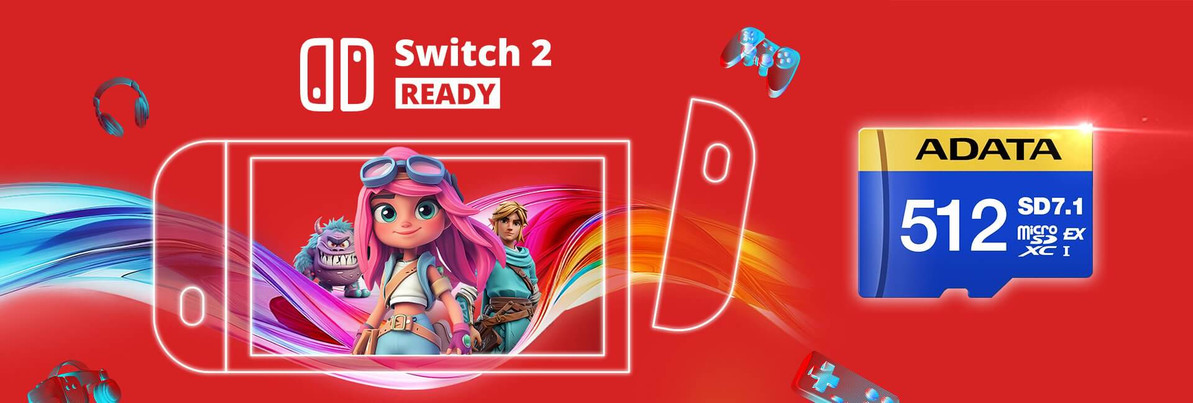
Table of Contents
- A Tiny Card with Ridiculous Ambition (What makes it special?)
- The Saturday Morning Story (Why this upgrade matters)
- Nintendo Switch 2 Storage 101 (How microSD, SD Express & performance fit together)
- Which Capacity Should You Choose? (Where each card shines)
- Quick-Start Setup: From Box to Boss (How to install & format, step by step)
- Ten Reasons Gamers Pick ADATA Premier Extreme (Why this specific memory card for Nintendo Switch 2)
- Can We Ask You Something?
- ADATA vs “Generic Bargains” (Where cheap gets expensive)
- Pro Tips to Keep Your Switch 2 Library Lightning-Ready
- The Memox Advantage (Where to buy & how we help)
- Summary: Why ADATA Premier Extreme Is the “Memory Card for Nintendo Switch 2” To Beat
- Ready to Level Up? (Call to Action)
- FAQs
Imagine tapping “Start” and your next-gen game loads while your tea’s still mid-pour. No waiting. No juggling installs. No “which game do I delete this time?” That’s the promise of pairing your console with a high-performance memory card for Nintendo Switch 2—and right now, the standout pick is ADATA’s Premier Extreme microSDXC SD7.1 Express range.
At Memox, we’ve tested, stocked, and helped thousands of gamers upgrade their storage. Today, we’re zooming in on two stars:
Whether you’re prepping for launch day or future-proofing your setup, here’s the full, no-nonsense guide to what these cards are, how they work, where they shine, and why they’re the smartest storage upgrade you can make.
A Tiny Card with Ridiculous Ambition (What makes it special?)
The ADATA Premier Extreme SD7.1 Express series takes the humble microSD and straps a rocket to it. Instead of the older UHS-I bus that most microSDs use, these SD Express cards leverage PCIe Gen3 x1—a technology lineage shared with desktop NVMe SSDs. The result? Up to 800 MB/s read and 700 MB/s write (in ideal conditions), alongside video/speed classes you already know and trust: V30, U3, and C10.
In plain English: you get big-boy SSD-style throughput in a tiny microSD form factor, while keeping backwards compatibility with devices that speak the older language. If a device supports SD Express, the card can stretch its legs; if it doesn’t, it still works—falling back to UHS speeds.
The Saturday Morning Story (Why this upgrade matters)
Picture this. It’s Saturday. The new expansion everyone’s chatting about dropped overnight. Your console announces: “Not enough space.” You start the ritual: scroll… delete… second-guess… Will I replay this? You dump a 20-hour save you “might” finish one day. Then the download crawls because your old card stutters with large files.
Now picture the same morning after upgrading:
-
You’ve got 512GB breathing room (or 256GB if you prefer).
-
No delete-and-regret cycle—just install and play.
-
Large patches write smoothly; game assets stream cleanly.
-
You tap Start, sip your tea, and you’re in.
It’s not just more space; it’s smoother gaming—the difference between friction and flow.
Nintendo Switch 2 Storage 101 (How microSD, SD Express & performance fit together)
Let’s demystify the tech:
-
Form Factor: microSDXC (the “XC” means high capacity—great for modern game libraries).
-
Bus/Protocol:
-
SD Express (PCIe Gen3 x1) for peak speeds.
-
Backwards compatible with UHS-I for universal use.
-
-
Speed Classes: V30 / U3 / C10—reliable sustained write speeds suitable for high-bitrate video and large game files.
-
Real-World Impact:
-
Faster installs and updates.
-
More consistent level streaming in asset-heavy games.
-
Less waiting, more playing—especially when titles ship with chunky day-one patches.
-
Which Capacity Should You Choose? (Where each card shines)
ADATA Premier Extreme 256GB (SD7.1 Express)
Best if you:
-
Play a handful of big titles at a time
-
Don’t hoard older games
-
Want top endurance per pound without overbuying
ADATA Premier Extreme 512GB (SD7.1 Express)
Best if you:
-
Install many large games simultaneously
-
Hate micro-managing space
-
Want room for DLC, mods, indies, and screenshots without compromise
Rule of thumb: Next-gen games are getting bigger, not smaller. If your budget allows, get the 512GB. You’ll thank yourself in six months.
Quick-Start Setup: From Box to Boss (How to install & format, step by step)
-
Unbox & Inspect
-
Check the holograms/seals. At Memox, we source from authorised channels—no grey imports or refurbs.
-
-
Back Up Anything Important
-
Moving from an older card? Copy your old microSD contents to a PC folder first.
-
-
Insert the ADATA Card
-
Power down your console completely. Insert the microSD until it clicks.
-
-
Format the Card in the Console
-
Always format in the console itself. It applies the correct filesystem and directory structure. (Avoid third-party formatters; the console knows what it wants.)
-
-
Restore or Re-Install
-
Copy back compatible data and/or re-download your games. Use wired or stable Wi-Fi for big patches.
-
-
Keep It Cool & Clean
-
Don’t block console vents. Store your microSD cases somewhere dry. (ADATA cards are built to be rugged—temperature, shock, X-ray—but a little care goes a long way.)
-
Ten Reasons Gamers Pick ADATA Premier Extreme (Why this specific memory card for Nintendo Switch 2)
-
SD Express power with PCIe-class throughput (up to 800/700 MB/s under ideal conditions).
-
Backward compatible with UHS-I devices—no lock-in.
-
V30 / U3 / C10: stable sustained writes for big game assets.
-
Consistency under heavy workloads—fast isn’t useful unless it’s repeatable.
-
ADATA pedigree: rock-solid flash engineering and controllers.
-
Two sweet-spot capacities—256GB and 512GB—fit real gamer libraries.
-
Rugged build: shock, temperature, and X-ray resistance.
-
Switch-friendly footprint: microSDXC, tiny, invisible once installed.
-
Future-minded: if Switch 2 enables SD Express, you’re already ready.
-
Memox assurance: UK stock, warranty support, and human tech help.
Can We Ask You Something?
What would you play first if you never had to delete a game again?
The blockbuster you’ve been side-eyeing? That evergreen indie? Your backlog is calling. (Tell us—we love recommendations!)
ADATA vs “Generic Bargains” (Where cheap gets expensive)
We get it—there are “microSD bargains” everywhere. But here’s the catch:
-
Inconsistent Speeds: Some off-brand cards advertise big numbers that don’t hold up under real game workloads.
-
Counterfeits: Fake capacity cards report 512GB but corrupt data past 64GB or 128GB.
-
Warranty Woes: Unknown sellers = zero support when things go sideways.
-
Time Tax: Re-downloading, re-installing, or salvaging saves can wipe out any “savings.”
With ADATA Premier Extreme, you’re buying time, stability, and certainty—plus Memox’s support if you need a hand.
Pro Tips to Keep Your Switch 2 Library Lightning-Ready
-
Format in the Console: Always. It’s the easiest way to avoid filesystem snags.
-
Avoid Filling to 100%: Keep 5–10% free; it helps maintain performance and reduces write amplification.
-
Update Regularly: Console updates can include storage performance tweaks.
-
Don’t Hot-Swap: Power down before removing the microSD to protect data integrity.
-
Label Your Cards: If you rotate multiple cards, label them; your future self will be grateful.
The Memox Advantage (Where to buy & how we help)
When you buy from Memox, you get more than a box:
-
Trusted UK retailer with real support and advice
-
Authorised supply chain—no grey imports
-
Fast shipping and sensible returns
-
Technical backup if you need migration help
Pick your capacity:
-
Shop 256GB Premier Extreme (SD7.1 Express)
https://memox.co.uk/adata-256gb-premier-extreme-microsdxc-sd7-1-express-card-nintendo-switch-2-ready-800mb-s/ -
Shop 512GB Premier Extreme (SD7.1 Express)
https://memox.co.uk/adata-512gb-premier-extreme-microsdxc-sd7-1-express-card-nintendo-switch-2-ready-800mb-s/
Summary: Why ADATA Premier Extreme Is the “Memory Card for Nintendo Switch 2” To Beat
-
Speed headroom today, Express potential tomorrow
-
Solid capacities that match modern game sizes
-
Reliability that protects your time (and saves)
-
Memox service that stands behind every sale
If you want your Switch 2 experience to feel next-gen from the first boot, make storage part of your plan. The ADATA Premier Extreme microSDXC SD7.1 Express cards deliver exactly what you’re looking for: speed, space, and zero compromises.
Ready to Level Up? (Call to Action)
Whether you’re eyeing 256GB or going all-in with 512GB, Memox has you covered. Chat with us on site, drop us a message, or head straight to checkout via the links above. Need advice on migration, formatting, or fake-card spotting? We’re here for you.
? Upgrade your memory card for Nintendo Switch 2 today and make launch day effortless.
FAQs
More from MemoX
View all articles-
 3000VA UPS
VIDA Armour 3000VA UPS Review: Is It Worth It for Gaming PCs, NAS & Servers?
3rd Oct 2026 -
 Announcements
ASRock A520M-HVS: The Budget AM4 Motherboard Still Worth Buying for Ryzen Builds
1st Oct 2026 -
-
 Storage & Memory Guides
How to Check the SSD Health Before It’s Too Late (And Save Your Data)
1st Oct 2026 -
 Announcements
Why the WRX90 WS EVO Is Trending for AI + Multi-GPU Workstations (And What to Know Before You Buy)
1st Oct 2026 -
 Announcements
The Best Micro SD Express Cards for Nintendo Switch 2: Speed Now, Future-Proofed For Tomorrow
1st Oct 2026