
The New Memory Card for Nintendo Switch 2: Team Group APEX SD Express (256GB & 512GB)
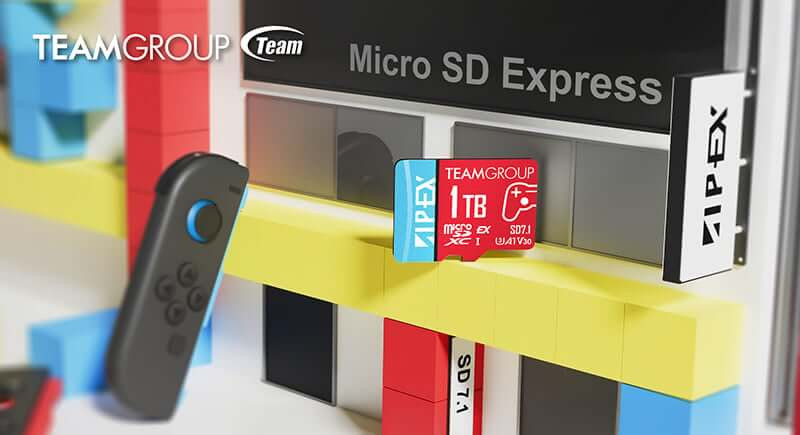
Table of Contents
- A Saturday Upgrade Story (and why it matters)
- What Is SD Express (SD7.1), and Why Should Switch 2 Owners Care?
- Why Team Group APEX for Nintendo Switch 2? (7 smart reasons)
- How Much Space Do You Really Need? (256GB vs 512GB)
- Where to Buy in the UK (and why Memox)
- How to Install and Format on Your Console (Quick Start)
- Performance Beyond Numbers: Real-World Gains You’ll Notice
- The “Why” in One Paragraph
- Pro Tips for Getting the Most from Your Card
- Mini Buyer’s Checklist (so you feel confident)
- FAQs: Choosing the Best Memory Card for Nintendo Switch 2
- The Bottom Line
- Ready to Level Up?
- FAQs
Crack the case, slide the card, boot the game—boom. That’s how fast your Nintendo Switch 2 can feel when you match it with the right storage. If you’ve been waiting for a memory card for Nintendo switch 2 that’s built for today’s biggest titles and tomorrow’s even bigger ones, the Team Group APEX SD7.1 microSDXC Express range is the clever pick. In this guide, we’ll explore the what, how, where, and why behind these cards, share a quick real-world story, answer your top questions, and help you choose between 256GB and 512GB—all with an eye on performance, reliability, and value.
Quick links:
• 256GB Team Group APEX SD7.1 microSDXC Express — Nintendo Switch 2 ready, up to 800MB/s: Shop at Memox
• 512GB Team Group APEX SD7.1 microSDXC Express — Nintendo Switch 2 ready, up to 800MB/s: Shop at Memox
A Saturday Upgrade Story (and why it matters)
It’s launch weekend. You’ve installed two massive games and a day-one patch, and you’re staring at the dreaded “Storage Almost Full” pop-up. Your friend Jamie swings by with a small box and a grin: “Slide this in.” It’s the Team Group APEX SD7.1 microSDXC Express. Thirty seconds later, your Switch 2 restarts, recognises the card, and you migrate your titles. Suddenly you’re not deleting favourites to make room; you’re installing that chunky DLC without a second thought. The next time you boot a large open-world game, menus snap open and load screens shrink. That tiny card just changed how your console feels.
That, in a nutshell, is what the right memory card for Nintendo switch 2 should do—remove friction, keep you future-proof, and make the console you already love feel brand-new.
What Is SD Express (SD7.1), and Why Should Switch 2 Owners Care?
The APEX SD7.1 cards use SD Express, a newer standard that connects via PCIe for headline speeds up to 800MB/s on supported devices—many times faster than typical UHS-I microSD cards.
-
If your device supports SD Express: you unlock that next-gen speed potential for installs, asset streaming, and file copying.
-
If your device doesn’t: the card remains backwards-compatible, running at UHS-I speeds while still giving you a high-quality U3/V30-class microSDXC with excellent all-round performance for gaming, 4K capture, and transfers.
Either way, you’re buying today’s stability with tomorrow’s headroom—which is exactly what you want from a memory card for Nintendo switch 2.
Why Team Group APEX for Nintendo Switch 2? (7 smart reasons)
-
Built for next-gen: SD7.1 SD Express design with quoted speeds up to 800MB/s (device-dependent).
-
Backwards-compatible: Works beautifully in devices that use UHS-I; you don’t lose the investment if you upgrade later.
-
Game-friendly performance: U3/V30 class helps with consistent performance for large assets and smooth gameplay experiences.
-
Quality brand: Team Group is a respected memory brand known for solid flash and DRAM products.
-
Future-proof storage: Choose 256GB or 512GB to match growing install sizes and DLC.
-
Great value: Price-to-performance that makes sense for UK gamers who want speed without overspending.
-
Easy install: Pop it in, format in-console, and you’re good to go.
Question for you: What’s the first game you’d install after upgrading—your all-time favourite, or the biggest new release on your wish list?
How Much Space Do You Really Need? (256GB vs 512GB)
Here’s a simple way to decide:
-
Pick 256GB if:
-
You mainly play a rotating set of 4–8 titles.
-
You don’t keep huge backlogs installed at once.
-
You’re budget-conscious but still want a fast, modern card.
-
-
Go 512GB if:
-
You love AAA releases that eat tens of gigabytes each.
-
You want to keep lots of games installed, plus DLC and updates.
-
You prefer to never manage storage mid-season.
-
Reality check: modern first-party and AAA titles, plus day-one patches and expansions, grow fast. If you can stretch to 512GB, it’s the most “set-and-forget” choice for a memory card for Nintendo switch 2. If you’re more selective or topping up existing storage, 256GB is a sweet spot.
Where to Buy in the UK (and why Memox)
You’re here—so you already know. Memox.co.uk is your UK-based source for genuine, performance-tested storage. You’ll get clear specs, friendly support, and quick shipping options—so you can start playing sooner.
-
256GB Team Group APEX SD7.1 SD Express: View product
-
512GB Team Group APEX SD7.1 SD Express: View product
How to Install and Format on Your Console (Quick Start)
-
Power down your console fully (not just sleep).
-
Insert the microSD (label facing outward as per the slot orientation).
-
Power on and follow on-screen prompts.
-
Format in-console when prompted to optimise for your system.
-
Manage storage via System Settings → Data Management to move or download games to the card.
Tip: If you have existing saves and downloads, consider reinstalling your biggest titles to the new card for the best experience.
Performance Beyond Numbers: Real-World Gains You’ll Notice
-
Shorter waits: Faster installs and updates mean less watching progress bars.
-
Smoother texture streaming: Large worlds and detailed assets feel snappier when your storage keeps up.
-
Instant “library feel”: With 256GB–512GB, you keep your favourites installed and jump straight into what you fancy.
Will you always see a massive difference? It depends on the game and your console’s interface. But the combination of higher-class flash, SD7.1 engineering, and solid controller logic makes these cards a strong all-rounder for Switch 2 owners now and later.
The “Why” in One Paragraph
If you want one memory card for Nintendo switch 2 that balances speed, capacity, compatibility, and longevity, the Team Group APEX SD7.1 line nails the brief. It’s fast if your device can use SD Express, dependable if it falls back to UHS-I, and sized right for modern games—without straining your budget. It’s the “buy once, play for years” approach to handheld storage.
Pro Tips for Getting the Most from Your Card
-
Keep 10–20% free space for updates and smooth installs.
-
Stick to one ecosystem: If possible, keep Switch 2 games on the same card rather than juggling multiple cards—less confusion, fewer errors.
-
Back up media: Use a PC occasionally to copy screenshots/clips if you create lots of content.
-
Handle with care: MicroSD cards are tough but tiny; store spares in cases, not pockets.
Mini Buyer’s Checklist (so you feel confident)
-
✅ Exact product name: Team Group APEX SD7.1 microSDXC Express
-
✅ Capacity: 256GB or 512GB
-
✅ Use-case: Nintendo Switch 2 games, DLC, updates, screens, clips
-
✅ Performance classes: U3/V30 for consistent performance
-
✅ Future-proofing: SD Express support if your device can use it
-
✅ Vendor: UK seller you trust—Memox
FAQs: Choosing the Best Memory Card for Nintendo Switch 2
Q1) Do I need an SD Express card for my Nintendo Switch 2?
Not strictly. The console will run on good UHS-I microSD cards, too. The advantage of an SD Express card like the Team Group APEX SD7.1 is future-proofing and the potential for much higher speeds if your device supports it. If not, the card still works great in UHS-I mode.
Q2) Will this card work with other devices (phones, cameras, PCs)?
Yes, microSDXC cards are broadly compatible. In devices without SD Express support, it will behave like a fast UHS-I card. Always check your device’s spec sheet for maximum supported capacities and formats.
Q3) Is 256GB enough for modern games?
For many players, yes—especially if you rotate a handful of titles. If you prefer installing many big games and DLC at once, 512GB gives you “install and forget” comfort.
Q4) How do I move games to the new card?
Install the card, format it in-console, then use System Settings → Data Management to move or redownload games to the new storage. For the cleanest setup, many players prefer redownloading their largest titles directly onto the new card.
Q5) Will I see “instant” load time reductions?
You’ll likely notice improvements in installs, updates, and some loading scenarios. The exact gain varies by game engine and system behaviour—but investing in a high-quality, higher-class card is one of the simplest ways to reduce friction in daily use.
The Bottom Line
If you’re shopping for a memory card for Nintendo switch 2, the Team Group APEX SD7.1 microSDXC Express line is a smart, forward-looking choice. You get fast, modern storage with big-game capacity and broad compatibility, whether you pick 256GB or 512GB. Pairing next-gen SD Express potential with today’s reliable U3/V30 performance, it’s the one card that makes sense now—and keeps making sense as your library grows.
Ready to Level Up?
Grab your card today and feel the difference the next time you hit “Install”:
-
256GB Team Group APEX SD7.1 — Add to basket at Memox
-
512GB Team Group APEX SD7.1 — Add to basket at Memox
Have a question about compatibility or setup? Message the Memox team—we’re here to help you pick the perfect upgrade.
FAQs
More from MemoX
View all articles-
 3000VA UPS
VIDA Armour 3000VA UPS Review: Is It Worth It for Gaming PCs, NAS & Servers?
3rd Oct 2026 -
 Announcements
ASRock A520M-HVS: The Budget AM4 Motherboard Still Worth Buying for Ryzen Builds
1st Oct 2026 -
-
 Storage & Memory Guides
How to Check the SSD Health Before It’s Too Late (And Save Your Data)
1st Oct 2026 -
 Announcements
Why the WRX90 WS EVO Is Trending for AI + Multi-GPU Workstations (And What to Know Before You Buy)
1st Oct 2026 -
 Announcements
The Best Micro SD Express Cards for Nintendo Switch 2: Speed Now, Future-Proofed For Tomorrow
1st Oct 2026