
No Fibre? No Problem. Meet the TP-LINK (TL-MR6400 V5)—Your Plug-and-Play 4G Lifeline
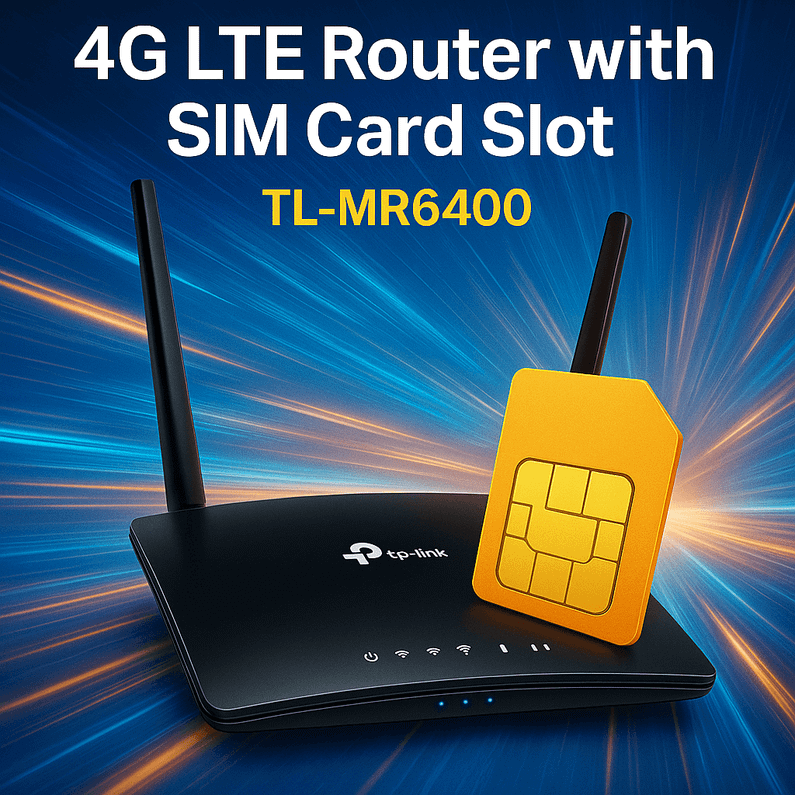
Table of Contents
- What Is the TP-LINK (TL-MR6400 V5) and Why Should You Care?
- A True Story: How One Café Saved Its Saturday with the TP-LINK (TL-MR6400 V5)
- Where the TP-LINK (TL-MR6400 V5) Shines (Use-Cases You’ll Actually Care About)
- The “Why”: 7 Reasons the TP-LINK (TL-MR6400 V5) Beats a Phone Hotspot
- How to Set Up the TP-LINK (TL-MR6400 V5) in 6 Easy Steps
- Tech Specs at a Glance (Plain-English Version)
- A Smart, Fail-Safe Network: Pairing 4G with Your Existing Broadband
- Troubleshooting & Performance Tips (Read Before You Mount It)
- Is the TP-LINK (TL-MR6400 V5) Right for You?
- Quick Decision Checklist
- Final Thought: Freedom Is a SIM Card Away
- Ready to Try It?
- FAQs
Picture this: the power’s on, the coffee’s hot, the deadline is today—and your broadband decides to take a personal day. Nightmare? Not if you’ve got the TP-LINK TL-MR6400 .. Pop in a SIM, power it up, and boom: reliable 4G LTE internet with up to 300 Mbps Wi-Fi for all your devices. No engineer, no contracts, no fuss. Just instant, portable connectivity that follows you from home to office to building site—wherever the job (or the weekend) takes you.
What would you do if your broadband went down for 24 hours?
With the TP-LINK (TL-MR6400 V5), you shrug, switch, and carry on.
What Is the TP-LINK (TL-MR6400 V5) and Why Should You Care?
The TP-LINK (TL-MR6400 V5) is a 300 Mbps Wireless-N 4G LTE router with a built-in SIM card slot and 3× LAN + 1× LAN/WAN ports. In plain English: it turns a mobile data SIM into a full home/office Wi-Fi network, while still allowing you to use a wired backup or connect wired devices like PCs, NVRs, tills, and printers. It’s the router you buy when:
-
You don’t have fixed-line broadband yet.
-
Your fibre is flaky and you want an automatic safety net.
-
You need internet somewhere unusual—events, garden office, pop-up shop, building site.
-
You want always-on access to remote CCTV without running a phone hotspot 24/7.
Because it’s plug-and-play, you get online fast. Because it’s 4G LTE, you’re not tied to a wall socket with a cable that stops at the front door.

A True Story: How One Café Saved Its Saturday with the TP-LINK (TL-MR6400 V5)
Saturday 10:15 a.m., brunch rush in full swing. A small café’s card machines start failing—broadband outage. Panic. The owner pulls a TP-LINK (TL-MR6400 V5) from the stock cupboard (smart!) and pops in a spare data SIM. Within minutes, the tills and card terminals jump back online over 4G LTE, the team switches Wi-Fi on the guest tablet, and the queue keeps moving. Customers never notice. The only giveaway? A tiny blinking 4G icon on the router and a very relieved smile behind the counter.
That’s not theory—that’s what this router is made for: business continuity. If you run anything where “no internet” means “no revenue,” the TP-LINK (TL-MR6400 V5) pays for itself the first time your line drops.
Where the TP-LINK (TL-MR6400 V5) Shines (Use-Cases You’ll Actually Care About)
-
Home without Fibre (yet): Move-in day? New build? Rural cottage? Get online immediately via 4G, then keep the router as a backup once fibre arrives.
-
Garden Office / Outbuilding: Extend reliable Wi-Fi without digging up the patio.
-
Retail Pop-Ups & Market Stalls: Stable connectivity for EPOS, inventory apps, and receipts.
-
Construction Sites: Team tablets, drawings, and site cameras online day one.
-
Events & Exhibitions: Temporary Wi-Fi you control—no surprise venue fees.
-
CCTV & Remote Access: Keep recorders reachable over 4G for alerts and live view.
-
Broadband Failover: Use the WAN port for your main line; if it goes down, 4G takes over.
The “Why”: 7 Reasons the TP-LINK (TL-MR6400 V5) Beats a Phone Hotspot
-
Always-On: Designed to stay powered 24/7 without cooking your phone battery.
-
Better Coverage: Strong external antennas and optimized 4G radios outperform most phones.
-
Wired Ports: Connect PCs, NVRs, printers, and tills—no dongles needed.
-
Whole-Home Wi-Fi: 300 Mbps Wireless-N for multiple rooms and many users.
-
Security Controls: Guest network, parental controls, firewall, and more.
-
Automatic Failover: Use fixed broadband as primary and 4G as plan B.
-
Remote Management: TP-Link Tether app makes setup and tweaks straightforward.
How to Set Up the TP-LINK (TL-MR6400 V5) in 6 Easy Steps
-
Insert Your SIM: Standard mobile data SIM from your preferred UK network (EE, O2, Vodafone, Three, etc.).
-
Power On: Wait for the LTE indicator to show signal.
-
Connect: Join the default Wi-Fi (details printed on the router) or plug in via Ethernet.
-
Quick Setup Wizard: The router usually detects APN automatically. If not, enter your network’s APN (found in your SIM’s documentation).
-
Name Your Network: Change SSID and set a strong Wi-Fi password.
-
Place for Performance: Position by a window or high shelf for the best signal. Avoid sealed metal cabinets where radio can’t escape.
Pro tip: If you’re using it inside a metal cabinet for CCTV or access control hardware, mount the router outside the cabinet if possible—or route the antennas outside the enclosure to prevent signal loss.
Tech Specs at a Glance (Plain-English Version)
-
4G LTE: Up to 150 Mbps down / 50 Mbps up (typical Cat 4 performance; actual speeds vary by coverage).
-
Wi-Fi: 300 Mbps 2.4 GHz Wireless-N for solid whole-home coverage.
-
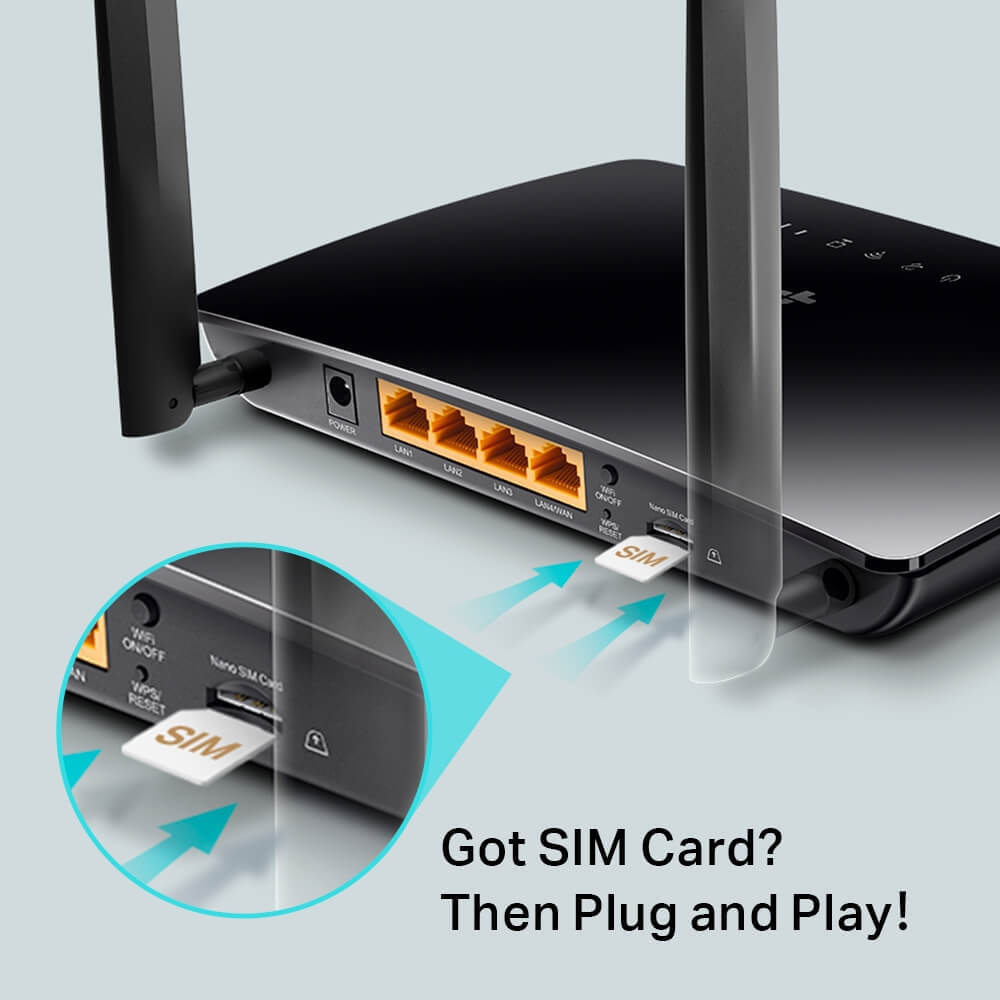
Ports: 3× LAN for wired devices + 1× LAN/WAN (for fixed line or extra LAN).
-
SIM Card Slot: Pop in a mobile SIM for instant internet.
-
Security: WPA/WPA2, firewall, MAC filtering, guest network.
-
Management: TP-Link Tether app + browser interface.
-
Extras: SMS management, IPv6 support, WPS for quick pairing.
You get everything you’d expect from a dependable home/SMB router—just with 4G LTE built straight in.
A Smart, Fail-Safe Network: Pairing 4G with Your Existing Broadband
One of the best tricks with the TL-MR6400 is using it as backup internet. Connect your main broadband to the WAN port; if it fails, the router can switch to 4G so the family can keep streaming and the business can keep selling. When fibre returns, it flips back. Seamless, simple, powerful.
Troubleshooting & Performance Tips (Read Before You Mount It)
-
Signal Rules Everything: The stronger the 4G signal, the better your speeds. If you’re seeing poor performance, experiment with placement—upstairs, near a window, or away from thick walls.
-
APN Matters: If automatic detection misses, manually input the correct APN from your mobile network.
-
Data Plan Fit: For EPOS and CCTV alerts, light plans are fine; for video streaming or heavy file transfers, choose an unlimited or high-cap plan.
-
CCTV in Metal Cabinets: Metal blocks radio. Install the router outside the cabinet, or route antennas outside if your setup requires enclosure-based gear.
-
Guest Network: Separate staff/guest Wi-Fi to protect devices and bandwidth.
-
Keep It Updated: Check firmware updates periodically to improve stability and security.
Is the TP-LINK (TL-MR6400 V5) Right for You?
If you value reliability, portability, and speed to deployment, the answer is probably yes. For homes waiting on fibre, small shops with card machines, event teams, and site managers, it’s a no-brainer. If you’re a gamer chasing ultra-low latency or need Wi-Fi 6/6E for very high device density, TP-Link has higher-tier models—but for most day-to-day productivity and streaming, the TP-LINK (TL-MR6400 V5) is the sweet spot of price, performance, and simplicity.
Quick Decision Checklist
-
Need internet today with no engineer? → Yes, TP-LINK (TL-MR6400 V5).
-
Want failover when fibre drops? → Yes, TP-LINK (TL-MR6400 V5).
-
Running EPOS/CCTV without fixed lines? → Yes, TP-LINK (TL-MR6400 V5).
-
Doing heavy 4K streaming on multiple TVs? → Works, but consider an unlimited data plan (or a higher-tier router if you want Wi-Fi 6).
Final Thought: Freedom Is a SIM Card Away
The TP-LINK (TL-MR6400 V5) is more than a router—it’s connectivity on your terms. Home, shop, site, or show—power it on and you’re online. No waiting. No drama. Just a dependable 4G lifeline that’s there when you need it most.
Ready to Try It?
You can order the TP-LINK (TL-MR6400 V5) right now from Memox—and if you’d like advice on SIM plans, placement, or CCTV setups, we’re happy to help.
? Shop TP-LINK (TL-MR6400 V5) at Memox
? Questions? Chat with us on the product page or contact Memox.
FAQs
More from MemoX
View all articles-
 3000VA UPS
VIDA Armour 3000VA UPS Review: Is It Worth It for Gaming PCs, NAS & Servers?
3rd Oct 2026 -
 Announcements
ASRock A520M-HVS: The Budget AM4 Motherboard Still Worth Buying for Ryzen Builds
1st Oct 2026 -

-
 Storage & Memory Guides
How to Check the SSD Health Before It’s Too Late (And Save Your Data)
1st Oct 2026 -
 Announcements
Why the WRX90 WS EVO Is Trending for AI + Multi-GPU Workstations (And What to Know Before You Buy)
1st Oct 2026 -
 Announcements
The Best Micro SD Express Cards for Nintendo Switch 2: Speed Now, Future-Proofed For Tomorrow
1st Oct 2026