
VIDA
VIDA Armour 3000VA UPS 2400W Battery Backup – LCD, Pure Sine Wave & AVR
- SKU:
- ARM3000
- UPC:
- 5056733100536
- MPN:
- ARM3000
- Availability:
- Free Click & Collect in Peterborough. UK delivery also available


Description
VIDA Armour 3000VA 2400W Pure Sine Wave UPS – AVR, LCD, USB & Battery Backup
The VIDA Armour ARM3000 3000VA / 2400W UPS is a high-capacity line-interactive uninterruptible power supply designed to protect compatible gaming PCs, professional workstations, servers, NAS systems, networking equipment, CCTV systems and other sensitive electronics from power cuts, voltage fluctuations, surges and electrical disturbances.
With a maximum capacity of 3000VA / 2400W, pure sine-wave inverter output, Automatic Voltage Regulation (AVR), four maintenance-free 12V 9Ah VRLA batteries and manufacturer-documented backup of approximately 10–30 minutes depending on connected load, the ARM3000 provides substantial short-duration battery backup for demanding IT environments.
Unlike basic UPS systems that use square-wave or heavily stepped battery output, the ARM3000 produces a pure sine wave while operating from battery. This makes it particularly suitable for compatible modern PC power supplies, including many systems using Active PFC, as well as servers, workstations and other sensitive electronic equipment.
The ARM3000 also provides five protected AC outputs comprising two standard UK Type-G sockets and three IEC outputs, plus USB Type-B monitoring, two RJ45 network-line protection ports, a comprehensive LCD display, LED status indicators, audible alarms, cold-start capability and automatic restart following mains recovery.
The exact model supplied by Memox is the VIDA Armour ARM3000, Memox SKU ARM3000, manufacturer part number ARM3000, EAN/GTIN 5056733100536.
Key Features of the VIDA Armour ARM3000 UPS
- 3000VA / 3kVA apparent-power capacity
- 2400W / 2.4kW maximum real-power output
- Line-interactive UPS technology
- Pure sine-wave battery output
- Automatic Voltage Regulation / AVR
- Buck / boost voltage stabilisation
- Current VIDA transfer-time specification of approximately 6ms
- 4 × 12V 9Ah sealed lead-acid batteries
- Maintenance-free VRLA battery technology
- Approximately 10–30 minutes documented backup time depending on load
- Approximately 8 hours to recharge to around 90% capacity
- 5 AC output sockets in total
- 2 × UK Type-G / BS 1363 outputs
- 3 × IEC outputs
- UK Type-G mains input
- USB Type-B monitoring
- 2 × RJ45 network-line protection ports
- Comprehensive LCD status display
- LED status indicators
- Audible alarm system
- Cold-start capability
- Automatic restart when mains power returns
- Over-voltage protection
- Under-voltage protection
- Overload protection
- Surge protection
- EMI/RFI noise filtering
- Settable ECO mode
- No-load shutdown functionality
- 0°C to 40°C operating-temperature range
- 20% to 90% non-condensing operating humidity
- Up to approximately 50dB operating noise
- Desktop / tower format
- Approximately 158 × 222 × 460mm (W × H × D)
- Current VIDA listed weight: approximately 23.2kg
- 1-year VIDA manufacturer warranty
What Is the VIDA Armour ARM3000?
The Armour ARM3000 is a 3000VA line-interactive UPS with pure sine-wave battery backup.
During normal mains operation, the UPS monitors the incoming electrical supply while powering connected equipment. Its built-in Automatic Voltage Regulation can correct certain voltage fluctuations without immediately switching to battery operation.
If the mains supply fails or moves outside the acceptable operating range, the UPS transfers the connected equipment to its internal battery-powered inverter.
What Does a UPS Do?
An uninterruptible power supply provides temporary electrical power when the normal mains supply fails.
This can provide valuable time to:
- Save unsaved documents
- Complete critical tasks
- Safely shut down computers
- Perform an orderly server shutdown
- Safely stop a NAS
- Keep networking equipment running during short outages
- Maintain CCTV recording temporarily
- Reduce disruption caused by short power interruptions
3000VA / 2400W Power Capacity Explained
The VIDA Armour ARM3000 has two important power ratings:
- 3000VA / 3kVA apparent power
- 2400W / 2.4kW maximum real power
3000VA Does Not Mean 3000W
VA and watts are related but are not interchangeable.
The ARM3000 should therefore not be advertised as a 3000W UPS.
Its maximum manufacturer-rated real-power output is 2400W.
Power Factor Based on the Published Rating
The published 3000VA / 2400W specification corresponds to a maximum-output power factor of approximately 0.8.
When sizing the UPS, both the VA and watt limits must be respected.
Leave Headroom Below the 2400W Maximum
Although the ARM3000 is rated to a maximum of 2400W, a practical installation should normally retain power headroom rather than operating continuously at the absolute maximum.
Headroom helps accommodate:
- Temporary CPU load changes
- GPU transient power spikes
- Server startup demand
- Additional storage devices
- Monitors and networking equipment
- Future hardware upgrades
- Battery ageing
Pure Sine-Wave Battery Output
One of the most important features of the ARM3000 is its pure sine-wave inverter.
During battery operation, the UPS produces an AC waveform designed to closely resemble normal mains electricity.
Why Is Pure Sine Wave Important?
Pure sine-wave UPS output offers broader compatibility with sophisticated electronic power supplies than basic square-wave or heavily stepped-wave designs.
This makes the ARM3000 particularly relevant for compatible:
- Gaming PCs
- High-performance workstations
- Servers
- NAS systems
- Professional computers
- Network equipment
- Other sensitive electronic loads
Suitable for Active PFC PC Power Supplies
Many modern PC power supplies use Active Power Factor Correction / Active PFC.
A pure sine-wave UPS is generally the preferable UPS type for modern Active PFC computer power supplies because its battery-mode waveform more closely resembles normal mains AC.
Pure Sine Wave Does Not Remove the Need to Size the UPS Correctly
Waveform compatibility and power capacity are separate considerations.
A PC may be electrically compatible with pure sine-wave output but still require more power than the ARM3000 can provide if the total load exceeds 2400W.
Line-Interactive UPS Technology
The ARM3000 uses line-interactive UPS topology.
A line-interactive UPS normally powers connected devices from the mains while continuously monitoring the supply.
When voltage moves outside supported conditions, the system can use AVR or transfer to battery operation as required.
Not an Online Double-Conversion UPS
The ARM3000 is not an online double-conversion UPS.
An online UPS continuously powers the connected load through its conversion system and normally provides zero transfer time.
The ARM3000 instead uses a line-interactive design with a short mains-to-battery transfer period.
Approximately 6ms Current Transfer-Time Specification
VIDA's current manufacturer page specifies a mains-to-battery transfer time of approximately 6 milliseconds.
This represents the brief transition between normal mains operation and battery-powered inverter operation.
Why Transfer Time Matters
Compatible computer and server power supplies are designed to tolerate very short mains interruptions.
The ARM3000's rapid transfer is intended to allow compatible equipment to continue operating while the UPS changes to battery power.
Automatic Voltage Regulation – AVR
The ARM3000 includes Automatic Voltage Regulation.
AVR is designed to compensate for supported fluctuations in incoming mains voltage before battery operation becomes necessary.
Buck and Boost Voltage Regulation
The ARM3000's documented AVR functionality provides voltage adjustment for supported high- and low-voltage conditions.
This can help manage:
- Brownouts
- Voltage sags
- Moderate over-voltage conditions
- Other correctable mains fluctuations
Why AVR Helps Preserve the Battery
If every small voltage fluctuation caused the UPS to switch to battery, the internal batteries would undergo unnecessary discharge cycles.
AVR helps reserve battery capacity for genuine outages and more severe supply problems.
Four 12V 9Ah VRLA Batteries
The ARM3000 contains:
- 4 × 12V 9Ah sealed lead-acid batteries
The batteries use maintenance-free VRLA technology.
What Does VRLA Mean?
VRLA stands for Valve-Regulated Lead-Acid.
These sealed batteries are designed for UPS use without requiring users to top up electrolyte during normal operation.
10–30 Minute Load-Dependent Backup
VIDA's ARM3000 technical documentation quotes approximately 10–30 minutes of backup time depending on connected load.
30 Minutes Is Not Guaranteed
UPS runtime is strongly affected by how much power the connected equipment consumes.
A lightly loaded ARM3000 can provide significantly more runtime than the same UPS supplying a heavily loaded gaming PC, workstation or server.
What Affects ARM3000 Runtime?
Actual battery runtime depends on factors including:
- Total connected wattage
- Battery condition
- Battery age
- Ambient temperature
- Number of previous discharge cycles
- Depth of previous discharges
- Workload at the moment mains power fails
Lower Loads Provide Longer Runtime
Networking equipment such as routers and switches may consume a relatively small percentage of the ARM3000's capacity and can therefore operate for longer than a high-power workstation drawing several times more power.
Heavy Loads Reduce Runtime
As connected load approaches the maximum 2400W output, available battery runtime decreases significantly.
The ARM3000 is primarily designed to provide short-duration continuity and orderly shutdown rather than hours of backup under maximum load.
Approximately 8-Hour Recharge Time
The detailed ARM3000 specification states that the internal batteries recharge to approximately 90% capacity after around eight hours.
Runtime May Be Reduced While Recharging
Following a significant outage, available backup time remains reduced until the batteries recharge.
The UPS should normally remain connected to mains electricity during everyday use so its batteries can stay charged.
Five AC Outputs
The ARM3000 provides five battery-backed AC output connections in total:
- 2 × UK Type-G / BS 1363 sockets
- 3 × IEC sockets
Two Standard UK Type-G Outputs
The two UK sockets accept standard compatible UK three-pin plugs.
They are useful for equipment such as:
- Desktop PCs
- Monitors
- NAS power supplies
- Routers
- Networking equipment
- Other compatible IT electronics
Three IEC Outputs
The three IEC connections are useful for professional IT equipment that uses IEC power leads.
This is particularly convenient in server, workstation and networking environments.
Five Outputs Still Share the 2400W Limit
The presence of five AC sockets does not increase the UPS's power capacity.
All connected equipment shares the same overall:
- 3000VA
- 2400W
limit.
UK Type-G Mains Input
The ARM3000 is designed for appropriate UK mains installations and uses a UK Type-G mains connection.
The current VIDA manufacturer specification lists mains operation in the 230–240V AC range.
LCD Status Display
The front-mounted LCD display provides real-time information about UPS operation without requiring a connected computer.
This makes it easier to monitor important operating conditions directly from the unit.
At-a-Glance UPS Monitoring
Depending on operating state, the LCD provides useful information relating to areas such as:
- Input power
- Output power
- Battery status
- Load level
- UPS operating mode
LED Status Indicators
In addition to the LCD display, the ARM3000 provides LED indicators for visual operating-status feedback.
Audible Alarm System
The ARM3000 incorporates an audible alarm system to alert users to important power and battery conditions.
Typical UPS alarm conditions can include:
- Mains failure
- Battery operation
- Low battery
- Overload
- Fault conditions
Refer to the supplied VIDA manual for the exact alarm patterns and meanings.
USB Type-B Monitoring
The ARM3000 provides a USB Type-B monitoring interface.
This allows a compatible computer to communicate with the UPS for monitoring and power-management purposes.
USB Monitoring Can Help Track
- UPS operating status
- Battery condition
- Mains power events
- Supported shutdown actions
Automatic Computer Shutdown Depends on Software Support
The presence of a USB monitoring connection does not guarantee unattended shutdown with every operating system, server or NAS platform.
If automatic shutdown is important, verify compatibility between the ARM3000 communication interface and the exact host operating system or NAS software.
Can the ARM3000 Be Used with a NAS?
The ARM3000 can provide electrical battery backup for compatible NAS systems where the total connected load is within the UPS rating.
Its USB monitoring interface may also support automated shutdown where the NAS operating system recognises the UPS communication method.
Check Synology, QNAP, UGREEN and Other NAS Compatibility Separately
Electrical compatibility does not automatically mean software-level UPS compatibility.
Before relying on automatic shutdown, check support with the exact NAS model and firmware.
Two RJ45 Network-Line Protection Ports
The ARM3000 provides 2 × RJ45 connections for protected network-line pass-through.
A network cable can be routed through the UPS to help provide surge protection for the data line.
RJ45 Ports Are Not an Ethernet Switch
The two RJ45 connections should not be confused with two independent LAN switch ports.
They are designed as an input/output protected pass-through pair.
Surge Protection
VIDA specifies surge protection for the ARM3000.
This helps provide an additional layer of protection for compatible connected electronics against supported short-duration electrical surges.
No UPS Can Guarantee Protection Against Every Electrical Event
Extreme electrical faults or direct lightning events can exceed the capability of desktop UPS equipment.
Correct building wiring, earthing and appropriate upstream electrical protection remain important.
Over-Voltage Protection
The ARM3000 includes protection against supported over-voltage conditions.
Combined with AVR, this helps the UPS respond appropriately when mains voltage rises outside normal conditions.
Under-Voltage Protection
The UPS also provides protection against supported under-voltage conditions.
This is useful in environments affected by brownouts or unstable mains supplies.
Overload Protection
The ARM3000 includes overload protection.
However, overload protection should never be used as a substitute for correct UPS sizing.
Calculate the maximum expected load before installation.
EMI/RFI Noise Filtering
ARM3000 documentation specifies full-time EMI/RFI noise filtering.
This is designed to reduce certain electromagnetic and radio-frequency interference travelling through the mains supply.
Automatic Restart After Mains Recovery
The ARM3000 supports automatic restart when mains power is restored.
This can be useful in unattended IT environments where equipment needs to resume normal operation after a temporary outage.
Cold-Start Capability
The UPS supports cold start, allowing it to start from battery power under supported conditions when mains electricity is unavailable.
Cold Start Uses Battery Capacity
Cold-start operation draws directly from the internal batteries.
Available runtime therefore depends on the connected load and remaining battery charge.
ECO Mode
ARM3000 documentation also lists a settable ECO mode.
This provides additional operating flexibility where energy efficiency and power-management behaviour are important.
No-Load Shutdown
The ARM3000 includes documented no-load shutdown functionality.
This can help prevent unnecessary battery discharge where the UPS detects no meaningful connected load under the applicable configuration.
Suitable for High-Performance Gaming PCs
The combination of 2400W capacity and pure sine-wave output makes the ARM3000 a strong UPS candidate for demanding compatible gaming PCs.
Potential protected equipment can include:
- High-end desktop PC
- Gaming monitors
- Router
- Network switch
- Selected low-power peripherals
Check Actual PC Power Consumption
A PC power supply marked 850W, 1000W, 1200W or 1600W does not constantly consume that wattage.
The PSU rating indicates the maximum output capacity of the computer's PSU rather than the computer's continuous electrical consumption.
UPS sizing should be based on the complete system's realistic maximum input demand.
Suitable for ATX 3.x Gaming Systems
The ARM3000's pure sine-wave output can make it a more appropriate UPS choice for modern high-end computer power supplies than basic square-wave UPS models.
However, modern GPUs can create significant transient power spikes.
Allow Extra Headroom for High-End GPUs
High-performance graphics cards can produce short-duration power demands above their average gaming consumption.
Leaving UPS capacity headroom reduces the risk of overload during those transient events.
Suitable for Workstations
The ARM3000 is well suited to compatible professional workstations where reliable power continuity is important.
Potential use cases include:
- CAD workstations
- 3D rendering systems
- Video-editing PCs
- Engineering workstations
- Development systems
- Professional content-creation PCs
Suitable for Servers
The 2400W capacity provides useful headroom for compatible small servers and server-related equipment.
Before installation, calculate:
- Maximum server power draw
- Power-supply redundancy requirements
- Network equipment load
- Required runtime
- Shutdown-management requirements
Not a Rack-Mount UPS
The ARM3000 is a desktop / tower UPS.
If a server environment specifically requires rack-mount hardware, use a UPS designed for rack installation.
Suitable for Networking Equipment
The ARM3000 can provide backup power to compatible:
- Routers
- Firewalls
- Network switches
- PoE switches
- Wireless controllers
- Wireless access points
Low-power networking loads can achieve substantially longer battery runtime than high-power computers.
PoE Switch Considerations
When protecting a PoE switch, include both:
- The switch's own consumption
- The power supplied to connected PoE devices
in the total UPS load calculation.
Suitable for CCTV and NVR Systems
The ARM3000 can also provide backup power for compatible security systems including:
- NVRs
- DVRs
- PoE switches
- Routers
- Network storage
- Selected CCTV equipment
For installations with many PoE cameras, calculate the maximum complete system power requirement rather than only the NVR's consumption.
Can It Power Two Computers?
Potentially, yes.
The five output sockets can supply several compatible devices provided their combined maximum load remains safely within 3000VA / 2400W.
More connected equipment will also reduce battery runtime.
What Should Be Connected to the UPS?
Battery capacity should be reserved for equipment that genuinely benefits from temporary backup power.
Typical priority loads include:
- PCs
- Workstations
- Servers
- NAS systems
- Main monitors
- Routers
- Network switches
- NVRs
Avoid Unnecessary Loads
Non-essential devices reduce the available runtime for critical equipment.
Where possible, avoid consuming UPS capacity with devices that do not need battery backup during a power cut.
High-Inrush Equipment Requires Special Care
Some electrical devices draw much more current at startup than during normal operation.
Examples can include:
- Motors
- Compressors
- Pumps
- Large transformers
- Heating elements
- Laser printers
Do not assume these devices are compatible simply because their normal running wattage is below 2400W.
Laser Printers Are Generally Poor UPS Loads
Laser printers can draw very high short-duration current when their fuser heaters activate.
For this reason, they should not automatically be connected to battery-backed UPS outputs without checking the printer manufacturer's peak power requirements and UPS recommendations.
Not a Long-Duration Battery System
The ARM3000 is designed primarily for:
- Power continuity
- Short outages
- Voltage protection
- Safe computer shutdown
- Temporary networking continuity
It is not a replacement for:
- A whole-house battery
- A standby generator
- A large portable power station
- A long-runtime battery-bank UPS system
Operating Temperature
VIDA specifies an operating-temperature range of:
- 0°C to 40°C
Operating Humidity
VIDA specifies:
- 20% to 90% relative humidity
- Non-condensing
Keep the UPS Cool and Ventilated
Heat can significantly shorten sealed lead-acid battery service life.
Install the ARM3000 in a dry, well-ventilated environment away from:
- Radiators
- Heaters
- Direct sunlight
- Water
- Excessive humidity
- Blocked ventilation areas
Noise Level
The current VIDA specification lists approximately 50dB noise for the ARM3000.
The detailed technical sheet describes this as up to approximately 50dB at 1 metre.
Actual perceived sound depends on operating mode, load and room acoustics.
Desktop / Tower Design
The ARM3000 is a substantial desktop/tower UPS intended to sit beside or beneath compatible IT equipment.
Current VIDA dimensions correspond to approximately:
- 158mm wide
- 222mm high
- 460mm deep
Allow Space for Ventilation and Cables
Do not install the UPS tightly against walls or furniture that blocks ventilation.
Also allow enough rear clearance for:
- UK power plugs
- IEC leads
- USB cable
- RJ45 cables
Current VIDA Weight: Approximately 23.2kg
VIDA's current manufacturer page lists the ARM3000 at approximately 23.2kg.
Because the unit contains four sealed lead-acid batteries, it is considerably heavier than a typical desktop electronic accessory.
Use Appropriate Lifting and Placement
Install the UPS on a stable surface capable of safely supporting its weight.
Take appropriate care when moving or lifting the unit.
How to Choose the Correct UPS Size
Step 1 – List the Equipment
Identify every device that will connect to the UPS.
Step 2 – Determine Maximum Power Demand
Check manufacturer ratings or measure actual power consumption where practical.
Step 3 – Add the Loads Together
The combined demand must remain within both:
- 3000VA
- 2400W
Step 4 – Allow Capacity Headroom
Avoid planning a system that continuously operates at the maximum UPS rating.
Step 5 – Decide How Much Runtime You Need
A UPS that comfortably handles the wattage may still provide less runtime than required under a heavy load.
Consider both power capacity and backup-time requirements.
ARM3000 vs ARM2000
VIDA Armour ARM3000
- 3000VA
- 2400W
- 4 × 12V 9Ah batteries
- Pure sine wave
- 5 AC outputs
- Higher power capacity
VIDA Armour ARM2000
- 2000VA
- 1600W
- 3 × 12V 9Ah batteries
- Pure sine wave
- 5 AC outputs
- Lower maximum output than ARM3000
Choose the ARM3000 where the connected equipment requires greater wattage headroom or where the additional battery capacity better suits the installation.
ARM3000 vs ARM1500
The ARM3000 represents a substantial step above lower Armour models in both capacity and waveform.
ARM3000
- 3000VA / 2400W
- Pure sine-wave battery output
- 4 × 12V 9Ah batteries
- Designed for more demanding IT loads
ARM1500
- 1500VA / 900W
- Lower power capacity
- 2 × 12V 7Ah batteries
- Designed for lighter loads
ARM3000 vs Online Double-Conversion UPS
The ARM3000 is a line-interactive pure sine-wave UPS.
An online double-conversion UPS is normally selected when applications require continuous power conversion and effectively zero transfer time.
Choose ARM3000 When
- High-capacity line-interactive protection is suitable
- Pure sine-wave battery output is required
- AVR is desirable
- Short transfer time is acceptable
- Cost is important compared with online UPS systems
Consider an Online UPS When
- Zero-transfer operation is critical
- Power quality requirements are exceptionally demanding
- Continuous double conversion is specifically required
What Is Included?
- 1 × VIDA Armour ARM3000 UPS
- 4 × internal 12V 9Ah VRLA batteries
- UK mains lead
- IEC cable
- USB monitoring cable
- User guide / manual
VIDA Armour ARM3000 Technical Summary
- Brand: VIDA
- Range: Armour
- Model: ARM3000
- MPN: ARM3000
- Memox SKU: ARM3000
- EAN / GTIN: 5056733100536
- UPS Type: Line-Interactive
- Apparent Power: 3000VA / 3kVA
- Maximum Real Power: 2400W / 2.4kW
- Output Waveform: Pure Sine Wave
- AVR: Yes
- Current VIDA Transfer Time: Approximately 6ms
- Battery Technology: Sealed Lead-Acid / VRLA
- Battery Configuration: 4 × 12V 9Ah
- Manufacturer-Documented Runtime: Approximately 10–30 minutes depending on load
- Recharge: Approximately 90% after 8 hours
- Total AC Outputs: 5
- UK Type-G Outputs: 2
- IEC Outputs: 3
- Input Plug: UK Type-G
- USB: USB Type-B monitoring
- RJ45: 2 × protected network-line ports
- Display: LCD
- LED Indicators: Yes
- Audible Alarm: Yes
- Cold Start: Yes
- Automatic Restart: Yes
- Overload Protection: Yes
- Surge Protection: Yes
- Over-Voltage Protection: Yes
- Under-Voltage Protection: Yes
- EMI/RFI Filtering: Yes
- ECO Mode: Yes
- No-Load Shutdown: Yes
- Current VIDA Input Voltage: 230–240V AC
- Current VIDA Output Voltage: 230–240V AC
- Operating Temperature: 0°C to 40°C
- Operating Humidity: 20–90% non-condensing
- Noise: Approximately 50dB
- Dimensions: Approximately 158 × 222 × 460mm (W × H × D)
- Current VIDA Weight: Approximately 23.2kg
- Form Factor: Desktop / Tower
- Colour: Black
- Warranty: 1 year
Important Pure Sine-Wave Note
The ARM3000 is officially specified as a pure sine-wave UPS.
This is one of its most important differences from lower-cost UPS systems that may use square or simulated waveforms during battery operation.
Important 3000VA vs 2400W Note
The ARM3000 is rated at 3000VA but a maximum of 2400W real power.
Do not calculate compatibility from the 3000VA number alone.
Important Runtime Note
The documented 10–30 minute backup time is load dependent.
Higher connected wattage significantly reduces battery runtime, while lighter loads can run for longer.
Important Transfer-Time Note
VIDA's current 2026 product specification lists approximately 6ms transfer from line mode to battery mode.
Older ARM3000 technical documentation has quoted figures of approximately 8ms or ≤10ms. For current product-page content, the latest VIDA specification of 6ms is recommended.
Important Battery Note
The ARM3000 uses four 12V 9Ah sealed lead-acid / VRLA batteries.
UPS batteries are consumable components and gradually lose capacity with age, temperature exposure and charge/discharge cycling.
Important Recharge Note
VIDA documentation states approximately 90% battery recharge after eight hours.
Following a substantial discharge, available backup runtime will remain reduced until charging is complete.
Important Socket Configuration Note
The ARM3000 has five AC output sockets in total:
- 2 × UK Type-G
- 3 × IEC
All five outputs share the same overall 3000VA / 2400W capacity.
Important USB Monitoring Note
The USB Type-B connection provides UPS monitoring capability.
Automatic PC, server or NAS shutdown depends on compatible software and operating-system support and is not guaranteed with every platform.
Important RJ45 Note
The two RJ45 connections provide network-line surge-protection pass-through.
They are not a network switch and should not be counted as two additional Ethernet LAN ports.
Important Gaming PC Note
A gaming PC power supply rated at 1000W, 1200W or 1600W does not necessarily consume that amount continuously.
However, high-end CPUs and GPUs can create significant peak and transient loads. Check actual maximum system demand and retain appropriate UPS capacity headroom.
Important Dimensions and Weight Note
VIDA's current specification lists dimensions of 158 × 460 × 222mm. The detailed dimensional convention identifies the same chassis as approximately 158mm wide × 222mm high × 460mm deep.
VIDA's current product page lists a weight of approximately 23.2kg. Older ARM3000 literature has published heavier historical figures, so the current VIDA value is recommended for the live Memox product page.
Important Indoor Installation Note
Install the UPS indoors on a stable surface in a dry, well-ventilated location within the specified 0°C to 40°C operating range.
Do not block ventilation openings or install the unit close to heaters, radiators, direct sunlight or moisture.
Important Battery Safety Note
The ARM3000 contains high-energy sealed lead-acid batteries capable of delivering substantial electrical current.
Do not dismantle, short-circuit, burn or improperly dispose of the batteries. Battery replacement and disposal should follow VIDA guidance and applicable electrical and battery-recycling requirements.
1-Year VIDA Manufacturer Warranty
The ARM3000 is supplied with a 1-year VIDA manufacturer warranty, subject to VIDA's applicable terms and conditions.
Why Choose the VIDA Armour ARM3000 3000VA / 2400W UPS?
The VIDA Armour ARM3000 is designed for users who require substantially more UPS capacity than entry-level home and office models while still benefiting from efficient line-interactive operation.
Its 3000VA / 2400W output capacity provides substantial headroom for compatible gaming PCs, professional workstations, servers, NAS systems, networking hardware and CCTV installations.
The pure sine-wave inverter is especially valuable for modern PC power supplies and sensitive electronics, while built-in Automatic Voltage Regulation helps manage supported mains-voltage fluctuations without unnecessarily draining the batteries.
Four 12V 9Ah maintenance-free VRLA batteries provide approximately 10–30 minutes of documented load-dependent backup, giving users valuable time to continue through shorter power interruptions or perform an orderly shutdown during longer outages.
Five AC outputs—including two standard UK sockets and three IEC connections—provide flexible connectivity for several pieces of IT equipment, while USB Type-B monitoring allows compatible computers to communicate with the UPS.
The comprehensive LCD display, LED indicators and audible alarm system provide clear local monitoring, while RJ45 surge protection, overload protection, over- and under-voltage protection, EMI/RFI filtering, cold start, ECO mode and automatic restart add further protection and management features.
Choose the VIDA Armour ARM3000 when you need a 3000VA / 2400W pure sine-wave UPS with AVR, four 12V 9Ah batteries, five AC outputs, LCD monitoring, USB communication and substantial short-duration battery backup for a demanding compatible home, office or professional IT installation.
Specification
VIDA Armour ARM3000 3000VA 2400W Pure Sine Wave UPS Specifications
The VIDA Armour ARM3000 is a high-capacity line-interactive uninterruptible power supply providing 3000VA / 2400W output, pure sine-wave battery operation, Automatic Voltage Regulation (AVR), four 12V 9Ah sealed lead-acid batteries, five AC outputs and USB monitoring.
The exact product supplied by Memox is model ARM3000, Memox SKU ARM3000, EAN/GTIN 5056733100536. It is designed for compatible desktop PCs, gaming systems, professional workstations, servers, NAS devices, networking equipment and other electronics requiring high-capacity short-duration battery backup.
General Information
| Brand | VIDA |
|---|---|
| Product Range | Armour |
| Model | ARM3000 |
| Manufacturer Part Number | ARM3000 |
| Memox SKU | ARM3000 |
| EAN / GTIN | 5056733100536 |
| Product Type | Uninterruptible Power Supply / UPS |
| Form Factor | Desktop / Tower |
| Colour | Black |
UPS Technology
| UPS Topology | Line-Interactive |
|---|---|
| Battery Backup | Yes |
| Automatic Voltage Regulation | Yes – AVR |
| Pure Sine-Wave Output | Yes |
| Cold Start | Yes |
| Online Double-Conversion | No – this is a line-interactive UPS |
Power Capacity
| Apparent Power Capacity | 3000VA / 3kVA |
|---|---|
| Maximum Real Power Output | 2400W / 2.4kW |
| 3000VA Equals 3000W | No |
| Maximum Manufacturer-Rated Wattage | 2400W |
| Rated VA-to-Watt Ratio | 0.8 based on the published 3000VA / 2400W ratings |
Output Waveform
| Manufacturer Waveform Specification | Pure Sine Wave |
|---|---|
| Battery-Mode Output | Pure Sine Wave |
| Square-Wave UPS | No |
| Simulated Sine-Wave Model | No – VIDA specifies Pure Sine Wave |
| Suitable for Equipment Requiring Pure Sine-Wave UPS Output | Potentially yes, subject to equipment power and UPS requirements |
Input Power
| Input Operating Voltage | 230–240V AC |
|---|---|
| UK Mains Plug Standard | Type G according to VIDA's current specification |
| Rear UPS Input | IEC-style mains inlet visible on VIDA's current ARM3000 rear-panel image |
| UK Market Use | Yes |
Output Power
| Output Operating Voltage | 230–240V AC |
|---|---|
| Maximum Apparent Output | 3000VA |
| Maximum Real-Power Output | 2400W |
| Output Waveform | Pure Sine Wave |
Transfer Time
| Current VIDA Line-to-Battery Transfer Time | 6ms |
|---|---|
| Zero Transfer Time | No |
| UPS Technology | Line-Interactive |
| Recommended Current Product-Page Value | 6ms |
Automatic Voltage Regulation
| AVR | Yes |
|---|---|
| Purpose | Helps regulate supported mains-voltage fluctuations without unnecessarily switching to battery operation |
| Brownout / Voltage Sag Assistance | Yes, within supported AVR operating conditions |
| Battery Conservation | AVR can reduce unnecessary battery use during correctable voltage fluctuations |
Battery Specifications
| Battery Technology | Sealed Lead-Acid / VRLA |
|---|---|
| Battery Voltage | 12V per battery |
| Battery Capacity | 9Ah per battery |
| Number of Batteries | 4 |
| Battery Configuration | 4 × 12V 9Ah VRLA |
| Number of Batteries Supported | 4 |
| Number of Batteries Included | 4 |
| Maintenance-Free Battery Design | Yes – sealed VRLA technology |
Battery Runtime
| Current VIDA Published Runtime | Not specified as a fixed figure on VIDA's current ARM3000 product page |
|---|---|
| Runtime Depends On | Connected load, battery condition, battery age, temperature and operating conditions |
| Runtime at Full 2400W Load | Not currently published by VIDA |
| Guaranteed Runtime | No fixed runtime should be assumed without a load-specific manufacturer runtime chart |
Battery Recharge
| Battery Recharge Time | Approximately 8 hours |
|---|---|
| Recharge Figure Published by VIDA | Yes |
| Exact Charge Percentage After 8 Hours | Not stated on VIDA's current live ARM3000 specification |
| Recharge Time May Vary | Yes, depending on battery condition and previous depth of discharge |
AC Output Connections
| Total AC Outputs | 5 |
|---|---|
| UK Type-G Outputs | 2 |
| IEC Outputs | 3 |
| Output Layout Verification | Confirmed from VIDA's current ARM3000 rear-panel product image |
| Total Output Capacity | All five outputs share the UPS's overall 3000VA / 2400W capacity |
UK Type-G Output Sockets
| UK Output Sockets | 2 |
|---|---|
| Socket Standard | Type G / BS 1363 |
| Standard UK 3-Pin Equipment | Supported subject to power requirements |
IEC Output Sockets
| IEC Output Sockets | 3 |
|---|---|
| Typical Use | Compatible PCs, servers, monitors and professional IT equipment using appropriate IEC power leads |
| Included in Total Five-Outlet Count | Yes |
Rear Panel Connections
| UK Type-G Outputs | 2 |
|---|---|
| IEC Outputs | 3 |
| USB Type-B | 1 |
| RJ45 Ports | 2 |
| AC Breaker | Present on current manufacturer rear-panel image |
| SNMP-Labelled Expansion Bay | Present on current manufacturer rear-panel image |
| External Battery Terminals | Present and labelled EXT.BATTERY on current manufacturer rear-panel image |
| Cooling Fan | Rear cooling fan visible on current manufacturer image |
USB Monitoring
| USB Monitoring | Yes |
|---|---|
| USB Port Type | USB Type-B |
| USB Cable Included | Yes |
| Computer Communication | Supported for compatible UPS monitoring software |
| Automatic Shutdown Support | Depends on compatible operating system, monitoring software and host-device support |
| Universal NAS Shutdown Compatibility | No – check the exact NAS platform before relying on unattended shutdown |
RJ45 Network-Line Protection
| RJ45 Ports | 2 |
|---|---|
| Purpose | Protected network / communications-line pass-through |
| Built-In Ethernet Switch | No |
| Adds Two Independent LAN Ports | No |
SNMP Expansion
| SNMP-Labelled Expansion Bay | Yes – visible on VIDA's current rear-panel image |
|---|---|
| SNMP Module Included | Not specified as included |
| Compatible SNMP Module | Not specified on VIDA's current public ARM3000 product table |
| Recommended Practice | Confirm compatible management-card options with VIDA before purchase |
External Battery Connection
| External Battery Terminals | Yes – labelled EXT.BATTERY on VIDA's current ARM3000 rear panel |
|---|---|
| External Battery Pack Included | No external battery pack is listed as included |
| Compatible External Battery Specification | Not published on VIDA's current ARM3000 product table |
| User Connection Without Manufacturer Guidance | Not recommended |
Display and Indicators
| Display Type | LCD |
|---|---|
| LCD Display | Yes |
| LED Indicators | Yes |
| Audible Alarm | Yes |
| Front Control Buttons | Yes – visible on current manufacturer product image |
Power Protection
| Surge Protection | Yes |
|---|---|
| Over-Voltage Protection | Yes |
| Under-Voltage Protection | Yes |
| Automatic Voltage Regulation | Yes |
| EMI / RFI Suppression | VIDA describes advanced surge / EMI / RFI suppression for the ARM3000 |
| Other Specific Protection Acronyms | Do not add unless explicitly confirmed by VIDA for this exact model |
Cold Start
| Cold Start | Yes |
|---|---|
| Purpose | Allows supported battery-powered startup when mains electricity is unavailable |
| Cold Start Uses Battery Capacity | Yes |
Gaming PC Compatibility
| Gaming PC Battery Backup | Suitable where total electrical demand remains within UPS limits |
|---|---|
| Pure Sine-Wave Output | Yes |
| Modern Active-PFC PC PSUs | Pure sine-wave output makes the ARM3000 a suitable type to consider, subject to the PC PSU manufacturer's requirements |
| High-End GPUs | Allow appropriate capacity headroom for transient power demand |
| 2400W Maximum May Be Exceeded | Possible with multiple high-power devices; calculate the complete load |
Workstation Compatibility
| Professional Workstations | Suitable where load remains within 3000VA / 2400W |
|---|---|
| CAD / Engineering Systems | Potentially suitable subject to electrical requirements |
| Content-Creation PCs | Potentially suitable |
| Multiple Monitors | Supported where combined UPS load remains within limits |
Server Compatibility
| Servers | Suitable where electrical requirements remain within UPS capacity |
|---|---|
| Pure Sine-Wave Output | Yes |
| USB Monitoring | Available |
| Tower UPS | Yes |
| Rack-Mount Form Factor | No |
NAS Compatibility
| NAS Battery Backup | Suitable where the NAS and associated equipment remain within UPS power limits |
|---|---|
| USB UPS Connection | Available |
| Automatic NAS Shutdown | Dependent on the NAS manufacturer's UPS compatibility and software support |
| Universal Synology / QNAP / UGREEN Compatibility | Not guaranteed – verify the exact NAS model |
Network Equipment Compatibility
| Routers | Suitable within UPS power limits |
|---|---|
| Network Switches | Suitable within UPS power limits |
| PoE Switches | Suitable where switch consumption plus downstream PoE load is included in the total UPS calculation |
| Firewalls | Suitable within power limits |
| Wireless Network Equipment | Suitable within power limits |
CCTV and Security Equipment
| NVR | Suitable where power requirements are within UPS limits |
|---|---|
| DVR | Suitable where compatible |
| PoE CCTV Switch | Suitable where total switch and camera PoE load is calculated |
| Networking Equipment | Suitable within total UPS power capacity |
Equipment Requiring Extra Caution
| Laser Printers | Check peak / fuser power requirement before connection |
|---|---|
| Motors | Check start-up current and manufacturer UPS requirements |
| Compressors | Check high-inrush power requirement |
| Heating Equipment | Generally unsuitable unless specifically approved and correctly sized |
| High-Inrush Loads | Must be assessed using startup and peak demand, not normal running wattage alone |
Operating Environment
| Operating Temperature | 0°C to 40°C |
|---|---|
| Operating Relative Humidity | 20% to 90% |
| Humidity Condition | Non-condensing recommended |
| Indoor Use | Yes |
| Ventilation Required | Yes |
Acoustic Noise
| Current VIDA Noise Specification | 50dB |
|---|---|
| Fanless | No – rear cooling fan is visible in manufacturer product imagery |
| Actual Perceived Noise | Can vary according to operating mode, load and room acoustics |
Physical Specifications
| Manufacturer Dimensions | 158 × 460 × 222mm |
|---|---|
| Width | Approximately 158mm |
| Depth | Approximately 460mm |
| Height | Approximately 222mm |
| Weight | 23.2kg |
| Form Factor | Desktop / Tower |
| Colour | Black |
Installation Requirements
| Installation Orientation | Desktop / tower placement |
|---|---|
| Stable Supporting Surface Required | Yes |
| Ventilation Clearance Required | Yes |
| Suitable for Enclosed Unventilated Cabinet | No – adequate airflow must be maintained |
| Unit Weight Consideration | Yes – approximately 23.2kg |
Package Contents
| VIDA Armour ARM3000 UPS | 1 |
|---|---|
| Internal Batteries | 4 × 12V 9Ah batteries included |
| USB Cable | Included |
| Manual | Included |
| SNMP Card | Not listed as included |
| External Battery Pack | Not listed as included |
| Mains / IEC Power Cables | Not explicitly listed under the current VIDA “Cables included” specification; confirm exact retail packaging before advertising additional cables as included |
Warranty
| VIDA Manufacturer Warranty | 1 year |
|---|---|
| Warranty Provider | VIDA, subject to applicable terms and conditions |
| Proof of Purchase | May be required for warranty service |
| Battery Capacity Over Time | Battery capacity naturally declines with age, temperature and charge/discharge use |
| UK Statutory Rights | Manufacturer warranty is additional to applicable UK statutory consumer rights |
Important Pure Sine-Wave Note
The ARM3000 is officially specified by VIDA as a Pure Sine Wave UPS.
This makes it fundamentally different from lower-cost UPS models that use square-wave or simulated-wave inverter output during battery operation.
Pure sine-wave output can provide broader compatibility with modern computer power supplies and sensitive electronics, but equipment must still remain within the ARM3000's electrical limits.
Important 3000VA / 2400W Note
The ARM3000 is rated at 3000VA / 3kVA apparent power and 2400W / 2.4kW maximum real power.
Do not advertise the product as a 3000W UPS. Connected equipment must remain within both the VA and wattage limits.
Important Transfer-Time Note
VIDA's current 2026 ARM3000 product page specifies a 6ms line-mode to battery-mode transfer time.
This is the recommended current value for the Memox specification tab.
Because the ARM3000 is line-interactive rather than online double-conversion, it should not be described as having zero transfer time.
Important Runtime Correction
VIDA's current live ARM3000 specification does not publish a fixed battery-runtime figure.
For current manufacturer-backed accuracy, avoid presenting an older 10–30 minute figure as a guaranteed permanent specification unless VIDA republishes a load-specific runtime chart or current technical document.
Actual runtime depends strongly on connected wattage, battery condition, battery age, temperature and usage history.
Important Battery Note
The ARM3000 contains 4 × 12V 9Ah sealed lead-acid / VRLA batteries.
All four batteries are listed by VIDA as included.
UPS batteries are consumable components and available runtime will gradually decrease as they age.
Important Recharge Note
VIDA's current manufacturer specification lists an approximate 8-hour battery recharge time.
The current live specification does not state a precise charge percentage associated with that eight-hour figure, so avoid adding an unsupported “90% after eight hours” claim to the permanent tab.
Important Outlet Configuration Correction
VIDA's current specification table lists 5 AC outlets but labels the outlet type generically as Type G.
However, VIDA's current official ARM3000 rear-panel image clearly shows the actual five-output layout as:
- 2 × UK Type-G sockets
- 3 × IEC output sockets
This 2 + 3 configuration is therefore the recommended socket layout for the Memox specification tab.
Important Five-Outlet Power Note
The five AC outlets do not each provide an independent 2400W capacity.
All connected equipment shares the UPS's total 3000VA / 2400W output rating.
Important USB Monitoring Note
The ARM3000 provides USB Type-B monitoring and VIDA lists a USB cable as included.
Automatic computer, server or NAS shutdown depends on compatible operating-system and monitoring-software support and should not be assumed for every platform.
Important RJ45 Note
The two RJ45 connections are intended for protected communications/network-line pass-through.
They should not be described as a two-port Ethernet switch or as two additional LAN connections.
Important SNMP Bay Note
VIDA's current rear-panel image shows an expansion area labelled SNMP.
The current manufacturer specification does not identify a specific compatible SNMP management card or state that one is included.
Do not advertise remote SNMP management as included unless the correct optional module is confirmed separately.
Important External Battery Connector Note
The current ARM3000 rear-panel image also shows terminals labelled EXT.BATTERY.
VIDA's current public product table does not specify a compatible external battery pack, battery voltage, cable or approved expansion configuration.
For safety, do not advertise compatibility with generic external batteries or battery packs unless VIDA provides the exact approved specification.
Important Input Connector Note
VIDA's current specification lists the wall-side power plug standard as Type G, while the official rear-panel image shows a detachable IEC-style power inlet on the UPS itself.
These two details are not contradictory: the mains lead can use a UK Type-G wall plug and a compatible IEC connector at the UPS end.
Important Included-Cable Note
VIDA's current “Cables included” specification explicitly lists a USB cable.
It does not separately list mains or IEC output cables in that field. For catalogue accuracy, confirm the exact Memox retail packaging before promising additional power cables as included.
Important Gaming PC Note
The ARM3000's pure sine-wave output and 2400W maximum capacity make it suitable to consider for high-performance PCs, but correct sizing is still essential.
The wattage printed on a gaming PC power supply is its maximum PSU output rating rather than its constant mains consumption. At the same time, powerful CPUs and GPUs can create high short-duration loads, so appropriate UPS headroom should be retained.
Important PoE Switch Note
When protecting a PoE network switch, calculate both the switch's own consumption and the power being delivered to connected cameras, access points, phones or other PoE devices.
The complete load contributes to the ARM3000's 2400W maximum.
Important Operating Environment Note
VIDA specifies an operating-temperature range of 0°C to 40°C and operating relative humidity of 20% to 90%.
Install the UPS indoors on a stable surface with sufficient ventilation and away from direct sunlight, heaters, moisture and blocked airflow.
Important Noise Note
VIDA currently specifies approximately 50dB noise for the ARM3000.
The unit has an active rear cooling fan and should not be described as fanless or silent.
Important Dimensions Note
VIDA currently lists dimensions as 158 × 460 × 222mm.
For practical tower-placement terminology, this corresponds to approximately 158mm wide × 460mm deep × 222mm high.
Important Weight Note
The current manufacturer-listed weight is 23.2kg.
Older distributor documentation may contain different historical weights. The current VIDA value of 23.2kg is recommended for the live Memox specification.
Important Battery Safety Note
The ARM3000 contains multiple high-current sealed lead-acid batteries.
Do not dismantle, short-circuit, burn or connect unapproved external batteries. Battery servicing, replacement and disposal should follow VIDA guidance and applicable electrical and battery-recycling requirements.
Return
FAQ: Frequenlty Asked Questions
VIDA Armour ARM3000 3000VA / 2400W Pure Sine Wave UPS FAQ
The VIDA Armour ARM3000 is a high-capacity 3000VA / 2400W line-interactive uninterruptible power supply designed for compatible gaming PCs, workstations, small servers, NAS systems, routers, PoE switches, CCTV/NVR equipment and other sensitive IT loads. It combines pure sine-wave battery output, boost/buck AVR, four 12V 9Ah sealed lead-acid batteries, LCD monitoring, USB Type-B communication, two UK Type-G outlets, three IEC outputs, RJ45 data-line surge protection, ECO/no-load settings, cold start and automatic restart.
Below are the most common questions buyers ask before choosing the ARM3000, including 3000VA vs 2400W sizing, Active PFC and RTX workstation compatibility, runtime and battery replacement, NAS/server shutdown, Synology/UGREEN/QNAP, UPSmart, optional SNMP, generator compatibility, AVR, pure sine vs online UPS, laser-printer warnings, PoE/network racks and comparisons with ARM1000, ARM1500 and ARM2000.
1. What is the VIDA Armour ARM3000 UPS?
The VIDA Armour ARM3000 is a high-capacity 3000VA / 2400W line-interactive uninterruptible power supply designed for compatible gaming PCs, workstations, small servers, NAS systems, networking equipment and other sensitive electronics. It combines pure sine-wave battery output, boost/buck AVR, LCD monitoring, USB communication, four 12V 9Ah VRLA batteries and five battery-backed AC outputs.
2. What is the exact model number?
The exact manufacturer model is VIDA ARM3000.
3. What is the Memox SKU?
The Memox SKU is ARM3000.
4. What is the EAN / UPC?
The EAN/UPC is 5056733100536.
5. What is the maximum VA rating?
The UPS is rated at 3000VA apparent power.
6. What is the maximum real-power output?
The manufacturer-rated maximum real output is 2400W.
7. Is 3000VA the same as 3000W?
No. VA and watts measure different aspects of AC power. The ARM3000 is rated at 3000VA apparent power and 2400W maximum real output.
8. Can I connect equipment totalling exactly 2400W?
2400W is the published maximum, not an ideal continuous design target. Leave practical headroom for transient loads, battery ageing, charging demand and future equipment.
9. How much headroom should I leave?
For a high-power UPS installation, designing around roughly 70–80% of maximum capacity where practical gives useful operating and transient headroom. For the ARM3000, avoid planning a normal continuous load right at 2400W.
10. Does a PC with a 1000W power supply consume 1000W all the time?
No. A PSU's wattage is its maximum rated capacity, not the PC's constant consumption. UPS sizing should be based on the system's actual or worst-case power draw rather than only the PSU label.
11. Can I use the ARM3000 with an 850W gaming PSU?
Yes, provided the complete PC and any other connected devices remain within the UPS's 2400W capacity. An 850W PSU rating is not the same as actual wall consumption.
12. Can I use it with a 1000W gaming PSU?
Yes. A 1000W PSU does not continuously draw 1000W, and the ARM3000 has substantial capacity. Measure or estimate the complete system's worst-case load and leave headroom.
13. Can I use it with a 1200W PSU?
Yes in many systems. Check the PC's real maximum draw and any connected monitors or peripherals rather than assuming the PSU label equals actual consumption.
14. Can I use it with a 1600W PSU?
Potentially. The ARM3000 is rated to 2400W, but a system capable of drawing close to 1600W can have large transients. Measure the real load and leave meaningful UPS headroom.
15. Is the ARM3000 pure sine wave?
Yes. VIDA specifies the ARM3000 with pure sine-wave output.
16. Why is pure sine-wave output important?
Pure sine-wave output more closely resembles normal mains AC than heavily stepped or square-wave inverter output, making it a better choice for sensitive electronics and many modern computer power supplies.
17. Is pure sine wave useful for Active PFC power supplies?
Yes. Major UPS manufacturers specifically recommend sine-wave output for equipment using Active PFC power supplies because it provides broader compatibility during battery operation.
18. Will the ARM3000 work with modern 80 PLUS Gold PC power supplies?
In general, yes when correctly sized. Its pure sine-wave battery output is well suited to modern Active PFC computer power supplies.
19. Will it work with ATX 3.0 and ATX 3.1 PSUs?
Yes from a waveform standpoint, provided the connected load and transient demand stay within the UPS capacity. High-end ATX 3.x systems still need generous wattage headroom.
20. Is it suitable for gaming PCs?
Yes. The pure sine-wave output, 2400W capacity and AVR make it suitable for many gaming PCs when correctly sized.
21. Can it support a gaming PC and monitor together?
Yes if their combined actual wattage remains within the UPS limits. Remember that adding a monitor reduces the runtime available to the PC.
22. Can it support two monitors?
Yes if the total UPS load remains within 2400W and the required runtime is acceptable.
23. Can it support a gaming PC, two monitors and router?
Often yes, but calculate the combined load. The more devices you connect, the shorter the battery runtime.
24. Is the ARM3000 suitable for RTX 4090 or RTX 5090-class systems?
Potentially, yes. Its 2400W capacity and pure sine-wave output make it much more suitable than small consumer UPS units, but exact compatibility still depends on the complete PC's worst-case draw, GPU transients and all other equipment connected to the UPS.
25. Can a graphics-card power spike overload a UPS?
Yes. Very high transient loads can trigger UPS overload protection even when average consumption appears acceptable, which is why capacity headroom matters.
26. Does the UPS improve PC performance or FPS?
No. A UPS protects power continuity and quality; it does not increase CPU or GPU performance.
27. What UPS topology does the ARM3000 use?
It uses line-interactive topology.
28. What does line-interactive mean?
A line-interactive UPS normally powers equipment from the mains while monitoring voltage. Its AVR can correct supported voltage variations without immediately switching to battery, and the inverter takes over when mains power fails or moves outside its acceptable range.
29. Is this an online double-conversion UPS?
No. It is line-interactive, not an online double-conversion model.
30. What is the difference between line-interactive and online UPS?
A line-interactive UPS normally uses mains power with AVR and transfers to its inverter when necessary. An online double-conversion UPS continuously powers the load through its conversion stages and typically provides zero transfer time, but usually costs more and can consume more power.
31. Is line-interactive suitable for home and small-office IT?
Yes. Line-interactive UPS systems are widely used for PCs, NAS systems, network equipment and small servers in homes and offices.
32. What is the transfer time from mains to battery?
VIDA's current product page lists approximately 6ms. An older ARM3000 technical sheet lists up to 10ms and several exact-SKU distributor specifications list around 8ms, indicating documentation/revision variation. For purchase-critical transfer-time requirements, confirm the value on the current unit/manual.
33. Why do some ARM3000 specifications say 6ms, 8ms or up to 10ms?
Public ARM3000 documentation is inconsistent across revisions and distributors. VIDA's current web specification lists 6ms, while an older VIDA technical sheet lists up to 10ms and several exact-SKU listings state about 8ms. This does not make it an online zero-transfer UPS.
34. Is the ARM3000 transfer time fast enough for a PC?
Most properly functioning computer PSUs are designed to ride through very short interruptions, and the ARM3000 is intended for compatible IT equipment. If zero transfer time is a hard requirement, choose an online double-conversion UPS.
35. Does it have Automatic Voltage Regulation?
Yes. The ARM3000 includes boost and buck AVR.
36. What does boost AVR do?
Boost AVR raises supported low incoming voltage conditions without immediately using the battery.
37. What does buck AVR do?
Buck AVR reduces supported high incoming voltage conditions without immediately switching to battery.
38. Why is AVR useful?
AVR can correct certain voltage sags and over-voltage conditions while preserving battery charge for actual outages.
39. Does AVR mean the UPS is always on battery?
No. AVR is specifically useful because it can regulate supported mains fluctuations without continuously discharging the battery.
40. Does the UPS protect against brownouts?
Yes. Its boost AVR and under-voltage protection are designed to manage supported low-voltage conditions.
41. Does it protect against over-voltage?
Yes. Over-voltage protection and buck AVR are part of the published feature set.
42. Does it have surge protection?
Yes.
43. Does it have short-circuit protection?
Yes. Short-circuit and overload protection are listed.
44. Does it have overload protection?
Yes.
45. Does it have EMI/RFI filtering?
Yes. ARM3000 listings specify full-time EMI/RFI noise filtering.
46. Does it have DSP digital control?
Yes. DSP digital control is one of the model's published features.
47. What is auto-sensing frequency?
The UPS can detect the incoming mains frequency and operate appropriately within its supported design rather than requiring the user to manually choose normal UK mains frequency.
48. Does the ARM3000 have ECO mode?
Yes. Settable ECO mode and no-load shutdown are listed for the ARM3000.
49. What does ECO mode do?
ECO modes are designed to prioritise efficient mains operation under acceptable power conditions. Exact behaviour should be configured using the UPS controls/software and tested with the intended load.
50. What is no-load shutdown?
The UPS can be configured to stop battery operation when it detects that little or no meaningful load is connected, helping avoid unnecessary battery discharge.
51. Can no-load shutdown cause problems with very small loads?
Potentially. If the connected load is extremely low, the UPS may interpret it as no load. Disable or adjust the feature if you need a very low-power device to remain powered during an outage.
52. Does the ARM3000 support cold start?
Yes.
53. What does cold start mean?
Cold start allows the UPS to start supported connected equipment from battery when mains power is unavailable, provided the batteries have sufficient charge.
54. Can I use cold start like a portable power station?
Cold start is intended for temporary UPS operation, not to turn the unit into a long-runtime portable power station. Battery runtime is limited and depends heavily on load.
55. Does it automatically restart when mains power returns?
Yes. Automatic restart when utility power is restored is listed as a feature.
56. Does the UPS charge its batteries while switched off?
The product literature lists automatic charging in OFF mode while connected to suitable mains power.
57. Does it have a power-on self-test?
Yes.
58. Does the ARM3000 have an LCD display?
Yes. It includes an LCD plus status indicators for at-a-glance monitoring.
59. What can the LCD display show?
The LCD is intended to provide at-a-glance UPS status such as operating state, battery/load information and power conditions. Exact displayed fields depend on firmware.
60. Does it have audible alarms?
Yes.
61. Can the UPS beep during a power cut?
Yes. Audible alarms notify the user of battery operation and other UPS conditions.
62. How noisy is the ARM3000?
VIDA lists a maximum noise level around 50dB at one metre.
63. Will it be completely silent at a desk?
No guarantee should be made. Relays, electronics, alarms and cooling behaviour can create audible noise, especially during battery operation or charging.
64. How many internal batteries does it use?
The ARM3000 uses four internal 12V 9Ah sealed lead-acid / VRLA batteries.
65. What battery technology is used?
It uses sealed lead-acid / VRLA batteries.
66. What does VRLA mean?
VRLA means Valve-Regulated Lead-Acid. These sealed batteries are commonly used in UPS systems and do not require normal electrolyte top-ups.
67. Are the batteries maintenance-free?
They are described as maintenance-free sealed lead-acid batteries, although their health and runtime still need periodic checking.
68. How long does the ARM3000 run during a power cut?
VIDA technical documentation quotes approximately 10–30 minutes, but runtime is highly dependent on the connected load, battery condition, temperature and age.
69. Does 10–30 minutes mean I will always get at least 10 minutes?
No. Runtime near a high load can be shorter as batteries age or conditions vary. Size the UPS around the actual load and required shutdown time rather than treating 10 minutes as guaranteed.
70. Why does runtime fall as wattage increases?
The batteries must supply more current at higher loads, so their stored energy is consumed much faster.
71. Will a lightly loaded NAS run longer than a gaming PC?
Usually yes. A NAS and router may consume far less power than a high-end gaming PC.
72. Can you give an exact runtime without knowing the wattage?
No. Exact runtime requires the actual connected load plus battery condition and operating conditions.
73. Should I use the PSU wattage label to calculate runtime?
No. Use actual system power draw where possible.
74. How can I measure connected wattage?
A plug-in energy meter can measure typical AC draw. For gaming/workstations, also consider peak sustained load and transient demand.
75. How long does it take to recharge?
The specification states approximately 8 hours to reach around 90% charge after discharge.
76. Does recharge time vary?
Yes. Battery age, discharge depth, temperature and charging conditions affect recharge time.
77. Should I charge the UPS before first use?
Yes. Allow the batteries to reach a healthy charge before relying on backup operation.
78. Can I use the UPS while charging?
Yes. UPS systems are designed to protect the load while maintaining their batteries.
79. Should I leave it plugged into mains?
Normally yes, so the batteries remain charged and the unit can respond immediately to an outage.
80. Do the batteries wear out even with few power cuts?
Yes. Lead-acid batteries age with time as well as cycling, and heat accelerates degradation.
81. How long do UPS batteries normally last?
Typical VRLA UPS batteries often need replacement after several years, but actual life depends heavily on heat, discharge cycles and storage.
82. Can an ageing battery fail suddenly under load?
Yes. A battery can show normal voltage at rest but collapse when asked to provide high current.
83. How often should I test the UPS?
A practical routine is to test battery transfer periodically and review battery condition about every 6–12 months.
84. Should I fully discharge the batteries for testing?
No. Repeated deep discharges shorten lead-acid battery life.
85. Can the batteries be replaced?
They are serviceable components, but the ARM3000 is not publicly documented as a user hot-swap model. Battery replacement should be done safely by a qualified person.
86. Should all four batteries be replaced together?
Yes. The four batteries work as one matched UPS battery bank, so replacing the full set together is normally preferable to mixing ages and conditions.
87. Can I mix old and new batteries?
It is not recommended because differing age and condition can create imbalance and reduce reliability.
88. Can I fit higher-Ah batteries?
Do not change battery specification without manufacturer approval because charger design and physical fit are matched to the UPS.
89. Can I install lithium batteries instead?
Not unless VIDA explicitly approves a compatible replacement system. The ARM3000 is designed for sealed lead-acid batteries.
90. Are the batteries hot-swappable?
No hot-swap capability is documented.
91. What are signs the batteries are weak?
Reduced runtime, early low-battery alarms, failed tests or immediate shutdown after a mains failure can indicate battery deterioration.
92. Does high temperature shorten battery life?
Yes. Heat is one of the main causes of accelerated VRLA battery ageing.
93. What operating temperature is specified?
Approximately 0°C to 40°C.
94. What operating humidity is specified?
Approximately 20% to 90% relative humidity, non-condensing.
95. Should I install it in a closed cupboard?
Avoid unventilated enclosed spaces because heat can shorten battery and electronics life.
96. Can I place it near a radiator?
No. Keep it away from direct heat and leave clear airflow.
97. Can I use it outdoors?
No. It is intended for indoor use.
98. What are the dimensions?
VIDA's current web specification lists approximately 158 x 460 x 222mm, while its technical sheet expresses the same physical dimensions as roughly 158 x 222 x 460mm depending on width/height/depth ordering.
99. How much does the UPS weigh?
VIDA's current web page lists about 23.2kg, while an older technical sheet and some exact-SKU distributor data list around 28.1kg. It is a heavy tower UPS, so use safe lifting practice and check the current unit/packaging if exact handling weight matters.
100. Why do some ARM3000 listings show different weights?
Public specifications appear to mix different net, revision or packaged-weight figures. VIDA's current web page lists about 23.2kg, an older technical sheet lists about 28.1kg and shipping data can be higher.
101. How many AC outputs are there?
There are five battery-backed AC outputs in total.
102. How many UK sockets are there?
The exact ARM3000 technical sheet and exact-SKU product listings specify two UK Type-G / BS 1363 output sockets.
103. How many IEC outputs are there?
There are three IEC output sockets.
104. Are there five UK sockets on ARM3000?
No. The exact ARM3000 technical sheet specifies two UK mains sockets plus three IEC sockets. Some current marketing copy says 'five UK mains sockets plus IEC outlets', which conflicts with the detailed hardware specification.
105. Are all five outputs battery-backed UPS outputs?
The ARM3000 documentation presents the two UK sockets and three IEC sockets as its five UPS outputs; it does not describe a separate surge-only outlet bank.
106. What can I plug into the UK sockets?
Compatible devices with standard UK plugs, provided the combined load stays within the UPS limits.
107. What devices commonly use the IEC outputs?
PCs, monitors, servers and network equipment often use IEC power cables.
108. What IEC cable is included?
Exact ARM3000 accessory listings include an IEC cable, but package contents can vary by seller. The usual package also includes a UK mains lead, USB cable and user guide.
109. Does the UPS use a UK mains input?
Yes. It is a UK-market 230/240V model.
110. Can I use it permanently in another country with a travel adapter?
Do not rely on a travel adapter for permanent UPS installation. Use a model approved for the destination electrical system.
111. Does it have USB monitoring?
Yes. It has a USB Type-B monitoring connection.
112. Is the USB Type-B port like a printer-style USB port?
Yes. It is the square-style device connector commonly used on printers and UPS units.
113. Is a USB cable included?
Yes.
114. What is Armour UPSmart software?
UPSmart is the monitoring software distributed for VIDA Armour UPS models. ARM3000 product listings link to VIDA's downloadable UPSmart installer.
115. What can UPS monitoring software do?
It can typically display power/battery status, log events and support controlled computer shutdown when configured correctly.
116. Does USB monitoring guarantee automatic Windows shutdown?
No. Automatic shutdown must be installed, configured and tested on the target computer.
117. Does the UPS work with Windows 11?
It can power Windows 11 PCs. For USB monitoring, verify that the current UPSmart package works correctly on the specific Windows installation.
118. Can it power a Linux server?
Yes electrically. USB shutdown integration depends on Linux/NUT driver support for the UPS protocol.
119. Is ARM3000 officially listed as Network UPS Tools compatible?
I could not find the VIDA ARM3000 on the current public Network UPS Tools compatibility listings. Linux/NUT USB support should therefore be tested rather than promised.
120. Can it power a Synology NAS?
Yes electrically if the NAS load is within capacity. Automatic USB shutdown is separate: Synology DSM must recognise the UPS USB protocol, and VIDA does not publish a Synology certification for ARM3000.
121. Does USB automatically mean Synology DSM will recognise it?
No. DSM must understand the UPS communication protocol.
122. How do I test it with Synology?
Connect USB, enable USB UPS support in DSM, confirm the UPS is detected and then perform a brief controlled mains-failure test before relying on automatic shutdown.
123. Can it power a UGREEN NAS?
Yes electrically when within the load limits. For automatic UGOS shutdown, UGREEN says the UPS must provide USB or network signalling that UGOS Pro can read.
124. Is ARM3000 on UGREEN's published tested UPS list?
I could not find ARM3000 in UGREEN's published tested/illustrative UPS guidance, so UGOS Pro USB shutdown compatibility should be verified with the exact NAS and software version.
125. Can it power a QNAP NAS?
Yes electrically. QNAP supports compatible USB UPS devices, but USB recognition should be tested on the exact QNAP system.
126. Can it automatically shut down a QNAP?
Only if QTS/QuTS hero recognises the USB UPS communication.
127. Can one NAS notify other NAS units?
Some NAS platforms support network UPS master/slave arrangements, but this is a NAS software feature rather than a direct ARM3000 feature.
128. Does the USB port charge phones?
No. It is a monitoring/data connection.
129. Does the UPS have RJ45 ports?
Yes. It has two RJ45 connectors.
130. What are the RJ45 ports for?
They are intended for network/data-line surge protection, typically in an in/out arrangement.
131. Are the RJ45 ports Ethernet management ports?
No.
132. Does Ethernet through the RJ45 ports let me configure the UPS?
No. They are surge-protection connections rather than a built-in IP-management interface.
133. Does the ARM3000 have built-in SNMP?
The standard ARM3000 literature describes AS400/SNMP as optional communication capability. Do not assume a network-management card is included in the base unit.
134. Is an SNMP card included?
No standard ARM3000 package list identifies an SNMP module as included.
135. What is SNMP useful for?
A compatible SNMP management option can allow remote UPS monitoring and integration with network-management or server systems.
136. Can the RJ45 ports guarantee Gigabit Ethernet speed?
The public ARM3000 specification does not publish a guaranteed data rate, so Gigabit throughput should not be promised without testing.
137. Can PoE pass through the RJ45 surge ports?
PoE pass-through capability is not specified. Use a surge protector explicitly rated for the required PoE standard if PoE line protection is needed.
138. Can I power a router without using the RJ45 ports?
Yes. The router can simply be powered from a UPS outlet.
139. Can it keep broadband working during a short outage?
Yes if the ONT/modem, router and required switches/access points are all backed up and the upstream ISP network remains active.
140. Can it power a network switch?
Yes, within the total load limit.
141. Can it power a PoE switch?
Yes if the switch plus all PoE devices stay within the UPS wattage capacity.
142. Can it protect CCTV equipment?
Yes. It can back up compatible NVRs, PoE switches, routers and related equipment.
143. Can it power an NVR and cameras?
Yes, usually by powering the NVR and PoE/network infrastructure.
144. Can it power a small server?
Yes, provided the server's actual demand fits within the UPS capacity.
145. Can it power a rack server?
Potentially, but check peak wattage and inrush. The UPS itself is a tower/desktop unit.
146. Is the ARM3000 rackmount?
No. It is a desktop/tower UPS rather than a native rackmount chassis.
147. Can I put it on a rack shelf?
Yes if the shelf is rated for its weight/depth and ventilation remains clear.
148. Can it power a workstation?
Yes. Workstations are one of its strongest use cases.
149. Can it power a Mac desktop or iMac?
Yes, subject to load and runtime requirements.
150. Can it power a PlayStation 5?
Yes from a normal AC-load standpoint, provided total wattage remains within the UPS capacity.
151. Can it power an Xbox Series X?
Yes from an AC-load standpoint.
152. Can it power a console and TV together?
Yes if combined consumption stays within the rating, although the TV reduces runtime.
153. Can it power a TV and home-theatre equipment?
Yes for compatible electronics, subject to load and inrush requirements.
154. Can it power studio monitors or powered speakers?
Potentially. Audio equipment varies in inrush current, so leave headroom.
155. Can it power a Hi-Fi amplifier?
Potentially, but large amplifiers can have significant startup/current peaks.
156. Can I plug in a laser printer?
Generally no. Laser printers can draw very high current when the fuser heats and major UPS manufacturers warn against using them on battery-backed UPS outputs.
157. Why are laser printers a problem?
Their short-term power demand can overload a UPS or cause repeated transfer events.
158. Can I use an inkjet printer?
Usually with much lower risk than a laser printer, but check maximum consumption and remember it reduces runtime.
159. Can I connect a photocopier?
Large copiers can have high heater/inrush loads and are generally poor UPS loads unless specifically engineered for them.
160. Can I connect a space heater?
No. High-power heating appliances are not appropriate loads for this IT UPS.
161. Can I connect a vacuum cleaner?
No. Motor inrush and high draw make vacuums inappropriate UPS loads.
162. Can I connect a refrigerator or freezer?
Do not assume compatibility. Compressor motors have high startup current and require a UPS/inverter specifically sized for motor loads.
163. Can I power a garage-door or roller-shutter motor?
Only after assessing the motor's real startup/inrush current. Motor loads are more demanding than ordinary IT equipment.
164. Can I use it with a boiler?
Only after checking the boiler's electrical, earthing and pump-inrush requirements and manufacturer guidance.
165. Can I use it for life-support medical equipment?
No. A general IT UPS should not be treated as medically certified life-support power.
166. Can I plug a surge protector into the UPS?
Daisy-chaining additional surge strips or extension systems is generally discouraged by major UPS manufacturers. Use the UPS outlets or properly engineered distribution.
167. Can I plug the UPS into a surge extension lead?
For reliable earthing and current capacity, direct connection to a properly wired wall outlet is preferable unless VIDA specifically approves another arrangement.
168. Can I connect a PDU?
A properly rated PDU can be used in a professional setup if the combined downstream load remains within the UPS and PDU ratings.
169. Can I use all five outputs at once?
Yes, provided the combined load stays within the UPS limits.
170. Does using all five outlets automatically mean overload?
No. Load is determined by wattage/VA, not outlet count.
171. What happens if the UPS is overloaded?
The overload protection can alarm or disconnect the load to protect the unit.
172. What should I do after an overload warning?
Turn off or disconnect non-essential equipment until the load is safely below the rating.
173. Why does the UPS click sometimes?
Line-interactive UPS relays can click when AVR changes state or when the unit transfers between mains and battery.
174. Why does it switch to battery even though the lights are still on?
The mains voltage or frequency may have moved outside the UPS's accepted range.
175. Can frequent battery switching shorten battery life?
Yes. More discharge cycles generally increase battery wear.
176. Can the ARM3000 work with a generator?
Possibly, but generator voltage and frequency stability matter. Line-interactive UPS units can reject unstable generator power and remain on battery. For mission-critical generator integration, online double-conversion UPS systems are generally more tolerant.
177. Why might it reject generator power?
If generator voltage or frequency falls outside the UPS's acceptable input range, the UPS may remain on battery.
178. What input voltage is specified?
VIDA lists UK 220–240V / 230–240V operation depending on the published specification revision.
179. What output voltage is specified?
VIDA lists UK 220–240V / 230–240V output depending on the published specification revision.
180. Is it designed for normal UK mains?
Yes.
181. Does it carry UKCA and CE compliance markings?
Current product listings identify UKCA and CE compliance.
182. What accessories are included?
Exact ARM3000 distributor documentation lists the UPS, UK mains lead, IEC cable, USB cable and user guide. Package presentation can vary by reseller.
183. Why do some ARM3000 titles say 'brown box'?
That refers to the packaging presentation rather than a different electrical model. The important identifiers are ARM3000 and EAN 5056733100536.
184. Can I monitor it without USB?
You can view local status on the LCD, but computer software monitoring requires the communication connection.
185. Can I remotely monitor it over Ethernet out of the box?
No. RJ45 is for line surge protection and SNMP is optional, not standard.
186. Can it automatically shut down more than one computer?
A single USB connection normally talks to one host. Multiple-device shutdown needs appropriate network UPS software or management architecture.
187. Why might UPSmart fail to detect the UPS?
Check the USB cable, try a direct USB port, restart the software and avoid hubs while troubleshooting.
188. Can a USB hub interfere with monitoring?
Yes. A direct connection is preferable when troubleshooting.
189. What should I do before relying on NAS auto-shutdown?
Confirm the NAS detects the UPS, reports battery status and actually performs the configured shutdown during a controlled test.
190. How long should a NAS wait before shutting down?
The correct delay depends on load and runtime. Begin shutdown with plenty of battery remaining rather than waiting for a low-battery condition.
191. Can the UPS keep a NAS running for hours?
No. It is intended for short-duration continuity and safe shutdown; VIDA quotes approximately 10–30 minutes depending on load.
192. Does a UPS replace backups?
No. It reduces abrupt-shutdown risk but does not protect against drive failure, malware, deletion or every form of corruption.
193. Can it protect a UniFi/Ubiquiti network?
Yes electrically, provided gateways, switches, PoE loads and access points stay within capacity.
194. Can it power TP-Link Omada equipment?
Yes, subject to total power demand.
195. Can it power CCTV cameras through a PoE switch?
Yes. If the PoE switch stays powered, its connected cameras can continue operating.
196. Can it keep Wi-Fi working during a power cut?
Yes if all required network equipment is on battery backup and the ISP remains available.
197. Can it power a 10GbE switch?
Yes if the switch and any PoE load fit within the total rating.
198. Can it power a NAS, switch and router together?
Yes in many setups; calculate load and verify NAS USB compatibility separately.
199. Can it protect external HDD or RAID enclosures?
Yes. Battery backup can help avoid abrupt power loss during writes.
200. Can it protect a video-editing workstation?
Yes. This is a strong use case for a 2400W pure-sine UPS.
201. Can it protect an audio-production PC?
Yes, subject to the total load of the PC and connected audio equipment.
202. Can it protect EPOS/POS equipment?
Yes. UPS backup is commonly used for POS computers, terminals and network hardware.
203. Can it be used in a home office?
Yes.
204. Can it be used in a small server room?
Yes if its tower form factor, runtime and noise are suitable.
205. Is it suitable for a bedroom?
It can operate there, but alarms, relay clicks and cooling noise may be intrusive.
206. Why might a very low-power router turn off on battery?
No-load shutdown or ECO settings may treat an extremely small load as no load.
207. What should I do if the UPS will not power on?
Check the wall outlet, mains cable, battery charge and protection/breaker state. Disconnect the load and seek support if it remains dead.
208. What should I do if it instantly shuts down on battery?
Possible causes include aged batteries, overload, battery connection faults or an internal UPS fault.
209. What should I do if runtime has dropped sharply?
Check the load, battery age and temperature. A major runtime loss after several years often indicates battery replacement is due.
210. What should I do if it keeps beeping on mains?
Check the LCD for overload, battery, fault or voltage indications and verify the incoming mains supply.
211. Can I test it by switching off the wall outlet?
A brief controlled test is useful after saving work and using a non-critical load. Switching off the wall socket is generally safer than unplugging live cables under load.
212. Should I test it first with my expensive gaming PC?
Start with a lower-risk load to confirm transfer before relying on it for critical hardware.
213. Should I test automatic shutdown after installing software?
Yes. Monitoring software should be verified with a controlled outage rather than assumed to work.
214. Can I store the UPS unused for months?
Lead-acid batteries self-discharge. Long storage requires periodic charging and a cool, dry environment.
215. Can I open the UPS while it is connected to mains?
No. Hazardous voltages can be present inside UPS equipment.
216. Can the battery bank remain hazardous when unplugged?
Yes. The batteries can supply very high current even with mains disconnected.
217. How should old batteries be disposed of?
Use an appropriate lead-acid battery recycling or hazardous-waste collection facility, not household rubbish.
218. Is ARM3000 better than Armour 1500VA / 900W?
ARM3000 offers much higher output capacity and pure sine-wave battery output, making it better suited to high-power Active-PFC PCs, workstations and server/network loads. ARM1500 is smaller and more economical for moderate loads.
219. ARM3000 vs ARM1500: which is better for Active PFC gaming PCs?
ARM3000 is the stronger choice because it provides pure sine-wave battery output and up to 2400W capacity.
220. ARM3000 vs ARM2000: what is the main difference?
ARM3000 increases capacity to 3000VA / 2400W with four 12V 9Ah batteries, while ARM2000 is 2000VA / 1600W with three 12V 9Ah batteries. Both are pure-sine line-interactive models.
221. When should I choose ARM2000 instead of ARM3000?
Choose ARM2000 when 1600W capacity is comfortably enough for the complete load and you want a smaller/lighter pure-sine UPS. Choose ARM3000 when you need higher wattage headroom or are protecting a heavier workstation/server/network load.
222. ARM3000 vs online double-conversion UPS: which should I choose?
Choose ARM3000 for high-capacity pure-sine line-interactive protection where a short transfer time is acceptable. Choose online double conversion when zero transfer time, continuous power conditioning or demanding generator integration is required.
223. ARM3000 vs simulated-sine UPS: why choose ARM3000?
Its pure sine-wave battery output offers broader compatibility with Active PFC and sensitive electronics than a stepped/simulated-sine UPS.
224. ARM3000 vs a surge protector: what is the difference?
A surge protector does not keep equipment powered during an outage. ARM3000 adds battery backup, AVR and monitoring as well as surge/voltage protection.
225. ARM3000 vs a portable power station: what is the difference?
ARM3000 is designed for automatic UPS transfer, AVR and short-duration IT continuity. Portable power stations prioritise stored-energy capacity and portable operation, and may not provide the same UPS transfer/management functions.
226. Who is the ARM3000 best for?
It is best for users who need high-capacity pure-sine backup for powerful gaming PCs, workstations, small servers, NAS systems, routers, PoE switches, CCTV/NVR infrastructure and other sensitive IT loads.
227. Who is the ARM3000 NOT ideal for?
It is not ideal for loads above 2400W, multi-hour backup requirements, laser printers/heaters/motors without specific sizing, medical life-support use, or applications that require guaranteed zero-transfer online UPS operation.
228. What are the strongest features?
Its strongest features are 3000VA/2400W capacity, pure sine-wave output, boost/buck AVR, four 12V 9Ah batteries, five battery-backed outputs, LCD monitoring, USB Type-B communication, ECO/no-load settings, cold start and optional AS400/SNMP capability.
229. What are the main limitations?
The main limitations are finite battery runtime, heavy tower construction, VRLA battery ageing, line-interactive rather than zero-transfer online topology, optional rather than built-in network management and no guaranteed plug-and-play NAS USB compatibility.
230. What should I check before buying?
Confirm the complete maximum wattage, desired runtime, two-UK/three-IEC outlet layout, USB shutdown requirements, installation space/weight, wall-circuit suitability and whether line-interactive transfer time is acceptable.
231. What should I check if buying specifically for a NAS?
Check total NAS/network load, desired shutdown delay and whether DSM, UGOS Pro, QTS/QuTS hero or your chosen software actually recognises the ARM3000 USB protocol.
232. What should I check if buying for a gaming PC?
Measure or estimate the PC's worst-case draw, include monitors/peripherals and GPU transient demand, then leave substantial capacity headroom.
233. What should I check if buying for a server?
Check peak wattage, redundant-PSU behaviour, runtime requirement, USB/SNMP shutdown strategy, generator plans and whether line-interactive topology meets your availability target.
234. Is the ARM3000 still a useful UPS in 2026?
Yes. Its 2400W capacity, pure sine-wave output and AVR make it a relevant high-capacity option for modern workstations, gaming systems and small-server/network installations when correctly sized and monitored.
235. What is the nominal energy of the four 12V 9Ah batteries?
Four 12V 9Ah batteries represent about 432Wh of nominal battery energy by simple voltage-times-capacity arithmetic. Usable AC energy is lower because of inverter losses, high-rate discharge behaviour, shutdown thresholds and battery age.
236. Does 432Wh mean a 432W load will run for exactly one hour?
No. Lead-acid battery capacity is rate-dependent and the inverter also has losses. The manufacturer therefore quotes runtime by load rather than using a simple watt-hour division.
237. Can the ARM3000 run a 2000W load?
It is within the 2400W published maximum, but 2000W is a very heavy load that leaves limited headroom and will produce short battery runtime. Confirm equipment transients and the exact runtime requirement before using it this heavily.
238. Can the ARM3000 run a 1500W load?
Potentially yes. A 1500W real load is below the 2400W rating, but battery runtime will be much shorter than with a few-hundred-watt load.
239. Can it run two gaming PCs?
Potentially, if the two PCs plus monitors and peripherals remain comfortably within 2400W at worst case. Measure the combined real load rather than adding PSU label wattages.
240. Can it run a gaming PC and a home server together?
Yes if the combined peak load remains within capacity and the required runtime is acceptable.
241. Can it run a workstation with a 1600W PSU and monitors?
Potentially, because the PSU's 1600W label is only its maximum capacity. Measure the workstation's actual peak wall draw and leave headroom for transient loads and the monitors.
242. Can it support an RTX 5090 workstation?
Potentially. The 2400W UPS capacity and pure sine-wave output are appropriate characteristics, but the complete workstation, GPU transient behaviour and other connected loads must be checked.
243. Can it support a dual-GPU workstation?
Only after calculating the real worst-case draw and PSU requirements. Dual high-end GPUs can approach or exceed the practical headroom of a 2400W UPS.
244. Can it protect a render workstation during a power cut?
Yes. One of the strongest use cases is keeping a high-power workstation alive long enough to save work and shut down safely.
245. Can it run a rack with a server, switch, router and NAS?
Yes if the combined measured load stays within 2400W. For rack environments, remember ARM3000 is a tower UPS and not a rackmount unit.
246. Can I put ARM3000 at the bottom of a network rack?
Yes on a suitably rated shelf or base because of its substantial weight and depth. Do not place it on a lightweight shelf that is not rated for the load.
247. Should heavy UPS units be placed low in a rack?
Yes. Heavy equipment is generally safest low in the rack to reduce the centre of gravity and shelf-loading risk.
248. Can I use a rack PDU with ARM3000?
Yes if the PDU, connectors and total downstream load are correctly rated. A PDU adds outlets but does not increase the UPS's 2400W capacity.
249. Does a PDU let me exceed the five built-in outlets?
It can provide more physical sockets, but the combined load still cannot exceed the UPS, PDU or circuit ratings.
250. Can I connect a 13A UK extension block to one of the UK outlets?
For critical/high-power installations, use purpose-designed correctly rated distribution rather than casual daisy-chaining. More sockets do not increase the UPS's output capacity.
251. Can the 2400W UPS draw more than 2400W from the wall?
Yes. AC input can exceed output load because the UPS also has conversion losses and may be charging its batteries. Do not size the wall circuit from output watts alone.
252. Is a normal UK 13A wall socket suitable?
ARM3000 is a UK-market unit supplied with a Type-G mains connection, but the wall outlet and circuit must be properly wired and able to support the UPS and load. For sustained high loads, have the installation checked if there is any doubt.
253. Should ARM3000 be plugged directly into a wall outlet?
For a high-power UPS, direct connection to a properly wired wall outlet is preferable to daisy-chained extensions or cheap power strips.
254. Can I use it on a circuit shared with heaters or kettles?
Avoid heavily loading the same circuit with high-power appliances. A 2400W UPS installation can itself represent a substantial electrical load.
255. Will the UPS protect equipment if the house circuit breaker trips?
If mains power disappears because the breaker trips, the UPS can transfer to battery for connected compatible loads, provided the UPS itself and cabling remain intact.
256. Does the ARM3000 have a relay cut-off safety feature?
VIDA technical listings describe a relay automatic circuit cut-off switch as part of the ARM3000 design.
257. What does adjustable charging current mean?
ARM3000 product literature lists adjustable charging current, allowing the charger behaviour to be configured within the manufacturer's supported settings.
258. What does adjustable battery shutdown point mean?
It refers to configuring the battery-voltage threshold at which the UPS stops discharging to protect the battery bank. Use manufacturer-supported settings rather than experimenting with unusually low thresholds.
259. Should I lower the battery shutdown point to get more runtime?
Not casually. Excessive discharge shortens VRLA battery life and can leave too little reserve for a clean shutdown.
260. Can I increase charging current to recharge faster?
Only within settings approved for the installed battery bank. Higher charging current can increase heat and battery stress.
261. Does intelligent battery management extend battery life?
It is designed to manage charging and discharge behaviour, but battery life still depends heavily on temperature, age and cycling.
262. Why does a 3000VA UPS still only quote 10–30 minutes?
VA/W capacity describes how much load the UPS can support, not how much energy is stored. The ARM3000 is designed primarily for short-term continuity and safe shutdown rather than multi-hour backup.
263. Why can a low-power network rack run much longer than 30 minutes?
Manufacturer runtime ranges are broad and load dependent. A network rack drawing only a small fraction of 2400W can run much longer than a high-power workstation; community users frequently see long runtimes on lightly loaded UPS systems.
264. Can I get several hours of router runtime from ARM3000?
Possibly at very low load, but do not buy it on a guaranteed multi-hour claim. Actual runtime needs to be measured with the real router/ONT/switch load and healthy batteries.
265. Is ARM3000 oversized for a small router and ONT?
Usually yes from a power-capacity perspective, although the larger battery bank may provide long runtime. A smaller UPS can be more economical if long runtime is not required.
266. Can I turn off non-essential loads during an outage to extend runtime?
Yes. Disconnecting high-power monitors, speakers, secondary switches or other non-essential equipment can significantly extend the time available to critical devices.
267. Should I stop gaming or rendering when the mains fails?
Yes. Reducing CPU/GPU load quickly can extend battery runtime and make a controlled shutdown more reliable.
268. Can UPS software automatically shut down a workstation?
Yes when compatible UPSmart software/USB communication is correctly installed and configured on the host PC.
269. Is UPSmart the same as NAS USB-HID compatibility?
No. A Windows monitoring application may communicate with a UPS even when a NAS operating system does not recognise the same USB protocol.
270. Can I use the USB cable with only one host at a time?
Normally yes. The direct USB communication connection is to one host; multi-device shutdown requires network software, a NAS UPS-master feature or optional network/SNMP management.
271. Can a Synology NAS act as a network UPS server for other Synology devices?
Yes when DSM recognises the connected USB UPS and Network UPS Server is configured. Test the actual ARM3000 detection first.
272. Can a QNAP NAS act as a network UPS master?
Yes. QNAP supports a network UPS master mode when a compatible UPS is connected by USB, allowing other supported NAS units to follow shutdown instructions.
273. Can UGREEN NAS automatically shut down from a UPS?
UGOS Pro supports USB or network-signalled UPS shutdown when the UPS communication is compatible. ARM3000 recognition should be tested because VIDA does not publish a UGREEN-specific compatibility certification.
274. What shutdown delay should I use for a NAS?
Choose a delay that leaves generous battery reserve for clean shutdown. QNAP guidance commonly recommends only a few minutes after power loss, while other NAS vendors allow longer delays depending on runtime.
275. Should I wait for low battery before shutting a server down?
Usually no. A planned early shutdown leaves more reserve for disk flushing, services and unexpected battery degradation.
276. Can ARM3000 power a UniFi Dream Machine, PoE switch and access points?
Yes if their combined load fits within capacity. PoE loads should be calculated from the switch's actual output demand, not just the switch chassis consumption.
277. Does a PoE switch's maximum PoE budget equal its normal power draw?
No. Actual draw depends on how many powered devices are connected and what they consume. Use measured or monitored PoE demand when estimating runtime.
278. Can the UPS keep CCTV recording during a power cut?
Yes while the NVR, PoE switch/camera power and network equipment remain powered. Runtime depends on the combined load.
279. Can I prioritise only the NVR and switch during a long outage?
Yes by manually disconnecting non-essential loads or using appropriate managed power distribution outside the basic ARM3000 unit.
280. Does the RJ45 pair protect the UPS itself from network traffic?
The RJ45 connectors are data-line surge-protection pass-through ports. They are not required for the UPS to provide AC backup.
281. Should I route 10GbE or PoE through the RJ45 surge ports?
The public ARM3000 specification does not publish a guaranteed Ethernet speed or PoE pass-through rating, so use dedicated surge protection rated for your data rate/PoE standard when that matters.
282. Can I use the optional SNMP feature for a server room?
Potentially, if the correct compatible ARM3000 SNMP/AS400 accessory is available. Verify the exact option before purchase because it is not standard equipment.
283. Does optional SNMP make the RJ45 surge ports into management ports?
No. The RJ45 surge pass-through and an optional SNMP management interface are different functions.
284. Can I remotely monitor ARM3000 out of the box?
Not over Ethernet by default. The standard unit provides local LCD and USB monitoring; network management is described as optional.
285. Can I use ARM3000 with Home Assistant?
Potentially through a compatible host/software integration if the USB protocol is supported, but no direct official Home Assistant integration is advertised for ARM3000.
286. Can I use ARM3000 with Proxmox?
Yes electrically. Automatic shutdown depends on whether the host can communicate with the UPS through supported software such as a compatible UPS daemon; exact ARM3000 NUT compatibility is not officially listed.
287. Can I use it with TrueNAS?
Yes electrically. For automatic shutdown, confirm that TrueNAS/NUT actually recognises the ARM3000 before relying on it.
288. Can I use it with Unraid?
Yes electrically. USB shutdown monitoring should be tested with Unraid's UPS/NUT/APC-compatible tooling rather than assumed.
289. Can a UPS protect a ZFS pool from every kind of corruption?
No. A UPS reduces abrupt-power-loss risk, but it does not replace backups, ECC where appropriate, healthy drives or sound storage design.
290. Can I connect a laser printer because ARM3000 is 3000VA?
Do not assume so. Laser printers can have very high fuser inrush/current demand; major UPS manufacturers recommend sizing specifically for the printer's maximum draw and often keeping laser printers off ordinary UPS battery outlets.
291. Can a large photocopier overload a 3000VA UPS?
Yes. Heating elements and motors can create very high startup/current demand even when average power appears reasonable.
292. Can I run a microwave, kettle or heater from ARM3000?
No. The ARM3000 is designed for IT and compatible electronic equipment, not as a general high-power appliance backup supply.
293. Can I run a fridge/freezer during an outage?
Do not assume compatibility. Compressor startup current can be several times normal running power, so use a UPS/inverter specifically sized for motor loads.
294. Can I use ARM3000 for a roller shutter or garage door?
VIDA marketing mentions cold-start use cases such as roller shutters and garage doors, but motor inrush must still be checked against the specific motor and UPS capability.
295. Can I use ARM3000 with a gas boiler?
Only after confirming the boiler, pump, earthing/neutral arrangement and manufacturer guidance. Boiler compatibility involves more than wattage.
296. Is ARM3000 medically certified?
No medical-grade certification is advertised. Do not use it as a substitute for approved life-support or patient-care power equipment.
297. Can I use ARM3000 with a standby generator?
It can bridge the outage while a generator starts, but line-interactive units can be sensitive to generator frequency/voltage quality. Test the exact combination or use an online UPS for demanding generator integration.
298. Why can a generator make the UPS click between mains and battery?
If generator voltage or frequency repeatedly moves outside the UPS's acceptable window, the line-interactive transfer relays may keep switching.
299. Is an online UPS better with a generator?
Often yes for critical installations because double-conversion units can provide zero transfer time and are generally designed to tolerate wider generator power variations.
300. Does pure sine wave make ARM3000 the same as an online UPS?
No. Pure sine describes the output waveform; line-interactive versus online describes the power-conversion topology. ARM3000 is pure-sine but still line-interactive.
301. Does line-interactive AVR condition power all the time?
It corrects supported voltage variations without immediately using the battery, but it does not continuously double-convert the incoming AC like an online UPS.
302. Can AVR help with repeated brownouts?
Yes. That is one of the main benefits of line-interactive topology: supported voltage sags can be corrected without unnecessary battery cycling.
303. Can unstable mains wear out the batteries faster?
Yes if the voltage/frequency repeatedly falls outside the AVR operating range and forces battery transfers.
304. Can I hear the relays during AVR changes?
Yes. Clicking during transfer or AVR tap changes can be normal.
305. Is 50dB loud?
Around 50dB is clearly audible in a quiet room, so ARM3000 may be better suited to an office, equipment area or server/network room than a silent bedroom.
306. Can I place ARM3000 under a desk?
Yes if there is enough ventilation, floor space and safe access, but its heavy weight and possible fan/relay noise should be considered.
307. Can I put it inside a closed network cabinet?
Only if the cabinet has adequate ventilation and shelf/load capacity. Heat is one of the main enemies of VRLA battery life.
308. How much clearance should I leave around the vents?
Leave enough open space for unrestricted airflow and follow the current manual. Do not press the unit tightly against walls or block side/front/rear ventilation.
309. Does a hot server room reduce runtime?
High temperature can reduce battery life and accelerate ageing. Keep the UPS within its specified 0–40°C environment and preferably well below the upper limit.
310. Can battery runtime look normal on the LCD but fail under a real outage?
Yes. Ageing lead-acid batteries can appear charged yet suffer severe voltage sag under high load, which is why periodic controlled testing matters.
311. Should I replace all four 12V 9Ah batteries with the same brand/model?
Use a matched set with the correct voltage, capacity, physical dimensions and terminal type from a reputable battery supplier, ideally as specified by the manufacturer/service provider.
312. Can I mix 7Ah and 9Ah batteries?
No. The battery bank should use matched batteries of the specified type and capacity.
313. Can I add an external battery pack?
No standard external-battery connector or supported expansion battery module is advertised for ARM3000. Do not modify the battery system.
314. Can I connect car batteries to ARM3000?
No. The charger, enclosure, wiring and safety systems are designed for the specified internal VRLA batteries, not improvised automotive batteries.
315. Can I leave the UPS unused with flat batteries?
No. Storing VRLA batteries discharged can cause irreversible sulphation and capacity loss.
316. Should I recharge it after every outage?
Yes. Leave it connected to mains so the internal charger can restore battery capacity before the next outage.
317. How long should I wait before another full battery test?
After a meaningful discharge, allow the battery bank to recharge substantially—VIDA quotes around 8 hours to about 90%—before relying on a second long test.
318. Can I test ARM3000 by starting a game and pulling mains power?
A controlled transfer test is useful, but save work first and begin with a safer non-critical load. Once basic transfer is confirmed, test the actual system under a representative load while monitoring the UPS.
319. Why might the UPS shut down only when gaming or rendering?
Those workloads raise CPU/GPU power demand and transients. The likely causes include overload, weak batteries, poor connections or a system whose peak load exceeds the UPS's practical capacity.
320. What does an overload alarm mean on a 2400W UPS?
It means the connected load has reached a level the UPS considers excessive. Reduce load immediately rather than assuming the battery will simply run for less time.
321. Can a weak battery bank trigger overload-like shutdown symptoms?
Yes. A worn battery bank may collapse under heavy current and shut the inverter down even when the measured load is below the nominal watt rating.
322. Can I use a smart plug to measure ARM3000 load?
A suitably rated quality energy meter can help estimate AC input, but it must be rated for the current and should not compromise the safety of a high-power UPS installation.
323. Does the LCD load percentage replace a proper power measurement?
It is useful for real-time monitoring, but an external meter and software logs can provide additional context when sizing or troubleshooting.
324. Can I use all five outputs with different types of equipment?
Yes, provided all devices are compatible UPS loads and the combined power remains within capacity.
325. Can I use UK-to-IEC adapters on the output?
Use properly rated purpose-built power leads rather than improvised adapters. The correct cable type is safer and reduces unnecessary connection points.
326. Can I connect monitors to the IEC outlets?
Yes. Many monitors use IEC C13 power inputs and can be connected with suitable cables.
327. Can I connect a server PSU to the IEC outlets?
Yes when the server uses compatible IEC power input and the overall load fits within capacity.
328. Can two redundant server PSUs both be connected to the same ARM3000?
They can be, but doing so does not provide independent power-source redundancy because both feeds still depend on one UPS. For true power redundancy, use separate independent UPS/circuit paths where supported.
329. Can I connect one redundant server PSU to ARM3000 and one to mains?
That topology is used in some environments, but power-source design, earthing and redundancy strategy should be planned professionally for critical servers.
330. Does ARM3000 provide an isolated output?
No isolation-transformer feature is advertised. Do not treat it as a medical or galvanically isolated power source.
331. Does surge protection mean it can take a direct lightning strike?
No. No consumer UPS can guarantee survival from a direct lightning event. Building-level surge protection and proper earthing remain important.
332. Does EMI/RFI filtering help with electrical noise?
Yes. ARM3000 technical listings specify full-time EMI/RFI filtering to reduce supported high-frequency line noise.
333. Can EMI/RFI filtering fix every audio hum problem?
No. Ground loops, cable shielding and equipment design can also cause hum.
334. Can I use ARM3000 for studio/audio equipment?
Yes for compatible electronic loads, and pure sine output is beneficial, but large power amplifiers can have high inrush and should be sized carefully.
335. Can I use ARM3000 with a projector?
Yes if the projector's maximum power and startup characteristics are within capacity. Keeping cooling fans running during an outage can be particularly useful for lamp-based projectors.
336. Can I use it for point-of-sale systems?
Yes. POS PCs, network equipment and terminals are common UPS loads.
337. Can I use it for a CCTV control room?
Yes. Its capacity can support an NVR/server, displays and network equipment when the total load and desired runtime are correctly sized.
338. Can I use it for a small office server rack?
Yes. This is a strong use case provided the rack load is within 2400W and tower form factor is acceptable.
339. Can I use it for a home lab?
Yes. Homelab users commonly prioritise pure sine output, USB/network shutdown and enough runtime for a graceful shutdown—the ARM3000 addresses the power side, while software compatibility must be tested.
340. Why do homelab users often prefer UPS network management?
Network management can coordinate shutdowns across several hosts without relying on one direct USB cable. ARM3000 describes SNMP/AS400 as optional rather than standard.
341. Is optional SNMP worth it for multiple servers?
It can be valuable in multi-host environments because it centralises UPS status and shutdown signalling, provided the correct compatible accessory/software is available.
342. Can ARM3000 replace a whole-home battery?
No. It is an IT UPS with a small internal VRLA battery bank, not a whole-home energy-storage system.
343. Can ARM3000 replace a generator for long blackouts?
No. It is designed for short continuity and safe shutdown. A generator or large battery system is required for extended outages.
344. Is a bigger VA rating always better for runtime?
No. Runtime depends on battery energy as well as load. Larger VA mainly increases the load the inverter can support.
345. Why does ARM3000 have 3000VA but 2400W?
The 0.8 VA-to-watt ratio reflects its real-power design limit. Both limits matter when sizing equipment.
346. Can a load be under 2400W but still exceed 3000VA?
Yes in theory if the connected equipment has a poor power factor. Modern Active-PFC IT equipment usually has a high power factor, but both VA and watts should be respected.
347. Which number should I use when sizing—VA or watts?
Check both, but for modern PC/server loads the real-watt limit is often the more intuitive starting point. Do not exceed either 3000VA or 2400W.
348. ARM3000 vs ARM2000: which gives more runtime?
ARM3000 has a larger four-battery bank and higher power capacity, but exact runtime depends on the connected load. A heavily loaded ARM3000 can run for less time than a lightly loaded ARM2000.
349. ARM3000 vs ARM2000: which is physically larger?
ARM3000 is substantially larger and heavier because it uses four 9Ah batteries and a higher-power inverter.
350. ARM3000 vs ARM2000: do both use pure sine wave?
Yes. Both are specified as pure-sine line-interactive models.
351. ARM3000 vs ARM1000: which is better for a high-end gaming PC?
ARM3000 is far more suitable because it provides pure sine-wave battery output and 2400W capacity; ARM1000 is a smaller 600W square-wave-inverter model.
352. ARM3000 vs ARM1500: do they use the same inverter waveform?
No. ARM3000 is pure sine wave, while ARM1500 is commonly specified with square-wave inverter output.
353. ARM3000 vs a 3000VA online UPS: why might an online model cost more?
Online double-conversion models continuously convert power, provide zero transfer time and often add enterprise management, hot-swappable batteries or generator features, which increases cost and complexity.
354. Is ARM3000 the largest VIDA Armour model in this range?
It is the 3000VA / 2400W high-capacity model in the commonly listed ARM650–ARM3000 tower range.
355. What is the safest one-sentence buying advice for ARM3000?
Choose ARM3000 when you need up to 2400W of pure-sine line-interactive backup for powerful IT equipment and can accept short transfer time; choose an online UPS if zero-transfer or mission-critical generator integration is required.
Related Products
Related Products


Armour 2000VA UPS 1600W Battery Backup – LCD, Pure Sine Wave & USB Monitoring
VIDA


Armour 1000VA UPS 600W Battery Backup – LCD, AVR & USB Monitoring
VIDA
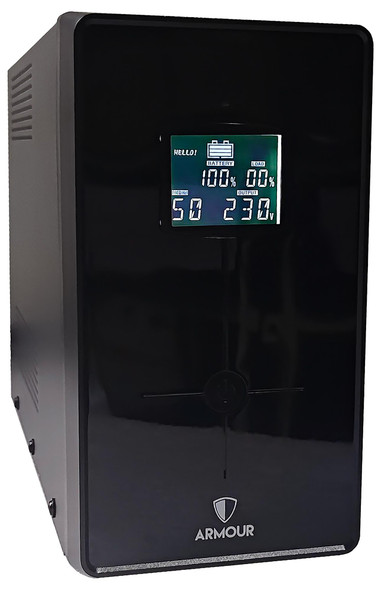
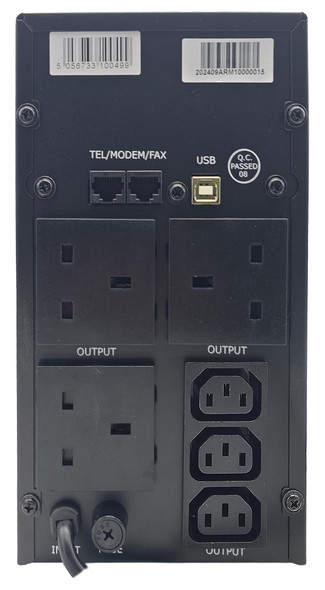
Armour 1500VA UPS 900W Battery Backup – LCD, 6 Outlets & USB Monitoring
VIDA


Armour 650VA UPS 390W Battery Backup – 2 UK Plugs, RJ45 & USB Monitoring
VIDA