
ADATA
ADATA 4TB HD710 Pro Rugged External Hard Drive, 2.5", USB 3.1, IP68 Water/Dust Proof, Shock Proof, Black
- SKU:
- HDADA-HD710P4TBB
- UPC:
- 4713218461209
- MPN:
- AHD710P-4TU31-CBK
- Availability:
- Free Click & Collect in Peterborough. UK delivery also available.


Description
ADATA HD710 Pro 4 TB Rugged External Hard Drive
USB 3.2 Gen 1 · IP68 Water- & Dust-Proof · MIL-STD-810G Shock-Resistant
Built for Real-World Extremes
Whether you’re backing up 4K footage on a Cornish beach or hauling project files between client sites, the HD710 Pro is engineered to shrug off environments that would finish ordinary drives. ADATA seals the 2.5-inch HDD inside a triple-layer armour of shock-absorbing silicone, rigid polycarbonate and an inner suspension cradle. The design comfortably passed U.S. Army MIL-STD-810G 516.6 drop tests from 1.5 m and survived a 60-minute dive at 2 m depth, exceeding IPX8 waterproof criteria and earning a full IP68 rating for dust, sand and water ingress.
Key Features at a Glance
4 TB Capacity – room for ~100 PS4 titles, 1 million RAW photos or an entire wedding-season archive.
USB 3.2 Gen 1 (5 Gb/s) – backwards-compatible, plug-and-play on Windows, macOS, Linux, Smart TVs and consoles.
Shock Sensor & LED Status Ring – pauses writes the instant an impact is detected; blue = safe, red = shock event.
Cable Groove & Port Cap – stow the detachable cable in the rubber channel, then snap the one-touch cap closed for a watertight seal.
Free Backup-to-Go Software – schedule encrypted sync jobs, carry Outlook & browser profiles, or add a ‘Lost-and-Found’ message right on the drive.
3-Year ADATA Warranty & UK Support.
Tested Performance
Independent reviewers recorded real-world transfers around 137 MB/s read and 134 MB/s write—perfect for HD video, Lightroom catalogues or Steam libraries that don’t need blazing-fast SSD speeds.
Designed for Creators, Travellers & Gamers
Field Creators: Off-load drone footage or DSLR stills even in a downpour; the HD710 Pro kept working after repeated drops and submersion tests in Tech4Gamers’ six-hour torture session.
Console Owners: Use it as extended USB storage for PS5/PS4 or Xbox—store legacy titles externally and free up precious internal SSD space (PS5 titles can be archived then copied back when you’re ready to play).
Business Travellers: The 4 TB model weighs roughly 390 g—lighter than most mirrorless camera bodies—and fits any carry-on tech pouch.
Specifications
Max. 5Gbps (USB 3.0)
Max. 480Mbps (USB 2.0)
USB port cover
Military-grade toughness
Shock-resistant & shock sensors
Cable Management
133.3 x 98.5 x 26.7mm
Quick Start Guide
Reviews

ADATA’s HD710 Pro offers an impressive protection for a portable HDD. Above IP68 rating, Military-grade drop protection, and G-Shock sensor are all part of the package.
Read MoreFAQ: Frequently Asked Question
ADATA HD710 Pro 4TB Rugged External Hard Drive FAQ
The ADATA HD710 Pro 4TB is a rugged 2.5-inch portable external hard drive designed for users who need large-capacity storage with extra physical protection. With 4TB capacity, USB 3.1 / USB 3.2 Gen 1 connectivity, IP68 water and dust resistance, military-grade shock protection, triple-layer construction and G Shock Sensor Protection, it is suitable for backups, travel, photography, video files, documents, school work, office data, gaming storage and outdoor use. Below are the most common questions buyers ask before choosing this ADATA HD710 Pro 4TB rugged external HDD, including waterproof protection, shock resistance, speed, Mac and Windows compatibility, PS4 and Xbox use, backup setup, formatting, cable type, drive care and who this rugged portable hard drive is best suited for.
1. What is the ADATA HD710 Pro 4TB?
The ADATA HD710 Pro 4TB is a rugged portable external hard drive designed for large file storage and backup. It offers 4TB capacity, USB connectivity, IP68 water and dust resistance, military-grade shock protection and a tough outer casing for users who need portable storage with extra durability.
2. What is the ADATA HD710 Pro 4TB best used for?
The ADATA HD710 Pro 4TB is best used for file backups, photos, videos, documents, school work, business files, travel storage, photography projects, video libraries, console game storage and users who want a rugged external hard drive for everyday or outdoor use.
3. Is the ADATA HD710 Pro 4TB an HDD or SSD?
The ADATA HD710 Pro 4TB is an external HDD, not an SSD. It offers large storage capacity at a better price per terabyte than many SSDs, but it is slower and more sensitive to movement while operating than a solid-state drive.
4. How much storage does the ADATA HD710 Pro 4TB provide?
The drive provides 4TB of advertised storage capacity. The usable space shown by Windows or macOS will be slightly lower because computers calculate storage differently and the file system uses some space for formatting.
5. Why does my 4TB drive show less than 4TB available?
This is normal. Storage manufacturers use decimal terabytes, while operating systems often display capacity in binary measurements. Formatting and file system overhead also use some space, so the available capacity appears lower than 4TB.
6. Is the ADATA HD710 Pro 4TB portable?
Yes. The ADATA HD710 Pro 4TB is a 2.5-inch portable external hard drive. It is designed to be carried in a bag, used with laptops and desktops, and taken between home, office, school, studio or travel locations.
7. Does the ADATA HD710 Pro 4TB need a power adapter?
No. The ADATA HD710 Pro 4TB is normally powered through its USB cable, so it does not need a separate power adapter. Use a reliable USB port that can provide enough power for a portable hard drive.
8. What USB connection does the ADATA HD710 Pro use?
The ADATA HD710 Pro uses USB 3.1 / USB 3.2 Gen 1 style connectivity depending on how the specification is labelled. It is backward compatible with older USB ports, but speed may be reduced on USB 2.0 connections.
9. Is USB 3.1 the same as USB 3.2 Gen 1?
In many product listings, USB 3.1 Gen 1 and USB 3.2 Gen 1 refer to the same 5Gbps USB speed class. Different retailers may use different naming, but the practical performance is limited by the hard drive inside, not only the USB version.
10. What cable does the ADATA HD710 Pro 4TB use?
The HD710 Pro commonly uses a USB Type-A to Micro-B style external hard drive cable. Use the supplied cable where possible, or a good-quality compatible replacement cable if needed.
11. Does the ADATA HD710 Pro have cable storage?
Yes. The HD710 Pro has an integrated cable groove around the drive body, allowing the USB cable to be stored neatly with the drive when travelling or keeping the drive in a drawer or laptop bag.
12. Is the ADATA HD710 Pro 4TB waterproof?
Yes. The ADATA HD710 Pro is rated for IP68 water resistance when the USB port cover is firmly closed. It is designed to survive accidental water exposure better than a normal external hard drive, but it should not be used underwater or left wet unnecessarily.
13. What does IP68 mean on the ADATA HD710 Pro?
IP68 means the drive is dust-tight and water-resistant under tested conditions. ADATA states the HD710 Pro is tested for 60 minutes in 2 metres of water when the USB port cover is fully closed.
14. Is the ADATA HD710 Pro dustproof?
Yes. The IP68 rating includes dust-tight protection. This makes the drive more suitable for travel, workshops, outdoor work, photography trips and tougher environments than a standard non-rugged portable drive.
15. Is the ADATA HD710 Pro shockproof?
Yes. The HD710 Pro is designed with military-grade shock protection and a triple-layer protective construction. It is more resistant to drops and knocks than a normal external hard drive, but it should still be handled carefully because it contains a mechanical HDD.
16. What is military-grade shock protection?
Military-grade shock protection means the drive is tested against specific shock and drop-style standards. It helps protect the drive from accidental knocks and drops, but it does not make the drive indestructible or safe from every impact.
17. What is triple-layer protection?
Triple-layer protection refers to the drive’s rugged construction, including protective materials around the internal hard drive. This helps absorb impact and protect the drive from knocks, drops and everyday travel damage.
18. What is G Shock Sensor Protection?
G Shock Sensor Protection is a feature that can detect shock or sudden movement and help protect the drive while it is operating. It is designed to reduce the risk of data problems caused by physical impact during use.
19. Can I drop the ADATA HD710 Pro 4TB?
The HD710 Pro is built to survive accidental drops better than a normal drive, but you should not intentionally drop it. It still contains a mechanical hard drive, so strong impacts, repeated drops or drops while writing data can still cause damage.
20. Can I use the ADATA HD710 Pro outdoors?
Yes. The rugged casing, IP68 rating and shock protection make it suitable for outdoor work, travel, photography, field work and mobile storage. Keep the USB cover closed when not connected and avoid extreme heat, cold or direct water exposure for long periods.
21. Can I use the ADATA HD710 Pro in the rain?
It can handle accidental water exposure better than a standard drive, but it is best to avoid using it in active rain while connected. Water protection depends on the USB cover being properly closed, and the port must be open when the drive is connected.
22. Can I plug in the drive while it is wet?
No. If the drive gets wet, dry it fully before connecting it to a computer or console. Never plug in a wet USB device, because moisture around the port can cause connection problems or electrical damage.
23. Is the ADATA HD710 Pro faster than an external SSD?
No. The ADATA HD710 Pro is an external hard drive, so it is slower than most external SSDs. It is better for large-capacity storage and backups, while an external SSD is better for faster transfers, editing directly from the drive and heavy portable performance.
24. What speed should I expect from the ADATA HD710 Pro 4TB?
Real-world speed depends on file size, USB port, cable, drive condition and computer performance. As a portable HDD, it is suitable for backups and large file storage, but it will not match the speed of a modern USB SSD.
25. Why is my ADATA HD710 Pro slow?
Slow speeds can be caused by using a USB 2.0 port, a poor cable, many small files, background antivirus scanning, low computer performance, disk errors, a nearly full drive or a failing drive. Try another USB 3.x port and cable, then check drive health if the issue continues.
26. Is the ADATA HD710 Pro good for backups?
Yes. The 4TB capacity makes it a good choice for backing up photos, videos, work files, school files, documents, music and project folders. For important data, keep at least one additional backup in another location or cloud storage.
27. Can I use this drive for Time Machine on Mac?
Yes. The ADATA HD710 Pro can be used for Apple Time Machine after formatting it correctly for macOS. Formatting will erase existing data, so back up anything important before setting it up.
28. Does the ADATA HD710 Pro work with Windows?
Yes. The drive works with Windows PCs and laptops. It can be used for file storage, backups, photos, videos, game files and general portable storage.
29. Does the ADATA HD710 Pro work with macOS?
Yes. It can work with macOS, but you may need to format it depending on how you want to use it. Use exFAT if you want to share files between Windows and Mac, or APFS/Mac OS Extended for Mac-only backup use.
30. Can I use the ADATA HD710 Pro with both Windows and Mac?
Yes. Format the drive as exFAT if you want to move files between Windows and Mac. Remember that formatting deletes data, so choose the file system before adding important files.
31. What format should I use for the ADATA HD710 Pro?
Use NTFS for Windows-only use, exFAT for Windows and Mac compatibility, and APFS or Mac OS Extended for Mac-only use such as Time Machine. Some consoles may require their own formatting process.
32. Can I use the ADATA HD710 Pro with PS4?
Yes. The 4TB capacity is suitable for PS4 external storage if formatted by the console. It can be used to store and run PS4 games, depending on the console’s external drive setup requirements.
33. Can I use the ADATA HD710 Pro with PS5?
Yes, it can be used with PS5 for storing and playing PS4 games and for storing PS5 game files. However, PS5 games must be moved to internal SSD storage or an approved internal expansion SSD before playing.
34. Can I use the ADATA HD710 Pro with Xbox One?
Yes. The 4TB capacity can be used for Xbox One game storage after formatting it on the console. This gives extra space for game installs and updates.
35. Can I use the ADATA HD710 Pro with Xbox Series X or Series S?
Yes. It can store and play compatible Xbox One, Xbox 360 and original Xbox games. Xbox Series X/S optimised games may need to be moved to the internal SSD or official expansion storage to play.
36. Is the ADATA HD710 Pro good for video editing?
It is good for storing video files and backups, but it is not the best choice for editing high-resolution footage directly from the drive. For active 4K editing, an external SSD is usually faster and smoother.
37. Is the ADATA HD710 Pro good for photographers?
Yes. The 4TB capacity and rugged design make it useful for photographers who need to back up RAW files, JPEGs and project folders while travelling or working outdoors. Important shoots should still be backed up to more than one drive.
38. Is the ADATA HD710 Pro good for students?
Yes. It is useful for students who need large storage for assignments, videos, photos, course materials, backups and moving files between computers. The rugged design is helpful for bags, travel and everyday handling.
39. Is the ADATA HD710 Pro good for business use?
Yes. It can be used for office backups, document archives, project files, media storage and portable data transfer. For sensitive business data, use encryption and keep multiple backups in different locations.
40. Does the ADATA HD710 Pro include encryption software?
The HD710 Pro is mainly a rugged external hard drive. If you need encrypted storage, use operating system encryption such as BitLocker on Windows or FileVault/disk encryption options on Mac, or trusted third-party encryption software.
41. Is the ADATA HD710 Pro safe for important data?
It is suitable for storing important files, but no single hard drive should be the only copy of important data. Use the 3-2-1 backup rule: keep three copies of important files, on two different types of storage, with one copy off-site or in the cloud.
42. Why is my ADATA HD710 Pro not recognised?
Common causes include a faulty USB cable, low-power USB port, drive letter conflict, unsupported file system, disk error, damaged port, outdated drivers or physical drive failure. Try another cable, another USB port and another computer before assuming the drive has failed.
43. What should I do if the drive makes clicking noises?
If the drive makes repeated clicking sounds, stop using it and avoid copying more files to it. Clicking can indicate a mechanical problem. If the data is important, contact a professional data recovery service instead of continuing to test the drive.
44. Can I leave the ADATA HD710 Pro plugged in all the time?
You can leave it connected for backup use, but external portable HDDs are often better used as backup drives that are disconnected when not needed. Disconnecting after backups can protect against accidental deletion, malware, power issues and physical knocks.
45. Is the ADATA HD710 Pro suitable for NAS use?
It can be connected to some routers or NAS devices that support USB external drives, but it is not a dedicated internal NAS hard drive. For 24/7 NAS storage, purpose-built NAS drives or internal drives are usually more suitable.
46. Can I use the ADATA HD710 Pro with a smart TV?
It may work with smart TVs that support USB external hard drives and the chosen file system. Some TVs have capacity limits, power limits or require formatting the drive for recording, so check your TV manual first.
47. What is included in the box?
Retail listings commonly include the external hard drive, USB cable and quick start guide. Package contents can vary by region or supplier, so check the product listing before ordering if a specific accessory is required.
48. What should I check before buying the ADATA HD710 Pro 4TB?
Check whether you need HDD capacity or SSD speed, whether 4TB is enough storage, your device’s USB compatibility, file system needs, console requirements, backup plan, rugged protection needs and whether you require encryption or very fast editing performance.
49. Who should NOT buy the ADATA HD710 Pro 4TB?
This drive is not ideal for users who need SSD-level speed, professional 4K editing directly from the drive, internal NAS storage, fully waterproof operation while connected, or a drive that can survive careless handling without backups. It is best for users who want large 4TB portable storage with extra rugged protection for backups, travel and everyday files.
50. Why buy the ADATA HD710 Pro 4TB from Memox?
Buying the ADATA 4TB HD710 Pro Rugged External Hard Drive from Memox is a practical choice if you want a large-capacity portable HDD with IP68 water and dust resistance, shock protection, USB connectivity and a tough black rugged design. Memox offers external hard drives, SSDs, memory cards, RAM, PC components, networking products and computer accessories for UK customers.
Related Products
Related Products


ADATA 1TB HD710 Pro Rugged External Hard Drive, 2.5", USB 3.1, IP68 Water/Dust Proof, Shock Proof, Black
ADATA

ADATA 2TB HD710 Pro Rugged External Hard Drive, 2.5", USB 3.1, IP68 Water/Dust Proof, Shock Proof, Black
ADATA

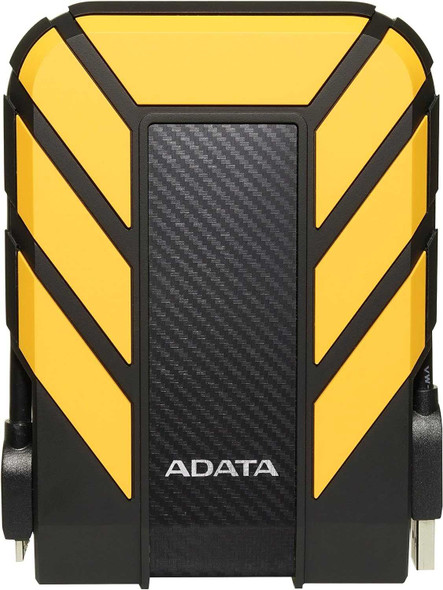
ADATA 1TB HD710 Pro Rugged External Hard Drive, 2.5", USB 3.1, IP68 Water/Dust Proof, Shock Proof, Yellow
ADATA


ADATA 2TB HD710 Pro Rugged External Hard Drive, 2.5", USB 3.1, IP68 Water/Dust Proof, Shock Proof, Red
ADATA
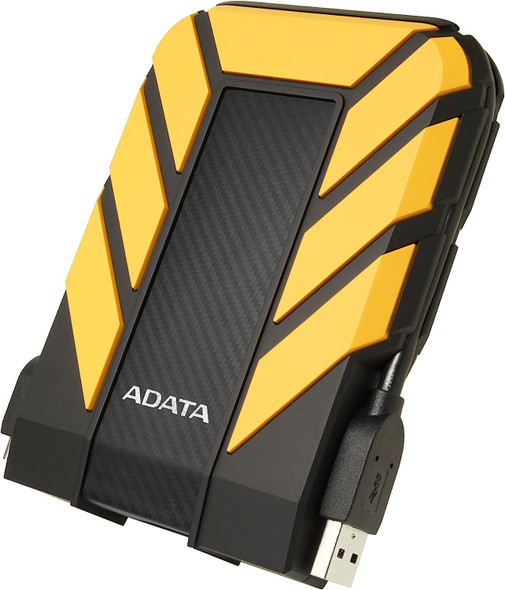

ADATA 2TB HD710 Pro Rugged External Hard Drive, 2.5", USB 3.1, IP68 Water/Dust Proof, Shock Proof, Yellow
ADATA