
ACER
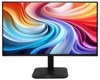
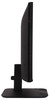
Acer KA2 KA272P6 Monitor - 27 Full HD (1920x1080), IPS, 144Hz, 1ms, FreeSync, Black"
- SKU:
- 11863850
- UPC:
- 4711474560407
- MPN:
- UM.HX2EE.605
- Availability:
- Free Click & Collect in Peterborough. UK delivery also available



Description
Acer KA272 P6bi 27-Inch Full HD IPS Monitor – 144Hz, 1ms VRB & AMD FreeSync
The Acer KA272 P6bi is a versatile 27-inch Full HD IPS monitor designed for smooth gaming, everyday computing, home working, multimedia and general creative use. Combining a 1920 x 1080 Full HD resolution, fast 144Hz refresh rate, 1ms VRB response time and AMD FreeSync, it delivers noticeably smoother motion than a conventional 60Hz display while retaining the wide viewing angles and consistent colour associated with IPS panel technology.
Part of Acer's KA2 Series, the KA272 P6bi also provides 99% sRGB colour coverage, a 1500:1 native contrast ratio, 250 cd/m² brightness and wide 178-degree viewing angles. Its slim ZeroFrame-style design, anti-glare screen, HDMI and VGA connectivity and 100 x 100mm VESA mounting support make it a practical choice for gaming PCs, home offices, study areas and multi-monitor desktop setups.
Model: Acer KA272 P6bi | Manufacturer Part Number: UM.HX2EE.605 | EAN: 4711474560407
Key Features of the Acer KA272 P6bi Monitor
- 27-inch IPS display with wide 178° horizontal and vertical viewing angles
- Full HD 1920 x 1080 resolution with a 16:9 widescreen aspect ratio
- 144Hz refresh rate for smoother gaming, scrolling, video and everyday desktop movement
- 1ms VRB (Visual Response Boost) designed to reduce perceived motion blur during fast-moving scenes
- AMD FreeSync variable refresh rate technology for smoother compatible gameplay
- 99% sRGB colour gamut for vibrant and consistent everyday colour reproduction
- 1500:1 native contrast ratio and 100,000,000:1 dynamic contrast specification
- 250 cd/m² brightness for everyday home and office environments
- Anti-glare display surface to help reduce distracting reflections
- Acer VisionCare 1.0 technology designed with comfortable extended viewing in mind
- HDMI 1.4 and VGA connectivity for modern and legacy video sources
- 100 x 100mm VESA mount support for compatible monitor arms and wall mounts
- -5° to +25° tilt adjustment for a more comfortable viewing position
- Slim ZeroFrame-style design suitable for modern desks and multi-monitor configurations
- HDMI cable and UK power cable included
27-Inch Full HD IPS Display
The Acer KA272 P6bi uses a 27-inch In-Plane Switching (IPS) panel with a native 1920 x 1080 Full HD resolution. IPS technology helps maintain consistent colours and image quality when the screen is viewed from different positions, with viewing angles of up to 178° horizontally and 178° vertically.
The larger 27-inch screen provides plenty of usable desktop space for web browsing, spreadsheets, documents, streaming, gaming and multitasking. It can be particularly useful for users moving from a smaller 21.5-inch, 22-inch or 24-inch monitor who want a more spacious desktop without moving to a higher-resolution display.
Is 1080p Suitable for a 27-Inch Monitor?
Yes. Full HD remains a popular resolution for 27-inch monitors where affordability, compatibility and gaming performance are priorities. Its 1920 x 1080 resolution is easy for a wide range of PCs and graphics cards to drive, which can make achieving higher frame rates easier than with more demanding 1440p or 4K resolutions.
For users primarily focused on extremely high pixel density, professional image editing or very fine text reproduction, a higher-resolution monitor may be preferable. For everyday computing, entertainment and high-refresh-rate gaming, however, Full HD offers a practical balance of performance and image quality.
Smooth 144Hz Refresh Rate for Gaming and Everyday Use
One of the biggest advantages of the Acer KA272 P6bi is its 144Hz maximum refresh rate. A 144Hz monitor can refresh the picture substantially more often each second than a traditional 60Hz screen, making movement appear smoother when your computer and application are capable of producing higher frame rates.
This benefit is particularly noticeable in fast-moving games such as racing, sports, action, FPS and competitive multiplayer titles, but 144Hz can also make ordinary desktop activities such as scrolling through web pages, moving windows and navigating applications feel more responsive.
1ms VRB for Reduced Motion Blur
The monitor supports 1ms VRB – Acer Visual Response Boost. VRB is designed to reduce perceived motion blur during fast-moving content, helping moving objects remain clearer during games and video.
The 1ms figure refers specifically to Acer's VRB mode. Standard panel response measurements may be quoted differently depending on the measurement method, settings and operating mode.
AMD FreeSync for Smoother Gameplay
AMD FreeSync helps synchronise the monitor's refresh behaviour with the frame output of a compatible graphics system. This can help reduce visible screen tearing and improve perceived smoothness when game frame rates fluctuate.
Combined with the monitor's 144Hz refresh rate and 1ms VRB capability, FreeSync makes the KA272 P6bi a strong option for users who want an affordable 27-inch 144Hz gaming monitor while retaining the colour and viewing-angle benefits of an IPS display.
Suitable for Gaming PCs and Everyday Computers
The KA272 P6bi can be connected to compatible desktops and laptops through HDMI. Its Full HD resolution also means that users do not necessarily need an extremely powerful graphics card to benefit from higher frame rates in many games.
Actual refresh rate and FreeSync availability depend on the connected computer, graphics hardware, cable, operating system, graphics settings and application being used.
99% sRGB Colour Coverage
With approximately 99% sRGB colour coverage, the Acer KA272 P6bi provides a broad colour range suited to everyday photography, graphics, web content, video playback and general creative applications.
The IPS panel helps maintain colour consistency across the screen and when viewed from an angle, making the monitor useful for shared viewing as well as everyday content creation.
Is the Acer KA272 P6bi Suitable for Photo and Video Editing?
It is suitable for general photo editing, web graphics, video editing and content creation thanks to its IPS panel and 99% sRGB coverage. Users carrying out professional colour-critical production, print proofing, HDR grading or work requiring factory-certified colour accuracy may prefer a specialist professional monitor with hardware calibration and a wider colour gamut.
Acer VisionCare and Anti-Glare Viewing
The KA272 P6bi features Acer VisionCare 1.0 technology and an anti-glare screen surface, helping make the display more comfortable for prolonged everyday viewing.
An anti-glare display can reduce reflections from windows and room lighting compared with highly reflective glossy screens, making the monitor well suited to home offices, bedrooms, classrooms and workplace environments.
HDMI 1.4 and VGA Connectivity
The Acer KA272 P6bi provides both modern digital and traditional analogue connectivity:
- 1 x HDMI 1.4
- 1 x VGA
HDMI is the recommended connection for modern desktops, laptops, compatible games consoles and other digital video devices. VGA is useful for connecting older PCs and equipment that still use an analogue video output.
How Do I Get 144Hz on the Acer KA272 P6bi?
For high-refresh-rate operation, connect a compatible computer through HDMI and then select the appropriate refresh rate in Windows or your graphics control panel. The graphics adapter, source device, cable, resolution and software must also support the selected refresh rate.
VGA is primarily provided for compatibility with older equipment and should not be relied upon for the monitor's maximum 144Hz capability.
VESA Mounting and Adjustable Viewing Angle
The supplied stand supports approximately -5° to +25° tilt adjustment, allowing the screen angle to be changed for a more comfortable viewing position.
The monitor also supports the common 100 x 100mm VESA mounting standard. This allows it to be used with compatible monitor arms, desk mounts and wall brackets, which can help free desk space or create a dual-monitor or multi-monitor workstation.
Does the Acer KA272 P6bi Have Height Adjustment?
No. The standard supplied stand provides tilt adjustment but not height adjustment. Users who require greater positioning flexibility can use a compatible 100 x 100mm VESA monitor arm or stand.
Slim Design for Home Office and Multi-Monitor Setups
The narrow-bezel ZeroFrame-style design gives the Acer KA272 P6bi a clean and modern appearance while helping minimise the visual gap between screens in a multi-monitor configuration.
This makes it suitable for users who want two monitors for productivity, trading, spreadsheets, development, content creation or gaming while maintaining a consistent desktop appearance.
Who Is the Acer KA272 P6bi Best For?
- PC gamers wanting a 27-inch 144Hz IPS monitor without moving to an expensive high-resolution gaming display
- Home-office users wanting a spacious 27-inch screen for productivity and multitasking
- Students needing one monitor for study, entertainment and gaming
- Home users upgrading from a smaller or slower 60Hz display
- Content creators carrying out general sRGB photo, video and web work
- Multi-monitor users looking for a slim-bezel display with VESA mounting
- Users who still need VGA connectivity for older PCs while also having HDMI for newer devices
Important Things to Know Before Buying
- The native resolution is 1920 x 1080 Full HD, not 1440p or 4K.
- The maximum refresh rate is 144Hz, subject to the connected device and connection configuration.
- The quoted 1ms response time is Acer's VRB specification.
- The supplied stand offers tilt adjustment only and is not height adjustable.
- The monitor supports 100 x 100mm VESA mounting.
- Connectivity consists of 1 x HDMI 1.4 and 1 x VGA.
- There is no DisplayPort connection on this model.
- This model should not be purchased specifically for HDR content, as HDR support is not part of its core specification.
- It does not include the advanced ergonomic stand functions found on specialist business monitors.
Acer KA272 P6bi Technical Highlights
- Brand: Acer
- Series: Acer KA2
- Model: KA272 P6bi / KA272 P6
- Manufacturer Part Number: UM.HX2EE.605
- EAN: 4711474560407
- Display Size: 27 inches / 68.6 cm
- Panel Technology: IPS
- Resolution: 1920 x 1080 Full HD
- Aspect Ratio: 16:9
- Maximum Refresh Rate: 144Hz
- Response Technology: 1ms VRB
- Adaptive Sync: AMD FreeSync
- Colour Gamut: 99% sRGB
- Brightness: 250 cd/m²
- Native Contrast Ratio: 1500:1
- Dynamic Contrast: 100,000,000:1
- Viewing Angles: 178° horizontal / 178° vertical
- Screen Surface: Anti-glare
- HDMI: 1 x HDMI 1.4
- VGA: 1 x VGA
- VESA Mount: 100 x 100mm
- Tilt: -5° to +25°
- Height Adjustable: No
- Colour: Black
- Dimensions with Stand: Approximately 612.1 x 210 x 464.4mm
- Weight with Stand: Approximately 3.65kg
- Maximum Power Consumption: 45W
- Standby Power: Approximately 0.3W
- Energy Efficiency Class: D
What's Included?
- 1 x Acer KA272 P6 widescreen LCD monitor
- 1 x Monitor stand
- 1 x UK power cord
- 1 x HDMI cable
Why Choose the Acer KA272 P6bi?
The Acer KA272 P6bi 27-inch 144Hz IPS monitor combines the features many home, office and gaming users need in one affordable display. Its 27-inch Full HD IPS panel offers a large viewing area and wide viewing angles, while the 144Hz refresh rate, 1ms VRB and AMD FreeSync support provide smoother motion for gaming and multimedia.
At the same time, 99% sRGB coverage, Acer VisionCare, an anti-glare screen, HDMI and VGA connectivity and 100 x 100mm VESA support make it flexible enough for work, study and everyday computing. If you want a 27-inch Full HD monitor with IPS image quality and a high 144Hz refresh rate, the Acer KA272 P6bi offers a strong balance of gaming performance, everyday usability and value.
Specification
Acer KA272 P6bi 27-Inch 144Hz IPS Monitor Specifications
The Acer KA272 P6bi is a 27-inch Full HD IPS monitor featuring a 1920 x 1080 resolution, 144Hz maximum refresh rate, 1ms VRB / MPRT, AMD FreeSync, 99% sRGB colour coverage and HDMI 1.4 connectivity. The specifications below apply specifically to Acer part number UM.HX2EE.605.
General Information
| Brand | Acer |
| Series | Acer KA2 Series |
| Model | KA272 P6bi |
| Manufacturer Part Number | UM.HX2EE.605 |
| EAN / GTIN | 4711474560407 |
| Product Type | LED-backlit LCD monitor |
| Market Positioning | Consumer / home / office / gaming |
| Product Colour | Black |
Display Specifications
| Screen Size | 27 inches / 68.6 cm |
| Panel Type | IPS (In-Plane Switching) |
| Display Technology | LCD with LED backlight |
| Screen Shape | Flat |
| Native Resolution | 1920 x 1080 pixels |
| HD Type | Full HD / 1080p |
| Aspect Ratio | 16:9 |
| Maximum Refresh Rate | 144Hz |
| Standard GtG Response Time | 4ms GtG |
| Fast Response Mode | 1ms VRB / 1ms MPRT |
| Pixel Pitch | 0.311mm |
| Brightness | 250 cd/m² |
| Native Contrast Ratio | 1500:1 |
| Dynamic Contrast Ratio | 100,000,000:1 |
| Horizontal Viewing Angle | 178° |
| Vertical Viewing Angle | 178° |
| Colour Gamut | 99% sRGB |
| Display Colours | 16.7 million colours |
| Active Display Area | 598 x 336mm |
| Screen Surface | Anti-glare |
| Touchscreen | No |
| HDR Support | No |
Gaming & Display Technologies
| Adaptive-Sync Technology | AMD FreeSync |
| AMD FreeSync | Yes |
| Acer VisionCare | VisionCare 1.0 |
| Acer Adaptive Contrast Management | Yes |
| On-Screen Display | Yes |
| Acer Display Widget Support | Yes |
Connectivity
| HDMI | Yes |
| HDMI Ports | 1 x HDMI |
| HDMI Version | HDMI 1.4 |
| VGA / D-Sub | 1 x VGA |
| DisplayPort | No |
| Built-in USB Hub | No |
Audio & Multimedia
| Built-in Speakers | No |
| Built-in Camera | No |
Stand & Ergonomics
| Stand Adjustment | Tilt |
| Tilt Range | -5° to +25° |
| Height Adjustment | No |
| VESA Mount Compatible | Yes |
| VESA Mounting Standard | 100 x 100mm |
| Security Lock Slot | Yes, Kensington-compatible security slot |
Dimensions & Weight
| Width with Stand | 612.1mm |
| Height with Stand | 464.4mm |
| Depth with Stand | 210mm |
| Weight with Stand | Approx. 3.65kg |
| Width without Stand | 612.1mm |
| Height without Stand | 359mm |
| Depth without Stand | 49.1mm |
| Weight without Stand | Approx. 3.29kg |
Power & Energy
| Energy Efficiency Class | D |
| SDR Energy Consumption | 16 kWh / 1000 hours |
| Maximum Power Consumption | 45W |
| Standby Power Consumption | Approx. 0.3W |
Package Contents
| Monitor | 1 x Acer KA272 P6 Widescreen LCD Monitor |
| Stand | Included |
| HDMI Cable | 1 x HDMI cable |
| Power Cord | 1 x UK power cord |
Important Specification Notes
Response time: Acer specifies this monitor as 1ms VRB (Visual Response Boost). Detailed distributor product data additionally lists a standard response time of 4ms GtG and a fast motion-response measurement of 1ms MPRT. These measurements use different testing methods and should not be treated as directly equivalent.
HDMI ports: This exact UK model, UM.HX2EE.605, is specified by Acer with one HDMI 1.4 port and one VGA port. Specifications from other KA272 variants should not be applied to this model.
144Hz operation: The maximum refresh rate is 144Hz. Available refresh rates can depend on the connected device, graphics hardware, cable, resolution and operating-system/display settings.
Audio: This model does not include built-in speakers. External speakers, headphones or another audio solution will therefore be required if audio output is needed.
Stand adjustment: The supplied stand provides tilt adjustment only. It is not height adjustable. A compatible 100 x 100mm VESA monitor arm or wall mount can be used where greater positioning flexibility is required.
Return
FAQ: Frequently Asked Questions
Acer KA272 P6bi 27-Inch Full HD 144Hz IPS Monitor FAQ
The Acer KA272 P6bi (UM.HX2EE.605) is a 27-inch Full HD IPS monitor designed for gaming, home entertainment, office work and everyday computing. It combines a 1920 × 1080 resolution with a refresh rate up to 144Hz over HDMI, AMD FreeSync, 1ms Visual Response Boost, 99% sRGB colour coverage and wide 178-degree IPS viewing angles.
Below are answers to the most common questions buyers ask about the Acer KA272 P6, including 144Hz setup, HDMI vs VGA, FreeSync, PS5 and Xbox compatibility, 1ms VRB response time, 27-inch 1080p sharpness, VESA mounting, speakers, colour accuracy, monitor arms and the difference between the KA272 P6bi and other similarly named KA272 models.
1. What is the Acer KA272 P6bi?
The Acer KA272 P6bi is a 27-inch Full HD IPS monitor designed for smooth gaming, multimedia, office applications and general PC use. Its main features include a refresh rate up to 144Hz, AMD FreeSync, 1ms VRB response time and 99% sRGB colour coverage.
2. What is the exact Acer part number, Memox SKU and EAN?
The exact UK model sold on this page is Acer KA272 P6bi, manufacturer part number UM.HX2EE.605. The Memox SKU is 11863850 and the EAN / GTIN-13 is 4711474560407.
3. What are the main specifications of the Acer KA272 P6?
Key specifications include a 27-inch IPS panel, 1920 × 1080 Full HD resolution, up to 144Hz refresh rate, 1ms VRB response time, AMD FreeSync, 99% sRGB, 250cd/m² brightness, 1500:1 native contrast ratio, HDMI 1.4, VGA, 100 × 100mm VESA mounting and an anti-glare screen.
4. Is the Acer KA272 P6 really a 144Hz monitor?
Yes. The KA272 P6 supports a maximum refresh rate of 144Hz at its native 1920 × 1080 resolution when using the appropriate digital HDMI connection and graphics hardware.
5. Can the Acer KA272 P6 run 144Hz over HDMI?
Yes. Acer's P6 specification lists Full HD at up to 144Hz through HDMI. The exact UM.HX2EE.605 model uses HDMI 1.4, which has sufficient bandwidth for 1920 × 1080 at 144Hz.
6. What is the maximum refresh rate through VGA?
The analogue VGA connection is limited to approximately 1920 × 1080 at 75Hz. Use HDMI if you want the full 144Hz capability.
7. Does the Acer KA272 P6bi have DisplayPort?
No. The exact UK UM.HX2EE.605 KA272 P6bi has one HDMI input and one VGA input. It does not have DisplayPort.
8. Why do some websites say the KA272 P6 has DisplayPort?
Acer sells several regional versions of the KA272 P6. For example, the KA272 P6bip / UM.HX2EE.604 available in some European markets includes DisplayPort. The UK model on this page is KA272 P6bi / UM.HX2EE.605, which uses HDMI + VGA instead. Always check the complete MPN rather than relying only on the KA272 P6 name.
9. Is an HDMI cable included?
Yes. Acer lists an HDMI cable and UK power cord in the package for the UM.HX2EE.605 model.
10. What does 1ms VRB response time mean?
VRB means Visual Response Boost. Acer uses this motion-blur-reduction mode to achieve a quoted 1ms visual response figure during fast movement. It is designed to make moving objects appear clearer during gaming.
11. Is the normal grey-to-grey response time also 1ms?
Not necessarily. The advertised 1ms figure refers specifically to Acer VRB motion-blur-reduction performance. Some product databases list the underlying normal grey-to-grey response around 4ms. Buyers should therefore understand 1ms VRB as a motion-performance feature rather than assuming every pixel transition always occurs in exactly 1ms.
12. Does the Acer KA272 P6 support AMD FreeSync?
Yes. AMD FreeSync dynamically synchronises the monitor's refresh behaviour with a compatible graphics card to reduce visible tearing and stutter when the frame rate varies.
13. What is screen tearing and how does FreeSync help?
Screen tearing occurs when the graphics card outputs a new frame while the monitor is part-way through displaying the previous one. FreeSync allows the refresh timing to follow compatible GPU frame delivery more closely, helping produce smoother motion without the traditional tearing line.
14. Can NVIDIA graphics cards use variable refresh rate with this monitor?
The monitor is officially advertised with AMD FreeSync, not NVIDIA G-SYNC certification. Some modern NVIDIA graphics cards can use Adaptive-Sync/FreeSync displays, but this exact monitor is not advertised by Acer as officially G-SYNC Compatible, so operation should not be guaranteed in the same way as a certified model.
15. What type of panel does the KA272 P6 use?
It uses an IPS / In-Plane Switching panel. IPS technology is known for wide viewing angles and relatively consistent colour when the screen is viewed from different positions.
16. What are the viewing angles?
Acer specifies approximately 178° horizontal and 178° vertical viewing angles.
17. How much of the sRGB colour space does the KA272 P6 cover?
Acer specifies approximately 99% sRGB colour coverage, making it suitable for everyday content creation, web graphics, photographs and media consumption where good mainstream colour coverage is desirable.
18. Is the KA272 P6 good for photo editing and graphic design?
Its IPS panel and 99% sRGB coverage make it suitable for general photo editing, web design and content creation. Professionals requiring factory-calibrated colour, wide-gamut Adobe RGB/DCI-P3 coverage, 10-bit workflows or hardware calibration should consider a specialist professional display.
19. How bright is the Acer KA272 P6?
Acer specifies typical brightness of 250cd/m². This is appropriate for many normal indoor environments, although users working in very bright sunlit rooms may prefer a brighter monitor.
20. What is the native contrast ratio?
The IPS panel has a stated native contrast ratio of approximately 1500:1. Acer additionally quotes a much larger dynamic contrast figure through its Adaptive Contrast Management technology.
21. Is the 100,000,000:1 contrast figure the real native contrast?
No. The 100,000,000:1 figure is a dynamic contrast specification associated with Acer Adaptive Contrast Management. The more meaningful native/static panel contrast figure for everyday comparison is approximately 1500:1.
22. Does the Acer KA272 P6 support HDR?
No HDR capability is specified for this exact model. It should be considered a standard SDR Full HD monitor rather than an HDR gaming display.
23. Is 1920 × 1080 Full HD sharp enough on a 27-inch screen?
This depends on your viewing distance and preference. A 27-inch 1920 × 1080 display has a pixel density of approximately 82 pixels per inch. It provides a large, easy-to-read desktop and good gaming performance, but text and fine detail are less dense than on a 24-inch 1080p or 27-inch 1440p monitor.
24. Is 27-inch 1080p bad for gaming?
Not necessarily. Many users enjoy 27-inch Full HD because the larger screen is immersive and 1080p is easier for a graphics card to drive at high frame rates. Buyers who sit very close to the screen or prioritise maximum text/detail sharpness may prefer 1440p at 27 inches.
25. 24-inch 1080p vs 27-inch 1080p – which is better?
A 24-inch Full HD monitor has higher pixel density and therefore normally looks sharper from the same viewing distance. The 27-inch KA272 P6 offers a physically larger image, which can be more immersive for gaming, video and general use. The better choice therefore depends on whether size or pixel density matters more to you.
26. 27-inch 1080p vs 27-inch 1440p – which should I choose?
Choose 1080p when affordability and achieving high gaming frame rates are priorities. Choose 1440p if you want noticeably higher pixel density, sharper text and more desktop workspace and have graphics hardware capable of driving the higher resolution.
27. Is the Acer KA272 P6 good for gaming?
Yes. Its combination of 144Hz refresh, AMD FreeSync, IPS panel and 1ms VRB makes it considerably more gaming-focused than a typical 60Hz or 75Hz office monitor while remaining suitable for everyday use.
28. Is the Acer KA272 P6 good for competitive FPS games?
It can be a good affordable choice for games such as Counter-Strike, Valorant, Fortnite, Overwatch and Call of Duty because its 144Hz refresh rate displays a new frame every approximately 6.9ms, giving visibly smoother motion than a standard 60Hz display.
29. Do I need to achieve exactly 144 FPS to benefit from a 144Hz monitor?
No. Even frame rates such as 80, 100 or 120 FPS can look smoother on a high-refresh monitor than on a 60Hz display. Reaching 144 FPS simply allows the system to make full use of all 144 refresh opportunities each second.
30. Is 144Hz noticeably smoother than 60Hz or 75Hz?
For many users, yes. 144Hz refreshes the display much more frequently, which makes mouse movement, scrolling and especially fast gaming motion appear smoother. The difference is generally easiest to notice in games that run well above 60 FPS.
31. Why is Windows only showing 60Hz after I connect the monitor?
Windows may default to 60Hz when a new monitor is first connected. Make sure you are using HDMI rather than VGA for 144Hz, install current graphics drivers and select the higher refresh rate in Windows display settings or the graphics driver's control panel.
32. How do I enable 144Hz in Windows 11?
Open Settings > System > Display > Advanced display, select the Acer KA272 P6 and choose the available refresh rate up to 144Hz. If 144Hz is missing, check the HDMI connection, graphics driver and GPU output capabilities.
33. Does the Acer KA272 P6 work with PlayStation 5?
Yes. A PS5 can connect through HDMI and output standard Full HD video to the monitor.
34. Can PS5 run games at 120Hz on the KA272 P6?
The monitor has sufficient HDMI bandwidth and refresh capability for 1920 × 1080 at 120Hz. The PS5 game must support 120Hz mode, and the console must recognise the appropriate 1080p/120Hz timing. Individual games may require Performance Mode to be selected.
35. Does PS5 VRR work on this monitor?
Do not buy this model specifically for PS5 VRR. Sony's PS5 variable-refresh implementation is designed around HDMI VRR requirements associated with newer HDMI functionality, while the KA272 P6bi uses HDMI 1.4 and is primarily advertised for AMD FreeSync on PC.
36. Does the Acer KA272 P6 work with Xbox Series X or Series S?
Yes. Xbox Series consoles can output 1920 × 1080 over HDMI and can take advantage of high-refresh modes when supported by the console settings and game.
37. Can Xbox Series X/S use 120Hz on the KA272 P6?
The monitor is capable of refresh rates above 120Hz through HDMI, so 1080p/120Hz is within its display capability. Ensure the Xbox is set to 1080p and 120Hz and that the selected game supports 120 FPS output.
38. Does Xbox FreeSync work with the KA272 P6?
Xbox consoles support AMD FreeSync on compatible HDMI displays, but successful VRR operation depends on the monitor's HDMI FreeSync implementation and console handshake. Acer officially advertises FreeSync on the KA272 P6, but does not market this exact model as an Xbox-certified display.
39. Can I connect a Nintendo Switch or Switch 2?
Yes. Any console providing a compatible HDMI video output can use the monitor. Nintendo consoles operate below the KA272 P6's maximum 144Hz capability, but the display will simply run at the refresh rate supplied by the console.
40. Can I connect a laptop to the Acer KA272 P6?
Yes. A laptop with HDMI can connect directly. Laptops with USB-C DisplayPort or Thunderbolt output can normally use a suitable USB-C-to-HDMI adapter or cable, provided the laptop's USB-C port supports video output.
41. Will the Acer KA272 P6 work with a MacBook or Mac mini?
Yes, provided the Mac has HDMI output or a suitable USB-C/Thunderbolt-to-HDMI connection. macOS will treat it as a standard external Full HD display. Maximum refresh rate can depend on the Mac model and adapter being used.
42. Does the Acer KA272 P6 have built-in speakers?
No. The exact KA272 P6bi / UM.HX2EE.605 does not include built-in speakers. This is important because several other KA272 variants have different audio specifications.
43. Why do I get no sound when using HDMI?
HDMI can carry audio, but the exact KA272 P6bi has no speakers. Therefore selecting the monitor as an HDMI audio device will not produce audible sound from the screen itself.
44. Does the KA272 P6 have a headphone or audio-output socket?
Acer's official specification for UM.HX2EE.605 lists only HDMI and VGA interfaces and does not list a headphone/audio output. Connect headphones or speakers directly to the PC, console or another compatible audio device instead.
45. Does the Acer KA272 P6 have a USB hub?
No. The exact model does not include USB ports or a built-in USB hub.
46. Can the Acer KA272 P6 be wall mounted?
Yes. It supports the standard VESA 100 × 100mm mounting pattern.
47. Can I use the Acer KA272 P6 on a monitor arm?
Yes. Choose a monitor arm supporting 100 × 100mm VESA and at least the monitor's approximately 3.29kg stand-free weight. Also check that the arm provides the height, tilt and movement range you require.
48. Is the supplied stand height adjustable?
No. The supplied stand does not provide height adjustment, swivel or pivot.
49. How far can the monitor tilt?
Acer specifies a tilt range of approximately -5° forward to +25° backward.
50. What are the dimensions of the Acer KA272 P6?
With its supplied stand installed, the monitor measures approximately 612.1mm wide × 210mm deep × 464.4mm high. Without the stand it is approximately 612.1 × 49.1 × 359mm.
51. How much does the Acer KA272 P6 weigh?
Acer specifies approximately 3.65kg with the stand and 3.29kg without the stand.
52. Does the screen have an anti-glare coating?
Yes. The KA272 P6 uses an anti-glare screen surface designed to reduce reflections from indoor lighting compared with a glossy display.
53. What is Acer VisionCare 1.0?
VisionCare is Acer's collection of display-comfort features intended to make extended viewing more comfortable. The KA272 P6 also uses an anti-glare ComfyView-style screen surface and provides on-screen display controls for adjusting the image to your environment.
54. Is the Acer KA272 P6 suitable for office and home working?
Yes. A 27-inch Full HD screen provides a large workspace for web browsing, documents, spreadsheets, email and video conferencing, while the IPS panel and wide viewing angles are useful for everyday productivity.
55. Is the KA272 P6 suitable for a dual-monitor setup?
Yes. Its slim three-sided ZeroFrame-style bezel helps reduce the visual gap between displays. VESA mounting is also useful when using a dual-monitor arm.
56. What should I check if the monitor has power but no picture?
Confirm that the correct input is selected, reseat the HDMI cable and test another cable or source device. Also verify that the computer is outputting a supported resolution and refresh rate. If necessary, disconnect power and video cables, hold the monitor power button briefly, reconnect the power and retest.
57. What should I do if 144Hz causes flickering, blank screens or instability?
Try the supplied or another known-good HDMI cable, update the graphics driver and test at 120Hz or 60Hz. Also temporarily disable FreeSync to determine whether variable refresh is involved. Persistent instability can indicate a cable, GPU-output, driver or display problem rather than the refresh rate itself.
58. How much power does the Acer KA272 P6 use?
Acer lists a maximum power consumption of approximately 45W, standby consumption around 0.3W and EU SDR energy consumption around 16kWh per 1,000 hours. The exact UK model is rated Energy Class D under the current SDR scale.
59. What warranty does the Acer KA272 P6 have in the UK?
Acer's current UK standard-warranty table lists its consumer monitor families, including the K-series range, with a 2-year carry-in standard warranty. Warranty eligibility and statutory consumer rights remain subject to Acer's terms and the purchase circumstances.
60. Who is the Acer KA272 P6 best for, and who should choose another monitor?
The Acer KA272 P6 is particularly suitable for budget-conscious PC gamers, esports players wanting 144Hz, home-office users, students and buyers who prefer a physically larger 27-inch display without the higher GPU demands of 1440p.
Choose another monitor if you specifically need 1440p or 4K resolution, HDR, built-in speakers, DisplayPort, USB-C, a USB hub, a height-adjustable stand, official G-SYNC certification or very high pixel density for close-up text and professional image work.
Related Products
Related Products

ASUS VA249QGSE 23.8in Full HD IPS Monitor – 120Hz, 1ms, Ergonomic Stand
ASUS

piXL CM32F4 32-Inch Full HD IPS Monitor – HDMI, DisplayPort & VESA Mount
PIXL