
GIGABYTE
Gigabyte B550 EAGLE AM4 ATX Motherboard – DDR4, Dual M.2, PCIe 4.0 & HDMI
- SKU:
- MBGIG-B550E
- UPC:
- 4719331868208
- MPN:
- B550 EAGLE
- Availability:
- Free Click & Collect in Peterborough. UK delivery also available



Description
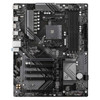
GIGABYTE B550 EAGLE AM4 ATX Motherboard – DDR4, Dual M.2, PCIe 4.0, HDMI, USB-C and GbE LAN
The GIGABYTE B550 EAGLE is an AM4 ATX motherboard designed for powerful AMD Ryzen desktop PC builds, gaming systems, office PCs and upgrade projects. Built around the AMD B550 chipset, it supports selected AMD Ryzen 5000 Series, Ryzen 5000 G-Series, Ryzen 4000 G-Series, Ryzen 3000 Series and Ryzen 3000 G-Series processors, giving users a stable platform for DDR4 memory, PCIe 4.0 graphics, fast M.2 storage and modern connectivity.
This GIGABYTE B550 EAGLE AM4 motherboard is ideal for customers searching for a B550 ATX motherboard, AM4 DDR4 motherboard, Ryzen 5000 motherboard, PCIe 4.0 motherboard, dual M.2 motherboard, motherboard with HDMI, Gigabyte B550 EAGLE, or a reliable AMD platform for gaming, productivity and everyday desktop builds.
Key Features of the GIGABYTE B550 EAGLE
- AMD AM4 socket for supported Ryzen 5000, 5000 G-Series, 4000 G-Series, 3000 and 3000 G-Series processors
- AMD B550 chipset for modern AM4 desktop builds
- ATX form factor for standard gaming and desktop PC cases
- 4× DDR4 DIMM slots supporting up to 128GB system memory
- Dual-channel DDR4 architecture with XMP memory profile support
- Dual M.2 storage with one CPU-connected M.2 slot and one chipset-connected M.2 slot
- PCIe 4.0 x16 graphics slot with compatible Ryzen 5000 / 3000 Series processors
- 4× SATA 6Gb/s ports for SSDs, hard drives and optical drives
- HDMI 2.1 output for compatible Ryzen processors with integrated Radeon graphics
- Realtek GbE LAN for wired Gigabit networking
- Realtek HD Audio with 2 / 4 / 5.1 / 7.1-channel audio support
- USB-C connectivity on the rear panel plus internal USB-C header support
- Q-Flash Plus for easier BIOS updates without installing CPU, memory or graphics card
- Smart Fan 6 with multiple fan headers for better cooling control
- RGB Fusion support with RGB and addressable RGB headers
AM4 B550 Motherboard for AMD Ryzen Builds
The GIGABYTE B550 EAGLE gives builders a strong AM4 foundation for modern desktop systems. It is suitable for users building a gaming PC, home office desktop, content creation workstation, student computer or general-purpose upgrade system using compatible AMD Ryzen processors.
Ryzen 5000 and Ryzen 3000 Series Support
This motherboard supports selected AMD Ryzen 5000 Series, Ryzen 5000 G-Series, Ryzen 4000 G-Series, Ryzen 3000 Series and Ryzen 3000 G-Series processors. Always check the latest CPU support list and BIOS version before installation, especially when using newer Ryzen processors.
DDR4 Memory with Four DIMM Slots
The B550 EAGLE includes 4 DDR4 DIMM sockets supporting up to 128GB of system memory. Dual-channel memory support helps improve performance when two or four compatible modules are installed correctly.
XMP Memory Profile Support
Support for Extreme Memory Profile, also known as XMP, allows compatible DDR4 memory kits to run at their rated profile speed when supported by the CPU, motherboard BIOS and memory configuration. Final memory speed depends on the installed processor, RAM kit and system settings.
PCIe 4.0 Graphics and Expansion Support
The main PCI Express x16 slot is connected through the CPU and supports PCIe 4.0 x16 mode when paired with compatible Ryzen 5000 or Ryzen 3000 Series processors. This makes it suitable for modern graphics cards and high-performance expansion devices.
PCIe Version Depends on Processor
With Ryzen 5000 G-Series, Ryzen 4000 G-Series and Ryzen 3000 G-Series processors, the main graphics slot runs at PCIe 3.0 x16. This is normal for those processor families and should be considered when planning a build.
Dual M.2 Storage and SATA Expansion
The GIGABYTE B550 EAGLE includes 2× M.2 Socket 3 connectors and 4× SATA 6Gb/s connectors. This gives users flexible storage options for fast NVMe SSDs, SATA SSDs and larger hard drives.
PCIe 4.0 M.2 Support with Compatible CPUs
The CPU-connected M.2 slot supports PCIe 4.0 x4 / x2 SSDs when used with compatible Ryzen 5000 or Ryzen 3000 Series processors. The second M.2 slot is chipset-connected and supports PCIe 3.0 x4 / x2 SSDs. M.2 performance and supported drive type depend on the processor and slot used.
HDMI Output for Ryzen Processors with Integrated Graphics
The motherboard includes an HDMI port with support for up to 4096 × 2160 at 60Hz, HDMI 2.1, HDCP 2.3 and HDR. The HDMI output works only when the installed AM4 processor has integrated AMD Radeon graphics, such as compatible Ryzen G-Series APUs.
Important Display Output Notice
If you install a Ryzen processor without integrated graphics, such as many standard Ryzen desktop CPUs, the motherboard HDMI port will not provide display output. In that case, a separate graphics card is required.
Realtek GbE LAN and HD Audio
The GIGABYTE B550 EAGLE includes Realtek Gigabit Ethernet for stable wired networking and Realtek High Definition Audio for 2 / 4 / 5.1 / 7.1-channel audio support. This makes it suitable for gaming, streaming, video meetings and everyday desktop use.
Wired Networking for Gaming and Work
Gigabit LAN is ideal for users who want a stable wired connection for online gaming, downloading, cloud software, NAS access, streaming and office networking.
USB-C, USB 3.2 and Rear I/O Connectivity
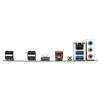
The rear panel includes USB Type-C, USB 3.2 ports, USB 2.0 ports, HDMI, RJ-45 LAN and audio jacks. The board also includes an internal USB-C header and USB 3.2 Gen 1 header for compatible PC cases with front-panel ports.
Case Front USB-C Support
To use a case front USB-C port, your PC case must have a compatible USB-C front-panel cable that connects to the motherboard’s internal USB-C header.
Cooling, RGB and DIY-Friendly Features
GIGABYTE includes VRM Thermal Armor, Smart Fan 6, multiple fan headers, RGB headers, addressable RGB headers and PCIe EZ-Latch to make building, cooling and maintenance easier.
Q-Flash Plus BIOS Updates
Q-Flash Plus allows BIOS updating using a USB flash drive and the dedicated Q-Flash Plus button, without needing to install a CPU, memory or graphics card. This can be useful when preparing the board for a newer supported Ryzen processor.
Who Is the GIGABYTE B550 EAGLE Best For?
- Users building a new AM4 Ryzen desktop PC
- Gamers wanting PCIe 4.0 graphics support with compatible CPUs
- PC builders upgrading from older AM4 motherboards
- Home office users needing DDR4, M.2 storage and Gigabit LAN
- Students and creators building a budget-friendly Ryzen system
- Users wanting dual M.2 storage and four DDR4 memory slots
- Builders who need Q-Flash Plus for easier BIOS updates
GIGABYTE B550 EAGLE Motherboard Specifications
- Brand: GIGABYTE
- Model: B550 EAGLE
- Product Type: ATX AM4 motherboard
- Chipset: AMD B550
- CPU Socket: AMD AM4
- Supported CPU Families: AMD Ryzen 5000 G-Series, Ryzen 5000 Series, Ryzen 4000 G-Series, Ryzen 3000 G-Series and Ryzen 3000 Series processors
- Memory Slots: 4× DDR4 DIMM
- Maximum Memory: Up to 128GB
- Memory Speed Support: DDR4 3200 / 2933 / 2667 / 2400 / 2133 MT/s, with XMP support
- Memory Architecture: Dual channel
- Graphics Output: 1× HDMI, APU dependent
- HDMI Support: Up to 4096 × 2160 at 60Hz, HDMI 2.1, HDCP 2.3 and HDR
- Audio: Realtek HD Audio, 2 / 4 / 5.1 / 7.1-channel support
- LAN: Realtek GbE LAN, 10 / 100 / 1000Mbps
- Main PCIe Slot: 1× PCI Express x16 slot, PCIe 4.0 x16 with compatible Ryzen 5000 / 3000 Series processors
- Additional PCIe Slots: 4× PCIe 3.0 slots running at x1
- M.2 Storage: 2× M.2 Socket 3 connectors
- M.2 Slot 1: CPU-connected M.2, supports PCIe 4.0 x4 / x2 and SATA with compatible Ryzen 5000 / 3000 Series processors
- M.2 Slot 2: Chipset-connected M.2, supports PCIe 3.0 x4 / x2 SSDs
- SATA Ports: 4× SATA 6Gb/s
- RAID Support: RAID 0, RAID 1 and RAID 10 for NVMe and SATA storage
- Rear USB: 4× USB 2.0 / 1.1, 1× USB Type-C USB 3.2 Gen 1, 2× USB 3.2 Gen 1, and 1× red USB port with Gen 2 / Gen 1 support depending on CPU
- Internal USB Headers: USB-C header, USB 3.2 Gen 1 header and USB 2.0 headers
- Power Connectors: 24-pin ATX main power and 8-pin ATX 12V CPU power
- Fan Headers: 1× CPU fan, 1× CPU fan / water cooling pump and 3× system fan headers
- RGB Headers: RGB and addressable RGB headers with RGB Fusion support
- BIOS: 128Mbit AMI UEFI BIOS
- Special Features: Q-Flash, Q-Flash Plus, Smart Fan 6, RGB Fusion, PCIe EZ-Latch
- Operating System Support: Windows 11 64-bit and Windows 10 64-bit
- Form Factor: ATX, 30.5 × 24.4cm
Buying Advice
Before ordering, please check that your chosen processor is on GIGABYTE’s latest CPU support list and that the motherboard BIOS supports it. This motherboard uses DDR4 memory, not DDR5. HDMI output requires a Ryzen processor with integrated Radeon graphics. PCIe 4.0 support depends on the installed CPU, and some Ryzen G-Series processors run PCIe slots and M.2 storage at PCIe 3.0 speeds.
Why Buy the GIGABYTE B550 EAGLE?
The GIGABYTE B550 EAGLE AM4 ATX Motherboard is a strong choice for users building or upgrading a Ryzen DDR4 desktop PC. With AMD B550 chipset support, 4× DDR4 DIMM slots, dual M.2 storage, PCIe 4.0 support with compatible CPUs, HDMI, USB-C, Realtek GbE LAN, Smart Fan 6, Q-Flash Plus and an ATX layout, it offers a balanced foundation for gaming PCs, workstations, home office desktops and everyday AM4 builds.
Specification
GIGABYTE B550 EAGLE AM4 ATX Motherboard Specifications
| Product Type | ATX Desktop Motherboard |
| Brand | GIGABYTE |
| Model | B550 EAGLE |
| Chipset | AMD B550 |
| CPU Socket | AMD AM4 |
| Supported CPU Families | AMD Ryzen 5000 G-Series, Ryzen 5000 Series, Ryzen 4000 G-Series, Ryzen 3000 G-Series and Ryzen 3000 Series Processors |
| Memory Slots | 4 × DDR4 DIMM Sockets |
| Maximum Memory Capacity | Up to 128GB, 32GB Single DIMM Capacity |
| Memory Architecture | Dual Channel DDR4 |
| Supported Memory Speeds | DDR4 3200 / 2933 / 2667 / 2400 / 2133 MT/s |
| Memory Profile Support | Extreme Memory Profile / XMP Supported |
| Memory Type Support | ECC Unbuffered and Non-ECC Unbuffered DDR4 DIMMs, CPU and Memory Dependent |
| Onboard Graphics Output | 1 × HDMI Port, Requires CPU with Integrated AMD Radeon Graphics |
| HDMI Support | HDMI 2.1, HDCP 2.3 and HDR, up to 4096 × 2160 @ 60Hz |
| Maximum Shared Graphics Memory | Up to 16GB, APU and System Memory Dependent |
| Audio | Realtek Audio CODEC, High Definition Audio, 2 / 4 / 5.1 / 7.1-Channel Support |
| LAN | Realtek GbE LAN, 10 / 100 / 1000Mbps |
| Main Expansion Slot | 1 × PCI Express x16 Slot, Integrated in CPU |
| Main Slot PCIe Mode | PCIe 4.0 x16 with Ryzen 5000 / 3000 Series CPUs; PCIe 3.0 x16 with Ryzen 5000 G / 4000 G / 3000 G-Series CPUs |
| Additional PCIe Slots | 4 × PCI Express x16 Physical Slots, Chipset Connected, PCIe 3.0 Running at x1 |
| M.2 Slot 1 | M2A_CPU, Socket 3 M-Key, Type 22110 / 2280 SSD Support |
| M.2 Slot 1 Support | SATA and PCIe 4.0 x4 / x2 with Ryzen 5000 / 3000 Series CPUs; SATA and PCIe 3.0 x4 / x2 with Ryzen G-Series CPUs |
| M.2 Slot 2 | M2B_SB, Socket 3 M-Key, Type 22110 / 2280 PCIe 3.0 x4 / x2 SSD Support |
| SATA Ports | 4 × SATA 6Gb/s Connectors |
| RAID Support | RAID 0, RAID 1 and RAID 10 for NVMe SSD and SATA Storage Devices |
| Rear USB Ports | 4 × USB 2.0 / 1.1, 1 × USB 3.2 Gen 2 Type-A or USB 3.2 Gen 1 Red Port Depending on CPU, 1 × USB Type-C USB 3.2 Gen 1, 2 × USB 3.2 Gen 1 |
| Internal USB Headers | 1 × USB Type-C USB 3.2 Gen 1 Header, 1 × USB 3.2 Gen 1 Header, 2 × USB 2.0 / 1.1 Headers |
| Back Panel Connectors | USB Ports, HDMI, Q-Flash Plus Button, RJ-45 LAN and 3 Audio Jacks |
| Internal Power Connectors | 1 × 24-Pin ATX Main Power and 1 × 8-Pin ATX 12V CPU Power |
| Fan / Pump Headers | 1 × CPU Fan, 1 × CPU Fan / Water Cooling Pump and 3 × System Fan Headers |
| RGB Headers | 2 × Addressable LED Strip Headers, 2 × RGB LED Strip Headers and 1 × CPU Cooler LED / RGB Header |
| TPM Header | 1 × Trusted Platform Module Header, 2×6 Pin, for GC-TPM2.0_S Module Only |
| BIOS | 128Mbit AMI UEFI BIOS |
| Special Features | Q-Flash, Q-Flash Plus, RGB Fusion, EasyTune, Smart Backup and System Information Viewer |
| Operating System Support | Windows 11 64-bit and Windows 10 64-bit |
| Form Factor | ATX |
| Dimensions | 30.5 × 24.4cm |
CPU Compatibility Notice
This motherboard supports selected AMD Ryzen 5000 G-Series, Ryzen 5000 Series, Ryzen 4000 G-Series, Ryzen 3000 G-Series and Ryzen 3000 Series processors. Always check GIGABYTE’s latest CPU support list and required BIOS version before installation.
PCIe 4.0 Notice
PCIe 4.0 support depends on the installed processor. Ryzen 5000 and Ryzen 3000 Series CPUs support PCIe 4.0 on the main PCIe x16 slot and first M.2 slot, while Ryzen G-Series processors run these connections at PCIe 3.0 speeds.
HDMI Display Notice
The HDMI port only works when the installed AM4 processor includes integrated AMD Radeon graphics, such as a compatible Ryzen G-Series APU. Standard Ryzen CPUs without integrated graphics require a separate graphics card.
Memory Compatibility Notice
This board uses DDR4 DIMM memory, not DDR5. Supported speed and capacity depend on the CPU, memory kit, number of installed modules and BIOS settings.
Storage Compatibility Notice
The motherboard includes 2 × M.2 Socket 3 connectors and 4 × SATA 6Gb/s connectors. M.2 speed and SATA/PCIe support vary by slot and CPU generation.
Wireless Connectivity Notice
This standard GIGABYTE B550 EAGLE model does not include built-in WiFi or Bluetooth. Use a PCIe or USB wireless adapter if wireless networking is required.
Return
FAQ: Frequenlty Asked Questions
Gigabyte B550 EAGLE AM4 ATX Motherboard FAQ
The Gigabyte B550 EAGLE AM4 ATX Motherboard is a full-size AMD AM4 B550 motherboard designed for compatible Ryzen desktop PC builds. It supports AMD Ryzen 5000, 4000 G-Series, 3000 G-Series and 3000 Series processors, DDR4 memory, dual M.2 storage, PCIe 4.0 graphics and SSD support with compatible CPUs, HDMI output with supported Ryzen processors with integrated graphics, Gigabit LAN, Q-Flash Plus BIOS updating, Smart Fan 6 cooling control, RGB headers and Windows 10 / Windows 11 64-bit support. Below are the most common questions buyers ask before choosing the Gigabyte B550 EAGLE motherboard, including Ryzen CPU compatibility, BIOS updates, HDMI/no display issues, RAM support, M.2 SSD installation, PCIe 4.0, gaming builds, Wi-Fi, Bluetooth, fan headers, case compatibility and who this AM4 motherboard is best suited for.
1. What is the Gigabyte B550 EAGLE motherboard?
The Gigabyte B550 EAGLE is an ATX motherboard for AMD AM4 Ryzen desktop processors. It is designed for DDR4 gaming PCs, home computers, workstation-style builds and upgrade systems using compatible Ryzen 3000, 4000 G-Series and 5000 processors.
2. What is the Gigabyte B550 EAGLE best used for?
The B550 EAGLE is best used for building a Ryzen gaming PC, office desktop, home workstation, upgrade build or budget AM4 system where you want DDR4 memory, dual M.2 storage, PCIe 4.0 support with compatible CPUs and a full-size ATX layout.
3. What CPU socket does the Gigabyte B550 EAGLE use?
The Gigabyte B550 EAGLE uses the AMD AM4 socket. It is not compatible with newer AM5 processors such as Ryzen 7000, Ryzen 8000 or Ryzen 9000 series CPUs.
4. Which Ryzen processors does the B550 EAGLE support?
Gigabyte lists support for AMD Ryzen 5000 G-Series, Ryzen 5000 Series, Ryzen 4000 G-Series, Ryzen 3000 G-Series and Ryzen 3000 Series processors. Always check Gigabyte's CPU support list for the exact CPU and required BIOS version.
5. Does the Gigabyte B550 EAGLE support Ryzen 5000 CPUs?
Yes. The motherboard supports Ryzen 5000 Series processors, but some CPUs may require a suitable BIOS version. Q-Flash Plus can help update the BIOS without needing a CPU, RAM or graphics card installed.
6. Does the B550 EAGLE support Ryzen 7 5700X or Ryzen 7 5800X?
It can support compatible Ryzen 5000 CPUs such as Ryzen 7 models when the correct BIOS is installed. Check the official Gigabyte CPU support list for the exact processor and BIOS requirement before building.
7. Does the B550 EAGLE support Ryzen 5 5600 or 5600X?
Yes, the board can support Ryzen 5 5600 and Ryzen 5 5600X with the correct BIOS. If the system does not boot with a Ryzen 5000 CPU, a BIOS update may be required.
8. Does this motherboard support Ryzen 7000 or Ryzen 9000?
No. Ryzen 7000 and Ryzen 9000 processors use the AM5 socket and DDR5 memory. The Gigabyte B550 EAGLE is an AM4 motherboard for compatible DDR4 Ryzen processors.
9. Does the Gigabyte B550 EAGLE support Windows 11?
Yes. Gigabyte lists support for Windows 11 64-bit. For Windows 11 installation, make sure TPM/fTPM and Secure Boot settings are configured correctly in BIOS if required.
10. Does the Gigabyte B550 EAGLE support Windows 10?
Yes. Gigabyte lists support for Windows 10 64-bit, making it suitable for users who still prefer Windows 10 on a compatible Ryzen AM4 system.
11. What chipset does the B550 EAGLE use?
The motherboard uses the AMD B550 chipset. B550 is popular for AM4 builds because it supports PCIe 4.0 from compatible Ryzen CPUs while keeping costs lower than many X570 motherboards.
12. Is the Gigabyte B550 EAGLE an ATX motherboard?
Yes. The B550 EAGLE uses the ATX form factor and measures approximately 30.5cm x 24.4cm. It should be installed in a PC case that supports ATX motherboards.
13. Will the B550 EAGLE fit in a Micro-ATX case?
No, not in most Micro-ATX-only cases. This is a full-size ATX motherboard, so you need a case that supports ATX motherboards.
14. How much RAM does the Gigabyte B550 EAGLE support?
The motherboard has four DDR4 DIMM slots and supports up to 128GB of system memory, using up to 32GB per slot on supported configurations.
15. What type of RAM does the B550 EAGLE use?
The B550 EAGLE uses DDR4 desktop DIMM memory. It does not support DDR5 laptop SODIMM, DDR5 desktop DIMM or older DDR3 memory.
16. Does the B550 EAGLE support DDR4 3200MHz?
Yes. Gigabyte lists support for DDR4 3200, 2933, 2667, 2400 and 2133 MT/s memory modules. Higher memory speeds may depend on the CPU, BIOS, memory kit and XMP settings.
17. Does the B550 EAGLE support XMP memory?
Yes. The board supports Extreme Memory Profile, commonly called XMP. Enabling XMP in BIOS can help compatible RAM run at its rated speed instead of default JEDEC speed.
18. Why is my RAM running slower than advertised?
RAM may run slower if XMP is not enabled, if the CPU memory controller does not support the speed, if four DIMMs are installed, or if the memory kit is not stable at the selected profile. Enable XMP and update BIOS if needed.
19. Can I use 2x16GB RAM with this motherboard?
Yes. A 2x16GB DDR4 kit is a common choice for this motherboard and can provide 32GB total memory with dual-channel operation when installed in the correct slots.
20. Can I use four RAM sticks on the B550 EAGLE?
Yes, the motherboard has four DDR4 DIMM slots. However, using four sticks can sometimes reduce maximum stable memory speed, especially with high-frequency RAM or mixed kits.
21. Does the Gigabyte B550 EAGLE support PCIe 4.0?
Yes, with compatible Ryzen 5000 or Ryzen 3000 Series processors, the main PCIe x16 slot can support PCIe 4.0 x16. Ryzen G-Series processors may run the main slot at PCIe 3.0 mode instead.
22. Does the B550 EAGLE support PCIe 5.0?
No. This is an AMD B550 motherboard, so it does not support PCIe 5.0. For PCIe 5.0, you would need a newer compatible platform such as selected AM5 motherboards.
23. How many PCIe slots does the B550 EAGLE have?
The board has one main full-length PCIe x16 slot connected to the CPU and four additional PCIe 3.0 slots from the chipset running at x1 mode.
24. Which PCIe slot should I use for my graphics card?
Use the main PCIe x16 slot for your graphics card. Gigabyte notes that if only one graphics card is installed, it should be installed in the PCIEX16 slot.
25. Does the B550 EAGLE have Gigabyte PCIe EZ-Latch?
Yes. The board includes a PCIe EZ-Latch design to help remove a graphics card more easily, which is useful when working around large GPUs and CPU coolers.
26. How many M.2 SSD slots does the B550 EAGLE have?
The motherboard has two M.2 Socket 3 connectors. One is CPU-connected and can support PCIe 4.0 with compatible Ryzen CPUs, while the second is chipset-connected and supports PCIe 3.0.
27. Does the B550 EAGLE support PCIe 4.0 NVMe SSDs?
Yes. The CPU-connected M.2 slot can support PCIe 4.0 x4 or x2 SSDs when used with compatible Ryzen 5000 or Ryzen 3000 Series processors. With Ryzen G-Series processors, M.2 speed may be limited to PCIe 3.0.
28. Does the second M.2 slot support PCIe 4.0?
No. The second M.2 slot is chipset-connected and supports PCIe 3.0 x4 or x2 SSDs. Use the top CPU-connected M.2 slot for a PCIe 4.0 NVMe SSD where supported.
29. Does the B550 EAGLE support SATA M.2 SSDs?
The CPU-connected M.2 slot supports SATA and PCIe M.2 SSDs with compatible Ryzen CPUs. The chipset-connected M.2 slot supports PCIe M.2 SSDs. Always check the manual before choosing a SATA M.2 drive.
30. How many SATA ports does the B550 EAGLE have?
The motherboard has four SATA 6Gb/s connectors for SATA SSDs, hard drives and other SATA storage devices.
31. Does the B550 EAGLE support RAID?
Yes. Gigabyte lists RAID 0, RAID 1 and RAID 10 support for NVMe SSD storage devices and SATA storage devices.
32. Does the Gigabyte B550 EAGLE have Wi-Fi?
No. This standard B550 EAGLE model does not include built-in Wi-Fi. If you need wireless networking, use a PCIe Wi-Fi card, USB Wi-Fi adapter or choose a motherboard model with Wi-Fi built in.
33. Does the Gigabyte B550 EAGLE have Bluetooth?
No. The standard B550 EAGLE does not include built-in Bluetooth. Bluetooth can be added with a USB Bluetooth adapter or a PCIe Wi-Fi/Bluetooth card.
34. What LAN does the B550 EAGLE use?
The motherboard includes Realtek Gigabit Ethernet LAN, suitable for wired home, office and gaming network connections up to 1Gbps when used with compatible networking equipment.
35. Does the B550 EAGLE have HDMI?
Yes. The motherboard has one HDMI port. However, the HDMI output only works when using a compatible AMD Ryzen processor with integrated Radeon graphics, such as selected Ryzen G-Series APUs.
36. Why does the motherboard HDMI show no signal?
The most common reason is using a Ryzen CPU without integrated graphics. Standard Ryzen CPUs such as many Ryzen 5, Ryzen 7 and Ryzen 9 non-G models require a separate graphics card, and the monitor cable should be connected to the graphics card, not the motherboard HDMI port.
37. Does Ryzen 5 5600X work with motherboard HDMI?
No. Ryzen 5 5600X does not have integrated graphics, so the motherboard HDMI port will not output video with that CPU. You need a dedicated graphics card.
38. Does Ryzen 5 5600G work with motherboard HDMI?
Yes, Ryzen 5 5600G includes integrated Radeon graphics, so the motherboard HDMI port can be used if the BIOS supports the CPU and the system is configured correctly.
39. What HDMI resolution does the B550 EAGLE support?
Gigabyte lists HDMI support up to 4096 x 2160 at 60Hz with compatible AMD processors with integrated graphics. Actual support may vary depending on CPU and display configuration.
40. Does the Gigabyte B550 EAGLE support Q-Flash Plus?
Yes. Q-Flash Plus allows the BIOS to be updated without installing a CPU, RAM or graphics card, which is useful if the board needs a newer BIOS for a newer Ryzen processor.
41. Why might I need Q-Flash Plus?
You may need Q-Flash Plus if the motherboard has an older BIOS that does not support your Ryzen CPU. It can help update the BIOS before the first successful boot.
42. Does the B550 EAGLE have USB-C?
Yes. The motherboard has a rear USB Type-C port with USB 3.2 Gen 1 support and an internal USB Type-C header for compatible PC case front-panel USB-C ports.
43. What rear USB ports does the B550 EAGLE have?
The rear panel includes USB 2.0 ports, USB 3.2 Gen 1 ports, a USB Type-C port and a red USB port that may operate as USB 3.2 Gen 2 or USB 3.2 Gen 1 depending on the CPU used.
44. Does the B550 EAGLE have RGB headers?
Yes. The motherboard includes RGB and addressable RGB headers for compatible lighting strips, fans and accessories. Always check voltage and pin type before connecting RGB devices.
45. Does the B550 EAGLE support ARGB fans?
Yes, it includes addressable LED strip headers for compatible 5V ARGB devices. Do not connect 5V ARGB products to 12V RGB headers, as that can damage lighting components.
46. How many fan headers does the B550 EAGLE have?
The board includes one CPU fan header, one CPU fan/water cooling pump header and three system fan headers. Gigabyte also promotes Smart Fan 6 for fan control and custom fan curves.
47. Is the Gigabyte B550 EAGLE good for gaming?
Yes. It is a good AM4 gaming motherboard for compatible Ryzen CPUs, DDR4 memory, PCIe graphics cards and NVMe SSDs. Pair it with a suitable CPU, GPU, RAM kit, power supply and airflow-focused case for best results.
48. Is B550 still worth buying?
B550 is still worth buying if you are building or upgrading an AM4 DDR4 system and want strong value, Ryzen 5000 compatibility and PCIe 4.0 support. If you want a new long-term platform with DDR5 and future CPU upgrades, AM5 may be a better choice.
49. Who should NOT buy the Gigabyte B550 EAGLE?
This motherboard is not suitable for users who need AM5 Ryzen support, DDR5 memory, built-in Wi-Fi, built-in Bluetooth, PCIe 5.0, Micro-ATX case compatibility, or guaranteed motherboard HDMI output with a non-G Ryzen CPU. It is best for users who want a full-size ATX AM4 DDR4 motherboard for compatible Ryzen 3000, 4000 G-Series and 5000 builds.
50. Why buy the Gigabyte B550 EAGLE AM4 ATX motherboard from Memox?
Buying the Gigabyte B550 EAGLE AM4 ATX Motherboard from Memox is a practical choice if you need a compatible AM4 DDR4 motherboard for a Ryzen gaming PC, home desktop or upgrade build. Memox offers motherboards, processors, RAM, SSDs, graphics cards, PC cases, power supplies, cooling products, networking products and computer accessories for UK customers.