
VIDA
Armour 2000VA UPS 1600W Battery Backup – LCD, Pure Sine Wave & USB Monitoring
- SKU:
- ARM2000
- UPC:
- 5056733100529
- MPN:
- ARM2000
- Availability:
- Free Click & Collect in Peterborough. UK delivery also available



Description
Armour 2000VA 1600W Pure Sine Wave UPS – Line-Interactive Battery Backup, AVR, LCD & USB Monitoring
The VIDA Armour ARM2000 2000VA / 1600W UPS is a high-capacity line-interactive uninterruptible power supply designed to protect desktop PCs, workstations, servers, NAS systems, networking equipment and other compatible electronics against power cuts, voltage fluctuations, surges and brief mains interruptions.
Unlike lower-cost UPS models that can use a stepped or simulated waveform when operating from battery, the Armour 2000VA provides pure sine-wave output. Combined with automatic voltage regulation (AVR), approximately 6ms mains-to-battery transfer, three maintenance-free 12V 9Ah sealed lead-acid batteries and a maximum real-power output of 1600W, it is particularly suitable for demanding computer and professional IT environments.
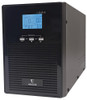
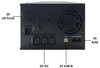
The ARM2000 provides five AC output sockets: two UK Type-G mains sockets and three IEC outputs. It also features USB Type-B monitoring, two RJ45 connections for network-line surge protection, an LCD status display, LED indicators and audible alarms.
VIDA quotes approximately 10–30 minutes of battery backup depending on connected load, providing time to continue through a short interruption or save important work and perform an orderly shutdown during a longer outage. Runtime is load dependent and will decrease as the connected wattage increases.
The exact model supplied here is VIDA Armour ARM2000, Memox SKU ARM2000, manufacturer part number ARM2000, EAN 5056733100529.
Key Features of the Armour ARM2000 2000VA UPS
- 2000VA output capacity
- 1600W maximum real-power output
- Line-interactive UPS technology
- Pure sine-wave battery output
- Automatic Voltage Regulation / AVR
- Approximately 6ms transfer from mains to battery
- 3 × 12V 9Ah sealed lead-acid batteries
- Maintenance-free VRLA battery technology
- Approximately 10–30 minutes quoted backup time depending on load
- Approximately 8 hours to recharge batteries to around 90%
- 5 AC output sockets in total
- 2 × UK Type-G / BS 1363 output sockets
- 3 × IEC output sockets
- UK Type-G mains input plug
- USB Type-B monitoring connection
- 2 × RJ45 connections
- RJ45 network-line surge protection
- LCD status display
- LED status indicators
- Audible alarm system
- Cold-start capability
- Surge protection
- Over-voltage protection
- Under-voltage protection
- EMI/RFI noise filtering
- Automatic restart when mains power returns
- 230–240V input and output operation
- 0°C to 40°C operating-temperature range
- 20–90% non-condensing operating humidity
- Black desktop/tower design
- 1-year VIDA manufacturer warranty
What Is the VIDA Armour ARM2000 UPS?
The Armour ARM2000 is a line-interactive UPS with built-in battery backup and voltage regulation.
During normal mains operation, the UPS supplies connected equipment while monitoring incoming voltage. Its automatic voltage regulator can compensate for certain low- or high-voltage conditions without unnecessarily switching to battery operation.
If mains power fails or moves outside the UPS's operating range, the unit transfers the connected load to its internal battery and inverter system.
Why Use a UPS?
An uninterruptible power supply is designed to give connected equipment temporary backup power rather than allowing it to switch off immediately when the mains supply fails.
This can provide valuable time to:
- Save documents and unfinished work
- Complete or stop important computer processes
- Perform a controlled Windows or Linux shutdown
- Keep networking equipment running during short interruptions
- Reduce the risk of abrupt shutdowns
- Maintain temporary access to supported network devices
- Protect compatible electronics from specified voltage problems
2000VA / 1600W – What Do These Ratings Mean?
The ARM2000 is rated at:
- 2000VA apparent-power capacity
- 1600W maximum real-power output
VA and watts are related but are not interchangeable measurements.
2000VA Is Not the Same as 2000W
The UPS should not be described as a 2000W UPS.
Its maximum manufacturer-rated real output is 1600W.
The combined connected equipment must remain within both the UPS's VA and wattage limits.
Leave Capacity Headroom
For a practical installation, it is generally sensible not to design a system around continuously operating at the absolute maximum UPS rating.
Available headroom can help accommodate:
- Temporary power spikes
- Changing PC workloads
- GPU load changes
- Additional peripherals
- Battery ageing
- Future hardware upgrades
Pure Sine-Wave Battery Output
One of the ARM2000's most important features is its pure sine-wave output.
When the UPS is operating from battery, its inverter produces an AC waveform designed to closely resemble normal mains electricity rather than the stepped or square-wave output found on some lower-cost UPS products.
Why Is Pure Sine Wave Useful for Computers?
Modern desktop PCs and workstations often use sophisticated switch-mode power supplies, including units with active power-factor-correction circuitry.
A pure sine-wave UPS is generally the preferable choice for these systems because it provides a smoother battery-mode waveform and wider compatibility than basic square-wave or heavily stepped-wave designs.
Suitable for Sensitive IT Equipment
Pure sine-wave output makes the ARM2000 particularly relevant for compatible:
- Desktop PCs
- Gaming PCs
- Workstations
- Small servers
- NAS systems
- Network switches
- Routers
- Professional IT equipment
- Other compatible electronic loads
Line-Interactive UPS Technology
The Armour ARM2000 uses a line-interactive UPS topology.
A line-interactive UPS normally powers equipment from the incoming AC supply while actively monitoring voltage. Its AVR circuitry can adjust certain voltage variations before the UPS needs to consume battery power.
When mains power fails, the UPS rapidly switches to its battery-powered inverter.
Approximately 6ms Transfer Time
VIDA currently specifies a mains-to-battery transfer time of approximately 6 milliseconds.
This short transfer is designed to allow compatible computer and IT power supplies to continue operating through the transition.
Automatic Voltage Regulation – AVR
The ARM2000 incorporates Automatic Voltage Regulation.
AVR is designed to stabilise certain fluctuations in incoming mains voltage without immediately switching the UPS to battery power.
Why AVR Matters
Mains electricity is not always perfectly stable. Depending on the electrical supply and connected loads, voltage can temporarily rise or fall.
AVR can help manage:
- Brownouts
- Voltage sags
- Moderate over-voltage conditions
- Other supported voltage fluctuations
This can reduce unnecessary battery operation during correctable voltage variations.
Three 12V 9Ah Sealed Lead-Acid Batteries
The ARM2000 uses three 12V 9Ah sealed lead-acid batteries.
VIDA identifies these as maintenance-free VRLA batteries.
Maintenance-Free VRLA Technology
VRLA stands for Valve-Regulated Lead-Acid.
The sealed battery design is intended for normal UPS operation without users having to top up electrolyte or perform the type of maintenance associated with traditional flooded lead-acid batteries.
UPS Batteries Are Consumable Components
Like all UPS batteries, sealed lead-acid batteries gradually lose capacity as they age.
Battery lifespan is influenced by:
- Ambient temperature
- Number of discharge cycles
- Depth of discharge
- Storage conditions
- Connected load
- Battery age
A reduction in available runtime after several years of use can therefore be normal and may indicate that the batteries require replacement.
10–30 Minutes Quoted Battery Backup
The ARM2000 technical specification quotes approximately 10–30 minutes of backup operation depending on load.
Runtime Depends on Connected Wattage
The quoted runtime is not a fixed 30-minute guarantee.
A lightly loaded UPS can run substantially longer than the same UPS powering equipment close to its maximum output.
Runtime is affected by:
- Total wattage connected to the UPS
- Battery condition
- Battery age
- Ambient temperature
- Power factor of the connected equipment
- Actual operating load at the time of the outage
UPS Runtime Is Primarily for Continuity and Safe Shutdown
The ARM2000 should be considered a short-duration battery-backup system rather than a substitute for a long-runtime generator or portable power station.
Its main role is to bridge shorter interruptions and provide enough time to save data or safely shut down equipment during a prolonged outage.
Approximately 8-Hour Recharge Time
VIDA specifies approximately 8 hours to recharge the internal batteries to around 90% capacity.
Recharge time can vary according to the battery's previous discharge level, age and operating conditions.
The UPS Can Remain Connected to Mains
During normal use, a UPS is designed to remain connected to the mains so its batteries can stay charged and it can immediately respond to a power interruption.
Five AC Output Sockets
The ARM2000 provides five AC output connections in total.
Two UK Type-G Sockets
The unit provides:
- 2 × UK BS 1363 / Type-G sockets
These accept standard UK three-pin plugs used by many computers, monitors and other compatible devices.
Three IEC Outputs
It also provides:
- 3 × IEC output sockets
These are useful for compatible computer and IT equipment using IEC power connections.
Five Outputs Do Not Increase the 1600W Rating
The five sockets share the UPS's available capacity.
Connecting equipment to every outlet does not increase the ARM2000's output beyond 2000VA / 1600W.
The total combined load must remain within the UPS rating.
UK Type-G Mains Connection
The ARM2000 is designed for UK mains environments and uses a Type-G / BS 1363 mains connection.
It is a 230–240V-class product intended for appropriate UK electrical installations and compatible equipment.
LCD Status Display
A front-mounted LCD display provides at-a-glance information about UPS operation.
This makes it possible to check important power and battery information directly from the unit without always opening monitoring software on a PC.
LED Status Indicators
Additional LED indicators provide visual information about the current state of the UPS.
Audible Alarm System
The ARM2000 includes an audible alarm to alert the user to important operating conditions.
Depending on the operating state, alarms can help draw attention to conditions such as:
- Battery operation
- Low-battery state
- Power problems
- UPS warnings
Refer to the supplied manual for the exact alarm pattern and meaning.
USB Monitoring
The rear of the UPS provides a USB Type-B monitoring port.
A USB cable is included, allowing the UPS to communicate with a compatible computer and supported UPS monitoring software.
What Can UPS Monitoring Be Used For?
Depending on the supported monitoring software and operating system, UPS communication can help users monitor power and battery conditions from a computer.
This is particularly useful for:
- Desktop PCs
- Workstations
- Small servers
- Other computers requiring power-status monitoring
Automatic Shutdown Depends on Software Compatibility
The presence of a USB monitoring port does not guarantee automatic shutdown support with every operating system, NAS or server platform.
If unattended shutdown is essential, check that the specific host operating system or device supports the ARM2000's USB monitoring method or compatible software before deployment.
Can the Armour ARM2000 Be Used with a NAS?
The ARM2000 has the electrical capacity and pure sine-wave output required by many NAS installations, and its USB monitoring connection can be useful where the NAS operating system supports the UPS communication method.
However, NAS compatibility should be checked against the exact NAS model and operating-system UPS support before relying on automatic shutdown.
Two RJ45 Connections for Network-Line Protection
The ARM2000 provides two RJ45 ports for protected network-line pass-through.
These are used as an input/output pair so a compatible Ethernet/network cable can pass through the UPS's surge-protection circuitry.
RJ45 Ports Are Not an Ethernet Switch
The two RJ45 sockets should not be confused with built-in network-switch ports.
They are provided primarily for network-line protection rather than to add extra LAN ports to a router or PC.
Surge Protection
The Armour ARM2000 incorporates surge protection to help protect connected compatible electronics against specified electrical disturbances.
VIDA also lists:
- Over-voltage protection
- Under-voltage protection
- RJ45 surge protection
- EMI/RFI noise filtering
A UPS Is Not a Substitute for Building-Level Lightning Protection
UPS surge protection provides another layer of equipment protection but should not be treated as a guarantee against every possible lightning strike, mains fault or extreme electrical event.
Correct building wiring, earthing and appropriate upstream electrical protection remain important.
Full-Time EMI/RFI Noise Filtering
VIDA specifies EMI/RFI noise filtering for the Armour UPS.
EMI and RFI refer to electromagnetic and radio-frequency interference that can be carried through electrical wiring.
Filtering is intended to help provide cleaner power to connected compatible electronics.
Cold-Start Capability
The ARM2000 supports cold start.
This allows the UPS inverter to start from its battery under supported conditions even when normal mains electricity is unavailable.
Cold Start Does Not Increase Battery Runtime
Running directly from battery still consumes the available stored energy.
Cold-start capability should therefore be used with an understanding of the connected load and remaining battery charge.
Automatic Restart After Mains Recovery
VIDA specifies automatic restart functionality when the normal mains supply returns.
This can be useful in unattended IT installations where equipment needs the UPS to resume normal mains-powered operation following an outage.
Over-Voltage and Under-Voltage Protection
The ARM2000 monitors the incoming electricity supply and provides protection against specified over-voltage and under-voltage conditions.
In conjunction with AVR and battery backup, this can help protect compatible equipment against more than complete blackouts alone.
Suitable for Gaming PCs
The combination of 1600W output capacity and pure sine-wave battery operation makes the ARM2000 a strong candidate for compatible gaming systems.
A typical protected setup could include:
- Gaming desktop PC
- One or more monitors
- Router
- Network switch
- Selected low-power peripherals
Check Actual Gaming PC Consumption
The wattage printed on a PC power supply is its maximum PSU capability, not necessarily how much power the computer continuously draws.
For example, a computer containing a 1000W PSU does not automatically consume 1000W.
For accurate UPS sizing, calculate or measure the actual maximum system consumption and maintain sufficient headroom below the UPS's 1600W rating.
Suitable for Workstations
The ARM2000 can be useful for professional workstations where an unexpected shutdown could interrupt:
- Video editing
- 3D rendering
- CAD work
- Software development
- Data processing
- Business applications
The battery backup provides time to save current work or perform an orderly shutdown.
Suitable for Small Servers
VIDA specifically identifies server and professional IT applications among the ARM2000's intended uses.
Before using it with server hardware, verify:
- Maximum server wattage
- Power-supply configuration
- Required runtime
- Shutdown-software compatibility
- Total load of connected network equipment
Suitable for Routers and Network Equipment
Networking hardware often consumes substantially less power than a desktop workstation, so backup runtime can be longer when the ARM2000 is used with lower-power compatible equipment.
Potential loads include:
- Routers
- Modems
- Network switches
- Access points
- Firewalls
- Small network appliances
Suitable for CCTV and Security Equipment
A UPS can also provide temporary power to compatible low-voltage security infrastructure whose AC power adapters or equipment fall within the ARM2000's electrical limits.
Potential examples include:
- CCTV recorders
- Network video recorders / NVRs
- PoE switches
- Routers
- Selected access-control equipment
Total wattage, start-up current and manufacturer requirements should always be checked before connection.
Can the ARM2000 Power Equipment for Hours?
The ARM2000 is primarily designed for short-term UPS backup.
VIDA's technical specification quotes approximately 10–30 minutes depending on load, not multiple hours at its rated capacity.
Users needing very long backup periods should consider a solution specifically designed for extended runtime.
What Determines UPS Runtime?
The largest factor is the connected load.
Lower Load
Connecting only a router, NAS or other relatively low-power equipment can provide more runtime than connecting a gaming PC, monitor and other high-power equipment simultaneously.
Higher Load
As connected wattage increases towards the ARM2000's maximum rating, available battery runtime falls substantially.
Do Not Exceed 1600W
The total real-power load connected to the UPS must remain below the manufacturer's 1600W maximum output rating.
Overloading a UPS can cause alarms, protective shutdown or failure to support equipment correctly when mains electricity is lost.
High-Inrush Loads Require Extra Care
Some electrical devices draw a brief start-up current considerably higher than their normal running power.
Examples can include equipment containing:
- Large motors
- Compressors
- Heating elements
- Laser-printer fusers
- Other high-inrush components
Do not assume that a device is suitable merely because its normal running wattage is below 1600W. Check its start-up characteristics and UPS requirements.
Not Intended as a Whole-House Backup System
The ARM2000 is a desktop/tower UPS intended to protect selected compatible equipment.
It is not designed to replace a building-level battery-storage system, standby generator or whole-house UPS installation.
Operating Environment
VIDA specifies an operating-temperature range of:
- 0°C to 40°C
Operating relative humidity is specified as:
- 20% to 90%, non-condensing
Keep the UPS Cool and Ventilated
Battery life can be adversely affected by excessive temperature.
Install the UPS in a dry, ventilated location with sufficient clearance around its ventilation openings.
Avoid:
- Direct sunlight
- Radiators and heaters
- Blocked ventilation
- High humidity or condensation
- Water exposure
Noise Level
VIDA's current ARM2000 product specification lists operating noise at approximately 45dB.
Actual perceived noise can vary according to operating mode, load, room acoustics and cooling activity.
Compact Desktop / Tower Format
The ARM2000 uses a freestanding desktop/tower design rather than a rackmount chassis.
VIDA currently lists dimensions of approximately:
- 144mm wide
- 410mm deep
- 215mm high
Allow additional space around the UPS for ventilation and cable connections.
Where Should the UPS Be Installed?
For normal computer use, place the UPS on a secure, level and ventilated surface close enough to the protected equipment for cables to reach without tension.
Because the unit contains substantial lead-acid batteries, it should be positioned where it cannot easily be knocked over or obstructed.
What Should Be Connected to Battery Backup?
Priority should generally be given to equipment that must remain operating long enough for safe shutdown or short-term continuity.
Typical priority equipment may include:
- Computer or workstation
- Main monitor
- NAS
- Router
- Network switch
- Server
- NVR
Avoid Wasting Battery Capacity
Non-essential equipment can shorten backup runtime unnecessarily.
Where appropriate, avoid using precious UPS battery capacity for devices that do not need to remain operational during a power cut.
What Is Included?
- 1 × VIDA Armour ARM2000 2000VA / 1600W UPS
- Internal 3 × 12V 9Ah VRLA batteries
- UK mains power cable
- IEC cable
- USB monitoring cable
- User guide / manual
Armour ARM2000 Technical Summary
- Brand: VIDA
- Product Range: Armour
- Model: ARM2000
- MPN: ARM2000
- Memox SKU: ARM2000
- EAN / GTIN: 5056733100529
- UPS Topology: Line-Interactive
- Capacity: 2000VA / 2kVA
- Maximum Real Power: 1600W / 1.6kW
- Waveform: Pure Sine Wave
- Automatic Voltage Regulation: Yes
- Input Voltage: 230–240VAC
- Output Voltage: 230–240VAC
- Mains-to-Battery Transfer Time: Approximately 6ms according to VIDA's current specification
- Battery Type: Sealed Lead-Acid / VRLA
- Battery Configuration: 3 × 12V 9Ah
- Batteries Included: Yes
- Quoted Runtime: Approximately 10–30 minutes depending on load
- Recharge Time: Approximately 8 hours to around 90% capacity
- Total AC Output Sockets: 5
- UK Outputs: 2 × Type-G / BS 1363
- IEC Outputs: 3
- RJ45 Ports: 2
- USB Monitoring: Yes
- USB Port: USB Type-B
- LCD Display: Yes
- LED Indicators: Yes
- Audible Alarm: Yes
- Cold Start: Yes
- Surge Protection: Yes
- Over-Voltage Protection: Yes
- Under-Voltage Protection: Yes
- RJ45 Surge Protection: Yes
- EMI/RFI Filtering: Yes
- Automatic Restart: Yes
- Operating Temperature: 0°C to 40°C
- Operating Humidity: 20–90% non-condensing
- Noise: Approximately 45dB according to current VIDA data
- Dimensions: 144 × 410 × 215mm
- Form Factor: Desktop / Tower
- Colour: Black
- Warranty: 1 year
Important Pure Sine-Wave Information
The ARM2000 is officially specified by VIDA as a pure sine-wave UPS.
This should not be confused with smaller Armour models whose battery inverter may use a different waveform.
Important 2000VA vs 1600W Information
The UPS is rated for 2000VA apparent power but 1600W maximum real output.
Do not list or describe the ARM2000 as a 2000W UPS.
Important Runtime Information
The manufacturer-quoted 10–30 minute backup time is load dependent.
Do not advertise 30 minutes as guaranteed runtime. A high-power gaming PC or workstation can have significantly less runtime than a router, NAS or other lower-power load.
Important Socket Information
The ARM2000 has five AC output sockets in total, consisting of:
- 2 × UK Type-G / BS 1363 sockets
- 3 × IEC sockets
The five outputs all share the UPS's overall 2000VA / 1600W capacity.
Important USB Monitoring Information
A USB Type-B monitoring port and USB cable are provided.
Automatic shutdown and advanced monitoring functions depend on compatible software, operating system or host-device UPS support. Do not promise automatic NAS shutdown for every NAS brand or model without checking compatibility first.
Important Battery Information
The ARM2000 contains three maintenance-free 12V 9Ah VRLA batteries.
UPS batteries are consumable components whose available capacity reduces over time. Battery service life depends heavily on temperature, number and depth of discharge cycles, storage conditions and usage.
Important Recharge Information
VIDA quotes approximately 8 hours to reach around 90% battery capacity.
A UPS that has recently experienced a long outage may therefore provide reduced runtime until the batteries have recharged sufficiently.
Important Load Information
Before connecting equipment, calculate the combined maximum power requirement.
The sum of all connected equipment must remain within both the ARM2000's 2000VA and 1600W ratings.
Important High-Inrush Equipment Information
Equipment with motors, compressors, heating elements or other large start-up loads may draw significantly more current when starting than during normal operation.
Check the equipment manufacturer's UPS requirements rather than sizing the UPS only from normal running wattage.
Important Installation Information
Install the UPS indoors in a dry and well-ventilated environment within its specified temperature and humidity range.
Do not obstruct ventilation openings, expose the unit to liquids or place it next to significant heat sources.
Important Battery Safety Information
The ARM2000 contains high-energy sealed lead-acid batteries and should not be opened or serviced by unqualified users.
Follow VIDA's manual and applicable local battery-disposal requirements when batteries eventually require replacement.
1-Year VIDA Warranty
VIDA currently specifies a 1-year warranty for the Armour ARM2000, subject to the manufacturer's applicable terms and conditions.
Why Choose the Armour ARM2000 2000VA / 1600W UPS?
The VIDA Armour ARM2000 provides a strong combination of high output capacity, pure sine-wave battery power and line-interactive voltage protection for demanding home, office and professional IT environments.
Its 2000VA / 1600W capacity provides significantly more headroom than entry-level UPS systems, making it suitable for more powerful desktop PCs, gaming systems, workstations, networking equipment and selected server or NAS installations.
The pure sine-wave inverter is a particularly valuable feature for modern computer hardware, while built-in AVR helps stabilise supported mains-voltage fluctuations without consuming the battery unnecessarily.
Three 12V 9Ah maintenance-free batteries provide approximately 10–30 minutes of manufacturer-quoted backup depending on load, giving users valuable time to continue through short power cuts or perform a controlled shutdown during longer outages.
Five AC outputs—including two standard UK sockets and three IEC connections—allow several compatible devices to be protected from one UPS, while USB monitoring and an LCD display provide convenient power-status information.
RJ45 surge protection, EMI/RFI filtering, over- and under-voltage protection, cold-start capability, audible alarms and automatic restart add further protection and management features.
Choose the Armour ARM2000 when you need a 2000VA pure sine-wave UPS with up to 1600W output, AVR, LCD monitoring, five AC outputs, USB communication, RJ45 protection and substantial battery backup for compatible PCs, workstations, NAS, servers and networking equipment.
Specification
VIDA Armour ARM2000 2000VA 1600W Pure Sine Wave UPS Specifications
The VIDA Armour ARM2000 is a 2000VA / 1600W line-interactive uninterruptible power supply designed to provide battery backup, automatic voltage regulation and pure sine-wave output for compatible computers, workstations, servers, NAS systems and networking equipment.
The ARM2000 includes three 12V 9Ah maintenance-free VRLA batteries, LCD monitoring, USB Type-B communication, two RJ45 surge-protection ports and five AC outputs comprising two UK Type-G sockets and three IEC sockets.
General Information
| Brand | VIDA |
|---|---|
| Product Range | Armour |
| Model | ARM2000 |
| Manufacturer Part Number | ARM2000 |
| Memox SKU | ARM2000 |
| EAN / GTIN | 5056733100529 |
| Product Type | Uninterruptible Power Supply / UPS |
| UPS Form Factor | Desktop / Tower |
| Colour | Black |
| Primary Application | IT equipment, computers, servers, workstations, NAS and compatible networking equipment |
UPS Technology
| UPS Topology | Line-Interactive |
|---|---|
| Automatic Voltage Regulation | Yes |
| AVR Type | Buck / Boost AVR |
| Battery Backup | Yes |
| Cold Start | Yes |
| Automatic Restart After Mains Recovery | Yes |
Power Capacity
| Apparent Power Capacity | 2000VA / 2kVA |
|---|---|
| Maximum Real Power Output | 1600W / 1.6kW |
| Power Factor Based on VA/W Rating | 0.8 |
| 2000VA Equals 2000W | No |
| Maximum Manufacturer-Rated Wattage | 1600W |
Output Waveform
| Output Waveform | Pure Sine Wave |
|---|---|
| Battery Mode Waveform | Pure Sine Wave |
| Simulated / Stepped Sine Wave | No – ARM2000 is officially specified as Pure Sine Wave |
| Suitable for Modern PC Power Supplies | Designed for compatible sensitive IT and computer equipment, including systems using modern switch-mode power supplies |
Input Power Specifications
| Manufacturer-Listed Input Operating Voltage | 230V – 240V AC |
|---|---|
| Input Connection | UK Type-G / BS 1363 |
| UK Mains Plug | Yes |
| Input Relay Protection | Relay-based mains switching / protection is listed in VIDA technical documentation |
Output Power Specifications
| Manufacturer-Listed Output Voltage | 230V – 240V AC |
|---|---|
| Maximum Output Power | 1600W |
| Maximum Apparent Power | 2000VA |
| Output Socket Types | UK Type-G and IEC |
Transfer Time
| Current VIDA Line-to-Battery Transfer Time | Approximately 6ms |
|---|---|
| UPS Type | Line-Interactive |
| Zero Transfer Time | No – this is not an online double-conversion UPS |
Automatic Voltage Regulation
| AVR | Yes |
|---|---|
| Voltage Boost | Supported through AVR |
| Voltage Buck | Supported through AVR |
| Purpose | Helps stabilise supported mains voltage fluctuations without unnecessarily using battery power |
Battery Specifications
| Battery Technology | Sealed Lead-Acid / VRLA |
|---|---|
| Maintenance-Free | Yes |
| Battery Voltage | 12V per battery |
| Battery Capacity | 9Ah per battery |
| Number of Batteries | 3 |
| Battery Configuration | 3 × 12V 9Ah VRLA batteries |
| Batteries Included | Yes |
Battery Runtime
| Manufacturer-Quoted Backup Time | Approximately 10–30 minutes depending on connected load |
|---|---|
| 30-Minute Runtime Guaranteed | No |
| Runtime at Maximum Load | Not separately published as a guaranteed figure |
| Runtime Depends On | Connected wattage, battery condition, battery age, temperature and operating conditions |
Battery Recharge
| Recharge Time | Approximately 8 hours |
|---|---|
| Charge Level After Quoted Recharge Time | Approximately 90% |
| Recharge Time Guaranteed in Every Condition | No – actual charging time can vary with battery condition and previous discharge level |
AC Output Connections
| Total AC Output Sockets | 5 |
|---|---|
| UK Type-G / BS 1363 Outputs | 2 |
| IEC Outputs | 3 |
| Five UK Type-G Sockets | No – the official ARM2000 technical sheet specifies 2 UK sockets plus 3 IEC sockets |
| Total Combined Output Limit | 2000VA / 1600W across the UPS |
UK Socket Specifications
| UK Output Sockets | 2 |
|---|---|
| Socket Standard | Type-G / BS 1363 |
| Standard UK 3-Pin Plug Compatibility | Yes |
IEC Output Specifications
| IEC Output Sockets | 3 |
|---|---|
| Intended Use | Compatible computers, monitors and other IEC-powered IT equipment |
| IEC Cable | Listed in CPC/Farnell package contents |
USB Monitoring
| USB Monitoring | Yes |
|---|---|
| USB Port Type | USB Type-B |
| USB Cable Included | Yes |
| Computer Monitoring Support | Yes, with compatible UPS monitoring software / operating system |
| Automatic Shutdown | Software and host-device compatibility dependent |
| Universal NAS Shutdown Compatibility | No – check the exact NAS model and operating system before relying on USB shutdown signalling |
RJ45 Network-Line Protection
| RJ45 Ports | 2 |
|---|---|
| Configuration | RJ45 In / Out pass-through |
| Purpose | Network / LAN line surge protection |
| Built-In Ethernet Switch | No |
| Adds Extra Network Ports | No |
Display and Status Monitoring
| Display Type | LCD |
|---|---|
| LCD Status Monitoring | Yes |
| LED Status Indicators | Yes |
| Audible Alarm | Yes |
| PC Connection Required to View Basic UPS Status | No – basic status information is available from the UPS display |
Power Protection Features
| Surge Protection | Yes |
|---|---|
| Over-Voltage Protection | Yes |
| Under-Voltage Protection | Yes |
| Overload Protection | Yes |
| RJ45 Surge Protection | Yes |
| EMI Filtering | Yes |
| RFI Filtering | Yes |
| Automatic Voltage Regulation | Yes |
Additional UPS Functions
| Cold Start | Yes |
|---|---|
| Automatic Restart When Mains Returns | Yes |
| Settable ECO Mode | Listed in current CPC/Farnell ARM2000 product information |
| No-Load Shutdown | Listed in current CPC/Farnell ARM2000 product information |
| Audible Warning System | Yes |
Compatible Equipment Types
| Desktop PCs | Suitable within UPS power limits |
|---|---|
| Gaming PCs | Suitable within UPS power limits |
| Workstations | Suitable within UPS power limits |
| Small Servers | Suitable within UPS power and runtime requirements |
| NAS Systems | Suitable electrically within limits; USB shutdown compatibility depends on NAS software support |
| Routers | Suitable within power limits |
| Network Switches | Suitable within power limits |
| CCTV / NVR Equipment | Suitable where electrical and start-up requirements are within UPS limits |
| High-Inrush Motor / Compressor Loads | Must be checked carefully against start-up current and manufacturer requirements |
Operating Environment
| Operating Temperature | 0°C to 40°C |
|---|---|
| Operating Relative Humidity | 20% to 90% |
| Humidity Condition | Non-condensing |
| Indoor Use | Yes |
| Ventilation Required | Yes |
Acoustic Noise
| Current VIDA Published Noise Level | Approximately 45dB |
|---|---|
| Older Technical Sheet | Lists up to 50dB at 1 metre |
| Recommended Current Listing Value | 45dB, based on VIDA's current product page |
Physical Specifications
| Form Factor | Desktop / Tower |
|---|---|
| Dimensions | 144 × 410 × 215mm |
| Manufacturer Dimension Order | Current VIDA page publishes 144 × 410 × 215mm; older technical sheet presents the same dimensions as 144 × 215 × 410mm (W × H × D) |
| Current VIDA Published Weight | 19.8kg |
| Colour | Black |
Package Contents
| VIDA Armour ARM2000 UPS | 1 |
|---|---|
| Internal Batteries | 3 × 12V 9Ah VRLA batteries pre-installed / included |
| USB Monitoring Cable | Included |
| User Guide / Manual | Included |
| UK Mains Lead | Listed in CPC/Farnell package contents |
| IEC Cable | Listed in CPC/Farnell package contents |
Regional and Compliance Information
| Mains Plug | UK Type-G |
|---|---|
| Primary Market | United Kingdom |
| CPC Regional Warning | Listed as for UK use and not for sale in the EU |
| Country of Origin | China according to CPC/Farnell product information |
| RoHS | Listed as compliant by CPC/Farnell |
Warranty
| VIDA Manufacturer Warranty | 1 year |
|---|---|
| Warranty Provider | VIDA, subject to applicable warranty terms |
| Proof of Purchase | May be required for warranty service |
| UK Statutory Rights | Manufacturer warranty is additional to applicable UK consumer statutory rights |
Important 2000VA vs 1600W Note
The ARM2000 is rated at 2000VA apparent power and 1600W maximum real output power.
It should therefore not be described as a 2000W UPS. The combined equipment connected to the UPS must remain within both its VA and wattage limits.
Important Pure Sine Wave Note
The exact ARM2000 model is officially specified by VIDA as a Pure Sine Wave UPS.
This is an important distinction from lower-capacity UPS models that may use square-wave or simulated-wave battery output.
Important Socket Configuration Note
The ARM2000 provides five AC output sockets in total: 2 × UK Type-G sockets and 3 × IEC sockets.
VIDA's current webpage contains ambiguous wording suggesting “five UK mains sockets plus IEC outlets”, but the official ARM2000 technical specification clearly identifies the physical configuration as two UK sockets plus three IEC sockets. This is the configuration that should be used on the Memox specification tab.
Important Runtime Note
VIDA's official technical documentation quotes approximately 10–30 minutes of battery backup depending on load.
This should not be interpreted as a guaranteed 30-minute runtime. A high-power gaming PC or workstation can have significantly less runtime than lower-power networking or NAS equipment.
Important Transfer-Time Revision Note
VIDA's current 2026 product page specifies a line-to-battery transfer time of approximately 6ms.
An older official ARM2000 technical sheet lists ≤10ms, while CPC historically listed approximately 8ms. For the current Memox specification, 6ms is the preferred figure because it is VIDA's current published specification.
Important Noise-Level Revision Note
VIDA's current product page specifies approximately 45dB.
The older ARM2000 technical sheet states up to 50dB at one metre. For the current product listing, use the newer 45dB manufacturer figure.
Important Weight Revision Note
VIDA's current product page lists the ARM2000 at 19.8kg.
An older technical sheet lists 11.7kg and some older distributor data contains another historical weight figure. Because VIDA's current manufacturer page is the newest source, 19.8kg is the recommended current specification.
Important Battery Runtime and Ageing Note
The UPS contains three sealed 12V 9Ah VRLA batteries. Battery capacity naturally decreases with age and use.
Runtime is affected by battery age, ambient temperature, discharge history and the connected load, so an older UPS may provide less backup time than when the batteries were new.
Important Recharge-Time Note
The official technical specification states approximately 8 hours to recharge to around 90% battery capacity.
After a lengthy power outage, available backup runtime may remain reduced until the batteries have had sufficient time to recharge.
Important USB Monitoring Note
The ARM2000 provides a USB Type-B monitoring connection.
Monitoring and automatic shutdown functionality depend on the connected computer, operating system, NAS or server supporting the relevant UPS communication method or compatible monitoring software.
USB connectivity alone should not be interpreted as guaranteeing automatic shutdown compatibility with every NAS model.
Important RJ45 Note
The two RJ45 connections are designed as network-line surge-protection pass-through ports.
They are not an Ethernet switch and do not provide two additional network connections for devices.
Important High-Inrush Equipment Note
Equipment containing motors, compressors, heating elements or other high-inrush loads can require substantially more power during start-up than during normal operation.
Do not size the UPS using running wattage alone for such equipment. Check the equipment manufacturer's UPS requirements and start-up current before connection.
Important Installation Note
Install the UPS indoors in a dry, well-ventilated location between 0°C and 40°C and within the specified 20–90% non-condensing humidity range.
Do not obstruct ventilation openings or install the UPS beside radiators, heaters, direct sunlight or other significant heat sources, as elevated temperature can reduce battery service life.
Important Battery Safety Note
The ARM2000 contains high-energy sealed lead-acid batteries.
Do not dismantle, short-circuit, burn or improperly dispose of the batteries. Battery servicing and replacement should be carried out in accordance with VIDA's instructions and appropriate electrical safety procedures.
Important UPS Purpose Note
The Armour ARM2000 is designed primarily to provide short-term backup power, voltage regulation and enough time for continuity or an orderly shutdown during a mains failure.
It should not be treated as a replacement for a long-runtime generator, portable power station or whole-building battery system.
Return
FAQ: Frequenlty Asked Questions
VIDA Armour ARM2000 2000VA / 1600W Pure Sine Wave UPS FAQ
The VIDA Armour ARM2000 is a 2000VA / 1600W line-interactive UPS designed for compatible gaming PCs, workstations, small servers, NAS systems, routers, switches, CCTV/NVR equipment and other sensitive IT loads. It combines pure sine-wave battery output, boost/buck AVR, three 12V 9Ah sealed lead-acid batteries, an LCD display, USB Type-B monitoring, two UK Type-G outlets, three IEC outputs and RJ45 data-line surge protection.
Below are the most common questions buyers ask before choosing the ARM2000, including 2000VA vs 1600W sizing, Active PFC gaming-PC compatibility, 8ms transfer time, runtime and battery replacement, NAS shutdown support, Synology/UGREEN/QNAP USB compatibility, UPSmart software, RJ45 vs SNMP management, pure sine vs simulated sine wave, laser-printer warnings, AVR/ECO/cold-start operation and comparisons with the Armour 1500VA and 3000VA models.
1. What is the VIDA Armour ARM2000 UPS?
The VIDA Armour ARM2000 is a 2000VA / 1600W line-interactive uninterruptible power supply designed for PCs, workstations, small servers, NAS systems, networking equipment and other compatible electronics. It combines pure sine-wave battery output, boost/buck AVR, LCD monitoring, USB communication and five AC outputs.
2. What is the exact model number?
The exact manufacturer model is VIDA ARM2000.
3. What is the Memox SKU?
The Memox SKU is ARM2000.
4. What is the EAN / UPC?
The EAN/UPC is 5056733100529.
5. What is the maximum VA rating?
The UPS is rated at 2000VA apparent power.
6. What is the maximum real-power output?
The manufacturer-rated maximum real output is 1600W.
7. Is 2000VA the same as 2000W?
No. VA and watts measure different aspects of AC power. This model is 2000VA but its maximum real-power output is 1600W.
8. Can I connect equipment totalling exactly 1600W?
1600W is the absolute published maximum, not an ideal continuous design target. It is better to keep practical headroom for temporary power peaks, changing workloads, battery ageing and future equipment.
9. How much headroom should I leave?
As a general UPS-sizing practice, allowing roughly 20–30% capacity headroom is sensible where possible. For a 1600W UPS, this means avoiding a design that continuously sits close to the full 1600W limit.
10. Does a PC with a 1000W power supply consume 1000W all the time?
No. A PSU's wattage is its maximum rated capacity, not the PC's constant consumption. UPS sizing should be based on the system's actual or worst-case power draw rather than only the PSU label.
11. Can I use the ARM2000 with an 850W gaming PSU?
Yes, provided the total real system load plus monitors and other connected equipment remains comfortably within the UPS's 1600W rating.
12. Can I use it with a 1000W gaming PSU?
Yes. A 1000W PSU does not automatically draw 1000W. Measure or estimate the PC's actual worst-case consumption and leave UPS headroom.
13. Can I use it with a 1200W PSU?
Potentially, but a high-end PC using a 1200W PSU can have substantial transient and sustained loads. Check the actual system draw and avoid operating the UPS close to 1600W.
14. Can I use it with a 1600W PSU?
The PSU can physically be used, but the UPS itself is limited to 1600W. A PC capable of approaching a 1600W draw would leave no practical UPS headroom and should be paired with a higher-capacity solution.
15. Is the ARM2000 pure sine wave?
Yes. The ARM2000 is specified with pure sine-wave inverter output.
16. Why is pure sine-wave output important?
Pure sine-wave output more closely resembles normal mains AC than heavily stepped or square-wave inverter output, making it a better choice for sensitive electronics and many modern computer power supplies.
17. Is pure sine wave useful for Active PFC power supplies?
Yes. Major UPS manufacturers specifically recommend sine-wave output for equipment using Active PFC power supplies because it provides broader compatibility during battery operation.
18. Will the ARM2000 work with modern 80 PLUS Gold PC power supplies?
In general, yes when the load is within the UPS rating. Pure sine-wave output makes the ARM2000 a more appropriate match for modern Active PFC desktop PSUs than a basic square-wave UPS.
19. Will it work with ATX 3.0 and ATX 3.1 PSUs?
Yes from a waveform standpoint, provided the connected load and transient demand stay within the UPS capacity. High-end ATX 3.x systems still need generous wattage headroom.
20. Is it suitable for gaming PCs?
Yes. The pure sine-wave output, 1600W capacity and AVR make it suitable for many gaming PCs when correctly sized.
21. Can it support a gaming PC and monitor together?
Yes if their combined actual wattage remains within the UPS limits. Remember that adding a monitor reduces the runtime available to the PC.
22. Can it support two monitors?
Yes if the total UPS load remains within 1600W and the required runtime is acceptable.
23. Can it support a gaming PC, two monitors and router?
Often yes, but calculate the combined load. The more devices you connect, the shorter the battery runtime.
24. Is the ARM2000 suitable for RTX 4090 or RTX 5090-class systems?
Potentially. The UPS has substantial capacity, but these systems can produce high transient and sustained loads. Measure the complete PC draw and leave headroom rather than sizing from average gaming consumption alone.
25. Can a graphics-card power spike overload a UPS?
Yes. Very high transient loads can trigger UPS overload protection even when average consumption appears acceptable, which is why capacity headroom matters.
26. Does the UPS improve PC performance or FPS?
No. A UPS protects power continuity and quality; it does not increase CPU or GPU performance.
27. What UPS topology does the ARM2000 use?
It uses line-interactive topology.
28. What does line-interactive mean?
A line-interactive UPS normally powers equipment from the mains while monitoring voltage. Its AVR can correct supported voltage variations without immediately switching to battery, and the inverter takes over when mains power fails or moves outside its acceptable range.
29. Is this an online double-conversion UPS?
No. It is line-interactive, not an online double-conversion model.
30. What is the difference between line-interactive and online UPS?
A line-interactive UPS normally uses mains power with AVR and transfers to its inverter when necessary. An online double-conversion UPS continuously powers the load through its conversion stages and typically provides zero transfer time, but usually costs more and can consume more power.
31. Is line-interactive suitable for home and small-office IT?
Yes. Line-interactive UPS systems are widely used for PCs, NAS systems, network equipment and small servers in homes and offices.
32. What is the transfer time from mains to battery?
Multiple exact ARM2000 technical listings specify approximately 8ms transfer time.
33. Should the ARM2000 be described as 6ms transfer time?
No. The exact ARM2000 / EAN 5056733100529 technical specification is consistently listed at 8ms. The 6ms figure belongs to other Armour models such as some lower-capacity units.
34. Is an 8ms transfer fast enough for a PC?
Most properly functioning computer PSUs are designed to ride through very short mains interruptions. The ARM2000's 8ms transfer is intended for compatible IT equipment, although no UPS can guarantee compatibility with every power supply.
35. Does it have Automatic Voltage Regulation?
Yes. The ARM2000 includes boost and buck AVR.
36. What does boost AVR do?
Boost AVR raises supported low incoming voltage conditions without immediately using the battery.
37. What does buck AVR do?
Buck AVR reduces supported high incoming voltage conditions without immediately switching to battery.
38. Why is AVR useful?
AVR can correct certain voltage sags and over-voltage conditions while preserving battery charge for actual outages.
39. Does AVR mean the UPS is always on battery?
No. AVR is specifically useful because it can regulate supported mains fluctuations without continuously discharging the battery.
40. Does the UPS protect against brownouts?
Yes. Its boost AVR and under-voltage protection are designed to manage supported low-voltage conditions.
41. Does it protect against over-voltage?
Yes. Over-voltage protection and buck AVR are part of the published feature set.
42. Does it have surge protection?
Yes.
43. Does it have short-circuit protection?
Yes. Short-circuit and overload protection are listed.
44. Does it have overload protection?
Yes.
45. Does it have EMI/RFI filtering?
Yes. ARM2000 listings specify full-time EMI/RFI noise filtering.
46. Does it have DSP digital control?
Yes. DSP digital control is one of the model's published features.
47. What is auto-sensing frequency?
The UPS can detect the incoming mains frequency and operate appropriately within its supported design rather than requiring the user to manually choose normal UK mains frequency.
48. Does the ARM2000 have ECO mode?
Yes. Settable ECO mode is listed.
49. What does ECO mode do?
ECO modes are designed to prioritise efficient mains operation under acceptable power conditions. Exact behaviour should be configured using the UPS controls/software and tested with the intended load.
50. What is no-load shutdown?
The UPS can be configured to stop battery operation when it detects that little or no meaningful load is connected, helping avoid unnecessary battery discharge.
51. Can no-load shutdown cause problems with very small loads?
Potentially. If the connected load is extremely low, the UPS may interpret it as no load. Disable or adjust the feature if you need a very low-power device to remain powered during an outage.
52. Does the ARM2000 support cold start?
Yes.
53. What does cold start mean?
Cold start allows the UPS to start supported connected equipment from battery when mains power is unavailable, provided the batteries have sufficient charge.
54. Can I use cold start like a portable power station?
Cold start is intended for temporary UPS operation, not to turn the unit into a long-runtime portable power station. Battery runtime is limited and depends heavily on load.
55. Does it automatically restart when mains power returns?
Yes. Automatic restart when utility power is restored is listed as a feature.
56. Does the UPS charge its batteries while switched off?
The product literature lists automatic charging in OFF mode while connected to suitable mains power.
57. Does it have a power-on self-test?
Yes.
58. Does the ARM2000 have an LCD display?
Yes.
59. What can the LCD display show?
The LCD is intended to provide at-a-glance UPS status such as operating state, battery/load information and power conditions. Exact displayed fields depend on firmware.
60. Does it have audible alarms?
Yes.
61. Can the UPS beep during a power cut?
Yes. Audible alarms notify the user of battery operation and other UPS conditions.
62. How noisy is the ARM2000?
The published specification lists up to approximately 50dB at one metre.
63. Will it be completely silent at a desk?
No guarantee should be made. Relays, electronics, alarms and cooling behaviour can create audible noise, especially during battery operation or charging.
64. How many internal batteries does it use?
The exact ARM2000 specification lists three internal 12V 9Ah batteries.
65. What battery technology is used?
It uses sealed lead-acid / VRLA batteries.
66. What does VRLA mean?
VRLA means Valve-Regulated Lead-Acid. These sealed batteries are commonly used in UPS systems and do not require normal electrolyte top-ups.
67. Are the batteries maintenance-free?
They are described as maintenance-free sealed lead-acid batteries, although their health and runtime still need periodic checking.
68. How long does the ARM2000 run during a power cut?
VIDA technical listings quote approximately 10–30 minutes, but runtime is highly load dependent and is not a fixed guarantee.
69. Does 10–30 minutes mean I will always get at least 10 minutes?
No. Runtime near a high load can be shorter as batteries age or conditions vary. Size the UPS around the actual load and required shutdown time rather than treating 10 minutes as guaranteed.
70. Why does runtime fall as wattage increases?
The batteries must supply more current at higher loads, so their stored energy is consumed much faster.
71. Will a lightly loaded NAS run longer than a gaming PC?
Usually yes. A NAS and router may consume far less power than a high-end gaming PC.
72. Can you give an exact runtime without knowing the wattage?
No. Exact runtime requires the actual connected load plus battery condition and operating conditions.
73. Should I use the PSU wattage label to calculate runtime?
No. Use actual system power draw where possible.
74. How can I measure connected wattage?
A plug-in energy meter can measure typical AC draw. For gaming/workstations, also consider peak sustained load and transient demand.
75. How long does it take to recharge?
The specification states approximately 8 hours to reach around 90% charge after discharge.
76. Does recharge time vary?
Yes. Battery age, discharge depth, temperature and charging conditions affect recharge time.
77. Should I charge the UPS before first use?
Yes. Allow the batteries to reach a healthy charge before relying on backup operation.
78. Can I use the UPS while charging?
Yes. UPS systems are designed to protect the load while maintaining their batteries.
79. Should I leave it plugged into mains?
Normally yes, so the batteries remain charged and the unit can respond immediately to an outage.
80. Do the batteries wear out even with few power cuts?
Yes. Lead-acid batteries age with time as well as cycling, and heat accelerates degradation.
81. How long do UPS batteries normally last?
Typical VRLA UPS batteries often need replacement after several years, but actual life depends heavily on heat, discharge cycles and storage.
82. Can an ageing battery fail suddenly under load?
Yes. A battery can show normal voltage at rest but collapse when asked to provide high current.
83. How often should I test the UPS?
A practical routine is to test battery transfer periodically and review battery condition about every 6–12 months.
84. Should I fully discharge the batteries for testing?
No. Repeated deep discharges shorten lead-acid battery life.
85. Can the batteries be replaced?
They are serviceable components, but the ARM2000 is not publicly documented as a user hot-swap model. Battery replacement should be done safely by a qualified person.
86. Should all three batteries be replaced together?
Yes. Replacing the full battery set with matched batteries is generally preferable.
87. Can I mix old and new batteries?
It is not recommended because differing age and condition can create imbalance and reduce reliability.
88. Can I fit higher-Ah batteries?
Do not change battery specification without manufacturer approval because charger design and physical fit are matched to the UPS.
89. Can I install lithium batteries instead?
Not unless VIDA explicitly approves a compatible replacement system. The ARM2000 is designed for sealed lead-acid batteries.
90. Are the batteries hot-swappable?
No hot-swap capability is documented.
91. What are signs the batteries are weak?
Reduced runtime, early low-battery alarms, failed tests or immediate shutdown after a mains failure can indicate battery deterioration.
92. Does high temperature shorten battery life?
Yes. Heat is one of the main causes of accelerated VRLA battery ageing.
93. What operating temperature is specified?
Approximately 0°C to 40°C.
94. What operating humidity is specified?
Approximately 20% to 90% relative humidity, non-condensing.
95. Should I install it in a closed cupboard?
Avoid unventilated enclosed spaces because heat can shorten battery and electronics life.
96. Can I place it near a radiator?
No. Keep it away from direct heat and leave clear airflow.
97. Can I use it outdoors?
No. It is intended for indoor use.
98. What are the dimensions?
Approximately 144mm wide x 215mm high x 410mm deep.
99. How much does the UPS weigh?
Approximately 11.7kg.
100. Why do some listings show about 19.8kg?
That is packaged shipping weight rather than the bare UPS weight.
101. How many AC outputs are there?
Five in total.
102. How many UK sockets are there?
Two UK Type-G / BS 1363 outputs.
103. How many IEC outputs are there?
Three IEC outputs.
104. Are there three UK sockets on ARM2000?
No. Exact ARM2000 specifications list two UK sockets plus three IEC outputs.
105. Are all five outputs UPS outputs?
The published documentation treats the five sockets as UPS outputs and does not list a separate surge-only bank.
106. What can I plug into the UK sockets?
Compatible devices with standard UK plugs, provided the combined load stays within the UPS limits.
107. What devices commonly use the IEC outputs?
PCs, monitors, servers and network equipment often use IEC power cables.
108. What IEC cable is included?
Exact listings include an IEC C14-to-C13 cable.
109. Does the UPS use a UK mains input?
Yes. It is a UK-market 230/240V model.
110. Can I use it permanently in another country with a travel adapter?
Do not rely on a travel adapter for permanent UPS installation. Use a model approved for the destination electrical system.
111. Does it have USB monitoring?
Yes. It has a USB Type-B monitoring connection.
112. Is the USB Type-B port like a printer-style USB port?
Yes. It is the square-style device connector commonly used on printers and UPS units.
113. Is a USB cable included?
Yes.
114. What is Armour UPSmart software?
UPSmart is the monitoring software distributed for VIDA Armour UPS models. ARM2000 product listings link to VIDA's downloadable UPSmart installer.
115. What can UPS monitoring software do?
It can typically display power/battery status, log events and support controlled computer shutdown when configured correctly.
116. Does USB monitoring guarantee automatic Windows shutdown?
No. Automatic shutdown must be installed, configured and tested on the target computer.
117. Does the UPS work with Windows 11?
It can power Windows 11 PCs. For USB monitoring, verify that the current UPSmart package works correctly on the specific Windows installation.
118. Can it power a Linux server?
Yes electrically. USB shutdown integration depends on Linux/NUT driver support for the UPS protocol.
119. Is ARM2000 officially listed as NUT compatible?
I have not found ARM2000 on an official Network UPS Tools compatibility list, so NUT support should not be promised without testing.
120. Can it power a Synology NAS?
Yes electrically, but automatic USB shutdown is separate. Synology supports compatible USB UPS devices, and the ARM2000 should be tested because VIDA does not publish Synology certification.
121. Does USB automatically mean Synology DSM will recognise it?
No. DSM must understand the UPS communication protocol.
122. How do I test it with Synology?
Connect USB, enable USB UPS support in DSM, confirm the UPS is detected and then perform a brief controlled mains-failure test before relying on automatic shutdown.
123. Can it power a UGREEN NAS?
Yes electrically when within the load limits. For automatic UGOS shutdown, UGREEN says the UPS must provide USB or network signalling that UGOS Pro can read.
124. Is ARM2000 on UGREEN's published tested UPS list?
No ARM2000 listing was found in UGREEN's current tested-model examples, so plug-and-play shutdown should be verified rather than promised.
125. Can it power a QNAP NAS?
Yes electrically. QNAP supports compatible USB UPS devices, but USB recognition should be tested on the exact QNAP system.
126. Can it automatically shut down a QNAP?
Only if QTS/QuTS hero recognises the USB UPS communication.
127. Can one NAS notify other NAS units?
Some NAS platforms support network UPS master/slave arrangements, but this is a NAS software feature rather than a direct ARM2000 feature.
128. Does the USB port charge phones?
No. It is a monitoring/data connection.
129. Does the UPS have RJ45 ports?
Yes. It has two RJ45 connectors.
130. What are the RJ45 ports for?
They are intended for network/data-line surge protection, typically in an in/out arrangement.
131. Are the RJ45 ports Ethernet management ports?
No.
132. Does Ethernet through the RJ45 ports let me configure the UPS?
No. They are surge-protection connections rather than a built-in IP-management interface.
133. Does the ARM2000 have built-in SNMP?
The literature describes AS400/SNMP as optional communication capability. Do not assume network management is built in.
134. Is an SNMP card included?
No standard ARM2000 package list identifies an SNMP module as included.
135. What is SNMP useful for?
A compatible SNMP management option can allow remote UPS monitoring and integration with network-management or server systems.
136. Can the RJ45 ports guarantee Gigabit Ethernet speed?
The public ARM2000 specification does not publish a guaranteed data rate, so Gigabit throughput should not be promised without testing.
137. Can PoE pass through the RJ45 surge ports?
PoE pass-through capability is not specified. Use a surge protector explicitly rated for the required PoE standard if PoE line protection is needed.
138. Can I power a router without using the RJ45 ports?
Yes. The router can simply be powered from a UPS outlet.
139. Can it keep broadband working during a short outage?
Yes if the ONT/modem, router and required switches/access points are all backed up and the upstream ISP network remains active.
140. Can it power a network switch?
Yes, within the total load limit.
141. Can it power a PoE switch?
Yes if the switch plus all PoE devices stay within the UPS wattage capacity.
142. Can it protect CCTV equipment?
Yes. It can back up compatible NVRs, PoE switches, routers and related equipment.
143. Can it power an NVR and cameras?
Yes, usually by powering the NVR and PoE/network infrastructure.
144. Can it power a small server?
Yes, provided the server's actual demand fits within the UPS capacity.
145. Can it power a rack server?
Potentially, but check peak wattage and inrush. The UPS itself is a tower/desktop unit.
146. Is the ARM2000 rackmount?
No.
147. Can I put it on a rack shelf?
Yes if the shelf is rated for its weight/depth and ventilation remains clear.
148. Can it power a workstation?
Yes. Workstations are one of its strongest use cases.
149. Can it power a Mac desktop or iMac?
Yes, subject to load and runtime requirements.
150. Can it power a PlayStation 5?
Yes from a normal AC-load standpoint, provided total wattage remains within the UPS capacity.
151. Can it power an Xbox Series X?
Yes from an AC-load standpoint.
152. Can it power a console and TV together?
Yes if combined consumption stays within the rating, although the TV reduces runtime.
153. Can it power a TV and home-theatre equipment?
Yes for compatible electronics, subject to load and inrush requirements.
154. Can it power studio monitors or powered speakers?
Potentially. Audio equipment varies in inrush current, so leave headroom.
155. Can it power a Hi-Fi amplifier?
Potentially, but large amplifiers can have significant startup/current peaks.
156. Can I plug in a laser printer?
Generally no. Laser printers can draw very high current when the fuser heats and major UPS manufacturers warn against using them on battery-backed UPS outputs.
157. Why are laser printers a problem?
Their short-term power demand can overload a UPS or cause repeated transfer events.
158. Can I use an inkjet printer?
Usually with much lower risk than a laser printer, but check maximum consumption and remember it reduces runtime.
159. Can I connect a photocopier?
Large copiers can have high heater/inrush loads and are generally poor UPS loads unless specifically engineered for them.
160. Can I connect a space heater?
No. High-power heating appliances are not appropriate loads for this IT UPS.
161. Can I connect a vacuum cleaner?
No. Motor inrush and high draw make vacuums inappropriate UPS loads.
162. Can I connect a refrigerator or freezer?
Do not assume compatibility. Compressor motors have high startup current and require a UPS/inverter specifically sized for motor loads.
163. Can I power a garage-door or roller-shutter motor?
Only after assessing the motor's real startup/inrush current. Motor loads are more demanding than ordinary IT equipment.
164. Can I use it with a boiler?
Only after checking the boiler's electrical, earthing and pump-inrush requirements and manufacturer guidance.
165. Can I use it for life-support medical equipment?
No. A general IT UPS should not be treated as medically certified life-support power.
166. Can I plug a surge protector into the UPS?
Daisy-chaining additional surge strips or extension systems is generally discouraged by major UPS manufacturers. Use the UPS outlets or properly engineered distribution.
167. Can I plug the UPS into a surge extension lead?
For reliable earthing and current capacity, direct connection to a properly wired wall outlet is preferable unless VIDA specifically approves another arrangement.
168. Can I connect a PDU?
A properly rated PDU can be used in a professional setup if the combined downstream load remains within the UPS and PDU ratings.
169. Can I use all five outputs at once?
Yes, provided the combined load stays within the UPS limits.
170. Does using all five outlets automatically mean overload?
No. Load is determined by wattage/VA, not outlet count.
171. What happens if the UPS is overloaded?
The overload protection can alarm or disconnect the load to protect the unit.
172. What should I do after an overload warning?
Turn off or disconnect non-essential equipment until the load is safely below the rating.
173. Why does the UPS click sometimes?
Line-interactive UPS relays can click when AVR changes state or when the unit transfers between mains and battery.
174. Why does it switch to battery even though the lights are still on?
The mains voltage or frequency may have moved outside the UPS's accepted range.
175. Can frequent battery switching shorten battery life?
Yes. More discharge cycles generally increase battery wear.
176. Can the ARM2000 work with a generator?
Possibly, but generator voltage/frequency stability matters. Test the actual generator/UPS combination rather than assuming universal compatibility.
177. Why might it reject generator power?
If generator voltage or frequency falls outside the UPS's acceptable input range, the UPS may remain on battery.
178. What input voltage is specified?
The product data lists 230–240VAC operation.
179. What output voltage is specified?
The product data lists 230–240VAC output.
180. Is it designed for normal UK mains?
Yes.
181. Does it carry UKCA and CE compliance markings?
Current product listings identify UKCA and CE compliance.
182. What accessories are included?
Listings include a UK mains cable, IEC C14-to-C13 cable, USB cable and user documentation.
183. Why do some titles say 'brown box'?
That refers to packaging presentation, not a different electrical model. ARM2000 and EAN 5056733100529 are the important identifiers.
184. Can I monitor it without USB?
You can view local status on the LCD, but computer software monitoring requires the communication connection.
185. Can I remotely monitor it over Ethernet out of the box?
No. RJ45 is for line surge protection and SNMP is optional, not standard.
186. Can it automatically shut down more than one computer?
A single USB connection normally talks to one host. Multiple-device shutdown needs appropriate network UPS software or management architecture.
187. Why might UPSmart fail to detect the UPS?
Check the USB cable, try a direct USB port, restart the software and avoid hubs while troubleshooting.
188. Can a USB hub interfere with monitoring?
Yes. A direct connection is preferable when troubleshooting.
189. What should I do before relying on NAS auto-shutdown?
Confirm the NAS detects the UPS, reports battery status and actually performs the configured shutdown during a controlled test.
190. How long should a NAS wait before shutting down?
The correct delay depends on load and runtime. Begin shutdown with plenty of battery remaining rather than waiting for a low-battery condition.
191. Can the UPS keep a NAS running for hours?
No. It is intended for short-duration continuity and safe shutdown; VIDA quotes approximately 10–30 minutes depending on load.
192. Does a UPS replace backups?
No. It reduces abrupt-shutdown risk but does not protect against drive failure, malware, deletion or every form of corruption.
193. Can it protect a UniFi/Ubiquiti network?
Yes electrically, provided gateways, switches, PoE loads and access points stay within capacity.
194. Can it power TP-Link Omada equipment?
Yes, subject to total power demand.
195. Can it power CCTV cameras through a PoE switch?
Yes. If the PoE switch stays powered, its connected cameras can continue operating.
196. Can it keep Wi-Fi working during a power cut?
Yes if all required network equipment is on battery backup and the ISP remains available.
197. Can it power a 10GbE switch?
Yes if the switch and any PoE load fit within the total rating.
198. Can it power a NAS, switch and router together?
Yes in many setups; calculate load and verify NAS USB compatibility separately.
199. Can it protect external HDD or RAID enclosures?
Yes. Battery backup can help avoid abrupt power loss during writes.
200. Can it protect a video-editing workstation?
Yes. This is a strong use case for a 1600W pure-sine UPS.
201. Can it protect an audio-production PC?
Yes, subject to the total load of the PC and connected audio equipment.
202. Can it protect EPOS/POS equipment?
Yes. UPS backup is commonly used for POS computers, terminals and network hardware.
203. Can it be used in a home office?
Yes.
204. Can it be used in a small server room?
Yes if its tower form factor, runtime and noise are suitable.
205. Is it suitable for a bedroom?
It can operate there, but alarms, relay clicks and cooling noise may be intrusive.
206. Why might a very low-power router turn off on battery?
No-load shutdown or ECO settings may treat an extremely small load as no load.
207. What should I do if the UPS will not power on?
Check the wall outlet, mains cable, battery charge and protection/breaker state. Disconnect the load and seek support if it remains dead.
208. What should I do if it instantly shuts down on battery?
Possible causes include aged batteries, overload, battery connection faults or an internal UPS fault.
209. What should I do if runtime has dropped sharply?
Check the load, battery age and temperature. A major runtime loss after several years often indicates battery replacement is due.
210. What should I do if it keeps beeping on mains?
Check the LCD for overload, battery, fault or voltage indications and verify the incoming mains supply.
211. Can I test it by switching off the wall outlet?
A brief controlled test is useful after saving work and using a non-critical load. Switching off the wall socket is generally safer than unplugging live cables under load.
212. Should I test it first with my expensive gaming PC?
Start with a lower-risk load to confirm transfer before relying on it for critical hardware.
213. Should I test automatic shutdown after installing software?
Yes. Monitoring software should be verified with a controlled outage rather than assumed to work.
214. Can I store the UPS unused for months?
Lead-acid batteries self-discharge. Long storage requires periodic charging and a cool, dry environment.
215. Can I open the UPS while it is connected to mains?
No. Hazardous voltages can be present inside UPS equipment.
216. Can the battery bank remain hazardous when unplugged?
Yes. The batteries can supply very high current even with mains disconnected.
217. How should old batteries be disposed of?
Use an appropriate lead-acid battery recycling or hazardous-waste collection facility, not household rubbish.
218. Is ARM2000 better than Armour 1500VA / 900W?
It provides much higher real-power capacity and, importantly, pure sine-wave battery output. The ARM1500 is a lower-capacity model whose inverter is commonly listed as square wave.
219. ARM2000 vs ARM1500: which is better for Active PFC gaming PCs?
ARM2000 is the stronger choice because it is pure sine wave and offers 1600W instead of 900W.
220. ARM2000 vs ARM3000: what is the main difference?
ARM3000 increases capacity to 3000VA / 2400W and uses a larger battery configuration while keeping pure-sine line-interactive operation.
221. When should I choose ARM3000 instead?
Choose it when the connected load, transient demand or desired capacity headroom is too high for the 1600W ARM2000.
222. ARM2000 vs online double-conversion UPS: which should I choose?
Choose ARM2000 for cost-effective pure-sine line-interactive protection. Choose online double conversion when zero transfer time and continuous conversion are critical.
223. ARM2000 vs simulated-sine UPS: why choose ARM2000?
The main advantage is pure sine-wave battery output and better compatibility with Active PFC and sensitive electronics.
224. ARM2000 vs a surge protector: what is the difference?
A surge protector cannot power equipment during an outage. The ARM2000 adds battery backup and AVR.
225. ARM2000 vs a portable power station: what is the difference?
ARM2000 prioritises automatic short-duration backup and fast transfer; portable power stations prioritise stored energy and portable runtime.
226. Who is the ARM2000 best for?
It is best for users who need high-capacity pure-sine backup for gaming PCs, workstations, NAS systems, small servers, routers, switches and CCTV/NVR equipment.
227. Who is the ARM2000 NOT ideal for?
It is not ideal for loads above 1600W, multi-hour outages, laser printers, heaters, large motors/compressors, medically critical life-support equipment or applications requiring guaranteed zero-transfer online UPS operation.
228. What are the strongest features?
Its strongest features are 2000VA/1600W capacity, pure sine-wave output, boost/buck AVR, five AC outputs, LCD monitoring, USB Type-B communication, cold start, auto restart and three 12V 9Ah batteries.
229. What are the main limitations?
The main limitations are finite runtime, VRLA battery ageing, 8ms transfer rather than zero transfer, no built-in network management and no guaranteed plug-and-play NAS USB compatibility.
230. What should I check before buying?
Confirm actual maximum wattage, required runtime, outlet/cable types, whether USB shutdown integration is required, installation space and whether a line-interactive 8ms UPS is suitable.
231. What should I check if buying specifically for a NAS?
Check NAS power draw, desired shutdown delay and whether the NAS OS recognises the ARM2000's USB protocol. Electrical backup and USB shutdown compatibility are separate requirements.
232. What should I check if buying for a gaming PC?
Measure or estimate worst-case PC draw, include monitors/peripherals and leave enough transient headroom.
233. What should I check if buying for a server?
Check peak wattage, PSU inrush/redundancy, runtime requirement, shutdown software compatibility, whether SNMP is required and whether line-interactive topology is acceptable.
234. Is the ARM2000 still a useful UPS in 2026?
Yes. Its 1600W rating, pure sine-wave inverter and AVR remain highly relevant for modern PCs, NAS systems and small-office IT when correctly sized and when monitoring compatibility is verified.
Related Products
Related Products
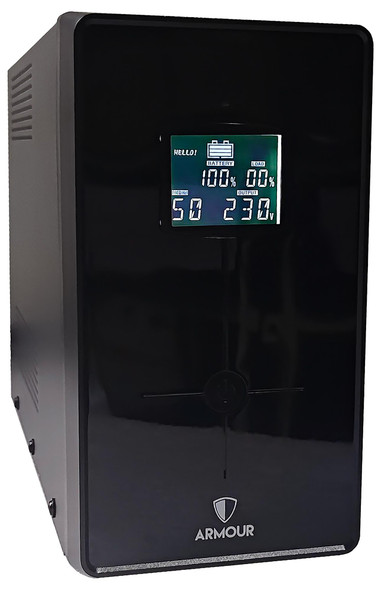
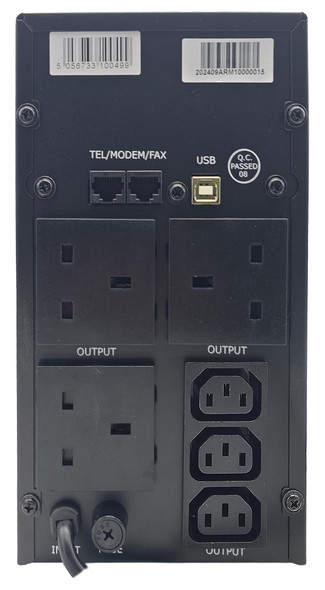
Armour 1500VA UPS 900W Battery Backup – LCD, 6 Outlets & USB Monitoring
VIDA


Armour 650VA UPS 390W Battery Backup – 2 UK Plugs, RJ45 & USB Monitoring
VIDA