
VIDA
VIDA Boreas ARGB CPU Air Cooler – 6 Heatpipes, Dual 120mm PWM Fans, Intel & AMD
- SKU:
- BOREAS-BLK
- UPC:
- 5056733100215
- MPN:
- BOREAS-BLK
- Availability:
- Free Click & Collect in Peterborough. UK delivery also available





Description
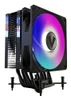
VIDA Boreas ARGB CPU Air Cooler – 6 Copper Heatpipes & Dual 120mm PWM Fans
The VIDA Boreas ARGB CPU Air Cooler is a tower-style processor cooler designed for gaming PCs, productivity systems and performance desktop builds using compatible Intel or AMD processors.
The exact BOREAS-BLK model combines six copper heatpipes with an aluminium heatsink and includes two 120mm PWM fans: one ARGB fan for illuminated builds and one plain black PWM fan for users who prefer a non-RGB appearance.
VIDA's current manufacturer specification rates the Boreas for up to 200W TDP, with fan speeds ranging from approximately 500 to 2000RPM, airflow from 20 to 73 CFM and a rated noise range of approximately 18 to 35dBA.
Wide socket compatibility includes modern Intel LGA1851, LGA1700 and LGA1200 platforms together with AMD AM5 and AM4, plus a range of older Intel and AMD sockets.
Model: BOREAS-BLK | EAN: 5056733100215 | Heatpipes: 6 | Fans: 2 x 120mm PWM | Cooler Height: 156mm
Key Features of the VIDA Boreas CPU Cooler
- 6 copper heatpipes
- Aluminium heatsink construction
- Two 120mm PWM fans supplied
- 1 x 120mm ARGB PWM fan
- 1 x 120mm plain black PWM fan
- 500–2000RPM fan-speed range
- 20–73 CFM airflow
- Hydraulic fan bearings
- Approx. 18–35dBA noise range
- 12V DC fan power
- 3-pin ARGB lighting connection for motherboard lighting synchronisation
- 4-pin PWM fan control
- Compatible with modern Intel LGA1851 / LGA1700 processors
- Compatible with AMD AM5 / AM4 processors
- 156mm total cooler height
- Approx. 800g cooler weight
- 40,000-hour fan MTBF specification
- Black-coated heatsink design
- 2-year VIDA manufacturer warranty
Six Copper Heatpipes for CPU Heat Transfer
The VIDA Boreas uses six copper heatpipes to move heat away from the processor and into the large aluminium fin stack.
Heatpipes are a key part of a tower air cooler because they transfer heat from the CPU contact area into a much larger surface area where airflow from the fans can dissipate it into the PC case.
Why Do Six Heatpipes Matter?
Using multiple heatpipes allows thermal energy to be distributed across more of the heatsink rather than concentrating heat near the base.
Actual CPU temperature still depends on processor power consumption, ambient temperature, case airflow, fan speed, thermal paste application and motherboard power settings.
Current VIDA 200W TDP Rating
VIDA's current official product specification lists the Boreas with a 200W TDP cooling rating.
This figure should be treated as a manufacturer cooling classification rather than a guarantee that every 200W processor will reach a particular temperature.
Can the VIDA Boreas Cool a 200W CPU?
VIDA currently rates the cooler at up to 200W TDP, but CPU cooling requirements cannot be determined from TDP alone.
Real heat output varies with processor model, boost behaviour, motherboard power limits, workload and ambient conditions.
For high-power processors that operate near their electrical limits for long periods, temperature and acoustic expectations should be considered carefully.
Why Do Some Websites Say 220W TDP?
Older distributor and reseller data for BOREAS-BLK lists a 220W TDP rating.
VIDA's current manufacturer website now specifies 200W. For current product information, the manufacturer specification should take priority.
Two 120mm PWM Fans Included
The Boreas package includes two 120mm fans:
- 1 x 120mm ARGB PWM fan
- 1 x 120mm plain black PWM fan
This gives builders the flexibility to choose an illuminated or non-RGB cooling setup.
VIDA's current product page presents the plain fan as a non-RGB alternative, while current distributor documentation also lists two sets of fan-mounting arms that allow both supplied fans to be fitted to the heatsink where the installation configuration and surrounding component clearance permit.
Can Both Included Fans Be Used at the Same Time?
Current VIDA distributor documentation lists two sets of mounting arms and states that both fans can be installed simultaneously.
However, users should check motherboard, RAM and case clearance before using a dual-fan configuration.
Do I Have to Use the RGB Fan?
No. A plain black PWM fan is also supplied.
This allows the Boreas to be used in systems where RGB lighting is not wanted.
500 to 2000RPM PWM Fan Control
The supplied fans support PWM speed control, with VIDA specifying a rotational-speed range of approximately 500 to 2000RPM.
A compatible motherboard can automatically vary fan speed according to CPU temperature and the selected BIOS fan curve.
What Does PWM Fan Control Mean?
PWM, or Pulse Width Modulation, allows a compatible motherboard to control fan speed electronically through a 4-pin fan connection.
This allows the system to reduce fan speed during lighter workloads and increase airflow when CPU temperature rises.
20–73 CFM Airflow
VIDA rates the Boreas fan airflow between approximately 20 and 73 CFM, depending on rotational speed.
Higher airflow helps move thermal energy through the heatsink more quickly under demanding workloads, while lower fan speeds can reduce acoustic output when the processor is lightly loaded.
18–35dBA Rated Noise Range
The specified fan-noise range is approximately 18dBA at lower speeds to 35dBA at higher speeds.
Real-world system noise will also depend on:
- Fan curve
- CPU temperature
- Whether one or two fans are fitted
- PC case acoustics
- Case fan noise
- Graphics-card cooling
- Ambient noise level
Is the VIDA Boreas Silent?
No CPU cooler should be assumed to be silent under every workload.
The Boreas can operate at lower fan speeds during light workloads, but the fans can reach up to 2000RPM when additional cooling is required.
Hydraulic Bearing Fans
VIDA specifies hydraulic bearings for the supplied fans.
The current manufacturer specification lists a fan MTBF of approximately 40,000 hours.
What Does 40,000-Hour MTBF Mean?
MTBF means Mean Time Between Failures and is a statistical reliability figure rather than a guarantee that an individual fan will operate for exactly 40,000 hours.
ARGB Motherboard-Synchronised Lighting
The included ARGB fan can connect to a compatible motherboard's 3-pin addressable RGB header, allowing its lighting to be synchronised with supported motherboard RGB software.
This makes the Boreas suitable for gaming PCs where lighting is coordinated across the case, fans, memory and other compatible components.
What ARGB Connector Does the VIDA Boreas Use?
The lighting connection is a 3-pin ARGB connection.
ARGB lighting is normally based on a 5V addressable RGB standard and must be connected only to the correct compatible motherboard header or controller.
Can I Plug the ARGB Connector into a 12V 4-Pin RGB Header?
No.
A 3-pin addressable RGB connection and a conventional 4-pin 12V RGB connection use different electrical standards.
Connecting an ARGB device to an incompatible RGB header can damage the LEDs.
Compatible with Intel LGA1851
VIDA's current manufacturer specification lists support for Intel LGA1851, allowing the Boreas to be considered for compatible newer Intel desktop systems.
Always confirm motherboard socket type and chassis clearance before purchase.
Compatible with Intel LGA1700
The Boreas supports Intel LGA1700, used by multiple generations of Intel Core desktop processors.
The supplied mounting hardware should be installed according to the VIDA installation guide for the specific socket.
Compatible with Intel LGA1200 and LGA115x
The current VIDA specification also lists support for:
- Intel LGA1200
- Intel LGA115x family
- Intel LGA2011
- Intel LGA1366
Older reseller documentation may additionally list LGA2066, but VIDA's current official compatibility list does not presently show LGA2066. If that socket is required, compatibility should therefore be verified before purchase.
Compatible with AMD AM5 and AM4
The Boreas supports both AMD AM5 and AM4, making it suitable for a broad range of Ryzen-based desktop systems.
Current VIDA compatibility also includes:
- AMD AM5
- AMD AM4
- AMD AM3+
- AMD AM3
- AMD AM2+
- AMD AM2
- AMD FM2
- AMD FM1
Will the VIDA Boreas Fit My Ryzen CPU?
If your Ryzen desktop processor uses a supported AM4 or AM5 socket, the socket itself is compatible.
You must still verify case height clearance, motherboard layout and surrounding component clearance.
156mm CPU Cooler Height
The VIDA Boreas measures approximately:
- Width: 124mm
- Depth: 76mm
- Height: 156mm
The 156mm height is particularly important when checking PC case compatibility.
Will the VIDA Boreas Fit My PC Case?
Your case must support a CPU cooler height of at least 156mm.
It is preferable to allow a small additional clearance margin rather than selecting a case with exactly the same published maximum cooler height.
Why Is CPU Cooler Height Important?
Tower CPU coolers extend outward from the motherboard toward the side panel.
If the case's maximum CPU cooler clearance is lower than the Boreas's 156mm height, the side panel may not close correctly.
RAM Clearance with Dual Fans
Large CPU air coolers can overlap the DIMM area on some motherboards.
The Boreas's compatibility with tall RGB memory depends on motherboard socket position, DIMM placement and the position of the fan mounted nearest the RAM.
Will the VIDA Boreas Clear Tall RGB RAM?
It depends on the motherboard and memory height.
Where the front fan overlaps the memory modules, the fan may need to be positioned slightly higher if the mounting clips allow it.
Raising the fan can increase the cooler's effective total height, so case side-panel clearance should be checked at the same time.
Direct CPU Heat Transfer Design
Distributor documentation for the BOREAS-BLK describes the cooler as using six copper heatpipes with direct CPU contact, combined with aluminium cooling fins.
This design aims to move processor heat efficiently into the tower fin stack where the 120mm fan airflow can dissipate it.
Black-Coated Tower Heatsink
The BOREAS-BLK uses a black-coated heatsink and black fan design, making it suitable for black or dark-themed gaming PCs and workstations.
The ARGB fan can add lighting when desired, while the supplied plain black fan allows a more understated build.
Approx. 800g Cooler Weight
VIDA lists the cooler itself at approximately 0.8kg / 800g.
The cooler should always be secured using the supplied mounting hardware rather than relying on improvised mounting methods.
12V Fan Power
VIDA specifies a rated fan voltage of 12V DC.
PWM fan power and ARGB lighting are separate electrical functions, so users should ensure both the fan connector and lighting connector are attached to the correct motherboard headers.
Suitable for Gaming PCs
The six-heatpipe tower design, 120mm PWM airflow and broad modern socket support make the Boreas suitable for many gaming PC configurations.
The actual cooling result depends on the specific processor and its configured power limits.
Is the VIDA Boreas Better Than a Stock CPU Cooler?
For processors supplied with a small stock cooler, a larger six-heatpipe tower cooler can provide substantially more heatsink area and fan capacity.
The actual temperature and noise improvement depends on the original cooler, CPU power consumption, case airflow and fan settings.
Suitable for Productivity and Workstation Builds
Air cooling is also useful for productivity PCs because there is no pump, radiator or coolant loop.
A tower air cooler can therefore offer a straightforward cooling solution for systems used for:
- Office productivity
- Software development
- Content creation
- Photo editing
- Video encoding
- CAD
- General workstation workloads
Air Cooling vs AIO Liquid Cooling
The VIDA Boreas is a traditional air CPU cooler.
It transfers processor heat through copper heatpipes into an aluminium heatsink and then removes that heat using 120mm fans.
Unlike an AIO liquid cooler, there is:
- No pump
- No liquid loop
- No radiator
- No radiator mounting requirement
This can simplify installation and long-term maintenance, although a large tower heatsink requires sufficient case and RAM clearance.
Thermal Paste Included
Current VIDA distributor package information lists thermal paste with the Boreas mounting kit.
Thermal paste should be applied correctly between the CPU heat spreader and cooler base during installation.
Do I Need to Buy Thermal Paste Separately?
Current distributor documentation lists thermal paste as included, so an additional tube should not normally be required for the initial installation.
Installation Considerations
Before installation:
- Confirm the CPU socket is supported.
- Check the case supports at least a 156mm CPU cooler.
- Check RAM and motherboard heatsink clearance.
- Use the mounting hardware for the correct socket.
- Connect the fan to a PWM-capable CPU fan header.
- Connect the ARGB cable only to a compatible addressable RGB header.
- Apply thermal paste correctly.
- Check fan direction so airflow moves through the heatsink toward the case exhaust.
Which Direction Should the Fans Face?
In a conventional tower PC, CPU cooler airflow is normally configured to move from the front of the case toward the rear exhaust fan.
If both Boreas fans are installed, they should work together in the same airflow direction rather than pushing air against one another.
What Should I Check Before Buying?
- Confirm your CPU socket is supported.
- Check your PC case supports a 156mm CPU cooler height.
- Check RAM clearance if using tall memory modules.
- Check motherboard VRM-heatsink clearance.
- Confirm a 4-pin CPU PWM fan header is available.
- Confirm a compatible 3-pin ARGB header or controller is available if RGB lighting is required.
- Do not connect the ARGB plug to an incompatible 12V 4-pin RGB header.
- Remember that CPU temperature depends on real processor power, not TDP rating alone.
Who Is the VIDA Boreas Best For?
- Intel LGA1851 desktop builds
- Intel LGA1700 gaming PCs
- AMD AM5 Ryzen systems
- AMD AM4 upgrades
- Gaming PCs
- Productivity PCs
- Workstations
- Builders wanting ARGB lighting
- Builders wanting a non-RGB fan option
- Users who prefer tower air cooling to an AIO liquid cooler
Important Things to Know Before Buying
- The exact black model is BOREAS-BLK.
- EAN is 5056733100215.
- VIDA's current manufacturer page rates the cooler at 200W TDP.
- Older distributor feeds may show 220W.
- The cooler uses 6 copper heatpipes.
- Two 120mm PWM fans are supplied.
- One fan includes ARGB lighting.
- One plain black fan is supplied for a non-RGB configuration.
- Distributor documentation states two fan-mounting clip sets allow both fans to be fitted simultaneously.
- Fan speed range is approximately 500–2000RPM.
- Airflow is approximately 20–73 CFM.
- Rated noise range is approximately 18–35dBA.
- The fans use hydraulic bearings.
- VIDA lists a 40,000-hour MTBF.
- The cooler measures approximately 124 x 76 x 156mm.
- Case CPU cooler clearance must therefore support at least 156mm.
- The cooler weighs approximately 800g.
- Current VIDA data supports Intel LGA1851, 1700, 1200, 115x, 2011 and 1366.
- AMD support includes AM5, AM4, AM3+, AM3, AM2+, AM2, FM2 and FM1.
- The cooler is covered by a 2-year VIDA warranty.
VIDA Boreas Technical Highlights
- Brand: VIDA
- Model: Boreas
- MPN: BOREAS-BLK
- EAN: 5056733100215
- Product Type: CPU air cooler
- Colour: Black
- Current Manufacturer TDP Rating: 200W
- Heatpipes: 6 copper heatpipes
- Heatsink: Aluminium
- Cooler Dimensions: 124 x 76 x 156mm
- Cooler Weight: Approx. 0.8kg
- Included Fans: 2 x 120mm
- ARGB Fan: 1 x 120mm
- Plain Fan: 1 x 120mm
- Fan Dimensions: 120 x 120 x 25mm
- Fan Controller: PWM
- Fan Speed: 500–2000RPM
- Airflow: 20–73 CFM
- Noise: 18–35dBA
- Bearing: Hydraulic bearing
- Rated Fan Voltage: 12V DC
- ARGB: 3-pin motherboard-sync ARGB
- MTBF: 40,000 hours
- Intel Compatibility: LGA1851, LGA1700, LGA1200, LGA115x, LGA2011, LGA1366
- AMD Compatibility: AM5, AM4, AM3+, AM3, AM2+, AM2, FM2, FM1
- Warranty: 2 years
What's Included?
- 1 x VIDA Boreas CPU air cooler
- 1 x Intel / AMD mounting kit
- 1 x 120mm ARGB PWM fan
- 1 x 120mm plain black PWM fan
- Fan mounting hardware
- Thermal paste
- 1 x user manual
Why Choose the VIDA Boreas ARGB CPU Cooler?
The VIDA Boreas BOREAS-BLK combines a six-heatpipe tower heatsink with two supplied 120mm PWM fans, broad Intel and AMD socket compatibility and optional ARGB lighting at a particularly competitive price point.
The 500–2000RPM PWM range allows the motherboard to balance cooling performance and noise automatically, while airflow of up to 73 CFM provides substantial ventilation through the aluminium fin stack when CPU load increases.
Modern socket support includes Intel LGA1851 and LGA1700 plus AMD AM5 and AM4, making the cooler relevant to both new PC builds and upgrades to existing systems.
The two-fan package also provides flexibility: builders can use the ARGB fan for an illuminated gaming build, use the plain black fan for a more understated appearance, or use the supplied mounting hardware for a dual-fan configuration where component and case clearance allow.
For PC builders looking for a 156mm tower CPU cooler with six copper heatpipes, two 120mm PWM fans, ARGB motherboard sync and wide Intel / AMD compatibility, the VIDA Boreas offers a strong combination of cooling hardware, visual flexibility and straightforward air-cooling design.
Related Products
Related Products

DeepCool LE240 V2 240mm Liquid CPU Cooler, Dual 120mm ARGB Fans, Anti-Leak Tech, Quiet Pump, High Performance for Intel & AMD Sockets
DEEPCOOL