
TP-LINK
TP-Link TL-SX105 5-Port 10G Multi-Gigabit Switch – Fanless, Unmanaged
- SKU:
- 6321910
- UPC:
- 6935364030902
- MPN:
- TL-SX105
- Availability:
- Free Click & Collect in Peterborough. UK delivery also available






Description
TP-Link TL-SX105 – 5-Port 10G Multi-Gigabit Unmanaged Ethernet Switch
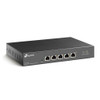
The TP-Link TL-SX105 is a compact, fanless 5-port 10 Gigabit Ethernet switch designed to deliver high-speed wired networking for home offices, small businesses, gaming PCs, workstations, network-attached storage and compatible multi-gigabit WiFi access points. All five RJ45 ports support automatic negotiation at 100Mbps, 1Gbps, 2.5Gbps, 5Gbps and 10Gbps, allowing older Gigabit devices and newer 10G equipment to operate on the same network.
With a 100Gbps switching capacity, the TL-SX105 is designed to handle high-bandwidth local network traffic between compatible devices. Its unmanaged, plug-and-play design means there is no complex configuration or controller to install. Connect the supplied power adapter, attach your Ethernet cables and the switch automatically negotiates the supported speed of each connection.
A durable metal enclosure, completely fanless cooling and desktop or wall-mounting options make it suitable for quiet home offices, professional workstations, multimedia production rooms and compact business networks.
Model: TP-Link TL-SX105 | Ports: 5 x 10Gbps RJ45 | Port Speeds: 100M / 1G / 2.5G / 5G / 10G | Switching Capacity: 100Gbps | Management: Unmanaged | Cooling: Fanless
Key Features of the TP-Link TL-SX105
- Five 10Gbps RJ45 Ethernet ports for high-speed wired network connections.
- Five-speed auto-negotiation: 100Mbps, 1Gbps, 2.5Gbps, 5Gbps and 10Gbps.
- 100Gbps switching capacity for demanding local-network traffic.
- 74.4 Mpps packet forwarding rate for high-performance Ethernet switching.
- Unmanaged plug-and-play operation with no software configuration required.
- Fanless design for silent operation in offices and living spaces.
- Durable metal casing with a design intended for effective passive heat dissipation.
- Desktop or wall-mounting for flexible installation.
- 802.1p/DSCP Quality of Service for automatic traffic prioritisation.
- IEEE 802.3x flow control to help manage Ethernet traffic.
- Auto-MDI/MDIX removes the need for crossover Ethernet cables.
- Compatible with suitable existing Cat5e cabling for 1G, 2.5G and 5G connections.
- Supports 10GBASE-T connections up to 100 metres with appropriate Cat6a or better cabling.
- Ideal for 10G NAS devices, servers, workstations, gaming PCs and multi-gigabit WiFi access points.
- Compact dimensions of approximately 226 x 131 x 35mm.
Five 10Gbps Ports for High-Speed Local Networking
Unlike switches that provide only one or two high-speed uplink ports, the TP-Link TL-SX105 gives you five multi-gigabit RJ45 ports. Each port supports the same range of Ethernet speeds, making it possible to connect several high-performance devices without reserving a particular port for the router, NAS or workstation.
For example, a typical installation could connect a 10G NAS, two workstations, a compatible multi-gigabit WiFi access point and an existing router. The actual connection speed of each device is negotiated independently.
Does Every TL-SX105 Port Support 10Gbps?
Yes. All five RJ45 ports support Ethernet connections up to 10Gbps. Each port also supports 5Gbps, 2.5Gbps, 1Gbps and 100Mbps.
Actual link speed depends on the connected device's network adapter, Ethernet cable, cable length and other installation conditions. A device equipped with a 1Gbps Ethernet port will normally connect at 1Gbps rather than 10Gbps.
100Gbps Switching Capacity
The TL-SX105 provides a rated 100Gbps switching capacity, supporting demanding network traffic between compatible connected equipment. TP-Link also specifies a packet forwarding rate of 74.4 million packets per second.
This makes the switch useful for transferring large project files, working with shared network storage, connecting high-performance desktop systems and expanding an existing multi-gigabit network.
Does 100Gbps Switching Capacity Mean 100Gbps Internet?
No. The 100Gbps figure describes the switch's aggregate internal switching capacity, accounting for traffic in both directions across its ports. Each individual RJ45 port supports a maximum negotiated Ethernet link rate of 10Gbps.
Your internet speed is determined by your broadband connection, router, network adapters, cabling and other equipment. Adding the TL-SX105 does not automatically increase your broadband speed.
Automatic Multi-Gigabit Speed Negotiation
One of the main advantages of the TL-SX105 is its ability to support both existing Gigabit equipment and newer multi-gigabit devices.
Each port automatically negotiates one of five supported Ethernet speeds:
- 100Mbps: compatible Fast Ethernet devices.
- 1Gbps: conventional Gigabit computers, routers and network equipment.
- 2.5Gbps: multi-gigabit network adapters and compatible WiFi access points.
- 5Gbps: suitable workstations, access points and multi-gigabit network equipment.
- 10Gbps: compatible 10G NAS devices, servers, computers and network infrastructure.
Can I Connect a 1Gbps Device to a 10Gbps Switch?
Yes. The TL-SX105 is backward-compatible with supported lower Ethernet speeds. A 1Gbps device can connect to the same switch as equipment using 2.5Gbps, 5Gbps or 10Gbps connections.
Each connection operates at its own negotiated speed, making the TL-SX105 a useful option when upgrading a network gradually rather than replacing every device at once.
Ideal for 10G NAS and High-Speed File Transfers
The TP-Link TL-SX105 is particularly useful for customers using network-attached storage (NAS). A compatible 10G NAS can be connected directly to the switch alongside computers equipped with suitable 10GbE network adapters.
This can provide substantially more local network bandwidth than conventional Gigabit Ethernet, helping reduce transfer times for large files and supporting demanding shared-storage workflows.
Can the TL-SX105 Be Used with a Synology or QNAP NAS?
Yes. Compatible Synology, QNAP and other NAS devices can connect using their Ethernet ports. A NAS equipped with a supported 10GbE RJ45 interface can negotiate a 10Gbps connection when connected using suitable cabling.
NAS models with 1Gbps or 2.5Gbps interfaces can also be used, but their connections will be limited to the supported speed of their Ethernet interfaces.
Actual file-transfer performance also depends on drive speeds, RAID configuration, NAS processing power, network protocols and the connected computer.
High-Speed Networking for Gaming PCs and Workstations
The TL-SX105 is suitable for gaming PCs, creative workstations and other desktops equipped with multi-gigabit or 10 Gigabit Ethernet.
A high-speed local connection is particularly useful when accessing shared files, transferring large game libraries, backing up computers or working directly with high-performance network storage.
Will a 10G Switch Reduce Gaming Ping?
A 10G switch can provide more local network bandwidth between compatible devices, but it does not guarantee lower internet gaming latency. Online gaming performance also depends on the broadband service, router, game server, network congestion and other factors.
For local transfers between compatible gaming PCs, servers and NAS equipment, 10Gbps connectivity can provide considerably more bandwidth than Gigabit Ethernet.
Multi-Gigabit Connectivity for WiFi 6, WiFi 6E and WiFi 7
Modern wireless access points increasingly offer 2.5Gbps, 5Gbps or 10Gbps wired uplinks. The TL-SX105 can connect to compatible access points at these speeds, helping prevent a conventional 1Gbps Ethernet port from becoming a bottleneck.
It can also provide additional high-speed Ethernet ports for routers equipped with compatible multi-gigabit LAN interfaces.
Can It Power a PoE WiFi Access Point?
No. The TL-SX105 does not provide Power over Ethernet (PoE). A compatible access point requiring PoE must be powered using a separate suitable PoE injector, PoE switch or its supported power adapter.
The TL-SX105 provides Ethernet data connectivity, not electrical power, through its RJ45 ports.
What Ethernet Cable Do You Need for 10Gbps?
The correct Ethernet cable is important when building a reliable multi-gigabit network. TP-Link's hardware V4 documentation gives the following cable guidance:
- 100Mbps: Cat5 or better, up to 100 metres.
- 1Gbps, 2.5Gbps and 5Gbps: Cat5e or better, up to 100 metres under suitable conditions.
- 10Gbps over Cat6: up to approximately 55 metres using suitable cabling and installation conditions.
- 10Gbps over suitable shielded Cat6a or better: up to approximately 100 metres.
Can the TL-SX105 Run 10Gbps over Cat5e?
Cat5e is suitable for the switch's specified 1Gbps, 2.5Gbps and 5Gbps connections over supported distances. For a reliable 10Gbps installation, use appropriately rated Cat6 or Cat6a cabling.
Existing Cat5e installations can therefore be upgraded to multi-gigabit speeds without necessarily replacing every cable, although the achievable link rate depends on cable quality, length and installation conditions.
Is Cat6a Worth Using for a 10G Network?
For new 10 Gigabit Ethernet installations, appropriately installed Cat6a cabling is a practical choice, particularly for longer cable runs approaching the 100-metre limit specified for suitable 10GBASE-T cabling.
Always use properly terminated cable and compatible networking equipment. Poor connectors, damaged cabling and unsuitable installation practices can reduce the achievable link speed.
Plug-and-Play Unmanaged Network Switch
The TL-SX105 is an unmanaged Ethernet switch, designed for straightforward installation without a dedicated network-management interface.
Connect the supplied power adapter, attach compatible Ethernet equipment and the switch automatically detects and negotiates supported port speeds. Auto-MDI/MDIX means standard Ethernet patch leads can be used without needing special crossover cables.
Does the TL-SX105 Require Configuration?
No. Basic operation does not require an application, controller, login or software installation. This makes it suitable for home users and businesses that need faster Ethernet connectivity without the administration required by a managed switch.
Does the TL-SX105 Support VLAN Configuration?
The TL-SX105 is an unmanaged switch and does not provide the configurable VLAN controls of a managed network switch.
If you require adjustable VLAN membership, detailed traffic monitoring, port configuration or more advanced network-security policies, choose a suitable managed switch instead.
Automatic Quality of Service and Flow Control
Although the TL-SX105 is unmanaged, it supports IEEE 802.1p/DSCP Quality of Service (QoS) and IEEE 802.3x flow control.
QoS allows the switch to recognise supported traffic-priority information and handle traffic accordingly. Flow control helps manage data transmission when connected Ethernet devices or links experience congestion.
These features operate without the detailed manual configuration available on a managed switch.
Completely Fanless, Silent Operation
The TL-SX105 uses a fanless metal enclosure for passive cooling. With no internal cooling fan, it avoids fan noise and is suitable for installation close to a desk, entertainment setup or quiet home-office workstation.
Its robust metal chassis also helps dissipate heat during operation.
Does a Fanless 10G Switch Get Warm?
Like other high-speed Ethernet equipment, the TL-SX105 can become warm during operation. Its metal casing is designed to assist passive heat dissipation.
Install the switch in a ventilated location and avoid covering its ventilation areas or stacking it tightly against equipment that produces substantial heat.
Desktop or Wall-Mounted Installation
The compact TL-SX105 measures approximately 226 x 131 x 35mm, making it suitable for a desktop, shelf or compatible wall-mounted installation.
Its metal enclosure and flexible placement options allow it to fit into home offices, small-business networking areas and entertainment setups without requiring a dedicated equipment rack.
Can the TL-SX105 Be Rack Mounted?
The TL-SX105 is designed primarily for desktop or wall mounting. It is not supplied as a standard 19-inch rack-mount switch with integrated rack ears.
For an equipment rack, it can be placed on a suitable ventilated rack shelf.
Compact 10G Switch for Small Businesses
Small businesses can use the TL-SX105 to build a high-speed local network between a file server, NAS, desktop workstations and compatible networking infrastructure.
Its five multi-gigabit ports are particularly useful for small teams that transfer large files or need faster access to shared data without investing in a larger managed network switch.
Typical applications include design studios, video-editing workstations, home offices, photography businesses, small production teams and shared-storage environments.
Technical Highlights
- Brand: TP-Link
- Model / MPN: TL-SX105
- Product Type: Unmanaged 10 Gigabit multi-gigabit Ethernet switch
- RJ45 Ports: 5
- Supported Port Speeds: 100Mbps / 1Gbps / 2.5Gbps / 5Gbps / 10Gbps
- Maximum Speed per Port: 10Gbps
- Switching Capacity: 100Gbps
- Packet Forwarding Rate: 74.4 Mpps
- Ethernet Standards: IEEE 802.3, 802.3u, 802.3ab, 802.3an and 802.3bz
- Traffic Features: 802.3x flow control and 802.1p/DSCP QoS
- Auto-Negotiation: Yes
- Auto-MDI/MDIX: Yes
- Management: Unmanaged / plug and play
- PoE: Not supported
- SFP / SFP+ Ports: None
- Cooling: Fanless
- Enclosure: Metal
- Installation: Desktop or wall mounted
- Dimensions: Approximately 226 x 131 x 35mm
- Power: External 12V DC / 2A adapter
- Operating Temperature: 0°C to 40°C
What's Included?
- 1 x TP-Link TL-SX105 5-Port 10G Multi-Gigabit Switch
- External power supply
- Installation guide
- Rubber feet
Ethernet cables, network adapters, NAS devices and other connected equipment are not included.
Important Things to Know Before Buying
- Every RJ45 port supports up to 10Gbps, but connected equipment must also support the required speed.
- The TL-SX105 is an unmanaged switch and does not offer a configurable management interface.
- It does not provide Power over Ethernet.
- It has copper RJ45 Ethernet ports, not SFP+ fibre or DAC ports.
- Use suitable Cat6 or Cat6a cabling for reliable 10Gbps connections.
- A router is still required for ordinary internet routing and DHCP services.
- The switch does not increase the maximum speed of your broadband subscription.
- Actual transfer performance depends on the entire network, including cables, network adapters, computers and storage devices.
- Internal specifications such as buffer memory and maximum power consumption can differ between hardware revisions.
Why Choose the TP-Link TL-SX105?
The TP-Link TL-SX105 5-Port 10G Multi-Gigabit Switch offers a straightforward way to upgrade a wired network without the additional complexity of managed-switch configuration.
Five auto-negotiating RJ45 ports allow conventional Gigabit devices and modern 2.5G, 5G and 10G equipment to share the same switch. Its 100Gbps switching capacity makes it suitable for high-bandwidth local networking, including compatible NAS storage, workstations, gaming PCs and multi-gigabit wireless access points.
With silent fanless operation, a durable metal enclosure and flexible desktop or wall-mounting options, the TL-SX105 is a practical choice for home users and small businesses building a faster wired network.
Specification
TP-Link TL-SX105 5-Port 10G Multi-Gigabit Switch Specifications
The TP-Link TL-SX105 is a fanless, unmanaged 5-port 10 Gigabit Ethernet switch designed for high-speed wired networking. Each RJ45 port supports automatic negotiation at 100Mbps, 1Gbps, 2.5Gbps, 5Gbps and 10Gbps. With 100Gbps switching capacity, a durable metal enclosure and plug-and-play operation, it is suitable for connecting compatible NAS devices, servers, workstations, gaming PCs and multi-gigabit networking equipment.
General Information
| Brand | TP-Link |
| Model | TL-SX105 |
| Manufacturer Part Number | TL-SX105 |
| EAN / GTIN | 6935364030902 |
| Product Type | 10 Gigabit multi-gigabit Ethernet switch |
| Switch Management | Unmanaged |
| Installation | Plug and play |
| Colour | Black |
| Enclosure | Metal |
| Recommended Installation | Indoor desktop or wall-mounted installation |
Ethernet Ports & Connectivity
| RJ45 Ethernet Ports | 5 |
| Maximum Speed per Port | 10Gbps |
| Supported Port Speeds | 100Mbps / 1Gbps / 2.5Gbps / 5Gbps / 10Gbps |
| 10GBASE-T Support | Yes, on all five RJ45 ports |
| 5GBASE-T Support | Yes |
| 2.5GBASE-T Support | Yes |
| Gigabit Ethernet Support | Yes, 1000Mbps |
| Fast Ethernet Support | Yes, 100Mbps |
| Auto-Negotiation | Yes, five-speed auto-negotiation |
| Auto-MDI/MDIX | Yes |
| SFP / SFP+ Ports | None |
| PoE Power Output | Not supported |
| PoE Power Input | Not supported; requires external power adapter |
Ethernet Standards
| IEEE 802.3 | Ethernet |
| IEEE 802.3u | Fast Ethernet |
| IEEE 802.3ab | Gigabit Ethernet |
| IEEE 802.3bz | 2.5GBASE-T / 5GBASE-T |
| IEEE 802.3an | 10GBASE-T |
| IEEE 802.3x | Flow control |
| IEEE 802.1p | Traffic prioritisation |
Switching Performance
| Switching Capacity | 100Gbps |
| Packet Forwarding Rate | 74.4Mpps |
| Transmission Method | Store and forward |
| Automatic Traffic Prioritisation | IEEE 802.1p / DSCP QoS |
| Flow Control | IEEE 802.3x |
| MAC Table / Packet Buffer / Jumbo Frame | Hardware-version dependent; check the revision-specific TP-Link datasheet |
Network Management & Features
| Management Type | Unmanaged |
| Plug-and-Play Installation | Yes |
| Automatic QoS | 802.1p / DSCP |
| Flow Control | 802.3x |
| Manual Port Configuration | No |
| Configurable VLAN Management | No |
| Web Management Interface | No |
| Omada Controller Management | No |
Ethernet Cable Requirements
| 100Mbps | Cat5 or better, up to 100m |
| 1Gbps | Cat5e or better, up to 100m |
| 2.5Gbps | Cat5e or better, up to 100m |
| 5Gbps | Cat5e or better, up to 100m |
| 10Gbps – Cat6 UTP | Up to 55m under suitable conditions |
| 10Gbps – Suitable Shielded Cat6 / Cat6a / Cat7 | Up to 100m under suitable conditions |
| Recommended Cable for New 10G Installations | Appropriately rated Cat6a or better |
Power & Cooling
| Power Supply | External power adapter |
| Power Adapter Output | 12V DC / 2A |
| Maximum Power Consumption | Varies by hardware revision; see the revision-specific TP-Link datasheet |
| Cooling System | Passive cooling |
| Internal Fans | None |
| Fan Noise | Silent fanless operation |
Dimensions, Enclosure & Mounting
| Width | 226mm |
| Depth | Approx. 131mm |
| Height | 35mm |
| Dimensions | Approx. 226 x 131 x 35mm (W x D x H) |
| Enclosure Material | Metal |
| Desktop Installation | Yes |
| Wall Mounting | Yes |
| 19-Inch Rack-Mount Kit | Not specified in TP-Link's standard package contents; use a suitable rack shelf if required |
| LED Indicators | Power and Ethernet link/activity indicators; exact LED configuration varies by hardware revision |
Environmental Specifications
| Operating Temperature | 0°C to 40°C |
| Storage Temperature | -40°C to 70°C |
| Operating Humidity | 10% to 90% RH, non-condensing |
| Storage Humidity | 5% to 90% RH, non-condensing |
| Intended Environment | Indoor |
| Manufacturer-Listed Certifications | CE, FCC and RoHS |
Package Contents
| Network Switch | 1 x TP-Link TL-SX105 |
| Power Supply / Cord | Included, appropriate to the supplied regional package |
| Installation Guide | Included |
| Rubber Feet | Included |
| Ethernet Cables | Not listed as included |
Important Hardware Version Note
The TP-Link TL-SX105 has been released in multiple hardware revisions. Core features such as its five 10Gbps RJ45 ports, five-speed auto-negotiation, 100Gbps switching capacity, 74.4Mpps forwarding rate and fanless construction are documented by TP-Link. Other figures, including maximum power consumption, MAC address table capacity, packet-buffer memory and jumbo-frame size, can differ by revision. Check the hardware version printed on the device or retail packaging before using revision-specific values.
Important 10Gbps Speed Note
Each RJ45 port supports a maximum negotiated Ethernet link speed of 10Gbps. The actual connection speed depends on the network interfaces at both ends, cable type, cable quality, cable length and operating conditions. A Gigabit-only device will not achieve 10Gbps simply by connecting to this switch.
Important Switching Capacity Note
The advertised 100Gbps switching capacity represents the switch's aggregate internal switching capability across its five ports, accounting for full-duplex traffic. It does not mean that one Ethernet port supports 100Gbps or that the switch increases your broadband connection to 100Gbps.
Important PoE Note
The TL-SX105 does not provide Power over Ethernet to connected equipment and cannot be powered through PoE itself. A connected PoE access point, IP camera or other powered device requires a separate compatible PoE injector or another appropriate power source.
Important Unmanaged Switch Note
The TL-SX105 is an unmanaged, plug-and-play switch. It does not have the configurable VLAN, port-management or centralised controller features of a managed switch. Its supported automatic QoS and flow-control functions operate without a management interface.
Important 10G Cabling Note
For a 10Gbps wired connection, TP-Link specifies suitable Cat6 UTP cabling for runs up to approximately 55 metres and appropriate shielded Cat6/Cat6a or better cabling for runs up to 100 metres. Cat5e can support the listed 1Gbps, 2.5Gbps and 5Gbps connections up to 100 metres under suitable conditions.
Important Installation Note
The switch uses passive fanless cooling and should be installed indoors with adequate ventilation. Avoid covering the enclosure or placing it directly against other equipment that produces substantial heat.
Return
FAQ: Frequenlty Asked Questions
TP-Link TL-SX105 5-Port 10G Multi-Gigabit Switch FAQ
The TP-Link TL-SX105 is a fanless, unmanaged five-port 10-Gigabit Ethernet switch for fast home networks, 10GbE NAS systems, gaming PCs, creative workstations and small offices. Each RJ45 port automatically supports 100Mbps, 1Gbps, 2.5Gbps, 5Gbps or 10Gbps, allowing a mix of existing Gigabit equipment and newer multi-gigabit devices.
These answers cover 10Gbps transfer speeds, Cat5e versus Cat6a cabling, NAS and Wi-Fi access-point compatibility, fanless heat, connection troubleshooting, PoE and SFP+ limitations, VLANs, jumbo frames and hardware-version differences. Check the version on your unit when a feature differs between TP-Link revisions.
1. What is the TP-Link TL-SX105?
The TP-Link TL-SX105 is a five-port unmanaged 10-Gigabit Ethernet switch for connecting compatible PCs, NAS systems, routers and other wired devices. All five ports support multi-gigabit speeds, and the fanless metal design makes it suitable for quiet home and office installations.
2. What are the MPN, Memox SKU and EAN?
The manufacturer model is TL-SX105, the Memox SKU is 6321910 and the EAN is 6935364030902. Hardware revisions can vary between production batches; check the version on the actual unit if you need a revision-specific feature.
3. What are the main specifications of the TL-SX105?
The switch has five 100Mbps/1G/2.5G/5G/10G RJ45 ports, 100Gbps switching capacity, up to 74.4 million packets per second, a fanless metal enclosure, automatic speed negotiation, 802.3x flow control, 802.1p/DSCP QoS and jumbo-frame support. Power, packet-buffer and some other figures vary by hardware revision.
4. Are all five Ethernet ports capable of 10Gbps?
Yes. Every RJ45 port supports 10GBASE-T. There is no dedicated, lower-speed uplink port, so any port can connect to a compatible router, NAS, server or workstation.
5. What network speeds does each port support?
Each port automatically negotiates 100Mbps, 1Gbps, 2.5Gbps, 5Gbps or 10Gbps, depending on the connected device and the quality and length of the Ethernet cable.
6. Can I connect devices running at different Ethernet speeds?
Yes. For example, you can connect a 10GbE NAS, a 5GbE workstation, a 2.5GbE PC and a Gigabit router at the same time. Each port negotiates independently.
7. What does 100Gbps switching capacity mean?
It is the theoretical aggregate bidirectional capacity of the switch: five 10Gbps ports operating in full duplex. It is not a 100Gbps speed available to one device, and an individual port is limited to its negotiated Ethernet link rate.
8. Can all five ports operate at 10Gbps simultaneously?
The 100Gbps switching fabric is designed to accommodate five simultaneous full-duplex 10Gbps links. Real throughput depends on traffic patterns, connected devices and protocol overhead; several devices sharing one uplink still share that uplink's capacity.
9. What is the maximum file-transfer speed over 10GbE?
A 10Gbps Ethernet link has a theoretical capacity of 1,250MB/s (1.25GB/s). Actual file transfers are lower after Ethernet and TCP/IP overhead and may be limited by the source or destination storage.
10. Is the TL-SX105 suitable for a 10GbE NAS?
Yes. It is designed for devices such as 10GBASE-T NAS units, servers and high-speed workstations. Two devices connected to the switch can transfer files locally without sending the file data through the router.
11. Will my NAS automatically transfer files at 1GB/s?
Not necessarily. Hard-drive speeds, RAID configuration, SSD caching, NAS processing power, SMB settings and the receiving computer all affect file-transfer performance. A 10GbE connection removes one potential bottleneck but does not guarantee 1GB/s storage transfers.
12. Is the TL-SX105 compatible with Synology, QNAP, TrueNAS and Unraid?
Yes. It uses standard Ethernet rather than a brand-specific NAS protocol. For a 10Gbps link, the NAS needs a compatible 10GBASE-T RJ45 interface; an SFP+-only NAS requires suitable additional equipment.
13. Do I need a 10GbE network card in my computer?
To connect at 10Gbps, the computer needs a 10GBASE-T network adapter, either integrated into its motherboard or installed separately. A Gigabit or 2.5GbE network card will work but will negotiate at its own maximum speed.
14. Does the switch work with 2.5GbE and 5GbE devices?
Yes. All five ports support 2.5GBASE-T and 5GBASE-T as well as Gigabit and 10-Gigabit Ethernet. This is useful when gradually upgrading a network without replacing every device at once.
15. Will ordinary Gigabit devices still work?
Yes. Standard 1GbE devices and compatible 100Mbps devices can connect normally. Their ports run at their own supported speeds without reducing every other switch port to Gigabit.
16. Do I need 10Gbps broadband to benefit from this switch?
No. A 10GbE PC can communicate with a 10GbE NAS or server at high local-network speeds even when the internet connection is 1Gbps or slower.
17. Will the TL-SX105 make my internet connection faster?
It cannot increase the broadband speed purchased from your provider. It can remove a slower Ethernet switch as a bottleneck if your internet service, router, client and cabling already support higher speeds.
18. Is the TL-SX105 a router?
No. It is a Layer 2 Ethernet switch. Your router remains responsible for functions such as internet access, NAT, DHCP and firewalling.
19. How do I connect the TL-SX105 to my router?
Use a suitable Ethernet cable between any TL-SX105 port and a LAN port on the router. Connect your other wired devices to the remaining ports. To carry more than 1Gbps through the router uplink, the router's LAN port must also support the required multi-gigabit speed.
20. Is the TP-Link TL-SX105 plug and play?
Yes. Connect the supplied power adapter and Ethernet cables. The switch automatically detects link speeds and does not need initial configuration for normal operation.
21. Do I need to install software or drivers?
No software or drivers are needed for the switch. The computers and network adapters connected to it may need appropriate operating-system drivers.
22. Which Ethernet cable should I use for 10Gbps?
Cat6a is the preferred choice for new, longer 10GbE cable runs. Properly installed Cat6 can support 10Gbps at shorter distances. Check cable quality, terminations and interference, not merely the category printed on the jacket.
23. Can Cat5e support 10Gbps with the TL-SX105?
A very short high-quality Cat5e cable may establish a 10Gbps link, but 10GBASE-T over Cat5e is not a reliable, universally specified installation. TP-Link rates Cat5e for up to 5Gbps at suitable distances; use properly installed Cat6 or Cat6a for a planned 10Gbps connection.
24. What is the maximum Ethernet cable length?
TP-Link's V4 cabling specification lists Cat6 up to 55m at 10Gbps and suitable shielded Cat6/6a/7 up to 100m. Properly installed Cat6a is generally recommended for 100m 10GbE runs. Lower negotiated speeds have different distance allowances.
25. Why is my 10GbE connection negotiating at only 5Gbps?
Check cable category, termination quality, cable damage, excessive length, interference and the network adapter's actual capabilities. First test with a short, known-good Cat6a cable, then check adapter drivers and link settings. A 5Gbps negotiated connection often means the two devices cannot establish a reliable 10Gbps link in the current setup.
26. Why is my connection showing only 1Gbps?
Confirm that the other device has a multi-gigabit adapter and that its driver is installed. Test a different cable and switch port, and leave the adapter on automatic negotiation where possible. A router or PC with only a Gigabit port cannot negotiate above 1Gbps.
27. Can I manually force a port to 10Gbps?
Not on the switch itself. The TL-SX105 is unmanaged and does not provide per-port speed controls. Some network adapters offer speed settings, but both devices and the cabling still need to support the chosen mode.
28. Does the TL-SX105 have SFP+ ports?
No. It has five RJ45 10GBASE-T copper ports and no SFP+ sockets. Choose a switch with SFP+ ports if you need direct fibre or DAC connections.
29. Can I connect an SFP+ fibre module directly to the TL-SX105?
No. SFP+ modules need an SFP+ cage. You would need suitable separate conversion equipment or a different switch with an appropriate fibre uplink.
30. Does the TP-Link TL-SX105 support Power over Ethernet?
No. The TL-SX105 does not provide PoE power on its RJ45 ports. Cameras, access points and other PoE-powered devices require a separate compatible PoE injector or PoE switch.
31. Can I connect a Wi-Fi 6E or Wi-Fi 7 access point?
Yes. Compatible access points can use the TL-SX105's 2.5G, 5G or 10G Ethernet ports. If the access point needs PoE, supply power using a suitable separate injector or other approved power source.
32. Is the TL-SX105 fanless?
Yes. It has no cooling fan and uses its metal enclosure for passive heat dissipation. It does not produce fan noise.
33. Does the TL-SX105 get hot?
The enclosure can feel warm because high-speed 10GBASE-T ports generate heat. Passive cooling transfers that heat into the metal casing. Keep the ventilation openings unobstructed and follow TP-Link's operating-temperature guidance.
34. Can I place the switch in a closed cupboard?
Only if the cupboard has adequate airflow and the ambient temperature remains within the specified operating range. For several active 10Gbps copper links, a ventilated shelf or cabinet is preferable to a tightly sealed space.
35. Can the TL-SX105 be wall mounted?
Yes. TP-Link lists desktop and wall-mounting options. Use appropriate fixings and allow enough clearance for ventilation, Ethernet cables and the power adapter.
36. Can I install the TL-SX105 in a network rack?
The TL-SX105 is a compact desktop/wall-mount switch, not a standard 19-inch rackmount chassis. You can install it on an appropriately ventilated rack shelf; do not assume rack ears are included.
37. Does the TL-SX105 support VLANs?
It has no configurable VLAN management interface. For assigning tagged or untagged VLANs to specific switch ports and enforcing network segmentation, choose a managed switch.
38. Will VLAN-tagged traffic pass through the TL-SX105?
It may forward standard 802.1Q-tagged frames as Ethernet traffic, but it cannot assign VLAN membership, create access ports or enforce VLAN isolation. A managed switch is preferable wherever VLAN behaviour is a critical requirement.
39. Does the TL-SX105 support link aggregation or LACP?
No user-configurable LACP or link aggregation is provided. Use a managed switch with explicit 802.3ad support when you need bonded Ethernet connections.
40. Can I connect two Ethernet cables between the same router and TL-SX105?
Avoid creating parallel network paths without a properly designed loop-prevention or aggregation configuration. The unmanaged TL-SX105 does not provide configurable LACP, and an accidental Ethernet loop can disrupt an entire network.
41. Does the TL-SX105 support jumbo frames?
Yes. The published maximum varies by hardware revision. TP-Link's UK generic specification lists 10KB, while its V4 datasheet lists 12KB. Check the hardware version printed on your switch before depending on a specific jumbo-frame limit.
42. Should I enable 9000-byte jumbo frames for my NAS?
Jumbo frames are optional rather than required for 10GbE. If you enable them, ensure the network adapters and devices on the entire relevant path use compatible MTU settings. Incorrect settings can cause failed connections or unusually slow transfers.
43. Does the TL-SX105 support Quality of Service?
Yes. TP-Link advertises automatic 802.1p/DSCP QoS support. Because the switch is unmanaged, it does not offer detailed user-configurable traffic queues or QoS policies.
44. Does the TL-SX105 support IGMP snooping?
Check the hardware revision. TP-Link's V4 datasheet explicitly lists IGMP snooping V1/V2/V3, but the generic UK product specification does not promise this feature for every revision. If multicast or IPTV optimisation is essential, verify the supplied hardware version.
45. Does the TL-SX105 support Energy-Efficient Ethernet?
TP-Link markets energy-saving features for the TL-SX105 family. Actual consumption depends on hardware version, link speeds, how many ports are active and the connected equipment. Check the exact revision's documentation for formal feature and power figures.
46. How much power does the TL-SX105 consume?
Power figures differ by hardware revision. The current generic UK specification lists up to 21.4W, while TP-Link's V4 datasheet lists up to 24.44W. Do not assume that a figure published for one revision applies to every unit.
47. Does the switch include a power adapter?
Yes. TP-Link lists a power supply in the package. Its published specifications show an external 12V DC, 2A adapter; use an appropriate manufacturer-approved replacement if needed.
48. Can I monitor port statistics through a web interface?
No. The TL-SX105 is unmanaged and has no ordinary web-management interface, configurable port statistics dashboard or SNMP interface. Use its port LEDs and the connected devices' network information for basic diagnostics.
49. Can I update the TL-SX105 firmware?
It does not have a conventional user-facing firmware-management interface. Consult TP-Link's support page for the exact hardware version printed on your unit if you need service documentation or manufacturer guidance.
50. What do the Ethernet port LEDs indicate?
The LEDs show basic port connection and activity information. Exact LED colours and the mapping of speed indications may differ by hardware revision, so use the installation guide supplied for your version.
51. Why are file transfers slow when my network link shows 10Gbps?
A 10Gbps link is not a guarantee of 10Gbps file transfers. Check SSD or HDD performance, NAS RAID configuration, CPU load, SMB settings, security software, NIC drivers and destination write speed. A network-only speed test can help identify whether the problem is the network or the storage.
52. How can I test the speed of my 10GbE network?
Use a network throughput tool such as iperf3 between two computers with compatible 10GbE adapters. This measures network performance without requiring hard drives to read or write files at the same rate.
53. Is the TL-SX105 suitable for gaming?
Yes. It provides fast wired connectivity for gaming PCs, LAN parties and shared local storage. However, moving from a healthy Gigabit connection to 10GbE does not automatically lower internet-game latency; broadband quality and the game server also matter.
54. Can I connect a PlayStation 5 or Xbox?
Yes. Game consoles connect using their built-in Ethernet ports and negotiate the speed that their own hardware supports. Connecting a console to a 10Gbps switch does not give that console a 10Gbps network interface.
55. Is the TL-SX105 suitable for video editing over a NAS?
Yes. It is useful for high-bandwidth access to shared project files, especially when both the workstation and NAS have 10GBASE-T interfaces and the underlying storage is fast enough. Performance varies with media codecs, storage arrays and concurrent users.
56. Can I connect another Ethernet switch to the TL-SX105?
Yes. Any port can serve as an uplink to another compatible switch. Devices on the other switch share the available bandwidth of that uplink when communicating across it.
57. Can I use the TL-SX105 without an internet connection?
Yes. It can create or expand a completely local wired Ethernet network. Internet access is not needed for the switching function.
58. TL-SX105 vs a 2.5GbE switch: which should I choose?
A 2.5GbE switch suits networks where all devices are 1GbE or 2.5GbE. The TL-SX105 adds 5Gbps and 10Gbps connectivity, making it more suitable for PCs, servers and NAS systems with faster interfaces.
59. TP-Link TL-SX105 vs TL-SX1008: what is the difference?
The TL-SX105 has five 10Gbps multi-gigabit RJ45 ports; the TL-SX1008 has eight. Both are designed for unmanaged 10GbE networking, but check each product's hardware revision for differences in cooling, dimensions and power consumption.
60. Who is the TP-Link TL-SX105 best for?
It is particularly suitable for home labs, 10GbE NAS owners, creative workstations, small offices and buyers upgrading from Gigabit or 2.5GbE who want several fast RJ45 connections in a compact fanless switch.
61. Who should NOT choose the TP-Link TL-SX105?
Choose another switch if you specifically require PoE power, native SFP+ fibre or DAC connections, managed VLANs, LACP, detailed network monitoring or more than five Ethernet ports. If multicast features are essential, verify the hardware revision before buying.
