
TP-LINK
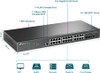
TP-Link TL-SG3428X 24-Port Gigabit L2+ Managed Switch – 4× 10G SFP+
- SKU:
- SG3428X
- UPC:
- 6935364010539
- MPN:
- SG3428X
- Availability:
- Free Click & Collect in Peterborough. UK delivery also available


Description
TP-Link TL-SG3428X 24-Port Gigabit L2+ Managed Switch – 4× 10G SFP+ & Omada SDN
The TP-Link TL-SG3428X is a professional 24-port Gigabit L2+ managed network switch designed for business networks, offices, schools, hospitality, retail, surveillance infrastructure and other environments requiring reliable Gigabit Ethernet connectivity with high-speed 10Gbps fibre or DAC uplinks.
It combines 24 × 10/100/1000Mbps RJ45 Ethernet ports with 4 × 10Gbps SFP+ slots, giving network administrators a flexible way to connect desktop computers, servers, access points, other switches and network infrastructure while using the faster SFP+ connections for uplinks, aggregation, servers, NAS systems or switch-to-switch links.
The TL-SG3428X integrates with TP-Link Omada Software Defined Networking (SDN) for centralised network management and also supports standalone administration through web, command-line, SNMP and other management tools. Advanced functionality includes VLANs, static routing, Link Aggregation, STP/RSTP/MSTP, ACL security, 802.1X authentication, QoS, IGMP Snooping, DHCP Snooping and comprehensive IPv4/IPv6 support.
Quick answer: The TP-Link TL-SG3428X is a fanless rackmount L2+ managed switch with 24 Gigabit RJ45 ports and four 10Gbps SFP+ uplink slots. It delivers up to 128Gbps switching capacity, supports Omada centralised management, VLANs, static routing, LACP, QoS, ACLs and multicast management, and is designed for professional networks requiring silent operation and high-bandwidth 10Gbps uplinks.
Key Features of the TP-Link TL-SG3428X
- 24 × 10/100/1000Mbps Gigabit RJ45 ports
- 4 × 10Gbps SFP+ slots
- 128Gbps switching capacity
- 95.23Mpps packet forwarding rate
- 16K MAC address table
- 12Mbit packet buffer memory
- Up to 9KB Jumbo Frames
- Fanless design for silent operation
- Durable metal chassis
- 19-inch rackmountable design
- TP-Link Omada SDN integration
- Centralised cloud-based network management
- Compatible with Omada hardware, software and cloud controllers
- Omada App support with a compatible controller
- Zero-Touch Provisioning support through compatible Omada cloud management
- 802.1Q VLAN
- Up to 4K VLAN groups on supported firmware
- Private VLAN
- Voice VLAN
- QinQ VLAN support
- Static IPv4/IPv6 routing
- DHCP Server and DHCP Relay functionality
- 802.3ad LACP Link Aggregation
- STP / RSTP / MSTP
- IGMP v1/v2/v3 Snooping
- MLD Snooping for IPv6 multicast
- L2/L3/L4 Quality of Service
- 8 QoS priority queues
- Port and flow-based bandwidth control
- Access Control Lists (ACL)
- 802.1X authentication
- RADIUS and TACACS+ support
- DHCP Snooping
- ARP Inspection
- IP-MAC-Port Binding
- Port Security
- Storm Control
- DoS protection
- Port Mirroring
- Web, CLI, SNMP and RMON standalone management
- Dual Image / Dual Configuration support
- Network cable diagnostics
- IPv4 and IPv6 support
- 100–240V AC internal power supply
- Maximum listed power consumption approximately 23.6W
- Dimensions: 440 × 180 × 44mm
24 Gigabit Ethernet Ports for Business Networks
The TL-SG3428X provides 24 × Gigabit RJ45 Ethernet ports, each supporting 10Mbps, 100Mbps and 1000Mbps Ethernet connections with automatic negotiation.
These ports can be used to connect compatible wired network devices including:
- Desktop PCs
- Business workstations
- Servers
- NAS storage systems
- Printers
- Wireless access points
- IP cameras when separately powered
- VoIP equipment when separately powered
- Routers and gateways
- Additional managed or unmanaged switches
- Network controllers
- Other Ethernet-enabled equipment
Auto-Negotiation and Auto MDI/MDIX
The Gigabit RJ45 ports support automatic negotiation and Auto MDI/MDIX, simplifying Ethernet installation by automatically determining appropriate connection parameters for compatible devices.
Four 10Gbps SFP+ Uplink Slots
A major advantage of the TL-SG3428X over a conventional 24-port Gigabit switch is its four dedicated 10Gbps SFP+ slots.
Each SFP+ interface can provide high-bandwidth connectivity suitable for links where standard Gigabit Ethernet could become a bottleneck.
Typical 10Gbps SFP+ applications include:
- Switch-to-switch uplinks
- Core or aggregation switch connections
- 10GbE server links
- NAS and storage connectivity
- Network backbone connections
- Fibre links between different rooms or buildings
- High-bandwidth network segmentation
Why 10G Uplinks Matter on a 24-Port Gigabit Switch
Twenty-four Gigabit devices can potentially generate considerably more than 1Gbps of combined network traffic. Connecting the switch to the rest of the network through only a single 1Gbps uplink can therefore create a bottleneck under heavy simultaneous use.
The four 10Gbps SFP+ interfaces provide substantially more uplink bandwidth, making the TL-SG3428X particularly useful as an access or aggregation switch in a larger network.
128Gbps Switching Capacity
The TL-SG3428X provides a manufacturer-rated 128Gbps switching capacity.
This high internal switching bandwidth is designed to handle traffic across its 24 Gigabit copper ports and four 10Gbps SFP+ interfaces efficiently.
95.23Mpps Packet Forwarding
TP-Link specifies a packet forwarding rate of approximately 95.23 million packets per second.
This is particularly relevant in business environments where the switch may need to process traffic from many network devices simultaneously.
16K MAC Address Table
The switch supports a 16,000-entry MAC address table, providing capacity for large numbers of connected network devices and learned Ethernet addresses.
This makes the TL-SG3428X suitable for networks considerably larger and more complex than a typical home LAN.
12Mbit Packet Buffer
TP-Link specifies 12Mbit of packet buffer memory.
Packet buffering helps the switch manage temporary differences in network traffic flow, particularly where data moves between connections operating at different effective speeds or where ports experience short traffic bursts.
9KB Jumbo Frame Support
The TL-SG3428X supports Jumbo Frames up to 9KB.
Larger Ethernet frames can reduce protocol overhead in compatible environments and may be useful for certain storage, backup and server workloads.
For Jumbo Frames to work correctly, all relevant network devices along the communication path should be configured with compatible MTU settings.
TP-Link Omada SDN Centralised Management
The TL-SG3428X integrates with TP-Link Omada Software Defined Networking, allowing compatible switches, gateways and wireless access points to be managed through a unified platform.
Instead of individually configuring every compatible network device, administrators can use an Omada controller to centralise configuration and monitoring.
Omada Controller Options
Depending on the chosen deployment, the TL-SG3428X can be centrally managed using compatible options such as:
- TP-Link Omada Hardware Controller
- Omada OC200
- Omada OC300
- Omada Software Controller
- Omada Cloud-Based Controller
Multi-Site Network Management
Omada is particularly useful for businesses operating networks across multiple locations because compatible network equipment can be monitored and administered through a centralised interface.
Potential deployment environments include:
- Multiple office branches
- Hotels
- Schools and colleges
- Retail stores
- Restaurants
- Warehouses
- Managed IT environments
Omada App Support
The TL-SG3428X can be managed through the Omada mobile app when deployed with an appropriate Omada controller.
This allows authorised administrators to monitor compatible network infrastructure without needing to remain at the local switch console.
Important Omada Controller Requirement
Cloud access and Omada App management require a compatible Omada controller deployment. The TL-SG3428X can also operate independently using its standalone management interfaces if centralised Omada management is not required.
Zero-Touch Provisioning
The switch supports Zero-Touch Provisioning (ZTP) when used with the appropriate Omada cloud-based management service.
ZTP can be valuable for businesses deploying switches to remote offices because compatible devices can be provisioned centrally rather than requiring every configuration task to be performed manually on-site.
Standalone Managed Switch Operation
An Omada controller is not required for basic standalone operation.
The TL-SG3428X provides several traditional network-management options, including:
- Web-based graphical interface
- Command Line Interface
- Console management
- Telnet
- SSH
- SNMP v1/v2c/v3
- RMON
This gives experienced administrators considerable flexibility when integrating the switch into an existing non-Omada network.
Advanced L2+ Managed Switching
The TL-SG3428X is classified as an L2+ managed switch. It combines comprehensive Layer 2 Ethernet-management functions with selected Layer 3 capabilities such as static routing.
This makes it more capable than a basic unmanaged switch or entry-level smart switch while avoiding the complexity and cost of a full enterprise router.
Static Routing
Static routing allows the TL-SG3428X to route compatible traffic between configured IP networks or VLAN interfaces without sending every internal packet through an external router.
This can improve network efficiency in appropriately designed LAN environments.
Useful for VLAN-to-VLAN Network Design
Static routing can be useful where an organisation separates devices into different networks, for example:
- Staff network
- Guest network
- Server network
- Management network
- Voice network
- CCTV network
The exact configuration required depends on the wider router, firewall and network architecture.
DHCP Server and Relay Features
The TL-SG3428X provides advanced DHCP functionality including compatible:
- DHCP Server functionality
- DHCP Relay
- DHCP Interface Relay
- DHCP VLAN Relay
- DHCP Layer 2 Relay
These functions can help administrators control how IP addresses are distributed across segmented business networks.
802.1Q VLAN Network Segmentation
The switch supports IEEE 802.1Q tagged VLANs, allowing administrators to logically separate network traffic even when devices share the same physical switching infrastructure.
Why Use VLANs?
VLANs can help separate:
- Employees
- Visitors
- Servers
- VoIP systems
- IP surveillance devices
- Building-management equipment
- Network administration devices
This can improve network organisation, security and traffic management when configured correctly.
Advanced VLAN Features
The TL-SG3428X also provides advanced VLAN functions including:
- 802.1Q Tagged VLAN
- MAC VLAN
- Protocol VLAN
- Private VLAN
- Voice VLAN
- GVRP
- QinQ / VLAN VPN
Link Aggregation and LACP
The switch supports Link Aggregation, including static aggregation and IEEE 802.3ad LACP.
Multiple compatible Ethernet connections can therefore be grouped into a logical link where supported by devices at both ends.
Why Use Link Aggregation?
Depending on the network design, LACP can provide:
- Increased aggregate bandwidth
- Link redundancy
- More resilient server connectivity
- Higher-capacity switch uplinks
Link Aggregation does not normally make a single network flow exceed the speed of one individual member link. Traffic is distributed according to the configured aggregation method.
STP, RSTP and MSTP Support
The TL-SG3428X supports:
- IEEE 802.1D STP
- IEEE 802.1W RSTP
- IEEE 802.1S MSTP
Spanning Tree technologies help prevent Layer 2 network loops where redundant Ethernet links exist.
Network Loop Protection
Ethernet loops can create broadcast storms capable of severely disrupting a network. Correctly configured Spanning Tree protocols provide a controlled method of introducing redundant connections while preventing looping traffic.
IGMP Snooping for Multicast Networks
The TL-SG3428X supports IGMP v1/v2/v3 Snooping and related multicast-management functionality.
IGMP Snooping allows the switch to identify which ports actually require specific multicast streams instead of automatically flooding multicast traffic to every port.
Useful for IPTV and Multicast Video
Multicast management can be particularly useful for:
- IPTV distribution
- Multicast video
- Enterprise streaming systems
- Multicast applications
IPv6 MLD Snooping
For IPv6 environments, the switch also provides MLD Snooping for managing IPv6 multicast traffic.
Advanced Quality of Service
The TL-SG3428X supports L2/L3/L4 Quality of Service functionality to prioritise important network traffic.
TP-Link provides eight priority queues together with 802.1p CoS and DSCP prioritisation.
Prioritise Voice and Video Traffic
QoS can be configured to prioritise applications such as:
- VoIP calls
- Video conferencing
- Real-time communications
- Business-critical applications
This can help maintain consistent performance where multiple applications compete for available bandwidth.
Bandwidth Control
Port-based and flow-based rate limiting allows administrators to control how much network bandwidth particular devices or traffic classes can consume.
This can help prevent one user or application from monopolising available network bandwidth.
Access Control Lists
The TL-SG3428X includes extensive Access Control List (ACL) functionality.
Network administrators can create rules based on parameters such as:
- Source MAC address
- Destination MAC address
- Source IP address
- Destination IP address
- VLAN ID
- IP protocol
- TCP/UDP port
- IPv6 information
ACLs can be used to restrict or control access to sensitive network resources.
802.1X Network Authentication
The TL-SG3428X supports IEEE 802.1X authentication with compatible RADIUS infrastructure.
This can help business networks require users or devices to authenticate before network access is granted.
RADIUS and TACACS+ Support
Authentication and administrative access can be integrated with compatible RADIUS and TACACS+ services, making the switch suitable for more controlled enterprise environments.
IP-MAC-Port Binding
TP-Link provides IP-MAC-Port Binding to help administrators associate particular network identities with specific switching interfaces.
This can form part of a wider network-access security strategy.
DHCP Snooping and ARP Inspection
DHCP Snooping can help protect networks against unauthorised DHCP servers, while ARP Inspection helps mitigate certain address-spoofing attacks.
These features are particularly relevant in managed networks where administrators need greater visibility and control over connected clients.
Port Security
Port Security allows administrators to control the MAC addresses that may use specific switch interfaces.
This can help reduce unauthorised network access through physical Ethernet connections.
Storm Control and DoS Protection
The TL-SG3428X provides controls for broadcast, multicast and unknown-unicast traffic storms as well as protection against common denial-of-service attack patterns.
These features can help maintain network availability when abnormal traffic occurs.
Port Isolation
Port Isolation allows selected switch ports to be prevented from communicating directly with each other while still allowing access to designated upstream resources.
This can be useful in guest, hospitality or shared network environments.
Port Mirroring for Network Monitoring
The TL-SG3428X supports Port Mirroring, enabling copies of network traffic to be sent to another switch interface for monitoring or troubleshooting.
This is useful for network diagnostics, security monitoring and packet-capture systems.
IPv4 and IPv6 Support
The switch supports both IPv4 and IPv6, allowing it to operate in modern dual-stack network environments.
Supported IPv6 functions include technologies such as:
- IPv4/IPv6 dual stack
- IPv6 interfaces
- Static IPv6 routing
- IPv6 ACL
- MLD Snooping
- IPv6 Neighbor Discovery
- DHCPv6 functionality
SNMP and RMON Network Monitoring
The TL-SG3428X supports SNMP v1, v2c and v3 as well as RMON functionality.
This allows compatible third-party network-monitoring platforms to collect operational information from the switch.
Dual Image and Dual Configuration
TP-Link includes Dual Image and Dual Configuration functionality to provide additional resilience during switch administration and firmware maintenance.
This can help reduce the risk associated with configuration or image changes in professional networks.
Built-In Cable Diagnostics
The integrated cable diagnostic feature can help administrators identify certain Ethernet cable problems without manually testing every cable run using separate equipment.
This can make troubleshooting wired network connections more efficient.
Fanless Switch for Silent Operation
The TL-SG3428X uses a fanless cooling design.
Because it does not require an internal cooling fan, the switch operates without fan noise and avoids the additional moving component found inside many higher-power enterprise switches.
Ideal for Noise-Sensitive Environments
Fanless operation is particularly useful for:
- Small offices
- Meeting rooms
- Recording environments
- Home offices
- Classrooms
- Retail installations
- Quiet server or network cupboards
Low-Power Business Networking
Despite its 24 Gigabit ports and four 10Gbps uplinks, TP-Link lists a maximum power consumption of approximately 23.6W under its specified test conditions.
The fanless design and relatively modest power requirement make the switch suitable for continuous business-network operation.
Rackmountable Metal Chassis
The TL-SG3428X uses a durable metal enclosure designed for professional network installations.
Its dimensions are approximately:
- Width: 440mm
- Depth: 180mm
- Height: 44mm
The approximately 44mm height corresponds to the standard 1U rackmount form factor.
Rackmount Kit Included
TP-Link supplies the switch with rack-mounting hardware, allowing it to be installed into a compatible 19-inch network cabinet or rack.
Rubber feet are also supplied for compatible desktop or shelf placement.
100–240V Internal AC Power Supply
The switch uses an integrated 100–240V AC, 50/60Hz power supply.
A separate external power brick is therefore not required for normal operation.
Important: This Is Not a PoE Switch
The TL-SG3428X does not provide Power over Ethernet on its 24 Gigabit RJ45 ports.
It can carry Ethernet data to compatible devices such as wireless access points, VoIP phones and IP cameras, but those devices need their own power source or an appropriate external PoE injector.
When Should You Choose a PoE Switch Instead?
Consider a PoE-capable Omada switch if you need the network switch itself to power multiple:
- Wireless access points
- IP security cameras
- VoIP phones
- PoE-powered network devices
If those devices already receive power independently, the non-PoE TL-SG3428X can be an efficient choice.
Important: RJ45 Ports Are Gigabit, Not 2.5GbE
The 24 copper Ethernet ports support a maximum link speed of 1Gbps per RJ45 port.
The 10Gbps capability applies to the four SFP+ interfaces.
If you specifically require 2.5Gbps Ethernet from the copper RJ45 ports, consider a different Multi-Gigabit model such as the appropriate SG3428X-M2 rather than the standard TL-SG3428X.
TL-SG3428X vs TL-SG3428
These two TP-Link switches have similar names but a significant uplink difference.
- TL-SG3428X: 24 × Gigabit RJ45 + 4 × 10Gbps SFP+
- TL-SG3428: 24 × Gigabit RJ45 + 4 × Gigabit SFP
The X version therefore provides substantially faster uplink capability for compatible 10Gbps network infrastructure.
TL-SG3428X vs SG3428X-M2
The SG3428X-M2 is also a different product.
- TL-SG3428X / SG3428X: 24 × 1Gbps RJ45
- SG3428X-M2: 24 × 2.5Gbps RJ45
Both families may provide high-speed SFP+ uplinks, but their copper Ethernet capabilities are different.
10G SFP+ Modules and DAC Cables
The SFP+ interfaces require compatible transceivers or direct-attach cables appropriate to the network installation.
Depending on the required connection, this may include compatible:
- 10G SFP+ fibre transceivers
- SFP+ Direct Attach Copper cables
- Compatible Gigabit SFP transceivers where supported by the relevant hardware/firmware
SFP+ Transceivers Are Not Included
The standard switch package does not include SFP or SFP+ optical transceivers or DAC cables. These should be selected separately according to the required network medium, distance and equipment compatibility.
Suitable for Servers and NAS Storage
The 10Gbps SFP+ interfaces can be particularly useful for networks containing compatible servers or NAS systems.
Instead of forcing multiple Gigabit clients to share a single Gigabit storage uplink, a compatible 10Gbps connection can provide substantially more aggregate bandwidth between the switch and central storage infrastructure.
Suitable for Wi-Fi 6 and Wi-Fi 7 Network Infrastructure
The TL-SG3428X can form part of an Omada network containing modern wireless access points.
However, remember that its copper RJ45 connections are limited to Gigabit Ethernet and do not provide PoE. Access points requiring more than 1Gbps Ethernet or PoE directly from the switch may be better paired with a suitable Multi-Gigabit PoE model.
Suitable for CCTV and Surveillance Networks
The combination of VLANs, IGMP management, access controls and multiple Ethernet ports can make the TL-SG3428X useful as part of a professional surveillance network.
Because it does not provide PoE, IP cameras must receive power from separate PoE switches, injectors or another compatible power source.
Suitable for Offices and Business Networks
The TL-SG3428X is particularly well suited to offices that require many Gigabit desktop connections but also need faster links between network switches, servers or storage devices.
A typical deployment could connect:
- Employee PCs through Gigabit Ethernet
- Printers through Gigabit Ethernet
- Business servers
- NAS storage
- Separately powered access points
- Additional network switches
while using one or more 10Gbps SFP+ links for the network backbone.
Suitable for Schools and Education
Schools and colleges can use the advanced VLAN and security functionality to logically separate staff, students, servers, administration systems and other network resources.
Omada central management can also simplify administration where compatible TP-Link equipment is deployed across multiple classrooms or buildings.
Suitable for Hospitality and Retail
Hotels, restaurants and retail environments can benefit from features including VLAN separation, centralised Omada management and QoS.
Different network functions such as office systems, guest connectivity, payment infrastructure and building systems can be logically separated according to the organisation's network-security design.
Who Is the TP-Link TL-SG3428X Best For?
- Small and medium businesses
- Offices requiring 24 Gigabit Ethernet connections
- Omada SDN network deployments
- Schools and education networks
- Hotels and hospitality businesses
- Retail networks
- IT administrators
- Network cabinets requiring silent fanless operation
- Networks requiring 10Gbps fibre uplinks
- Server and NAS environments
- Networks requiring VLAN segmentation
- Networks requiring static routing
- Networks requiring LACP and redundant links
- Businesses requiring advanced ACL and authentication features
Who Should Consider a Different Switch?
A different switch may be more suitable if you specifically require:
- PoE or PoE+ power from the Ethernet ports
- 2.5Gbps RJ45 connectivity
- 5Gbps or 10Gbps copper Ethernet
- More than 24 copper Ethernet ports
- A full Layer 3 core switch with advanced dynamic routing requirements
- An unmanaged plug-and-play switch with no configuration requirements
TP-Link TL-SG3428X Technical Overview
- Brand: TP-Link
- Series: JetStream / Omada
- Model: TL-SG3428X / SG3428X
- Product Type: L2+ Managed Ethernet Switch
- Gigabit RJ45 Ports: 24
- RJ45 Speed: 10 / 100 / 1000Mbps
- 10G SFP+ Slots: 4
- Maximum SFP+ Speed: 10Gbps
- PoE: No
- Switching Capacity: 128Gbps
- Packet Forwarding Rate: 95.23Mpps
- MAC Address Table: 16K
- Packet Buffer: 12Mbit
- Jumbo Frame: 9KB
- Fan: Fanless
- VLAN: 802.1Q and advanced VLAN functionality
- Static Routing: Yes
- IPv6: Yes
- LACP: Yes
- STP / RSTP / MSTP: Yes
- IGMP Snooping: v1 / v2 / v3
- MLD Snooping: Yes
- QoS: L2 / L3 / L4
- Priority Queues: 8
- ACL: Yes
- 802.1X: Yes
- RADIUS: Yes
- TACACS+: Yes
- DHCP Snooping: Yes
- ARP Inspection: Yes
- Port Security: Yes
- Storm Control: Yes
- DoS Protection: Yes
- Port Mirroring: Yes
- Omada SDN: Supported
- Omada App: Supported with compatible controller
- Zero-Touch Provisioning: Supported with compatible Omada Cloud-Based Controller
- Standalone Web Management: Yes
- CLI: Yes
- SSH: Yes
- SNMP: v1 / v2c / v3
- RMON: Yes
- Dual Image / Configuration: Yes
- Cable Diagnostics: Yes
- Power Supply: Internal 100–240V AC, 50/60Hz
- Maximum Listed Power Consumption: 23.6W
- Maximum Listed Heat Dissipation: Approximately 80.5 BTU/h
- Mounting: Rackmountable
- Rack Form Factor: Approximately 1U
- Dimensions: 440 × 180 × 44mm
- Chassis: Metal
- EAN / GTIN-13: 6935364010539
What Is Included?
- 1 × TP-Link TL-SG3428X / SG3428X Managed Switch
- 1 × AC Power Cord
- 1 × Quick Installation Guide
- 1 × Rackmount Kit
- Rubber Feet
SFP/SFP+ transceivers, fibre cables, DAC cables, Omada controllers and Ethernet cables are not listed as part of the standard switch package and should be purchased separately where required.
Important PoE Compatibility Note
The TL-SG3428X is not a PoE switch. Its Ethernet ports provide network data connectivity but do not supply PoE power to connected devices.
If you intend to connect PoE-powered access points, IP cameras or VoIP phones, use suitable PoE injectors or a separate PoE/PoE+ switch.
Important 10Gbps Port Note
The four 10Gbps interfaces use SFP+ slots. The 24 standard RJ45 Ethernet ports operate at up to 1Gbps each.
Do not confuse this model with the SG3428X-M2, which provides 2.5Gbps copper Ethernet connectivity.
Important SFP+ Compatibility Note
SFP+ transceivers and DAC cables are not universally identical. Select a compatible module or cable appropriate to the required fibre type, wavelength, link distance and connected equipment.
Check the TP-Link compatibility information and specifications of both devices before purchasing optical modules or DAC cables.
Important Omada Management Note
The switch can operate in standalone mode without an Omada controller. However, Omada App, centralised cloud access and Zero-Touch Provisioning require the appropriate Omada controller or cloud-management deployment.
Some advanced features available in standalone mode may also differ from those exposed through a particular Omada controller or firmware version.
Important Hardware Revision Note
TP-Link periodically releases different hardware revisions of networking products while retaining the same main model designation. Console-port type, firmware options or individual software capabilities can therefore vary slightly between hardware versions.
The specifications on this page describe the core TL-SG3428X / SG3428X platform identified by EAN 6935364010539. For revision-specific firmware or console information, check the hardware version printed on the physical product label.
Important Routing Note
The TL-SG3428X supports selected Layer 3 functions including static routing, but it should not automatically be treated as a replacement for an Internet router or security gateway.
Features such as Internet NAT, WAN connectivity, advanced firewalling and VPN routing normally require a compatible dedicated router or gateway.
Why Choose the TP-Link TL-SG3428X?
The TP-Link TL-SG3428X is a strong choice for networks that need a large number of reliable Gigabit Ethernet connections without limiting the network backbone to Gigabit speeds.
Its combination of 24 × Gigabit RJ45 ports and four 10Gbps SFP+ slots allows ordinary PCs and network devices to operate at Gigabit speeds while high-bandwidth uplinks connect the switch to servers, NAS storage, aggregation switches or other network infrastructure.
The 128Gbps switching capacity, 95.23Mpps forwarding performance, 16K MAC table and 12Mbit packet buffer provide a capable hardware platform for professional wired networks.
Advanced functionality including 802.1Q VLANs, static routing, LACP, STP/RSTP/MSTP, ACLs, QoS, IGMP Snooping, 802.1X, DHCP Snooping and IPv6 gives network administrators much greater control than an unmanaged switch.
Integration with TP-Link Omada SDN makes it especially attractive for organisations already using Omada gateways, switches and wireless access points, while standalone Web, CLI and SNMP administration allows the switch to work effectively in conventional managed networks as well.
The fanless metal 1U rackmount design also provides silent operation, making it practical not only for server rooms but for offices and other environments where fan noise would be undesirable.
Choose the TP-Link TL-SG3428X if you need a professional 24-port Gigabit L2+ managed switch with four high-speed 10Gbps SFP+ uplinks, Omada SDN management, advanced VLAN and security features, static routing and silent fanless operation.
Specification
TP-Link TL-SG3428X 24-Port Gigabit L2+ Managed Switch Specifications
The TP-Link TL-SG3428X / SG3428X is a professional fanless L2+ managed Ethernet switch featuring 24 Gigabit RJ45 ports and four high-speed 10Gbps SFP+ uplink slots. It supports TP-Link Omada SDN centralised management together with standalone web, CLI, SNMP and RMON administration, and provides advanced VLAN, static routing, Link Aggregation, QoS, multicast and network-security features.
General Information
| Brand | TP-Link |
| Product Family | JetStream / Omada |
| Model | TL-SG3428X / SG3428X |
| Manufacturer Part Number | TL-SG3428X |
| Memox SKU | SG3428X |
| EAN / GTIN-13 | 6935364010539 |
| Product Type | L2+ Managed Gigabit Ethernet Switch |
| Switching Layer | Layer 2+ with Static Layer 3 Routing Features |
| PoE Support | No |
| Cooling Design | Fanless / Passive Cooling |
| Chassis | Metal |
| Mounting | Desktop / 19-Inch Rackmount |
| Rack Height | Approximately 1U |
RJ45 Ethernet Ports
| Gigabit RJ45 Ports | 24 |
| Supported RJ45 Speeds | 10 / 100 / 1000Mbps |
| Maximum RJ45 Link Speed | 1Gbps Per Port |
| Auto-Negotiation | Yes |
| Auto MDI/MDIX | Yes |
| 2.5GbE RJ45 | No |
| 5GbE RJ45 | No |
| 10GbE RJ45 | No |
| PoE / PoE+ Output | No |
10Gbps SFP+ Uplink Ports
| SFP+ Slots | 4 |
| Maximum SFP+ Speed | 10Gbps Per Slot |
| 10GbE Fibre Support | Yes – with suitable compatible SFP+ transceiver |
| SFP+ DAC Support | Yes – with suitable compatible Direct Attach Copper cable |
| SFP / SFP+ Modules Included | No |
| DAC Cable Included | No |
Console and Management Ports
| RJ45 Console Port | 1 |
| Micro-USB Console Port | 1 – on applicable TL-SG3428X hardware revisions |
| Console CLI Management | Yes |
Switching Performance
| Switching Capacity | 128Gbps |
| Packet Forwarding Rate | 95.23Mpps |
| MAC Address Table | 16K Entries |
| Packet Buffer Memory | 12Mbit |
| Maximum Jumbo Frame | 9KB |
Layer 3 / L2+ Routing Features
| Static Routing | Yes |
| Maximum Static Routes | 48 IPv4 / IPv6 Static Routes |
| IPv4 / IPv6 Interfaces | Hardware / firmware revision dependent – see important revision note below |
| Static ARP | Yes |
| Static ARP Entries | Up to 128 |
| ARP Table | Up to 512 Entries |
| Proxy ARP | Yes |
| Gratuitous ARP | Yes |
| DHCP Server | Yes |
| DHCP Relay | Yes |
| DHCP Interface Relay | Yes |
| DHCP VLAN Relay | Yes |
| DHCP Layer 2 Relay | Yes |
Link Aggregation
| Link Aggregation | Yes |
| Static Link Aggregation | Yes |
| IEEE 802.3ad LACP | Yes |
| Maximum Aggregation Groups | 8 |
| Maximum Ports Per Aggregation Group | 8 |
Spanning Tree and Loop Protection
| IEEE 802.1D STP | Yes |
| IEEE 802.1W RSTP | Yes |
| IEEE 802.1S MSTP | Yes |
| TC Protect | Yes |
| BPDU Filter | Yes |
| Root Protect | Yes |
| Loopback Detection | Port-Based and VLAN-Based |
| 802.3x Flow Control | Yes |
| HOL Blocking Prevention | Yes |
VLAN Features
| VLAN Support | Yes |
| Maximum VLAN Groups | Up to 4K |
| IEEE 802.1Q Tagged VLAN | Yes |
| MAC VLAN | Yes |
| Protocol VLAN | Yes |
| Private VLAN | Yes |
| Voice VLAN | Yes |
| GVRP | Yes |
| QinQ / VLAN VPN | Yes |
| Port-Based QinQ | Yes |
| Selective QinQ | Yes |
Multicast Features
| IGMP Snooping | IGMP v1 / v2 / v3 |
| IGMP Fast Leave | Yes |
| IGMP Snooping Querier | Yes |
| IGMP Authentication | Yes |
| MLD Snooping | MLD v1 / v2 |
| MLD Fast Leave | Yes |
| MLD Snooping Querier | Yes |
| MVR – Multicast VLAN Registration | Yes |
| Multicast Filtering | Yes |
Quality of Service
| Quality of Service | L2 / L3 / L4 QoS |
| Priority Queues | 8 |
| IEEE 802.1p CoS | Yes |
| DSCP Priority | Yes |
| Strict Priority – SP | Yes |
| Weighted Round Robin – WRR | Yes |
| SP + WRR | Yes |
| Port-Based Bandwidth Control | Yes |
| Flow-Based Rate Limiting | Yes |
| QoS Remarking | Yes |
Access Control Lists
| ACL Support | Yes |
| Time-Based ACL | Yes |
| MAC ACL | Yes |
| IP ACL | Yes |
| Combined ACL | Yes |
| Packet Content ACL | Yes |
| IPv6 ACL | Yes |
| ACL Application | Port / VLAN |
| ACL Actions | Mirror / Redirect / Rate Limit / QoS Remark |
Network Security
| IP-MAC-Port Binding | Yes |
| Maximum IPv4 IP-MAC-Port Binding Entries | 512 |
| IPv6-MAC-Port Binding | Yes |
| Maximum IPv6-MAC-Port Binding Entries | 512 |
| DHCP Snooping | Yes |
| DHCPv6 Snooping | Yes |
| ARP Inspection | Yes |
| IPv4 Source Guard | Yes – up to 100 entries |
| IPv6 Source Guard | Yes – up to 100 entries |
| DoS Defence | Yes |
| Port Security | Static / Dynamic |
| Maximum Secure MAC Addresses Per Port | Up to 64 |
| Storm Control | Broadcast / Multicast / Unknown Unicast |
| Port Isolation | Yes |
Network Authentication
| IEEE 802.1X | Yes |
| Port-Based Authentication | Yes |
| MAC-Based Authentication | Yes |
| MAB – MAC Authentication Bypass | Yes |
| Guest VLAN | Yes |
| VLAN Assignment | Yes |
| RADIUS Authentication | Yes |
| RADIUS Accounting | Yes |
| TACACS+ | Yes |
Port Mirroring and Diagnostics
| Port Mirroring | Yes |
| CPU Mirroring | Yes |
| One-to-One Mirroring | Yes |
| Many-to-One Mirroring | Yes |
| TX / RX / Both Directions | Supported |
| Cable Diagnostics | Yes |
| CPU Monitoring | Yes |
| System Log | Yes |
Omada SDN Management
| TP-Link Omada SDN | Supported |
| Omada OC200 | Supported |
| Omada OC300 | Supported |
| Omada Software Controller | Supported |
| Omada Cloud-Based Controller | Supported |
| Omada App | Yes – requires compatible Omada Controller |
| Cloud Access | Yes – requires compatible Omada Controller |
| Zero-Touch Provisioning | Yes – requires Omada Cloud-Based Controller |
| Automatic Device Discovery | Yes |
| Batch Configuration | Yes |
| Batch Firmware Upgrading | Yes |
| Intelligent Network Monitoring | Yes |
| Abnormal Event Warnings | Yes |
| Reboot Scheduling | Yes |
Standalone Management
| Web-Based GUI | Yes |
| Command Line Interface | Yes |
| Console Management | Yes |
| Telnet | Yes |
| SSH | Yes |
| SNMP | v1 / v2c / v3 |
| SNMP Trap / Inform | Yes |
| RMON | Groups 1 / 2 / 3 / 9 |
| LLDP | IEEE 802.1AB |
| LLDP-MED | Yes |
| DHCP / BOOTP Client | Yes |
| DHCP AutoInstall | Yes |
| Dual Image | Yes |
| Dual Configuration | Yes |
| Password Recovery | Yes |
| SNTP | Yes |
| Energy Efficient Ethernet – EEE | Yes |
IPv6 Features
| IPv4 / IPv6 Dual Stack | Yes |
| IPv6 Interfaces | Yes |
| Static IPv6 Routing | Yes |
| IPv6 ACL | Yes |
| MLD Snooping | Yes |
| IPv6 Neighbor Discovery | Yes |
| PMTU Discovery | Yes |
| ICMPv6 | Yes |
| TCPv6 / UDPv6 | Yes |
| DHCPv6 Client | Yes |
| IPv6 SNMP / SSH / HTTPS | Supported |
ISP and Advanced Features
| QinQ | Yes |
| L2PT – Layer 2 Protocol Tunnelling | Supported on applicable hardware / firmware revisions |
| PPPoE ID Insertion | Supported on applicable hardware / firmware revisions |
| 802.3ah Ethernet OAM | Supported on applicable hardware / firmware revisions |
| DDM – Digital Diagnostic Monitoring | Supported on applicable hardware / firmware revisions |
| ERPS – Ethernet Ring Protection Switching | Supported on current SG3428X firmware / hardware |
| sFlow | Supported on current SG3428X firmware / hardware |
Power Specifications
| Power Supply | Internal AC Power Supply |
| AC Input | 100–240V AC |
| Input Frequency | 50 / 60Hz |
| Maximum Power Consumption | 23.6W at 110V / 60Hz |
| Maximum Heat Dissipation | Approximately 80.35–80.52 BTU/h |
| External Power Adapter Required | No |
| PoE Power Budget | Not Applicable – Non-PoE Switch |
Cooling and Acoustic Specifications
| Cooling Method | Passive |
| Internal Fans | None |
| Fanless Design | Yes |
| Fan Noise | None |
Physical Specifications
| Width | 440mm |
| Depth | 180mm |
| Height | 44mm |
| Overall Dimensions | 440 × 180 × 44mm (W × D × H) |
| Rackmount Form Factor | Approximately 1U |
| Rackmountable | Yes |
| Desktop Installation | Yes – rubber feet included |
| Chassis Material | Metal |
| Physical Security Lock | Available on current SG3428X hardware |
Environmental Specifications
| Operating Temperature | 0°C to 45°C |
| Storage Temperature | -40°C to 70°C |
| Operating Humidity | 10% to 90% RH, Non-Condensing |
| Storage Humidity | 5% to 90% RH, Non-Condensing |
Certifications
| CE | Yes |
| FCC | Yes |
| RoHS | Yes |
Package Contents
| Managed Switch | 1 × TP-Link TL-SG3428X / SG3428X |
| AC Power Cord | Included |
| Quick Installation Guide | Included |
| Rackmount Kit | Included |
| Rubber Feet | Included |
| SFP+ Transceivers | Not Included |
| SFP+ DAC Cables | Not Included |
| Ethernet Cables | Not Listed as Included |
| Omada Controller | Not Included |
Product Identification
| Manufacturer | TP-Link |
| Legacy Product Name | TL-SG3428X |
| Current Omada Product Name | SG3428X |
| Manufacturer Part Number | TL-SG3428X |
| Memox SKU | SG3428X |
| EAN / GTIN-13 | 6935364010539 |
UK Warranty
| TP-Link UK Product Category | SMB / Business Networking Product |
| Current TP-Link UK Warranty Policy | Limited Lifetime Warranty – subject to TP-Link UK eligibility, authorised-retailer, registration and product-lifecycle terms |
Important Non-PoE Note
The TP-Link TL-SG3428X / SG3428X is a non-PoE switch. Its 24 RJ45 Ethernet ports provide network-data connectivity only and do not supply PoE, PoE+ or PoE++ electrical power.
Wireless access points, IP cameras, VoIP phones and other PoE-powered devices therefore require a separate compatible PoE injector, PoE switch or their own power supply.
Important Gigabit vs 2.5GbE Note
The 24 copper RJ45 ports operate at a maximum link speed of 1Gbps per port. The four high-speed interfaces are the 10Gbps SFP+ slots.
Do not confuse the TL-SG3428X / SG3428X with the SG3428X-M2, which is a different model with 24 × 2.5GbE RJ45 ports.
Important TL-SG3428 vs TL-SG3428X Note
The similarly named TL-SG3428 is a different switch. It provides 24 Gigabit RJ45 ports plus four standard Gigabit SFP slots.
The TL-SG3428X listed here provides four much faster 10Gbps SFP+ uplink slots and a higher 128Gbps switching capacity.
Important SFP+ Module Note
SFP+ optical modules and DAC cables are not included with the standard switch package. Select compatible modules according to the required network speed, fibre type, wavelength, connector type, cable length and equipment at the opposite end of the link.
Important Omada Controller Note
An Omada controller is not required for standalone switch operation. The TL-SG3428X supports independent administration through its web interface, CLI, SNMP and RMON.
However, Omada App access and centralised cloud management require a compatible Omada Controller. Zero-Touch Provisioning specifically requires the Omada Cloud-Based Controller.
Important L3 / ISP Feature Note
TP-Link states for the TL-SG3428X V1 that certain Layer 3 and ISP features are configurable only in standalone mode. Feature availability can also vary depending on hardware revision, installed firmware and Omada Controller version.
Important Hardware Revision Note
TP-Link has sold this switch under both TL-SG3428X and the newer SG3428X Omada naming. Hardware and firmware revisions can have slightly different management specifications even though the core port configuration and switching performance remain the same.
For example, TP-Link's legacy TL-SG3428X V1 specification lists 16 IPv4/IPv6 interfaces and 48 static routes, while the newer SG3428X V1.30 specification lists 128 IPv4/IPv6 interfaces and 48 static routes.
Because the EAN does not reliably identify the physical hardware revision supplied in every distribution batch, this specification does not promise a specific IP-interface count. Check the hardware-version label on the actual unit when that particular limit is critical to the network deployment.
Important Firmware Note
Advanced functions such as ERPS, sFlow, ISP features, security options and controller-managed features can depend on the exact hardware revision and installed firmware. Always use firmware intended for the hardware version printed on the product label.
Important Routing Note
The TL-SG3428X is an L2+ managed switch with static routing capabilities. It is not automatically a replacement for a dedicated Internet router, firewall or Omada gateway.
Internet NAT, WAN routing, VPN services and advanced firewall functions normally require a separate compatible router or security gateway.
Model Identification Note
These specifications apply specifically to the TP-Link TL-SG3428X / SG3428X 24-Port Gigabit L2+ Managed Switch with 4 × 10Gbps SFP+ slots, associated with EAN 6935364010539.
Do not mix these specifications with the TL-SG3428, SG3428X-M2, SG3428MP or other similarly named TP-Link Omada switches.
Return
FAQ: Frequenlty Asked Questions
TP-Link TL-SG3428X 24-Port Gigabit L2+ Managed Switch FAQ
The TP-Link TL-SG3428X / SG3428X is a business-class Omada L2+ managed network switch designed for offices, small businesses, home labs, server networks and advanced home networking. It provides 24 Gigabit RJ45 Ethernet ports plus four dedicated 10Gbps SFP+ slots for high-speed uplinks to servers, NAS devices, routers and other network switches.
Below are answers to the most common questions buyers ask about the TP-Link TL-SG3428X, including 10Gb SFP+ connectivity, NAS and server links, Omada SDN, VLANs, static routing, LACP, ACLs, DHCP, SFP modules, DAC cables, 2.5GbE compatibility, PoE, fan noise, rack mounting and the differences between the SG3428X, SG3428X-M2 and PoE models.
1. What is the TP-Link TL-SG3428X?
The TP-Link TL-SG3428X is a 24-port Gigabit L2+ managed Ethernet switch with four 10Gbps SFP+ slots. It is designed for networks that need advanced management features such as VLANs, ACLs, static routing, link aggregation, QoS, multicast management and centralised Omada SDN administration.
2. What is the exact model sold on this Memox product page?
The Memox listing is for the TP-Link SG3428X / TL-SG3428X, SKU and MPN SG3428X, UPC/EAN 6935364010539. TP-Link's newer documentation may use the shortened SG3428X name while older documentation and product references use TL-SG3428X. Always match the exact hardware revision when downloading firmware.
3. What are the main specifications of the TP-Link SG3428X?
Key specifications include 24 x 10/100/1000Mbps RJ45 ports, 4 x 10Gbps SFP+ slots, 128Gbps switching capacity, 95.23Mpps packet-forwarding rate, 16K MAC address table, 12Mbit packet buffer, 9KB jumbo frames, fanless cooling, Omada SDN support, static routing and rackmountable metal construction.
4. Are all 24 RJ45 ports on the TL-SG3428X Gigabit Ethernet?
Yes. All 24 standard copper Ethernet ports support 10Mbps, 100Mbps and 1000Mbps Gigabit Ethernet with auto-negotiation and Auto MDI/MDIX.
5. Do the 24 RJ45 ports support 2.5GbE?
No. The 24 built-in RJ45 ports are limited to a maximum of 1Gbps. Buyers requiring 24 native 2.5GbE copper ports should consider the SG3428X-M2 instead.
6. How many 10Gbps ports does the TP-Link TL-SG3428X have?
The switch provides four dedicated 10Gbps SFP+ slots. These are separate from the 24 Gigabit RJ45 ports and can be used for high-speed connections to servers, NAS systems, routers or additional switches.
7. Are the four SFP+ ports genuine 10Gbps ports?
Yes. TP-Link specifies all four SFP+ slots as genuine 10 Gigabit Ethernet interfaces. They are designed for non-blocking high-bandwidth connections between servers, storage systems, routers and other switches.
8. Can the four SFP+ ports communicate with each other at 10Gbps?
Yes. Traffic can be switched directly between the 10Gbps SFP+ interfaces. The SG3428X has enough internal switching capacity to operate its ports at their designed line rates. Real application throughput will normally be slightly below 10Gbps because of Ethernet, TCP/IP and other protocol overhead.
9. What is the switching capacity of the TP-Link SG3428X?
TP-Link specifies a 128Gbps switching capacity. This is sufficient to support the combined full-duplex bandwidth of the switch's 24 Gigabit ports and four 10Gbps SFP+ ports.
10. What is the packet-forwarding rate of the SG3428X?
The switch is rated for approximately 95.23 million packets per second (Mpps). It also has a 16K MAC address table, 12Mbit packet buffer and support for jumbo frames up to 9KB.
11. Does the TP-Link TL-SG3428X support jumbo frames?
Yes. TP-Link specifies support for jumbo frames up to 9KB. Jumbo frames can be useful in some storage and high-throughput network environments, but every device along the path should be configured with compatible MTU settings.
12. Does the TL-SG3428X provide PoE or PoE+ power?
No. The SG3428X is a non-PoE switch. Its 24 RJ45 Ethernet ports carry network data but do not supply Power over Ethernet to connected equipment.
13. Can the SG3428X power Wi-Fi access points, IP cameras or VoIP phones?
Not directly. PoE devices require their own power adapters, suitable PoE injectors or a separate PoE-capable network switch. If you require integrated PoE across the switch ports, choose a PoE model such as an appropriate SG3428XMP-series switch.
14. Is the TP-Link TL-SG3428X fanless?
Yes. TP-Link specifies a fanless cooling design. This means there is no internal cooling fan generating continuous fan noise, making the switch particularly attractive for offices, studios, home labs and other noise-sensitive environments.
15. Is the SG3428X completely silent?
Because the switch has no cooling fan, it does not produce normal fan noise. As with most electronic equipment, very faint electrical noise may sometimes be audible in an extremely quiet environment, but there is no continuously running mechanical fan.
16. What are the dimensions of the TP-Link SG3428X?
The switch measures approximately 440 × 180 × 44mm. Its 44mm height corresponds to a standard 1U rackmount form factor.
17. Can the TL-SG3428X be installed in a standard 19-inch network rack?
Yes. The SG3428X is designed to be rack mountable in a standard 19-inch network cabinet or equipment rack using the appropriate mounting brackets.
18. Can I use the SG3428X on a desk or shelf instead of a rack?
Yes. A rack is not required for operation. The switch can be placed on a suitable stable shelf or desktop with adequate ventilation. Because it uses passive fanless cooling, avoid blocking its ventilation openings or stacking hot equipment directly against it.
19. How much power does the TL-SG3428X consume?
TP-Link lists maximum power consumption at approximately 23.6W under its specified test conditions. Actual consumption varies with connected ports, SFP+ modules and traffic load.
20. What is Omada SDN and does the SG3428X support it?
Yes. The SG3428X integrates with TP-Link Omada Software Defined Networking (SDN). Omada allows compatible switches, wireless access points and gateways to be centrally configured, monitored and managed through one interface.
21. Do I need an Omada Controller to use the TL-SG3428X?
No. The switch can operate completely in standalone mode. An Omada Controller is optional and is mainly useful when you want centralised management, remote administration, network monitoring and unified configuration across multiple Omada devices.
22. Which Omada controllers can manage the SG3428X?
Depending on the current firmware and controller version, the switch can be centrally managed using compatible Omada hardware controllers such as OC200/OC300, the Omada Software Controller or supported cloud-based Omada management.
23. How can I manage the TL-SG3428X without Omada?
Standalone management options include a web-based interface, command-line interface, console connection, SSH, SNMP and RMON. This makes the switch suitable for administrators who prefer traditional standalone network management instead of SDN.
24. Can I SSH into the TP-Link SG3428X?
Yes. TP-Link lists secure CLI administration using SSH. The switch also includes both an RJ45 console port and Micro-USB console port for local command-line configuration and troubleshooting.
25. Can I manage the SG3428X remotely from the Omada app?
Yes, when the switch is adopted into a compatible Omada SDN environment with cloud access configured. This allows administrators to monitor and manage supported network functions remotely through Omada.
26. Does the TP-Link SG3428X support Zero-Touch Provisioning?
Yes, within supported Omada deployments. Zero-Touch Provisioning (ZTP) can simplify deployment of switches at remote sites by allowing devices to receive configuration through the Omada management platform rather than requiring every setting to be entered locally.
27. Does the TL-SG3428X support VLANs?
Yes. The switch provides extensive VLAN functionality including 802.1Q tagged VLANs, MAC VLAN, protocol VLAN, Private VLAN, Voice VLAN and other advanced VLAN features.
28. How many VLANs can the SG3428X support?
Current TP-Link specifications list support for up to approximately 4,000 VLAN groups. This provides far more segmentation capacity than most small-business or home-lab networks require.
29. Can I separate guest, IoT, CCTV, office and server devices into different VLANs?
Yes. This is one of the main reasons to use a managed switch. Separate VLANs can be created for networks such as staff, guests, IoT devices, security cameras, VoIP phones, servers and management equipment. Your router, firewall and ACL configuration determine which VLANs are allowed to communicate with each other or access the internet.
30. Can the TL-SG3428X route traffic between VLANs?
Yes. The SG3428X provides L2+ static-routing functionality and can route between configured IP interfaces/VLANs. If VLAN interfaces are created on the switch, appropriate ACLs should also be configured when you need to restrict communication between those networks.
31. How many static routes does the SG3428X support?
TP-Link documentation lists support for up to 48 IPv4/IPv6 static routes. Static routing allows local network traffic to be routed efficiently without sending every inter-network packet through an external router.
32. Can the SG3428X replace my internet router or firewall?
No, not in a typical internet setup. The SG3428X provides Layer 2+ switching and static routing, but it is not intended to replace a full internet gateway/firewall providing features such as WAN NAT, stateful firewalling and broadband authentication. Most networks still require a dedicated router or firewall.
33. Does the TL-SG3428X have a DHCP server?
Yes. Current TP-Link specifications include DHCP Server, DHCP Relay, DHCP VLAN Relay and DHCP L2 Relay functionality. Whether you should run DHCP on the switch or your router/firewall depends on your network architecture.
34. Does the SG3428X support ACLs to control traffic between VLANs?
Yes. The switch supports extensive Access Control Lists (ACLs), including MAC, IPv4, IPv6, time-based and combined ACL rules. ACLs can be applied to ports or VLANs to permit, block, redirect or rate-limit selected traffic.
35. What security features does the TP-Link SG3428X provide?
Security features include IP-MAC-Port Binding, DHCP Snooping, ARP Inspection, Source Guard, ACLs, port security, DoS defence, storm control, 802.1X authentication, RADIUS support and secure HTTPS/SSH management.
36. Does the SG3428X support QoS for VoIP, video or important traffic?
Yes. The switch includes L2/L3/L4 Quality of Service, eight priority queues, 802.1p CoS/DSCP prioritisation, rate limiting and configurable queue scheduling. These features can prioritise voice, video or other latency-sensitive traffic.
37. Does the TP-Link TL-SG3428X support IGMP Snooping?
Yes. IGMP Snooping helps control IPv4 multicast traffic so multicast streams are forwarded only to ports that need them rather than unnecessarily flooding the entire VLAN. The switch also supports MLD Snooping for IPv6 multicast and other multicast-management functions.
38. Does the SG3428X support LACP link aggregation?
Yes. The SG3428X supports link aggregation including LACP. Link aggregation can combine multiple physical connections into one logical link for increased aggregate bandwidth and/or redundancy when the devices at both ends support compatible LAG settings.
39. Can I aggregate multiple 10Gb SFP+ ports between two switches?
Yes, link aggregation can be used with suitable ports and compatible equipment. For example, multiple SFP+ links can be combined into an LACP trunk between compatible managed switches. Remember that a single network flow usually remains limited to one member link; the main benefit is increased aggregate bandwidth across multiple simultaneous flows and redundancy.
40. Can two TL-SG3428X switches be stacked as one logical switch?
The SG3428X is not advertised as a hardware-stacking switch. You can connect multiple SG3428X switches using 10Gb SFP+ uplinks and optionally LACP, and manage them centrally through Omada, but they remain separate switching devices rather than becoming one physical stack.
41. Does the SG3428X support STP, RSTP and MSTP?
Yes. TP-Link supports STP, Rapid STP and Multiple STP together with related loop-protection functions. These protocols help prevent Layer 2 switching loops when redundant network paths are installed.
42. What is ERPS and does the SG3428X support it?
Yes. Current SG3428X specifications include Ethernet Ring Protection Switching (ERPS). ERPS is designed to provide rapid recovery when a link in a configured Ethernet ring fails and is particularly useful in business, campus and service-provider-style network topologies.
43. Does the TP-Link SG3428X support IPv6?
Yes. IPv6 features include IPv4/IPv6 dual-stack operation, IPv6 interfaces, static IPv6 routing, IPv6 ACLs, MLD Snooping, IPv6 neighbour discovery, Ping6, Tracert6, SNMP over IPv6 and SSH/HTTPS management over IPv6.
44. What can I connect to the four SFP+ ports?
The SFP+ slots can be used with suitable 10Gb optical transceivers, direct-attach copper cables or compatible SFP+ RJ45 transceiver modules. Typical devices include servers, NAS systems, firewalls, routers and other network switches.
45. Can I use a 10Gb SFP+ DAC cable with the TL-SG3428X?
Yes. A compatible 10Gb SFP+ Direct Attach Copper (DAC) cable is often the simplest and most economical option for short-distance connections inside the same rack or between nearby equipment. TP-Link's SM5220-1M, for example, is a 1-metre passive 10Gbps SFP+ DAC cable.
46. Can I connect a 10Gb Ethernet RJ45 device to an SFP+ port?
Yes, by using a compatible 10GBASE-T RJ45 SFP+ transceiver. TP-Link's SM5310-T converts an SFP+ slot into an RJ45 connection and supports 10GbE as well as selected lower multi-gigabit speeds.
47. Can the TL-SG3428X connect to a 2.5GbE device?
The built-in 24 RJ45 ports do not support 2.5GbE, but a compatible multi-rate SFP+ copper module can provide a possible solution. TP-Link's SM5310-T supports 10Gbps, 5Gbps, 2.5Gbps and 1Gbps Ethernet. Always check the compatibility list for your switch hardware revision and transceiver.
48. Can I install four 10G RJ45 SFP+ copper modules at the same time?
Do not assume this is recommended. 10GBASE-T SFP+ copper modules generate considerably more heat and consume more power than passive DACs or optical modules. TP-Link's current SM5310-T compatibility list marks SG3428X V1.30 with a recommendation to use only one SM5310-T module. If you need several 10Gb RJ45 copper ports, a switch with native 10GBASE-T ports may be more appropriate.
49. Can I connect a NAS or server at 10Gbps to the SG3428X?
Yes. This is one of the strongest use cases for the SG3428X. A server or NAS with a compatible 10Gb network interface can connect through SFP+ using fibre, DAC or a suitable copper transceiver. The remaining 1Gb ports can then serve desktop PCs and other client devices.
50. Will I actually see a full 10.0Gbps file-transfer speed?
Not usually as application throughput. Ethernet and TCP/IP overhead mean real measured throughput is normally somewhat below the nominal 10Gbps line rate. Storage speed, CPU performance, network protocol and file size can also become bottlenecks. Community testing on this switch has reported around 9.4Gbps in iPerf3, which is typical of a healthy 10GbE TCP connection.
51. Can I use fibre to connect two buildings with the SG3428X?
Yes. Suitable SFP+ optical transceivers can create electrically isolated high-speed links over fibre, which is often preferable between buildings. For example, TP-Link's 10GBASE-LR SM5110-LR supports single-mode fibre links of up to approximately 10km under specified conditions. Select transceivers and fibre appropriate for the required distance and environment.
52. Can the SFP+ ports also use 1Gb fibre modules?
The TL-SG3428X platform includes support for 1000BASE-X Gigabit optical Ethernet as well as 10 Gigabit Ethernet. However, SFP/SFP+ module compatibility can depend on the exact module and switch hardware/firmware revision, so check TP-Link's current compatibility list before purchasing a transceiver.
53. Can I use third-party SFP or SFP+ modules with the SG3428X?
Some standards-compliant third-party modules may operate, but compatibility is not guaranteed simply because a module physically fits the slot. For the most predictable operation, check TP-Link's compatibility information or use a module confirmed compatible with the exact SG3428X hardware revision.
54. What Ethernet cable should I use with the 24 Gigabit RJ45 ports?
For normal 1Gbps Ethernet, good-quality Cat5e or better cabling is normally sufficient up to the standard Ethernet distance when installed correctly. Cat6 or Cat6a can be useful for newer installations and future upgrades.
55. TP-Link SG3428X vs SG3428X-M2 – which should I choose?
Choose the SG3428X when 24 Gigabit RJ45 access ports plus four 10Gb SFP+ uplinks meet your requirements and you value its fanless, low-power design. Choose the SG3428X-M2 if you specifically require 24 native 2.5GbE RJ45 ports for multi-gigabit PCs, Wi-Fi access points, NAS systems or servers. Both provide four 10Gb SFP+ uplinks, but the M2 model offers significantly faster copper access ports.
56. Who is the TP-Link SG3428X best for, and who should choose another switch?
The SG3428X is particularly suitable for small businesses, offices, advanced home networks and home labs that need 24 managed Gigabit ports plus multiple 10Gb uplinks for servers, NAS devices, routers or switch-to-switch connections. It is also a strong choice for Omada networks requiring VLANs, ACLs, static routing and centralised management. Choose another model if you need integrated PoE, native 2.5GbE on the 24 RJ45 ports, multiple native 10GBASE-T copper ports, hardware stacking or more advanced full Layer 3 dynamic-routing capabilities.
Related Products
Related Products
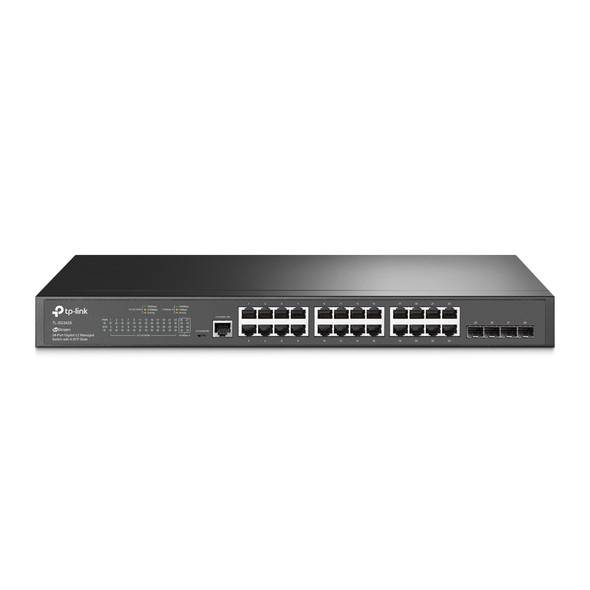

TP-Link TL-SG3428 24-Port Gigabit L2+ Managed Switch – 4× SFP, Fanless
TP-LINK