
TP-LINK
TP-Link Tapo D130 Wired Video Doorbell – 2K 5MP, AI Detection & Chime
- SKU:
- TAPOD130
- UPC:
- 1210002615624
- MPN:
- TAPO D130
- Availability:
- Free Click & Collect in Peterborough. UK delivery also available







Description
TP-Link Tapo D130 Wired Video Doorbell – 2K 5MP, 180° View, AI Detection and Chime
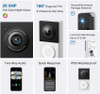
The TP-Link Tapo D130 Smart Wired Video Doorbell provides a clear head-to-toe view of visitors, deliveries and activity outside your entrance. Its 2K 5MP camera records at a maximum resolution of 2560 × 1920 pixels, while the ultra-wide 180-degree diagonal field of view and 4:3 image format help capture people and packages positioned close to the door.
Designed for continuous hardwired power, the Tapo D130 can provide live viewing, motion alerts and 24-hour local recording without the need to recharge a battery. Smart detection can distinguish between people, pets, vehicles and packages, while additional motion, line-crossing and tamper detection options help users focus notifications on relevant activity.
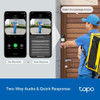
The built-in microphone and speaker support two-way audio with noise cancellation, allowing you to speak to visitors or delivery drivers through the Tapo app. Recorded quick responses can also be used when you are unable to answer directly.
An indoor Tapo chime is included, together with horizontal and vertical mounting wedges, installation accessories and wiring components. Video can be saved locally to a compatible microSD card up to 512GB or stored using the optional Tapo Care cloud subscription service.
This doorbell is suitable for customers searching for a TP-Link wired video doorbell, Tapo D130 5MP doorbell camera, video doorbell with local microSD storage, AI package-detection doorbell, 180-degree head-to-toe doorbell camera or a smart doorbell that works with Amazon Alexa and Google Assistant.
Key Features of the TP-Link Tapo D130
- 2K 5MP video resolution at up to 2560 × 1920 pixels
- 4:3 head-to-toe image format for improved vertical coverage
- 180° diagonal field of view with 172° horizontal and 144° vertical coverage
- 1/2.7-inch progressive-scan CMOS sensor
- F1.8 aperture lens for improved low-light image capture
- Colour night vision using the integrated spotlight
- 850nm infrared night vision up to approximately 10 metres
- Smart AI detection for people, pets, vehicles and packages
- Motion, line-crossing and tamper detection
- Custom activity zones for motion monitoring
- Two-way audio with noise cancellation
- Recorded quick responses for visitors and deliveries
- 16× digital zoom
- WDR and 3D noise reduction for improved image detail
- Local microSD storage up to 512GB, with card purchased separately
- 24/7 continuous recording support with a compatible microSD card
- Optional Tapo Care cloud storage, requiring a separate subscription
- RTSP support for compatible network video applications
- 2.4GHz Wi-Fi connectivity
- WPA, WPA2 and WPA3 wireless-security support
- IP65 weather-resistant construction
- Hardwired continuous power with no battery charging required
- Indoor Tapo chime included
- 15° horizontal and 5° vertical mounting wedges included
- Compatible with Amazon Alexa and Google Assistant
2K 5MP Video for Clear Doorstep Monitoring
The Tapo D130 records at a maximum resolution of 2560 × 1920 pixels. This 5-megapixel image provides more visible detail than lower-resolution Full HD doorbells, helping users inspect visitors, parcels, clothing and activity near the entrance.
Higher-resolution footage can be useful when reviewing an event after it has happened, particularly when the person or object does not remain directly in front of the camera.
Available Frame-Rate Settings
The doorbell supports selectable frame rates of 15, 20, 25 and 30 frames per second, with 15fps listed as the default setting.
A higher frame rate can provide smoother-looking movement but may use more network bandwidth and storage capacity. The best setting depends on the available Wi-Fi connection, recording requirements and installed microSD card.
H.264 Video Compression
The D130 uses H.264 video compression to reduce the amount of storage and network bandwidth required for video footage. File size and recording duration can still vary according to resolution, frame rate, scene complexity, movement and lighting conditions.
180-Degree Head-to-Toe Field of View
The camera provides an ultra-wide field of view measuring approximately:
- 180° diagonally
- 172° horizontally
- 144° vertically
The 4:3 image format provides more vertical information than many conventional 16:9 doorbell cameras. This helps the camera capture a visitor from head to toe and can make it easier to see parcels placed near the bottom of the door.
TP-Link states that the D130 can maintain a head-to-toe view even when a person is positioned approximately 0.4 metres from the camera, although the visible result depends on mounting height, door layout and the selected wedge.
Fisheye View and Distortion Correction
The extremely wide 180-degree lens can produce some fisheye distortion or darkened corners in the default live view. TP-Link provides a Distortion Correction option within the device's Video and Display settings for users who prefer a corrected image.
Correcting lens distortion may change how the outer edges of the scene appear. Users can compare both settings and select the view that works best for their doorway.
Flexible Mounting with Horizontal and Vertical Wedges
The package includes mounting options for flat installation and for adjusting the camera towards a particular area.
- Flat mounting bracket: positions the doorbell directly forwards
- 15° horizontal wedge: angles the camera towards the left or right
- 5° vertical wedge: angles the view to improve coverage of people or parcels
TP-Link confirms that the supplied wedges adjust the direction of the camera without reducing its available field of view.
Choosing the Best Mounting Position
Before drilling or applying adhesive, hold the doorbell in the proposed position and review the live image through the Tapo app where possible. Check that the camera can see:
- The approach to the entrance
- A visitor's face
- The doorstep and likely parcel location
- Any gate, path or driveway area you want to monitor
- The edge of the door without excessive wall obstruction
A door frame, wall, drainpipe or projecting brickwork can block part of the wide-angle image. The horizontal wedge can help direct the view away from an obstruction.
Colour Night Vision with Built-In Spotlight
The Tapo D130 combines a starlight-capable camera sensor with built-in spotlights to provide colour images in low-light and night-time conditions.
Colour night vision can make details such as clothing, vehicles and parcels easier to distinguish than a conventional monochrome infrared image when sufficient light is available.
Infrared Night Vision up to 10 Metres
The doorbell also includes an 850nm infrared LED with a manufacturer-listed night-vision range of up to approximately 10 metres or 30 feet.
Actual night-time visibility depends on surrounding light, reflective surfaces, weather, camera position and the object being viewed. Bright walls or reflective objects close to the lens can affect exposure.
Smart AI Detection and Notifications
The Tapo D130 uses on-device machine learning to analyse activity and provide more specific alerts than basic motion detection alone.
Supported Detection Types
- Person detection: identifies human-shaped activity near the entrance
- Pet detection: recognises supported animal activity
- Vehicle detection: identifies vehicles entering the camera's view
- Package detection: helps identify parcels placed near the doorway
- Motion detection: alerts when movement occurs in the monitored area
- Line-crossing detection: detects movement across a configured virtual line
- Tamper detection: can alert users when the camera view is interfered with
AI detection accuracy can vary according to the camera angle, distance, lighting, weather, partial obstruction and appearance of the person, pet, vehicle or package.
Activity Zones
Custom activity zones allow users to define the sections of the image that should be monitored by motion detection. This can help reduce unnecessary alerts caused by public pavements, roads, moving trees or neighbouring areas.
TP-Link specifies that activity zones apply to motion detection. Other AI detection functions can have their own available settings within the Tapo app.
Notifications and Snapshot Alerts
Standard system notifications can be sent to a compatible phone or tablet through the Tapo app. Snapshot-rich notifications are available through supported Tapo Care services and require the applicable subscription.
Notification delivery depends on the doorbell's Wi-Fi connection, internet availability, Tapo service availability and the phone's notification, battery-saving and background-app settings.
Two-Way Audio with Noise Cancellation
A built-in microphone and speaker allow users to listen and speak through the doorbell using the Tapo app.
Two-way audio can be used to:
- Speak to a visitor before opening the door
- Ask a delivery driver to leave a parcel in a suitable place
- Tell a caller that you are unavailable
- Communicate remotely when away from home
- Respond without physically approaching the entrance
Audio quality depends on network performance, wind, traffic, background noise, phone volume and the distance between the visitor and doorbell.
Recorded Quick Responses
When you cannot speak directly, a recorded quick response can be played through the doorbell speaker. This provides a convenient way to give common instructions or acknowledge a visitor through the app.
Indoor Tapo Chime Included
The package contains an indoor Tapo doorbell chime. Plug the chime into a suitable indoor power socket and configure it through the Tapo app so that the household can hear when the doorbell button is pressed.
The chime provides a selection of ringtones and allows the user to receive an audible alert inside the property without relying only on smartphone notifications.
Does the Tapo D130 Work with an Existing Wired Chime?
No. The hardwired Tapo D130 does not operate a conventional existing mechanical or electronic doorbell chime. The included Tapo wireless chime should be used instead.
When replacing an existing wired doorbell, the original chime may need to be bypassed using the supplied jumper so that the D130 receives continuous power. Follow the official installation instructions carefully.
If you are uncertain about the existing transformer, chime circuit or wiring, use a competent electrician or installer. Work involving a doorbell transformer can involve a connection to the mains electrical supply.
Hardwired Power for Continuous Operation
The Tapo D130 is a hardwired-only video doorbell. It does not contain a rechargeable battery for normal operation.
TP-Link lists the power requirement as:
- 8–24V AC
- Minimum 10VA transformer output
- 50/60Hz electrical frequency
Before ordering, check the voltage and power rating printed on the existing doorbell transformer or have the circuit inspected by a competent person.
Advantages of Hardwired Power
- No rechargeable battery to remove or recharge
- Continuous availability when the property has power
- Support for 24/7 local recording
- More consistent operation during frequent motion events
- No reduced recording mode intended to extend battery life
The doorbell will stop operating during a power cut unless the relevant transformer, router and network equipment are connected to a suitable backup power supply.
Local microSD Storage up to 512GB
The supplied Tapo indoor chime/hub includes a microSD card slot supporting compatible cards up to 512GB. The microSD card is purchased separately.
Local storage allows supported event recordings and continuous footage to be saved without requiring a Tapo Care cloud-storage subscription.
24/7 Continuous Recording
Because the D130 uses continuous wired power, it supports 24-hour recording to a compatible microSD card. When loop recording is enabled and the card becomes full, the oldest footage can be overwritten by newer recordings.
TP-Link estimates that a 512GB card can store hundreds of hours of 2K 5MP footage. Actual duration varies according to resolution, frame rate, video complexity, recording schedule and firmware settings.
Which microSD Card Should Be Used?
TP-Link currently recommends the following minimum ratings for Tapo camera and hub recording:
- Class 10 or higher
- UHS Speed Class U1 or higher
- Video Speed Class V10 or higher
- microSDHC or microSDXC format
For continuous recording, a High Endurance, Max Endurance or Pro Endurance card is recommended because surveillance recording repeatedly writes and overwrites data.
Format and initialise the card through the Tapo app before recording. Due to differences between memory-card models and production batches, compatibility with every card cannot be guaranteed.
Optional Tapo Care Cloud Storage
Tapo Care provides optional cloud-based video storage and additional supported notification features. A separate subscription is required after any applicable promotional or trial period.
Tapo Care can provide features such as:
- Cloud storage of supported event clips
- Video backup away from the doorbell location
- Notifications with snapshots on supported plans
- Playback through the Tapo app
A cloud subscription is not required for basic live view, standard notifications or compatible local microSD recording.
2.4GHz Wi-Fi Connectivity
The Tapo D130 connects through 2.4GHz IEEE 802.11b/g/n Wi-Fi. It does not connect directly to a 5GHz-only wireless network.
Many dual-band routers use one network name for both 2.4GHz and 5GHz. The router must have an active 2.4GHz band for initial setup and normal doorbell operation.
Improving the Doorbell Wi-Fi Connection
- Position the router or mesh node as close to the entrance as practical
- Avoid placing the router behind thick concrete, metal or foil-backed insulation
- Check signal strength at the mounting location before permanent installation
- Use a suitable Wi-Fi extender or mesh system where the doorway signal is weak
- Keep the router firmware and Tapo device firmware updated
- Avoid congested 2.4GHz channels where possible
Poor Wi-Fi can cause delayed notifications, slow live-view loading, interrupted two-way audio or gaps in remote access.
Wireless and Data Security
TP-Link lists the following security technologies for the D130:
- On-device machine learning
- 128-bit AES encryption
- SSL/TLS protected communication
- WPA-PSK support
- WPA2-PSK support
- WPA3 support
Users should also protect their Tapo account with a strong, unique password and enable additional account-security options where available. Keep the doorbell, Tapo app and router firmware updated.
RTSP Support for Compatible Video Systems
The Tapo D130 officially supports RTSP. This can allow a compatible third-party video application, network video recorder or monitoring system to request a live video stream from the doorbell.
RTSP compatibility depends on the third-party system, network configuration, selected stream settings and current firmware. Features such as AI alerts, doorbell calls, two-way audio and playback may still require the Tapo app.
Amazon Alexa and Google Assistant Integration
The Tapo D130 supports integration with compatible Amazon Alexa and Google Assistant ecosystems.
Available functions depend on the selected smart speaker, display, region, account linking and current platform support. Voice-assistant integration does not replace the Tapo app for installation, detailed settings, recordings or firmware updates.
IP65 Weather-Resistant Doorbell
The outdoor doorbell unit has an IP65 weather-resistance rating. This provides protection against dust and water jets, making the D130 suitable for normal outdoor doorway installation.
IP65 does not mean that the doorbell is waterproof under every condition. It should not be submerged, pressure-washed or installed where water can remain trapped around the wiring or rear mounting surface.
Operating Conditions
- Operating temperature: -20°C to 45°C
- Operating humidity: 10% to 90% RH, non-condensing
- Storage temperature: -20°C to 60°C
- Storage humidity: 5% to 90% RH, non-condensing
Installing the doorbell beneath an existing porch, canopy or sheltered doorway can provide additional protection from severe weather and direct sunlight.
Image Enhancement and Digital Zoom
The Tapo D130 supports Wide Dynamic Range and 3D digital noise reduction.
Wide Dynamic Range
WDR helps balance bright and dark parts of the image. This can be useful when a visitor is standing in shadow while the background is brightly lit.
3D Noise Reduction
3D noise reduction helps reduce grain and visual noise, particularly in low-light footage. The result depends on the available light and selected video settings.
16× Digital Zoom
Digital zoom allows users to enlarge a selected part of the image in the live view or supported playback interface. Because this is digital rather than optical zoom, enlarging the image does not add new camera detail and may make pixelation more visible.
Who Is the Tapo D130 Best For?
- Homes with suitable existing low-voltage doorbell wiring
- Users who do not want to recharge a doorbell battery
- Customers wanting 24/7 continuous local recording
- Users wanting a 4:3 head-to-toe doorstep view
- Households wanting person, pet, vehicle and package alerts
- Customers wanting local storage without a compulsory cloud subscription
- Users who want an indoor chime supplied with the doorbell
- Properties with a reliable 2.4GHz Wi-Fi connection near the entrance
- Users of compatible Amazon Alexa or Google Assistant devices
- Customers wanting RTSP support for a compatible network-video system
Who May Need a Different Video Doorbell?
The Tapo D130 may not be suitable for:
- Properties without suitable low-voltage doorbell wiring or transformer power
- Users requiring a completely wireless battery doorbell
- Customers who want to operate their existing mechanical doorbell chime directly
- Homes with only a 5GHz Wi-Fi network and no active 2.4GHz band
- Locations without reliable Wi-Fi coverage at the entrance
- Users requiring Power over Ethernet or an Ethernet network connection
- Installations where electrical wiring cannot be altered or inspected
- Customers wanting an included microSD card
How to Check Compatibility Before Ordering
- Confirm that existing low-voltage doorbell wiring is available.
- Check that the transformer output is 8–24V AC with at least 10VA.
- Confirm that a 2.4GHz Wi-Fi signal reaches the mounting position.
- Check that a suitable indoor socket is available for the included Tapo chime.
- Understand that the existing traditional chime will need to be bypassed.
- Choose whether the flat bracket, 15° horizontal wedge or 5° vertical wedge is required.
- Confirm that the outdoor mounting area is suitable for the 85 × 42.5 × 32.5mm doorbell.
- Purchase a suitable microSD card separately if local recording is required.
High-Level Installation Overview
Installation should follow the official Tapo app guidance and Quick Start Guide supplied with the product.
- Download the Tapo app and sign in to a TP-Link account.
- Switch off electrical power to the existing doorbell circuit.
- Confirm that the transformer meets the required voltage and power rating.
- Bypass the existing chime using the supplied jumper where instructed.
- Select the flat bracket or appropriate mounting wedge.
- Attach the low-voltage extension wires where required.
- Secure the mounting bracket to the wall or door frame.
- Connect the low-voltage doorbell wires to the D130.
- Attach the doorbell securely to the bracket.
- Restore power and complete Wi-Fi configuration through the Tapo app.
- Plug in and pair the supplied indoor chime.
- Test live view, alerts, audio, chime operation and recording.
If the transformer, chime wiring or electrical circuit is not clearly identified, professional installation is recommended.
Privacy and Responsible Camera Positioning
Position the doorbell so that it primarily monitors your own entrance, path and property. Avoid capturing more of neighbouring homes, private gardens or public areas than is reasonably necessary.
Users are responsible for complying with applicable privacy, data-protection, audio-recording and surveillance requirements. Consider using activity zones and privacy settings to reduce unnecessary recording.
TP-Link Tapo D130 Technical Specifications
- Brand: TP-Link / Tapo
- Model: Tapo D130
- Manufacturer Part Number: TAPO D130
- Memox SKU: TAPOD130
- GTIN / Barcode: 1210002615624
- Product Type: Smart wired video doorbell with indoor chime
- Image Sensor: 1/2.7-inch progressive-scan CMOS
- Maximum Resolution: 2K 5MP, 2560 × 1920 pixels
- Image Aspect Ratio: 4:3
- Frame Rates: 15 / 20 / 25 / 30fps
- Default Frame Rate: 15fps
- Video Compression: H.264
- Lens Focal Length: 1.18mm
- Lens Aperture: F1.8
- Diagonal Field of View: 180°
- Horizontal Field of View: 172°
- Vertical Field of View: 144°
- Digital Zoom: 16×
- Night Vision: 850nm infrared LED
- Infrared Range: Up to 10m / 30ft
- Spotlight: Built in
- Colour Night Vision: Yes
- Image Enhancement: WDR and 3DNR
- Audio: Built-in microphone and speaker
- Audio Communication: Two-way audio with noise cancellation
- Quick Responses: Yes
- Detection: Motion, line crossing, tamper, person, pet, vehicle and package detection
- Activity Zones: Yes, for motion detection
- Local Storage: microSD card up to 512GB, sold separately
- Continuous Recording: Supported
- Cloud Storage: Optional Tapo Care subscription
- Network: 2.4GHz IEEE 802.11b/g/n Wi-Fi
- 5GHz Wi-Fi: Not supported
- RTSP: Supported
- Wireless Security: WPA/WPA2-PSK/WPA3
- Data Security: 128-bit AES with SSL/TLS
- Machine Learning: On-device
- Smart Integration: Amazon Alexa and Google Assistant
- Power Source: Hardwired only
- Power Requirement: 8–24V AC, minimum 10VA
- Weather Resistance: IP65
- Operating Temperature: -20°C to 45°C
- Storage Temperature: -20°C to 60°C
- Operating Humidity: 10% to 90% RH, non-condensing
- Storage Humidity: 5% to 90% RH, non-condensing
- Doorbell Dimensions: 85 × 42.5 × 32.5mm
- Indoor Chime Dimensions: 73 × 43.5 × 46.9mm
- Certifications: CE, RoHS, FCC, EAC, UKCA, KC, ETL and IC
What Is Included?
- 1 × TP-Link Tapo D130 wired video doorbell
- 1 × Tapo indoor doorbell chime
- 1 × Mounting bracket
- 1 × 15° horizontal mounting wedge
- 1 × 5° vertical mounting wedge
- 1 × Mounting template
- 3M adhesive
- Foam pad
- Extension wires
- Jumpers for an existing chime
- Mounting screws and anchors
- Mounting-wedge screws
- Doorbell-detaching pin
- Wire nuts
- Quick Start Guide
A microSD card, doorbell transformer, smartphone, Wi-Fi router and professional installation are not included.
Important Power and Chime Information
The Tapo D130 requires continuous low-voltage hardwired power and does not operate from a rechargeable battery. Check that the transformer provides 8–24V AC and at least 10VA before installation.
The doorbell does not ring an existing conventional wired chime. Use the supplied Tapo indoor chime and install the included chime jumper as directed by TP-Link.
Important Storage Information
A microSD card is not included. For dependable continuous recording, use a genuine Class 10, U1 and V10 or faster card. An endurance-rated card is recommended for repeated security-camera recording.
Local storage does not require a Tapo Care subscription, but the optional cloud service is required for supported cloud recording and snapshot-rich notification features.
Important Network Information
The Tapo D130 connects to 2.4GHz Wi-Fi only. Confirm that the router has an active 2.4GHz network and that the signal is strong enough at the entrance before permanently mounting the doorbell.
Why Choose the TP-Link Tapo D130?
The TP-Link Tapo D130 Wired Video Doorbell combines high-resolution 2K 5MP video with a wide 180-degree head-to-toe view, helping users monitor visitors, vehicles and parcels near the entrance. Its F1.8 lens, infrared LEDs and integrated spotlight support both infrared and colour night viewing.
Smart person, pet, vehicle and package detection can provide more relevant notifications, while motion, line-crossing, tamper detection and activity zones offer additional monitoring control. Two-way audio and recorded quick responses make it possible to communicate with visitors from a compatible phone or tablet.
Continuous wired power allows 24/7 recording to a compatible microSD card without regularly charging a battery. The included Tapo indoor chime provides audible alerts inside the property, while optional Tapo Care storage, RTSP support, Alexa integration and Google Assistant compatibility provide additional flexibility.
Choose the Tapo D130 when you need a hardwired smart video doorbell with 5MP recording, local storage, AI package detection and an included indoor chime, and your property has suitable transformer power and reliable 2.4GHz Wi-Fi coverage.
Specification
TP-Link Tapo D130 Wired Video Doorbell Specifications
The TP-Link Tapo D130 is a hardwired smart video doorbell featuring 2K 5MP recording, a 180-degree diagonal head-to-toe view, colour night vision, two-way audio and smart detection for people, pets, vehicles and packages.
It connects through 2.4GHz Wi-Fi and supports local recording to a compatible microSD card up to 512GB through the supplied indoor Tapo chime. A compatible microSD card is sold separately.
General Information
| Brand | TP-Link |
|---|---|
| Product Range | Tapo |
| Product Name | TP-Link Tapo D130 Smart Wired Video Doorbell |
| Model | Tapo D130 |
| Manufacturer Part Number | TAPO D130 |
| Memox SKU | TAPOD130 |
| GTIN / UPC | 1210002615624 |
| Product Type | Smart hardwired video doorbell with indoor chime |
| Product Colour | Black and white |
| Power Type | Hardwired only |
| Rechargeable Battery | No |
Camera Specifications
| Image Sensor | 1/2.7-inch progressive-scan CMOS sensor |
|---|---|
| Maximum Video Resolution | 2K 5MP – 2560 × 1920 pixels |
| Image Aspect Ratio | 4:3 |
| Lens Focal Length | 1.18mm |
| Lens Aperture | F1.8 |
| Diagonal Field of View | 180° |
| Horizontal Field of View | 172° |
| Vertical Field of View | 144° |
| Digital Zoom | Up to 16× |
| Live View | Yes, through the Tapo app |
| Camera Controls | 1 × reset button and 1 × doorbell button |
Video Specifications
| Maximum Resolution | 2560 × 1920 pixels |
|---|---|
| Available Frame Rates | 15fps, 20fps, 25fps and 30fps |
| Default Frame Rate | 15fps |
| Video Compression | H.264 |
| Wide Dynamic Range | Yes, WDR |
| Noise Reduction | 3D digital noise reduction |
| Continuous Recording | Yes, with a compatible microSD card and continuous recording enabled |
Night-Vision Specifications
| Infrared Night Vision | Yes |
|---|---|
| Infrared Wavelength | 850nm |
| Maximum Infrared Range | Up to 10 metres / 30 feet |
| Built-In Spotlight | Yes |
| Colour Night Vision | Yes, using the integrated spotlight and available ambient light |
Detection and Notification Features
| Motion Detection | Yes |
|---|---|
| Person Detection | Yes |
| Pet Detection | Yes |
| Vehicle Detection | Yes |
| Package Detection | Yes |
| Line-Crossing Detection | Yes |
| Tamper Detection | Yes |
| On-Device Machine Learning | Yes |
| Activity Zones | Yes; TP-Link specifies activity-zone support for motion detection |
| Standard Notifications | System notifications through the Tapo app |
| Notifications with Snapshots | Available through supported Tapo Care subscription services |
Audio Specifications
| Built-In Microphone | Yes |
|---|---|
| Built-In Speaker | Yes |
| Two-Way Audio | Yes |
| Noise Cancellation | Yes |
| Recorded Quick Responses | Yes |
Local and Cloud Storage
| Local Storage | microSD card through the supplied indoor Tapo chime/hub |
|---|---|
| Maximum microSD Capacity | Up to 512GB |
| microSD Card Included | No |
| Supported Card Type | Compatible microSDHC or microSDXC card |
| Minimum Recommended Speed | Class 10, U1 and V10 or higher |
| Recommended for Continuous Recording | High Endurance, Max Endurance or Pro Endurance microSD card |
| Loop Recording | Supported when enabled; older footage can be overwritten when storage becomes full |
| TP-Link Recording Estimate | Up to approximately 390 hours of 2K 5MP footage on a 512GB card under TP-Link test conditions |
| Cloud Storage | Optional Tapo Care cloud service |
| Cloud Subscription Required | Yes, for Tapo Care cloud-storage features |
Indoor Chime Specifications
| Indoor Chime Included | Yes |
|---|---|
| Chime Functions | Provides an indoor audible alert when the doorbell is pressed |
| Chime Ringtones | Multiple ringtone choices available |
| Chime Controls | 1 × reset button and 1 × ring button |
| microSD Card Slot | 1 × microSD card slot supporting up to 512GB |
| Existing Traditional Chime Support | No; the old wired chime must be bypassed and the supplied Tapo chime used instead |
Network Specifications
| Network Connection | Wi-Fi |
|---|---|
| Wireless Standard | IEEE 802.11b/g/n |
| Wi-Fi Frequency | 2.4GHz |
| 5GHz Wi-Fi | Not supported |
| Ethernet Connection | No Ethernet port listed |
| Power over Ethernet | No |
| RTSP Support | Yes |
| ONVIF Support | Not listed in TP-Link's official D130 specification |
Security Specifications
| Data Encryption | 128-bit AES encryption with SSL/TLS |
|---|---|
| Wi-Fi Security | WPA-PSK, WPA2-PSK and WPA3 |
| AI Processing | On-device machine learning |
| Account Requirement | TP-Link ID and Tapo app required for setup and remote features |
Power Requirements
| Power Source | Existing compatible low-voltage doorbell wiring |
|---|---|
| Input Voltage | 8–24V AC |
| Minimum Transformer Rating | 10VA |
| Electrical Frequency | 50/60Hz, according to the applicable transformer supply |
| Battery Operation | No |
| Transformer Included | No |
| Existing Chime Jumper | Included to bypass a compatible existing chime circuit |
Smart-Home Compatibility
| Tapo App | Required for setup, live viewing, settings, notifications and recording access |
|---|---|
| Amazon Alexa | Compatible |
| Google Assistant | Compatible |
| Apple HomeKit | Not listed as supported |
| Matter Support | Not listed in the official D130 specification |
Mounting Specifications
| Standard Mounting Position | Flat wall or door-frame mounting |
|---|---|
| Horizontal Wedge | 15° horizontal mounting wedge included |
| Vertical Wedge | 5° vertical mounting wedge included |
| Screw Mounting | Supported; mounting screws and anchors are included |
| Adhesive Mounting | 3M adhesive included for suitable clean, smooth and hard surfaces |
| Adhesive Reuse | No; the supplied adhesive is intended for one-time use |
Weather and Environmental Specifications
| Weather-Resistance Rating | IP65 |
|---|---|
| Outdoor Doorbell Use | Yes |
| Indoor Chime Use | Indoor use only |
| Operating Temperature | -20°C to 45°C |
| Storage Temperature | -20°C to 60°C |
| Operating Humidity | 10% to 90% RH, non-condensing |
| Storage Humidity | 5% to 90% RH, non-condensing |
Dimensions
| Doorbell Dimensions | 85 × 42.5 × 32.5mm |
|---|---|
| Doorbell Dimensions in Inches | 3.35 × 1.67 × 1.28 inches |
| Indoor Chime Dimensions | 73 × 43.5 × 46.9mm |
| Indoor Chime Dimensions in Inches | 2.87 × 1.71 × 1.85 inches |
Certifications and Compliance
| UK Certification | UKCA |
|---|---|
| European Certification | CE |
| Environmental Compliance | RoHS |
| Additional Listed Certifications | FCC, EAC, KC, ETL and IC |
Package Contents
| Video Doorbell | 1 × TP-Link Tapo D130 wired video doorbell |
|---|---|
| Indoor Chime | 1 × Tapo doorbell chime with microSD card slot |
| Mounting Bracket | Included |
| Horizontal Mounting Wedge | Included |
| Vertical Mounting Wedge | Included |
| Mounting Template | Included |
| 3M Adhesive | Included |
| Foam Pad | Included |
| Extension Wires | Included |
| Existing-Chime Jumper | Included |
| Mounting Screws and Anchors | Included |
| Mounting-Wedge Screws | Included |
| Doorbell Detaching Pin | Included |
| Wire Nuts | Included |
| Quick Start Guide | Included |
| microSD Card | Not included |
| Doorbell Transformer | Not included |
Warranty
| TP-Link UK Manufacturer Warranty | 2 years for eligible Smart Home products |
|---|---|
| Warranty Eligibility | Subject to purchase from an authorised retailer, product registration and TP-Link UK's applicable warranty terms |
| Proof of Purchase | Required for warranty service |
Important Power Compatibility Note
The Tapo D130 requires a continuous 8–24V AC doorbell supply rated at a minimum of 10VA. It does not operate from a rechargeable battery.
Check the existing transformer rating before ordering. If the transformer, voltage or wiring cannot be identified safely, installation should be completed by a qualified electrician.
Important Existing-Chime Note
The D130 does not operate a conventional existing mechanical or electronic doorbell chime. The old chime must be bypassed using the supplied jumper wire so that the doorbell receives sufficient continuous power.
The supplied Tapo indoor chime should be used for audible alerts inside the property. Follow the Tapo app and official installation guide carefully.
Important microSD Storage Note
The microSD card is installed in the supplied indoor Tapo chime/hub rather than in the outdoor doorbell body. A microSD card is not included.
TP-Link recommends at least Class 10, U1 and V10 performance. An endurance-rated card is strongly recommended for continuous recording because ordinary cards can wear more quickly under repeated recording and overwriting.
Important Wi-Fi Note
The Tapo D130 connects to 2.4GHz Wi-Fi only. It does not connect directly to a 5GHz-only wireless network.
Confirm that a reliable 2.4GHz signal reaches the installation position before permanently mounting the doorbell. Weak Wi-Fi can affect live view, notifications, audio and remote access.
Important Detection Note
AI detection performance can vary according to lighting, weather, viewing angle, distance, obstruction and the appearance of the person, pet, vehicle or parcel.
Detection alerts should assist with monitoring but should not be treated as guaranteed identification of every event.
Important Weather-Resistance Note
The outdoor doorbell carries an IP65 weather-resistance rating. It is protected against dust and water jets but should not be submerged, pressure-washed or installed where water can remain trapped behind the unit.
The supplied plug-in chime is intended for indoor use only.
Important Privacy Note
Position the doorbell so that it monitors your own entrance and property as far as reasonably possible. Avoid recording more of neighbouring homes, private gardens or public areas than is necessary.
The owner and installer are responsible for complying with applicable privacy, audio-recording, surveillance and data-protection requirements.
Return
FAQ: Frequenlty Asked Questions
TP-Link Tapo D130 Wired Video Doorbell FAQ
The TP-Link Tapo D130 is a hardwired 2K 5MP smart video doorbell with a 180° diagonal head-to-toe view, colour night vision, person, pet, vehicle and package detection, two-way audio, an included indoor Wi-Fi chime and optional local microSD recording up to 512GB.
Below are the most common questions buyers ask before choosing the Tapo D130, including transformer compatibility, existing chime wiring, 2.4GHz Wi-Fi, microSD cards, 24/7 recording, Tapo Care, Alexa and Google integration, RTSP/ONVIF, notification delays, mounting wedges, night vision and troubleshooting.
1. What is the TP-Link Tapo D130?
The Tapo D130 is a hardwired smart video doorbell with a 2K 5MP camera, 180° diagonal field of view, colour night vision, two-way audio, AI detection, local microSD recording and an included indoor Wi-Fi chime. It is designed for continuous power rather than battery operation.
2. Is the Tapo D130 a wired or battery-powered doorbell?
It is a hardwired-only model. The D130 does not contain a rechargeable battery, so it must remain connected to a compatible low-voltage AC or DC power supply.
3. What power supply does the Tapo D130 require?
TP-Link's current compatibility guidance lists 8–24V AC at a minimum of 10VA, 50/60Hz, or 10–24V DC at a minimum of 10W. Check the transformer or adapter label and have the wiring tested if the rating is unclear.
4. Is a doorbell transformer included in the box?
No transformer or mains power adapter is listed in the standard package contents. The box includes the doorbell, wireless chime and mounting accessories, but you need compatible existing wiring or a separately purchased suitable power supply.
5. Can I install the Tapo D130 without an existing doorbell system?
Yes, provided a compatible low-voltage transformer or DC adapter is installed to supply continuous power. Do not connect the D130 directly to UK 230V mains electricity. Use a qualified electrician if you are unsure how to provide the required low-voltage supply.
6. Can the D130 use my existing doorbell wires?
Usually, if the wiring is in good condition and the transformer meets the required voltage and power. Measure or verify the transformer output before installation because an underpowered transformer can cause restarts, connection problems or unreliable operation.
7. Will my existing mechanical or wired chime still ring?
No. TP-Link states that the D130 does not operate an existing mechanical or wired chime. The old chime is normally bypassed with the supplied jumper wires so the video doorbell receives constant power.
8. What are the supplied jumper wires for?
The jumpers bypass the original wired chime in a traditional doorbell circuit. This prevents the old chime from repeatedly triggering and helps provide continuous power to the D130. Follow the Tapo app and installation guide carefully.
9. Does the Tapo D130 include an indoor chime?
Yes. A Tapo wireless indoor chime is included. Plug it into a suitable indoor socket, connect it to Wi-Fi and pair it with the D130 through the Tapo app.
10. How far can the included Tapo chime be from the doorbell?
The Tapo chime communicates through Wi-Fi rather than directly through the old doorbell wire. It can be placed wherever it has suitable Wi-Fi and internet access. Performance therefore depends more on network coverage than a fixed doorbell-to-chime distance.
11. Can I add more than one Tapo chime?
Yes. TP-Link supports pairing additional compatible Tapo chimes or supported Tapo hubs through Device Settings > Doorbell > Paired Chimes. This can help make the doorbell audible on multiple floors or in larger homes.
12. Can I use a Kasa, Ring, Eufy or generic wireless chime?
Not as a direct replacement for the included Tapo chime. TP-Link states that Kasa and Tapo chimes use different protocols, and third-party doorbell chimes are not directly interchangeable. Compatible Alexa or Google speakers may be configured for announcements.
13. Will the chime still ring if the internet connection fails?
If the D130 and chime remain connected to the same working local Wi-Fi network, TP-Link says the chime can continue ringing even when internet access is unavailable. Remote notifications and cloud-dependent functions will not work until internet access returns.
14. Does the Tapo D130 need a separate Tapo hub?
No. The D130 connects directly to 2.4GHz Wi-Fi and includes its own plug-in chime. A separate hub is not required for normal operation, although selected Tapo hubs may offer extra storage or chime functions subject to current firmware compatibility.
15. What video resolution does the Tapo D130 record?
It supports up to 2K 5MP resolution at 2560 × 1920 pixels. This provides more detail than standard 1080p video, although final clarity still depends on lighting, Wi-Fi quality, camera position and video settings.
16. Is 2K 5MP the same as 4K?
No. The D130's maximum resolution is 2560 × 1920, which TP-Link describes as 2K 5MP. It is higher than 1080p but lower than 4K or 8MP video.
17. What aspect ratio does the D130 use?
It uses a 4:3 image shape. This taller frame is intended to show visitors from head to toe and make it easier to see parcels placed close to the door than a wider 16:9 view.
18. What is the Tapo D130 field of view?
TP-Link lists 180° diagonal, 172° horizontal and 144° vertical field of view. The very wide fisheye lens is designed to cover the doorway, surrounding area and ground close to the camera.
19. Can the D130 see a visitor standing close to the door?
Yes. TP-Link states that the head-to-toe 4:3 view can retain a complete view when a visitor is approximately 0.4 metres away, although the result depends on mounting height, wall position and wedge selection.
20. What mounting wedges are included?
The package includes a 15° horizontal wedge and a 5° vertical wedge. The horizontal wedge turns the view left or right, while the vertical wedge can angle the camera to improve parcel and ground coverage.
21. Do the wedges reduce the camera's field of view?
The wedges redirect the view rather than changing the lens specification. TP-Link says they do not reduce the doorbell's stated viewing field, but nearby walls or door frames may block part of the image after the angle is changed.
22. Can I mount the Tapo D130 upside down?
The intended installation is vertical and upright. TP-Link provides an Invert Image setting for unusual installations, but the physical button position, drainage and cable routing should still be considered before mounting it upside down.
23. Why are the four corners of the video dark or rounded?
The D130 uses an extremely wide 180° fisheye lens, so some corner vignetting can appear in the default image. TP-Link provides a Distortion Correction option under Device Settings > Video & Display to reduce this appearance.
24. What frame rates does the Tapo D130 support?
TP-Link lists 15, 20, 25 and 30 frames per second, with 15fps as the default. Higher frame rates can make motion look smoother but may use more network bandwidth and storage.
25. Does the D130 provide colour night vision?
Yes. Its starlight sensor and built-in spotlight can provide colour detail in low light. It also includes 850nm infrared night vision for situations where visible illumination is not preferred.
26. How far does the infrared night vision reach?
TP-Link lists infrared night vision up to approximately 10 metres or 30 feet. Real range and image quality depend on ambient light, reflective surfaces, weather, camera angle and obstructions.
27. Can the built-in spotlight be controlled?
The spotlight is used to support full-colour night viewing and may be managed through the Tapo app's night-vision and lighting settings, depending on the installed firmware. Position the doorbell so the light does not reflect strongly from a nearby wall or glass panel.
28. Does the Tapo D130 have digital zoom?
Yes. TP-Link lists up to 16× digital zoom. Digital zoom enlarges existing pixels rather than adding optical detail, so image quality decreases as magnification increases.
29. What video format does the D130 use?
TP-Link lists H.264 video compression. H.264 balances picture quality, storage use and compatibility with local recording, RTSP and many third-party viewing systems.
30. What can the D130 AI detection recognise?
It supports motion, person, pet, vehicle and package detection, plus line-crossing and tamper detection. Feature availability and behaviour can change with app and firmware updates.
31. Does package detection require a Tapo Care subscription?
TP-Link lists package detection as an on-device AI detection feature. A Tapo Care plan is not required for basic supported AI detection, although cloud plans can add cloud clip history, snapshot-rich notifications and backup features.
32. How can I improve package detection?
Use the 5° vertical wedge if needed, keep the parcel area inside the lower part of the 4:3 frame, avoid strong backlighting and configure suitable detection zones and sensitivity. Packages hidden behind walls, bins or an open door may not be detected reliably.
33. Can I create activity zones?
Yes. Activity zones let you focus motion monitoring on selected areas. TP-Link notes that the D130's activity-zone function works with motion detection, so review the individual AI detection settings separately.
34. What is line-crossing detection?
Line-crossing detection alerts when movement crosses a virtual line you define in the image. It can be useful for a gate, path or driveway entrance, but positioning and sensitivity should be tested to reduce alerts from shadows, trees or passing traffic.
35. What is tamper detection on the D130?
Tamper detection is intended to notify you when the camera view is obstructed or significantly interfered with. It should not be treated as a guarantee against theft, so use secure mounting and consider cloud or remote storage for important footage.
36. How can I reduce false motion alerts?
Create activity zones, lower sensitivity, disable unnecessary detection types and avoid including busy roads, moving trees or reflective surfaces. Allow time to test settings in daylight, darkness and poor weather because one sensitivity level may not suit every condition.
37. Can I receive alerts only when somebody presses the button?
Yes. TP-Link advises disabling motion and AI detection notifications if you only want doorbell-press alerts. Detection recording can be configured separately if you still want events saved without receiving every push notification.
38. What is the Doorbell Video Call or Ring Call feature?
When enabled on a phone, a doorbell press can appear as a more prominent incoming video-call screen with ringing and vibration instead of only a standard push notification. Each phone controls this setting independently.
39. Does the Tapo D130 support two-way audio?
Yes. It has a built-in microphone and speaker with two-way audio and noise cancellation, allowing you to speak to a visitor through the Tapo app.
40. Does it support recorded quick responses?
Yes. Quick Response lets you play a prepared message when you cannot speak live, which can be useful for deliveries. The available messages and customisation options depend on the current app and firmware.
41. Why is two-way audio quiet, delayed or unclear?
Check the phone volume, microphone permissions, D130 microphone and speaker settings, and Wi-Fi signal. Network latency can create delay or speech overlap. Keep the doorbell microphone clear of water, dirt and sealant, and update the app and firmware.
42. What size microSD card does the Tapo D130 support?
It supports a microSD card of up to 512GB. The card is purchased separately, and actual usable capacity is lower after formatting.
43. Where is the microSD card installed?
The microSD card slot is on the D130 doorbell camera itself, not inside the plug-in chime. Detach the doorbell from its mounting bracket with the supplied pin to access the relevant controls and card area.
44. Is a microSD card included?
No. TP-Link lists microSD storage as optional and the card is sold separately.
45. What type of microSD card should I buy?
TP-Link recommends at least Class 10, U1 or V10 and strongly recommends High Endurance, Max Endurance or Pro Endurance cards for continuous recording. Endurance cards are designed for repeated video writing and are generally more suitable than basic phone-storage cards.
46. Which microSD capacity is best for the D130?
Choose according to recording mode and retention needs. A smaller card may be adequate for motion-only clips, while 128GB, 256GB or 512GB is more practical for continuous recording. A larger card stores more history before older footage is overwritten.
47. Can the Tapo D130 record continuously 24 hours a day?
Yes. Because it is continuously powered, the D130 supports 24/7 recording to a compatible microSD card. Enable Local Recording and create a Continuous Recording schedule in the Tapo app.
48. How much footage can a 512GB card hold?
TP-Link estimates up to approximately 390 hours of 2K 5MP footage on a 512GB card. This is an estimate rather than a guarantee because frame rate, scene complexity, audio, firmware and recording settings affect storage use.
49. What is the difference between continuous and detection recording?
Continuous recording writes video throughout the selected schedule, while detection recording saves clips when configured events occur. Continuous recording provides a complete timeline but uses card capacity and write cycles more quickly.
50. How do I format a microSD card for the D130?
Insert a compatible card, open the D130 in the Tapo app and use Device Settings > Storage & Recording > microSD Card to format it. Formatting deletes existing data, so back up anything important first.
51. What should I do if the microSD card is not recognised?
Update the Tapo app and doorbell firmware, power down safely, reseat the card and try formatting it in the app. Test another compatible High Endurance card and verify the original card with a computer. Counterfeit, worn or unsupported cards commonly cause format failures.
52. Does the D130 automatically overwrite old recordings?
Yes, when loop recording is enabled and the card becomes full, the system can overwrite the oldest footage with new recordings. Download or export important clips before they are replaced.
53. Can I use the Tapo D130 without paying a monthly subscription?
Yes. Live view, supported local AI detection, two-way audio and microSD recording can be used without a Tapo Care subscription. You still need a compatible microSD card for local recorded-video storage.
54. What does Tapo Care add?
Tapo Care is an optional cloud subscription that can provide cloud video history, snapshot-rich notifications, encrypted cloud backup and other plan-dependent features. Prices, retention periods and features vary by country and plan.
55. Is local microSD storage better than cloud storage?
Local storage avoids a mandatory monthly fee and can support continuous recording, while cloud storage keeps clips away from the doorbell if the unit or card is stolen or damaged. Some buyers use local storage for the main timeline and cloud storage for important event backup.
56. Will the D130 keep recording if the internet goes down?
After setup, microSD recording can continue while the doorbell remains powered and connected to the local router, but remote access, push notifications, cloud services and time synchronisation may be unavailable until internet access returns.
57. What Wi-Fi network does the Tapo D130 use?
It connects through IEEE 802.11b/g/n on the 2.4GHz band. It does not require an Ethernet data cable.
58. Does the D130 support 5GHz Wi-Fi?
No. TP-Link lists 2.4GHz Wi-Fi only. If your router combines 2.4GHz and 5GHz under one network name, setup may still work, but the router must allow the D130 to connect to its 2.4GHz band.
59. Does the Tapo D130 support Ethernet or Power over Ethernet?
No. Power is supplied through low-voltage doorbell wiring, while network connectivity is through 2.4GHz Wi-Fi. It does not have an Ethernet or PoE port.
60. What internet speed is recommended?
TP-Link's D130 FAQ recommends at least 3Mbps upload speed on the 2.4GHz Wi-Fi network. More bandwidth may be needed when several cameras, live streams or cloud uploads operate simultaneously.
61. How can I improve a weak or delayed D130 connection?
Check Wi-Fi signal strength at the doorway, move the router or mesh node closer, reduce interference and avoid placing the router behind dense walls or metal objects. Test 2.4GHz coverage outside before permanent installation.
62. Why did the D130 go offline after I changed my router?
It may still be trying to join the old Wi-Fi name and password. You can configure the new router with the same SSID, security and password, or reset the D130's Wi-Fi settings and set it up again in the Tapo app.
63. Does the Tapo D130 work with Amazon Alexa?
Yes. TP-Link lists Amazon Alexa compatibility. Depending on the Alexa device and regional support, you can view the stream on a compatible display and configure doorbell-press or detection announcements.
64. Does the D130 work with Google Assistant or Google Home?
Yes. TP-Link lists Google Assistant compatibility. You can link the Tapo service and view the camera on supported Nest or Chromecast displays. Google live streams may stop automatically after a limited period and can be requested again.
65. Does the Tapo D130 support Apple HomeKit?
Native Apple HomeKit or HomeKit Secure Video support is not listed for the D130. TP-Link provides some Siri Shortcuts integration for Tapo services, but this is not the same as native HomeKit doorbell integration.
66. Does the D130 support IFTTT?
TP-Link lists the D130 among Tapo devices supported by its IFTTT service. Available triggers and actions can change, so check the current Tapo and IFTTT app options before planning a critical automation.
67. Does the Tapo D130 support RTSP and ONVIF?
Yes. TP-Link's product FAQ confirms both RTSP and ONVIF support, allowing compatible software, NAS devices and NVRs to access the video stream after a camera account is configured.
68. Can I record the D130 to a NAS or NVR?
Potentially, using compatible ONVIF or RTSP software. Compatibility, audio, event handling and recording reliability depend on the third-party NAS or NVR. TP-Link recommends the official Tapo app for full device management.
69. Can several family members use the doorbell?
Yes. The owner can share Tapo cameras and doorbells with up to five other TP-Link accounts under TP-Link's current sharing guidance. Shared users have limited permissions and cannot change every owner setting or access the owner's Tapo Care storage.
70. Can I view the D130 on a Windows PC?
There is no full Tapo desktop app equivalent to the mobile app. For computer viewing, compatible third-party software can use the D130's RTSP or ONVIF stream, but configuration and supported features differ from the Tapo app.
71. How is D130 video protected?
TP-Link lists on-device machine learning, 128-bit AES encryption with SSL/TLS and WPA/WPA2-PSK/WPA3 support. Use a strong unique TP-Link password, enable two-factor authentication and keep the doorbell, app and router firmware updated.
72. Can I block part of the camera view for privacy?
Yes. Privacy Zones can mask selected parts of the image from viewing and monitoring. This can help avoid filming a neighbour's window or an area outside your property, but local privacy and surveillance rules still apply.
73. Is the Tapo D130 weatherproof?
It has an IP65 rating, meaning it is designed to resist dust and water jets such as normal rain. It is not intended for immersion, pressure washing or installation where water can collect behind the unit.
74. What temperature range can the D130 operate in?
TP-Link lists an operating temperature of -20°C to 45°C and operating humidity of 10% to 90% RH, non-condensing. Direct sunlight, poor ventilation and extreme weather can still affect temperature and performance.
75. What are the dimensions of the doorbell and chime?
The doorbell measures approximately 85 × 42.5 × 32.5mm. The included chime measures approximately 73 × 43.5 × 46.9mm, excluding the space needed around the socket and plug.
76. Can the D130 be attached with adhesive instead of screws?
The package includes 3M adhesive as well as screws, anchors, a foam pad and mounting bracket. Screws are generally more secure for long-term outdoor installation, while adhesive suitability depends on the surface, weather exposure and landlord permission.
77. What is included in the Tapo D130 box?
TP-Link lists the wired D130 doorbell, Tapo chime, mounting bracket, horizontal and vertical wedges, mounting template, 3M adhesive, foam pad, extension wires, chime jumpers, screws, anchors, wire nuts, detaching pin and quick-start guide.
78. Is the Tapo D130 easy to install?
The app provides guided installation, but the physical job involves identifying a compatible transformer, isolating power, bypassing the old chime and securing low-voltage wiring. It is straightforward for an experienced installer but not completely wire-free.
79. Should I use an electrician to install the D130?
Use a qualified electrician if you cannot safely identify the transformer, verify voltage, isolate the circuit or route suitable low-voltage wiring. Never connect the doorbell directly to mains electricity.
80. Which phones support the Tapo app?
TP-Link's product specification lists iOS 9.0 or later and Android 4.4 or later, but app-store requirements can increase over time. Check the current Apple App Store or Google Play listing before purchase if your phone is old.
81. Do I need a TP-Link account to set up the D130?
Yes. Initial setup and remote app access use a TP-Link ID in the Tapo app. An internet connection is required for first-time configuration and cloud-connected functions.
82. What should I check if the D130 shows a red light or will not complete setup?
Confirm that the power supply meets the minimum rating, wait for startup to finish, check 2.4GHz Wi-Fi and phone permissions, and restart the router and doorbell. If setup stalls, manually join the temporary Tapo Wi-Fi network when prompted and retry.
83. How do I reset the Tapo D130?
Detach it with the supplied pin and locate the RESET button. TP-Link's current guidance says holding RESET for about 5 seconds resets Wi-Fi settings, while holding it for about 10 seconds restores factory settings. A factory reset removes the existing configuration.
84. How do I update the D130 firmware?
Open the D130 in the Tapo app, enter Device Settings and check Firmware Update. Keep the doorbell powered and connected during the update. Firmware can add features, improve detection and correct connection or security issues.
85. Tapo D130 vs Tapo D230S1: which should I choose?
Choose the D130 when you have compatible wiring and want continuous power, direct microSD storage and 24/7 recording. The D230S1 is a battery-operated doorbell kit designed for locations where wiring is inconvenient, but it requires charging and does not use hardwiring to recharge its battery.
86. Tapo D130 vs Tapo D210: which is better?
The D130 is the stronger choice for existing low-voltage wiring and uninterrupted 24/7 recording. The D210 is a battery doorbell intended for easier wire-free placement. Compare current resolution, field of view, AI features, storage location and charging requirements before choosing.
87. Tapo D130 vs Tapo D225: what is the difference?
The D130 is hardwired-only and includes a compact wired-doorbell design with 5MP video and microSD storage on the camera. The D225 can operate from its battery or compatible wiring and is better where flexible power is needed. Exact regional features and package contents should be checked on the relevant product page.
88. Is the Tapo D130 suitable for a flat or rented property?
It can be, but it requires continuous low-voltage power and a secure mounting position. Tenants should obtain permission before drilling, changing a transformer or bypassing a shared chime. A battery doorbell may be easier where permanent wiring changes are not allowed.
89. Who is the Tapo D130 best for?
It is best for homeowners with compatible doorbell wiring who want 2K 5MP head-to-toe video, local microSD storage, optional continuous recording, free supported AI alerts, an included indoor chime and Alexa or Google integration.
90. Who is the Tapo D130 not suitable for?
It is not ideal for homes without a safe power route, renters who cannot alter wiring, buyers needing a battery doorbell, 5GHz Wi-Fi, PoE, a working traditional wired chime or native Apple HomeKit. It also requires a separately purchased microSD card for local recordings.
