
TP-LINK
TP-LINK (CPE710) 5GHz AC 867Mbps 23DBI 23dBi Outdoor CPE Wireless Access Point, Passive PoE, Weatherproof
- SKU:
- CPE710
- UPC:
- 6935364053345
- MPN:
- CPE710
- Availability:
- Free Click & Collect in Peterborough. UK delivery also available.



Description
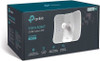
TP-Link CPE710 5GHz AC 867Mbps 23dBi Outdoor CPE – Directional Wireless Access Point with Passive PoE
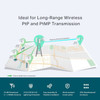
The TP-Link CPE710 is a high-performance 5GHz outdoor wireless CPE designed for long-distance point-to-point and point-to-multipoint network links. With 802.11ac wireless speeds up to 867Mbps, a powerful 23dBi high-gain directional antenna, IP65 weatherproof housing and Passive PoE support, it is built for outdoor wireless bridging between buildings, CCTV networks, farm networks, business premises, warehouses and remote network locations.
This TP-Link CPE710 outdoor access point is ideal for customers searching for a 5GHz outdoor CPE, 867Mbps wireless bridge, 23dBi directional access point, Passive PoE outdoor wireless AP, TP-Link Pharos CPE, point-to-point wireless bridge, or a weatherproof long-range WiFi solution for business and outdoor networking.
Key Features of the TP-Link CPE710 Outdoor CPE
- 5GHz 802.11ac wireless performance with speeds up to 867Mbps
- 23dBi high-gain directional antenna for long-distance outdoor links
- 2×2 MIMO directional design for improved wireless performance
- IP65 weatherproof enclosure for outdoor installation
- 15kV ESD protection and 6kV lightning protection for outdoor reliability
- 1 × Gigabit shielded Ethernet LAN/PoE port
- Passive PoE support for easier outdoor power and data installation
- Pharos Control support for centralised network management
- Excellent beam directivity for focused outdoor wireless links
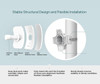
- Snap-lock design for faster assembly and stable mounting
- Ideal for point-to-point and point-to-multipoint outdoor networking
Long-Range Outdoor Wireless Bridge for 5GHz Networks
The TP-Link CPE710 is designed for outdoor wireless transmission where running a physical network cable may be difficult, expensive or impractical. It is commonly used to connect two buildings, extend a network to an outbuilding, link CCTV cameras, connect farm offices, join warehouse units or create a wireless bridge across open spaces.
23dBi Directional Antenna for Focused Wireless Links
The built-in 23dBi directional antenna helps focus the wireless signal in a narrow direction rather than broadcasting widely in all directions. This makes the CPE710 more suitable for targeted outdoor links where the two devices are aligned toward each other with a clear line of sight.
867Mbps 5GHz AC Wireless Performance
The CPE710 supports IEEE 802.11ac wireless performance on the 5GHz band, with wireless data rates up to 867Mbps. The 5GHz frequency helps reduce congestion compared with busy 2.4GHz environments and is well suited to point-to-point outdoor bridging where line-of-sight installation is possible.
Performance Depends on Installation Conditions
Outdoor wireless performance depends on distance, antenna alignment, local interference, channel selection, mounting height, obstacles, weather conditions and regional transmit power limits. For the best results, the CPE710 should normally be installed with clear line of sight between devices.
Weatherproof Outdoor Design
The TP-Link CPE710 uses a durable IP65-rated weatherproof enclosure, helping protect the device against dust and water exposure in outdoor installations. It also includes 15kV ESD protection and 6kV lightning protection, making it more suitable for outdoor network deployments than standard indoor access points.
Outdoor Installation Advice
For outdoor use, the device should be securely mounted, correctly aligned, and installed with suitable grounding, weatherproof cabling and surge protection where required. Professional installation may be recommended for business, CCTV, farm or long-distance building-to-building links.
Passive PoE for Easier Installation
The CPE710 uses Passive Power over Ethernet, allowing power and data to be carried through a single Ethernet cable to the outdoor unit. This makes installation easier because the device can be mounted outside while the power adapter or injector is kept indoors or in a protected location.
Passive PoE Compatibility Notice
This model uses Passive PoE, not standard IEEE 802.3af/at PoE. Always use the correct compatible passive PoE adapter or power source and check voltage requirements before installation.
Pharos Control Centralised Management
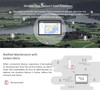
The TP-Link CPE710 is part of TP-Link’s Pharos outdoor wireless range and supports Pharos Control, giving administrators a way to manage compatible Pharos devices centrally. This is useful for installers and businesses managing multiple outdoor links or wireless bridge deployments.
Common Uses for the TP-Link CPE710
- Building-to-building wireless bridge links
- Outdoor point-to-point network connections
- Point-to-multipoint outdoor wireless coverage
- CCTV camera network backhaul
- Farm, yard and rural network links
- Warehouse and industrial unit connectivity
- Connecting remote offices, workshops or outbuildings
- Business networks where cable installation is difficult
Who Is the TP-Link CPE710 Best For?
- Installers creating outdoor wireless bridge links
- Small businesses linking two buildings wirelessly
- CCTV installers needing outdoor network backhaul
- Farms, workshops and yards needing long-range connectivity
- Users needing a 5GHz directional outdoor CPE
- Network administrators managing multiple Pharos devices
- Customers who need a weatherproof wireless access point for outdoor links
TP-Link CPE710 Outdoor CPE Specifications
- Brand: TP-Link
- Model: CPE710
- Product Type: 5GHz outdoor CPE / directional wireless access point
- Wireless Standard: IEEE 802.11a/n/ac
- Wireless Band: 5GHz
- Wireless Speed: Up to 867Mbps
- Antenna Gain: 23dBi directional antenna
- Antenna Beamwidth: 9° azimuth / 7° elevation
- Processor: Qualcomm 750MHz CPU, MIPS 74Kc
- Memory: 128MB DDR2 RAM, 16MB flash
- Ethernet Interface: 1 × 10/100/1000Mbps shielded Ethernet port, LAN/PoE
- Power Method: Passive Power over Ethernet via LAN
- Voltage Range: 16–27V DC
- Maximum Power Consumption: 7.3W max
- Weatherproof Rating: IP65
- Protection: 15kV ESD protection and 6kV lightning protection
- Management: Pharos Control centralised management
- Reset Button: Yes
- Dimensions: 366 × 280 × 207mm
- Typical Package Contents: Outdoor wireless CPE, 24V passive PoE adapter, pole mounting kits, AC power cord and installation guide
Buying Advice
Before ordering, please note that the TP-Link CPE710 is a directional outdoor CPE, not a normal indoor WiFi router for whole-home coverage. For a building-to-building wireless bridge, you will usually need two compatible CPE units, one at each end of the link. Performance depends heavily on clear line of sight, correct alignment, installation height, interference levels and local wireless regulations.
Why Buy the TP-Link CPE710 5GHz Outdoor CPE?
The TP-Link CPE710 5GHz AC 867Mbps 23dBi Outdoor CPE is a strong choice for long-distance outdoor wireless networking. With a high-gain 23dBi directional antenna, 867Mbps 5GHz AC wireless speed, IP65 weatherproof housing, Passive PoE, Gigabit Ethernet, ESD and lightning protection, plus Pharos Control management, it offers a practical solution for outdoor point-to-point links, CCTV backhaul, business networks and building-to-building connectivity.
Specification
TP-Link CPE710 5GHz AC 867Mbps 23dBi Outdoor CPE Specifications
| Product Type | Outdoor CPE / Directional Wireless Access Point |
| Brand | TP-Link |
| Model | CPE710 |
| Product Series | TP-Link Pharos Outdoor CPE |
| Wireless Band | 5GHz |
| Wireless Standards | IEEE 802.11a/n/ac |
| WiFi Class | AC867 / WiFi 5 |
| Maximum Wireless Speed | Up to 867Mbps on 5GHz |
| MIMO | 2×2 MIMO |
| Antenna Type | Built-In High-Gain Directional Antenna |
| Antenna Gain | 23dBi |
| Antenna Beamwidth | 9° Azimuth / 7° Elevation |
| Processor | Qualcomm 750MHz CPU, MIPS 74Kc |
| Memory | 128MB DDR2 RAM, 16MB Flash |
| Ethernet Interface | 1 × 10/100/1000Mbps Shielded Ethernet Port |
| Port Function | LAN / Passive PoE |
| Power Method | Passive Power over Ethernet via LAN |
| Passive PoE Pinout | +4,5 Pins / -7,8 Pins |
| Voltage Range | 16–27V DC |
| Maximum Power Consumption | 7.3W Max |
| Weatherproof Rating | IP65 |
| Outdoor Protection | 15kV ESD Protection and 6kV Lightning Protection |
| Management | Pharos Control Centralised Management |
| Reset Button | Yes |
| Installation Type | Outdoor Pole / Directional Mounting |
| Product Dimensions | 366 × 280 × 207mm |
| Typical Package Contents | Outdoor Wireless CPE, 24V 0.5A Passive PoE Adapter, Pole Mounting Kits, AC Power Cord and Installation Guide |
Directional CPE Notice
The TP-Link CPE710 is a directional outdoor CPE, not a normal indoor WiFi router or whole-home mesh unit. It is designed for focused 5GHz outdoor links such as building-to-building wireless bridge connections.
Bridge Installation Notice
For a point-to-point wireless bridge, customers will usually need two compatible CPE units, one at each end of the link. Performance depends on clear line of sight, antenna alignment, mounting height, local interference, channel selection and regional wireless regulations.
Passive PoE Notice
This model uses Passive PoE with a 16–27V DC range. It is not the same as standard IEEE 802.3af/at PoE. Use only a compatible passive PoE adapter or power source.
Outdoor Installation Notice
The CPE710 has an IP65 weatherproof enclosure plus 15kV ESD and 6kV lightning protection. For outdoor installation, use suitable mounting, grounding, shielded outdoor cabling and surge protection where required.
Return
FAQ: Frequently Asked Questions
TP-Link CPE710 5GHz AC 867Mbps 23dBi Outdoor CPE FAQ
The TP-Link CPE710 is a professional 5GHz outdoor CPE wireless access point designed for long-distance wireless links, point-to-point bridging, outbuilding internet, farm networks, CCTV connections, business premises, warehouses, barns, garden offices and outdoor network extensions. It features a 23dBi high-gain directional antenna, 802.11ac 867Mbps wireless speed, Gigabit Ethernet, passive PoE, IP65 weatherproof housing, and TP-Link Pharos management. Below are the most common questions buyers ask before choosing this TP-Link CPE710 5GHz AC867 23dBi outdoor CPE, including point-to-point setup, range, line-of-sight, passive PoE, weatherproofing, bridge mode, access point mode, client mode, CCTV use, barn WiFi, outbuilding internet, alignment and who this product is best suited for.
1. What is the TP-Link CPE710?
The TP-Link CPE710 is a 5GHz outdoor CPE wireless access point designed for long-distance wireless networking. It is commonly used to create point-to-point or point-to-multipoint wireless links between buildings, outdoor areas, CCTV locations, barns, offices and remote network points.
2. What is the TP-Link CPE710 best used for?
The TP-Link CPE710 is best used for building-to-building wireless links, outbuilding internet, barn WiFi, farm networking, CCTV camera links, warehouse connections, garden office internet, remote access points and long-distance 5GHz wireless bridges where running Ethernet cable is difficult.
3. Is the TP-Link CPE710 an outdoor access point?
Yes. The TP-Link CPE710 is designed for outdoor use. It has an IP65 weatherproof enclosure and is built for outdoor wireless installations when properly mounted, grounded and protected according to the installation guide.
4. Is the TP-Link CPE710 a router?
The TP-Link CPE710 is not mainly sold as a normal home WiFi router. It is an outdoor CPE/access point designed for directional wireless links. It can support different operation modes, but most buyers use it as part of a bridge or outdoor wireless link rather than as a standard indoor router.
5. What does CPE mean?
CPE stands for Customer Premises Equipment. In outdoor wireless networking, a CPE is usually a directional wireless device installed at a building, pole or outdoor location to connect to another access point or CPE over distance.
6. What WiFi speed does the TP-Link CPE710 support?
The TP-Link CPE710 supports 802.11ac wireless speeds up to 867Mbps on the 5GHz band. Real-world throughput will be lower and depends on distance, line-of-sight, interference, channel width, alignment and network conditions.
7. Is the TP-Link CPE710 dual-band?
No. The TP-Link CPE710 is a 5GHz outdoor CPE. It does not provide 2.4GHz WiFi. It is designed for faster, directional 5GHz links rather than broad indoor dual-band WiFi coverage.
8. What does 23dBi mean on the TP-Link CPE710?
23dBi refers to the gain of the built-in directional antenna. A higher-gain antenna focuses the wireless signal into a narrow beam, helping the CPE710 create stronger long-distance links when aimed correctly.
9. Is the TP-Link CPE710 directional?
Yes. The CPE710 uses a high-gain directional antenna, meaning it sends and receives signal in a focused direction. It must be aimed carefully at the other wireless device for best performance.
10. Can the TP-Link CPE710 provide WiFi around my garden?
It can provide a directional outdoor wireless signal, but it is not the best choice for wide garden WiFi coverage because its beam is narrow. For general garden WiFi, an outdoor omnidirectional access point may be more suitable. The CPE710 is best for targeted links between locations.
11. Do I need two TP-Link CPE710 units?
For a point-to-point bridge between two buildings, yes, you normally need two compatible outdoor wireless devices: one at each end of the link. A single CPE710 can connect to another compatible access point, but two matched units are usually easier to configure and align.
12. Can I use just one TP-Link CPE710?
Yes, but it depends on the setup. One CPE710 can be used as an access point, client or part of a point-to-multipoint setup. However, for a simple building-to-building bridge, most users buy two units so one sends and the other receives the wireless link.
13. What is a point-to-point wireless bridge?
A point-to-point wireless bridge connects two locations wirelessly, such as a house and a barn, office and warehouse, or main building and outbuilding. It works like an invisible Ethernet cable between the two points when configured correctly.
14. Is the TP-Link CPE710 good for connecting a house to a garage or shed?
Yes. The CPE710 is a good option for linking a house to a garage, shed, garden office or outbuilding when there is clear line-of-sight between the two locations and running cable is not practical.
15. Is the TP-Link CPE710 good for farm or barn internet?
Yes. It is often used for farm buildings, barns, workshops and remote outdoor locations. For best performance, mount the units high enough for clear line-of-sight and avoid obstacles such as trees, metal buildings and thick walls.
16. Can I use the TP-Link CPE710 for CCTV cameras?
Yes. The CPE710 can be used to create a wireless link for CCTV camera networks, especially where cameras or a PoE switch are located in another building. Make sure the link has enough throughput for the number and resolution of cameras used.
17. Can the TP-Link CPE710 power PoE cameras directly?
No. The CPE710 itself is powered by passive PoE, but it is not a PoE switch for powering multiple cameras. If you need to power PoE cameras at the remote end, use a suitable PoE switch or injector connected after the wireless bridge.
18. What range does the TP-Link CPE710 have?
The CPE710 is designed for long-distance outdoor wireless links, but actual range depends heavily on line-of-sight, mounting height, interference, local regulations, channel settings and alignment. Shorter links such as 100m to a few hundred metres are common use cases, while longer links require careful planning.
19. Can the TP-Link CPE710 work over 100 metres?
Yes. The CPE710 can be suitable for 100m links when there is clear line-of-sight and both units are aimed correctly. For a 100m garden, barn or office link, the CPE710 is usually more than capable when installed properly.
20. Can the TP-Link CPE710 work over 200 metres?
Yes, it can work over 200 metres with clear line-of-sight, suitable mounting height and correct alignment. Outdoor wireless performance is very sensitive to obstacles, so avoid trees, buildings and metal structures between the two units.
21. Can the TP-Link CPE710 work over several kilometres?
It may be possible in carefully planned outdoor links with excellent line-of-sight, correct mounting, low interference and suitable legal settings, but long links should be designed carefully. For business-critical links, a professional installer is recommended.
22. Does the TP-Link CPE710 need line-of-sight?
Yes, clear line-of-sight is strongly recommended. The CPE710 uses a directional 5GHz signal, and obstacles such as trees, walls, hills, vehicles and metal structures can reduce speed, reliability or prevent the link from working.
23. Will the TP-Link CPE710 work through walls?
It is not designed to work through walls. For best results, mount it outdoors with direct line-of-sight to the other unit. 5GHz signals are easily weakened by walls, especially brick, concrete, foil insulation and metal cladding.
24. Will trees affect the TP-Link CPE710 signal?
Yes. Trees, leaves and wet foliage can strongly affect 5GHz outdoor wireless links. Try to mount the units above or around trees and keep the path between the devices clear.
25. What is the beamwidth of the TP-Link CPE710?
TP-Link lists the antenna beamwidth as 9° azimuth and 7° elevation. This narrow beam helps long-distance performance but also means careful aiming is important during installation.
26. Is the TP-Link CPE710 hard to align?
It can take some care because the antenna beam is narrow. Mount both units securely, aim them directly at each other and use the signal strength tools in the TP-Link Pharos interface to fine-tune alignment.
27. What is TP-Link Pharos?
TP-Link Pharos is the management platform used for TP-Link outdoor CPE products. It provides configuration tools, wireless settings, operation modes, signal monitoring and management features for outdoor wireless networks.
28. Does the TP-Link CPE710 support Pharos Control?
Yes. The CPE710 is part of TP-Link’s Pharos outdoor wireless range and can be managed with Pharos tools, making it suitable for administrators managing outdoor point-to-point or point-to-multipoint links.
29. What operation modes does the TP-Link CPE710 support?
The CPE710 supports common outdoor CPE modes such as Access Point, Client, Repeater, Bridge and AP Router style operation, depending on firmware and configuration. The correct mode depends on whether you are sending WiFi, receiving WiFi or building a bridge.
30. Which mode should I use for a building-to-building bridge?
For a simple point-to-point bridge, one unit is usually configured as Access Point and the other as Client, or both are configured using a bridge-style setup according to TP-Link’s guide. Use the same SSID, security settings and correct network addressing.
31. Does the TP-Link CPE710 create normal indoor WiFi at the far end?
No, not by itself in the way most home users expect. It creates the outdoor wireless link. At the remote end, you normally connect a switch, router or indoor access point to provide normal WiFi coverage inside the building.
32. Can I connect a WiFi router to the far end of a CPE710 bridge?
Yes. Many users connect the remote CPE710 to an indoor access point, switch or router at the far building. For best results, configure the remote device correctly to avoid double NAT or IP conflicts.
33. Does the TP-Link CPE710 have a Gigabit Ethernet port?
Yes. The TP-Link CPE710 has one shielded Gigabit Ethernet port used for LAN and passive PoE power. This helps prevent the Ethernet port from becoming a bottleneck for many outdoor bridge installations.
34. Does the TP-Link CPE710 use PoE?
Yes. The TP-Link CPE710 is powered using passive Power over Ethernet via its LAN/PoE port. This allows power and data to run through one Ethernet cable from the included or compatible passive PoE injector.
35. Is the TP-Link CPE710 standard 802.3af/at PoE?
No. The CPE710 uses passive PoE, not standard 802.3af/at PoE. Do not assume it will work from every PoE switch. Use the correct passive PoE voltage and injector specified for the device.
36. What PoE voltage does the TP-Link CPE710 use?
TP-Link lists passive PoE with a voltage range of 16–27V DC. Use the correct injector or power equipment designed for this model to avoid damage or power issues.
37. Does the TP-Link CPE710 include a PoE adapter?
Many retail packages include a passive PoE adapter, but package contents can vary by supplier and region. Check the product page or box contents before ordering if the PoE injector is essential for your installation.
38. What Ethernet cable should I use with the TP-Link CPE710?
Use good-quality outdoor-rated, shielded Ethernet cable for outdoor runs. Proper grounding and cable shielding are important because TP-Link highlights lightning and ESD protection only when the product is installed correctly.
39. Is the TP-Link CPE710 weatherproof?
Yes. TP-Link lists the CPE710 with an IP65 weatherproof enclosure. This protects against dust and water jets, but it should still be mounted correctly and cable entries should be installed properly to maintain weather protection.
40. Can the TP-Link CPE710 be used in rain?
Yes. The IP65 outdoor enclosure is designed for outdoor weather conditions including rain. Make sure the unit is installed correctly, the cable connection is protected and the mounting is secure.
41. Does the TP-Link CPE710 have lightning protection?
TP-Link lists 6kV lightning protection and 15kV ESD protection. For this protection to be effective, proper grounding, shielded cable and correct installation are important. Outdoor installations should follow TP-Link’s manual and local safety guidance.
42. Can I mount the TP-Link CPE710 on a pole?
Yes. The CPE710 is designed for outdoor mounting, including pole-mounted installations. Mount it securely so it does not move in wind, because even small movement can affect a narrow-beam directional link.
43. Is the TP-Link CPE710 stable in strong wind?
TP-Link highlights a sturdy structural design with snap-lock parts intended to keep the unit stable in strong winds. Correct mounting is still very important, especially on exposed poles or rooftops.
44. Why is my TP-Link CPE710 link slow?
Slow speed can be caused by poor alignment, obstacles, long distance, wireless interference, wrong channel width, weak signal, bad Ethernet cable, incorrect mode, local network bottlenecks or using the wrong PoE/power setup. Check signal strength and link quality in the Pharos interface.
45. Why does my TP-Link CPE710 disconnect?
Disconnections can be caused by weak signal, wind movement, poor mounting, interference, bad cable, water ingress, unstable power, wrong channel settings or obstacles moving into the signal path. Recheck alignment, cable quality, grounding and firmware updates.
46. Does the TP-Link CPE710 need firmware updates?
Yes, it is good practice to check for firmware updates from TP-Link. Firmware updates can improve stability, security, wireless performance and compatibility. Always follow TP-Link’s update instructions carefully.
47. Is the TP-Link CPE710 good for 24/7 use?
Yes, it is designed for outdoor network installations and can be used for continuous links when installed correctly. For business-critical use, use proper mounting, surge protection, grounding, quality cabling and a stable power source.
48. What should I check before buying the TP-Link CPE710?
Check whether you need one unit or a pair, whether you have clear line-of-sight, the distance between buildings, mounting points, cable route, passive PoE requirements, grounding, local 5GHz interference, indoor WiFi needs at the far end and whether you need an installer.
49. Who should NOT buy the TP-Link CPE710?
The TP-Link CPE710 is not ideal for users who want normal indoor WiFi coverage, plug-and-play whole-home mesh, 2.4GHz WiFi, wide outdoor garden WiFi, or a simple router replacement. It is best for directional outdoor wireless links where line-of-sight and correct installation are possible.
50. Why buy the TP-Link CPE710 from Memox?
Buying the TP-Link CPE710 5GHz AC 867Mbps 23dBi Outdoor CPE from Memox is a practical choice if you want a professional outdoor wireless bridge for outbuildings, barns, CCTV, garden offices, farms, warehouses or business networks. Memox offers TP-Link networking products, outdoor wireless access points, switches, cables, routers, PC components and computer accessories for UK customers.
Related Products
Related Products

TP-LINK (CPE510) 5GHz 300Mbps 13dbi High Power Outdoor Wireless Access Point, Weatherproof
TP-LINK