
TP-LINK
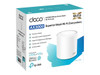
TP-Link AX3000 Whole Home Mesh WiFi 6 Unit
- SKU:
- DECOX501PK
- UPC:
- 4897098681657
- MPN:
- DECO X50(1-PACK)
- Availability:
- Free Click & Collect in Peterborough. UK delivery also available.







Description
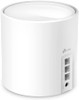
TP-Link Deco X50 AX3000 Whole Home Mesh WiFi 6 Unit – Dual-Band Mesh Router, 3 Gigabit Ports, Single Pack
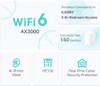
The TP-Link Deco X50 AX3000 Whole Home Mesh WiFi 6 Unit is a powerful single-pack mesh WiFi router designed to improve wireless coverage, speed and reliability across homes, flats and small offices. Using WiFi 6 / 802.11ax technology, the Deco X50 delivers dual-band wireless speeds of up to 3000Mbps, made up of up to 2402Mbps on 5GHz and up to 574Mbps on 2.4GHz.
This TP-Link Deco X50 single unit is ideal for customers searching for an AX3000 mesh WiFi 6 router, whole home mesh WiFi unit, TP-Link Deco WiFi 6 system, single Deco X50 node, mesh router with 3 Gigabit ports, or a reliable WiFi upgrade for streaming, gaming, video calls, smart home devices and everyday internet use.
Key Features of the TP-Link Deco X50 AX3000 Mesh WiFi 6 Unit
- AX3000 dual-band WiFi 6 with speeds up to 3000Mbps
- 5GHz speed up to 2402Mbps using WiFi 6 HE160 support
- 2.4GHz speed up to 574Mbps for wider coverage and smart devices
- TP-Link Mesh technology for one unified WiFi network
- AI-Driven Mesh learns your network environment and optimises WiFi performance
- 3 × Gigabit WAN/LAN auto-sensing ports per Deco unit
- Supports optional Ethernet backhaul between compatible Deco units
- 4 streams, OFDMA and MU-MIMO for better multi-device performance
- Beamforming and BSS Colour help improve signal strength and reduce WiFi interference
- Connects over 150 devices, depending on environment and usage
- TP-Link HomeShield with network protection, parental controls and QoS features
- Router mode and access point mode for flexible home network setup
- Easy setup and management through the Deco app
AX3000 WiFi 6 Performance for Modern Homes
The Deco X50 uses WiFi 6 technology to improve speed, capacity and efficiency compared with older WiFi generations. With combined speeds up to 3000Mbps, it is suitable for busy homes with phones, laptops, tablets, smart TVs, game consoles, smart speakers, cameras and other connected devices.
AX3000 Speed Explained
The AX3000 speed rating combines both wireless bands: up to 2402Mbps on 5GHz and up to 574Mbps on 2.4GHz. The 5GHz band is best for faster tasks such as 4K streaming, gaming, video calls and large downloads, while the 2.4GHz band is useful for wider coverage and many smart home devices.
Whole Home Mesh WiFi with One Network Name
TP-Link Deco units work together to create a single mesh WiFi network. This means compatible Deco units can share one WiFi name, helping your phone, laptop or tablet move around the home without needing to manually switch between separate networks.
Single Pack for Smaller Homes or Mesh Expansion
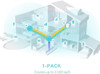
This product is a single Deco X50 unit / 1-pack. It can be used as a standalone router or access point for smaller spaces, or added to an existing compatible Deco mesh network to expand coverage. For larger homes, multiple Deco units may be needed for stronger whole-home coverage.
AI-Driven Mesh for Smarter WiFi
The AI-Driven Mesh feature helps Deco X50 learn your network environment and optimise WiFi performance based on usage, device behaviour and signal conditions. This helps provide a smoother experience as you move around the home with mobile devices.
Optional Ethernet Backhaul
Wireless connections and optional Ethernet backhaul can work together between compatible Deco units. Ethernet backhaul can improve stability and speed where network cables are available, especially in larger homes or buildings with thick walls.
3 Gigabit Ports for Wired Devices
Each Deco X50 unit includes 3 × Gigabit Ethernet ports with WAN/LAN auto-sensing. These ports can be used for a broadband modem or router connection, desktop PC, smart TV, games console, network switch or other wired device.
WAN/LAN Auto-Sensing
The Ethernet ports automatically detect WAN or LAN usage depending on your setup. Only one port is normally used as the WAN/internet connection when the Deco X50 is operating as the main router, while the remaining ports can be used for wired devices.
WiFi 6 Features for Multiple Devices
The Deco X50 supports important WiFi 6 technologies such as OFDMA, MU-MIMO, 1024-QAM, HE160 and 4 streams. These features help improve efficiency when many devices are connected at the same time.
Better Signal with Beamforming and BSS Colour
Beamforming helps concentrate wireless signal towards connected devices, while BSS Colour helps reduce interference from nearby WiFi networks. This is useful in homes, flats and neighbourhoods where several WiFi networks may overlap.
HomeShield Security and Parental Controls
TP-Link HomeShield provides useful built-in tools for home network management, including network protection, parental controls and quality of service features. This helps users manage connected devices, create profiles, control online time and prioritise important devices where supported.
Guest Network and WPA3 Security
The Deco X50 supports guest networks on both 2.4GHz and 5GHz bands and supports modern WiFi encryption including WPA-Personal, WPA2-Personal and WPA3-Personal. This helps keep your main home network separate from visitors and compatible smart devices.
Easy Setup with the Deco App
The Deco app guides users through setup and allows easy management of the home network. You can view connected devices, manage WiFi settings, create guest access, adjust parental controls, update firmware and control network features from a compatible Android or iOS device.
Who Is the TP-Link Deco X50 Single Unit Best For?
- Home users upgrading from an older WiFi router
- Customers wanting a single WiFi 6 mesh unit for smaller homes or flats
- Users expanding an existing TP-Link Deco mesh network
- Families needing parental controls and guest WiFi
- Homes with many connected devices, smart TVs, phones and tablets
- Users wanting 3 Gigabit Ethernet ports on a compact mesh router
- Customers needing router mode or access point mode flexibility
TP-Link Deco X50 AX3000 Specifications
- Brand: TP-Link
- Model: Deco X50
- Pack Type: Single Unit / 1-Pack
- Product Type: Whole Home Mesh WiFi 6 Router / Mesh Unit
- WiFi Standard: WiFi 6 / IEEE 802.11ax
- Wireless Class: AX3000
- Wireless Bands: Dual-band 2.4GHz and 5GHz
- 5GHz Speed: Up to 2402Mbps
- 2.4GHz Speed: Up to 574Mbps
- Combined Wireless Speed: Up to 3000Mbps
- WiFi Capacity: High, with support for over 150 connected devices under suitable conditions
- WiFi Technologies: OFDMA, MU-MIMO, 1024-QAM, HE160, Beamforming and BSS Colour
- Mesh Technology: TP-Link Mesh Technology with AI-Driven Mesh
- Ethernet Ports: 3 × Gigabit WAN/LAN auto-sensing ports per Deco unit
- Operating Modes: Router Mode and Access Point Mode
- Security: SPI Firewall, Access Control, TP-Link HomeShield, WPA/WPA2/WPA3-Personal
- Guest Network: 1 × 5GHz guest network and 1 × 2.4GHz guest network
- VPN Server: OpenVPN, PPTP and L2TP support
- VPN Client: OpenVPN, PPTP and L2TP support
- Management: Deco app
- Protocols: IPv4 and IPv6
- Dimensions: 110 × 110 × 114mm
- Package Contents: 1 × Deco X50 unit, 1 × RJ45 Ethernet cable, 1 × power adapter and 1 × quick installation guide
Buying Advice
Before ordering, please remember that the TP-Link Deco X50 is a mesh WiFi router / mesh unit, not a modem. It normally connects to your broadband modem, ONT or existing router depending on your internet setup. To get the best WiFi 6 performance, your phones, laptops and tablets should also support WiFi 6 features, and real-world performance will depend on broadband speed, walls, distance, interference, connected devices and network traffic.
Why Buy the TP-Link Deco X50 AX3000 Mesh WiFi 6 Unit?
The TP-Link Deco X50 AX3000 Whole Home Mesh WiFi 6 Unit is a strong choice for users who want faster WiFi, better coverage and easier network management in a compact single unit. With AX3000 dual-band WiFi 6 speeds, 3 Gigabit ports, TP-Link Mesh, AI-Driven Mesh, HomeShield, WPA3 support, guest network features and Deco app control, it is a practical upgrade for modern home internet, smart devices, streaming, gaming and remote working.
Specification
TP-Link Deco X50 AX3000 Whole Home Mesh WiFi 6 Unit Specifications
| Product Type | Whole Home Mesh WiFi 6 Router / Mesh Unit |
| Brand | TP-Link |
| Series | Deco |
| Model | Deco X50 |
| Pack Type | Single Unit / 1-Pack |
| WiFi Standard | WiFi 6 / IEEE 802.11ax |
| Backward Compatibility | IEEE 802.11a/b/g/n/ac |
| Wireless Class | AX3000 |
| Wireless Bands | Dual-Band 2.4GHz and 5GHz |
| 5GHz WiFi Speed | Up to 2402Mbps |
| 2.4GHz WiFi Speed | Up to 574Mbps |
| Combined Wireless Speed | Up to 3000Mbps / 3.0Gbps |
| Wireless Streams | 4 Streams: 2×2 / HE160 5GHz + 2×2 2.4GHz |
| WiFi Technologies | OFDMA, MU-MIMO, 1024-QAM, HE160, Beamforming and BSS Colour |
| Mesh Technology | TP-Link Mesh Technology with AI-Driven Mesh |
| Ethernet Ports | 3 × Gigabit WAN/LAN Auto-Sensing Ports per Deco Unit |
| Ethernet Backhaul | Supported Between Compatible Deco Units |
| Operating Modes | Router Mode and Access Point Mode |
| Device Capacity | Supports Over 150 Devices under Suitable Conditions |
| Security | SPI Firewall, Access Control, HomeShield Security Features |
| WiFi Encryption | WPA-Personal, WPA2-Personal and WPA3-Personal |
| Guest Network | 2.4GHz Guest Network and 5GHz Guest Network |
| VPN Server | OpenVPN, PPTP and L2TP |
| VPN Client | OpenVPN, PPTP and L2TP |
| Protocols | IPv4 and IPv6 |
| Management | TP-Link Deco App |
| Voice Assistant Support | Amazon Alexa and Google Assistant |
| Dimensions | 110 × 110 × 114mm |
| Package Contents | 1 × Deco X50 Unit, 1 × RJ45 Ethernet Cable, 1 × Power Adapter and 1 × Quick Installation Guide |
Single-Unit Notice
This product is the TP-Link Deco X50 single unit / 1-pack. It can be used as a standalone router or access point, or added to a compatible Deco mesh network. Larger homes may need additional Deco units for stronger whole-home coverage.
Router / Modem Notice
The Deco X50 is a mesh WiFi router / mesh unit, not a modem. It normally connects to your broadband modem, ONT or existing ISP router depending on your internet setup.
Speed Notice
The AX3000 speed rating is a combined theoretical wireless speed of up to 2402Mbps on 5GHz plus up to 574Mbps on 2.4GHz. Real-world speed depends on broadband speed, device capability, distance, walls, interference, firmware and network traffic.
Model Notice
This specification is for the standard TP-Link Deco X50 AX3000 WiFi 6 mesh unit. It is not the Deco X50-PoE, Deco X50-Outdoor, Deco X50-4G, Deco X50-5G or Deco X55 model, which have different specifications.
Return
FAQ: Frequenlty Asked Questions
TP-Link AX3000 Whole Home Mesh WiFi 6 Unit FAQ
The TP-Link AX3000 Whole Home Mesh WiFi 6 Unit is a powerful WiFi 6 mesh networking unit designed to improve home WiFi coverage, reduce dead zones and provide faster wireless performance for streaming, gaming, video calls, smart home devices and everyday internet use. Commonly associated with the TP-Link Deco X50 AX3000 WiFi 6 mesh system, it offers dual-band AX3000 speeds, Gigabit Ethernet ports, AI-driven mesh, optional Ethernet backhaul and app-based setup. Below are the most common questions buyers ask before choosing this TP-Link AX3000 mesh WiFi 6 unit, including coverage, speed, single-unit use, router mode, access point mode, Ethernet backhaul, ISP router compatibility, device limits, gaming, streaming, smart home use and troubleshooting.
1. What is the TP-Link AX3000 Whole Home Mesh WiFi 6 Unit?
The TP-Link AX3000 Whole Home Mesh WiFi 6 Unit is a mesh WiFi unit designed to provide fast wireless coverage across a home or office. It uses WiFi 6 technology and can work as part of a Deco mesh system to reduce WiFi dead zones and keep devices connected as you move around.
2. What is this TP-Link AX3000 mesh unit best used for?
This TP-Link AX3000 mesh unit is best used for improving WiFi coverage, replacing weak ISP router WiFi, extending a Deco mesh system, supporting multiple devices, streaming, video calls, gaming, smart home devices and providing a more stable whole-home wireless network.
3. Is this a single TP-Link AX3000 mesh unit?
Yes. This product page is for a TP-Link AX3000 Whole Home Mesh WiFi 6 unit. A single unit can work as a main router or as an extra mesh node, but larger homes normally need two or more units for full whole-home coverage.
4. What does AX3000 mean?
AX3000 refers to the combined theoretical WiFi 6 speed class. For TP-Link Deco X50-style AX3000 systems, this is commonly made up of up to 2402Mbps on 5GHz and up to 574Mbps on 2.4GHz, giving a combined class of around 3000Mbps under ideal conditions.
5. Will I get the full 3000Mbps speed?
No. AX3000 is a combined theoretical wireless speed rating, not the real speed one device will normally receive. Real-world speed depends on your broadband package, device WiFi capability, signal strength, distance, walls, interference, backhaul type and network traffic.
6. Is the TP-Link AX3000 mesh unit WiFi 6?
Yes. This unit is part of TP-Link’s AX3000 WiFi 6 mesh range. WiFi 6 can improve wireless speed, capacity and efficiency compared with older WiFi standards when used with compatible devices.
7. Does the TP-Link AX3000 support older WiFi devices?
Yes. WiFi 6 routers and mesh systems are backward compatible with older WiFi devices such as WiFi 5, WiFi 4 and earlier standards. Older devices can connect, but they will run at the maximum speed supported by that device.
8. Do I need WiFi 6 devices to use this mesh unit?
No. You can use the TP-Link AX3000 mesh unit with older phones, laptops, tablets, smart TVs, cameras and smart home devices. WiFi 6 devices will benefit most from the newer features, but older devices can still connect normally.
9. Is this TP-Link AX3000 unit the same as Deco X50?
TP-Link’s AX3000 Whole Home Mesh WiFi 6 unit is commonly associated with the Deco X50 AX3000 mesh range. Always check the exact model code, packaging and product images before publishing final specifications, because TP-Link has several AX3000-class products.
10. How many Ethernet ports does the TP-Link AX3000 mesh unit have?
TP-Link Deco X50 AX3000 units are listed with 3 Gigabit Ethernet ports. These can be used for wired devices, connecting to a modem or router, or creating wired Ethernet backhaul between Deco units.
11. Are the Ethernet ports Gigabit?
Yes. The Deco X50 AX3000 specification lists Gigabit Ethernet ports. This is suitable for many UK broadband connections up to around 1Gbps, wired smart TVs, consoles, PCs, switches and Ethernet backhaul.
12. Does this TP-Link AX3000 mesh unit have 2.5G Ethernet?
The standard Deco X50 AX3000 model is commonly listed with Gigabit Ethernet ports rather than 2.5G ports. If you specifically need 2.5G Ethernet, check the exact TP-Link model, because other Deco models may include faster wired ports.
13. Can I use one TP-Link AX3000 unit by itself?
Yes. One unit can be used by itself as a router or access point, depending on your setup. However, the main benefit of mesh WiFi comes when you use multiple units to improve coverage across different rooms or floors.
14. Can I add more TP-Link Deco units later?
Yes. You can usually add compatible Deco units later through the Deco app. This is useful if you start with one AX3000 unit and later need better coverage upstairs, in an extension, garage office or garden room.
15. Can I mix this AX3000 unit with other TP-Link Deco models?
In many cases, Deco models can work together in the same Deco mesh network. Features and performance may vary depending on the models used, so for best results use similar-speed Deco units or check TP-Link compatibility guidance before mixing models.
16. Does the TP-Link AX3000 mesh unit replace my router?
It can replace your router’s WiFi and may also work as your main router if your broadband setup allows it. Some internet providers require their own modem or router, so you may need to connect the Deco unit to the ISP router or ONT.
17. Can I use this with my existing ISP router?
Yes. You can connect the TP-Link AX3000 mesh unit to your existing ISP router. You can then use it in router mode or access point mode, depending on whether you want the Deco to manage the network or simply provide better WiFi coverage.
18. What is router mode?
Router mode means the TP-Link AX3000 unit manages the network, including WiFi, IP addresses, DHCP and routing. This is useful when you want the Deco system to act as the main network controller.
19. What is access point mode?
Access point mode means your existing router continues to manage the network, while the TP-Link AX3000 unit mainly provides WiFi coverage. This can help avoid double NAT issues when you need to keep your ISP router in place.
20. Should I use router mode or access point mode?
Use router mode if you want the Deco system to control your network and your ISP setup allows it. Use access point mode if you must keep your ISP router active or want to avoid double NAT while still improving WiFi coverage.
21. Does this TP-Link AX3000 unit support Ethernet backhaul?
Yes. TP-Link Deco AX3000 mesh systems support Ethernet backhaul, allowing Deco units to connect to each other using Ethernet cables. Wired backhaul usually improves speed and stability compared with wireless backhaul.
22. What is Ethernet backhaul?
Ethernet backhaul means mesh units communicate with each other using a network cable instead of only wireless signal. This can improve performance, reduce latency and make the mesh system more reliable, especially through thick walls or multiple floors.
23. Is wired backhaul better than wireless backhaul?
Yes, wired Ethernet backhaul is usually better because it avoids wireless interference and signal loss between mesh units. Wireless backhaul is easier to set up, but wired backhaul normally gives stronger and more consistent performance.
24. Does mesh WiFi increase internet speed?
Mesh WiFi mainly improves coverage and consistency across your home. It will not increase the speed of your broadband package. It may feel faster in weak-signal rooms because devices get a stronger WiFi connection than before.
25. Why is my speed not faster after installing mesh WiFi?
Mesh WiFi cannot exceed your broadband speed, and real-world WiFi depends on distance, walls, device capability, backhaul, interference and router placement. If your old router already delivered strong speed in the same room, mesh may improve coverage more than peak speed.
26. Is the TP-Link AX3000 mesh unit better than a WiFi extender?
Yes, for many homes a mesh system is better than a basic extender because it creates a more seamless network and can handle roaming between units more smoothly. Extenders can help a single dead spot, but mesh is usually better for whole-home coverage.
27. How much coverage does one TP-Link AX3000 unit provide?
Coverage from one unit depends on your home layout, wall materials, interference and placement. TP-Link publishes larger coverage figures for multi-pack systems, so a single unit is best for smaller areas or as an extra mesh node rather than very large whole-home coverage by itself.
28. How many TP-Link AX3000 units do I need?
A flat or small home may need one or two units, while larger houses, thick walls, loft rooms, extensions or multi-floor homes may need two or three units. For best results, place each unit where it still receives a strong signal from the main unit or use Ethernet backhaul.
29. Is this mesh unit good for thick walls?
It can improve WiFi through a home, but thick brick, concrete, foil insulation and multiple floors can still reduce signal. For difficult UK homes, using multiple units and Ethernet backhaul is often the best solution.
30. Where should I place the TP-Link AX3000 mesh unit?
Place it in an open, central location away from metal objects, thick walls, microwaves, large appliances and enclosed cabinets. For extra mesh nodes, place them halfway between the main unit and the weak-signal area, not inside the dead zone itself.
31. Is the TP-Link AX3000 mesh unit good for gaming?
Yes, it can be good for gaming, especially when the gaming device has a strong connection or is wired to a Deco unit. For the lowest latency, connect a PC or console by Ethernet where possible.
32. Is it good for Xbox and PlayStation?
Yes. Xbox and PlayStation consoles can connect by WiFi or Ethernet. For online gaming, downloads and streaming, wired Ethernet to the Deco unit or main router is usually more stable than WiFi.
33. Is the TP-Link AX3000 mesh unit good for 4K streaming?
Yes. It is suitable for 4K streaming if your broadband is fast enough and the device has a strong WiFi or Ethernet connection. Placement and signal quality are important for smooth streaming without buffering.
34. Is it good for video calls and working from home?
Yes. Mesh WiFi can improve video calls and working from home by providing stronger coverage in offices, bedrooms and work areas. For the best stability, use Ethernet backhaul or connect your work PC by cable where possible.
35. Is the TP-Link AX3000 mesh unit good for smart home devices?
Yes. It can support many smart home devices such as cameras, smart plugs, bulbs, speakers, thermostats and doorbells. Some older smart devices may prefer 2.4GHz WiFi, so check device setup requirements if pairing fails.
36. Can I separate 2.4GHz and 5GHz on Deco?
Deco systems usually aim to simplify WiFi using one network name, but settings can vary by model and firmware. Some users may use guest network or IoT network options for devices that need 2.4GHz setup support.
37. Why do some smart devices not connect?
Some smart devices only support 2.4GHz WiFi or struggle with combined mesh networks during setup. Try moving the device closer, using the Deco app’s IoT or guest network options if available, temporarily disabling 5GHz if the app allows it, or following the smart device setup guide.
38. Does the TP-Link AX3000 mesh unit support guest WiFi?
Yes. Deco systems commonly support guest network features through the Deco app. A guest network lets visitors use the internet without giving them full access to your main home network devices.
39. Does it include parental controls?
Yes. TP-Link lists HomeShield features for Deco X50-style AX3000 systems, including parental controls and network protection. Exact free and paid features can vary by region, firmware and TP-Link account services.
40. What is TP-Link HomeShield?
TP-Link HomeShield is TP-Link’s network protection and management platform. It can include security features, parental controls, quality-of-service tools and IoT protection depending on the model, firmware and service level.
41. Does the TP-Link AX3000 mesh unit need a subscription?
Normal WiFi use does not require a subscription. Some advanced HomeShield features may require a paid subscription depending on TP-Link’s current service offering, region and firmware version.
42. How do I set up the TP-Link AX3000 mesh unit?
Download the TP-Link Deco app, connect the unit to your modem or router, power it on, follow the app instructions, create your WiFi name and password, update firmware and add extra Deco units if needed.
43. Do I need the Deco app?
Yes, TP-Link Deco systems are normally set up and managed using the Deco app. The app guides you through installation, adding units, checking connected devices, changing settings and updating firmware.
44. Can I use this with full fibre broadband?
Yes. You can use the TP-Link AX3000 mesh unit with many full fibre broadband services by connecting it to the ONT, modem or ISP router. Some providers may need specific settings such as PPPoE, VLAN ID or bridge mode.
45. Can I use this with Virgin Media, BT, Sky or Plusnet?
Yes, it can often be used with major UK broadband providers, but setup varies. Some users place the ISP router in modem or bridge mode, while others use the Deco in access point mode. Check your provider’s router settings and requirements.
46. Why does my Deco show slow speeds in the app?
The app may show current device usage, node connection quality or a speed test result depending on the screen you are viewing. Slow speeds can also be caused by wireless backhaul, poor placement, weak signal, old client devices, interference or the internet package itself.
47. Why does my phone not reach gigabit speed on WiFi?
Many phones cannot reach full gigabit speeds over WiFi in real-world conditions. Speed depends on the phone’s WiFi hardware, channel width, signal strength, interference, backhaul type and broadband speed. 400–700Mbps can already be normal for many WiFi 6 client devices.
48. What should I check before buying this TP-Link AX3000 unit?
Check whether you need one unit or a multi-pack, your broadband speed, home size, wall thickness, whether you can use Ethernet backhaul, whether you need 2.5G Ethernet, whether you want router mode or access point mode, and whether your existing Deco system is compatible.
49. Who should NOT buy this TP-Link AX3000 mesh unit?
This unit is not ideal for users who need WiFi 6E with 6GHz, WiFi 7, 2.5G Ethernet on every port, a single unit to cover a very large thick-walled home, or advanced business networking features. It is best for home users who want reliable WiFi 6 mesh coverage and simple app-based setup.
50. Why buy the TP-Link AX3000 Whole Home Mesh WiFi 6 Unit from Memox?
Buying the TP-Link AX3000 Whole Home Mesh WiFi 6 Unit from Memox is a practical choice if you want a WiFi 6 mesh unit for better home coverage, faster wireless networking, streaming, gaming, smart home devices and working from home. Memox offers routers, mesh WiFi systems, networking products, cables, PC components, storage and computer accessories for UK customers.