
MAXCases Shield Case for iPad 10th (10.9") & 11th Gen (A16 11") (Black) with Shoulder Strap & Hand Strap & Stylus Holder
- SKU:
- AP-SC-IP10-BLK
- UPC:
- 0783970096029
- MPN:
- AP-SC-IP10-BLK
- Availability:
- Free Click & Collect in Peterborough. UK delivery also available.




Description
MAXCases Shield Case for iPad 10th Gen 10.9" / 11th Gen A16 11" – Black with Shoulder Strap, Hand Strap and Stylus Holder
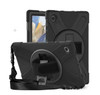
The MAXCases Shield Case for iPad 10th Gen 10.9" and iPad 11th Gen A16 11" is a protective black tablet case designed for everyday use in schools, offices, warehouses, retail, healthcare, field work and home environments. With a shoulder strap, hand strap and stylus holder, it is ideal for users who need a practical iPad case that supports carrying, handling, writing and mobile working.
This case is ideal for customers searching for a MAXCases Shield Case for iPad 10th Gen, iPad 10.9" protective case with shoulder strap, iPad 11th Gen A16 11" rugged case, black iPad case with hand strap, or a tablet case with stylus holder. UK supplier listings identify the model as AP-SC-IP10-BLK and describe it as a Shield Case for iPad 10th 10.9" and 11th Gen A16 11" with shoulder strap, hand strap and stylus holder.
Key Features of the MAXCases Shield Case for iPad 10th / 11th Gen
- Designed for iPad 10th Gen 10.9" and iPad 11th Gen A16 11"
- Protective Shield-style case for everyday tablet protection
- Black finish for a clean, professional look
- Shoulder strap included for easier carrying between rooms, sites or classrooms
- Hand strap included for a secure grip during mobile tablet use
- Built-in stylus holder to help keep a compatible stylus close to the iPad
- Useful for schools, offices, warehouses, retail and field workers
- Suitable for shared-device and mobile-use environments
- Helps protect against everyday knocks, scratches and handling wear
- Allows easier carrying and handling compared with a basic slim folio case
- MPN: AP-SC-IP10-BLK
Protective iPad Case for Work, School and Everyday Use
The MAXCases Shield Case is designed for users who need more practical handling and protection than a standard slim tablet cover. It is especially useful in environments where the iPad is carried between locations, held for long periods, passed between users, or used while standing.
The protective case design helps reduce the risk of everyday cosmetic damage from handling, desk use, bag storage and general movement. It is a good option for education, retail, stock control, healthcare forms, field service, reception desks, mobile checklists and home use.
Useful for Education and Business iPad Deployments
MAXCases has a strong focus on tablet cases for education and device protection. The Shield-style design is well suited to schools and organisations that need practical iPad handling, carrying and stylus storage for daily use.
Shoulder Strap for Easier Carrying
The included shoulder strap helps users carry the iPad more comfortably when moving between classrooms, offices, stockrooms, customer areas or workstations. This is useful for users who need both hands free while keeping the tablet accessible.
For business and school users, a shoulder strap can reduce the chance of the iPad being placed down and forgotten, while also making it easier to transport during busy working days.
Hand Strap for Secure Tablet Handling
The built-in hand strap supports a more secure grip when holding the iPad for reading, scanning, data entry, note taking or customer-facing work. This is useful for users who hold the tablet for longer periods or use it while walking around.
A hand strap is especially helpful in retail, warehouse, field service, school and healthcare-style environments where the tablet is used as a mobile work device rather than kept on a desk.
Stylus Holder for Apple Pencil and Compatible Stylus Storage
The integrated stylus holder helps keep a compatible stylus close to the tablet, reducing the chance of losing it during travel or daily use. This is useful for note taking, forms, drawing, signatures, classroom tasks and business workflows.
Stylus compatibility may depend on the stylus model and size. Always check your stylus dimensions before purchase, especially if using third-party stylus pens or accessories.
Designed for iPad 10th Gen 10.9" and iPad 11th Gen A16 11"
This model is listed for iPad 10th Gen 10.9" and iPad 11th Gen A16 11". It is important to check your iPad model before ordering, because iPad cases are not universally interchangeable between iPad, iPad Air, iPad Pro and iPad mini models.
Check Before You Buy
- Your tablet is an iPad 10th Gen 10.9" or iPad 11th Gen A16 11"
- Your iPad camera and button layout matches this case version
- You do not need a case for iPad Air, iPad Pro or iPad mini
- Your stylus fits the holder correctly
- You want a practical protective case with straps rather than a slim folio keyboard case
Who Is the MAXCases Shield Case Best For?
- Schools and colleges using iPads in classrooms
- Business users who carry an iPad around the workplace
- Retail staff using tablets for stock, POS or customer service
- Warehouse and field workers using mobile forms or checklists
- Healthcare, reception and admin teams using shared tablets
- Home users who want better grip and carrying options
- Users who need a stylus holder built into the case
Who Is This Case Not For?
This case is not the best choice if you need a keyboard case, folio cover, ultra-slim sleeve, waterproof case, iPad Pro case, iPad Air case, iPad mini case, or a case for an older iPad with a different size and camera layout. It is also not a replacement for insurance or accidental damage cover.
Technical Specifications
- Brand: MAXCases
- Product Series: Shield Case
- Model / MPN: AP-SC-IP10-BLK
- Product Type: Protective tablet case
- Compatible Device: iPad 10th Gen 10.9" and iPad 11th Gen A16 11"
- Colour: Black
- Shoulder Strap: Included
- Hand Strap: Included
- Stylus Holder: Included
- Material: Silicone / bumper-style case material listed by supplier data
- Case Type: Protective bumper / Shield-style case
- Keyboard Included: No
- iPad Included: No
- Stylus Included: No, holder only
- Recommended Use: Education, office, retail, field work, home use and shared tablet environments
Important Compatibility Note
This case is designed for iPad 10th Gen 10.9" and iPad 11th Gen A16 11". It should not be listed as compatible with iPad Air, iPad Pro, iPad mini or older iPad generations unless your supplier confirms those exact models. Always check the iPad model number before purchase.
Important Accessory Note
The case includes a shoulder strap, hand strap and stylus holder. The iPad, stylus, charger, screen protector and keyboard are not included unless separately stated in the retail package.
Important Protection Note
This is a protective tablet case for everyday knocks, handling and carrying. It should not be described as waterproof, fully sealed, military-grade, drop-certified or screen-protector included unless your physical stock or supplier documentation confirms those features.
Why Buy the MAXCases Shield Case for iPad 10th / 11th Gen?
The MAXCases Shield Case for iPad 10th Gen 10.9" and 11th Gen A16 11" is a practical choice for users who want a protective black iPad case with better carrying and handling options. With a shoulder strap, hand strap and stylus holder included, it is well suited to schools, businesses, retail, field work and everyday tablet users who need more than a basic slim cover.
Choose this case if you need a protective iPad 10th / 11th Gen case that is easy to carry, easier to grip and ready for stylus-based workflows.
Specification
MAXCases Shield Case for iPad 10th Gen / 11th Gen A16 Specifications
The MAXCases Shield Case AP-SC-IP10-BLK is a black protective tablet case designed for Apple iPad 10th Gen 10.9" and iPad 11th Gen A16 11". It includes a shoulder strap, removable rotating hand strap and stylus holder, making it suitable for schools, offices, retail, field work and everyday mobile tablet use.
General Information
| Brand | MAXCases |
| Product Series | Shield Case |
| Model / MPN | AP-SC-IP10-BLK |
| EAN | 0783970096029 |
| Product Type | Protective tablet case |
| Case Colour | Black |
| Recommended Use | Education, classroom devices, office tablets, retail, field work, mobile data entry and everyday iPad protection |
Device Compatibility
| Compatible Apple Tablet | iPad 10th Gen 10.9" |
| Compatible Apple Tablet | iPad 11th Gen A16 11" |
| iPad Air Compatibility | Not listed for this model |
| iPad Pro Compatibility | Not listed for this model |
| iPad mini Compatibility | Not listed for this model |
| Compatibility Note | Check your iPad model number, screen size, camera layout and button layout before purchase |
Protection and Case Design
| Protection Style | Shield-style rugged protective case |
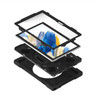
| Construction | Three-layer construction, listed by Origin Storage |
| Back Protection | Rigid back panel with silicone shock-absorbing protection |
| Material | Silicone / rugged protective case material, listed by UK retailer specifications |
| Shock Protection | Shock-absorbing bumper-style protection for everyday knocks and handling |
| Port Covers | Yes, port covers listed to help prevent dust build-up |
| Screen Protector Included | Not safely confirmed for this exact listing; do not list unless physical stock confirms it |
| Waterproof | No, not listed as waterproof |
Carrying and Handling Features
| Shoulder Strap | Included |
| Hand Strap | Included |
| Hand Strap Type | Removable integrated rotating hand strap, listed by Origin Storage |
| Stylus Holder | Included |
| Kickstand | Integrated kickstand |
| Kickstand Positions | Two positioning options, listed by Origin Storage |
Accessibility and Daily Use
| Port Access | Designed to allow access to required iPad ports, subject to correct iPad model fit |
| Button Access | Designed to allow access to required iPad buttons, subject to correct iPad model fit |
| Camera Access | Designed for the compatible iPad camera layout |
| Stylus Storage | Built-in holder for a compatible stylus |
| Keyboard Included | No |
Package Contents
| Protective Case | 1 x MAXCases Shield Case AP-SC-IP10-BLK |
| Shoulder Strap | Included |
| Hand Strap | Included / integrated |
| Stylus Holder | Built into the case |
| iPad | Not included |
| Stylus / Apple Pencil | Not included |
| Charger / Cable | Not included |
| Keyboard | Not included |
Warranty
| Warranty | Check Memox warranty terms / supplier warranty for final coverage |
Important Compatibility Notes
This case is designed for iPad 10th Gen 10.9" and iPad 11th Gen A16 11". It should not be listed as compatible with iPad Air, iPad Pro, iPad mini or older iPad generations unless your supplier confirms those exact models. Always check the iPad model number before purchase.
Important Accessory Note
The iPad, stylus / Apple Pencil, charger, cable and keyboard are not included. This listing is for the protective MAXCases Shield Case and included case accessories only.
Important Protection Note
This is a protective tablet case for everyday handling, carrying, bumps and scratches. Do not describe it as waterproof, fully sealed, military-grade, drop-certified or screen-protector included unless your physical stock or supplier documentation confirms those features.
Return
FAQ: Frequenlty Asked Questions
MAXCases Shield Case for iPad 10th Gen & 11th Gen A16 FAQ
The MAXCases Shield Case for iPad 10th Gen 10.9-inch and iPad 11th Gen A16 11-inch is a rugged black protective iPad case designed for school, work, business, travel, field use, home use and everyday handling. It includes a shoulder strap, hand strap and stylus holder, making it useful for users who carry or hold their iPad for long periods. Below are the most common questions buyers ask before choosing this MAXCases Shield iPad 10th/11th Gen rugged case, including iPad compatibility, Apple Pencil and stylus storage, shoulder strap use, hand strap comfort, protection, school use, work use, screen protector compatibility and whether this case is right for your iPad.
1. What is the MAXCases Shield Case for iPad 10th Gen and 11th Gen A16?
The MAXCases Shield Case is a protective rugged-style case for compatible Apple iPad 10th Gen 10.9-inch and iPad 11th Gen A16 11-inch models. It is designed to help protect the iPad during everyday use and includes a shoulder strap, hand strap and stylus holder.
2. Which iPad models does this MAXCases Shield Case fit?
This case is designed for the iPad 10th Generation 10.9-inch and the iPad 11th Generation A16 11-inch. Always check your iPad model number before buying to make sure the buttons, camera, speakers and USB-C port line up correctly.
3. Does this case fit the iPad 10th Generation 10.9-inch?
Yes. This case is listed for the Apple iPad 10th Gen 10.9-inch, making it suitable for users who want a rugged protective case with carry straps and stylus storage for that iPad model.
4. Does this case fit the iPad 11th Generation A16 11-inch?
Yes. This case is also listed for the iPad 11th Gen A16 11-inch. Because iPad model naming can be confusing, check your iPad model number and compare it with the product compatibility before ordering.
5. How do I check which iPad model I have?
On your iPad, go to Settings > General > About and check the model name or model number. You can also find the model number printed on the back of many iPads. Match this with the case compatibility before buying.
6. Will this case fit older iPad 9th, 8th or 7th Gen models?
No. The iPad 9th, 8th and 7th Gen models have a different size and design from the iPad 10th Gen and 11th Gen A16. Choose a case made specifically for your older iPad model.
7. Will this case fit iPad Air models?
This listing is for iPad 10th Gen 10.9-inch and iPad 11th Gen A16 11-inch. Do not assume it fits iPad Air models, even if the screen size looks similar, because button placement, camera position and dimensions can differ.
8. Will this case fit iPad Pro 11-inch?
No, not unless the manufacturer specifically lists that iPad Pro model as compatible. iPad Pro 11-inch models have different layouts and dimensions from the standard iPad 10th/11th Gen models, so choose the correct iPad Pro case instead.
9. Does this case include a shoulder strap?
Yes. This MAXCases Shield Case includes a shoulder strap, making it easier to carry the iPad around school, work, warehouses, shops, events, travel or field environments without holding it in your hands all the time.
10. What is the shoulder strap useful for?
The shoulder strap is useful when carrying the iPad between rooms, classrooms, meetings, work sites or customer visits. It can reduce the chance of dropping the iPad because the device can stay attached while being carried.
11. Does this case include a hand strap?
Yes. The case includes a hand strap, which helps you hold the iPad more securely with one hand. This is useful for standing work, stock checking, teaching, presentations, inspections and mobile tablet use.
12. Why is a hand strap useful on an iPad case?
A hand strap makes the iPad easier to hold for longer periods and can reduce hand fatigue. It is especially useful for users who walk around while using the iPad or need to hold the tablet securely while entering information.
13. Does this case have a stylus holder?
Yes. This case includes a stylus holder, helping keep a compatible stylus or Apple Pencil-style accessory with the iPad so it is less likely to be lost during travel, school or work use.
14. Does the stylus holder fit Apple Pencil?
The case includes a stylus holder, but fit can depend on the exact Apple Pencil or stylus model. Check whether you use Apple Pencil USB-C, Apple Pencil 1st Gen, Apple Pencil Pro or another stylus, and confirm the holder size before relying on it for travel.
15. Does this case charge the Apple Pencil?
No. A case with a stylus holder stores the stylus, but it does not charge the Apple Pencil by itself. Charging depends on your iPad model and the Apple Pencil or stylus version you are using.
16. Can I use the Apple Pencil USB-C with this case?
You can use an Apple Pencil USB-C with a compatible iPad, but the case itself does not guarantee charging or pairing support. The stylus holder is mainly for storage, so check holder fit and access to the iPad USB-C port before use.
17. Is this case good for school iPads?
Yes. Rugged iPad cases with straps are popular for school and education use because they help protect against everyday bumps, drops and handling. The hand strap, shoulder strap and stylus holder make it practical for classrooms and student use.
18. Is this case good for children?
Yes, it can be a good option for children because it adds extra protection and makes the iPad easier to carry. For younger children, supervision is still recommended because no case can make an iPad completely unbreakable.
19. Is this case good for business and work use?
Yes. It is suitable for business environments such as shops, warehouses, offices, field service, hospitality, healthcare reception, inspections, events and mobile point-of-work tasks where the iPad is carried or held frequently.
20. Is this case good for warehouse or stock control use?
Yes. The rugged design, hand strap and shoulder strap make it useful for stock control, scanning workflows, warehouse checks and inventory tasks, provided your iPad and any scanner or accessory setup remain compatible with the case.
21. Is this case good for travel?
Yes. The shoulder strap and rugged protection make it useful for travel, commuting, school bags, work trips and mobile users who want extra security while carrying the iPad.
22. Does this case protect against drops?
The case is designed to provide rugged everyday protection against bumps, knocks and minor drops. However, no case can guarantee full protection against every drop, impact angle or screen damage, especially from height or onto hard surfaces.
23. Does this case protect the corners?
Yes. Rugged iPad cases like this are designed to add extra protection around the corners and edges, which are common impact areas if an iPad is dropped.
24. Does this case protect the screen?
The case helps protect the edges and body of the iPad, but check whether your package includes a built-in screen protector. If it does not, use a compatible tempered glass or film screen protector for extra screen protection.
25. Can I use a separate screen protector with this case?
In many cases, yes. A slim tempered glass or film screen protector may work, but very thick screen protectors can sometimes interfere with tight-fitting rugged cases. Install carefully and check that the case does not lift the screen protector edges.
26. Is this case waterproof?
No. This is a protective iPad case, not a fully waterproof enclosure. It can help protect against everyday handling, but it should not be used as waterproof protection against rain, spills, soaking or underwater use.
27. Does the case protect the camera?
The case is designed with a camera cut-out for compatible iPad models and may add raised protection around the camera area. Avoid placing the iPad on rough surfaces that could scratch the camera lens area.
28. Does the case allow access to the USB-C charging port?
Yes, the case should allow access to the iPad USB-C charging port when fitted to a compatible iPad model. Always use a correctly sized USB-C cable and avoid forcing oversized connectors through the case opening.
29. Can I charge the iPad while it is inside the case?
Yes. The case is designed to allow charging access, so you should be able to charge the iPad without removing it from the case, provided your cable connector fits through the port opening.
30. Does the case block the speakers?
The case should include cut-outs for speakers on compatible iPad models. If sound seems muffled, check that the iPad is fully seated in the case and that no strap, cover or hand is blocking the speaker openings.
31. Does the case block the microphone?
A compatible case should have the correct microphone openings. If voice recording or calls sound muffled, check the case fit, microphone openings and whether a screen protector or debris is blocking any holes.
32. Does this case support Touch ID?
For compatible iPad 10th/11th Gen models, the case should allow access to the top power button where Touch ID is located. Make sure the iPad is correctly fitted so the button remains easy to press.
33. Does the case support the iPad camera and video calls?
Yes. The case is designed with camera access for compatible iPads, so it can be used for video calls, online lessons, FaceTime, Teams, Zoom and photo capture without removing the iPad.
34. Is this case slim or bulky?
This is a rugged protective case, so it will be bulkier than a slim folio or thin silicone case. The extra size is part of the protection and strap functionality, making it better for tougher everyday use rather than minimal pocket-style carrying.
35. Is a rugged iPad case better than a slim folio case?
A rugged case is better if protection, grip, carrying straps and work/school durability matter most. A slim folio case is better if you want a lighter, thinner, more minimal case mainly for desk, sofa or bag use.
36. Is this case heavy?
Rugged cases are normally heavier than slim cases because they use thicker materials and extra strap hardware. The trade-off is better grip, carry convenience and impact protection for daily use.
37. Can I use this case for presentations?
Yes. The hand strap and shoulder strap make it useful for presentations, training, customer demos, site visits and situations where you need to hold or carry the iPad while speaking or moving around.
38. Can I use this case for point-of-sale or shop use?
Yes. It can be useful for mobile point-of-sale, stock lookup, customer service and shop-floor tasks. Check compatibility with any card reader, scanner, stand or dock you plan to use with the iPad.
39. Can the shoulder strap be removed?
The case is supplied with a shoulder strap, and shoulder straps on rugged cases are usually detachable or adjustable. Check the strap attachment points and product instructions before removing or refitting it.
40. Is the hand strap adjustable?
Hand straps on rugged tablet cases are usually designed to help different hand sizes hold the iPad more securely. Check the strap mechanism before use and adjust it so the iPad feels stable but not uncomfortable.
41. Can I use the iPad in portrait and landscape with this case?
You can use the iPad in portrait or landscape by rotating the device in your hands. If you need a rotating kickstand or multiple stand angles, check whether this exact case version includes those features before buying.
42. Does this case include a stand?
This listing highlights a shoulder strap, hand strap and stylus holder. If a built-in kickstand is important, check the product images and specification carefully before buying, as not all rugged strap cases include a stand.
43. Can I use a keyboard with this case?
You can use a Bluetooth keyboard separately, but this case is not a keyboard case. It may not fit into keyboard docks or cases that require the iPad to attach magnetically or through a specific connector.
44. Does this case work with Apple Magic Keyboard?
No. Rugged protective cases usually do not fit inside Apple Magic Keyboard accessories. If you want Magic Keyboard use, you normally need to remove the iPad from the rugged case or choose a keyboard case designed for your model.
45. Can I use this case with a docking station or tablet stand?
It depends on the dock or stand. Because rugged cases add thickness, some tight-fitting docks and stands may not work. Use adjustable tablet stands or check the dock’s supported device thickness before buying.
46. Is this case suitable for hospitals, clinics or care settings?
It can be useful in healthcare-style environments where an iPad is carried frequently, but cleaning requirements vary. Check whether the case material is suitable for your cleaning products and do not use harsh chemicals unless approved by the case manufacturer.
47. Is this case suitable for restaurants or hospitality?
Yes. The hand strap and shoulder strap can be useful for order taking, table service, stock checks and customer-facing tasks. Keep the case clean and avoid exposing the iPad to liquids, heat or kitchen grease.
48. Is this case suitable for delivery drivers or field engineers?
Yes. It can help field workers carry and hold the iPad more securely while checking jobs, collecting signatures, viewing maps, completing forms or taking photos on site.
49. Can I clean this case?
Yes. Wipe the case with a soft, slightly damp cloth and mild cleaning solution where suitable. Avoid soaking the case, spraying liquid directly into ports, or using harsh solvents that may damage the material.
50. Does this case scratch the iPad?
A correctly fitted case should not scratch the iPad during normal use. Before installation, remove dust, sand or debris from the iPad and case because trapped particles can cause marks over time.
51. How do I install the iPad into the case?
Clean the iPad first, open the case according to the instructions, place the iPad carefully into the shell, check all corners are seated, and confirm the buttons, camera, speakers and charging port line up correctly before using the straps.
52. Should I remove the case often?
It is usually better to leave rugged cases installed unless you need to clean or change accessories. Removing and refitting a rugged case too often may wear clips or make installation less secure over time.
53. Is this case good for shared iPads?
Yes. The extra protection, straps and stylus holder make it useful for shared iPads in schools, offices, warehouses, retail stores and family homes where the device may be used by multiple people.
54. Is this case good for people who drop their iPad often?
Yes, it is a better choice than a thin case for users who often drop or carry their iPad. The straps also help reduce drop risk by making the iPad easier to hold and carry securely.
55. Is this case good for drawing or note-taking?
Yes, it can be used for drawing and notes if your iPad and stylus are compatible. The stylus holder is useful for keeping the pen nearby, although artists who draw for long periods may also want a stand angle that suits their wrist position.
56. MAXCases Shield Case vs slim iPad case — which should I choose?
Choose the MAXCases Shield Case if protection, grip, shoulder carrying and stylus storage are important. Choose a slim iPad case if you prefer a lighter, thinner design for mainly home, desk or bag use.
57. MAXCases Shield Case vs keyboard case — which is better?
Choose this MAXCases Shield Case if protection and carrying are more important than typing. Choose a keyboard case if your main use is writing emails, documents or coursework and you need an integrated keyboard.
58. MAXCases Shield Case vs folio case — which is better?
A folio case is slimmer and often better for light home or office use. The MAXCases Shield Case is better for tougher daily handling, carrying the iPad with a strap, one-handed use and environments where the iPad may be dropped more often.
59. Who is the MAXCases Shield Case best for?
This case is best for students, children, schools, teachers, field workers, shop staff, warehouse users, business users, travellers and anyone who wants a more protective iPad 10th/11th Gen case with a shoulder strap, hand strap and stylus holder.
60. Who is this case not for?
This case is not the best choice if you want the thinnest possible iPad case, a built-in keyboard, Apple Magic Keyboard compatibility, waterproof protection, a premium leather folio look, or a case for a different iPad model such as iPad Air or iPad Pro.
61. What should I check before buying this MAXCases Shield Case?
Before buying, check your exact iPad model, whether you need iPad 10th Gen or 11th Gen A16 compatibility, whether your stylus fits the holder, whether you need a separate screen protector, and whether a rugged case with straps suits your daily use better than a slim or keyboard case.
Related Products
Related Products


MAXCases Extreme Shell-L for Asus 1100 Series 11.6" Win 10/Chrome, BR1100F, Flip CR1, CR1 (Black/Clear)


Vida Genesis Black ARGB Gaming Case w/ Glass Window, Micro ATX, 2x ARGB Fans, Front ARGB Strip
VIDA