
Kingston
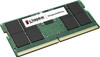
Kingston ValueRAM 16GB DDR5 5600MT/s Laptop RAM – CL46, 262-Pin SODIMM
- SKU:
- SDKIN-KVR56S46BS
- UPC:
- 740617334050
- MPN:
- KVR56S46BS8-16
- Availability:
- Free Click & Collect in Peterborough. UK delivery also available





Description
Kingston ValueRAM 16GB DDR5 5600MT/s Laptop RAM – CL46, PC5-44800, 262-Pin SO-DIMM
The Kingston ValueRAM 16GB DDR5 5600MT/s Laptop Memory (KVR56S46BS8-16) is a high-performance, industry-standard memory module designed for compatible laptops, mini PCs, all-in-one computers and compact systems that support DDR5 262-pin SO-DIMM RAM. Featuring 16GB capacity, 5600MT/s data transfer speed, CL46 latency, 1.1V operating voltage and a single-rank 1Rx8 configuration, it offers a practical memory upgrade for everyday computing, business applications and demanding multitasking.
Built to JEDEC industry-standard specifications, the Kingston ValueRAM DDR5-5600 SO-DIMM uses 46-45-45 timings at 1.1V and includes on-die error correction technology within its DDR5 memory components. Its compact 262-pin SO-DIMM format is designed for compatible portable and small-form-factor computers.
Upgrading a compatible system to 16GB or adding another supported memory module can help reduce memory-related slowdowns when running several applications, working with large documents, using multiple browser tabs or performing everyday productivity tasks. The benefit depends on the computer's existing memory capacity, supported configuration and workload.
Kingston's ValueRAM range is designed around standard memory specifications rather than aggressive overclocking profiles, making it suitable for customers who require reliable, compatible replacement or upgrade RAM for supported systems.
The KVR56S46BS8-16 is supplied as one 16GB DDR5 memory module and is covered by Kingston's limited lifetime manufacturer warranty, subject to applicable warranty conditions.
Quick answer: The Kingston ValueRAM KVR56S46BS8-16 is a single 16GB DDR5-5600 laptop memory module with 262 pins, PC5-44800 bandwidth classification, CL46 latency, JEDEC 46-45-45 timings and 1.1V operation. It is single-rank (1Rx8), non-ECC and unbuffered, with DDR5 on-die ECC. It is designed for compatible laptops and compact PCs with DDR5 SO-DIMM slots. It cannot be installed in DDR4 SO-DIMM or desktop DDR5 DIMM slots.
Key Features of Kingston ValueRAM 16GB DDR5-5600 SO-DIMM
- 16GB DDR5 capacity: One 16GB memory module for compatible laptop and compact PC upgrades.
- 5600MT/s data transfer rate: DDR5-5600 memory performance on supported systems.
- PC5-44800 bandwidth classification: Theoretical peak memory transfer bandwidth of approximately 44.8GB/s per 64-bit module.
- CL46 CAS latency: JEDEC-standard latency specification at DDR5-5600.
- 46-45-45 primary timings: Manufacturer-programmed JEDEC timings at the rated memory speed.
- 1.1V operating voltage: DDR5-standard low-voltage operation.
- 262-pin SO-DIMM: Compact memory format used by compatible DDR5 laptops and mini PCs.
- Single-rank 1Rx8 design: One memory rank using x8-organised DRAM components.
- Non-ECC memory module: Intended for compatible systems requiring standard non-ECC unbuffered RAM.
- On-die ECC: Internal error correction technology within the DDR5 DRAM components.
- Unbuffered design: Standard client-system memory rather than registered server RAM.
- JEDEC SPD programming: Standard DDR5-5600 timings stored in the module's serial presence detect information.
- Gold contact fingers: Manufacturer-specified module connector construction.
- 30mm PCB height: Compact SO-DIMM form factor for supported equipment.
- RoHS compliant: Meets the manufacturer's listed environmental compliance requirements.
- Halogen-free: Listed as halogen-free in Kingston's technical documentation.
- Limited lifetime warranty: Kingston manufacturer coverage subject to its terms.
- Manufacturer part number: KVR56S46BS8-16.
Upgrade Your Laptop with 16GB DDR5 RAM
Adding or replacing system memory is a practical way to improve the usable capacity of a compatible laptop.
RAM temporarily holds the information that the processor and operating system need while applications are running. When available RAM becomes insufficient, the computer may need to move more information between system memory and its storage drive.
This can lead to delays, particularly when switching between several demanding applications.
Improve Multitasking on Compatible Laptops
A 16GB memory configuration can provide useful capacity for everyday workloads such as:
- Running Windows and standard productivity applications.
- Working with Microsoft Office and other document software.
- Using web browsers with multiple open tabs.
- Participating in online meetings and video calls.
- Working with spreadsheets and presentation files.
- Using supported photo-editing software.
- Running business applications and communication tools.
- General home, school and university computing.
Whether this module increases your system to 16GB, 24GB, 32GB or another total depends on the memory already installed and the computer's supported memory configuration.
Upgrade from 8GB to 16GB RAM
For a laptop currently using a replaceable 8GB memory module, upgrading to a compatible 16GB module may provide more room for applications and background processes.
This can help when the existing 8GB capacity is frequently exhausted during everyday use.
Before replacing the existing memory, verify whether the computer uses a removable DDR5 SO-DIMM and whether 16GB modules are supported.
Can More RAM Make a Laptop Faster?
Increasing RAM can improve responsiveness when insufficient memory is restricting performance.
However, more RAM does not automatically increase processor performance, SSD transfer speed or graphics hardware capability.
If the computer already has sufficient RAM for its workload, adding memory may provide only a modest improvement.
Upgrade advice: Check the computer's existing RAM usage, supported maximum capacity and available slots before purchasing.
DDR5-5600 Performance with PC5-44800 Bandwidth
The Kingston ValueRAM KVR56S46BS8-16 is rated for DDR5-5600, providing a maximum supported transfer rate of 5600 mega transfers per second (MT/s) under suitable system conditions.
What Does 5600MT/s Mean?
MT/s measures the number of data transfers performed per second by the memory interface.
DDR5-5600 provides a rated transfer rate of 5.6 billion transfers per second on a compatible memory connection.
Because DDR stands for Double Data Rate, the effective data transfer rating should not be confused with the underlying physical clock frequency.
5600MT/s is the more precise specification, although some computer and retailer listings describe the same memory rating as 5600MHz.
What Is PC5-44800?
PC5-44800 is the memory bandwidth classification associated with DDR5-5600.
For a standard 64-bit memory module, the theoretical peak bandwidth is approximately 44,800MB/s, or 44.8GB/s.
This is a theoretical interface rating rather than a guaranteed application transfer speed.
Actual memory bandwidth depends on the processor's memory controller, system configuration and software workload.
Does the Laptop Need to Support 5600MT/s?
The computer must support DDR5 SO-DIMM memory, and the actual operating speed is determined by the CPU, chipset, BIOS and memory configuration.
Some systems support DDR5-5600, while others operate compatible DDR5 memory at lower rates such as 5200MT/s or 4800MT/s.
Where a lower-speed configuration is supported, the module may operate at that speed automatically.
Speed compatibility note: Installing DDR5-5600 memory does not guarantee that a computer will run it at 5600MT/s. Confirm the laptop manufacturer's maximum supported memory speed.
CL46 CAS Latency and JEDEC 46-45-45 Timings
The KVR56S46BS8-16 uses CL46 CAS latency with manufacturer-programmed primary timings of 46-45-45 at its DDR5-5600 rating.
What Is CAS Latency?
CAS latency describes part of the delay involved when the memory controller requests data from an open memory row.
It is expressed in memory clock cycles.
A CAS latency value should be considered alongside the memory's operating speed, rather than compared in isolation between DDR4 and DDR5 modules.
JEDEC Standard Memory Settings
Kingston programs this ValueRAM module to standard DDR5 timing requirements through its SPD information.
The manufacturer lists DDR5-5600, 46-45-45 timings and 1.1V operation.
This makes the module suitable for compatible systems designed to operate using standard memory settings.
Does Kingston ValueRAM Need XMP or AMD EXPO?
No special memory-overclocking profile is required for the module's published JEDEC DDR5-5600 specification.
Kingston ValueRAM is intended for standards-based operation rather than depending on an advertised XMP or AMD EXPO overclocking profile.
The computer must still support the required memory speed and configuration.
Important: The actual speed and timings may differ from the module's maximum published rating when installed in a particular computer.
1.1V Low-Voltage DDR5 Laptop Memory
The Kingston KVR56S46BS8-16 operates using a typical 1.1V VDD and VDDQ supply.
This is consistent with the standard electrical requirements of the supported DDR5 memory design.
What Are the Benefits of DDR5's 1.1V Operation?
The DDR5 memory standard uses lower nominal core voltage than standard DDR4 memory, which typically operates at 1.2V.
This is part of DDR5's approach to power delivery and memory efficiency.
However, actual laptop battery life depends on the processor, display, storage, background applications and the complete system power configuration.
Replacing RAM with this module does not guarantee a specific improvement in battery runtime.
Additional Electrical Specifications
Kingston's manufacturer datasheet also lists the following electrical values:
- VDD: 1.1V typical.
- VDDQ: 1.1V typical.
- VPP: 1.8V typical.
- VDDSPD: 1.8V to 2.0V.
These are memory module electrical specifications. The buyer should select RAM according to the computer's supported DDR5 SO-DIMM specification rather than attempting to supply these voltages externally.
Compact 262-Pin DDR5 SO-DIMM Form Factor
The Kingston ValueRAM 16GB module uses a 262-pin DDR5 SO-DIMM connector.
SO-DIMM stands for Small Outline Dual In-line Memory Module and is commonly used in laptops and compact computers where a full-size desktop memory module will not fit.
Designed for Compatible Laptops
Many modern serviceable DDR5 laptops use SO-DIMM memory slots.
The compact form factor helps the memory module fit inside the restricted space available in suitable notebooks.
However, some laptops use soldered memory or proprietary memory designs and cannot accept a conventional SO-DIMM upgrade.
Compatible with Selected Mini PCs and Compact Systems
Some mini PCs, all-in-one computers and small-form-factor systems also use 262-pin DDR5 SO-DIMM modules.
The Kingston KVR56S46BS8-16 may be suitable for these systems when their manufacturer explicitly supports compatible non-ECC DDR5 SO-DIMM memory.
Check the exact system model and supported memory population rules before ordering.
Will DDR5 SO-DIMM Fit a DDR4 Laptop?
No. DDR4 SO-DIMM and DDR5 SO-DIMM memory use different electrical and physical interfaces.
Standard DDR4 SO-DIMM memory uses 260 pins, while this DDR5 SO-DIMM uses 262 pins.
The connector keying is different, so DDR5 memory cannot be installed in a DDR4-only slot.
Will It Fit a Desktop DDR5 Motherboard?
Not if the motherboard requires standard full-size desktop DDR5 DIMMs.
Most desktop DDR5 motherboards use 288-pin DIMM slots, whereas this product is a 262-pin SO-DIMM.
Some specialist desktop or mini-PC motherboards do use SO-DIMM slots, so the exact motherboard specification determines compatibility.
Physical compatibility note: DDR5 SO-DIMM is not interchangeable with DDR4 SO-DIMM, desktop DDR5 DIMM or registered server DIMM memory.
Single-Rank 1Rx8 Memory Architecture
Kingston specifies this module as 1Rx8, meaning a single-rank memory configuration using x8-organised DRAM components.
The manufacturer describes the module as a 2G x 64-bit, 16GB design based on eight 2G x 8-bit FBGA memory components.
What Does 1Rx8 Mean?
The designation has two main parts:
- 1R: One memory rank.
- x8: The data width of each DRAM component is eight bits.
These are technical characteristics that may matter for compatibility with certain memory controllers and system designs.
Is Single-Rank RAM Better Than Dual-Rank?
Single-rank and dual-rank memory modules have different internal organisations.
Performance differences depend on the memory controller, workload and number of installed modules.
Neither design guarantees superior performance in every laptop.
Configuration note: The Kingston KVR56S46BS8-16 is specifically a single-rank 1Rx8 module. Customers requiring a particular rank layout should check the computer manufacturer's memory requirements.
Non-ECC Unbuffered DDR5 with On-Die ECC
The Kingston ValueRAM KVR56S46BS8-16 is a non-ECC, unbuffered memory module intended for compatible standard computer systems.
It also includes DDR5 on-die ECC functionality within its memory components.
What Is On-Die ECC?
On-die ECC is an internal error-correction feature implemented within DDR5 DRAM components.
It helps manage certain errors within the memory chips themselves.
Is On-Die ECC the Same as Server ECC Memory?
No. On-die ECC should not be confused with the end-to-end error-correction capabilities of a dedicated system-level ECC memory configuration.
Kingston classifies the KVR56S46BS8-16 as non-ECC.
It does not provide the same host-visible ECC data path expected by systems requiring compatible ECC memory modules.
What Does Unbuffered Mean?
Unbuffered memory communicates with the host memory controller without the register architecture used in registered server DIMMs.
This module is intended for compatible DDR5 client systems rather than server platforms that require registered memory.
Important server compatibility note: Do not purchase this module for a server or workstation that specifically requires ECC RDIMM, registered DIMM or another different memory specification.
Upgrade to 32GB Using Two Compatible 16GB Modules
Some DDR5 laptops and mini PCs have two upgradeable SO-DIMM slots.
Where the system supports a total capacity of 32GB and an appropriate memory configuration, two compatible 16GB modules can provide 32GB of installed RAM.
Does This Product Include Two Modules?
No. The Kingston KVR56S46BS8-16 is sold as one 16GB module.
Two modules must be purchased separately if the customer needs two sticks.
Can Two Modules Improve Memory Performance?
Many compatible computers can achieve greater aggregate memory bandwidth when suitable modules are installed across the available memory channels.
This can benefit selected workloads, including applications that rely heavily on memory bandwidth.
However, the performance improvement depends on the processor, motherboard, channel arrangement and memory configuration.
Can I Mix Kingston RAM with Another Brand?
Memory modules with different brands, capacities, rankings or timing specifications may work together in some systems, but successful operation is not guaranteed.
When different memory speeds are installed, the computer may select a lower mutually supported memory setting.
For best compatibility, follow the system manufacturer's memory population guidance and use appropriately matched modules where possible.
Can I Add This 16GB Module to Existing 8GB RAM?
Some systems support mixed-capacity DDR5 memory configurations, while others have stricter requirements.
A combination such as 8GB plus 16GB may be possible in a supported computer, but performance, total capacity and memory-channel behaviour depend on the specific hardware.
Upgrade planning note: Check the number of available memory slots, existing module type, maximum supported capacity and CPU memory specifications before purchasing additional RAM.
Compatible with Selected Intel and AMD DDR5 Systems
The Kingston ValueRAM KVR56S46BS8-16 is designed around standard DDR5 SO-DIMM specifications rather than a particular processor brand.
It may be suitable for compatible Intel-based or AMD-based computers equipped with supported DDR5 SO-DIMM slots.
Intel Laptop Compatibility
Selected Intel laptop platforms support DDR5 SO-DIMM memory.
However, supported memory transfer rates vary between processor generations and individual laptop designs.
Some Intel systems support DDR5-5600, while others are limited to a lower operating rate.
Confirm the exact processor and laptop specifications rather than relying only on the Intel brand or processor family name.
AMD Laptop Compatibility
Selected AMD laptop and mini-PC platforms also support DDR5 SO-DIMM memory.
Supported memory capacity, speed and rank configurations depend on the particular processor, motherboard and firmware.
Some modern AMD systems use soldered LPDDR5 or LPDDR5X instead of removable DDR5 SO-DIMM memory, so a DDR5-capable processor alone does not confirm upgrade compatibility.
Use Kingston's Memory Compatibility Finder
Kingston provides a memory finder that helps customers identify supported upgrades by system manufacturer, model or memory part number.
Before purchasing, compare the Kingston part number with the laptop manufacturer's documentation and use the manufacturer's compatibility tools where available.
Kingston Memory Finder: Check compatible Kingston memory upgrades.
Kingston ValueRAM vs Kingston FURY Laptop Memory
Kingston offers different memory product families to suit different system requirements.
Kingston ValueRAM
ValueRAM is designed around industry-standard memory requirements and JEDEC specifications.
The KVR56S46BS8-16 uses standard DDR5-5600 CL46 timing information and does not depend on a dedicated overclocking profile to advertise its specified speed.
This makes it a practical option for compatible business laptops, everyday computers and systems requiring standard memory settings.
Kingston FURY Impact
Kingston FURY Impact is a separate laptop memory product family aimed at compatible systems where its specific performance features are supported.
Depending on the exact model, FURY memory may offer different configurations, timings or performance-oriented features.
These features must be supported by the host system to provide the intended benefit.
Which Kingston Memory Should You Choose?
Choose Kingston ValueRAM when the computer requires industry-standard, non-ECC unbuffered DDR5 SO-DIMM memory and the published capacity, speed and rank configuration match the supported system specification.
Consider other Kingston memory ranges only when the computer supports the relevant alternative specification and there is a clear reason to choose it.
Who Is Kingston ValueRAM 16GB DDR5-5600 Best For?
- Laptop users: Customers upgrading a compatible DDR5 notebook with removable SO-DIMM memory.
- Office workers: Users running business applications, spreadsheets, email and several browser tabs.
- Students: People using compatible laptops for coursework, research and productivity tasks.
- Mini PC owners: Customers upgrading small computers with supported 262-pin DDR5 SO-DIMM slots.
- All-in-one PC users: Owners of suitable systems using replaceable DDR5 laptop-format memory.
- IT departments: Businesses maintaining or upgrading compatible DDR5 computers.
- Computer repair technicians: Professionals replacing a failed or insufficient DDR5 SO-DIMM module.
- Home users: People wanting more memory capacity for everyday multitasking.
- Users building a 32GB configuration: Customers installing two compatible 16GB modules in systems that support the intended configuration.
- Customers seeking JEDEC memory: Buyers looking for standard DDR5-5600 CL46 settings rather than an overclocking-focused kit.
Who Should Consider Different RAM?
- DDR4 laptop owners: This DDR5 module will not fit a DDR4 SO-DIMM slot.
- Desktop DIMM users: Standard desktop DDR5 motherboards typically require 288-pin DIMMs.
- Owners of soldered-memory laptops: Systems without replaceable SO-DIMM slots cannot use this as an internal upgrade.
- LPDDR5 or LPDDR5X-only systems: These memory technologies are not interchangeable with removable DDR5 SO-DIMM.
- ECC server memory buyers: This is a non-ECC module, despite having DDR5 on-die ECC.
- Systems requiring registered memory: The module is unbuffered and not an RDIMM.
- Users requiring a 32GB single module: This product contains one 16GB module.
- Customers requiring a two-stick kit: One module is included; it is not a 2 x 8GB or 2 x 16GB kit.
- Systems requiring a different memory speed or ranking: Check the system manufacturer's supported configurations before ordering.
Kingston ValueRAM 16GB DDR5-5600 – Technical Overview
- Brand: Kingston
- Manufacturer: Kingston Technology
- Product Family: ValueRAM
- Manufacturer Part Number: KVR56S46BS8-16
- Product Type: Laptop / compact PC RAM
- Capacity: 16GB
- Module Quantity: 1 x 16GB
- Memory Technology: DDR5 SDRAM
- Memory Speed: 5600MT/s
- Memory Classification: PC5-44800
- CAS Latency: CL46
- Primary Timings: 46-45-45
- Operating Voltage: 1.1V
- Form Factor: SO-DIMM
- Connector: 262-pin
- Memory Ranking: 1Rx8
- Number of Ranks: 1
- DRAM Chip Organisation: x8
- DRAM Chip Density: 16Gbit
- Component Configuration: Eight 2G x 8-bit FBGA components
- Module Data Organisation: 2G x 64-bit
- Module Data Width: 64-bit
- Error Correction: Non-ECC module with on-die ECC
- Memory Buffering: Unbuffered
- SPD: JEDEC-programmed DDR5-5600 timings
- VDD: 1.1V typical
- VDDQ: 1.1V typical
- VPP: 1.8V typical
- VDDSPD: 1.8V to 2.0V
- PCB Height: 30mm
- Module Length: Approximately 69.6mm
- Connector Contacts: Gold contact fingers
- Operating Temperature: 0°C to 85°C
- Storage Temperature: -55°C to 100°C
- RoHS: Compliant
- Halogen-Free: Yes
- Manufacturer Warranty: Limited lifetime
- Intended Systems: Compatible DDR5 SO-DIMM laptops and compact PCs
How to Install Kingston 16GB DDR5 SO-DIMM Laptop RAM
- Verify compatibility: Confirm that the laptop or mini PC supports removable 262-pin DDR5 SO-DIMM memory.
- Check the existing configuration: Identify the installed capacity, available slots and maximum supported memory.
- Back up important files: Save important work before servicing the computer.
- Turn off the computer: Shut down the operating system completely.
- Disconnect external power: Remove the charger and connected accessories.
- Follow the service manual: Open the relevant access panel or enclosure only where the manufacturer permits user servicing.
- Observe anti-static precautions: Handle the RAM by its edges and avoid touching the contacts or components.
- Identify the SO-DIMM slot: Confirm it is a DDR5 slot and check the connector alignment.
- Insert the module: Align the notch with the socket and insert it at the angle specified by the system manufacturer.
- Secure the RAM: Press the module into position until the retaining clips engage correctly.
- Reassemble the computer: Refit the enclosure and reconnect power according to the manufacturer's instructions.
- Start the computer: Allow the system to initialise and train the memory where required.
- Check the installed capacity: Verify that the BIOS/UEFI or operating system recognises the new memory.
- Confirm operating speed: Check the actual memory speed, remembering that it may be below 5600MT/s if the computer requires a lower setting.
- Test system stability: If problems occur, use suitable diagnostics and check the memory installation and compatibility.
Installation warning: Never force a DDR5 SO-DIMM into an incompatible slot. Memory connector keying is designed to prevent installation into the wrong socket type. For laptops with internal batteries or restricted service access, follow the manufacturer's instructions or use a qualified technician.
What to Check Before Buying Kingston KVR56S46BS8-16
1. Confirm Your Laptop Uses DDR5
A laptop using DDR4, LPDDR5, LPDDR5X or another memory technology is not automatically compatible with this removable DDR5 SO-DIMM module.
2. Confirm the Number of Pins
This memory uses a 262-pin SO-DIMM connector. Standard DDR4 SO-DIMM modules use 260 pins and cannot be interchanged.
3. Check Maximum Supported Capacity
Make sure the computer supports a 16GB module in the intended slot and the required total installed RAM capacity.
4. Check the Supported Memory Speed
The module is rated for 5600MT/s, but the laptop may use a lower supported speed.
5. Check Existing Memory
If another module is already installed, compare its memory generation, capacity, speed and configuration against the system manufacturer's requirements.
6. Confirm the Memory Is Replaceable
Some modern laptops have soldered memory without removable slots. These computers cannot be upgraded using a conventional SO-DIMM unless a separate compatible expansion slot is provided.
7. Confirm Non-ECC Unbuffered Support
The KVR56S46BS8-16 is a non-ECC, unbuffered module. It is not suitable for systems that require a different ECC or registered memory specification.
Important Compatibility and Performance Notes
5600MT/s Speed Depends on the Computer
The rated memory speed is 5600MT/s. The installed system may operate at a lower speed depending on the processor, BIOS, memory controller and configuration.
DDR5 Is Not Backwards Compatible with DDR4 Slots
DDR5 SO-DIMM memory cannot be inserted into a DDR4 SO-DIMM connector. Check the computer's supported memory generation before purchasing.
On-Die ECC Is Not System-Level ECC
The module includes DDR5 on-die ECC but is classified as non-ECC unbuffered memory. It should not be purchased as a substitute for dedicated system-level ECC server RAM.
One 16GB Module Is Included
The package contains one 16GB SO-DIMM, not a two-module kit. Purchase additional compatible memory separately if the system requires more than one module.
Mixed Memory Configurations Are Not Guaranteed
Mixing memory modules with different capacities, brands, speeds or rankings may affect stability and performance. Follow Kingston's and the computer manufacturer's supported configuration guidance.
Some Laptops Cannot Be Upgraded
Devices with fully soldered memory or restricted internal layouts may not accept additional RAM. Verify the exact computer model before ordering.
Why Choose Kingston ValueRAM 16GB DDR5 5600MT/s Laptop Memory?
The Kingston ValueRAM 16GB DDR5-5600 SO-DIMM is a practical memory upgrade for compatible laptops and compact PCs requiring standard DDR5 memory.
Its 16GB capacity, 5600MT/s transfer rate, CL46 timing specification, 1.1V operation and single-rank 1Rx8 architecture provide a clear, standards-based specification for replacement and upgrade applications.
Unlike an overclocking-focused memory product, Kingston ValueRAM uses manufacturer-programmed JEDEC settings that are intended for compatibility with supported computer platforms.
The combination of compact 262-pin SO-DIMM construction, non-ECC unbuffered design, on-die ECC and Kingston's limited lifetime warranty makes it suitable for customers seeking a dependable laptop RAM upgrade.
Choose Kingston KVR56S46BS8-16 if your laptop or mini PC supports a 16GB DDR5-5600 non-ECC unbuffered 262-pin SO-DIMM module and you want to expand or replace its system memory.
Official manufacturer specifications: Kingston ValueRAM KVR56S46BS8-16 Technical Datasheet (PDF).
Official product details: Kingston KVR56S46BS8-16 Product Information.
Manufacturer warranty: Kingston Limited Lifetime Memory Warranty.
Specifications apply to Kingston ValueRAM KVR56S46BS8-16. Actual installed memory speed, capacity support and compatibility depend on the laptop or computer manufacturer, processor, firmware and memory configuration. Verify system compatibility before purchase. Warranty coverage is subject to Kingston's applicable terms and conditions.
Specification
Kingston ValueRAM 16GB DDR5 5600MT/s Laptop RAM – Technical Specifications
The Kingston ValueRAM KVR56S46BS8-16 is a 16GB DDR5-5600 laptop memory module designed for compatible computers with 262-pin DDR5 SO-DIMM slots. It features CL46 CAS latency, JEDEC 46-45-45 timings, 1.1V operation and a single-rank 1Rx8 configuration. The module is non-ECC and unbuffered, with DDR5 on-die ECC technology, making it suitable for compatible laptops, mini PCs and other systems requiring standard DDR5 SO-DIMM memory.
General Information
| Brand | Kingston |
|---|---|
| Manufacturer | Kingston Technology |
| Product Family | ValueRAM |
| Manufacturer Part Number (MPN) | KVR56S46BS8-16 |
| EAN / GTIN | 0740617334050 |
| UPC | 740617334050 |
| Product Name | Kingston ValueRAM 16GB DDR5 5600MT/s CL46 262-Pin SO-DIMM |
| Product Type | Internal system memory / RAM |
| Memory Technology | DDR5 SDRAM |
| Memory Application | Compatible laptops, mini PCs and compact systems |
| Memory Form Factor | SO-DIMM |
| Memory Capacity | 16GB |
| Module Quantity | 1 |
| Module Configuration | 1 x 16GB |
| Manufacturer Warranty | Limited lifetime |
Memory Capacity and Configuration
| Total Supplied Capacity | 16GB |
|---|---|
| Capacity per Module | 16GB |
| Number of Modules Supplied | 1 |
| Memory Kit Type | Single module, not a two-module kit |
| Module Data Organisation | 2G x 64-bit |
| Module Data Width | 64-bit |
| Rank Configuration | Single-rank |
| Rank Designation | 1Rx8 |
| Number of Ranks | 1 |
| DRAM Chip Organisation | x8 |
| Number of DRAM Components | 8 |
| Individual DRAM Component Organisation | 2G x 8-bit |
| DRAM Density per Component | 16Gbit |
| DRAM Component Package | FBGA |
Capacity Note: This product contains one 16GB memory module. It is not a 2 x 8GB kit or a 2 x 16GB kit.
Installing two compatible 16GB modules may provide 32GB of total system memory, but only where the laptop or computer supports the required capacity and module configuration.
Memory Speed and Bandwidth
| Memory Standard | DDR5 |
|---|---|
| Memory Speed | 5600MT/s |
| JEDEC Speed Rating | DDR5-5600 |
| Bandwidth Classification | PC5-44800 |
| Theoretical Peak Bandwidth | 44,800MB/s / 44.8GB/s per 64-bit module |
| Effective Data Transfer Rate | 5,600 million transfers per second |
| Manufacturer-Programmed Speed | DDR5-5600 |
| Speed Configuration | JEDEC standard |
| Required Host Support | Compatible DDR5 memory controller, motherboard and BIOS/UEFI |
| Lower-Speed Operation | Possible where supported by the system and module configuration |
| Guaranteed Installed Speed | Determined by the host system; 5600MT/s is the module's rated speed |
Memory Speed Note: The module is rated for 5600MT/s. Actual installed speed depends on the processor, BIOS, motherboard, available memory slots and other installed modules.
Some compatible systems may operate DDR5-5600 memory at lower transfer rates, such as 5200MT/s or 4800MT/s.
Bandwidth Clarification: PC5-44800 represents a theoretical bandwidth classification. It is not a guaranteed application data-transfer speed.
CAS Latency and JEDEC Timings
| CAS Latency | CL46 |
|---|---|
| CAS Latency (tCL) | 46 cycles |
| JEDEC Primary Timings | 46-45-45 |
| JEDEC Timing Speed | DDR5-5600 |
| JEDEC Timing Voltage | 1.1V |
| Minimum Row Cycle Time (tRCmin) | 48ns |
| Minimum Refresh Cycle Time (tRFCmin) | 295ns |
| Minimum Row Active Time (tRASmin) | 32ns |
| SPD Timing Programming | JEDEC DDR5-5600, 46-45-45 at 1.1V |
| XMP Profile Required for Rated Specification | No; the published rating is a JEDEC specification |
| AMD EXPO Profile Required | No; the published rating is a JEDEC specification |
Timing Note: Kingston specifies CL46 and primary timings of 46-45-45 at DDR5-5600. These settings are programmed according to JEDEC standards.
Actual operating timings may differ if the host computer uses a lower supported memory speed or another compatible configuration.
Electrical and Voltage Specifications
| Nominal Operating Voltage | 1.1V |
|---|---|
| VDD Supply | 1.1V typical |
| VDDQ Supply | 1.1V typical |
| VPP Supply | 1.8V typical |
| VDDSPD Supply | 1.8V to 2.0V |
| Voltage Specification | DDR5 JEDEC standard |
| Host Power Delivery | Provided through the compatible DDR5 SO-DIMM slot |
| External Power Supply | Not required |
Electrical Compatibility Note: The module uses standard DDR5 voltage requirements. It must be installed only in a compatible DDR5 SO-DIMM slot.
The additional voltage values above describe the internal electrical requirements of the memory design. They are not separate power connections that users need to provide.
ECC and Memory Buffering
| System-Level ECC Module | No |
|---|---|
| Module ECC Classification | Non-ECC |
| DDR5 On-Die ECC | Supported |
| Module Data Width | 64-bit |
| Unbuffered Memory | Yes |
| Registered Memory (RDIMM) | No |
| Load-Reduced Memory (LRDIMM) | No |
| Server ECC RDIMM Replacement | Not suitable for systems requiring registered ECC DIMMs |
| Typical Target System | Compatible client laptop or compact computer |
Important ECC Clarification: This Kingston module is classified as non-ECC, unbuffered memory, even though DDR5 provides on-die ECC within the DRAM components.
On-die ECC does not provide the same system-level error-correction functionality as dedicated ECC memory modules. The KVR56S46BS8-16 should not be used in systems that specifically require registered ECC or another incompatible memory type.
Physical Form Factor and Dimensions
| Memory Form Factor | SO-DIMM |
|---|---|
| Memory Generation | DDR5 |
| Connector Pin Count | 262 |
| Module Length | 69.60mm |
| PCB Height | 30.00mm |
| Module PCB Dimensions (L x H) | 69.60 x 30.00mm |
| PCB Height in Inches | 1.18 inches |
| Connector Contact Type | Gold contact fingers |
| Connector Keying | DDR5 SO-DIMM-specific |
| Manufacturer Dimension Tolerance | ±0.12mm unless otherwise specified in the drawing |
| Module Thickness | Not specified as an overall thickness in the checked datasheet |
| Heat Spreader | No separate heat spreader specified |
| RGB Lighting | Not included |
Dimensions Note: The manufacturer dimension drawing confirms a module length of 69.60mm and a PCB height of 30.00mm. The overall assembled thickness is not provided as a confirmed specification.
Physical Compatibility Note: The 262-pin DDR5 SO-DIMM connector differs from 260-pin DDR4 SO-DIMM and standard 288-pin desktop DDR5 DIMM connectors. These memory types are not physically interchangeable.
Operating and Storage Environment
| Minimum Operating Temperature | 0°C |
|---|---|
| Maximum Operating Temperature | 85°C |
| Operating Temperature Range | 0°C to 85°C |
| Minimum Storage Temperature | -55°C |
| Maximum Storage Temperature | 100°C |
| Storage Temperature Range | -55°C to 100°C |
| UL Flammability Rating | 94 V-0 |
| RoHS Compliance | Compliant |
| Halogen-Free | Yes |
Environmental Note: The temperature values are memory-module specifications. They do not establish that the complete laptop or computer can operate safely at the same extreme temperatures.
The memory should be installed and used within the environmental limits of the host system.
Laptop and Notebook Compatibility
| Laptop Compatibility | Compatible laptops with removable DDR5 SO-DIMM slots |
|---|---|
| Required Memory Generation | DDR5 |
| Required Memory Slot | 262-pin DDR5 SO-DIMM |
| Required Module Type | Non-ECC, unbuffered DDR5 SO-DIMM |
| Required Capacity Support | Host system must support a 16GB module |
| 5600MT/s Operation | Requires compatible processor, BIOS and memory configuration |
| Intel Laptop Compatibility | Selected DDR5 SO-DIMM systems, subject to exact model requirements |
| AMD Laptop Compatibility | Selected DDR5 SO-DIMM systems, subject to exact model requirements |
| DDR4 Laptop Compatibility | Not compatible |
| Soldered-Memory-Only Laptops | Not compatible without a separate supported DDR5 SO-DIMM slot |
| LPDDR5 / LPDDR5X-Only Systems | Not directly compatible |
| Maximum Installed RAM | Depends on the individual laptop or computer |
Important Laptop Compatibility Note: The KVR56S46BS8-16 is not a universal laptop memory module. The computer must have a compatible removable DDR5 SO-DIMM slot and support the required capacity and organisation.
Check the exact laptop model and manufacturer documentation before ordering. Laptop brand alone does not guarantee compatibility.
Mini PC and Compact Computer Compatibility
| Mini PC Compatibility | Supported where the system uses compatible DDR5 SO-DIMM memory |
|---|---|
| All-in-One PC Compatibility | Supported on compatible models with DDR5 SO-DIMM slots |
| Small-Form-Factor PC Compatibility | Depends on motherboard memory format |
| Standard Desktop DDR5 DIMM Slots | Not directly compatible |
| DDR4 SO-DIMM Slots | Not compatible |
| Registered Server Memory Slots | Not compatible where RDIMM memory is required |
| ECC-Required Systems | Not a replacement for dedicated system-level ECC RAM |
| Host Firmware | Must support the intended DDR5 module and configuration |
Compact PC Note: Some mini PCs and all-in-one computers use laptop-format DDR5 SO-DIMM memory, while others use desktop DIMMs or soldered RAM. Verify the exact motherboard or system specification.
Memory Upgrade and Multi-Module Configuration
| Single Module Installation | Supported by compatible systems |
|---|---|
| Two-Module Installation | Possible where the host supports the intended configuration |
| Two Matching 16GB Modules | 32GB total, subject to host compatibility |
| Dual-Channel Operation | Depends on processor, memory slots and installed configuration |
| Mixing with Existing RAM | Not universally guaranteed |
| Mixing Different Speeds | System may select a lower mutually supported speed |
| Mixing Different Capacities | Depends on host platform support |
| Mixing Different Rank Organisations | Subject to motherboard and memory controller compatibility |
| Maximum System Capacity | Determined by the computer manufacturer and platform |
Upgrade Note: When installing additional memory, check whether the computer already has a module installed and whether the available slot supports the Kingston KVR56S46BS8-16.
For multi-module configurations, follow the system manufacturer's guidance on capacity, slot population, memory speed and rank organisation.
JEDEC and Memory Profile Compatibility
| Memory Specification | JEDEC DDR5-5600 |
|---|---|
| SPD Programming | JEDEC 46-45-45 at 1.1V |
| JEDEC Standard Operation | Supported |
| Overclocking Required for Published Rating | No; the published specification is JEDEC-based |
| Advertised XMP Overclocking Profile | Not specified for this ValueRAM part number |
| Advertised AMD EXPO Profile | Not specified for this ValueRAM part number |
| Automatic Memory Configuration | Determined by the host BIOS/UEFI and SPD information |
JEDEC Note: Kingston ValueRAM is intended for standards-based memory operation. The advertised DDR5-5600 CL46 specification is programmed through the module's JEDEC SPD settings.
Systems without 5600MT/s support may use another compatible memory setting.
Product Certifications and Compliance
| RoHS | Compliant |
|---|---|
| Halogen-Free | Yes |
| UL Flammability Rating | 94 V-0 |
| JEDEC Memory Specification | DDR5-5600 standard programming |
| DDR5 On-Die ECC | Supported |
Package Contents
| Memory Module | 1 x Kingston ValueRAM KVR56S46BS8-16 |
|---|---|
| Capacity | 16GB |
| Module Quantity | 1 |
| Memory Technology | DDR5 |
| Form Factor | 262-pin SO-DIMM |
| Two-Module Kit | No |
| Second 16GB Module | Not included |
| Computer or Laptop | Not included |
| Installation Tools | Not advertised as included |
Package Contents Note: The product is a single 16GB DDR5 SO-DIMM module. Additional memory and any tools needed to access the computer's memory slots must be obtained separately.
Manufacturer Warranty and Support
| Manufacturer | Kingston Technology |
|---|---|
| Product Family | ValueRAM |
| Manufacturer Part Number | KVR56S46BS8-16 |
| Warranty Type | Limited manufacturer warranty |
| Warranty Duration | Product lifetime, subject to Kingston's applicable warranty definition and terms |
| Warranty Coverage | Subject to manufacturer warranty conditions and exclusions |
| Original Proof of Purchase | Retain for warranty support |
| Technical Support | Available through Kingston support channels |
| Statutory Consumer Rights | Unaffected by the manufacturer's limited warranty |
| Manufacturer Warranty Policy | Kingston UK Warranty Information |
Warranty Note: Kingston lists ValueRAM memory under its product lifetime warranty. The warranty is limited and subject to Kingston's definition of product lifetime, eligibility requirements and exclusions.
The manufacturer's warranty does not replace applicable UK statutory consumer rights.
Important DDR5 Compatibility Note
This module is designed for compatible 262-pin DDR5 SO-DIMM memory slots.
It is not compatible with DDR4 SO-DIMM, standard desktop DDR5 DIMM or systems with no suitable replaceable memory slot.
Check the exact computer model before ordering.
Important DDR5-5600 Speed Note
The KVR56S46BS8-16 has a manufacturer-rated memory speed of 5600MT/s.
The actual operating speed depends on the host computer's memory controller, BIOS, supported DDR5 profiles and installed module configuration.
Maximum rated speed is not guaranteed in every compatible system.
Important CL46 Timing Note
Kingston specifies CL46 CAS latency and JEDEC 46-45-45 primary timings at DDR5-5600 and 1.1V.
Installed timings may vary when the computer uses another supported memory configuration.
Important ECC Note
The module is non-ECC and unbuffered, with on-die ECC within the DDR5 memory components.
On-die ECC does not provide the same host-visible system-level error correction as dedicated ECC server memory.
Important Single-Module Note
One 16GB module is supplied. The product is not a 32GB memory kit.
If two modules are required, confirm that the computer supports the intended total memory capacity and configuration before purchasing an additional module.
Important Installation Note
Before installing the memory, shut down the computer and disconnect external power. Follow the computer manufacturer's instructions for accessing and servicing memory slots.
Handle the module by its edges and avoid touching the gold contacts. Align the connector notch correctly and never force RAM into an incompatible slot.
After installation, check the BIOS/UEFI or operating system to confirm that the memory capacity is recognised and operating at an appropriate speed.
Official Kingston Technical Resources
Manufacturer Technical Datasheet: Kingston KVR56S46BS8-16 Official Datasheet (PDF)
Manufacturer Part Number Information: Kingston ValueRAM KVR56S46BS8-16 Product Information
Compatible Memory Finder: Kingston Memory Compatibility Finder
Manufacturer Warranty: Kingston UK Limited Warranty Policy
These specifications are based on Kingston's official KVR56S46BS8-16 technical datasheet and product information. Actual system compatibility, operating speed and usable memory capacity depend on the host processor, motherboard, BIOS/UEFI and installed configuration. Product details may change with manufacturer revisions. Always verify compatibility before purchase.
Return
FAQ: Frequenlty Asked Questions
Kingston ValueRAM 16GB DDR5 5600MT/s (KVR56S46BS8-16) FAQ
Find answers about Kingston KVR56S46BS8-16 laptop RAM, including DDR5 compatibility, memory speed, dual-channel upgrades, installation and troubleshooting. Always check your exact laptop or mini PC model before buying.
Product identity and specifications
1. What is the Kingston ValueRAM KVR56S46BS8-16?
The KVR56S46BS8-16 is one 16GB DDR5-5600 non-ECC, unbuffered 262-pin SO-DIMM memory module. It is intended for laptops, mini PCs and compact systems that specifically support removable DDR5 SO-DIMM memory. It can replace an existing compatible module or expand memory where an available slot permits.
2. What is the exact Kingston part number for this 16GB laptop RAM?
The manufacturer part number is KVR56S46BS8-16. Match that entire code, not just the words Kingston 16GB DDR5, when checking compatibility. Kingston also sells DDR5 modules with different capacities, speeds, rank layouts and desktop-sized connectors.
3. Does the package contain one 16GB RAM stick or two?
This is a single 16GB SO-DIMM, not a two-stick kit. A computer requiring two 16GB modules for a 32GB upgrade needs two suitable modules purchased separately or a manufacturer-supported matched kit. Check the number of accessible memory slots before ordering.
4. What are the key specifications of KVR56S46BS8-16?
Its principal specifications are 16GB DDR5, 5600MT/s, PC5-44800, CL46, JEDEC 46-45-45 timings, 1.1V, 262-pin SO-DIMM and single-rank 1Rx8 organisation. Kingston lists the module as non-ECC and unbuffered, with DDR5 on-die ECC inside the DRAM chips.
5. Is Kingston ValueRAM designed for gaming or everyday laptop upgrades?
ValueRAM is Kingston’s industry-standard memory family, designed to operate at published JEDEC settings rather than rely on overclocking profiles. It is suitable for supported business, home, student and gaming laptops. Gaming performance depends on the rest of the system and its memory configuration.
6. What does DDR5 mean on this RAM module?
DDR5 is a generation of computer memory with a different electrical and mechanical design from DDR4. A computer must have a compatible DDR5 SO-DIMM slot and memory controller; a simple BIOS setting cannot turn an older DDR4 laptop into a DDR5 laptop.
7. What does 262-pin SO-DIMM mean?
SO-DIMM is the compact removable memory format used in many laptops and mini PCs. This module has a 262-pin DDR5 connector. Standard DDR4 SO-DIMMs have 260 pins, while full-size desktop DDR5 DIMMs use 288 pins; the formats are not interchangeable.
8. What does DDR5-5600 or 5600MT/s mean?
The memory has a rated data transfer rate of 5,600 million transfers per second. This is normally written as 5600MT/s; shops sometimes use 5600MHz informally. Actual operating speed depends on the processor, firmware and installed memory configuration.
9. What does PC5-44800 mean for this module?
PC5 indicates DDR5 memory, while 44800 describes a theoretical peak data rate of about 44.8GB/s over one 64-bit module data path at 5600MT/s. It is a bandwidth classification, not a measured guarantee that every application will transfer 44.8GB each second.
10. What does CL46 mean on Kingston DDR5 laptop RAM?
CL46 is the CAS latency value at the module’s rated JEDEC speed: 46 memory clock cycles. CAS latency should be assessed with the memory transfer rate and the laptop’s configuration, not compared as an isolated number across DDR4, DDR5 and different speeds.
Laptop and physical compatibility
11. Which laptops are compatible with the Kingston KVR56S46BS8-16?
Only laptop models that support removable 262-pin DDR5 non-ECC unbuffered SO-DIMMs with the module’s capacity and organisation can be considered. Check the exact model or service tag in the manufacturer’s manual and Kingston’s Memory Finder. A brand name alone does not establish compatibility.
12. Will this DDR5 RAM work in a DDR4 laptop?
No. DDR5 SO-DIMMs and DDR4 SO-DIMMs are electrically and physically incompatible. A DDR4 laptop cannot be upgraded to DDR5 simply by changing the memory module. Confirm the existing memory generation before buying.
13. Can I put this laptop SO-DIMM in a desktop DDR5 memory slot?
Not in a standard desktop DDR5 DIMM slot: it is a smaller 262-pin SO-DIMM rather than a 288-pin DIMM. Some mini desktops and all-in-one computers deliberately use laptop-style SO-DIMM slots, so compatibility depends on the exact motherboard.
14. Does Kingston DDR5 SO-DIMM work in a laptop with LPDDR5 or LPDDR5X?
Not when the computer has only soldered LPDDR5 or LPDDR5X memory. Those technologies are not removable DDR5 SO-DIMMs. Some unusual laptops combine soldered memory with expansion options; verify that a separate compatible DDR5 SO-DIMM socket actually exists.
15. Can this module upgrade a laptop with soldered-on RAM?
Only if that specific laptop also has a supported removable DDR5 SO-DIMM expansion slot. If all memory is soldered and no slot is present, this module cannot be installed. Consult the device’s service manual rather than assuming the back cover hides an upgrade slot.
16. Is KVR56S46BS8-16 compatible with Intel laptops?
It can work in Intel-based laptops that officially support this DDR5 SO-DIMM specification. Intel branding or a particular Core processor name is insufficient by itself because manufacturers differ in slot type, memory speed limits, supported capacities and whether RAM is soldered.
17. Is this 16GB DDR5 module compatible with AMD Ryzen laptops?
Yes, in selected AMD Ryzen laptop systems with compatible DDR5 SO-DIMM sockets and supported memory configurations. Other Ryzen machines use DDR4 or soldered LPDDR memory, so check the exact laptop or mini-PC specification before ordering.
18. Will it work with Dell, HP, Lenovo, ASUS, Acer or MSI laptops?
Potentially, but compatibility must be confirmed by model number rather than brand. Each manufacturer sells models with DDR4, DDR5, soldered memory or different capacity limits. Use the laptop’s official service guide and Kingston Memory Finder to check KVR56S46BS8-16 specifically.
19. Can Kingston ValueRAM DDR5-5600 be used in a mini PC or Intel/ASUS NUC?
Yes, certain mini PCs and NUC models use removable 262-pin DDR5 SO-DIMMs and may support this part. Confirm the particular model’s memory type, slot count, rank and density support, maximum capacity and speed; not every NUC or mini PC accepts DDR5-5600.
20. Does KVR56S46BS8-16 work with Apple MacBooks or Apple Silicon Macs?
No current Apple Silicon MacBook with integrated unified memory can accept a removable DDR5 SO-DIMM. Many older Macs also use incompatible memory types or soldered RAM. Do not purchase this module for a Mac unless Apple’s exact hardware documentation explicitly specifies a compatible socket.
Speed, timings and memory technology
21. Will DDR5-5600 RAM work in a laptop limited to DDR5-4800?
Often yes, provided the laptop supports the module’s DDR5 SO-DIMM type, capacity and organisation. Kingston states that industry-standard faster memory can normally downclock to the supported system speed. A laptop limited to 4800MT/s will not gain 5600MT/s operation just by installing this RAM.
22. Can I use 5600MT/s Kingston RAM in a DDR5-5200 laptop?
Often yes: a compatible system may operate the module at 5200MT/s using supported settings. Compatibility is not universal, so check the manufacturer’s supported memory types and population rules. The module’s 5600MT/s rating is its capability, not the laptop’s guaranteed speed.
23. Why is my Kingston 5600MT/s RAM running at 4800MT/s or 5200MT/s?
The processor memory controller, laptop BIOS, other installed RAM or total installed capacity may impose a lower supported rate. This is a common and often normal outcome, not proof that the module is counterfeit or faulty. Check the laptop’s documented memory speed limits.
24. Is DDR5-5600 noticeably faster than DDR5-5200?
DDR5-5600 offers a higher theoretical transfer rate, but real gains vary and may be small in everyday tasks. CPU limits, channel configuration, capacity and whether software is memory-bandwidth-sensitive matter more than the label alone. A 5200-limited laptop will not run this module at 5600.
25. Why does CPU-Z show approximately 2800MHz instead of 5600?
DDR transfers data twice per memory clock, so a tool showing an actual DRAM clock near 2800MHz can correspond to an effective 5600MT/s transfer rate. Check whether the software is displaying physical clock frequency or effective data rate before concluding the RAM is slow.
26. What voltage does this Kingston ValueRAM 16GB DDR5 module need?
Kingston specifies 1.1V typical for VDD and VDDQ, following the module’s JEDEC DDR5 design. The computer must provide a compatible DDR5 memory power environment. Do not try to use it in a DDR4 socket or manually apply unsupported voltage settings.
27. Does KVR56S46BS8-16 need XMP or AMD EXPO to run at 5600MT/s?
No. Kingston programs this ValueRAM module with JEDEC DDR5-5600 CL46 settings. It is not sold as an XMP- or EXPO-dependent overclocking module. Nevertheless, the laptop must support DDR5-5600 for that operating speed to be selected.
28. Do I need to change BIOS settings after installing Kingston ValueRAM?
Normally no: supported laptops automatically select compatible JEDEC memory settings. If the new memory is not detected, follow the manufacturer’s installation and troubleshooting instructions rather than forcing overclocking or voltage changes.
29. What does 1Rx8 mean on this Kingston RAM?
1Rx8 describes a single-rank module constructed with x8-width DRAM chips. Kingston’s datasheet identifies this particular 16GB part as 1Rx8. A rank describes internal module organisation; it is not the same thing as single-channel versus dual-channel system operation.
30. Is Kingston KVR56S46BS8-16 ECC memory?
Kingston categorises it as non-ECC unbuffered memory. Its DDR5 chips incorporate on-die ECC, which corrects certain errors internally, but that does not make it a system-level ECC SO-DIMM for workstations or servers requiring a dedicated ECC memory data path.
Memory capacity, mixing and dual channel
31. Is a single 16GB SO-DIMM better than two 8GB modules?
One 16GB module leaves a second compatible slot free for later expansion, while two suitable 8GB modules may provide more aggregate bandwidth when installed across both channels. The best choice depends on available slots, future capacity needs and the laptop’s architecture.
32. Can I install two KVR56S46BS8-16 modules to get 32GB?
Yes, if your computer has two compatible slots and officially supports 32GB as two 16GB DDR5 SO-DIMMs. This item contains one module, so you need two units or a suitable matched kit. Some systems have only one replaceable slot or a lower capacity limit.
33. Does one 16GB RAM stick run in dual channel?
A single module in a conventional dual-channel laptop generally cannot populate both physical memory channels, although DDR5 itself has two internal subchannels per module. The processor’s memory-channel configuration and slot arrangement determine full system-level dual-channel operation.
34. Can I add this 16GB stick to an existing 8GB DDR5 stick for 24GB?
Some laptops accept an 8GB plus 16GB combination for 24GB total, sometimes with asymmetric or flex-channel operation. This is not guaranteed. Check slot capacity rules, compatible speeds and BIOS support; matching modules are preferable when consistent dual-channel behaviour matters.
35. Can I combine this 16GB Kingston RAM with a 32GB DDR5 module for 48GB?
Only if the laptop supports a 48GB total configuration and the installed modules are mutually compatible. Mixed capacities can change channel behaviour and operating speeds. Verify the device’s exact support information; never assume every DDR5 laptop accepts 16GB plus 32GB.
36. Can I mix Kingston ValueRAM with Samsung, SK hynix or Crucial DDR5?
Mixed-brand DDR5 modules sometimes work if their specifications and system requirements align, but boot compatibility, timing selection and stability are not guaranteed. Kingston recommends matched kits for multi-module upgrades because separately purchased modules may use different components.
37. Can I mix DDR5-4800 and DDR5-5600 SO-DIMMs?
Sometimes, if both modules are compatible with the laptop. The system normally uses a common supported operating speed, often no faster than the lower-rated module. Mixed settings can still cause instability or no boot on particular devices, so a matched configuration is safer.
38. Will installing two 16GB sticks always double laptop performance?
No. Two appropriately placed modules can substantially increase available memory bandwidth compared with a single-channel configuration, but application performance is rarely doubled. Gains depend on whether the workload is constrained by capacity, bandwidth, CPU, GPU or storage.
39. Can I mix 1Rx8 and 1Rx16 DDR5 SO-DIMMs?
Some systems can operate modules with different internal organisations, but matching capacity, speed and rank layout is preferable when possible. Kingston’s 16GB KVR56S46BS8-16 is 1Rx8; its 8GB KVR56S46BS6-8 is 1Rx16. Check your exact system’s supported combinations.
40. Are two separately purchased 16GB Kingston sticks the same as a matched kit?
They may work together, but Kingston notes that modules purchased at different times can contain different qualified components. A matched manufacturer kit is preferable for users who want modules supplied and validated together. Two standalone KVR56S46BS8-16 purchases are not advertised as a factory-paired kit.
Real-world performance and workloads
41. Will upgrading from 8GB to 16GB improve laptop performance?
It can make a noticeable difference if 8GB is insufficient for your applications, browser tabs or background processes. More RAM helps reduce memory pressure and swapping to storage. It will not automatically speed up software that was already running comfortably within 8GB.
42. Is 16GB DDR5-5600 enough for Windows 11?
For many typical Windows 11 tasks, including browsing, office work, streaming and multitasking, 16GB is a useful amount. Heavy games, virtual machines, content creation or many simultaneous applications may benefit from 32GB or more. Windows itself does not require this specific RAM brand.
43. Will Kingston 16GB DDR5-5600 improve gaming FPS?
It may improve frame consistency or FPS where the system previously lacked memory or operated in a bandwidth-limited configuration. It cannot overcome an underpowered CPU or GPU, and results vary by game. Check your game’s memory requirements and whether the laptop supports dual-channel upgrades.
44. Does dual-channel DDR5 RAM help integrated graphics?
Often, because integrated graphics shares system memory and can be sensitive to memory bandwidth. Installing suitable modules across both memory channels can help in supported laptops, although gains depend on CPU design, memory speed, graphics settings and the workload.
45. Is this 16GB Kingston memory good for Photoshop and photo editing?
It can be suitable for moderate photo editing on a compatible computer. Complex high-resolution projects, large layered images and running several creative applications simultaneously may require more capacity. Use the software vendor’s recommendations to decide between 16GB and 32GB.
46. Can I use this RAM for video editing?
Yes, in a supported laptop, but 16GB may be restrictive with high-resolution footage, heavy effects and multiple applications. More memory can reduce slowdowns caused by paging; editing speed also relies heavily on the processor, graphics hardware and SSD.
47. Is Kingston ValueRAM suitable for programming and software development?
It can support common coding, web development and productivity tasks in compatible systems. Large IDE projects, containers, emulators and multiple services can demand more than 16GB. Consider total installed RAM, not just the capacity of this individual stick.
48. Is a 16GB DDR5 SO-DIMM sufficient for virtual machines?
A single 16GB module may be enough for light virtualisation, depending on how much memory the host and each guest need. Several virtual machines, local AI workloads and lab environments often benefit from 32GB or more. Check the host device’s upgrade ceiling.
49. Will more RAM make my laptop start up faster?
Additional RAM helps mainly when the computer is short of memory during startup or subsequent activity. Boot time usually depends more on firmware, SSD performance, operating system and startup programs. Replacing an HDD with an SSD often has a more direct impact on boot speed.
50. Will 16GB RAM help with many browser tabs, Teams and office applications?
It may reduce interruptions when browser tabs, video meetings, spreadsheets and background applications collectively exceed the laptop’s available memory. A second compatible module may also improve bandwidth, but capacity and performance improvements depend on the machine’s starting configuration.
Buying the right module for your specific computer
51. How can I check whether my laptop supports 16GB DDR5 SO-DIMM RAM?
Find your laptop’s exact model, service tag or motherboard identifier; consult its service manual for memory type, slot count and capacity; then check Kingston Memory Finder for validated modules. Confirm support for non-ECC unbuffered DDR5 SO-DIMM rather than relying on approximate model names.
52. How do I check my current RAM type in Windows?
On Windows, Task Manager can show total installed memory and reported speed under Performance > Memory. Tools such as CPU-Z or the system manufacturer’s diagnostics can provide additional detail. To confirm SO-DIMM slots and upgradeability, compare the exact model with its official service manual.
53. How do I find the exact laptop model needed for RAM compatibility?
In Windows, open System Information and check System Model, or read the label or service tag on the laptop. Manufacturers also provide model information in BIOS/UEFI and support apps. Use the full model or machine type, because visually similar laptops can have different RAM designs.
54. How do I tell whether my laptop has one or two RAM slots?
The most reliable source is the laptop’s maintenance manual or an official memory configurator. Windows Task Manager may report slots used, but that reading is not always accurate for soldered memory or unusual hardware. If necessary, ask a technician to inspect the laptop.
55. Does the laptop manufacturer’s maximum RAM capacity matter?
Yes. Even if the connector accepts a 16GB SO-DIMM, the system may limit total capacity, per-slot capacity or approved configurations. Follow the official limit and tested memory list where available. Unsupported configurations may work sometimes but should not be promised as compatible.
56. Can I replace an existing 16GB DDR5 stick with this Kingston module?
You can replace it if the laptop supports KVR56S46BS8-16 and the existing memory is removable. A same-capacity replacement will not increase total RAM by itself; it is useful when substituting a faulty module or meeting a supported specification.
57. Will this module work in a laptop with a spare DDR5 RAM slot?
A spare socket is a good starting point, not enough on its own. Verify that it is a 262-pin DDR5 SO-DIMM slot and that the system supports the additional 16GB, the resulting total capacity and the memory population configuration.
58. Is this Kingston ValueRAM module suitable for workstations or servers?
It is non-ECC unbuffered SO-DIMM memory intended for compatible client systems. It is not a substitute for ECC registered DIMMs or other dedicated server memory. A specialised workstation using non-ECC DDR5 SO-DIMMs might accept it only if the manufacturer lists this specification.
59. Can this laptop RAM be used in a compact gaming PC?
Some compact PCs use DDR5 SO-DIMMs and can support KVR56S46BS8-16. Others use full-size desktop DIMMs, LPDDR memory or non-standard modules. Confirm the case or motherboard model and the installed memory interface before ordering.
60. Will this RAM be compatible with every laptop that advertises DDR5-5600?
No. The advertised speed alone does not confirm connector type, removable slots, maximum capacity, rank support or BIOS compatibility. Some DDR5-5600 laptops use soldered LPDDR or have restricted upgrade options. Match the exact Kingston part number to the exact device.
Installation and first startup
61. Is it difficult to install a Kingston 16GB DDR5 SO-DIMM?
Installation can be straightforward on computers with an accessible memory cover, but some laptops require significant disassembly. Follow the manufacturer’s service manual and consider professional installation if opening the device risks damage or conflicts with its service terms.
62. What should I do before installing new laptop RAM?
Save your work, shut the computer down fully, disconnect the charger and other cables, and follow the laptop manual’s battery-disconnection procedure. Work on an anti-static surface, discharge static safely, and handle the module by its edges rather than touching the gold contacts.
63. How do I physically fit a 262-pin DDR5 SO-DIMM?
With power safely isolated and the correct slot accessible, align the module’s notch with the socket, insert it at the angle specified by the laptop manual and press it into its retaining clips. Never force it or attempt to fit it into a different memory-generation socket.
64. Do I need extra cables, drivers or thermal paste to install this RAM?
No memory data cable or Windows driver is required for a standard supported SO-DIMM installation, and thermal paste is not applied to the module. You may need laptop-opening tools depending on your computer. Follow the system manufacturer’s instructions for any shields or covers.
65. Do I have to remove the existing RAM to install this 16GB stick?
Not if the laptop has an appropriate empty slot and supports the combined capacity. If all compatible sockets are occupied, you may need to replace an installed module. Check the manufacturer’s slot-population guidance before choosing which stick to remove.
66. Will the Kingston RAM be detected automatically after installation?
A compatible system should identify the module during startup and configure supported memory settings automatically. The first startup may be slower while DDR5 memory training runs. Verify the new capacity in BIOS/UEFI or your operating system once the machine starts.
67. Will installing RAM erase Windows, games, photos or files?
No. RAM is temporary working memory, not the SSD or hard drive that stores files. A normal memory upgrade does not erase your data, although you should still back up important files before servicing a computer and avoid changing or damaging storage devices.
68. Do I need to reinstall Windows after adding this 16GB DDR5 RAM?
Generally not. Compatible RAM is recognised by firmware and Windows without reinstalling the operating system. If Windows fails to boot after the change, investigate module seating, compatibility and BIOS behaviour rather than immediately reinstalling Windows.
69. How long should the laptop take to boot after a DDR5 RAM upgrade?
The first boot can take longer than normal because DDR5 memory training may run, sometimes for several minutes. Kingston notes that some systems need around three to five minutes. Follow your laptop’s status indicators and manual before deciding that the system has frozen.
70. Should I update the BIOS before fitting Kingston DDR5-5600 SO-DIMM?
Only when the laptop manufacturer recommends an update for memory compatibility, capacity support or a known issue. Updating firmware carries risk if interrupted; use the official model-specific instructions and stable power. You do not ordinarily need an update just because the RAM is new.
Troubleshooting and support questions
71. What if my laptop will not boot after installing Kingston KVR56S46BS8-16?
Power off and follow the manufacturer’s safe-access instructions. Confirm the exact RAM compatibility, fully reseat the module and test it alone where supported. Restore the original memory to check whether the fault follows the upgrade. Contact the laptop or Kingston support team if it persists.
72. Why is the screen black after upgrading DDR5 laptop RAM?
A blank screen immediately after changing DDR5 memory can be normal memory training, but it may also indicate a seating or compatibility problem. Give the system the training time described by its manufacturer; if it still fails, shut down safely and follow RAM troubleshooting steps.
73. Why does Windows show less memory than the amount installed?
Check whether BIOS/UEFI detects the full capacity. Reserved graphics memory, hardware-reserved regions, system configuration or an undetected module can make usable RAM lower than installed RAM. If BIOS detects only part of the upgrade, check seating and supported capacity first.
74. Why does Task Manager show 4800MT/s when the memory is rated 5600MT/s?
Task Manager typically reports the speed currently selected by the computer. If the laptop supports only 4800MT/s with that processor or memory configuration, the installed 5600MT/s module will operate at the lower supported rate. This does not necessarily indicate a fault.
75. Can mismatched DDR5 laptop RAM cause crashes or blue screens?
Yes. Some mixed modules fail to train reliably or produce instability even when the capacities and labelled speeds look similar. Check compatibility and test the new module by itself where possible. Also rule out overheating, firmware issues and other system faults before blaming RAM.
76. How can I test the new Kingston RAM for errors?
Run Windows Memory Diagnostic or a reputable bootable memory test according to its instructions. Test individual modules and slots if the laptop allows, and record any repeatable errors. A passing test is useful evidence but does not prove that every intermittent stability problem has been eliminated.
77. How do I know whether a RAM module is faulty or incompatible?
A module may be incompatible if it fails only in an unsupported system, while repeated errors in a verified compatible system can suggest a defect. Compare against the original RAM, test the module alone where practical and consult Kingston support or a technician before requesting a replacement.
78. Can a faulty RAM installation cause random restarts or freezing?
An incompletely seated or incompatible SO-DIMM can contribute to freezing, restarts and startup problems. Power the laptop down safely, check the module installation and run diagnostics. Similar symptoms can also come from drivers, SSD faults, thermal issues or power problems.
79. Why does my laptop show a different CL timing after installing CL46 RAM?
The CL46 specification applies to the published DDR5-5600 JEDEC operating point. If the laptop selects a slower rate or common settings with another module, monitoring software may show different timings. Compare the actual speed and timing together rather than treating every change as a fault.
80. Can BIOS memory training or a firmware update fix DDR5 recognition problems?
Sometimes. DDR5 training is part of normal startup, and an official BIOS update may resolve particular compatibility problems. Neither guarantees that unsupported RAM will work. Follow the manufacturer’s guidance, avoid interrupted updates and contact support for model-specific advice.
Comparisons and alternatives
81. Kingston KVR56S46BS8-16 vs KVR56S46BS6-8: which is better?
KVR56S46BS8-16 is one 16GB DDR5-5600 CL46 1Rx8 SO-DIMM, while KVR56S46BS6-8 is one 8GB DDR5-5600 CL46 1Rx16 SO-DIMM. Choose 16GB where the system supports it and you need greater capacity; choose 8GB for a suitable lower-capacity or matching requirement.
82. Kingston KVR56S46BS8-16 vs KVR52S42BS8-16: which should I choose?
Both are 16GB DDR5 SO-DIMMs with 1Rx8 organisation, but KVR56S46BS8-16 is rated 5600MT/s CL46 and KVR52S42BS8-16 is rated 5200MT/s CL42. Prefer the part specifically validated for your laptop; the faster-rated module may run at 5200 on a limited system.
83. Kingston KVR56S46BS8-16 vs KVR48S40BS8-16: what is different?
Both are 16GB single-rank x8 DDR5 SO-DIMMs. KVR56S46BS8-16 is rated 5600MT/s CL46, whereas KVR48S40BS8-16 is rated 4800MT/s CL40. Choose according to the laptop’s supported speed, approved module list and price rather than assuming the 5600 part will always run faster.
84. Kingston ValueRAM 5600 CL46 vs Kingston FURY Impact 5600 CL40: which is best?
ValueRAM KVR56S46BS8-16 targets JEDEC DDR5-5600 CL46 operation. A suitable FURY Impact 5600 CL40 module offers tighter rated latency, but the laptop must support its operating settings to realise that advantage. ValueRAM is an appropriate choice for a standard, compatibility-led upgrade.
85. Kingston ValueRAM 16GB vs Crucial DDR5-5600 laptop RAM: which is better?
Both brands offer standard laptop DDR5 modules, but precise part numbers can differ in latency, rank, memory-chip organisation and supported configurations. Compare official specifications and your laptop’s compatibility list. Brand alone does not determine the best choice or guarantee identical performance.
86. DDR4-3200 vs DDR5-5600 laptop RAM: which should I buy?
You cannot choose between them independently of the laptop. DDR4-3200 and DDR5-5600 use different sockets and controllers. Buy the memory generation supported by your computer; DDR5-5600 will not fit a DDR4-3200 laptop even though its transfer-rate rating is higher.
87. Is 1Rx8 RAM better than 1Rx16 for laptop upgrades?
These terms describe memory-chip width and rank organisation, not a universal performance ranking. Different configurations may perform differently in certain systems, and manufacturer validation takes priority. This Kingston 16GB module is 1Rx8; verify requirements rather than treating x8 as a compatibility guarantee.
88. Should I choose generic Kingston ValueRAM or model-specific Kingston RAM?
Kingston ValueRAM is suitable where its standard specifications match a system’s requirements. Kingston system-specific modules are selected against particular computer models and can simplify compatibility purchasing. For either option, use the precise device model and Kingston’s official configurator.
89. Who should NOT buy the Kingston KVR56S46BS8-16?
Do not buy it for DDR4 laptops, standard desktop DIMM slots, machines with only soldered LPDDR memory, systems requiring registered or system-level ECC RAM, or devices whose manufacturer does not support a 16GB DDR5 SO-DIMM in the intended slot. Seek a validated alternative for those computers.
90. Is 16GB or 32GB DDR5 RAM better for my laptop?
16GB is a practical target for many everyday users; 32GB may be worthwhile for memory-heavy games, content creation, multitasking and development. Your laptop must support the desired total and slot arrangement. One KVR56S46BS8-16 module provides 16GB, not 32GB.
Warranty, reliability and final buying advice
91. What warranty covers Kingston ValueRAM KVR56S46BS8-16?
Kingston lists ValueRAM under its limited lifetime memory warranty, subject to the manufacturer’s published eligibility, product-lifetime definition, proof-of-purchase requirements and exclusions. Keep your order details and consult Kingston’s UK warranty policy for current terms and claims procedures.
92. Does this DDR5 SO-DIMM need a heatsink or active cooling?
The module is designed for operation in compatible laptop memory environments and does not require a separate aftermarket RAM heatsink for ordinary use. Maintain the computer’s original thermal covers and airflow arrangements. Do not add bulky cooling accessories that interfere with the chassis.
93. Is Kingston ValueRAM reliable for everyday and business use?
Kingston positions ValueRAM as industry-standard memory and publishes the module’s JEDEC specifications. Reliability depends on a compatible computer, correct installation and normal operating conditions. No memory module can guarantee that a laptop will never crash or suffer a separate hardware problem.
94. Does DDR5-5600 RAM use much more battery power?
This module uses a standard 1.1V DDR5 design, but actual laptop energy use depends on system architecture, capacity, installed module count and activity. Adding a second module can change power consumption; it is not possible to promise a specific battery-life change from the RAM label alone.
95. Can replacing or upgrading RAM affect my laptop warranty?
Warranty treatment depends on the laptop manufacturer, model, region and whether damage occurs during servicing. Some models are user-upgradeable while others require authorised service. Check the manufacturer’s maintenance and warranty conditions before opening the case.
96. Is the Kingston RAM compatible with Windows 10 and Windows 11?
RAM compatibility is fundamentally determined by the computer hardware and firmware, not by Windows branding. If a supported system runs Windows 10 or 11, it can generally use the installed memory without a separate RAM driver. Operating-system and device requirements still apply.
97. Will this Kingston 16GB memory work with Linux?
Yes, on Linux computers whose processor, motherboard and firmware support this DDR5 SO-DIMM. Linux does not require a Kingston-specific RAM driver. Check hardware recognition and stability with standard system tools after installation.
98. Is this Kingston module suitable for ChromeOS or a Chromebook?
Only an unusually upgradeable Chromebook that explicitly uses a compatible DDR5 SO-DIMM could be considered. Many Chromebooks have soldered memory and cannot accept this module. Confirm the exact Chromebook model and serviceability before purchasing.
99. How should I store or handle an unused RAM module?
Keep it in its protective anti-static packaging until installation, away from moisture, physical pressure and extreme temperatures. Handle the edges and avoid touching contacts or chips unnecessarily. Kingston publishes operating and storage temperature ranges in the technical datasheet.
100. How do I decide if Kingston KVR56S46BS8-16 is the right upgrade?
Confirm five things: your exact device has a removable DDR5 262-pin SO-DIMM slot; it supports a 16GB non-ECC unbuffered 1Rx8 module; the resulting total capacity is supported; the expected operating speed meets your needs; and you are ordering the correct part number KVR56S46BS8-16. If any point is uncertain, check the manufacturer’s memory list before buying.
Related Products
Related Products

Kingston KCP556US8-16 16GB (1x 16GB) DIMM System Memory, 5600MHz, DDR5, CL46
Kingston