
Kingston
Kingston DataTraveler Exodia 128GB USB 3.2 Flash Drive – Keyring Loop
- SKU:
- DTX/128GB
- UPC:
- 0740617309928
- MPN:
- DTX/128GB
- Availability:
- Free Click & Collect in Peterborough. UK delivery also available.




Description
Kingston DataTraveler Exodia 128GB USB 3.2 Flash Drive – DTX/128GB
The Kingston DataTraveler Exodia 128GB USB 3.2 Flash Drive is a lightweight and portable USB-A storage device designed for transferring, carrying and temporarily backing up documents, photographs, music, videos, presentations and other everyday files.
Featuring a 128GB storage capacity and a USB 3.2 Gen 1 interface, the Kingston DataTraveler Exodia provides convenient file storage for compatible laptops, desktop computers, monitors and other digital devices with a standard USB-A port.
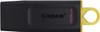
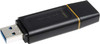
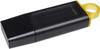
The practical design includes a removable protective cap that covers the USB connector when the drive is not in use. A large yellow loop allows the flash drive to be attached to a keyring, lanyard, bag or suitable carrying accessory, helping keep important files close at hand while travelling between home, work, school or university.
This genuine Kingston flash drive is model DTX/128GB and is supplied in a black and yellow colour combination. It is backed by Kingston's five-year warranty and free technical support.
Key Features of the Kingston DataTraveler Exodia 128GB
- 128GB storage capacity for documents, photos, music, videos and other digital files
- USB 3.2 Gen 1 compliant for use with compatible USB-A devices
- Standard USB Type-A connector for laptops, desktop PCs and other supported equipment
- Backwards compatible with USB 2.0 ports, with performance limited by the connected port
- Large integrated keyring loop for convenient everyday portability
- Removable protective cap helps protect the USB connector during transport
- Compact and lightweight design weighing approximately 11g
- Black body with yellow loop for the 128GB DTX version
- Compatible with Windows, macOS, Linux and ChromeOS versions listed by Kingston
- No batteries, charging or internet connection required
- Five-year Kingston warranty with free technical support
- Manufacturer part number: DTX/128GB
- EAN: 0740617309928
Portable 128GB Storage for Everyday Files
The Kingston DataTraveler Exodia provides 128GB of flash storage in a compact device that can be carried in a pocket, laptop bag, pencil case or attached to a keyring.
It can be used to store or move many common file types, including:
- Microsoft Word, Excel and PowerPoint files
- PDF documents and scanned paperwork
- JPEG, PNG, RAW and other image files
- MP3, WAV and other audio files
- MP4, MOV and other video files
- School, college and university assignments
- Work presentations and business documents
- Installation files, drivers and software utilities
- Personal file copies and temporary backups
The number of files that will fit on the drive depends on the size and format of each file. High-resolution photographs, 4K videos, large software packages and system images use considerably more capacity than ordinary documents or compressed music files.
Why Is the Available Capacity Lower Than 128GB?
After connecting the flash drive, the usable capacity shown by the operating system will be lower than the advertised 128GB. This is normal for flash storage.
Part of the stated capacity is used for formatting and other storage functions. Computer operating systems may also calculate gigabytes differently from storage manufacturers. A lower displayed capacity does not normally mean that the drive is faulty or that storage is missing.
USB 3.2 Gen 1 Connection
The Kingston DataTraveler Exodia DTX/128GB is compliant with the USB 3.2 Gen 1 standard. This connection standard was previously known as USB 3.0 and USB 3.1 Gen 1.
USB 3.2 Gen 1 supports a theoretical interface bandwidth of up to 5Gbps. However, this theoretical USB-interface limit is not a guaranteed transfer speed for the flash drive itself.
Important Transfer-Speed Information
Kingston does not publish a guaranteed read or write speed in megabytes per second for the DTX/128GB model. Actual file-transfer performance can vary according to:
- The USB port and USB standard supported by the computer
- The speed of the computer's internal SSD or hard drive
- The size, number and type of files being transferred
- The selected file system and operating system
- Available system resources and background applications
- USB hubs, extension cables and adapters
- The age and condition of the connected equipment
Transferring one large video or archive file may behave differently from transferring thousands of small documents or photographs. Small-file transfers commonly involve more processing overhead and may therefore appear slower.
For the best available performance, connect the drive directly to a compatible USB 3.x port on the computer rather than through an older USB 2.0 hub or an unverified extension cable.
Backwards Compatible with USB 2.0
The DataTraveler Exodia can also be connected to a compatible USB 2.0 Type-A port. This is useful for older laptops, desktop computers and other legacy devices.
When connected through USB 2.0, the drive will operate within the limits of the older USB connection. This means transfers may be slower than when the drive is connected to a suitable USB 3.x port.
How to Identify a USB 3.x Port
Some computers identify USB 3.x ports using a blue insert, an “SS” or SuperSpeed symbol, or a USB marking next to the port. However, colours and markings are not used consistently by every computer manufacturer.
Check the computer manual or manufacturer's technical specifications when you are uncertain which USB standard a port supports.
Standard USB-A Connector
The Kingston DTX/128GB uses a traditional rectangular USB Type-A connector. It can be connected directly to compatible laptops, desktop PCs, monitors and other devices equipped with a USB-A port.
Using the Drive with USB-C Devices
The flash drive does not have a USB-C connector. A suitable USB-C to USB-A adapter, dock or hub is required when using it with a laptop, tablet, phone or other device that has only USB-C ports.
The connected USB-C device must also support external USB storage and the file system used on the drive. An adapter changes the physical connector but does not guarantee that every phone, tablet or other device will recognise the flash drive.
Protective Cap for the USB Connector
The removable cap covers the USB plug when the flash drive is not connected. This helps protect the connector against dust, contact with other objects and minor everyday damage while the drive is carried in a pocket or bag.
Always replace the cap after use and avoid touching the metal contacts. The cap is removable rather than permanently attached, so it should be stored carefully while the drive is connected.
Large Yellow Keyring Loop
The integrated yellow loop makes the DataTraveler Exodia easier to attach to a keyring, lanyard or suitable bag clip. This can help reduce the chance of leaving the drive behind when moving between computers or locations.
Attaching the drive to a keyring does not make it impact-proof or waterproof. Avoid excessive force, heavy objects, liquids, extreme heat and conditions that could bend or damage the USB connector.
Suitable for Work, Education and Home Use
The Kingston DataTraveler Exodia is intended as an accessible everyday storage solution. Its compact design and broad computer compatibility make it useful across several environments.
For Work and Business
- Carry presentations between compatible computers
- Transfer reports, spreadsheets and PDF documents
- Provide files to colleagues or customers
- Store drivers, installation packages and technical utilities
- Keep a portable copy of non-confidential working files
For School, College and University
- Save assignments and coursework
- Carry presentation slides between home and class
- Transfer research documents and study materials
- Submit files where USB storage is accepted
- Keep a secondary copy of current projects
For Home and Personal Files
- Move photographs between computers
- Carry music and compatible video files
- Transfer documents to a new computer
- Store printer drivers and software installers
- Create a temporary copy of selected personal files
Operating-System Compatibility
Kingston lists the original DataTraveler Exodia DTX as compatible with the following operating systems:
- Windows 11
- Windows 10
- macOS 12.7.6 or later
- Linux kernel 4.4.x or later
- ChromeOS
Standard USB storage generally does not require a separate Kingston driver on a supported computer. Connect the drive to an available USB-A port and allow the operating system to detect it.
Compatibility with earlier operating systems or systems outside Kingston's current compatibility list is not guaranteed.
Can It Be Used with TVs, Monitors and Other Devices?
The DataTraveler Exodia may work with televisions, monitors, media players, car audio systems, printers and other digital equipment that supports USB mass-storage devices.
Compatibility depends on the receiving device rather than the flash drive alone. Before ordering for a particular device, check the device manual for:
- Maximum supported USB-drive capacity
- Supported file systems, such as FAT32, exFAT or NTFS
- Supported photo, music and video formats
- Whether the USB port supports storage or is intended only for power or servicing
- Any file-size, folder or partition restrictions
A physical USB port does not automatically mean that the device can read files from a USB flash drive.
Can It Be Used with Games Consoles?
The drive may be detected by some games consoles, but supported functions, formatting requirements and minimum performance requirements vary by console and intended use.
A console may accept a USB drive for media playback or transferring selected files but require a different type of storage device for installing or running games. Check the console manufacturer's current storage requirements before purchasing.
How to Transfer Files to the Kingston USB Drive
Using Windows
- Remove the protective cap from the flash drive.
- Insert the drive into an available USB-A port.
- Wait for Windows to recognise the device.
- Open File Explorer.
- Select This PC and open the Kingston USB drive.
- Copy or drag the required files into the drive window.
- Wait until all transfers have fully completed.
- Use the Safely Remove Hardware option before disconnecting the drive.
Using macOS
- Connect the drive to a USB-A port or compatible adapter.
- Wait for the drive to appear in Finder or on the desktop.
- Open the drive and copy the required files.
- Wait for the transfer to finish.
- Select the eject symbol next to the drive in Finder.
- Disconnect it only after macOS confirms that it is safe to do so.
File-System and Formatting Information
A receiving device must support the file system used on the flash drive. Windows, macOS, televisions, car audio systems and games consoles may support different formats.
If a particular device does not recognise the flash drive, check the device manual before reformatting it. Reformatting changes the file system and deletes all files currently stored on the drive.
Common File Systems
- FAT32: broadly compatible with many older devices but normally limited to individual files smaller than 4GB
- exFAT: supports files larger than 4GB and is commonly used for compatibility between modern Windows and macOS systems
- NTFS: commonly used by Windows but may have limited or read-only support on some other devices
Do not reformat the drive unless necessary, and always copy important files elsewhere first.
Important Data-Backup Advice
A USB flash drive is useful for transporting files and keeping an additional copy, but important information should not be stored on only one device.
Flash drives can be lost, accidentally erased, physically damaged or fail without warning. Maintain at least one additional copy of valuable files on another suitable storage device or trusted backup service.
Protecting Confidential Files
The standard Kingston DataTraveler Exodia is not advertised as a hardware-encrypted or password-protected security drive. Sensitive business, financial, medical or personal data should be protected using appropriate encryption software and organisational security procedures.
Customers requiring managed hardware encryption, PIN access or enterprise security should consider a dedicated encrypted Kingston IronKey product rather than a standard DataTraveler Exodia.
Compact and Lightweight Design
The DTX/128GB measures approximately 67.3 × 21.04 × 10.14mm and weighs approximately 11g. Its compact size makes it easy to carry without taking up significant space in a laptop bag or accessory case.
When connected, avoid knocking, twisting or applying sideways pressure to the flash drive. Physical force can damage the USB connector, the computer port or both.
Operating and Storage Temperatures
- Operating temperature: 0°C to 60°C
- Storage temperature: -20°C to 85°C
These figures describe Kingston's specified temperature ranges and do not mean the drive is designed for outdoor, waterproof, automotive or industrial use. Avoid moisture, condensation and sudden temperature changes.
Who Is the Kingston DataTraveler Exodia 128GB Best For?
- Home users transferring files between computers
- Students carrying coursework and presentations
- Office users moving documents between supported systems
- Technicians carrying drivers and software utilities
- Users who need a compact USB-A storage device
- Customers who want a large integrated keyring loop
- Users requiring compatibility with Windows, macOS, Linux or ChromeOS
- Customers looking for a Kingston flash drive with a five-year warranty
Who May Need a Different Storage Device?
This product may not be the most suitable choice for users who specifically require:
- A direct USB-C connection without an adapter
- Published and guaranteed professional transfer speeds
- Hardware encryption or built-in password protection
- Waterproof, rugged or industrial-grade construction
- Continuous video recording or surveillance workloads
- Long-term storage as the only copy of important data
- A high-performance external SSD for very large and frequent transfers
Kingston DataTraveler Exodia DTX/128GB Technical Specifications
- Brand: Kingston Technology
- Product Family: DataTraveler Exodia
- Model: DTX
- Manufacturer Part Number: DTX/128GB
- EAN / UPC: 0740617309928
- Product Type: USB flash drive
- Storage Capacity: 128GB
- Interface: USB Type-A
- USB Standard: USB 3.2 Gen 1 compliant
- USB 2.0 Compatibility: Yes, with performance limited to the connected interface
- Published Read Speed: Not specified by Kingston for this model
- Published Write Speed: Not specified by Kingston for this model
- Colour: Black with yellow loop
- Connector Protection: Removable cap
- Keyring Loop: Yes
- Dimensions: 67.3 × 21.04 × 10.14mm
- Weight: Approximately 11g
- Operating Temperature: 0°C to 60°C
- Storage Temperature: -20°C to 85°C
- Compatible Operating Systems: Windows 11/10, macOS 12.7.6 or later, Linux kernel 4.4.x or later and ChromeOS
- Encryption: No hardware-encryption feature listed
- Power Source: Powered through the connected USB port
- Manufacturer Warranty: Five years
- Technical Support: Free Kingston technical support
What Is Included?
- 1 × Kingston DataTraveler Exodia 128GB USB flash drive
- 1 × Removable protective USB cap
A USB-C adapter, lanyard, keyring, software, encryption application and recovery service are not listed as included.
Why Choose the Kingston DataTraveler Exodia 128GB?
The Kingston DataTraveler Exodia DTX/128GB provides practical portable storage for everyday documents, photographs, music, videos and other files. Its USB 3.2 Gen 1 Type-A connection supports a broad range of compatible computers, while backwards compatibility allows it to be used with older USB 2.0 equipment at the speed supported by that connection.
The lightweight 11g design, protective cap and large yellow keyring loop make the drive easy to carry between home, work, school and university. Kingston's five-year warranty and free technical support provide additional reassurance for everyday users.
Choose this model when you need a compact 128GB Kingston USB-A flash drive for convenient file transfer and portable storage, and do not require guaranteed professional transfer speeds, built-in hardware encryption or a direct USB-C connector.
Specification
Kingston DataTraveler Exodia 128GB USB Flash Drive Specifications
The Kingston DataTraveler Exodia DTX/128GB is a compact USB Type-A flash drive with 128GB storage capacity and USB 3.2 Gen 1 compliance. It features a removable protective cap, a large yellow keyring loop and a lightweight 11g design for portable file storage at home, work, school or university.
General Information
| Brand | Kingston Technology |
|---|---|
| Product Name | Kingston DataTraveler Exodia 128GB USB Flash Drive |
| Product Family | DataTraveler Exodia |
| Model | DTX |
| Manufacturer Part Number | DTX/128GB |
| EAN / UPC | 0740617309928 |
| Product Type | USB flash drive |
| Product Condition | New |
| Quantity | 1 flash drive |
| Recommended Use | Portable storage and transfer of documents, photographs, music, videos and other compatible files |
Storage Specifications
| Storage Capacity | 128GB |
|---|---|
| Storage Type | NAND flash memory |
| Removable Storage | Yes |
| Usable Capacity | Less than the stated 128GB after formatting and storage-system functions |
| Hardware Encryption | Not listed for this model |
| Built-In Password Protection | Not listed for this model |
USB Interface and Performance
| Device Interface | USB Type-A |
|---|---|
| USB Connector | Standard USB-A male connector |
| USB Standard | USB 3.2 Gen 1 compliant |
| Previous USB Standard Names | USB 3.0 / USB 3.1 Gen 1 |
| Published Read Speed | Not specified by Kingston for the DTX/128GB model |
| Published Write Speed | Not specified by Kingston for the DTX/128GB model |
| Performance Note | Actual transfer performance varies according to the host device, USB port, file type, file size and system configuration |
| USB-C Connector | No |
| USB-C Device Use | A compatible USB-C to USB-A adapter, hub or dock is required when the host device has no USB-A port |
| Power Source | Powered through the connected USB port |
| Battery Required | No |
Design and Physical Features
| Form Factor | Capped USB flash drive |
|---|---|
| Connector Protection | Removable protective cap |
| Keyring Loop | Yes, large integrated loop |
| Product Colour | Black with yellow loop |
| Waterproof | Not specified |
| Rugged or Industrial Design | No rugged or industrial rating is listed |
Dimensions and Weight
| Product Length | 67.3mm |
|---|---|
| Product Width | 21.04mm |
| Product Height / Thickness | 10.14mm |
| Product Dimensions | 67.3 × 21.04 × 10.14mm |
| Product Weight | 11g |
Operating-System Compatibility
| Windows Compatibility | Windows 11 and Windows 10 |
|---|---|
| macOS Compatibility | macOS 12.7.6 or later |
| Linux Compatibility | Linux kernel 4.4.x or later |
| ChromeOS Compatibility | Yes |
| Driver Required | No separate Kingston driver is normally required for standard USB mass-storage use on a supported operating system |
| Other Device Compatibility | May work with compatible TVs, media players, monitors, printers, car audio systems and other equipment that supports USB mass storage |
Environmental Specifications
| Operating Temperature | 0°C to 60°C |
|---|---|
| Storage Temperature | -20°C to 85°C |
| Outdoor Use Rating | Not specified |
| Moisture Protection Rating | No IP rating listed |
Package Contents
| USB Flash Drive Included | 1 × Kingston DataTraveler Exodia DTX/128GB flash drive |
|---|---|
| Protective Cap Included | Yes |
| Keyring Included | No, the drive has an integrated loop but a separate keyring is not listed as included |
| Lanyard Included | No |
| USB-C Adapter Included | No |
| Encryption Software Included | Not listed |
Warranty and Support
| Manufacturer Warranty | 5 years |
|---|---|
| Technical Support | Free Kingston technical support |
| Warranty Provider | Kingston, subject to Kingston's applicable warranty terms and conditions |
Important Model Identification Note
This product is the original Kingston DataTraveler Exodia DTX/128GB. It should not be confused with the DataTraveler Exodia M, Exodia S or newer Exodia DTXG2 models, which can have different dimensions, weights, colours, capacities and physical designs.
Important Transfer-Speed Note
USB 3.2 Gen 1 describes the USB connection standard and does not represent a guaranteed flash-drive transfer speed. Kingston does not publish a specific read or write speed in MB/s for the original DTX/128GB model.
Actual speed can vary according to the computer, USB port, operating system, storage source, file system and the size and number of files being transferred. A large single file may transfer differently from thousands of small files.
Important Capacity Note
The available capacity displayed by a computer will be lower than the advertised 128GB. Some of the stated capacity is used for formatting and other storage functions, and operating systems may calculate storage capacity differently from manufacturers.
Important Device-Compatibility Note
Compatibility with televisions, car audio systems, games consoles, printers, cameras and other non-computer devices depends on the receiving device's supported USB-drive capacity, file system and file formats.
Check the device manual before formatting the flash drive. Reformatting deletes all data currently stored on the drive.
Important Data-Safety Note
This standard DataTraveler Exodia is not listed as a hardware-encrypted security drive. Sensitive files should be protected with suitable encryption where required.
Important data should not be stored on only one USB flash drive. Maintain an additional backup because removable storage can be lost, accidentally erased, damaged or fail unexpectedly.
Return
FAQ: Frequenlty Asked Questions
Kingston DataTraveler Exodia DTX/128GB USB Flash Drive FAQ
The Kingston DataTraveler Exodia DTX/128GB is a 128GB USB 3.2 Gen 1 flash drive with a standard USB-A connector, protective cap and large black-and-yellow keyring-loop design. It is intended for convenient everyday storage and transfer of documents, photos, music, videos and other files between compatible devices.
Below are the most common questions buyers ask before choosing this Kingston 128GB USB flash drive, including real-world speed, usable capacity, Windows and Mac compatibility, USB-C adapters, exFAT and FAT32 formatting, large-file transfers, televisions, cars, consoles, bootable media, security, warranty and troubleshooting.
1. What is the Kingston DataTraveler Exodia DTX/128GB?
The Kingston DataTraveler Exodia DTX/128GB is a portable 128GB USB flash drive designed for everyday file storage and transfer. It uses a USB Type-A connector, supports the USB 3.2 Gen 1 standard, has a protective removable cap and includes a large coloured loop that can be attached to a keyring or lanyard.
2. What is the exact model number of this Kingston USB drive?
The manufacturer part number is DTX/128GB. This identifies the original 128GB Kingston DataTraveler Exodia with the black body and yellow loop. Check this code when comparing it with Exodia M, Exodia S, Exodia Onyx or newer Exodia G2 models.
3. What colour is the Kingston DTX/128GB?
Kingston identifies DTX/128GB as the black-and-yellow version. The main body is black and the large carrying loop is yellow, making the 128GB capacity easier to distinguish from some other Exodia capacities.
4. How much storage does this USB flash drive provide?
The advertised capacity is 128GB. It is suitable for carrying documents, presentations, photos, music, videos, installers and other everyday files.
5. Why does the drive show less than 128GB in Windows or macOS?
This is normal. Storage manufacturers calculate capacity using decimal units, while operating systems may display capacity differently, and some space is also used by formatting and drive-management data. The usable capacity will therefore be lower than the 128GB printed on the packaging.
6. What USB standard does the DataTraveler Exodia use?
The DTX/128GB is USB 3.2 Gen 1 compliant. This standard was previously called USB 3.1 Gen 1 and USB 3.0, so those names may appear on older computers, packaging or product descriptions.
7. Does this Kingston flash drive have a USB-A connector?
Yes. It has a standard USB Type-A plug, which fits the rectangular USB ports found on many desktop PCs, laptops, televisions, car stereos, game consoles and other compatible devices.
8. Can I connect it to a USB-C laptop or phone?
The drive does not have a built-in USB-C connector. You can use it with a USB-C device by adding a suitable USB-C-to-USB-A adapter or hub, provided the host device supports external USB storage.
9. Is USB 3.2 Gen 1 the same as USB 3.0?
For this product, yes in practical compatibility terms. USB 3.0 was renamed USB 3.1 Gen 1 and later USB 3.2 Gen 1. All refer to the 5Gbps-generation USB interface, although the actual flash-drive transfer speed is much lower than the interface's theoretical maximum.
10. Will the DataTraveler Exodia work in a USB 2.0 port?
Yes. USB standards are generally backward compatible, so the drive should work in a compatible USB 2.0 Type-A port. Transfers will be limited by the slower USB 2.0 connection.
11. What read and write speed does the Kingston DTX/128GB deliver?
Kingston describes this model as USB 3.2 Gen 1 compliant but does not publish a guaranteed read or write speed for DTX/128GB. Actual results vary with the computer, USB port, file size, file system, available cache, drive fill level and workload. It should be treated as an affordable everyday storage drive rather than a high-performance SSD.
12. Does USB 3.2 Gen 1 mean the drive transfers at 5Gbps?
No. The 5Gbps figure describes the theoretical bandwidth of the USB interface, not the guaranteed speed of the flash memory inside the drive. Controller performance, NAND flash, file type and the host system determine real transfer speeds.
13. Why can the write speed be much slower than the read speed?
USB flash drives often read data faster than they write it. Writing requires the controller to erase, organise and program flash-memory cells, and entry-level drives are optimised for affordability and convenient storage rather than sustained professional write performance.
14. Why is copying many small files slower than copying one large file?
Each small file creates extra file-system and directory work. Thousands of photos, documents or program files can therefore transfer much more slowly than one large video of the same total size. Compressing many small files into a ZIP archive before copying may improve convenience and sometimes transfer speed.
15. Why may transfer speed drop during a long copy?
Performance can fall after an initial burst when the drive's temporary cache is exhausted. Heat, a nearly full drive, background antivirus scanning, small-file workloads and slower source storage can also reduce sustained speed. This does not necessarily mean the drive is faulty.
16. How can I get the best transfer performance from this USB drive?
Connect it directly to a USB 3.x port rather than an unpowered hub, use a modern file system such as exFAT for large files, avoid running several transfers at once and leave some free space. The source drive must also be fast enough to supply the data.
17. Does the Kingston DataTraveler Exodia work with Windows 11?
Yes. Kingston lists the DataTraveler Exodia as compatible with Windows 11. It normally appears as removable storage without requiring a separate Kingston driver.
18. Does it work with Windows 10?
Yes. Kingston lists Windows 10 compatibility. Insert the drive into a working USB port and open File Explorer to access it under This PC.
19. Is the DTX/128GB compatible with macOS?
Yes. Kingston lists compatibility with supported modern macOS versions. The factory exFAT format is suitable for transferring files between current Windows and macOS systems.
20. Does it work with Linux?
Yes. Kingston lists Linux compatibility from kernel version 4.4.x and later. Support can still depend on the distribution, file system and device configuration.
21. Can I use it with a Chromebook or ChromeOS device?
Yes. Kingston lists ChromeOS compatibility. A Chromebook with only USB-C ports will require a suitable adapter or hub because this drive uses USB-A.
22. Can I use this USB drive with an Android phone or tablet?
It may work when the Android device supports USB On-The-Go or external storage and you use the correct adapter. File-system support varies by phone, so check the device manual before relying on it.
23. Can I use it with an iPhone or iPad?
It may work with compatible iPhones or iPads through the correct Apple or USB-C adapter and the Files app. Some devices or adapters may require additional power, and this USB-A drive does not connect directly without an adapter.
24. Will the Kingston Exodia work with a smart TV?
It can store films, photos and music for compatible televisions, but TV support depends on the model, maximum USB capacity, file system and media codecs. Check the television manual. Some older TVs require FAT32 and may not recognise the factory exFAT format.
25. Can I use it for music in a car stereo?
Possibly. Many car stereos read USB flash drives, but supported capacity, folder structure, audio format and file system vary. Older systems often require FAT32, while newer vehicles may support exFAT. Formatting erases the drive, so back up all files first.
26. Will it work with a PlayStation, Xbox or Nintendo console?
The hardware may be recognised by compatible consoles, but each console sets its own rules for media playback, game captures, save data and extended storage. Check the console's capacity and formatting requirements. A standard USB flash drive is not a substitute for a high-speed external SSD where the console requires one.
27. Can I connect the drive to a monitor, printer or media player?
Only if that device has a USB host port that supports removable storage. Some USB ports provide power or service access only, so the presence of a Type-A socket does not guarantee file-storage compatibility.
28. What file system is the 128GB Kingston Exodia supplied with?
Kingston states that its USB drives with capacities of 64GB and above are normally preformatted as exFAT. Factory formatting can occasionally vary by region or production batch, so you can confirm it in your operating system's drive properties.
29. Is exFAT the best format for this 128GB USB drive?
exFAT is a good general choice when you need large-file support and compatibility between modern Windows and macOS computers. Older TVs, stereos and specialist equipment may require FAT32 instead, so always check the host device's manual.
30. Can I format the drive as FAT32?
Yes, but Windows' standard formatting tool normally does not offer FAT32 for partitions larger than 32GB. A smaller FAT32 partition or another appropriate formatting method may be required. FAT32 is widely compatible but cannot store an individual file of 4GB or larger.
31. Can I format the Kingston Exodia as NTFS?
Yes, Windows can format it as NTFS. NTFS supports large files and Windows permissions, but macOS normally reads NTFS without writing to it, and many televisions, car stereos and media devices do not support NTFS.
32. Can this USB drive store a file larger than 4GB?
Yes, when it is formatted as exFAT or NTFS. FAT32 has an individual file-size limit just below 4GB, even when plenty of total free space remains.
33. How do I format the drive in Windows 11 or Windows 10?
Back up anything you need, open File Explorer, right-click the Kingston drive, choose Format, select the required file system, leave allocation size on Default, add a volume label if desired and start the format. Carefully confirm the correct drive because formatting erases its contents.
34. How do I format the drive on a Mac?
Back up the files, open Disk Utility, select the Kingston device, choose Erase and select the required format. Use exFAT for modern Windows and Mac compatibility. Select the physical device rather than the wrong internal disk, because erasing permanently removes the selected drive's data.
35. Will formatting the USB drive delete my files?
Yes. Formatting removes the existing file system and can make the stored data inaccessible. Copy important files to another storage device before formatting or repartitioning the drive.
36. Can the Kingston DataTraveler Exodia be made bootable?
It is technically possible to create bootable installation or recovery media, but Kingston states that booting from a DataTraveler is not a supported product feature. The drive is primarily intended for file storage.
37. Can I use it to install Windows 10 or Windows 11?
It may be used to create Windows installation media with Microsoft's Media Creation Tool or another suitable utility. Creating bootable media erases or repartitions the drive, and successful booting depends on the computer's BIOS or UEFI settings. Kingston does not officially support DataTraveler boot use.
38. Can I create a bootable Linux USB with it?
It may be possible with tools such as Rufus, balenaEtcher or a Linux image writer. Download the ISO from the operating system's official source and remember that writing an image will overwrite the drive. Boot compatibility depends on the target computer.
39. Can I return a bootable USB to normal storage use?
Yes. Back up anything required and reformat or repartition the drive. If imaging software created several partitions or left part of the capacity unallocated, Windows Disk Management or macOS Disk Utility may be needed to remove the old layout and create one new volume.
40. What should I do if the Kingston drive is not recognised?
Try a different USB port, connect it directly rather than through a hub, restart the computer and test it on another compatible device. In Windows, check Disk Management and Device Manager; on macOS, check Disk Utility. Do not format it if it contains important data that has not been backed up.
41. Why does Windows ask me to format a drive that works on a Mac?
The drive may have been formatted with a Mac-only file system such as APFS or Mac OS Extended. To share it between modern Windows and macOS systems, back up the files and reformat the drive as exFAT.
42. Why does the USB show a much smaller capacity after creating bootable media?
Bootable-image tools can create small partitions and leave the remaining space hidden or unallocated. Reusing the full capacity normally requires deleting the image partitions and creating a new volume across the whole drive. This process erases all data.
43. Does the DTX/128GB have a physical write-protect switch?
No physical write-protect switch is listed for the DataTraveler Exodia. A read-only message may instead be caused by operating-system permissions, file-system errors, security software or a failing drive.
44. How can I reduce the risk of corrupting files on the drive?
Wait for transfers to finish, use the operating system's eject function, avoid disconnecting it during updates or boot operations, keep a separate backup and scan unfamiliar computers for malware. No flash drive should be the only copy of important data.
45. Do I need to safely eject the Kingston USB drive?
Yes, especially after writing, deleting or editing files. Use Eject or Safely Remove Hardware and wait for confirmation before unplugging it. This allows cached write operations to complete.
46. What happens if I remove it while files are being copied?
The active files, folder structure or file system may become corrupted, and the drive may later request repair or formatting. Stop the transfer properly and eject the drive before removal.
47. Is the DataTraveler Exodia suitable for backups?
It is useful for carrying an extra copy of documents, photos or recovery files, but it should not be your only backup. Important data should follow a multi-copy backup plan using at least one separate device or trusted cloud location.
48. Is a USB flash drive suitable for permanent long-term archiving?
It is better for portable storage and occasional backups than as a sole permanent archive. Flash memory, connectors and small portable devices can fail or be lost, so archive important files on multiple maintained storage systems.
49. Does this Kingston drive include hardware encryption?
No built-in hardware encryption is listed for DTX/128GB. It is a standard consumer USB storage drive. Customers requiring managed encryption, PIN protection or certified security should choose a purpose-built Kingston IronKey or encrypted DataTraveler model.
50. Can I password-protect files on the Kingston Exodia?
The drive does not include a listed built-in password system. You may use suitable operating-system encryption or encrypted archive software, but compatibility will depend on the computers where you need to open the files. Keep recovery keys securely.
51. Does the drive have a keyring loop?
Yes. A large yellow loop is integrated into the body so the drive can be attached to a suitable keyring, lanyard or bag clip. The keyring itself is not normally included.
52. Does the Kingston Exodia have a protective cap?
Yes. A removable cap covers the USB-A connector when the drive is not in use. Replace the cap after use to help protect the plug from dust and contact damage.
53. Is the DataTraveler Exodia waterproof, dustproof or shockproof?
Kingston does not advertise DTX/128GB with a formal waterproof, dustproof or shockproof rating. Keep it dry, avoid impacts and do not leave it exposed to extreme heat, pressure or contamination.
54. What are the dimensions and weight of the Kingston Exodia?
Kingston lists dimensions of approximately 67.3 x 21.04 x 10.14mm and a weight of 11g. Its lightweight body is designed for portable everyday storage.
55. What temperatures can the USB drive operate in?
Kingston lists an operating-temperature range of 0°C to 60°C. Allow the drive and host device to return to a safe room temperature if they have been stored in very cold or hot conditions.
56. What is the listed storage-temperature range?
Kingston lists a storage-temperature range of -20°C to 85°C. This does not mean the drive should be left for long periods in a hot car, direct sunlight, freezing moisture or other harsh environments.
57. What warranty does the Kingston DTX/128GB include?
Kingston lists a five-year warranty with free technical support for the DataTraveler Exodia. Warranty service is subject to Kingston's terms, proof-of-purchase requirements and regional support process.
58. What is the difference between DataTraveler Exodia and Exodia M?
Both are affordable USB 3.2 Gen 1 Type-A flash-drive families, but the body design differs. The original Exodia DTX/128GB uses a separate protective cap and large coloured loop, while Exodia M uses a moving-cap design. Check the exact MPN because accessories, colour and dimensions are not interchangeable.
59. What is the difference between DataTraveler Exodia and Exodia S?
The original Exodia uses a removable cap and large keyring loop. Exodia S uses a swivel-cap design that keeps the connector cover attached to the body. Both are intended for convenient everyday storage, but the exact capacity options, colours and physical design differ.
60. Is DTX/128GB the same as the newer DTXG2/128GB?
No. DTX/128GB identifies the original DataTraveler Exodia, while DTXG2/128GB is a newer replacement generation. They serve a similar everyday-storage purpose, but their colour scheme, specifications and product codes should not be mixed.
61. Who is the Kingston DataTraveler Exodia 128GB best for?
It is best for students, home users and office users who want affordable portable storage for documents, presentations, photos, music, videos and installers. Its keyring loop and broad computer compatibility make it useful for everyday file transfer.
62. Who is this USB flash drive not suitable for?
It is not the best choice for customers needing guaranteed high sustained speeds, professional video recording, continuous CCTV or dash-cam recording, certified hardware encryption, waterproof construction, a native USB-C plug or SSD-class performance. Choose a specialist high-speed, industrial, encrypted or USB-C product for those requirements.
Related Products
Related Products

Kingston DataTraveler Exodia 128GB USB 3.2 Blk/Yellow USB Flash Drive
Kingston


Kingston DataTraveler Exodia 64GB USB 3.2 Black with Cyan loop USB Flash Drive
Kingston
Kingston DataTraveler Exodia S DTXS/128GB USB Flash Drive, 128GB, USB 3.2, Black/Green, Swivel Cap Design
Kingston

Kingston DataTraveler Exodia M 128GB USB-A Flash Drive - Black & Red
Kingston