
Ergotron LX Pro Wall Monitor Arm 45-683-292 – Up to 34in, 10kg, VESA 100x100
- SKU:
- 45-683-292
- UPC:
- 698833091618
- MPN:
- 45-683-292
- Availability:
- Free Click & Collect in Peterborough. UK delivery also available







Description
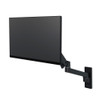
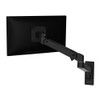
Ergotron LX Pro Wall Monitor Arm – Flexible Ergonomic Monitor Mount for Screens Up to 34 Inches
The Ergotron LX Pro Wall Monitor Arm is a premium articulating monitor mount designed to free valuable desk space while giving you extensive control over screen height, depth, tilt, pan and rotation. Designed for compatible monitors weighing between 1.8kg and 10kg, it is typically suitable for displays up to 34 inches and supports standard VESA 75 x 75mm and 100 x 100mm mounting patterns.
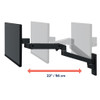
This Matte Black Ergotron LX Pro Wall Monitor Arm, part number 45-683-292, provides up to 33cm of vertical lift and extends the monitor up to approximately 64cm from the wall. Its articulated design allows the display to be pulled forward when needed, moved higher or lower for different users and repositioned away from the main workspace when more room is required.
Ergotron's Constant Force technology is designed to make screen repositioning smooth and consistent throughout the arm's movement range. Combined with improved cable management, a detachable monitor head and a rotation-stop mechanism, the LX Pro is designed for professional offices, home workspaces, control environments, healthcare settings, industrial workstations and other installations where monitor flexibility and desk-space efficiency are important.
Model: Ergotron LX Pro Wall Monitor Arm | Part Number: 45-683-292 | Colour: Matte Black | Maximum Load: 10kg | Typical Screen Size: Up to 34 inches
Key Features of the Ergotron LX Pro Wall Monitor Arm
- Wall-mounted articulating monitor arm that frees desk and work-surface space
- Designed for compatible monitors weighing 1.8–10kg
- Typical display size of up to 34 inches
- Supports VESA 75 x 75mm and 100 x 100mm monitor mounting
- 33cm / 13-inch vertical lift range
- Extends up to approximately 64cm / 25 inches from the wall
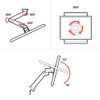
- 85° monitor tilt – approximately +70° upward and -15° downward
- 180° monitor pan for side-to-side screen positioning
- 360° monitor rotation for landscape or portrait orientation
- Base arm offers up to 360° movement, or 180° with rotation stop engaged
- Constant Force technology for smooth monitor adjustment
- Integrated rotation stop helps prevent the arm from contacting nearby walls or partitions
- Improved cable management helps maintain a cleaner workspace
- Detachable monitor head helps simplify installation and future screen changes
- Modular LX Pro design supports compatible Ergotron accessories and expansion options
- Premium professional monitor-arm construction
- 10-year Ergotron limited warranty
Wall-Mounted Monitor Arm That Frees Valuable Desk Space
Unlike a conventional monitor stand that occupies part of the desktop, the Ergotron LX Pro attaches directly to a suitable wall surface. Moving the monitor support away from the desk can create more usable space for a keyboard, laptop, documents, peripherals or other equipment.
This makes the LX Pro Wall Monitor Arm particularly useful for compact desks, home offices, reception areas, industrial workstations and professional environments where available work-surface space is limited.
Why Choose a Wall-Mounted Monitor Arm?
A wall-mounted monitor arm can be particularly useful where you want maximum desktop space or where attaching a monitor arm to the edge of a desk is not practical.
Because the support point is attached to the wall rather than the desktop, the monitor can remain independently positioned even if the desk or work surface has limited mounting space.
Supports Monitors Up to 10kg
The LX Pro Wall Monitor Arm supports compatible displays weighing from approximately 1.8kg to 10kg.
The minimum as well as the maximum weight is important. Ergotron's spring-assisted Constant Force mechanism is designed around a defined load range, so a display that is substantially lighter than the minimum specified weight may not balance correctly.
Will the Ergotron LX Pro Support My Monitor?
Your monitor should meet all of the main compatibility requirements:
- Monitor weight between 1.8kg and 10kg, excluding the original desktop stand
- Compatible 75 x 75mm or 100 x 100mm VESA mounting holes
- A display design that provides suitable clearance around the VESA mounting area
- A suitable wall and installation method capable of safely supporting the mount and monitor
Screen size alone should not be used to determine compatibility. The monitor's actual weight and VESA mounting pattern are the most important specifications to check.
Designed for Displays Up to 34 Inches
Ergotron specifies the LX Pro Wall Monitor Arm for a typical LCD size of up to 34 inches.
This makes it suitable for many conventional office monitors, productivity displays and compatible ultrawide monitors, provided the screen also meets the arm's weight and VESA requirements.
Can the Ergotron LX Pro Hold a 34-Inch Ultrawide Monitor?
Potentially, yes. A compatible 34-inch ultrawide monitor can be used when its weight is within the 1.8–10kg load range and it provides a compatible 75 x 75mm or 100 x 100mm VESA mounting interface.
Because ultrawide monitors vary significantly in weight, depth and centre of gravity, always check the exact monitor specifications before ordering.
Can It Hold a Monitor Larger Than 34 Inches?
Ergotron describes 34 inches as the typical maximum LCD size rather than an absolute dimensional limit. Ergotron notes that larger displays may sometimes be used provided they remain within the arm's weight capacity.
However, a larger monitor must also have a compatible VESA mounting pattern and suitable physical clearance. For this reason, compatibility should be checked using the exact display model rather than relying solely on diagonal screen size.
VESA 75 x 75mm and 100 x 100mm Compatibility
The LX Pro Wall Monitor Arm supports VESA MIS-D 75 x 75mm and 100 x 100mm mounting patterns.
These are among the most common VESA interfaces used by desktop monitors, making the arm compatible with a wide range of business, productivity and home-office displays.
What Is VESA Mounting?
VESA refers to the standard spacing of mounting holes on the rear of compatible displays. For example, a 100 x 100mm VESA pattern has four mounting holes arranged 100mm apart horizontally and vertically.
You should check your monitor's manufacturer specification or measure the mounting-hole spacing before purchasing the arm.
What If My Monitor Uses VESA 200 x 200mm?
The standard LX Pro Wall Monitor Arm directly supports 75 x 75mm and 100 x 100mm VESA patterns. A monitor using a substantially larger mounting interface is therefore not directly compatible with the supplied monitor pivot unless a suitable approved adapter solution is available.
33cm of Height Adjustment
The arm provides approximately 33cm / 13 inches of vertical lift, allowing the display to be raised or lowered according to the user, seating position and task.
This makes the workstation easier to adapt when multiple people use the same screen or when the preferred viewing height changes throughout the day.
Why Monitor Height Matters
A correctly positioned monitor can make a workstation more comfortable by allowing the display to be positioned around the user's natural viewing level rather than forcing the user to adapt their posture to a fixed monitor stand.
The LX Pro's adjustable height, depth and viewing angle make it much easier to position the screen according to the workspace and individual user.
Extends Up to 64cm From the Wall
The articulated arm can extend the monitor up to approximately 64cm / 25 inches from the wall.
This substantial reach allows the screen to be brought closer when detailed work is required and moved back towards the wall when additional workspace is needed.
The ability to control viewing distance can also be valuable on deeper desks, counters and industrial work surfaces where a fixed wall-mounted display could otherwise sit too far away from the user.
85° Tilt for Better Screen Positioning
The LX Pro provides approximately 85° of total monitor tilt, comprising up to around 70° upward tilt and 15° downward tilt.
This unusually broad upward tilt range can be useful when the monitor is positioned below the viewer, when the arm is installed at a particular wall height or when adapting the display for different workplace configurations.
Important Tilt Specification
The correct Ergotron specification is +70° upward / -15° downward. Some syndicated retailer databases list this range in reverse as -70° to +15°, but Ergotron's current documentation identifies the intended orientation as 70° upward and 15° downward.
180° Monitor Pan and 360° Rotation
The monitor pivot supports approximately 180° of pan, allowing the display to be turned left or right for different viewing positions.
The screen can also rotate through 360°, allowing compatible monitors to be changed between landscape and portrait orientations.
Can the Monitor Be Used Vertically?
Yes. The LX Pro provides 360° monitor rotation, so a suitably designed monitor can be turned into portrait orientation.
Whether portrait mode is practical will also depend on the monitor dimensions, cable length and surrounding clearance.
Rotation Stop Helps Protect Nearby Walls and Partitions
The LX Pro incorporates a rotation-stop function that can restrict the base arm's movement.
The base arm can provide up to 360° movement, or approximately 180° when the rotation stop is engaged. Limiting the rotation can help prevent the arm or monitor from swinging into a wall, partition or nearby equipment.
This can be particularly valuable in compact offices and installations where the monitor arm is mounted close to another surface.
Ergotron Constant Force Technology
The LX Pro uses Ergotron's Constant Force technology, which is designed to provide smooth and consistent movement throughout the arm's adjustment range.
Once correctly adjusted for the installed monitor weight, the screen can be repositioned without repeatedly loosening conventional knobs or mechanical clamps.
Why Does Monitor-Arm Tension Need Adjustment?
Different monitors have different weights. The arm's tension should therefore be adjusted to match the installed display.
Correct tension allows the monitor to remain where positioned rather than drifting upward or downward. The LX Pro platform includes adjustment features intended to make this process straightforward during installation.
Improved Cable Management
Integrated cable-management features help route display power and video cables along the arm for a cleaner workspace.
This can reduce loose cables around the desk while allowing sufficient cable movement as the monitor is raised, lowered or extended.
Plan Cable Length Before Installation
When installing a highly adjustable monitor arm, cables should be long enough to accommodate the full movement range without becoming stretched.
Allow sufficient slack for the arm's 33cm lift, 64cm extension, tilt, pan and rotation while avoiding excessive loose cable around moving joints.
Detachable Monitor Head for Easier Installation
Ergotron designed the LX Pro with a detachable display head to simplify initial assembly and future monitor changes.
This allows the VESA interface to be attached to the monitor before the display is positioned onto the main arm, helping reduce the amount of equipment that has to be held simultaneously during installation.
Modular LX Pro Platform
The LX Pro is part of Ergotron's modular monitor-arm platform. Compatible LX Pro accessories can be used to adapt or expand selected installations as workstation needs change.
Available LX Pro accessories include additional extensions, display pivots, expansion components and conversion kits for selected configurations.
Can the LX Pro Be Expanded Later?
Yes, selected LX Pro configurations can be expanded or modified with compatible Ergotron LX Pro accessories.
Accessory compatibility varies according to the mounting configuration, monitor size and total supported load, so the relevant Ergotron accessory specifications should be checked before expanding an installation.
Suitable for Home, Office and Professional Workspaces
The LX Pro Wall Monitor Arm can be used anywhere a compatible monitor needs flexible positioning without taking up desktop mounting space.
Typical applications include:
- Home offices
- Corporate workstations
- Reception desks
- Shared hot-desking environments
- Industrial workstations
- Manufacturing environments
- Healthcare workspaces
- Control rooms
- Security-monitoring stations
- Retail and commercial work areas
- Education and training environments
- Compact desks where surface space is limited
Wall Mount vs Desk Monitor Arm
A desk-mounted monitor arm attaches directly to the desk using a clamp or grommet mount. The Ergotron LX Pro Wall Monitor Arm instead fixes the arm to a suitable wall structure.
A wall mount may be the better option where:
- The desk edge cannot accept a clamp
- The work surface is too thin or unsuitable for an arm
- Maximum desk space is required
- The monitor needs to remain independent of the desk
- The workspace has a fixed wall-mounted equipment layout
A desk-mounted version may be preferable where wall drilling is not possible or where the workstation is likely to be relocated frequently.
Installation and Wall Compatibility
The LX Pro Wall Monitor Arm should be attached to a structurally suitable wall using the correct mounting method and appropriate hardware.
The wall must be capable of supporting the monitor arm, the display and the dynamic loads produced when the arm is extended or repositioned.
Can It Be Mounted on Plasterboard?
Wall construction and fixing requirements must be assessed before installation. A monitor arm should not simply be attached to unsupported plasterboard using unsuitable general-purpose fixings.
Where the wall uses timber or steel studs, masonry or another construction type, appropriate structural attachment methods should be used. If there is any doubt about the wall structure or suitable fixings, professional installation is recommended.
Who Is the Ergotron LX Pro Wall Monitor Arm Best For?
- Users who want to free desktop space
- Home-office users with compatible monitors
- Professional workplaces requiring frequent monitor repositioning
- Users sharing a workstation with people of different heights
- People using portrait and landscape monitor orientations
- Users with deeper desks who need substantial monitor reach
- Installations where a desk clamp or grommet mount is unsuitable
- Industrial, healthcare and commercial workstations
- Users wanting a premium monitor mount with a 10-year manufacturer warranty
Important Things to Know Before Buying
- This is a wall-mounted monitor arm, not a desk-clamp arm.
- The supported monitor weight range is 1.8–10kg.
- Ergotron's typical display-size recommendation is up to 34 inches.
- Supported VESA patterns are 75 x 75mm and 100 x 100mm.
- The monitor's weight should be checked without its original desktop stand.
- Screen size alone does not determine compatibility.
- The arm provides approximately 33cm of vertical lift.
- Maximum extension is approximately 64cm.
- Tilt range is approximately +70° upward / -15° downward.
- Monitor pan is approximately 180°.
- Monitor rotation is 360°.
- The base arm can rotate up to 360°, or approximately 180° with its rotation stop engaged.
- The wall structure must be suitable for the combined monitor and mounting loads.
- Always allow adequate cable length for the arm's full range of movement.
Ergotron LX Pro Wall Monitor Arm Technical Highlights
- Brand: Ergotron
- Series: LX Pro
- Product: LX Pro Wall Monitor Arm
- Part Number: 45-683-292
- UPC / EAN: 698833091618 / 0698833091618
- Colour: Matte Black
- Mount Type: Wall mount
- Displays Supported: 1
- Typical Maximum Screen Size: Up to 34 inches
- Minimum Monitor Weight: 1.8kg / 4lb
- Maximum Monitor Weight: 10kg / 22lb
- Vertical Lift: 33cm / 13in
- Maximum Extension: Approx. 64cm / 25in
- Total Monitor Tilt: 85°
- Upward Tilt: +70°
- Downward Tilt: -15°
- Monitor Pan: 180°
- Base Arm Pan: 360°, or 180° with rotation stop engaged
- Monitor Rotation: 360°
- VESA Standard: MIS-D, 100/75, C
- VESA 75 x 75mm: Yes
- VESA 100 x 100mm: Yes
- Constant Force Technology: Yes
- Rotation Stop: Yes
- Cable Management: Integrated
- Detachable Monitor Head: Yes
- Shipping Weight: Approx. 5.2kg
- Shipping Dimensions: Approx. 41.5 x 35 x 16.5cm
- Manufacturer Warranty: 10 years
What's Included?
- 1 x Ergotron LX Pro monitor arm
- 1 x Arm extension
- 1 x Monitor pivot / VESA mounting head
- 1 x Wall-mount base
- Required attachment hardware supplied by Ergotron for assembly
Why Choose the Ergotron LX Pro Wall Monitor Arm?
The Ergotron LX Pro Wall Monitor Arm combines professional-grade monitor support with a highly adjustable wall-mounted design that frees valuable desk space and allows the display to follow the user rather than forcing the user to adapt to a fixed screen position.
Its 1.8–10kg load range, compatibility with typical monitors up to 34 inches, 33cm height adjustment, 64cm extension, broad tilt range, 180° monitor pan and 360° monitor rotation give users substantial flexibility when configuring a workstation.
Ergotron's Constant Force movement technology, integrated rotation stop, improved cable management and detachable display head add practical benefits for both daily use and installation. The modular LX Pro platform also provides an upgrade path for selected future workstation configurations.
For users looking for a premium wall-mounted monitor arm with VESA 75 x 75mm or 100 x 100mm support, the Matte Black Ergotron LX Pro 45-683-292 provides a strong combination of adjustability, space efficiency, professional construction and a 10-year Ergotron warranty.
Specification
Ergotron LX Pro Wall Monitor Arm Specifications
The Ergotron LX Pro Wall Monitor Arm, part number 45-683-292, is a professional single-monitor wall mount designed for compatible displays weighing from 1.8kg to 10kg. It supports VESA 75 x 75mm and 100 x 100mm mounting, provides 33cm of vertical lift and extends up to approximately 64cm from the wall.
General Information
| Brand | Ergotron |
| Product Range | LX Pro |
| Product Name | Ergotron LX Pro Wall Monitor Arm |
| Manufacturer Part Number | 45-683-292 |
| UPC | 698833091618 |
| EAN / GTIN | 0698833091618 |
| Product Type | Single-monitor articulating wall mount |
| Mounting Location | Wall |
| Number of Displays Supported | 1 |
| Colour | Matte Black |
Monitor Compatibility
| Typical Maximum Display Size | Up to 34 inches |
| Minimum Monitor Weight | 1.8kg / 4lb |
| Maximum Monitor Weight | 10kg / 22lb |
| VESA Standard | VESA MIS-D, 100/75, C |
| VESA 75 x 75mm | Yes |
| VESA 100 x 100mm | Yes |
| Landscape Orientation | Yes |
| Portrait Orientation | Yes, subject to monitor dimensions and clearance |
Height, Reach & Adjustment
| Height Adjustment | Yes |
| Vertical Lift Range | 33cm / 13in |
| Maximum Extension | Up to 64cm / 25in |
| Adjustable Depth | Yes |
| Constant Force Lift Technology | Yes |
| Tension Adjustment | Yes |
| Tension Indicator | Yes |
Tilt, Pan & Rotation
| Total Monitor Tilt | 85° |
| Upward Tilt | +70° |
| Downward Tilt | -15° |
| Monitor Pan | 180° |
| Base Arm Pan | 360° |
| Base Arm Pan with Rotation Stop Engaged | 180° |
| Monitor Rotation | 360° |
| Landscape-to-Portrait Rotation | Yes |
Ergonomic & Installation Features
| Constant Force Technology | Yes – designed for smooth monitor positioning |
| Rotation Stop | Yes – helps prevent the arm contacting nearby walls, partitions or cubicles |
| Detachable Monitor Head | Yes |
| Cable Management | Integrated cable-management system |
| Cable Cover | Integrated LX Pro cable cover / routing system |
| Modular Accessory Support | Yes – compatible LX Pro accessories available separately |
Construction & Design
| Primary Construction | Aluminium monitor-arm construction |
| Finish | Matte Black |
| Installation Type | Fixed wall mounting |
| Desk Clamp Required | No |
| Grommet Mount Required | No |
Package & Shipping Specifications
| Shipping Width | 41.5cm |
| Shipping Depth | 35cm |
| Shipping Height | 16.5cm |
| Shipping Dimensions | 41.5 x 35 x 16.5cm |
| Shipping Weight | Approx. 5.2kg / 11.4lb |
| Quantity per Pack | 1 |
Package Contents
| Monitor Arm | Included |
| Arm Extension | Included |
| Monitor Pivot / VESA Head | Included |
| Wall-Mount Base | Included |
| Attachment Hardware | Included as specified by Ergotron |
Warranty
| Manufacturer Warranty | 10 years |
Important Monitor Size Note
Ergotron lists a typical maximum display size of 34 inches. This is an approximate diagonal screen-size guideline rather than an absolute physical limit. Ergotron states that larger displays may be used provided the monitor does not exceed the mount's 10kg maximum weight capacity and remains physically compatible with the arm and VESA interface.
Important Monitor Weight Note
The supported monitor weight range is 1.8kg to 10kg. Check the weight of the monitor itself without its original desktop stand. Both the minimum and maximum weight limits matter because the LX Pro uses a spring-assisted Constant Force mechanism that must be correctly tensioned for the installed display.
Important VESA Compatibility Note
The standard LX Pro monitor pivot supports VESA 75 x 75mm and 100 x 100mm mounting patterns. Monitors using larger patterns such as 200 x 100mm or 200 x 200mm are not directly compatible with the supplied mounting head unless a suitable compatible adapter is used.
Important Tilt Specification Note
Ergotron specifies the monitor tilt as 85° total movement: +70° upward and -15° downward. Some syndicated product databases incorrectly present the same figures as -70° to +15°. For this product, the manufacturer specification of 70° upward / 15° downward should be used.
Important Pan & Rotation Note
The monitor itself has approximately 180° of pan and 360° of rotation. The arm's base joint can pan through up to 360°, or approximately 180° when the built-in rotation stop is engaged. These are separate movement specifications and should not be combined into a single generic “pan range” value.
Important Wall Installation Note
The LX Pro Wall Monitor Arm must be attached to a structurally suitable wall using the correct installation method for the wall construction. The wall and fixings must safely support the combined monitor, arm and dynamic loads created when the arm is extended or repositioned.
Where installation involves plasterboard, hollow walls, masonry or an uncertain wall structure, appropriate structural anchoring should be used. Professional installation is recommended where the suitability of the wall or fixings is uncertain.
Important Cable Management Note
When routing monitor power, HDMI, DisplayPort, USB-C or other cables through the arm's cable-management system, allow sufficient cable length and slack for the full 33cm lift, 64cm extension, tilt, pan and rotation range. Cables should not become stretched when the monitor is moved to its maximum position.
Return
FAQ: Frequenlty Asked Questions
Ergotron LX Pro Wall Monitor Arm 45-683-292 FAQ
The Ergotron LX Pro Wall Monitor Arm 45-683-292 is a premium adjustable wall-mounted monitor arm designed for a single display weighing between 1.8kg and 10kg. It supports typical monitor sizes up to 34 inches, VESA 75 × 75mm and 100 × 100mm mounting patterns, up to 64cm of extension and 33cm of vertical lift.
Below are answers to the most common questions buyers ask about the Ergotron LX Pro Wall Monitor Arm, including 34-inch ultrawide compatibility, curved monitors, VESA mounting, wall installation, monitor weight, tilt sag, Constant Force adjustment, portrait rotation, wall clearance, cable management and comparisons with the original Ergotron LX and heavier-duty HX monitor arms.
1. What is the Ergotron LX Pro Wall Monitor Arm?
The Ergotron LX Pro Wall Monitor Arm is a fully articulating wall-mounted monitor arm designed to free desk space while allowing a compatible screen to be raised, lowered, tilted, extended, rotated and moved closer to or farther from the wall.
2. What is the exact model number and UPC?
The exact matte-black model sold on this page is Ergotron 45-683-292. The UPC is 698833091618.
3. What are the main specifications of the Ergotron LX Pro Wall Arm?
Key specifications include 1.8–10kg monitor capacity, typical screen size up to 34 inches, 33cm vertical lift, up to 64cm extension, 85° tilt (+70° / -15°), 180° monitor pan, 360° screen rotation, VESA 75 × 75 and 100 × 100mm compatibility and a 10-year warranty.
4. What colour is Ergotron part 45-683-292?
Part number 45-683-292 is the matte-black version of the LX Pro Wall Monitor Arm.
5. How much monitor weight can the LX Pro Wall Arm support?
Ergotron specifies a supported monitor weight range of 1.8kg to 10kg, equivalent to approximately 4–22lb.
6. Is there a minimum monitor weight?
Yes. The minimum supported display weight is approximately 1.8kg. A very light monitor below the minimum may not correctly balance against the arm's spring mechanism even when the tension is reduced.
7. Does the 10kg weight limit include the monitor stand?
No. The relevant figure is normally the monitor weight without its original desk stand, because the stand is removed when the VESA plate is attached. Include any VESA adapter or accessories that remain attached to the screen when checking the total supported weight.
8. What is the maximum recommended monitor size?
Ergotron lists a typical monitor size of up to 34 inches for the LX Pro Wall Arm.
9. Can I mount a monitor larger than 34 inches?
Potentially. Ergotron states that the quoted screen size is an approximation and can be exceeded as long as the display remains within the mount's weight capacity. However, VESA pattern, monitor depth, curvature and centre of gravity also matter, so use Ergotron's compatibility finder for larger screens rather than relying on weight alone.
10. Is weight more important than screen size when choosing a monitor arm?
Weight is extremely important, but it is not the only factor. A very wide or deeply curved screen can place its centre of gravity farther away from the tilt pivot, increasing leverage on the arm even when its weight appears to be within the published limit.
11. Will the LX Pro hold a 34-inch ultrawide monitor?
Many 34-inch ultrawide monitors are suitable if they weigh between 1.8kg and 10kg without their stand and use a supported 75 × 75 or 100 × 100mm VESA pattern. For curved ultrawides, also check screen depth and Ergotron's monitor compatibility guidance.
12. Can I use the LX Pro with a curved monitor?
Yes, potentially. Curved screens can be compatible, but a pronounced curve moves more of the monitor's mass forward from the VESA mounting point. That extra leverage can affect tilt performance, particularly on deep 1000R or similarly aggressive curved displays.
13. Is a 1000R curved ultrawide suitable for the LX Pro?
Do not assume compatibility from weight alone. Highly curved monitors can have a more forward centre of gravity and place additional torque on the tilt pivot. Check the exact monitor model using Ergotron's compatibility tool before purchasing the arm.
14. Will it hold a 32-inch monitor?
Yes, provided the monitor weighs 1.8–10kg and has a supported VESA mounting pattern. A 32-inch flat monitor is well within Ergotron's stated typical screen-size range.
15. Will it hold a 27-inch monitor?
Yes. A 27-inch monitor is suitable as long as its stand-free weight is at least 1.8kg and no more than 10kg and it uses a compatible VESA interface.
16. Which VESA mounting patterns does the Ergotron LX Pro support?
The arm directly supports VESA 75 × 75mm and VESA 100 × 100mm mounting patterns.
17. Does the LX Pro support VESA 200 × 200mm?
Not directly. The standard monitor pivot supports 75 × 75mm and 100 × 100mm. A screen using a larger pattern would require a suitable compatible adapter, but monitor weight and centre-of-gravity compatibility must still be checked separately.
18. Can I use a non-VESA monitor with the Ergotron LX Pro?
Only if a suitable VESA adapter specifically designed for that monitor is available. The total weight of the screen plus adapter must remain within the arm's supported range.
19. How far does the LX Pro Wall Arm extend from the wall?
Ergotron specifies a maximum extension of approximately 64cm / 25 inches.
20. How close can the monitor fold back toward the wall?
The LX Pro Wall Arm can fold to approximately 9cm / 3.5 inches of depth, helping reclaim desk or workstation space when the display is pushed back.
21. How much vertical height adjustment does the LX Pro provide?
The arm provides approximately 33cm / 13 inches of vertical lift.
22. What is the correct tilt range?
Ergotron specifies an 85° total tilt range consisting of approximately +70° upward and -15° downward.
23. Can the monitor tilt downward?
Yes. The LX Pro provides approximately 15° of downward tilt and substantially more upward tilt, useful when positioning screens above or below the normal eye line.
24. How far can the monitor pan left and right?
The monitor pivot provides approximately 180° of pan, allowing the screen to be angled toward different seating or working positions.
25. Can the screen rotate into portrait orientation?
Yes. The monitor mount supports up to 360° screen rotation, allowing compatible monitors to switch between landscape and portrait orientation.
26. Can a 34-inch ultrawide be rotated vertically?
The arm itself supports rotation, but a large ultrawide monitor may physically contact the wall, desk or surrounding equipment when rotated. Check the monitor dimensions and available clearance before attempting portrait orientation.
27. What is the rotation-stop feature?
The LX Pro includes a rotation stop at the wall/base arm. When engaged, it limits the base arm's movement to approximately 180° instead of allowing full rotation, helping prevent the arm or monitor from swinging into the wall or nearby partitions.
28. Does the rotation stop prevent the monitor itself from rotating?
No. The rotation stop primarily limits the movement of the arm at its base. The monitor pivot still provides screen positioning and rotation within its designed movement range.
29. What is Ergotron Constant Force technology?
Ergotron's Constant Force technology is the counterbalance mechanism that allows the monitor to move up and down smoothly once the arm has been correctly adjusted for the display's weight.
30. Do I need to adjust the arm tension after installation?
Usually yes. After installing the monitor, adjust the spring tension until the screen remains at the desired height without drifting upward or downward. Heavier monitors generally require more tension than lighter ones.
31. Why does my monitor slowly drop down after I position it?
The arm tension may be set too low for the monitor. Increase the lift tension gradually according to the Ergotron installation instructions. Also confirm that the monitor does not exceed the 10kg maximum capacity.
32. Why does the arm rise upward by itself?
The lift tension may be set too high for the monitor. Reduce the tension gradually. Also verify that the screen is not below the LX Pro's approximately 1.8kg minimum supported weight.
33. Why does my monitor tilt forward or droop?
Increase the tilt-pivot tension according to the installation instructions. If a heavy or deeply curved monitor still tilts forward even when its measured weight is within 10kg, its centre of gravity may place too much leverage on the pivot, in which case a heavier-duty arm may be more appropriate.
34. Why is a curved monitor harder for an arm to hold?
A curved screen projects more of its mass forward of the VESA mounting point. This increases the turning force or torque on the tilt mechanism, which is why two monitors of the same weight can behave differently on the same arm.
35. What should I do if my monitor appears slightly crooked?
First check that the VESA plate and mounting screws are seated evenly and that the wall base itself is level. Then verify the monitor rotation/pivot position. Large curved displays can make small alignment differences easier to notice.
36. Is some movement or wobble normal on an articulated monitor arm?
A small amount of movement can occur when an extended arm or the supporting wall/workstation is disturbed. Excessive wobble should prompt checks of the wall fixing, arm joints, VESA screws, tension settings and monitor compatibility.
37. Is the Ergotron LX Pro suitable for a standing desk setup?
A wall-mounted arm is independent of desk movement, so it can work well where the screen remains mounted to the wall. However, if the desk itself changes height and you need the monitor to move vertically with it, a desk-mounted arm or dedicated Ergotron sit-stand wall solution may be more appropriate.
38. What type of wall can the LX Pro be mounted to?
The mount should be fixed to a structurally suitable wall surface. Installation documentation supports secure mounting to appropriate structural materials such as wood studs or concrete using suitable fixings.
39. Can I mount the LX Pro directly onto plasterboard or drywall?
Do not rely on plasterboard alone to support a heavy articulated monitor arm unless an appropriate professionally specified mounting solution is used. The arm produces substantial leverage when extended. Ideally secure the wall base to a structural stud, masonry substrate or another mounting system rated for the complete dynamic load.
40. Can I install it on a timber stud wall?
Yes when the wall plate is correctly secured into a structural timber stud using suitable fasteners and the installation follows Ergotron's instructions.
41. Can it be mounted on concrete or brick?
Concrete is an appropriate mounting surface when the correct installation method and hardware are used. Brick and masonry installations should use fixings suitable for the specific substrate and load. If you are uncertain about the wall construction, use a qualified installer.
42. Can it be fitted to a metal-stud wall?
Potentially, but metal-stud installations can require a different structural mounting solution from the normal wood-stud or concrete installation. Do not use ordinary plasterboard anchors as a substitute for a correctly rated metal-stud mounting method.
43. Is wall mounting safer than using a desk clamp?
Both can be secure when installed correctly. A wall arm transfers the load into the building structure and leaves the desktop completely clear, while a desk arm depends on the strength and geometry of the desk. The better method depends on your workspace and the available structural mounting points.
44. What is included with the LX Pro Wall Monitor Arm?
Ergotron lists the arm, extension, monitor pivot, wall-mount base and attachment hardware as included with the LX Pro Wall Monitor Arm.
45. Does the LX Pro include cable management?
Yes. The LX Pro incorporates improved cable-management covers designed to route display cables neatly along the arm while allowing the screen to move.
46. How much cable slack should I leave?
Leave enough slack at each moving joint for the monitor to reach its full extension, tilt and rotation range without pulling on the HDMI, DisplayPort, USB-C or power cables. Test the complete movement range before closing the cable-management covers.
47. Can the wall arm damage HDMI or DisplayPort cables when moved?
It should not when cables are correctly routed with sufficient slack. Problems can occur if cables are pulled tightly through the arm or are forced into a sharp bend, so check cable movement throughout the arm's full range before regular use.
48. Is the VESA head detachable?
Yes. A detachable monitor head is one of the LX Pro design improvements. It allows the VESA attachment to be fitted to the display separately before connecting the monitor to the arm, simplifying installation and future screen changes.
49. What is the Smart Tension Indicator?
The LX Pro includes a tension indicator designed to make spring-force adjustment easier and repeatable, particularly useful when installing multiple workstations with similar displays.
50. How durable is the LX Pro Wall Monitor Arm?
Ergotron states that the LX Pro passes its 10,000-cycle motion test, reflecting the arm's design for frequent professional adjustment rather than being positioned only once and left fixed.
51. What warranty does Ergotron provide?
Ergotron specifies a 10-year limited warranty for the LX Pro Wall Monitor Arm, subject to Ergotron's warranty terms and authorised-purchase requirements.
52. Ergotron LX Pro Wall vs original LX Wall – what is different?
Both are premium articulated wall arms with approximately 64cm reach and 33cm lift. The newer LX Pro adds a redesigned detachable monitor head, improved cable management, increased downward-tilt flexibility, a rotation-stop feature and a Smart Tension Indicator.
The original LX Wall has a different weight range and remains a strong option for compatible displays, so exact monitor compatibility should be checked rather than assuming the newer Pro automatically suits every screen better.
53. Ergotron LX Pro Wall vs HX Wall – which should I choose?
The LX Pro Wall supports approximately 1.8–10kg and typical displays up to 34 inches. The heavier-duty Ergotron HX Wall supports approximately 9.1–19.1kg and typical displays up to around 49 inches.
Choose the LX Pro for mainstream and many 34-inch ultrawide monitors. Consider the HX when the monitor is substantially heavier, larger or places greater torque on the mount because of extreme depth or curvature.
54. Can I use an HX instead for a monitor weighing only 7kg?
Not necessarily. Heavy-duty arms also have a minimum supported weight. The HX Wall begins at approximately 9.1kg, so a 7kg monitor may be too light to correctly counterbalance it. This is why the exact supported weight range matters at both ends.
55. Ergotron LX Pro Wall vs LX Pro Desk Arm – which is better?
The core monitor support and ergonomic movement are similar, but the mounting method differs. The wall version keeps the desk completely free and does not depend on desktop thickness or strength, while the desk version is easier to reposition or take with you if the workstation moves.
56. Can I add another extension arm?
Ergotron offers modular LX Pro accessories, including an additional monitor-arm extension. Before adding extensions, check the exact supported configuration because additional reach changes leverage and may affect compatible monitor capacity or movement.
57. Can the LX Pro Wall Arm be converted to another mounting style later?
The LX Pro platform is modular and Ergotron offers separate wall-to-desk conversion and mounting accessories. Check the exact accessory part number and colour compatibility before ordering additional components.
58. Why would I choose a wall monitor arm instead of the monitor's original stand?
A wall arm can free desktop space, increase positioning range, place the monitor farther forward or farther back, allow height adjustment and make portrait/landscape changes easier. It is especially useful on shallow desks or worktops where a large factory monitor stand takes up substantial space.
59. Who is the Ergotron LX Pro Wall Monitor Arm best for?
The LX Pro Wall Arm is particularly suitable for home offices, professional workstations, gaming setups, industrial work areas and users with 24–34-inch monitors who want premium articulation without using desk space.
It is especially useful when a monitor needs to be frequently pulled forward, pushed back, raised, lowered or rotated rather than remaining in a fixed wall-mount position.
60. Who should NOT choose the Ergotron LX Pro Wall Monitor Arm?
Choose another mounting solution if your monitor weighs less than 1.8kg or more than 10kg, requires an unsupported VESA pattern, has an extreme curved/deep design that Ergotron does not list as compatible, or if your wall cannot safely accept an articulated wall mount.
For substantially heavier or larger displays, consider an appropriately rated Ergotron HX or another heavy-duty mounting solution.