
DEEPCOOL
DeepCool Mystique 360 CPU Cooler, Personalized Cooling with 2.8" TFT LCD Screen and Enhanced Pump Performance, 5 year warranty
- SKU:
- FADEE-MYSTIQ360
- UPC:
- 6933412728764
- MPN:
- R-LX750-BKDSNMP-G-1
- Availability:
- Free Click & Collect in Peterborough. UK delivery also available.




Description
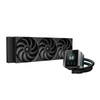
DeepCool MYSTIQUE 360 AIO Liquid CPU Cooler – 360mm Radiator, 2.8" TFT LCD and 5th-Generation Pump
The DeepCool MYSTIQUE 360 is a premium 360mm all-in-one liquid CPU cooler designed for high-performance gaming PCs, creator workstations and enthusiast desktop builds. With a sharp 2.8-inch TFT LCD screen, enhanced 5th-generation pump, 360mm aluminium radiator and three high-performance 120mm PWM fans, it delivers strong cooling performance with advanced personalisation for modern Intel and AMD systems.
This cooler is ideal for customers searching for a DeepCool MYSTIQUE 360 CPU cooler, 360mm AIO liquid cooler with LCD screen, Intel LGA 1700 liquid cooler, AMD AM5 AIO cooler, or a premium CPU cooler for gaming and content creation. It combines powerful thermal performance with a customisable LCD display that can show system information, images and animated content.
Key Features of the DeepCool MYSTIQUE 360
- 360mm all-in-one liquid CPU cooler for high-performance desktop systems
- 2.8-inch TFT LCD screen for personalised system display and visual customisation
- 640 x 480 screen resolution with 16.7 million colours for sharp image quality
- Built-in gyroscopic sensors help automatically adjust screen orientation
- Enhanced 5th-generation DeepCool pump with speed up to 3400 RPM ±10%
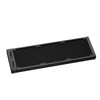
- 360mm aluminium radiator measuring 402 x 120 x 27mm
- 410mm tubing for flexible installation in compatible PC cases
- 3 x 120mm PWM fans for strong radiator airflow and cooling control
- Fan speed range: 500–2150 RPM ±10%
- Airflow: up to 72.45 CFM per fan
- Static pressure: up to 4.32 mmAq
- Fluid Dynamic Bearing fans for smoother operation and long-term use
- Intel socket support: LGA 1700, 1200, 1151, 1150 and 1155
- AMD socket support: AM5 and AM4
- DeepCool software support for LCD customisation and monitoring
- 5-year warranty for long-term confidence
- Model / Part Number: R-LX750-BKDSNMP-G-1
Premium 360mm AIO Cooling for Powerful CPUs
The DeepCool MYSTIQUE 360 is designed for users who need serious CPU cooling in a clean, all-in-one package. Its 360mm radiator provides a large cooling surface area, while the enhanced pump helps move coolant efficiently through the loop for stable thermal performance.
This makes it a strong option for gaming PCs, streaming systems, editing workstations, overclocking-focused builds and high-power processors that need more cooling capacity than many smaller 120mm or 240mm AIO coolers.
Good for Gaming, Streaming and Creator Workloads
Modern CPUs can produce significant heat during gaming, rendering, video editing, compiling, streaming and multitasking. A 360mm AIO cooler like the MYSTIQUE 360 helps control temperatures while keeping the build visually clean and showcase-ready.
2.8-Inch TFT LCD Screen for Personalisation
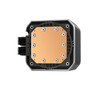
The MYSTIQUE 360 includes a large 2.8-inch TFT LCD screen on the pump housing. The display supports a sharp 640 x 480 resolution and 16.7 million colours, allowing users to personalise their build with images, animations and monitoring information.
The screen can be used to show system stats, custom visuals or branding, making it ideal for users building a premium gaming PC, streaming setup, white-glove workstation or showcase desktop.
Automatic Screen Orientation
Built-in gyroscopic sensors help the display adjust its orientation automatically, making the cooler easier to install in different pump orientations while keeping the screen readable.
Enhanced 5th-Generation Pump Performance
The MYSTIQUE 360 uses DeepCool’s enhanced 5th-generation pump platform. It is listed with a pump speed of 3400 RPM ±10%, a rated voltage of 12V DC, rated current of 0.35A and pump power consumption of 4.2W.
The pump is designed to provide strong coolant flow for modern power-hungry CPUs, helping maintain consistent performance during demanding tasks.
High-Performance 120mm PWM Fans
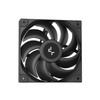
The cooler includes three 120mm PWM fans designed for radiator cooling. Each fan is listed with a speed range of 500–2150 RPM ±10%, airflow up to 72.45 CFM, static pressure up to 4.32 mmAq and noise up to 36.49 dB(A).
The 4-pin PWM connection allows compatible motherboards to adjust fan speed automatically based on CPU temperature, helping balance cooling and noise.
Wide Intel and AMD Socket Compatibility
The DeepCool MYSTIQUE 360 supports a range of current and previous Intel and AMD desktop sockets. It is suitable for many modern gaming and workstation builds using Intel LGA 1700 or AMD AM5 processors, as well as older supported platforms.
Supported CPU Sockets
- Intel: LGA 1700, LGA 1200, LGA 1151, LGA 1150 and LGA 1155
- AMD: AM5 and AM4
360mm Radiator Case Compatibility
Before purchasing, check that your PC case supports a 360mm radiator. The radiator measures 402 x 120 x 27mm, and additional clearance is required for the three 120mm fans, tubing, motherboard heatsinks, RAM and top or front panel spacing.
This cooler is best suited to mid tower and full tower cases with 360mm radiator support. Compact cases may not have enough room.
Who Is the DeepCool MYSTIQUE 360 Best For?
- Gamers building a premium high-performance PC
- Content creators using demanding CPUs
- PC builders wanting a 360mm AIO cooler with LCD display
- Intel LGA 1700 and AMD AM5 system builders
- Users who want custom screen personalisation
- Showcase PC builds with visible internal components
- Streaming and workstation systems needing strong CPU cooling
Who Is This Cooler Not For?
This cooler is not the best choice if your case does not support a 360mm radiator, if you need a low-profile cooler, if you want a basic budget air cooler, or if you are building in a very small form factor case. It is also not a custom-loop water-cooling kit; it is a sealed all-in-one liquid CPU cooler.
Technical Specifications
- Brand: DeepCool
- Model: MYSTIQUE 360
- Part Number: R-LX750-BKDSNMP-G-1
- Product Type: All-in-one liquid CPU cooler
- Colour: Black
- Radiator Size Class: 360mm
- Radiator Dimensions: 402 x 120 x 27mm / L x W x H
- Radiator Material: Aluminium
- Tube Length: 410mm
- Pump Dimensions: 93 x 77 x 66mm / L x W x H
- Pump Speed: 3400 RPM ±10%
- Pump Noise: 21 dB(A)
- Pump Connector: 3-pin
- Pump Rated Voltage: 12V DC
- Pump Rated Current: 0.35A
- Pump Power Consumption: 4.2W
- Fan Quantity: 3 x 120mm fans
- Fan Dimensions: 120 x 120 x 25mm
- Fan Speed: 500–2150 RPM ±10%
- Fan Airflow: Up to 72.45 CFM
- Fan Air Pressure: Up to 4.32 mmAq
- Fan Noise: ≤36.49 dB(A)
- Fan Connector: 4-pin PWM
- Fan Bearing Type: Fluid Dynamic Bearing
- LCD Screen Size: 2.8-inch TFT LCD
- LCD Resolution: 640 x 480
- LCD Colour Support: 16.7 million colours
- Screen Orientation: Built-in gyroscopic sensor support
- Intel Socket Support: LGA 1700, 1200, 1151, 1150, 1155
- AMD Socket Support: AM5, AM4
- Net Weight: 1847g
- Warranty: 5 years
Important Case Compatibility Note
Please check your case before purchase. This cooler uses a 360mm radiator measuring 402 x 120 x 27mm, plus three 120mm fans. Your case must support a 360mm radiator in the top, front or another compatible mounting position.
Important Socket Compatibility Note
Check your motherboard socket before ordering. The MYSTIQUE 360 supports Intel LGA 1700, 1200, 1151, 1150 and 1155, plus AMD AM5 and AM4. If you are using a newer Intel socket such as LGA 1851, check the latest DeepCool mounting compatibility or adapter availability before purchase.
Important Product Note
This is a sealed all-in-one liquid CPU cooler, not a custom water-cooling loop. It includes the pump, radiator, tubing and fans as part of the AIO cooler assembly. It is not designed to be opened, refilled or expanded like a custom loop.
Why Buy the DeepCool MYSTIQUE 360?
The DeepCool MYSTIQUE 360 is a strong choice for users who want high-end CPU cooling with premium display customisation. With a 360mm radiator, enhanced 5th-generation pump, three high-performance PWM fans, a sharp 2.8-inch TFT LCD screen and wide Intel/AMD socket support, it is ideal for gaming PCs, creator systems and showcase builds.
Choose this cooler if you need strong cooling performance, a customisable LCD display and a premium 360mm AIO solution for a compatible desktop PC case.
Specification
DeepCool MYSTIQUE 360 AIO Liquid CPU Cooler Specifications
The DeepCool MYSTIQUE 360 is a premium 360mm all-in-one liquid CPU cooler designed for high-performance Intel and AMD desktop systems. It features a customisable 2.83-inch TFT LCD display, enhanced 5th-generation pump, 360mm aluminium radiator, three 120mm PWM fans and broad socket compatibility for modern gaming and creator PC builds.
General Information
| Brand | DeepCool |
| Model | MYSTIQUE 360 |
| Manufacturer Part Number | R-LX750-BKDSNMP-G-1 |
| Product Type | All-in-one liquid CPU cooler |
| Radiator Size Class | 360mm |
| Colour | Black |
| Recommended Use | Gaming PCs, creator workstations, high-performance desktops, Intel LGA 1700 systems and AMD AM5 / AM4 builds |
Radiator and Tubing
| Radiator Dimensions | 402 x 120 x 27mm / L x W x H |
| Radiator Material | Aluminium |
| Tube Length | 410mm |
| Radiator Fan Size | 3 x 120mm fans |
| Case Compatibility Note | Requires a PC case with 360mm radiator support and enough clearance for radiator, fans, tubing, motherboard heatsinks and memory |
Pump Specifications
| Pump Dimensions | 93 x 77 x 66mm / L x W x H |
| Pump Speed | 3400 RPM ±10% |
| Pump Noise | 21 dB(A) |
| Pump Connector | 3-pin |
| Pump Rated Voltage | 12V DC |
| Pump Rated Current | 0.35A |
| Pump Power Consumption | 4.2W |
Fan Specifications
| Fan Quantity | 3 fans included |
| Fan Dimensions | 120 x 120 x 25mm / L x W x H |
| Fan Speed | 500–2150 RPM ±10% |
| Fan Airflow | 72.45 CFM |
| Fan Air Pressure | 4.32 mmAq |
| Fan Noise | ≤36.49 dB(A) |
| Fan Connector | 4-pin PWM |
| Fan Bearing Type | Fluid Dynamic Bearing |
| Fan Rated Voltage | 12V DC |
| Fan Rated Current | 0.3A |
| Fan Power Consumption | 3.6W |
LCD Display and Customisation
| Display Type | TFT LCD screen |
| Display Size | 2.83-inch |
| Display Resolution | 480 x 640 |
| Display Colour Support | 16.7 million colours |
| Screen Orientation | Built-in gyroscopic sensor support for automatic orientation adjustment |
| Display Function | Custom images, animated visuals and system monitoring via DeepCool software |
| Software Support | DeepCool software for screen customisation and system monitoring |
CPU Socket Compatibility
| Intel Socket Support | LGA 1700, LGA 1200, LGA 1151, LGA 1150, LGA 1155 |
| AMD Socket Support | AM5, AM4 |
| Intel LGA 1851 Support | Not listed on the main official DeepCool MYSTIQUE 360 page checked; verify adapter or latest mounting kit availability before listing LGA 1851 |
| Threadripper Support | No, not listed for this model |
Lighting and ARGB
| ARGB Fan Lighting | No, this checked model is the standard MYSTIQUE 360 with non-ARGB high-performance fans |
| LCD Power / LED Power | 2.45W pump display power consumption listed by DeepCool regional specifications |
| ARGB Model Note | Do not confuse this model with MYSTIQUE 360 ARGB, which has different fan specifications |
Physical Specifications
| Net Weight | 1847g |
| Radiator Dimensions | 402 x 120 x 27mm |
| Pump Dimensions | 93 x 77 x 66mm |
| Fan Dimensions | 120 x 120 x 25mm |
Package Contents
| AIO Cooler | 1 x DeepCool MYSTIQUE 360 liquid CPU cooler assembly |
| Radiator | 360mm aluminium radiator attached to pump and tubing |
| Fans | 3 x 120mm PWM fans |
| Mounting Hardware | Mounting hardware for supported Intel and AMD sockets, depending on retail package |
| Thermal Paste | Check retail package contents; thermal paste may be pre-applied or supplied depending on package version |
Warranty
| Warranty | 5 years |
Important Case Compatibility Note
Please check your PC case before purchase. The DeepCool MYSTIQUE 360 uses a 360mm radiator measuring 402 x 120 x 27mm, plus three 120mm fans. Your case must support a 360mm radiator in the intended mounting position and have enough clearance for the fans, tubes, RAM, motherboard heatsinks and top or front panel spacing.
Important Socket Compatibility Note
The official DeepCool MYSTIQUE 360 page checked lists Intel LGA 1700, 1200, 1151, 1150 and 1155, plus AMD AM5 and AM4. Do not list Intel LGA 1851 support unless your stock includes updated mounting hardware or DeepCool confirms compatibility for your exact package version.
Important Product Version Note
This specification is for the standard DeepCool MYSTIQUE 360 model, P/N R-LX750-BKDSNMP-G-1. Do not describe it as MYSTIQUE 360 ARGB unless your physical stock is the ARGB version, because the ARGB model has different fan speed, airflow, pressure, noise and bearing specifications.
Important AIO Cooler Note
This is a sealed all-in-one liquid CPU cooler. It is not a custom water-cooling loop and is not designed to be opened, refilled or expanded. Install it according to DeepCool’s instructions and connect the pump, fans and display cables correctly.
Return
FAQ: Frequenlty Asked Questions
DeepCool MYSTIQUE 360 LCD AIO CPU Cooler FAQ
The DeepCool MYSTIQUE 360 CPU Cooler is a premium 360mm all-in-one liquid CPU cooler designed for high-performance gaming PCs, creator workstations, showcase builds, and users who want strong cooling with a customisable 2.8-inch TFT LCD screen. It features a 5th-generation DeepCool pump, a 360mm aluminium radiator, three 120mm PWM fans, a personalised display, and a 5-year warranty. Below are the most common questions buyers ask before choosing this DeepCool MYSTIQUE 360 LCD AIO liquid cooler, including CPU socket compatibility, radiator fitment, LCD setup, pump noise, fan control, case clearance, Ryzen and Intel support, installation, maintenance, and whether this 360mm AIO is right for your PC build.
1. What is the DeepCool MYSTIQUE 360?
The DeepCool MYSTIQUE 360 is a 360mm all-in-one liquid CPU cooler with a customisable 2.8-inch TFT LCD screen. It is designed to cool modern desktop CPUs while also adding a premium visual display to gaming PCs and creator builds.
2. Is the DeepCool MYSTIQUE 360 an AIO cooler?
Yes. The MYSTIQUE 360 is an all-in-one liquid cooler, meaning the pump, cold plate, radiator, tubing and fans are supplied as a sealed cooling unit. It is not a custom-loop water block and does not require a separate pump, reservoir or coolant.
3. What radiator size does the MYSTIQUE 360 use?
The DeepCool MYSTIQUE 360 uses a 360mm-class radiator with three 120mm fans. DeepCool lists the radiator dimensions as approximately 402 × 120 × 27mm, so your case must support a 360mm radiator with enough clearance for fans and tubing.
4. Will the MYSTIQUE 360 fit in my PC case?
It will fit only if your case supports a 360mm radiator in the top, front or side mounting position. Check your case manual for radiator support, motherboard clearance, RAM height, VRM heatsink clearance, fan thickness and tube routing before buying.
5. Can I mount the MYSTIQUE 360 at the top of my case?
Yes, if your case supports a top-mounted 360mm radiator and has enough clearance above the motherboard. Top mounting is often preferred because it can help keep air away from the pump and gives a clean cooling layout.
6. Can I mount the MYSTIQUE 360 at the front of my case?
Yes, if your case supports a front 360mm radiator. When front mounting, try to position the radiator so the pump is not the highest point in the loop. This can reduce the chance of air collecting in the pump and causing noise.
7. Can I mount the MYSTIQUE 360 with the tubes at the top?
Front-mounted AIO radiators usually work best with the tubes at the bottom where possible, because it helps keep air away from the pump. If your case only allows tubes at the top, it may still work, but pump noise and trapped air can be more likely depending on the layout.
8. What CPU sockets does the DeepCool MYSTIQUE 360 support?
The MYSTIQUE 360 is commonly listed for modern Intel and AMD desktop sockets including Intel LGA 1700 and AMD AM5/AM4, with newer listings also showing LGA 1851 support. Always check the latest mounting hardware included with your exact version before installation.
9. Does the MYSTIQUE 360 support Intel LGA 1700?
Yes. The DeepCool MYSTIQUE 360 supports Intel LGA 1700, making it suitable for many Intel 12th, 13th and 14th Gen desktop CPUs when installed with the correct mounting kit.
10. Does the MYSTIQUE 360 support Intel LGA 1851?
Some current DeepCool MYSTIQUE 360 listings include Intel LGA 1851 support. If you are buying for a newer Intel platform, check that your box includes the correct LGA 1851 mounting hardware before fitting.
11. Does the MYSTIQUE 360 support AMD AM5?
Yes. The MYSTIQUE 360 supports AMD AM5, making it suitable for many Ryzen 7000, Ryzen 8000 and Ryzen 9000 series desktop processors when the correct AMD mounting hardware is used.
12. Does the MYSTIQUE 360 support AMD AM4?
Yes. The MYSTIQUE 360 supports AMD AM4, so it can be used with many Ryzen 1000, 2000, 3000, 4000, 5000 and selected AM4 processors when installed with the correct bracket and backplate setup.
13. Is the MYSTIQUE 360 good for Ryzen 7 and Ryzen 9 CPUs?
Yes. A 360mm AIO such as the MYSTIQUE 360 is a strong choice for Ryzen 7 and Ryzen 9 systems, especially for gaming, streaming, content creation and heavy multitasking. Final temperatures depend on case airflow, CPU settings, room temperature and fan curves.
14. Is the MYSTIQUE 360 good for Intel Core i7 and i9 CPUs?
Yes. The 360mm radiator and high-performance pump make it suitable for many Intel Core i7 and Core i9 builds. High-power Intel CPUs can run hot under heavy loads, so good case airflow and correct mounting are important.
15. Is the MYSTIQUE 360 good for overclocking?
Yes, it can be suitable for overclocking when paired with a compatible CPU, motherboard and case airflow setup. Overclocking increases heat output, so results depend on voltage, CPU quality, radiator airflow, fan speed and ambient temperature.
16. What is the 2.8-inch TFT LCD screen used for?
The 2.8-inch TFT LCD screen can display custom images, system information, animations and personalised visuals. It is designed for users who want both cooling performance and a premium showcase look inside their PC.
17. Can I customise the MYSTIQUE 360 LCD screen?
Yes. The MYSTIQUE 360 is designed with a customisable LCD screen. You can use DeepCool’s software to personalise the display with supported images, animations and system monitoring information, depending on software and firmware support.
18. What resolution is the MYSTIQUE 360 LCD screen?
DeepCool lists the display as a 2.8-inch TFT LCD. Some MYSTIQUE-series listings show a 480 × 640 display specification, giving a sharp screen for custom images and system monitoring inside the PC case.
19. What software controls the MYSTIQUE 360 screen?
The MYSTIQUE 360 display is controlled through DeepCool’s software ecosystem. Make sure you download the correct DeepCool setup/software for the MYSTIQUE cooler and keep it updated for best LCD and monitoring support.
20. Do I need a USB header for the LCD?
Yes, LCD AIO coolers normally need an internal USB connection for screen control and software communication. Check that your motherboard has a spare internal USB 2.0 header or use a suitable internal USB hub if needed.
21. Can the LCD show CPU temperature?
Yes. The LCD can be used to display system monitoring information such as CPU temperature, depending on the DeepCool software settings and sensor support. This is useful for quickly checking system status through the case window.
22. Can the LCD show GIFs or custom images?
Yes. The MYSTIQUE 360 is designed for personalised display content. Supported file types, file size limits and animation behaviour depend on DeepCool’s software, so use the official software guidance when uploading custom visuals.
23. Why is the LCD screen not turning on?
Common causes include the internal USB cable not connected, SATA or power connection missing if required, software not installed, wrong device selected, loose connector, or a firmware/software issue. Recheck all cables, install DeepCool software, restart the PC and confirm the cooler is detected.
24. Can I rotate the LCD display?
Display rotation options depend on DeepCool’s software and firmware. If your pump block orientation makes the display appear sideways, check the display settings in the DeepCool software for rotation or layout options.
25. What pump does the MYSTIQUE 360 use?
The MYSTIQUE 360 uses DeepCool’s newer pump design, commonly described as a 5th-generation pump. DeepCool lists the pump speed at around 3400RPM ±10%, with a 3-pin pump connector and 12V power rating.
26. Is pump noise normal on an AIO cooler?
A small amount of pump hum can be normal, especially close to the case. Loud buzzing, grinding, constant rattling or gurgling may indicate trapped air, poor radiator orientation, incorrect pump speed behaviour or a possible fault.
27. Why does my MYSTIQUE 360 pump sound like bubbles?
Bubble or gurgling sounds can happen when air is trapped in the pump or tubes. Check radiator orientation, make sure the pump is not the highest point in the loop, gently tilt the case while the pump runs, and allow time for air to move into the radiator. If noise remains severe, stop and check installation.
28. Should the AIO pump run at full speed?
Many AIO pumps are designed to run at a steady high speed for reliable coolant flow. Fans are usually adjusted more often than pump speed. Check DeepCool’s manual and your BIOS settings before changing pump speed control.
29. Where should I plug in the pump cable?
The pump cable should usually connect to the motherboard AIO_PUMP or PUMP header if available. If your motherboard only has CPU_FAN headers, follow the motherboard and cooler manuals so the system detects cooling correctly and does not show CPU fan errors.
30. Where should I plug in the fans?
The radiator fans use 4-pin PWM connectors and should connect to CPU_FAN, CPU_OPT, a fan splitter, or a suitable fan controller depending on your motherboard. Use a header or controller that can safely support the connected fan load.
31. What fans come with the MYSTIQUE 360?
The MYSTIQUE 360 includes three 120mm PWM fans. DeepCool lists the fans at approximately 500–2150RPM ±10%, with up to 72.45 CFM airflow and 4.32mmAq static pressure.
32. Are the fans PWM controlled?
Yes. The included 120mm fans use 4-pin PWM control, allowing the motherboard or fan controller to adjust fan speed based on temperature and fan curve settings.
33. Is the MYSTIQUE 360 quiet?
It can be quiet at low and moderate loads if fan curves are tuned well. Under heavy CPU load, the three radiator fans may become louder as they increase speed. Pump noise, fan curve, case airflow and radiator placement all affect real-world noise.
34. What is the maximum fan noise rating?
DeepCool lists the included fans with a noise rating of up to approximately 36.49 dB(A). Real-world noise can vary depending on case design, fan speed, radiator restriction and how close the PC is to the user.
35. Does the MYSTIQUE 360 have RGB lighting?
The standard MYSTIQUE 360 focuses on the LCD screen rather than heavy RGB lighting. If you specifically want ARGB fans and lighting effects, check whether you are buying the standard MYSTIQUE 360 or the MYSTIQUE 360 ARGB version.
36. Is this the same as the MYSTIQUE 360 ARGB?
No. The standard MYSTIQUE 360 and MYSTIQUE 360 ARGB versions can differ in lighting features and fan design. Check the exact part number and product photos if ARGB fan lighting is important to your build.
37. What is the tube length?
DeepCool lists the MYSTIQUE 360 tube length at approximately 410mm. This gives useful flexibility for top or front radiator mounting in many mid-tower and full-tower cases.
38. What is the radiator made from?
The MYSTIQUE 360 radiator is listed as aluminium. This is common for sealed AIO liquid coolers and is part of the factory-filled closed-loop design.
39. Do I need to refill the MYSTIQUE 360?
No. The MYSTIQUE 360 is a sealed AIO liquid cooler and is not designed for normal user refilling. You should not open the loop, add coolant or modify the tubing, as this can damage the cooler and cause leaks.
40. Does the MYSTIQUE 360 need maintenance?
It does not need coolant maintenance like a custom loop. Normal maintenance includes cleaning dust from the radiator and fans, checking fan operation, keeping cables secure, monitoring temperatures, and ensuring the pump is running correctly.
41. How often should I clean the radiator?
Clean the radiator whenever dust builds up, or every few months depending on your room, pets, carpet, airflow and dust filters. Dust can reduce airflow and increase CPU temperatures.
42. Does the MYSTIQUE 360 come with thermal paste?
AIO coolers often include pre-applied or supplied thermal paste, but package contents can vary by region and batch. Check the box contents before installation. If needed, use a good-quality CPU thermal compound.
43. Should I replace thermal paste when reinstalling the cooler?
Yes. If the pump block is removed from the CPU, clean off the old paste and apply fresh thermal paste before reinstalling. Reusing disturbed paste can cause air gaps and worse temperatures.
44. Why are my CPU temperatures high after installing the MYSTIQUE 360?
Common causes include plastic film left on the cold plate, poor thermal paste application, uneven mounting pressure, pump cable not connected, fans installed the wrong way, blocked radiator airflow, weak case airflow, or BIOS fan/pump settings not configured correctly.
45. How do I know if the pump is working?
Check BIOS or monitoring software for pump RPM, listen for a quiet pump hum, feel for slight tube warmth after load, and monitor CPU temperatures. If temperatures rise rapidly to unsafe levels, shut down and check pump power, mounting and fan connections.
46. Can the MYSTIQUE 360 leak?
AIO coolers are sealed and designed to prevent leaks, but any liquid cooler has some risk if damaged, incorrectly handled or defective. Do not twist tubes aggressively, do not open the loop, and check for visible damage before installation.
47. Is a 360mm AIO better than a 240mm AIO?
A 360mm AIO usually has more radiator surface area than a 240mm AIO, which can improve cooling potential or allow lower fan speeds. However, it needs a larger compatible case and can cost more. A good 240mm AIO may still be enough for many CPUs.
48. MYSTIQUE 360 vs air cooler — which should I choose?
Choose the MYSTIQUE 360 if you want stronger 360mm liquid-cooling potential, a custom LCD screen and a premium showcase look. Choose an air cooler if you want lower cost, simpler installation, fewer cables, and no pump noise or liquid-cooling concerns.
49. MYSTIQUE 360 vs custom water cooling — which is better?
The MYSTIQUE 360 is easier because it is a sealed AIO with no filling or custom loop maintenance. Custom water cooling can offer more flexibility and GPU cooling, but it costs more and requires pumps, reservoirs, fittings, coolant, leak testing and regular maintenance.
50. Is the MYSTIQUE 360 good for a showcase PC build?
Yes. The customisable LCD screen makes it a strong choice for showcase PCs, glass-panel cases, RGB builds and personalised setups where the cooler is a visible centrepiece inside the system.
51. Can I use the MYSTIQUE 360 in a small case?
Only if the small case specifically supports a 360mm radiator. Many compact cases do not. Check the case manual carefully before buying, as radiator length, thickness, tubes, fans and motherboard clearance all matter.
52. Is the MYSTIQUE 360 suitable for Mini-ITX builds?
It can work in selected larger Mini-ITX cases that support 360mm radiators, but many Mini-ITX cases only support 120mm, 240mm or 280mm cooling. For ITX builds, check radiator and tube clearance very carefully.
53. Can I use the MYSTIQUE 360 with tall RAM?
It depends on the case and top radiator clearance. A top-mounted 360mm radiator can conflict with tall RAM or motherboard heatsinks in some cases. Check your case clearance and RAM height before buying.
54. Can I use it with a high-end motherboard?
Yes, if the socket is compatible and the case has enough clearance. Large VRM heatsinks on high-end motherboards can affect top-mounted radiator and fan clearance, so check motherboard and case dimensions carefully.
55. Does it support push-pull fans?
Push-pull may be possible only if your case has enough extra radiator clearance. The cooler is supplied for a standard three-fan setup. Adding another three fans increases thickness, cable complexity, noise and power draw, so check space before planning it.
56. Can I replace the included fans?
Yes, you can replace the fans with other 120mm radiator-suitable PWM fans if needed. Choose fans with good static pressure for radiator use and make sure the motherboard or fan controller can power them safely.
57. Why does my motherboard show a CPU fan error?
This can happen if the pump or fan signal is not connected to the header the motherboard expects. Connect the pump and radiator fans according to the cooler and motherboard manuals, then adjust BIOS monitoring settings if needed.
58. Can I control the fans from BIOS?
Yes. The radiator fans use PWM control, so they can usually be controlled through BIOS or motherboard fan software. Set a balanced fan curve to reduce noise at idle while increasing cooling under load.
59. Can I control the screen from BIOS?
No. The LCD screen is normally controlled through DeepCool software in the operating system, not through BIOS. BIOS can manage fan and pump headers, but custom screen content requires the correct software connection.
60. What warranty does the MYSTIQUE 360 have?
This product is commonly listed with a 5-year warranty. Keep your invoice and packaging details in case support is needed. Warranty terms can depend on region and retailer.
61. Who is the DeepCool MYSTIQUE 360 best for?
The MYSTIQUE 360 is best for gamers, PC enthusiasts, content creators and builders using powerful Ryzen or Intel CPUs who want a 360mm AIO cooler with strong cooling potential and a customisable LCD screen for a premium build appearance.
62. Who is the DeepCool MYSTIQUE 360 not for?
This cooler is not the best choice if your case does not support a 360mm radiator, if you want the cheapest CPU cooler, if you dislike pump noise risk, if you do not want extra software for the LCD, or if a simple air cooler is enough for your CPU.
63. What should I check before buying the MYSTIQUE 360?
Before buying, check your CPU socket, case 360mm radiator support, top/front clearance, RAM height, motherboard VRM clearance, internal USB header availability, fan header availability, pump/fan cable routing, and whether you want LCD software customisation in your build.
Videos
View AllClose
Related Products
Related Products
Antec Vortex Lum 360 ARGB White CPU Liquid Cooler - Intel & AMD Compatible, 3 x 120mm ARGB Fans, Suspended Spiral Pump Head, Enhanced Cooling Performance
ANTEC