
DEEPCOOL
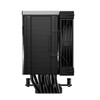
DeepCool AK700 DIGITAL NYX CPU Cooler – Digital Display, 7 Heatpipes, 120mm Fan
- SKU:
- FADEE-AK700
- UPC:
- 6933412729624
- MPN:
- R-AK700-BKNNMN-GJD-1
- Availability:
- Free Click & Collect in Peterborough. UK delivery also available.




Description
DeepCool AK700 DIGITAL NYX CPU Cooler – Digital Display, 7 Heatpipes and 120mm PWM Fan
The DeepCool AK700 DIGITAL NYX CPU Cooler is a premium single-tower air cooler designed for powerful Intel and AMD desktop processors. It combines seven 6mm copper heatpipes, a precision-machined copper base, a dense matrix-fin heatsink and a high-performance 120mm PWM fan to transfer heat away from the CPU efficiently.
An integrated quad-segment digital display provides real-time CPU information, including temperature, usage, power consumption and operating frequency. When connected to an available internal USB 2.0 motherboard header and used with DeepCool software, the display provides an easy way to monitor important processor information without keeping a separate monitoring window open.
The AK700 DIGITAL NYX supports modern Intel LGA1851 and LGA1700 processors alongside selected older Intel sockets, as well as AMD AM5 and AM4 desktop processors. Its offset single-tower design is intended to provide improved memory clearance while keeping the installed RAM slots visible.
This cooler is suitable for customers searching for a DeepCool digital CPU cooler, seven-heatpipe air cooler, AM5 CPU cooler, LGA1851 CPU cooler, high-performance 120mm PWM cooler or a single-tower air cooler with real-time CPU monitoring.
Key Features of the DeepCool AK700 DIGITAL NYX
- High-performance single-tower CPU air cooler
- Seven 6mm copper heatpipes for efficient heat transfer
- Precision-machined copper contact base
- DeepCool Core Touch Technology 2.0
- Dense matrix-fin heatsink for a large heat-dissipation area
- 120mm high-performance PWM cooling fan
- Maximum fan speed of 2700 ±10% RPM
- Maximum airflow of 77.23 CFM
- Maximum static pressure of 5.13mmAq
- Maximum listed noise level of 36dB(A)
- Hydro-bearing fan with a three-phase motor design
- 0-RPM start/stop operation at very low PWM signals
- Activate Clearing Tech for automatic dust-clearing operation
- Quad-segment digital CPU monitoring display
- Displays CPU temperature, usage, wattage and frequency
- Visual CPU temperature alert system
- DeepCreative automatic fan-curve control
- Sleep, Office, Gaming and Overclocking modes
- Offset heatpipe layout for improved RAM compatibility
- Compatible with Intel LGA1851, 1700, 1200 and 115x
- Compatible with AMD AM5 and AM4
- Three-year DeepCool limited warranty
Seven Copper Heatpipes for High-Performance CPU Cooling
The DeepCool AK700 DIGITAL NYX uses seven copper heatpipes measuring 6mm in diameter. These heatpipes move thermal energy from the processor contact base into the tower heatsink, where it can be dispersed by the cooling fan.
Seven heatpipes provide multiple thermal pathways between the CPU base and fin stack. This helps distribute heat across a wider area of the heatsink instead of concentrating it around a smaller section of the cooler.
Precision-Machined Copper Base
The cooler uses a precision-machined copper base to make contact with the processor's integrated heat spreader. Correct contact pressure and an even layer of suitable thermal compound are essential for transferring heat from the CPU into the cooler.
The supplied mounting system is designed to apply secure and even pressure across supported Intel and AMD processor platforms. Installation instructions should be followed carefully to ensure that the correct socket hardware and mounting orientation are used.
DeepCool Core Touch Technology 2.0
The AK700 DIGITAL NYX incorporates DeepCool Core Touch Technology 2.0. Combined with the cooler's optimised tower construction, copper base and seven-heatpipe layout, this design is intended to improve thermal transfer between the processor and heatsink.
Cooling performance still depends on the complete PC configuration. Processor power consumption, ambient temperature, case airflow, thermal compound application, motherboard settings and fan control can all affect the final CPU temperature.
Matrix-Fin Single-Tower Heatsink
The signature DeepCool matrix-fin array provides a dense surface through which the cooling fan can move air. Heat transferred into the fins is carried away by the fan and released into the surrounding case airflow.
Unlike a dual-tower cooler, the AK700 DIGITAL NYX uses a streamlined single-tower layout. This can provide a balance between substantial cooling hardware and improved access around the motherboard's memory area.
Quad-Segment Digital CPU Monitoring Display
A defining feature of the AK700 DIGITAL NYX is its integrated quad-segment digital display. The display is designed to present several useful CPU measurements directly on top of the cooler.
What Does the Digital Display Show?
- CPU temperature in Celsius or Fahrenheit
- CPU usage as the processor workload changes
- CPU wattage reported through the monitoring software
- CPU frequency during idle and active workloads
The displayed values are obtained through DeepCool's monitoring software. Measurements may differ slightly from values shown by motherboard utilities or third-party applications because different programs can use different sensors, polling intervals and calculation methods.
Visual Temperature Alert System
The digital module also includes a visual temperature alert system designed to make elevated CPU temperatures easier to identify. This provides a visible indication on the cooler but does not replace proper temperature monitoring, suitable fan settings or adequate case airflow.
USB 2.0 Header and Software Requirements
The digital display requires an available internal USB 2.0 motherboard header and compatible DeepCool software. This is separate from the cooler fan's normal 4-pin PWM connection.
Before ordering, check that the motherboard has:
- An available internal USB 2.0 header for the digital module
- An available 4-pin CPU_FAN or compatible PWM fan header
- A supported Intel or AMD processor socket
- Sufficient clearance around the CPU socket
If all internal USB 2.0 headers are already being used by a case controller, liquid cooler, lighting controller or another accessory, a suitable internal USB hub or alternative connection arrangement may be required.
Digital Does Not Mean RGB
The term “DIGITAL” refers to the integrated CPU monitoring display and software features. DeepCool's official specification for this model does not list RGB or ARGB illumination.
Customers specifically requiring synchronised RGB lighting should check whether a different cooler model is more appropriate.
DeepCreative Automatic Fan Control
The upgraded DeepCreative interface can monitor CPU load and automatically apply an appropriate fan-speed curve. DeepCool describes this as an AI-driven control system designed to balance cooling performance and operating noise without requiring the user to create a manual BIOS fan curve.
The automatic software function does not change the physical cooling capacity of the heatsink. Instead, it adjusts fan behaviour according to processor conditions and the selected operating mode.
Available Environmental Modes
- Sleep Mode: designed for very quiet, noise-sensitive environments
- Office Mode: prioritises lower noise during productivity and everyday use
- Gaming Mode: balances cooling performance with fan noise
- Overclocking Mode: allows more aggressive fan operation for demanding processor workloads
DeepCool lists approximate acoustic ranges of 0–20dB(A) for Sleep Mode, 20–25dB(A) for Office Mode, 25–33dB(A) for Gaming Mode and 25–40dB(A) for Overclocking Mode. Actual noise will depend on the fan speed, case construction, distance from the system and surrounding environment.
Automatic High-Temperature Response
DeepCool states that the fan can move to full speed when the CPU temperature rises above approximately 80°C and return to the selected preset behaviour after the temperature falls below that level.
This software-controlled response is designed to prioritise cooling during elevated processor temperatures. It should not be considered a substitute for correct cooler installation or adequate case ventilation.
High-Performance 120mm PWM Fan
The AK700 DIGITAL NYX includes a 120 × 120 × 25mm cooling fan capable of running at up to 2700 ±10% RPM. The 4-pin PWM connection allows the motherboard or DeepCool software to adjust the fan speed according to system conditions.
Fan Airflow and Static Pressure
- Maximum airflow: 77.23 CFM
- Maximum static pressure: 5.13mmAq
- Maximum fan speed: 2700 ±10% RPM
- Listed noise levels: 21.0 / 28.8 / 36.0dB(A)
Airflow measures the volume of air moved by the fan, while static pressure indicates its ability to push air through the dense heatsink fins. Both characteristics are important for a tower CPU cooler.
Hydro Bearing and Three-Phase Motor
The fan uses a hydro bearing and a three-phase, six-slot, four-pole motor. This design is intended to provide smooth fan operation, stable performance and controlled acoustics across the available speed range.
Fan noise will increase as rotational speed rises. During heavy CPU workloads or elevated temperatures, the cooler may become more audible as it prioritises cooling performance.
0-RPM Startup and Stop
The fan supports 0-RPM start/stop operation at PWM signals below approximately 5%. This allows the fan to stop under suitable low-load conditions, helping reduce unnecessary noise and fan operation.
Whether the fan reaches 0 RPM depends on the motherboard, software configuration, CPU temperature and selected control mode. Some motherboard BIOS settings may impose a minimum fan speed.
Activate Clearing Tech for Dust Removal
DeepCool's Activate Clearing Tech, also called ACT, is designed to help clear dust from the fan blades and heatsink. When activated within the first several seconds after the computer starts, the fan performs an automatic dust-clearing sequence.
This feature can help reduce light dust accumulation, but it does not eliminate the need for normal PC maintenance. Dust filters, case fans and the heatsink should still be inspected and cleaned periodically.
Safe Cooler Cleaning
- Switch off and unplug the computer before manual cleaning
- Prevent the fan from spinning freely when using compressed air
- Use short, controlled bursts of suitable compressed air
- Do not use a household vacuum directly on sensitive components
- Do not apply liquids or household cleaner to the heatsink or display
- Clean case filters regularly to maintain airflow
Improved RAM and Component Compatibility
The heatpipes are offset to accommodate the depth of the heatsink and provide more space around the motherboard's memory slots. DeepCool states that this design allows additional room for taller memory heat spreaders and keeps the RAM slots unobstructed and visible.
Exact compatibility still depends on the motherboard layout, memory-module height, fan position and surrounding components. PC builders should check all physical dimensions before installation.
Single-Tower Layout
The single-tower configuration can make the memory area easier to access than some large dual-tower coolers. This may be useful when installing or replacing RAM after the CPU cooler has been fitted.
Motherboards with unusually close memory slots, large voltage-regulator heatsinks or non-standard layouts should be measured carefully.
Intel and AMD Socket Compatibility
The AK700 DIGITAL NYX includes mounting support for the following desktop processor sockets:
Compatible Intel Sockets
- Intel LGA1851
- Intel LGA1700
- Intel LGA1200
- Intel LGA1151
- Intel LGA1150
- Intel LGA1155
Compatible AMD Sockets
- AMD AM5
- AMD AM4
Socket compatibility confirms that an appropriate mounting system is supplied. It does not guarantee that the cooler will fit every motherboard, computer case or complete PC configuration using that socket.
Check CPU Cooler Height Before Ordering
The complete AK700 DIGITAL NYX measures approximately 126 × 98 × 157mm. Your computer case must support a CPU cooler height of at least 157mm.
Allowing a small amount of additional clearance is recommended so the digital top cover does not press against the case side panel.
How to Check Case Compatibility
- Find the exact make and model of the PC case.
- Open the manufacturer's specification page or manual.
- Locate the maximum supported CPU cooler height.
- Confirm that it is at least 157mm.
- Check for additional restrictions caused by side fans or internal panels.
- Confirm that the case provides suitable intake and exhaust airflow.
Do not rely only on the general case size, such as ATX or micro-ATX. Cases using the same motherboard format can provide very different CPU cooler clearances.
Suitable for Gaming and Performance PCs
The AK700 DIGITAL NYX is designed for performance-focused systems where substantial air cooling, processor monitoring and modern styling are required.
Suitable Uses
- Gaming desktop computers
- Content-creation workstations
- Video-editing and rendering systems
- High-performance productivity PCs
- Streaming and recording computers
- Systems using unlocked or power-intensive processors
- PC builds where real-time CPU information should remain visible
- Users who prefer an air cooler instead of liquid cooling
DeepCool does not publish a universal processor-wattage or TDP capacity for the AK700 DIGITAL NYX on its official specification page. Cooling suitability should therefore be assessed using the exact processor, motherboard power settings, workload, case airflow and expected ambient temperature.
Air Cooling Without a Pump or Radiator
As a tower air cooler, the AK700 DIGITAL NYX does not use a water pump, coolant tubes or a radiator. Heat is carried through copper heatpipes and dissipated through the metal fin stack.
This can make it an attractive choice for users who want substantial cooling performance without installing an all-in-one liquid cooler. As with every cooling method, correct installation and regular maintenance remain important.
Who Is the DeepCool AK700 DIGITAL NYX Best For?
- PC builders using a compatible Intel or AMD desktop processor
- Gamers who want a high-performance tower air cooler
- Users who want CPU data displayed inside the PC
- Builders who prefer air cooling rather than liquid cooling
- Users who want seven copper heatpipes in a single-tower design
- Systems requiring a high-pressure 120mm PWM fan
- PCs with an available internal USB 2.0 header
- Cases supporting a CPU cooler height of at least 157mm
- Builders using tall memory modules who want improved RAM clearance
Who May Need a Different CPU Cooler?
The AK700 DIGITAL NYX may not be suitable for:
- Cases supporting less than 157mm CPU cooler height
- Motherboards without a supported Intel or AMD socket
- Systems with no available internal USB 2.0 header where digital monitoring is required
- Users specifically requiring RGB or ARGB lighting
- Small-form-factor systems with restricted internal space
- Intel LGA2011, LGA2066 or other unlisted sockets
- AMD Threadripper, TR4, sTRX4 or other unlisted sockets
- Users requiring a low-profile CPU cooler
- Systems where a 1.252kg cooler is unsuitable for the motherboard or intended use
DeepCool AK700 DIGITAL NYX Technical Specifications
- Brand: DeepCool
- Product Name: AK700 DIGITAL NYX
- Product Type: Single-tower CPU air cooler
- Manufacturer Part Number: R-AK700-BKNNMN-GJD-1
- Memox SKU: FADEE-AK700
- EAN: 6933412729624
- Colour: Black
- Product Dimensions: 126 × 98 × 157mm
- Heatsink Dimensions: 124 × 76 × 151mm
- Net Weight: 1252g
- Heatsink Design: Single tower with matrix-fin array
- Heatpipes: 7 × 6mm copper heatpipes
- Contact Base: Precision-machined copper base
- Cooling Technology: DeepCool Core Touch Technology 2.0
- Fan Quantity: 1
- Fan Dimensions: 120 × 120 × 25mm
- Maximum Fan Speed: 2700 ±10% RPM
- Maximum Fan Airflow: 77.23 CFM
- Maximum Fan Air Pressure: 5.13mmAq
- Fan Noise: 21.0 / 28.8 / 36.0dB(A)
- Fan Connector: 4-pin PWM
- Bearing Type: Hydro bearing
- Fan Rated Voltage: 12V DC
- Fan Rated Current: 0.35A
- Fan Power Consumption: 4.2W
- 0-RPM Operation: Yes, below approximately 5% PWM where supported
- Dust-Clearing Function: Activate Clearing Tech
- Digital Display: Quad-segment CPU monitoring display
- Display Functions: CPU temperature, usage, wattage and frequency
- Display Area: 29 × 39mm
- Display Rated Voltage: 5V DC
- Display Rated Current: 0.13A ±10%
- Display Power Consumption: 0.65W
- Display Connection Requirement: Available internal USB 2.0 header
- Control Software: DeepCool software with DeepCreative functions
- Intel Compatibility: LGA1851 / 1700 / 1200 / 1151 / 1150 / 1155
- AMD Compatibility: AM5 / AM4
- RGB or ARGB: Not listed in DeepCool's official specification
- Manufacturer Warranty: 3-year limited warranty
What Is Included?
- 1 × DeepCool AK700 DIGITAL NYX CPU cooler with integrated digital display
- 1 × 120mm PWM cooling fan
- Intel and AMD mounting hardware for the listed sockets
- Required digital-display connection hardware
- Installation tools and documentation
A processor, motherboard, computer case and other PC components are not included.
Important Compatibility Information
Before ordering, confirm the processor socket, motherboard layout, internal USB-header availability and maximum CPU cooler height supported by the case.
The computer case must provide at least 157mm of CPU cooler clearance. The motherboard must also provide a compatible 4-pin fan header and an available internal USB 2.0 header if the digital display and software monitoring functions are required.
Important Installation Information
The cooler weighs approximately 1252g and must be secured using the correct supplied mounting system. Do not attempt to install it using mounting hardware intended for a different socket or cooler.
Apply or retain an appropriate amount of thermal compound between the processor and cooler base. Tighten the mounting screws gradually and evenly according to the installation guide.
After installation, confirm that the fan rotates freely, the display cable is properly connected, the memory modules remain secure and the cooler does not contact the case side panel.
Why Choose the DeepCool AK700 DIGITAL NYX?
The DeepCool AK700 DIGITAL NYX combines a substantial seven-heatpipe cooling system with a streamlined single-tower layout and an integrated CPU monitoring display. Its 120mm PWM fan can deliver up to 77.23 CFM airflow and 5.13mmAq static pressure, while the hydro bearing, 0-RPM capability and software modes provide flexible control over cooling and acoustics.
The quad-segment display shows CPU temperature, usage, wattage and frequency, helping users monitor system behaviour directly from the cooler. DeepCreative automatic control, environmental operating modes and Activate Clearing Tech add further functionality beyond that of a conventional tower heatsink.
Choose the AK700 DIGITAL NYX when you need a high-performance Intel or AMD CPU air cooler with seven copper heatpipes, strong fan pressure, improved RAM clearance and a digital display, and your system has the required socket, case clearance and internal USB 2.0 connection.
Specification
DeepCool AK700 DIGITAL NYX CPU Cooler Specifications
The DeepCool AK700 DIGITAL NYX is a high-performance single-tower CPU air cooler featuring seven 6mm copper heatpipes, a precision-machined copper base, a 120mm PWM fan and an integrated quad-segment digital display.
It supports current Intel and AMD desktop platforms, including Intel LGA1851 and LGA1700 alongside AMD AM5 and AM4. The digital module can display CPU temperature, usage, power consumption and operating frequency when connected to an available internal USB 2.0 motherboard header and used with compatible DeepCool software.
General Information
| Brand | DeepCool |
|---|---|
| Product Name | DeepCool AK700 DIGITAL NYX CPU Cooler |
| Model | AK700 DIGITAL NYX |
| Manufacturer Part Number | R-AK700-BKNNMN-GJD-1 |
| Memox SKU | FADEE-AK700 |
| EAN / UPC | 6933412729624 |
| Product Type | Single-tower CPU air cooler with digital display |
| Product Colour | Black |
| Cooling Method | Air cooling |
| Recommended Use | High-performance gaming, content creation, productivity and enthusiast desktop PCs |
Heatsink and Cooling Design
| Heatsink Type | Single-tower heatsink |
|---|---|
| Heatsink Fin Design | Dense matrix-fin array |
| Heatpipe Quantity | 7 heatpipes |
| Heatpipe Diameter | 6mm |
| Heatpipe Material | Copper |
| CPU Contact Base | Precision-machined copper base |
| Cooling Technology | DeepCool Core Touch Technology 2.0 |
| Heatpipe Layout | Offset layout designed to improve RAM and component clearance |
| Published CPU TDP Rating | DeepCool does not publish a universal CPU TDP rating in the official technical specification for this model |
Fan Specifications
| Number of Fans | 1 |
|---|---|
| Fan Size | 120mm |
| Fan Dimensions | 120 × 120 × 25mm |
| Fan Speed | Up to 2700 ±10% RPM |
| Maximum Airflow | 77.23 CFM |
| Maximum Air Pressure | 5.13mmAq |
| Published Fan Noise | 21.0 / 28.8 / 36.0dB(A) |
| Maximum Listed Full-Load Noise | 36dB(A) |
| Fan Connector | 4-pin PWM |
| Recommended Motherboard Header | CPU_FAN or CPU_OPT 4-pin header |
| Fan Bearing Type | Hydro bearing |
| Fan Motor Design | Three-phase, six-slot, four-pole motor |
| Fan Rated Voltage | 12V DC |
| Fan Rated Current | 0.35A |
| Fan Power Consumption | 4.2W |
| 0-RPM Operation | Yes, below approximately 5% PWM where supported by the system configuration |
| Automatic Dust-Clearing Feature | Yes, DeepCool Activate Clearing Tech |
Digital Display Specifications
| Digital Display | Integrated quad-segment display |
|---|---|
| CPU Temperature Display | Yes |
| CPU Usage Display | Yes |
| CPU Power / Wattage Display | Yes |
| CPU Frequency Display | Yes |
| Temperature Units | Celsius and Fahrenheit |
| Visual Temperature Alert | Yes |
| Display Area | 29 × 39mm |
| Display Module Rated Voltage | 5V DC |
| Display Module Rated Current | 0.13A ±10% |
| Display Module Power Consumption | 0.65W |
| RGB / ARGB Lighting | RGB or ARGB lighting is not listed in DeepCool's official specification for this model |
Software and Connection Requirements
| Display Software | DeepCool Setup / DeepCreative-compatible DeepCool software |
|---|---|
| Display Connection | Internal 9-pin USB 2.0 motherboard header |
| Open USB 2.0 Header Required | Yes, for digital monitoring and software-controlled functions |
| Fan Connection | 4-pin PWM connection to CPU_FAN or CPU_OPT |
| Officially Listed Software Support | Windows 10 and Windows 11 |
| Internet Connection | Required to download the current DeepCool software |
| Basic Cooling Without Software | The PWM fan can operate through the motherboard fan header, but the digital monitoring and DeepCreative software functions require the USB connection and compatible software |
DeepCreative Cooling Modes
| Automatic Control | DeepCreative can monitor CPU load and automatically adjust the fan-speed curve |
|---|---|
| Sleep Mode | Designed for noise-sensitive environments; DeepCool lists approximately 0–20dB(A) |
| Office Mode | Designed for quieter productivity use; DeepCool lists approximately 20–25dB(A) |
| Gaming Mode | Designed to balance cooling and sound; DeepCool lists approximately 25–33dB(A) |
| Overclocking Mode | Provides more aggressive fan operation; DeepCool lists approximately 25–40dB(A) |
| High-Temperature Response | The fan can move to full speed when the CPU temperature rises above approximately 80°C and return to the selected preset after the temperature falls below 80°C |
Intel Socket Compatibility
| Intel LGA1851 | Compatible |
|---|---|
| Intel LGA1700 | Compatible |
| Intel LGA1200 | Compatible |
| Intel LGA1151 | Compatible |
| Intel LGA1150 | Compatible |
| Intel LGA1155 | Compatible |
| Intel LGA2011 / LGA2066 | Not listed as compatible |
AMD Socket Compatibility
| AMD AM5 | Compatible |
|---|---|
| AMD AM4 | Compatible |
| AMD TR4 / sTRX4 / Threadripper | Not listed as compatible |
Dimensions and Weight
| Complete Product Dimensions | 126 × 98 × 157mm |
|---|---|
| Product Length | 126mm |
| Product Width | 98mm |
| Product Height | 157mm |
| Heatsink Dimensions | 124 × 76 × 151mm |
| Net Weight | 1252g / 1.252kg |
| Minimum Case Cooler Clearance | The PC case must support a CPU cooler height of at least 157mm; allowing additional clearance is recommended |
Memory and Component Clearance
| RAM Clearance Design | Offset heatpipe and single-tower layout designed to provide additional room for tall memory heat spreaders |
|---|---|
| RAM Slots Obstructed | The official design is intended to keep the memory slots visible and unobstructed |
| Compatibility Guarantee | Exact clearance still depends on the motherboard layout, RAM height, fan position and surrounding components |
Package Contents
| CPU Cooler Assembly | 1 × DeepCool AK700 DIGITAL NYX heatsink and digital display assembly |
|---|---|
| Cooling Fan | 1 × 120mm PWM cooling fan |
| Fan Mounting Clips | Included |
| Intel Mounting Hardware | Included for the listed Intel sockets |
| AMD Mounting Hardware | Included for AMD AM5 and AM4 |
| Intel Backplate | Included |
| Thermal Compound | Included |
| Installation Tool | Hex key / installation tool included |
| Installation Documentation | Included |
| Processor Included | No |
| Motherboard Included | No |
Warranty
| Manufacturer Warranty | 3-year limited warranty |
|---|---|
| Warranty Provider | DeepCool, subject to the applicable DeepCool warranty terms and regional conditions |
| Proof of Purchase | May be required for warranty service |
Important Case Compatibility Note
The AK700 DIGITAL NYX is 157mm tall. Before ordering, check the exact PC case specification and confirm that its maximum supported CPU cooler height is at least 157mm.
Allowing a small amount of additional clearance is recommended so that the digital top cover does not touch or press against the side panel. Side-mounted fans, acoustic lining or unusually thick glass panels may reduce the available space.
Important Motherboard Connection Note
The cooling fan requires a compatible 4-pin PWM motherboard header. The integrated digital display additionally requires an available internal 9-pin USB 2.0 header.
If the motherboard's internal USB 2.0 headers are already being used by an AIO cooler, case controller, lighting controller or another device, an appropriate internal USB expansion hub may be required.
Important Software Note
The CPU temperature, usage, wattage and frequency information displayed on the cooler is controlled through compatible DeepCool software. DeepCool officially lists Windows 10 and Windows 11 for the software supplied for this product.
Sensor readings can differ slightly from values displayed by motherboard utilities or third-party monitoring programs because applications may use different sensors, averaging methods and polling intervals.
Important Noise Note
The published fan noise values are measured under manufacturer test conditions. Actual audible noise depends on fan speed, case construction, mounting, distance from the PC, room acoustics and surrounding background noise.
The fan may become more audible during intensive workloads or when the CPU temperature rises, particularly when the software moves the fan towards its maximum speed.
Important Cooling-Performance Note
DeepCool does not publish a single universal processor TDP rating for this cooler in its official specification table. Cooling suitability should be evaluated using the exact processor, motherboard power settings, workload, case ventilation and ambient temperature.
Correct installation, even mounting pressure, suitable thermal compound application and unobstructed case airflow are essential for effective cooling.
Important Installation Note
Use only the mounting hardware specified for the selected Intel or AMD socket. Tighten the mounting screws gradually and evenly to provide secure contact between the processor and the copper base.
Connect the fan to the motherboard CPU_FAN or CPU_OPT header and connect the display cable to an internal USB 2.0 header. After installation, confirm that the fan rotates freely, the RAM is fully seated and the cooler does not touch the graphics card or case panel.
Important Weight and Transport Note
The cooler weighs approximately 1.252kg. Ensure that the motherboard is correctly installed and that all mounting hardware is securely tightened.
When transporting a completed computer over a long distance, handle the system carefully and support or remove heavy internal components where appropriate to reduce stress on the motherboard.
Return
FAQ: Frequently Asked Questions
DeepCool AK700 DIGITAL NYX CPU Cooler FAQ
The DeepCool AK700 DIGITAL NYX is a high-performance black single-tower CPU air cooler featuring seven 6mm copper heatpipes, Core Touch Technology 2.0, a 120mm 4-pin PWM fan and an enhanced quad-segment digital display. It supports mainstream AMD AM5 and AM4 platforms plus Intel LGA1851, LGA1700, LGA1200 and LGA115X sockets.
Below are the most common questions buyers ask before choosing this DeepCool digital CPU cooler, including case and RAM clearance, supported processors, fan noise, 0-RPM mode, DeepCreative software, the internal USB 2.0 connection, display troubleshooting, installation, thermal paste and comparisons with other air and liquid coolers.
1. What is the DeepCool AK700 DIGITAL NYX?
The DeepCool AK700 DIGITAL NYX is a premium single-tower CPU air cooler with seven 6mm copper heatpipes, a 120mm PWM fan and a four-segment digital status display. It is designed for compatible Intel and AMD desktop processors and combines high-performance air cooling with live CPU monitoring through DeepCool's DeepCreative software.
2. What is the exact model number and EAN for this cooler?
The black model has manufacturer part number R-AK700-BKNNMN-GJD-1 and EAN 6933412729624. Check these identifiers when comparing it with the white AK700 DIGITAL, the non-digital AK700 or other DeepCool AK-series coolers.
3. What colour is this AK700 DIGITAL NYX model?
This listing is for the black version. The heatsink, heatpipes, fan frame and top display housing use a coordinated dark finish intended for black or stealth-themed PC builds.
4. Is the AK700 DIGITAL NYX a single-tower or dual-tower cooler?
It is a dense single-tower air cooler. This gives it a narrower front-to-back footprint than many dual-tower coolers while retaining seven heatpipes and a high-pressure 120mm fan.
5. How many heatpipes does the AK700 DIGITAL NYX have?
It has seven copper heatpipes, each measuring 6mm in diameter. They transfer heat from the precision-machined copper base into the fin stack where the fan removes it.
6. What is DeepCool CTT 2.0 technology?
Core Touch Technology 2.0 is DeepCool's updated heatpipe and base arrangement designed to improve contact and heat transfer from the processor into the cooler. It works together with the seven-heatpipe layout and optimised single-tower heatsink.
7. What are the full dimensions of the AK700 DIGITAL NYX?
DeepCool lists overall dimensions of 126 x 98 x 157mm, measured length x width x height. The heatsink alone measures 124 x 76 x 151mm.
8. How much does the AK700 DIGITAL NYX weigh?
The listed net weight is 1,252g. Because it is a substantial tower cooler, install the supplied mounting hardware correctly and avoid moving or shipping the PC roughly while the cooler is fitted.
9. Will the AK700 DIGITAL NYX fit inside my PC case?
Your case must support a CPU cooler height of at least 157mm. Allow a little extra tolerance for the side panel, manufacturing variation and cable routing rather than choosing a case with exactly 157mm of clearance.
10. How do I check CPU cooler clearance before buying?
Find the maximum CPU cooler height in the case specification and compare it with the AK700 DIGITAL NYX's 157mm height. Do not use the case's external width as a substitute because the motherboard tray, side panel and cable space reduce internal clearance.
11. Will this cooler fit in an ATX or Micro-ATX build?
It can fit many ATX and Micro-ATX cases that provide at least 157mm of cooler clearance. Motherboard form factor alone does not determine fit, so also check the case, RAM position, top-mounted fans and the first PCIe slot.
12. Is the AK700 DIGITAL NYX suitable for a Mini-ITX build?
It may fit selected large Mini-ITX cases, but many compact cases cannot accept a 157mm-tall, 1.252kg tower cooler. Check the case's cooler-height limit, motherboard layout, RAM clearance and graphics-card space carefully.
13. Which Intel and AMD sockets are supported?
DeepCool lists Intel LGA1851, LGA1700, LGA1200 and LGA115X, plus AMD AM5 and AM4. The required mounting hardware is supplied for the supported platforms.
14. Does the AK700 DIGITAL NYX support Intel LGA1851?
Yes. LGA1851 is included in DeepCool's official compatibility list. Use the supplied Intel mounting hardware and follow the current installation guide.
15. Does it support Intel LGA1700 processors?
Yes. The cooler supports LGA1700 for compatible Intel desktop processors. Correct bracket orientation, even screw pressure and suitable case clearance are important.
16. Can I use it on LGA1200 or LGA115X motherboards?
Yes. DeepCool lists LGA1200 and LGA115X support. LGA115X covers the mainstream 115-series mounting pattern, but you should still follow the bracket selection shown in the manual.
17. Does the AK700 DIGITAL NYX support Intel LGA2066 or LGA2011?
No. DeepCool's listed socket support for this model does not include LGA2066, LGA2011 or LGA2011-v3. Choose a cooler specifically supplied with mounting hardware for those high-end desktop sockets.
18. Is the cooler compatible with AMD AM5?
Yes. It supports AM5 processors and uses the supplied AMD mounting components with the motherboard's required socket hardware. Follow the manual and retain the original AM5 backplate where instructed.
19. Is the cooler compatible with AMD AM4?
Yes. AM4 is officially supported for compatible Ryzen desktop processors. Check case clearance and use the correct AMD spacers and mounting bars supplied with the cooler.
20. Does it support AMD Threadripper or TR4?
No. TR4, sTRX4 and other Threadripper sockets are not included in the official compatibility list. Threadripper processors require a cooler with a much larger contact area and dedicated mounting system.
21. What cooling capacity does DeepCool list for the AK700 DIGITAL NYX?
DeepCool's compatibility tool places the AK700 DIGITAL NYX in its 280W heat-dissipation class. This manufacturer classification is not the same as a guarantee that every 280W workload will stay below a specific temperature; CPU behaviour, voltage, ambient temperature, case airflow and mounting all matter.
22. Can the AK700 DIGITAL NYX cool an AMD Ryzen 7 or Ryzen 9?
It is designed for high-performance desktop processors and can suit many compatible Ryzen 7 and Ryzen 9 CPUs. Results depend on the exact processor, power limits, overclocking, room temperature and case airflow, so heavily tuned flagship CPUs may require careful fan and power settings.
23. Can it cool an Intel Core i7 or Core i9 processor?
It can be suitable for many supported Intel Core i7 and Core i9 processors, but modern Intel power limits can vary greatly by motherboard. Check the CPU's real package power and review the motherboard's default power settings rather than relying only on the processor's base-power label.
24. Will this cooler guarantee a specific CPU temperature?
No CPU cooler can guarantee one temperature across every build. Processor model, voltage, workload, thermal paste, mounting pressure, room temperature, case airflow, dust and fan control all influence the result.
25. Does the AK700 DIGITAL NYX provide good RAM clearance?
Yes. DeepCool uses offset heatpipes and a narrow single-tower layout to leave the RAM slots visible and provide space for tall heat spreaders. This is one of the main compatibility advantages of the design.
26. Can I use tall RGB memory with this cooler?
The offset design is intended to accommodate tall heat spreaders and avoid covering the RAM slots. Very unusual motherboard layouts can differ, so compare the cooler footprint with the board and memory dimensions when using exceptionally tall modules.
27. Will it block the first PCIe x16 graphics-card slot?
The compact single-tower footprint is designed to reduce motherboard interference, and independent testing has shown clearance on a modern ATX board. Because socket and slot spacing vary, check the exact motherboard layout if the first PCIe slot sits unusually close to the CPU socket.
28. Which direction should the fan face?
In a conventional tower build, install the fan so it pushes air through the heatsink toward the rear case exhaust. Follow the airflow arrows on the fan frame and make sure the cooler does not fight against the case's normal front-to-back airflow.
29. What size fan is included?
The cooler includes one 120 x 120 x 25mm fan. It uses a 4-pin PWM connection and a hydro bearing.
30. What is the maximum fan speed?
DeepCool lists a maximum speed of 2,700 RPM, with a tolerance of plus or minus 10 percent. The fan does not need to run at maximum speed during light workloads.
31. What airflow does the included fan provide?
The official maximum airflow rating is 77.23 CFM. Real airflow through a complete PC is affected by the heatsink, dust filters, case ventilation and fan speed.
32. What is the fan's static-pressure rating?
DeepCool lists maximum air pressure of 5.13mmAq. High static pressure helps the fan push air through the dense fin stack.
33. How noisy is the AK700 DIGITAL NYX?
DeepCool publishes fan-noise figures of 21.0, 28.8 and 36.0dB(A), with 36dB(A) representing full-speed operation. Actual perceived noise depends on distance, case panels, vibration, room noise and the selected fan mode.
34. Is the cooler quiet during everyday use?
It can be very quiet at light load because the PWM fan can slow down or stop. Under sustained heavy load, the 2,700 RPM fan becomes more audible, so a balanced DeepCreative mode or sensible custom fan curve may provide a better noise-to-temperature balance.
35. Does the AK700 DIGITAL NYX support zero-RPM fan operation?
Yes. DeepCool lists 0-RPM Startup/Stop, with the fan stopping below approximately 5 percent PWM. This reduces idle noise and unnecessary fan wear when cooling demand is low.
36. Is it normal for the CPU fan to stop at idle?
Yes, when the selected mode sends a PWM signal below the fan's stop threshold. The fan should restart when CPU load or temperature rises. If temperatures climb while the fan remains stopped, check the CPU-fan connection and control settings.
37. How is the fan connected to the motherboard?
The stock fan connects to the cooler's integrated fan lead, and the cooler's 4-pin PWM lead connects to the motherboard CPU_FAN header. This allows the motherboard or DeepCreative control system to regulate speed.
38. Should I connect the cooler to CPU_FAN or a system-fan header?
Use the motherboard CPU_FAN header unless the installation guide states otherwise. Many motherboards display a boot warning when no fan signal is detected on CPU_FAN.
39. Can I replace the supplied 120mm fan?
The included fan uses the standard 120mm size and a 4-pin PWM connection, so a physically suitable replacement may be possible. However, the stock fan is tuned for high pressure and the cooler's cable routing and software modes, so another fan may reduce performance or alter control behaviour.
40. Does the included fan have RGB or ARGB lighting?
No RGB or ARGB fan lighting is listed for this black model. Its visual feature is the digital status display on the top cover rather than illuminated fan blades.
41. Does the cooler need a 5V ARGB header?
No separate 5V ARGB connection is listed for the AK700 DIGITAL NYX. The fan uses a 4-pin PWM header and the display communicates through an internal USB 2.0 header.
42. What type of screen does the AK700 DIGITAL NYX use?
It uses a quad-segmented digital status display with a 29 x 39mm display area. It is designed to show system readings clearly rather than operate as a full-colour LCD panel.
43. What information can the digital display show?
DeepCool states that the display can monitor CPU temperature, CPU usage, CPU wattage and CPU frequency. These readings are supplied through DeepCreative software.
44. Can the display show GPU temperature or GPU usage?
GPU monitoring is not listed as an AK700 DIGITAL NYX display function. The supported readouts focus on CPU temperature, usage, power and frequency.
45. Can the display show Celsius and Fahrenheit?
Yes. DeepCool lists both Celsius and Fahrenheit display options. Select the preferred unit in the supported DeepCreative settings.
46. Does the display have a high-temperature warning?
Yes. The cooler includes a visual temperature-alert system intended to make unusually high CPU temperature easier to notice.
47. Can I upload custom pictures, logos or animated GIFs to the display?
No custom image or GIF function is advertised. This is a segmented hardware-monitoring display, not a full graphical LCD screen.
48. Does the display require an internal USB 2.0 header?
Yes. DeepCool states that the digital display requires one available internal USB 2.0 motherboard header. Check your motherboard manual if other devices such as an AIO, fan controller or case hub already use the available headers.
49. Does the display need a separate SATA power cable?
DeepCool does not list a separate SATA power requirement for the display. The display module is rated at 5V and connects through the internal USB 2.0 header, while the cooling fan uses the motherboard PWM header.
50. What can I do if my motherboard has no free USB 2.0 header?
A compatible internal USB 2.0 hub may provide additional headers, but hub compatibility and power sharing can vary. A direct motherboard connection is preferable, particularly when diagnosing detection or disconnect problems.
51. Can I connect the display cable to an external USB port?
The product is designed for an internal nine-pin USB 2.0 motherboard header. Do not force it into an external port. Any adapter solution must provide the correct internal-header pinout and should be used only with care.
52. Which software controls the AK700 DIGITAL NYX?
The cooler uses DeepCool's DeepCreative control software. Download the current release from DeepCool's official software-download centre rather than using an unknown third-party installer.
53. Which operating systems support DeepCreative?
DeepCool currently lists DeepCreative for Windows 10 and Windows 11. Operating-system support can change with later releases, so check the official download page before installation.
54. Will the display and software work on Linux or macOS?
DeepCool does not currently list Linux or macOS support for DeepCreative. Basic cooling can still operate through the motherboard's PWM fan control, but the digital display, live monitoring and AI control should not be assumed to work fully outside supported Windows versions.
55. Will the cooler still cool the CPU without DeepCreative installed?
Yes. The heatsink and PWM fan can provide normal air cooling through the motherboard fan header. DeepCreative is needed for the supported live display functions and software-controlled AI modes.
56. Does DeepCreative need to remain running for live readings?
Live monitoring requires the DeepCool service or application to access CPU sensor data. Closing or disabling it may stop the display from updating or remove software-controlled fan behaviour.
57. What does the DeepCreative AI fan control do?
DeepCreative monitors CPU load and automatically adjusts the fan curve to balance cooling and noise. It is intended to reduce the need for manual BIOS fan-curve tuning, although users can still choose motherboard control when preferred.
58. What operating modes are available in DeepCreative?
DeepCool lists Sleep, Office, Gaming and Overclocking environmental modes, plus an AI mode that balances quiet operation and performance according to load.
59. What are the approximate noise targets for the DeepCreative modes?
DeepCool describes Sleep Mode as approximately 0-20dBA, Office Mode as 20-25dBA, Gaming Mode as 25-33dBA and Overclocking Mode as 25-40dBA. These are mode targets, not guaranteed sound measurements in every PC.
60. What happens when the CPU temperature rises above 80 degrees Celsius?
In DeepCool's AI control description, the fan moves to full speed when CPU temperature exceeds 80 degrees Celsius and returns to the selected mode after temperature drops below 80 degrees. Behaviour may depend on the current software version and selected settings.
61. Can I control the fan from the motherboard BIOS instead?
Yes. The fan uses a standard 4-pin PWM connection, so the motherboard BIOS can normally control it. Avoid letting multiple applications fight over the same fan settings, and confirm which controller has priority.
62. What is Activate Clearing Tech or ACT?
ACT is DeepCool's automatic dust-clearing feature. Within the first eight seconds after power-on, the fan can briefly reverse to help clear dust from the fan blades and heatsink.
63. Why does the fan briefly spin backwards or sound unusual at startup?
A short reverse-spin sequence can be normal when ACT is enabled. It is intended to dislodge dust and should finish within the startup period before normal fan operation begins.
64. What should I check if the digital display does not turn on?
Confirm the internal USB 2.0 cable is connected correctly, install the current DeepCreative software, restart Windows and test another motherboard USB 2.0 header if available. Also check Device Manager for an unknown or failed USB device.
65. What should I do if DeepCreative says device not found?
Shut down the PC, switch off and unplug the power supply, hold the case power button for around 20-30 seconds, reconnect power and restart. If the issue remains, reseat the USB header, try another header, reinstall the official software and contact support before making physical modifications.
66. Why might the display switch off after sleep or after the PC has been running?
USB power-saving, Fast Startup, a loose header connection or a software service problem can interrupt the display. Restart DeepCreative, test with Windows USB selective suspend or Fast Startup disabled, and use a direct motherboard USB header during troubleshooting.
67. Can hardware-monitoring programs interfere with the display?
Multiple applications can sometimes compete for sensor access. If the display freezes or loses readings, temporarily close tools such as hardware monitors, motherboard suites or other cooling utilities and restart the DeepCreative service to test for a conflict.
68. What if the fan works but the digital display does not?
The cooling fan and digital display use different connections, so the fan can continue cooling even when the USB display is not detected. Check the internal USB cable and software separately while monitoring CPU temperature through the motherboard or another trusted tool.
69. Are small delays between the display and monitoring software normal?
Yes. Sensor polling, Windows scheduling and software update intervals can produce a small difference between the value shown on the cooler and another monitoring application. Large or frozen discrepancies should be investigated.
70. Does the cooler include thermal paste?
Yes. Independent bundle inspection confirms that DeepCool thermal compound is included. Use the supplied compound unless it is damaged, dried out or you prefer another suitable CPU thermal paste.
71. Does the package include mounting hardware and a screwdriver?
Yes. The bundle includes Intel and AMD mounting components, the required fasteners, an L-shaped Phillips screwdriver, thermal compound and the installation manual. Keep unused parts in case the cooler is moved to another supported platform later.
72. Is the AK700 DIGITAL NYX difficult to install?
The mounting system is designed to provide even pressure and independent reviewers describe AM5 installation as straightforward. First-time builders should still read the manual fully, identify the correct platform parts and connect both the fan and USB display cables before closing the case.
73. Do I need to remove the motherboard to install it?
That depends on the case and socket. Cases with a large rear CPU cut-out may allow installation while the board remains fitted. Otherwise, removing the motherboard can make backplate placement and even tightening safer and easier.
74. How tightly should I secure the cooler?
Tighten the spring-loaded mounting screws evenly, alternating between sides until they are securely seated. Do not use excessive force beyond the mounting system's intended stop, as uneven or extreme pressure can damage hardware.
75. How should I clean the AK700 DIGITAL NYX?
Power off and unplug the PC, hold the fan blades still and use short bursts of dry compressed air to remove dust from the fan and fin stack. Avoid liquids, household vacuums, high-pressure air at close range and allowing the fan to free-spin at excessive speed.
76. How should I clean the digital top display?
Use a clean, dry microfibre cloth with light pressure. Do not spray cleaner directly onto the display or allow liquid to enter the cable channel, fan or motherboard.
77. What warranty does the AK700 DIGITAL NYX include?
DeepCool lists a three-year limited warranty. Warranty service is subject to the manufacturer's terms, proof of purchase and regional support procedures.
78. AK700 DIGITAL NYX vs AK620 G2 DIGITAL NYX: which should I choose?
The AK700 DIGITAL NYX uses one dense tower, one 2,700 RPM fan and seven heatpipes in a 126 x 98 x 157mm body. The AK620 G2 DIGITAL NYX uses a larger dual-tower, dual-fan layout with six heatpipes and measures 127 x 144 x 159mm. Choose the AK700 for a narrower footprint, strong RAM visibility and lower height; choose the AK620 G2 when the case can accommodate its greater depth and you prefer the dual-tower design.
79. AK700 DIGITAL NYX vs AK500 DIGITAL: what is the difference?
The AK700 DIGITAL NYX is a newer seven-heatpipe, 157mm single-tower cooler with a quad-segment display, zero-RPM fan, ACT cleaning and DeepCreative AI modes. The older AK500 DIGITAL uses five heatpipes, is 160mm tall and includes ARGB strips around a simpler CPU temperature and usage display. Choose according to case clearance, display style, lighting and cooling requirements.
80. AK700 DIGITAL NYX vs a 240mm liquid cooler: which is better?
The AK700 avoids a pump, liquid and radiator placement, making it attractive for buyers who value air-cooler simplicity and long-term serviceability. A good 240mm AIO can move heat directly to a case radiator and may suit sustained high-power loads or a different visual layout, but adds pump noise, more cables and another potential wear component.
81. Who is the AK700 DIGITAL NYX best for?
It is best for PC builders who want a powerful black air cooler, a narrower single-tower footprint, clear access to tall RAM, current AM4, AM5 or mainstream Intel socket support and a visible CPU status display controlled from Windows.
82. Who is the AK700 DIGITAL NYX not suitable for?
It is not suitable for cases with less than 157mm CPU-cooler clearance, unsupported sockets such as Threadripper or LGA2066, systems without a free internal USB 2.0 header when the display is required, or users who need Linux or macOS software support, RGB fan lighting or a screen for custom pictures and GIFs.
Related Products
Related Products

DeepCool LE240 V2 240mm Liquid CPU Cooler, Dual 120mm ARGB Fans, Anti-Leak Tech, Quiet Pump, High Performance for Intel & AMD Sockets
DEEPCOOL


DeepCool AG400 Fan CPU Cooler, Universal Socket, High Efficiency 120mm PWM Cooling Black Fan, 2000RPM, 4 Heat Pipes, 220W Heat Dissipation Power, Unique Matrix Fin Design, Intel LGA 1700 Bracket Included
DEEPCOOL
Antec Vortex View 360 Black AIO Liquid CPU Cooler, Massive 5-Inch Rotatable IPS LCD Display, 9th Gen Asetek Pump for 400W TDP, Triple 120mm PWM Fans, ARGB Backglow
ANTEC