
CYBERPOWER
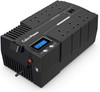
CyberPower BRICs 700VA UPS 420W – LCD, AVR, 6 UK Plug Sockets
- SKU:
- BR700ELCD-UK
- UPC:
- 4712856270082
- MPN:
- BR700ELCD-UK
- Availability:
- Free Click & Collect in Peterborough. UK delivery also available




Description
CyberPower BRICs BR700ELCD-UK 700VA 420W UPS – LCD, AVR, 6 UK Sockets and Battery Backup
The CyberPower BRICs BR700ELCD-UK 700VA / 420W UPS is a compact line-interactive uninterruptible power supply designed to protect home-office computers, workstations, routers, broadband equipment, NAS devices, network hardware and other compatible electronics against power cuts, voltage fluctuations, surges and spikes.
With a maximum output capacity of 700VA / 420W, the BR700ELCD-UK combines battery backup with Automatic Voltage Regulation (AVR), allowing the UPS to correct certain high and low mains-voltage conditions without immediately switching to battery power. This can help reduce unnecessary battery use while maintaining a more stable supply to connected equipment.
The UK version provides six UK BS 1363-style output sockets. Three sockets provide both battery backup and surge protection, while the other three provide surge protection only. This allows essential equipment such as a PC, router or NAS to be prioritised for battery backup while less critical equipment can remain surge protected without consuming valuable battery runtime during a power cut.
A front LCD status display provides useful information about mains power, battery condition, connected load and operating status. The UPS also includes a USB management connection for use with compatible CyberPower PowerPanel software, a separate USB-A 5V/1A charging port, and RJ11/RJ45 data-line surge protection for compatible phone or network connections.
The exact UK model is CyberPower BR700ELCD-UK, with EAN / UPC 4712856270082. It is suitable for customers searching for a 700VA UPS with UK sockets, 420W computer UPS, UPS with LCD and AVR, home-office battery backup or a compact CyberPower line-interactive UPS.
Key Features of the CyberPower BR700ELCD-UK
- 700VA / 420W maximum output capacity
- Line-interactive UPS topology
- Automatic Voltage Regulation – AVR
- Single Boost and Single Buck voltage regulation
- 6 × UK output sockets
- 3 × battery backup + surge-protected sockets
- 3 × surge-only protected sockets
- Simulated sine-wave battery output
- 230V nominal output
- Approximately 9 minutes runtime at half load
- Approximately 1.5 minutes runtime at full 420W load
- Approximately 28 minutes runtime at 90W
- Approximately 47 minutes runtime at 60W
- Sealed lead-acid battery
- Approximately 8-hour typical recharge time
- Cold-start / Start On Battery capability
- LCD status display
- USB HID management connection
- PowerPanel Personal software support
- 1 × USB-A charging port, 5V / 1A
- RJ11/RJ45 combination data-line surge protection
- 125-joule surge suppression
- EMI/RFI filtering
- Typical transfer time of approximately 4ms
- Circuit-breaker overload protection
- Audible battery, low-battery, overload and fault alarms
- CyberPower GreenPower UPS technology
- Desktop or wall-mount installation
- Compact 166 × 118 × 288mm enclosure
- Approximately 5.3kg product weight
- 2-year UPS warranty
- 2-year battery warranty
What Does a 700VA / 420W UPS Mean?
The CyberPower BR700ELCD-UK has two related power ratings:
- Apparent power: 700VA
- Real power capacity: 420W
When choosing a UPS, the 420W rating is particularly important because the combined real power consumed by equipment connected to the battery-backed outputs must remain within the UPS capacity.
Do Not Size a UPS by VA Alone
A computer power supply labelled 500W, 650W or 750W does not necessarily consume that amount continuously. The actual electrical load depends on the components installed and what the computer is doing.
For example, a desktop with a 650W PSU might consume considerably less than 420W during normal office work but could draw much more when the CPU and graphics card are heavily loaded.
The safest method is to estimate or measure the actual combined wattage of the equipment that will be connected to the battery-backed sockets.
Leave Capacity Headroom
It is generally sensible not to design a UPS installation around continuous operation at its absolute 420W maximum.
Leaving additional headroom can:
- Allow for temporary load increases
- Reduce the chance of overload alarms
- Provide additional battery runtime
- Allow future equipment additions
Line-Interactive UPS Technology
The BR700ELCD-UK uses a line-interactive UPS topology.
During normal mains operation, connected equipment receives power through the UPS while the battery remains charged. If the incoming mains voltage becomes too high or too low, Automatic Voltage Regulation can correct certain fluctuations without immediately using battery power.
If mains electricity fails completely or moves outside the UPS operating range, the BR700ELCD-UK transfers the battery-backed sockets to inverter power.
Why Choose a Line-Interactive UPS?
Line-interactive technology provides a useful balance of:
- Battery backup
- Voltage regulation
- Surge protection
- Energy efficiency
- Cost
This makes it a popular UPS architecture for home offices, small businesses and networking equipment.
Automatic Voltage Regulation – AVR
The BR700ELCD-UK includes Automatic Voltage Regulation with Single Boost and Single Buck functionality.
AVR allows the UPS to compensate for certain low-voltage and high-voltage mains conditions without repeatedly switching to battery operation.
Why AVR Is Useful
Electrical supply problems are not limited to complete blackouts. Equipment can also experience:
- Brownouts
- Low mains voltage
- Temporary over-voltage
- Voltage fluctuations
Repeatedly using the battery for every small voltage variation could increase battery cycling and reduce available backup charge. AVR allows suitable fluctuations to be corrected while preserving battery capacity for more serious power events.
Six UK Plug Sockets
The UK-specific BR700ELCD-UK provides six UK electrical output sockets, making it easier to connect standard UK equipment without IEC-to-UK adapters.
3 Battery Backup + Surge Protected Sockets
Three sockets provide battery backup and surge protection.
These should be reserved for the equipment that must remain powered briefly during a mains outage, such as:
- Desktop computer
- Router
- ONT or broadband modem
- Small NAS
- Network switch
- Other essential compatible electronics
3 Surge-Only Sockets
The remaining three sockets provide surge protection without battery backup.
Equipment connected to these outlets will lose power if the mains supply fails.
They are useful for compatible peripherals that do not need to remain powered during a blackout.
Why Does the UPS Split the Six Sockets?
Battery runtime is limited. Using battery power for unnecessary peripherals reduces the amount of time available for critical devices.
The split-outlet design allows users to prioritise essential equipment while still providing surge protection for less critical devices.
What Should Be Connected to Battery Backup?
Typical examples include:
- PC system unit
- Internet router
- Fibre ONT
- Broadband modem
- Small NAS
- Network switch
- Small CCTV recorder
- Other low-power critical networking devices
What Could Use Surge-Only Outlets?
Depending on the installation, surge-only sockets may be suitable for non-critical compatible equipment that does not need battery runtime.
The priority should always be to keep the essential shutdown and communications equipment on the battery-backed outlets.
Official CyberPower Runtime Figures
CyberPower currently provides several useful runtime examples for the BR700ELCD-UK:
- Approximately 47 minutes at a 60W load
- Approximately 28 minutes at a 90W load
- Approximately 9 minutes at half load
- Approximately 1.5 minutes at full 420W load
What Is Half Load?
Half of the 420W rated capacity is approximately 210W.
At this level, CyberPower currently specifies around nine minutes of battery runtime under its test conditions.
Why Runtime Changes So Much with Load
UPS battery runtime is not linear. A low-power network setup can operate much longer than a desktop PC drawing several hundred watts.
For example, a router and fibre ONT drawing around 60W combined may operate for much longer than a workstation approaching the UPS maximum capacity.
Runtime Figures Are Approximate
Actual runtime depends on:
- Connected wattage
- Battery age
- Battery charge level
- Battery condition
- Ambient temperature
- Frequency of previous discharges
- UPS operating conditions
A new, fully charged battery normally provides better runtime than an older battery nearing the end of its service life.
Designed to Give Time for Safe Shutdown
A UPS should not normally be viewed as a replacement for long-term mains electricity.
For a desktop computer, the main purpose of battery backup is typically to provide enough time to:
- Save open documents
- Finish critical tasks
- Close applications correctly
- Shut down Windows, Linux or another operating system safely
- Avoid an immediate hard power loss
For routers and other low-power networking equipment, the same UPS may provide considerably longer runtime.
Sealed Lead-Acid Battery
The BR700ELCD-UK uses a sealed lead-acid battery, a widely used battery technology in uninterruptible power supplies.
The battery is rechargeable and maintained automatically while the UPS is connected to mains electricity.
Typical Recharge Time
CyberPower specifies a typical recharge time of approximately 8 hours.
Recharge time can vary according to the battery's discharge level, temperature and condition.
Can the Battery Be Replaced?
CyberPower lists the battery as replaceable, but specifies replacement by qualified personnel only.
Do not open or service the UPS battery compartment unless you are suitably qualified and following the correct CyberPower service procedure.
UPS Batteries Are Consumable Components
Rechargeable UPS batteries gradually lose capacity as they age.
Battery lifespan can be affected by:
- High temperatures
- Frequent deep discharges
- Long periods without charging
- Battery age
- Storage conditions
A UPS that still turns on may provide much shorter backup time if its battery has aged significantly.
Cold Start / Start on Battery
CyberPower lists Start On Battery support.
This allows the UPS to start compatible battery-backed equipment from battery power when mains electricity is unavailable, provided the battery has sufficient charge and the connected load remains within specification.
Simulated Sine-Wave Battery Output
The BR700ELCD-UK produces a simulated sine-wave output while operating from its battery inverter.
This is common in affordable home and small-office UPS systems.
Is Simulated Sine Wave Suitable for Every Computer?
Many computers, routers, monitors and other electronic devices can operate from a simulated sine-wave UPS. However, some power supplies and specialist equipment may require or work better with a pure sine-wave source.
CyberPower does not list the BR700ELCD-UK as one of its dedicated PFC Sinewave models.
When Should You Consider a Pure Sine-Wave UPS?
Consider a pure sine-wave UPS when:
- The equipment manufacturer explicitly requires pure sine-wave backup power
- You are protecting a high-performance workstation
- The PC has a particularly sensitive Active PFC power supply
- The equipment has previously shown compatibility problems with simulated sine-wave UPS systems
- You are protecting specialist audio, laboratory or electrical equipment
For these applications, select an appropriately rated CyberPower PFC Sinewave or other pure sine-wave UPS.
Fast Transfer to Battery Power
CyberPower specifies a typical transfer time of approximately 4 milliseconds.
This is the brief interval required for the UPS to transition battery-backed equipment from mains operation to inverter power when necessary.
Compatible computer and networking power supplies are generally designed to tolerate short interruptions of this type.
230V UK Power Operation
The BR700ELCD-UK is the UK-oriented version of the CyberPower BRICs LCD UPS.
Input Specifications
- Nominal input: 230V AC
- Input voltage range: approximately 165–290V AC
- Input frequency: 50Hz / 60Hz auto sensing
- Rated input current: approximately 3.18A
- Power cord length: approximately 1.5m / 5ft
Battery Output Specifications
- On-battery voltage: 230V ±10%
- On-battery frequency: 50Hz ±1% / 60Hz ±1%
- Waveform: simulated sine wave
LCD Status Display
The integrated LCD gives the user direct access to important UPS operating information.
CyberPower lists display information including:
- Power status
- Battery status
- Connected load status
- Other UPS operating information
Why an LCD Is Useful
An LCD can help users quickly determine whether the UPS is:
- Operating from normal mains power
- Running from battery
- Approaching low battery
- Carrying a high connected load
- Reporting an operating warning
This can be more informative than relying only on a simple power LED.
LED Indicators and Audible Alarms
The BR700ELCD-UK also provides status LEDs and audible warnings.
LED Status Indicators
- Power On
- Line Mode
- Battery Mode
- Low Battery
Audible Alarm Conditions
- Battery operation
- Low battery
- Overload
- UPS fault
The alarm system helps alert the user even when the LCD is not being watched.
USB Computer Management
The UPS includes a USB HID-compliant management port.
Using the included USB management cable, a compatible computer can communicate with the UPS for monitoring and automated shutdown functions.
CyberPower PowerPanel Personal
CyberPower recommends PowerPanel Personal software for compatible installations.
Depending on the supported operating system and current software version, UPS management can provide features such as:
- UPS status monitoring
- Battery information
- Power-event logging
- Load information
- Configurable notifications
- Automatic computer shutdown during extended outages
Why Automatic Shutdown Matters
If a power cut continues until the UPS battery becomes depleted, a connected computer could still shut down unexpectedly.
UPS management software can allow the operating system to begin an orderly shutdown before the remaining battery reaches a critical level.
USB Charging Port
The BR700ELCD-UK also includes a separate USB-A charging port.
- Connector: USB-A
- Output: 5V
- Maximum current: 1A
This can be useful for charging compatible low-power USB devices.
USB Charging Is Not USB Power Delivery
The 5V / 1A port is a basic USB charging output. It should not be confused with USB-C Power Delivery, Quick Charge or a high-wattage laptop charging port.
125-Joule Surge Suppression
The UPS includes 125-joule surge suppression to help protect connected compatible electronics against certain transient voltage spikes.
Surge protection can help with electrical disturbances caused by switching events and other short-duration power irregularities.
Surge Protection Has Limits
No consumer UPS can guarantee protection from every electrical event.
For installations exposed to significant lightning or surge risk, appropriate building-level surge protection and correct electrical grounding should also be considered.
EMI and RFI Filtering
CyberPower specifies EMI/RFI filtration.
This helps filter certain electromagnetic and radio-frequency interference carried through the mains supply.
Phone and Network Data-Line Protection
The BR700ELCD-UK provides a combination RJ11/RJ45 1-in / 1-out protected data-line path.
This can be used with compatible phone or network connections to provide additional surge protection for communication lines.
How to Use the Protected Data Line
The incoming compatible cable connects to the protected input, and a second cable connects from the protected output to the equipment.
Only use the ports for the compatible communication type and pin configuration intended by CyberPower.
GreenPower UPS Energy-Saving Technology
The BR700ELCD-UK incorporates CyberPower GreenPower UPS Bypass Technology.
CyberPower developed GreenPower UPS technology to improve operating efficiency and reduce unnecessary energy consumption compared with less efficient UPS designs.
This can be particularly useful because a UPS may remain switched on continuously for years.
Circuit-Breaker Overload Protection
The UPS includes circuit-breaker overload protection.
If connected equipment places excessive demand on the unit, the UPS can indicate an overload condition and protective circuitry may operate.
Avoid UPS Overloads
Before connecting equipment:
- Estimate the combined real power consumption in watts.
- Keep the required battery-backed load below 420W.
- Leave additional headroom for temporary load changes.
- Use the LCD or management software to check load level.
If the UPS reports an overload, disconnect non-essential equipment and reduce the connected load.
Suitable for Home-Office Computers
The BR700ELCD-UK is designed primarily for home and office power protection.
A suitable installation may include:
- Desktop PC
- Monitor where sufficient capacity remains
- Broadband router
- Fibre ONT
- Network switch
The exact combination depends on total measured power consumption.
Suitable for Router and Broadband Backup
Because routers, ONTs and networking devices generally consume far less power than desktop PCs, the BR700ELCD-UK can potentially provide significantly longer battery runtime when protecting a low-power internet setup.
CyberPower specifies approximately 47 minutes at 60W and approximately 28 minutes at 90W under its runtime test conditions.
This can help keep:
- Internet access available
- WiFi operational
- VoIP equipment running
- Network devices online
Actual broadband availability during a regional power outage can also depend on whether the internet service provider's external infrastructure remains operational.
Suitable for NAS and Small Network Equipment
The UPS can also protect compatible NAS and network devices where their combined load remains within the UPS capacity.
Potential applications include:
- Small NAS appliance
- Router
- Network switch
- WiFi access point with compatible external power
- Home automation controller
NAS Safe Shutdown
Some NAS platforms can communicate with a compatible USB UPS and initiate an automatic shutdown when battery power reaches a configured threshold.
Check the NAS manufacturer's current UPS compatibility list before relying on automated USB shutdown support.
Can It Protect a Gaming PC?
Possibly, but compatibility depends on the gaming computer's actual power consumption and power-supply requirements.
A gaming PC drawing more than the UPS's 420W capacity is not suitable for battery operation on this model.
Even where the measured load remains below 420W, customers using high-end Active PFC PC power supplies may prefer a pure sine-wave UPS for the best electrical compatibility.
PSU Wattage Is Not the Same as PC Consumption
A computer with an 850W power supply does not continuously use 850W. However, a high-performance CPU and graphics card can cause the system's actual load to rise substantially under gaming or rendering workloads.
Measure or calculate the full system load rather than relying on the PSU label alone.
Can It Power Equipment for Several Hours?
The BR700ELCD-UK is primarily designed for short-term UPS protection, not long-duration off-grid operation.
CyberPower's published runtime examples demonstrate how strongly runtime depends on connected load:
- 60W – approximately 47 minutes
- 90W – approximately 28 minutes
- Half load – approximately 9 minutes
- Full load – approximately 1.5 minutes
Users requiring several hours of runtime should consider a larger UPS, dedicated extended-runtime system, power station or generator solution appropriate to their requirements.
Desktop or Wall-Mount Installation
CyberPower lists the BR700ELCD-UK as suitable for both desktop and wall-mount installation.
The compact brick-style chassis can therefore be positioned near home-office or networking equipment without requiring a rack.
Installation Considerations
- Keep ventilation openings clear
- Do not cover the UPS
- Keep it away from water and excessive humidity
- Avoid direct heat sources
- Allow access to the sockets and power cable
- Use secure wall fixings appropriate for the wall construction when wall mounting
Compact 166 × 118 × 288mm Design
The UPS measures approximately:
- Width: 166mm
- Height: 118mm
- Depth: 288mm
Product weight is approximately 5.3kg.
The relatively compact enclosure makes it suitable for desks, shelves and small networking areas where a larger rackmount UPS would be unnecessary.
Operating Environment
CyberPower specifies the following environmental limits:
- Operating temperature: 0°C to 40°C
- Operating relative humidity: 0–90%, non-condensing
- Operating altitude: up to 3,000m / 9,843ft
- Storage temperature: -20°C to 50°C
- Storage relative humidity: 0–90%, non-condensing
Temperature Matters to UPS Batteries
Although the UPS can operate within its manufacturer-specified temperature range, consistently high temperatures can accelerate battery ageing.
For longest practical battery life, install the UPS in a cool, dry and well-ventilated indoor environment.
Acoustic Noise
CyberPower lists an audible noise figure of approximately 40dBA at 1.5 metres.
Actual perceived noise can vary depending on operating mode, alarms, load and the surrounding environment.
Who Is the CyberPower BR700ELCD-UK Best For?
- Home-office users protecting a desktop PC
- Small businesses requiring short-term battery backup
- Users wanting six standard UK electrical sockets
- Broadband router and fibre ONT backup
- Small NAS installations
- Home network equipment
- Users who want an LCD status display
- Customers wanting AVR voltage correction
- Users who want PC monitoring through USB
- Applications where 420W maximum power is sufficient
Who May Need a Different UPS?
The BR700ELCD-UK may not be suitable when you require:
- More than 420W of battery-backed output
- Pure sine-wave battery output
- A large gaming workstation with high power consumption
- A server rack UPS
- Long-duration battery operation at high loads
- More than three battery-backed UK sockets
- Expandable external battery modules
- A high-current USB-C charging port
- Online double-conversion UPS topology
How to Choose the Correct UPS Size
- List all equipment that must remain running during a power cut.
- Find or measure the real power consumption of each device in watts.
- Add the wattages together.
- Confirm that the combined battery-backed load remains below 420W.
- Allow spare capacity rather than operating continuously at the maximum.
- Use CyberPower runtime information to estimate the required backup time.
- Check whether the equipment requires pure sine-wave battery output.
Example UPS Configuration
A typical home-office installation could prioritise the battery-backed sockets as follows:
Battery + Surge Outlets
- Desktop PC
- Monitor
- Router / broadband equipment
Surge-Only Outlets
- Printer
- Powered speakers
- Another non-critical peripheral
This is only an example. The total measured load and equipment requirements must always be checked first.
Important Printer Compatibility Information
High-current equipment such as laser printers can have significant startup or heating power requirements and generally should not be connected to battery-backed UPS outlets unless the UPS manufacturer explicitly approves the application.
Large heating appliances, kettles, portable heaters, vacuum cleaners and other high-current household equipment must not be powered from this UPS.
Basic Installation Guide
- Place the UPS in a cool, dry and ventilated location.
- Connect it directly to a suitable grounded UK mains socket.
- Allow the internal battery to charge before relying on the full expected runtime.
- Identify the three battery-backed outlets and three surge-only outlets.
- Connect critical devices to the battery-backed sockets.
- Connect non-critical compatible devices to surge-only sockets where appropriate.
- Confirm that the total battery-backed load remains below 420W.
- Switch on the UPS.
- Check the LCD for normal mains operation and load condition.
- Connect the USB management cable to a computer if software monitoring is required.
- Install current compatible CyberPower PowerPanel software if desired.
- Test the configuration in accordance with CyberPower's instructions.
CyberPower BR700ELCD-UK Technical Specifications
- Brand: CyberPower
- Series: BRICs LCD
- Model: BR700ELCD-UK
- Manufacturer Part Number: BR700ELCD-UK
- Memox SKU: BR700ELCD-UK
- EAN / UPC: 4712856270082
- Product Type: Uninterruptible Power Supply / UPS
- UPS Topology: Line-interactive
- Phase: Single phase
- Form Factor: Desktop / wall mountable
- Capacity: 700VA
- Maximum Real Power: 420W
- Nominal Input Voltage: 230V AC
- Input Voltage Range: 165–290V AC
- Input Frequency: 50Hz / 60Hz, auto sensing
- Rated Input Current: 3.18A
- Input Connector: UK
- Power Cord Length: 1.5m / 5ft
- On-Battery Output Voltage: 230V ±10%
- On-Battery Frequency: 50Hz ±1% / 60Hz ±1%
- On-Battery Waveform: Simulated sine wave
- Automatic Voltage Regulation: Yes
- AVR Type: Single Boost / Single Buck
- Typical Transfer Time: 4ms
- Total UK Outlets: 6
- Battery + Surge Outlets: 3
- Surge-Only Outlets: 3
- USB Charging: 1 × USB-A
- USB Charging Output: 5V / 1A
- Half-Load Runtime: Approximately 9 minutes
- Full-Load Runtime: Approximately 1.5 minutes
- Runtime at 60W: Approximately 47 minutes
- Runtime at 90W: Approximately 28 minutes
- Battery Type: Sealed lead-acid
- Typical Recharge Time: 8 hours
- Start on Battery: Yes
- Battery Replacement: Replaceable by qualified personnel
- Surge Suppression: 125 joules
- EMI/RFI Filtration: Yes
- Data-Line Protection: RJ11/RJ45 combination, 1-in / 1-out
- LCD: Yes
- LCD Information: Power, battery, load and operating status
- HID USB Management Port: 1
- Recommended Management Software: CyberPower PowerPanel Personal
- Audible Alarms: Battery mode, low battery, overload and UPS fault
- Overload Protection: Circuit breaker
- Energy-Saving Technology: GreenPower UPS Bypass Technology
- Wall Mountable: Yes
- Enclosure: Plastic
- Colour: Black
- Dimensions: 166 × 118 × 288mm, W × H × D
- Product Weight: Approximately 5.3kg
- Operating Temperature: 0°C to 40°C
- Operating Humidity: 0–90% non-condensing
- Operating Elevation: Up to 3,000m / 9,843ft
- Storage Temperature: -20°C to 50°C
- Online Thermal Dissipation: 71 BTU/hr
- Listed Audible Noise: Approximately 40dBA at 1.5m
- Certification: CE
- RoHS: Yes
- UPS Warranty: 2 years
- Battery Warranty: 2 years
What Is Included?
- 1 × CyberPower BR700ELCD-UK 700VA / 420W UPS
- 1 × USB management cable
- 1 × Phone / data-line cable
- 1 × User manual
- 1 × Product registration card, where supplied with the regional package
Important Outlet Information
Although the BR700ELCD-UK has six UK sockets, only three provide battery backup. The remaining three are surge-protected only and will not remain powered when mains electricity fails.
Place the most important equipment on the battery-backed outlets.
Important 420W Capacity Note
The UPS has a maximum real-power capacity of 420W. Do not exceed this figure with equipment connected for battery-backed operation.
For better runtime and additional load headroom, operating materially below the maximum capacity is preferable.
Important Runtime Note
CyberPower's runtime figures are approximate test results using fully charged new batteries under normal operating conditions.
Actual runtime will vary with load, battery age, temperature, battery condition and previous usage.
Important Simulated Sine-Wave Note
The BR700ELCD-UK uses a simulated sine-wave output while operating from battery power. It is not a pure sine-wave UPS.
Customers protecting equipment that specifically requires pure sine-wave input, or high-performance systems where maximum Active PFC compatibility is important, should consider an appropriately rated pure sine-wave UPS.
Important Battery Replacement Note
The internal sealed lead-acid battery is listed by CyberPower as replaceable by qualified personnel only.
Do not dismantle or replace the battery unless you are suitably qualified and are following CyberPower's correct service and safety procedure.
Important Safety Information
The UPS is intended for compatible electronic equipment within its electrical rating. Do not connect equipment whose starting or continuous load can exceed the UPS capacity.
Do not use the UPS to power high-current heating appliances or other equipment outside its intended application. Keep the UPS dry, ventilated and within its specified operating-temperature range.
Why Choose the CyberPower BR700ELCD-UK?
The CyberPower BRICs BR700ELCD-UK provides a useful combination of battery backup, AVR voltage correction, surge protection and intelligent monitoring in a compact format designed specifically around UK plug sockets.
Its 700VA / 420W capacity is well suited to many home-office PCs and lower-power networking systems, while the six-socket layout allows users to separate essential battery-backed equipment from peripherals that only require surge protection.
Automatic Voltage Regulation helps correct certain mains fluctuations without unnecessarily consuming battery charge, while the LCD makes power, battery and load conditions easier to monitor. USB connectivity and PowerPanel support add computer-based monitoring and controlled shutdown options.
For lower-power network equipment, CyberPower's published runtime figures of approximately 47 minutes at 60W and 28 minutes at 90W demonstrate that the BR700ELCD-UK can also be useful for keeping broadband and networking equipment operating through shorter outages.
Choose the BR700ELCD-UK when you need a compact 700VA / 420W line-interactive UPS with six UK sockets, LCD monitoring, AVR, USB management and battery backup, and your connected equipment is compatible with its simulated sine-wave battery output.
Specification
CyberPower BR700ELCD-UK 700VA 420W UPS Specifications
The CyberPower BR700ELCD-UK is a 700VA / 420W line-interactive uninterruptible power supply designed for home and office computers, broadband equipment, network devices and other compatible electronics. It combines battery backup, Automatic Voltage Regulation (AVR), surge protection, LCD monitoring and USB computer management in a compact desktop or wall-mountable enclosure.
The UK version provides six UK mains sockets. Three outlets provide battery backup plus surge protection, while three are surge-protected only. The UPS produces a simulated sine-wave output while operating from battery and provides approximately 9 minutes of manufacturer-rated runtime at half load.
General Information
| Brand | CyberPower |
|---|---|
| Product Series | BRICs LCD |
| Product Name | CyberPower BRICs BR700ELCD-UK 700VA / 420W UPS |
| Model | BR700ELCD-UK |
| Manufacturer Part Number | BR700ELCD-UK |
| Memox SKU | BR700ELCD-UK |
| EAN / GTIN | 4712856270082 |
| Product Type | Uninterruptible Power Supply / UPS |
| Phase | Single phase |
| Form Factor | Desktop |
| Wall Mountable | Yes |
| Product Colour | Black |
| Enclosure Construction | Plastic |
UPS Topology and Power Capacity
| UPS Topology | Line-interactive |
|---|---|
| Apparent Power Capacity | 700VA |
| Real Power Capacity | 420W |
| Maximum Battery-Backed Load | 420W maximum total real-power capacity |
| Energy-Saving Technology | CyberPower GreenPower UPS™ Bypass Technology |
| Active PFC Compatibility | Not specifically stated for the BR700ELCD-UK on CyberPower's current specification |
Input Specifications
| Nominal Input Voltage | 230V AC ±10% |
|---|---|
| Input Voltage Range | 165–290V AC |
| Input Frequency | 50Hz ±5 / 60Hz ±5 |
| Input Frequency Detection | Automatic sensing |
| Rated Input Current | 3.18A |
| Input Connector | UK mains plug |
| Input Power Cord Length | 1.5m / 5ft |
| Detachable Input Cable | Not listed as detachable |
Output Specifications
| Output Capacity | 700VA / 420W |
|---|---|
| On-Battery Output Voltage | 230V AC ±10% |
| On-Battery Frequency | 50Hz ±1% / 60Hz ±1% |
| On-Battery Waveform | Simulated sine wave |
| Pure Sine-Wave Output | No – this model uses a simulated sine wave while operating from battery |
| Typical Transfer Time | 4ms |
| Overload Protection | Circuit breaker |
Automatic Voltage Regulation – AVR
| Automatic Voltage Regulation | Yes |
|---|---|
| AVR Configuration | Single Boost / Single Buck |
| Boost Regulation | Yes – supports correction of suitable low-voltage conditions without immediately using battery power |
| Buck Regulation | Yes – supports correction of suitable high-voltage conditions without immediately using battery power |
| Purpose of AVR | Helps stabilise certain mains-voltage fluctuations while reducing unnecessary battery cycling |
UK Output Sockets
| Total Output Sockets | 6 |
|---|---|
| Socket Type | UK × 6 |
| Battery Backup + Surge Protected | 3 sockets |
| Surge-Only Protected | 3 sockets |
| Battery Backup on All 6 Sockets | No |
| Battery-Backed Socket Purpose | For essential compatible equipment that needs temporary power during a mains outage |
| Surge-Only Socket Purpose | For compatible non-critical equipment requiring surge protection but no battery runtime |
Battery Runtime
| Runtime at Half Load | Approximately 9 minutes |
|---|---|
| Approximate Half Load | 210W |
| Runtime at Full Load | Approximately 1.5 minutes |
| Full Rated Load | 420W |
| Runtime at 60W | Approximately 47 minutes |
| Runtime at 90W | Approximately 28 minutes |
| Runtime Guaranteed | No – runtime is approximate and varies with battery age, charge level, load, temperature and operating conditions |
Battery Specifications
| Battery Technology | Sealed lead-acid |
|---|---|
| Rechargeable Battery | Yes |
| Typical Recharge Time | 8 hours |
| Start On Battery / Cold Start | Yes |
| Battery Replaceable | Yes – by qualified personnel only |
| Hot-Swappable Battery | Not listed |
| Compatible External Battery Module | Not listed |
| Battery Cell Quantity | Not stated on CyberPower's current UK technical specification |
| Battery Ah Capacity | Not stated on CyberPower's current UK technical specification |
Surge Protection and Filtering
| Surge and Spike Protection | Yes |
|---|---|
| Surge Suppression Rating | 125 joules |
| EMI/RFI Filtration | Yes |
| Overload Protection | Circuit breaker |
| Lightning-Proof Guarantee | No – surge protection does not guarantee protection against every electrical or lightning event |
Phone and Network Data-Line Protection
| Protected Data-Line Connection | RJ11 / RJ45 combination |
|---|---|
| Protected Data-Line Inputs | 1 |
| Protected Data-Line Outputs | 1 |
| Configuration | 1-in / 1-out |
| Typical Uses | Compatible telephone, modem, DSL or network data-line surge protection |
| Coaxial RG6 Protection | Not listed |
USB Charging
| USB Charging Ports | 1 |
|---|---|
| USB Charging Connector | USB-A |
| USB Charging Voltage | 5V |
| USB Charging Current | 1A maximum total output |
| USB Charging Power | Up to approximately 5W |
| USB-C Charging | No USB-C charging port is listed for the BR700ELCD-UK |
| USB Power Delivery | No |
Computer Management Connection
| HID-Compliant USB Management Port | 1 |
|---|---|
| USB Management Cable | Included |
| Recommended Software | CyberPower PowerPanel Personal |
| UPS Status Monitoring | Supported with compatible software and operating system |
| Power Event Logging | Supported through compatible PowerPanel software |
| Graceful Computer Shutdown | Supported with compatible PowerPanel software and computer configuration |
| Dry Contact / Relay Port | Not listed |
| Emergency Power Off Port | Not listed |
LCD Display
| LCD Status Display | Yes |
|---|---|
| Power Status | Displayed |
| Battery Status | Displayed |
| Load Status | Displayed |
| Additional UPS Information | Displayed where supported by the UPS interface |
| LCD Alarm Setting | Supported |
LED Indicators
| Power On Indicator | Yes |
|---|---|
| Line Mode Indicator | Yes |
| Battery Mode Indicator | Yes |
| Low Battery Indicator | Yes |
Audible Alarms
| Battery Mode Alarm | Yes |
|---|---|
| Low Battery Alarm | Yes |
| Overload Alarm | Yes |
| UPS Fault Alarm | Yes |
| Configurable Alarm | Supported through the UPS / compatible management configuration |
Physical Specifications
| Width | 166mm / 6.54in |
|---|---|
| Height | 118mm / 4.65in |
| Depth | 288mm / 11.34in |
| Dimensions | 166 × 118 × 288mm, W × H × D |
| Product Weight | 5.3kg / 11.68lb |
| Form Factor | Desktop / brick-style UPS |
| Wall Mount Installation | Yes |
| Rackmount | No rack rails or rack ears are listed |
| Enclosure Material | Plastic |
| Colour | Black |
Shipping Specifications
| Shipping Width | 158mm / 6.22in |
|---|---|
| Shipping Height | 230mm / 9.06in |
| Shipping Depth | 325mm / 12.80in |
| Shipping Dimensions | 158 × 230 × 325mm, W × H × D |
| Shipping Weight | 5.89kg / 12.99lb |
Environmental Specifications
| Operating Temperature | 0°C to 40°C / 32°F to 104°F |
|---|---|
| Operating Relative Humidity | 0–90%, non-condensing |
| Maximum Operating Elevation | 3,000m / 9,843ft |
| Storage Temperature | -20°C to 50°C / -4°F to 122°F |
| Storage Relative Humidity | 0–90%, non-condensing |
| Maximum Storage Elevation | 3,000m / 9,843ft |
| Online Thermal Dissipation | 71 BTU/hr |
| Audible Noise | Approximately 40dBA at 1.5 metres |
Certifications and Compliance
| CE | Yes |
|---|---|
| RoHS | Yes |
Package Contents
| UPS | 1 × CyberPower BR700ELCD-UK |
|---|---|
| USB Management Cable | 1 included |
| Phone / Data-Line Cable | 1 included |
| User Manual | Included |
| Product Registration Card | Included in CyberPower's current UK package listing |
| Additional Battery Pack | Not included |
| External Battery Module | Not included |
Warranty
| UPS Product Warranty | 2 years |
|---|---|
| Battery Warranty | 2 years |
| Warranty Provider | CyberPower, subject to the manufacturer's applicable UK warranty terms |
| Proof of Purchase | May be required for warranty service |
| Customer Statutory Rights | Manufacturer warranty does not replace applicable UK consumer statutory rights |
Important 700VA / 420W Capacity Note
The BR700ELCD-UK is rated at 700VA and 420W. When sizing the UPS, pay particular attention to the actual combined wattage of equipment connected to the battery-backed outlets.
The wattage printed on a computer power supply is its maximum PSU rating and is not necessarily the computer's normal electrical consumption. However, the actual connected load must remain within the UPS's 420W capacity.
Leaving additional power headroom is recommended rather than designing an installation that continuously operates at the absolute maximum rating.
Important Socket Configuration Note
The BR700ELCD-UK provides six UK sockets, but only three sockets provide battery backup. These three outlets also provide surge protection.
The remaining three outlets provide surge protection only and will stop supplying power when mains electricity fails.
Connect essential equipment such as a computer, router, ONT, small NAS or other critical compatible device to the battery-backed outlets. Use surge-only sockets for equipment that does not need to remain operational during a blackout.
Important Runtime Note
CyberPower lists approximately 9 minutes at half load, 1.5 minutes at full load, 47 minutes at 60W and 28 minutes at 90W.
These are approximate manufacturer test figures using fully charged new batteries under normal operating conditions. Actual runtime varies according to connected load, battery age, battery charge level, temperature, operating environment and battery condition.
Important Simulated Sine-Wave Note
The BR700ELCD-UK provides a simulated sine-wave output while running from battery. It is not a pure sine-wave UPS.
Many standard home and office electronic devices can operate from a simulated sine-wave UPS, but equipment that specifically requires pure sine-wave backup power should use an appropriately rated pure sine-wave model.
Customers using sensitive Active PFC power supplies, specialist workstations or equipment whose manufacturer specifically requires pure sine-wave power should check compatibility before ordering.
Important AVR Note
Automatic Voltage Regulation uses Single Boost and Single Buck regulation to compensate for certain high or low mains-voltage conditions without immediately switching the connected equipment to battery power.
AVR does not mean that the UPS will continue operating from mains power under every possible voltage condition. If incoming power moves outside the supported operating range, battery operation or protective shutdown may still be required.
Important Battery Replacement Note
CyberPower lists the sealed lead-acid battery as replaceable by qualified personnel only.
The current UK product specification does not publish a replacement battery pack number, battery Ah capacity or cell quantity for this model, so these figures should not be guessed or copied from a different regional BR700ELCD variant.
Important USB Port Note
The BR700ELCD-UK provides one USB-A charging port rated at 5V / 1A. This is separate from the HID-compliant USB management connection used for UPS communication with a computer.
The charging port is not USB-C Power Delivery and should not be advertised as a high-power laptop charging connection.
Important Surge Protection Note
The current CyberPower UK specification lists 125 joules of surge suppression for the BR700ELCD-UK.
Do not use the 150J figure shown for certain non-UK BR700ELCD regional variants. The UK-specific BR700ELCD-UK specification should be used for this product.
Important Input Voltage Note
The current CyberPower UK specification lists an input operating range of 165–290V AC.
Specifications from the European Schuko BR700ELCD model should not be substituted because regional versions can have different input ranges, sockets, USB configuration and other technical details.
Important Printer and High-Current Equipment Note
Do not connect equipment whose starting or continuous power requirement can exceed the UPS capacity. High-current devices such as laser printers, heaters, kettles, vacuum cleaners and similar appliances are not appropriate battery-backed loads for this UPS.
For printers or other equipment with high startup demand, consult the equipment and UPS manufacturer's recommendations before connection.
Important Installation Note
Install the UPS indoors in a dry, ventilated location within its specified 0°C to 40°C operating range. Keep ventilation openings unobstructed and do not cover the unit.
The UPS can be positioned on a suitable desktop or mounted to a suitable wall using the mounting provision specified by CyberPower. Wall fixings must be appropriate for the wall material and the approximately 5.3kg UPS weight.
Important Battery Safety Note
The UPS contains a rechargeable sealed lead-acid battery. Do not short-circuit, puncture, crush, burn or dismantle the battery.
Used UPS batteries should be recycled through an appropriate battery recycling facility and should not be placed in normal household waste.
Return
FAQ: Frequenlty Asked Questions
CyberPower BR700ELCD-UK BRICs 700VA / 420W UPS FAQ
The CyberPower BR700ELCD-UK is a 700VA / 420W line-interactive UPS designed for home and small-office power protection. It provides Automatic Voltage Regulation (AVR), an LCD status display, six UK plug sockets, three battery-and-surge-protected outlets, three surge-only outlets, simulated sine-wave battery output, USB management and wall-mount capability.
Below are the most common questions buyers ask before choosing this CyberPower UPS, including runtime, PC and NAS compatibility, router backup, AVR, surge protection, 700VA versus 420W sizing, simulated versus pure sine wave, battery replacement, PowerPanel software, automatic shutdown, troubleshooting and comparisons with larger CyberPower BRICs and PFC Sinewave models.
1. What is the CyberPower BR700ELCD-UK?
The CyberPower BR700ELCD-UK is a 700VA / 420W line-interactive uninterruptible power supply for home and small-office equipment. It combines battery backup, Automatic Voltage Regulation (AVR), surge protection, an LCD status display and six UK plug sockets.
2. What is the exact model number?
The manufacturer model number is BR700ELCD-UK. Checking this exact code is important because CyberPower sells similar BRICs models with different socket types, wattages and regional specifications.
3. What is the EAN / UPC for this UK model?
The product page identifies UPC/EAN 4712856270082 for BR700ELCD-UK. Use the model number as the primary compatibility reference because packaging identifiers can vary by region or distribution channel.
4. What does 700VA mean?
700VA is the apparent-power rating of the UPS. It is not the same as 700 watts. The BR700ELCD-UK is rated for a maximum real load of 420W, so connected equipment must remain within both limits.
5. What is the maximum wattage of the BR700ELCD-UK?
The maximum output capacity is 420W. Do not size the UPS only from its 700VA figure; the actual connected load must stay below 420W and should ideally leave useful headroom.
6. Is this a 700W UPS?
No. It is a 700VA UPS with a 420W maximum output rating. A device or group of devices that can draw more than 420W requires a higher-capacity UPS.
7. What type of UPS topology does it use?
It uses line-interactive topology. During normal mains operation it passes power efficiently while AVR corrects certain voltage variations, and it switches to battery when mains power fails or moves outside the usable range.
8. What is Automatic Voltage Regulation (AVR)?
AVR adjusts low or high incoming voltage without immediately using the battery. This helps maintain safer output to connected electronics during brownouts or over-voltage conditions and reduces unnecessary battery cycling.
9. Does the BR700ELCD-UK have both boost and buck AVR?
Yes. CyberPower lists Single Boost and Single Buck AVR, meaning it can raise low voltage and reduce high voltage within its operating range before battery operation is required.
10. What input voltage range does the current CyberPower UK page list?
CyberPower UK's current specification lists an input operating range of approximately 165V to 290V. Outside the usable range the UPS may transfer to battery or shut down depending on conditions.
11. What output voltage does it provide on battery?
CyberPower lists 230V AC ±10% while operating on battery.
12. What waveform does the UPS provide on battery?
The BR700ELCD-UK uses a simulated sine-wave output when running from battery. It is not a pure sine-wave UPS.
13. Is simulated sine wave the same as pure sine wave?
No. A simulated sine wave approximates AC power in stepped sections, while a pure sine wave more closely matches utility mains power. Many ordinary electronics work with simulated sine wave, but some sensitive or Active-PFC equipment can prefer pure sine wave.
14. Is this UPS Active-PFC compatible?
CyberPower's current UK specification does not explicitly mark Active-PFC compatibility for BR700ELCD-UK. For a high-end gaming PC or workstation with an Active-PFC power supply, a CyberPower PFC Sinewave model such as CP900EPFCLCD-UK is the safer choice.
15. What is the typical transfer time to battery?
CyberPower lists a typical transfer time of about 4ms. Most ordinary PCs, routers, NAS devices and networking equipment can ride through such a short transfer, but unusually sensitive equipment may require an online or pure-sine UPS.
16. How many UK plug sockets does it have?
It has six UK BS 1363-style output sockets.
17. Are all six sockets battery backed?
No. Three sockets provide battery backup plus surge protection, while the other three are surge-protection-only sockets.
18. Which devices should go in the battery-backed sockets?
Use the three battery-backed sockets for equipment that must remain powered long enough to continue operating briefly or shut down safely, such as a PC, NAS, router, modem/ONT or small network switch.
19. What are the three surge-only sockets for?
The surge-only sockets protect connected equipment from supported surge events but do not provide battery power during a blackout. They are useful for non-critical accessories that do not need backup runtime.
20. Will equipment in the surge-only sockets stay on during a power cut?
No. Surge-only outlets lose power when the incoming mains supply fails. Only the battery-and-surge-protected outlets are designed to continue supplying power from the battery.
21. Can I plug a monitor into the UPS?
Yes, if the combined load remains within 420W. A monitor is often worth placing on a battery-backed socket so you can see the screen while saving work and shutting the computer down.
22. Can I connect a desktop PC and monitor together?
Yes, provided their real combined power draw stays safely below 420W. Measure or estimate actual load rather than adding the wattage printed on the PC power-supply label.
23. My PC has a 650W power supply — can I use this 420W UPS?
Possibly, because a 650W PSU rating is its maximum capability, not its constant power draw. However, if the computer can exceed 420W during gaming or heavy work, this UPS is undersized. Measure peak system draw and choose a larger unit when in doubt.
24. My PC has a 750W or 850W PSU — will the BR700ELCD-UK work?
The PSU label alone does not decide compatibility, but high-end systems with 750W or 850W PSUs can easily exceed this UPS's 420W output during demanding loads. A higher-wattage pure-sine UPS is usually more appropriate for such systems.
25. Is 420W the limit only when the UPS is on battery?
Treat 420W as the UPS system's maximum supported output load, not simply a battery-mode target. Do not deliberately run connected equipment above the rated capacity even while mains power is present.
26. How much spare capacity should I leave?
Avoid planning a system that sits at or near 420W during normal heavy use. Leaving headroom helps with short power spikes, future devices, battery ageing and changes in workload.
27. What happens if I overload the UPS?
The UPS can sound an overload alarm and may shut down to protect itself and connected equipment. If overload occurs, disconnect non-essential devices and reduce the load before restarting.
28. How do I estimate my PC's real power draw?
A plug-in power meter is one of the easiest methods. Measure the complete PC and monitor during the heaviest realistic workload, then choose a UPS whose watt rating comfortably exceeds the observed peak.
29. How do VA and watts affect UPS sizing?
Watts represent the real power consumed by your equipment, while VA includes the effect of power factor. A suitable UPS must have both a VA rating and watt rating above the connected load.
30. How long will the BR700ELCD-UK run at full load?
CyberPower UK's current page lists about 1.5 minutes at full load. Runtime is only an estimate and can decrease with battery age, temperature and actual load characteristics.
31. How long does it run at half load?
CyberPower UK's current page lists about 9 minutes at half load, although other CyberPower regional pages and syndicated datasheets for the same model show about 6 minutes. Treat runtime figures as revision-dependent estimates rather than guarantees.
32. How long does it run at 60W?
CyberPower UK lists approximately 47 minutes at a 60W load under its test conditions.
33. How long does it run at 90W?
CyberPower UK lists approximately 28 minutes at a 90W load under its test conditions.
34. How long will it run at 100W?
CyberPower does not publish a specific 100W figure on the current UK page. The 90W figure is approximately 28 minutes, but UPS runtime is not perfectly linear, so do not calculate 100W runtime by simple proportional scaling.
35. How long will it run a router?
It can run low-power networking equipment much longer than a heavily loaded PC, but CyberPower does not publish a model-specific runtime at typical 10-20W router loads. Actual runtime depends on the router, ONT/modem, battery condition and any other connected devices.
36. Can it keep broadband running during a power cut?
Yes, if the router and any required modem or fibre ONT are connected to battery-backed sockets and the local ISP infrastructure remains powered. A UPS cannot keep internet service running if the provider's network has also lost power.
37. Can it power a BT Smart Hub during an outage?
In principle yes, provided the Smart Hub's power adapter is plugged into a battery-backed socket and the total load is within the UPS rating. If you have FTTP, the ONT also needs backup power or the broadband connection will still drop.
38. Can it run a Wi-Fi router for 6 to 8 hours?
Do not assume it will. Low-power equipment may achieve long runtimes, but CyberPower's published figures are 47 minutes at 60W and 28 minutes at 90W. For multi-hour backup, measure the actual router/ONT load and use CyberPower's runtime data or a larger battery solution.
39. Can I use it with a NAS?
Yes, a small NAS can be a very good UPS use case because battery backup gives it time to shut down safely during an outage. Confirm the NAS and any connected network equipment stay within the 420W limit.
40. Will it work with a Synology NAS?
Many Synology systems can communicate with USB HID-compatible UPS units, and BR700ELCD-UK has a HID-compliant USB management port. Check the compatibility information for your exact Synology model and DSM version before relying on automatic shutdown.
41. Can I use it with a QNAP NAS?
Potentially yes. Many QNAP models support USB UPS monitoring, but compatibility depends on the NAS firmware and UPS support list. Verify the exact NAS model before configuring automatic shutdown.
42. Can a NAS shut itself down automatically when the battery gets low?
If the NAS supports this UPS or standard USB HID UPS monitoring, it may be configured to enter safe mode or shut down after a chosen battery condition. Test the configuration before relying on it.
43. Can I use this UPS for a home server?
Yes for a low-power home server whose total load stays comfortably below 420W. For higher-power servers, multiple systems or Active-PFC PSUs, consider a larger pure-sine or rack-oriented UPS.
44. Can I use it for a Raspberry Pi or mini PC?
Yes. Low-power mini PCs, Raspberry Pi systems and small network devices are well suited to a UPS of this type, and their lower draw can provide significantly longer runtime than a gaming desktop.
45. Can I use it with a network switch?
Yes, if the switch's power consumption and any other connected equipment remain within the UPS capacity. A PoE switch can draw much more power when powering cameras or access points, so include its actual PoE load in the calculation.
46. Can I use it with a PoE CCTV system?
It can back up a small PoE switch or NVR system if the total real load is below 420W. Add the NVR, PoE switch, cameras and router/ONT loads together and leave headroom.
47. Can I use it for CCTV cameras and an NVR?
Yes, within the watt limit. Battery backup can keep recording active briefly during a mains outage, but runtime can fall quickly when several PoE cameras and hard drives are connected.
48. Can I use it with a smart-home hub?
Yes. Hubs, routers, bridges and controllers typically have modest power requirements and can benefit from remaining online through short power interruptions.
49. Can I use the UPS for a television?
A television can be connected if its power draw and the combined load are within the UPS rating. The simulated sine-wave output and limited runtime make this better suited to brief protection than long entertainment use.
50. Can I use it for a games console?
Potentially, but combine the console and display load and ensure the maximum remains well below 420W. High-performance consoles plus large TVs can consume a significant portion of the UPS capacity.
51. Can I use it with a PlayStation 5?
A PS5 can draw substantial power under gaming load, so a PS5 plus television or monitor may approach the practical range of this 420W UPS. Measure the combined load and choose a larger UPS if you want comfortable headroom.
52. Can I use it with an Xbox Series X?
Potentially, but the console and display must remain within the 420W UPS limit. Measure the actual combined load under gaming conditions before relying on it.
53. Can I use it for a laser printer?
A laser printer can have a very high heater/fuser surge and is generally a poor choice for a small battery-backed UPS outlet. Keep high-inrush printers off the battery-backed sockets unless the printer and UPS manufacturers specifically confirm suitability.
54. Can I use it for an inkjet printer?
An inkjet usually draws much less power than a laser printer, but it is normally not a critical battery-backed device. If connected, keep the total load within limits and consider using a surge-only socket.
55. Can I connect a heater, kettle or coffee machine?
No. High-power heating appliances can greatly exceed the 420W rating and should not be connected to this UPS.
56. Can I connect a refrigerator or freezer?
This UPS is not designed as a household-appliance backup. Refrigerators and freezers use motors with high startup current and may require a much larger inverter or UPS designed for motor loads.
57. Can I use it for a CPAP or medical device?
Do not rely on a consumer home-office UPS for life-support or critical medical equipment unless the medical-device manufacturer and qualified healthcare/electrical professionals approve the exact setup.
58. Is it suitable for a high-end gaming PC?
Usually not as the first choice. A high-end gaming PC can exceed 420W and commonly uses an Active-PFC PSU, so a higher-wattage CyberPower PFC Sinewave model is normally more appropriate.
59. Is it suitable for a basic office PC?
Yes. A low- to moderate-power office desktop, monitor and router can be a good match when their combined peak load remains below 420W.
60. Is it suitable for a workstation?
Only for lower-power workstations. Rendering, GPU compute and professional workloads can produce sustained loads well beyond 420W, so check actual power draw and choose a larger pure-sine UPS if necessary.
61. Is it suitable for a home lab?
Yes for a modest low-power homelab such as a NAS, mini PC, router and small switch. Larger rack servers or several hosts may need a higher-capacity UPS with more runtime and management features.
62. Can the UPS protect equipment from brownouts?
Yes. AVR is specifically useful for low-voltage events because it can boost incoming voltage without immediately draining the battery.
63. Can it protect against over-voltage?
Its AVR includes buck regulation for high input voltage within the supported range, and it also provides surge protection. It is not a substitute for a complete building lightning-protection system.
64. Does it protect against power surges?
Yes. The BR700ELCD-UK includes surge and spike protection.
65. What is the surge-energy rating?
CyberPower UK's current page lists 125 joules for BR700ELCD-UK. Some CyberPower EU pages list 150J for the same model name, which appears to reflect a regional or revision-level specification difference.
66. Will it protect against a direct lightning strike?
No consumer UPS can guarantee protection from a direct lightning strike. Use proper building earthing and surge-protection measures and disconnect equipment during severe electrical events when practical.
67. Does it include EMI/RFI filtering?
Yes. CyberPower lists EMI/RFI filtration to help reduce electrical interference carried on the power line.
68. Does the UPS protect Ethernet or telephone lines?
It includes one input and one output for combined RJ11/RJ45 data-line surge protection. These ports are for passing a compatible data line through the UPS's protection circuit, not for network switching.
69. Can I connect my router's Ethernet cable through the UPS?
Potentially, using the RJ45 data-line protection path. However, CyberPower's current UK page does not specify a guaranteed Ethernet data rate for this model, so verify performance if you need full Gigabit or faster networking.
70. Does the RJ45 port provide network connectivity by itself?
No. It is only a protected pass-through for a network or communication line. It does not replace an Ethernet switch, router or modem.
71. Can the UPS protect a phone or DSL line?
Yes. CyberPower lists phone, fax, modem, DSL and network protection through the combo RJ11/RJ45 input/output connection.
72. Does it have a USB charging port?
The current CyberPower UK page lists one USB-A charging port rated at 5V / 1A. CyberPower's EU page shows a different USB-A plus USB-C arrangement, so check the physical unit or packaging for the stock revision you receive.
73. Is the USB charging port the same as the UPS management USB port?
No. The charging port is intended to supply low-voltage USB power to a device, while the HID-compliant USB management connection is used to communicate UPS status to a computer or compatible NAS.
74. Can I charge a phone from the UPS?
Yes, using the USB charging output supported by your hardware revision. The current UK specification lists USB-A at 5V / 1A, which is basic charging rather than modern high-power fast charging.
75. Does the USB port support USB Power Delivery fast charging?
The current CyberPower UK specification does not list USB Power Delivery. Treat the charging port as a basic 5V charging output unless the exact unit and packaging state otherwise.
76. What information does the LCD screen show?
CyberPower lists power status, battery status, load status and other operating information on the LCD. The display helps you check whether the UPS is on mains, battery or approaching overload.
77. Can the audible alarm be muted?
CyberPower lists alarm setting control through the LCD. Available mute behaviour can depend on operating state, so follow the model's manual for the exact button sequence.
78. What alarms can the UPS produce?
CyberPower lists audible alarms for battery mode, low battery, overload and UPS fault conditions.
79. Why is my UPS beeping?
Beeping commonly indicates battery operation, low battery, overload or a fault. Check the LCD and LEDs to identify the condition before disconnecting or restarting equipment.
80. Why does the UPS beep during a brownout?
If AVR cannot correct the incoming voltage sufficiently, the UPS may transfer to battery. The alarm then warns that the connected equipment is being powered from the battery.
81. Can I turn the beeping off permanently?
The LCD supports alarm settings, but not every warning should be ignored. Low-battery, overload and fault alarms are safety information; consult the manual before disabling audible alerts.
82. Does the UPS support cold start?
Yes. CyberPower lists Start On Battery, often called cold start, allowing the UPS to start supported loads from battery when mains power is unavailable, provided the battery has sufficient charge.
83. Can I use cold start to run equipment with no mains power at all?
Yes for a limited period if the battery has adequate charge and the connected load is within rating. Battery runtime is finite, so cold start is intended for short-term backup rather than off-grid use.
84. Can the UPS be wall mounted?
Yes. CyberPower lists wall-mount installation as a supported feature. Mount it securely with suitable fixings and leave adequate ventilation around the unit.
85. Can it be placed flat on a desk or floor?
Yes. The BRICs form factor is designed for desktop placement as well as supported wall mounting. Keep ventilation openings clear and avoid carpet, heat sources and moisture.
86. What are the dimensions?
CyberPower UK lists approximately 166mm wide, 118mm high and 288mm deep.
87. How much does the UPS weigh?
CyberPower UK lists approximately 5.3kg. Much of the weight comes from the internal battery, which is normal for this type of UPS.
88. Why is a small UPS so heavy?
Battery backup requires a substantial internal battery and transformer/electronics. A heavier weight is normal and is one reason UPS units should be placed on a stable surface.
89. How long is the mains power cable?
CyberPower UK lists a 1.5m input power cord.
90. What operating temperature is supported?
CyberPower specifies 0°C to 40°C operating temperature.
91. Can I put the UPS in a closed cupboard?
Only if there is adequate ventilation and the temperature remains within specification. Heat shortens battery life, so avoid tightly enclosed cupboards or locations beside radiators.
92. Can I keep it in a garage or loft?
Only if temperature and humidity remain within the published operating range and the location is dry, clean and well ventilated. Extreme summer heat in lofts or winter conditions in garages can shorten battery life.
93. What humidity range is supported?
CyberPower lists 0 to 90% relative humidity, non-condensing.
94. How noisy is the BR700ELCD-UK?
CyberPower UK lists an audible-noise figure of 40dBA at 1.5m. Actual sound varies with operating mode, alarms and environment; the unit can be more noticeable while running on battery.
95. Does the UPS have a fan?
CyberPower's current public specification does not highlight an active cooling fan for this model. Normal operating noise can still come from relays, transformers and alarms.
96. What is GreenPower UPS technology?
CyberPower's GreenPower UPS Bypass Technology is designed to reduce energy losses during normal mains operation, improving efficiency and reducing unnecessary heat compared with less efficient designs.
97. How much power does the UPS itself use?
CyberPower does not publish a simple idle-watt figure on the current UK product page. Self-consumption varies with charging state, mains conditions and connected load.
98. Does it support PowerPanel Personal software?
Yes. CyberPower recommends PowerPanel Personal for monitoring and management.
99. What can PowerPanel Personal do?
CyberPower lists real-time monitoring, graceful computer shutdown, scheduled shutdown/restart, event notifications, alarm management, event logs and energy statistics on supported systems.
100. Which Windows versions does current PowerPanel Personal support?
CyberPower's current Windows page lists Windows 11, Windows 10, Windows Server 2025 and Windows Server 2022. Software support can change, so check the latest CyberPower download page before installation.
101. Can PowerPanel shut down my PC automatically during an outage?
Yes. With the UPS connected by its management USB cable and supported PowerPanel software configured correctly, the computer can perform a graceful shutdown based on power-event settings.
102. Is a USB management cable included?
Yes. CyberPower lists one USB management cable in the box.
103. Is a phone-line cable included?
Yes. CyberPower UK's package list includes one phone-line cable.
104. Does the UPS need software to work?
No. Basic battery backup, AVR and surge protection work without software. Software is useful for monitoring, event logging and automatic shutdown of a connected computer.
105. Can I use the UPS with Linux?
The UPS exposes a HID-compliant USB port, which can be supported by Linux UPS tools such as NUT on many systems. CyberPower's PowerPanel Personal page is primarily focused on supported Windows platforms, so verify Linux compatibility for your distribution and software.
106. Can I use Network UPS Tools (NUT) with it?
Many HID-compliant UPS models can work with NUT, but configuration and device support can vary by NUT version. Confirm BR700ELCD-UK or its USB HID implementation in the compatibility information and test shutdown behaviour.
107. Can more than one computer monitor the UPS over USB?
The physical USB management connection normally attaches directly to one host. That host can sometimes share UPS status with other systems through software such as NUT, but this requires network configuration.
108. Does the UPS have a network-management card slot?
No network-management expansion slot is listed for this home/office BRICs model. Remote monitoring normally depends on the connected host computer or NAS.
109. Does it support SNMP directly?
No built-in SNMP interface is listed. If SNMP management is required, choose a CyberPower UPS designed for network management or use a host system that can relay UPS information.
110. Why does the runtime estimate change quickly after a power cut?
UPS runtime is an estimate based on load, battery voltage and battery condition. When the UPS actually switches to battery it can recalculate based on real discharge behaviour, so the estimate may fall or rise noticeably during the first part of an outage.
111. Does a 100% battery indicator guarantee the battery is healthy?
No. A battery can show fully charged voltage yet have lost much of its usable capacity with age. Periodic controlled testing and monitoring actual runtime are important, especially after several years.
112. How often should I test the UPS battery?
Check status regularly and perform controlled tests according to CyberPower's guidance and your equipment's importance. A real but supervised battery test can reveal reduced capacity that a simple charge percentage may not show.
113. Why does my UPS shut down sooner than it used to?
The battery may be ageing, the connected load may have increased, temperature may be high or the battery may not be fully charged. Compare current runtime with a known earlier test under a similar load.
114. How long does the battery take to recharge?
CyberPower lists a typical recharge time of about 8 hours. Recharge time can vary with battery condition and whether the UPS is carrying a load.
115. Should I charge the UPS before first use?
It is good practice to allow the battery to charge fully before relying on maximum runtime. Follow the supplied manual for the recommended initial charging procedure.
116. Is the battery replaceable?
Yes. CyberPower lists the battery as user-replaceable by qualified personnel only.
117. Is the battery hot-swappable?
No hot-swap capability is listed for BR700ELCD-UK. Battery replacement should therefore be treated as a maintenance procedure with the UPS safely shut down and disconnected as instructed.
118. What battery chemistry does it use?
BR700ELCD-family documentation and supplier data identify a sealed lead-acid / VRLA battery. Use only the exact replacement specification approved for the hardware revision.
119. What replacement battery should I buy?
CyberPower UK's current BR700ELCD-UK page does not publish a replacement-pack part number in its specification table. Before ordering a battery, confirm the exact battery label, dimensions, terminals and current CyberPower replacement guidance for your unit revision.
120. Can I fit a larger-capacity battery for more runtime?
Do not fit a different battery simply because it fits physically. Charging current, discharge characteristics, terminals and enclosure safety are designed for the specified battery; use a replacement that CyberPower approves for the exact model.
121. Can I replace the lead-acid battery with LiFePO4?
Do not assume that a lithium battery is compatible with a UPS designed for VRLA charging. Different battery chemistries require different charging and protection behaviour; use only an explicitly approved replacement.
122. How long do UPS batteries usually last?
Service life varies with temperature, charging, discharge frequency and storage. As batteries age, runtime falls even if the UPS still reports a full charge, so periodic testing is more useful than relying only on age.
123. Does heat shorten UPS battery life?
Yes. Elevated temperature accelerates battery ageing. Keep the UPS in a cool, ventilated indoor location within its specified operating range.
124. What should I do with the old UPS battery?
Recycle it through an approved lead-acid battery recycling route. Do not put a UPS battery in normal household waste.
125. What warranty does the BR700ELCD-UK have?
CyberPower UK lists a two-year product warranty and a two-year battery warranty, subject to its warranty terms and proof-of-purchase requirements.
126. Can I use an extension lead from a battery-backed outlet?
It is better to connect critical equipment directly where practical. If an extension is necessary, it must be correctly rated and the total connected load must remain within the UPS outlet and overall limits; never daisy-chain multiple power strips.
127. Can I plug the UPS into an extension lead?
For best safety and earthing, connect the UPS directly to a properly grounded wall socket whenever possible. If your installation requires something different, follow CyberPower's manual and local electrical guidance.
128. Can I plug a surge protector into the UPS?
Avoid unnecessary daisy-chaining of surge protectors and UPS units. Connect equipment directly to the UPS outlets where possible and follow CyberPower's installation instructions.
129. Can I plug one UPS into another UPS?
No. Cascading UPS units can produce abnormal transfer behaviour and is not a recommended way to increase runtime or capacity.
130. Can I use the UPS with a portable generator?
Generator compatibility is not specifically listed for BR700ELCD-UK. Generator frequency and voltage can vary enough to make some line-interactive UPS units switch repeatedly to battery, so choose a model explicitly listed as generator compatible if this is a requirement.
131. Why does the UPS click occasionally?
Relay clicks can occur when AVR changes between boost, buck and normal operation or when the unit transfers to and from battery. Repeated rapid clicking can indicate unstable mains voltage and should be investigated.
132. Why does the UPS switch to battery even though the lights are still on?
The incoming voltage or frequency may have moved outside the range the UPS accepts, even if other household devices continue operating. The LCD can help identify power conditions.
133. Why does the circuit breaker trip?
An overload, short circuit or fault can operate the UPS circuit breaker. Disconnect equipment, identify the cause and do not repeatedly reset the breaker without correcting the problem.
134. What should I do if the UPS will not turn on?
Check the wall socket, mains plug, breaker, battery connection and whether the unit has been allowed to charge. If it still fails, stop troubleshooting if there are signs of heat, swelling, burning smell or electrical damage and contact support.
135. What should I do if the UPS powers off immediately on battery?
This can indicate an exhausted battery, excessive load, poor battery connection or a fault. Reduce the load, charge the unit fully and perform a controlled test; replace or service the battery if capacity has deteriorated.
136. What should I do if the UPS shows full battery but runtime is very short?
A battery can reach charging voltage while having very little remaining capacity. If the unit is older or runtime has suddenly fallen, test under a known safe load and arrange battery replacement if performance is poor.
137. Can I leave the UPS switched on all the time?
Yes. UPS units are designed to remain connected so the battery stays charged and protection remains active. Keep the unit ventilated and periodically check battery health and alarms.
138. Should I switch the UPS off when going on holiday?
For a long absence, follow CyberPower's storage and shutdown guidance based on whether connected equipment needs to stay online. If storing the UPS, the battery still requires appropriate charging maintenance to avoid deep discharge.
139. Can the UPS battery discharge while stored?
Yes. Lead-acid batteries self-discharge over time. Long storage without periodic charging can permanently reduce capacity.
140. Is this UPS suitable for 24/7 operation?
Yes for supported home/office loads within its specification. Regularly check ventilation, battery condition and connected load, especially if it protects equipment that runs continuously.
141. BR700ELCD-UK vs BR1000ELCD-UK — what is the main difference?
BR700ELCD-UK is rated at 700VA / 420W, while BR1000ELCD-UK is rated at 1000VA / 600W. The 1000VA model provides more load capacity for larger systems, so choose based on measured wattage and required runtime rather than VA alone.
142. BR700ELCD-UK vs BR1200ELCD-UK — which should I choose?
BR700ELCD-UK provides 700VA / 420W, while BR1200ELCD-UK provides 1200VA / 720W. The 1200VA model is better for heavier PCs, larger NAS/network setups or more headroom; the 700VA model is more appropriate for modest loads.
143. BR700ELCD-UK vs CP900EPFCLCD-UK — what is the difference?
BR700ELCD-UK is 700VA / 420W with simulated sine-wave output. CP900EPFCLCD-UK is 900VA / 540W and CyberPower explicitly specifies pure sine-wave output and Active-PFC compatibility, making it the stronger choice for many modern performance PCs and sensitive equipment.
144. BR700ELCD-UK vs a standard surge protector — why buy a UPS?
A surge protector can help with voltage spikes but provides no battery backup. BR700ELCD-UK adds short-term battery power, AVR, LCD monitoring and optional automatic computer shutdown in addition to surge protection.
145. Who is the CyberPower BR700ELCD-UK best for?
It is best for low- to moderate-power home and office equipment such as routers, ONTs, NAS devices, small switches, office PCs, monitors and modest home-lab systems that need short-term battery backup and safe shutdown time.
146. Who is the BR700ELCD-UK not suitable for?
It is not the best choice for loads above 420W, high-end gaming PCs, large servers, motor-driven appliances, heaters, laser printers on battery backup, medical/life-support equipment or devices that specifically require a pure sine-wave supply.
147. What should I check before buying this UPS?
Add up or measure the real peak wattage of the devices that need battery backup, confirm you need no more than three battery-backed UK sockets, decide whether simulated sine wave is suitable, and estimate the runtime you need. If your load approaches 420W, select a larger UPS.
148. What is the most important thing to understand about this model?
The key point is that it is a 700VA but only 420W UPS, with three battery-backed outlets and three surge-only outlets. Size it from real watts and required runtime, not from the 700VA number or the wattage printed on your computer's PSU.
149. Why do different CyberPower pages show slightly different BR700ELCD-UK specifications?
CyberPower's current UK and EU pages show some differences in half-load runtime, surge-joule rating and USB charging ports, which can reflect regional pages or hardware revisions. For UK stock, use the current CyberPower UK specification as the primary reference and confirm the physical ports and packaging of the unit supplied.
150. What are the current UK figures I should use on a product page?
The current CyberPower UK page lists 700VA / 420W, six UK sockets, three battery-and-surge outlets, three surge-only outlets, simulated sine-wave output, 4ms typical transfer time, 9 minutes at half load, 1.5 minutes at full load, 47 minutes at 60W, 28 minutes at 90W, 125J surge suppression and one USB-A 5V/1A charging port.