
COLORWAY
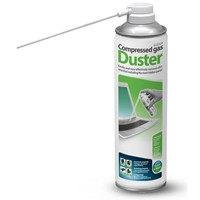
ColorWay Multipurpose Air Duster 750ml
- SKU:
- CPCOL-CW3375
- UPC:
- 4823108618733
- MPN:
- CW-3375
- Condition:
- New
- Availability:
- Free Click & Collect in Peterborough. UK delivery also available.

Description
ColorWay Multipurpose Air Duster 750ml – Compressed Gas Cleaner for Electronics, Keyboards, PCs and Office Equipment
The ColorWay Multipurpose Air Duster 750ml is a compressed gas cleaning spray designed for quickly removing dust, dirt and microscopic debris from hard-to-reach areas. It is ideal for cleaning keyboards, computer cases, PC components, laptop vents, printers, office equipment, cameras, gaming consoles, workstations and other delicate surfaces where wiping by hand is difficult.
This ColorWay 750ml air duster is suitable for customers searching for a compressed air duster for electronics, keyboard cleaning spray, PC dust cleaner, laptop vent cleaner, office equipment air cleaner, or a multipurpose dust remover for home, office, workshop and IT maintenance use.
Key Features of the ColorWay Multipurpose Air Duster 750ml
- 750ml compressed gas air duster for home, office and IT cleaning tasks
- Designed for hard-to-reach places such as keyboard gaps, vents, ports and tight corners
- Helps blow away dust, dirt and microscopic debris without direct surface contact
- Extension tube included for more accurate cleaning in narrow spaces and crevices
- Residue-free application when used correctly
- Useful for sensitive home and office environments
- Convenient alternative to an air compressor for quick maintenance tasks
- Suitable for electronics, peripherals and office equipment
- Large 750ml can size for repeated cleaning jobs
Designed for Cleaning Electronics and Hard-to-Reach Areas
The ColorWay air duster is useful for removing dust from areas that are difficult to clean with a cloth or brush. The directed airflow helps clean narrow gaps around keyboard keys, laptop cooling vents, desktop PC cases, fan grilles, printer trays, USB ports and other small spaces where dust can build up over time.
Ideal for PC, Laptop and Keyboard Maintenance
Dust build-up can affect airflow, make devices look dirty and make keyboards feel unpleasant to use. This compressed gas duster helps remove loose dust from keyboards, mice, computer vents, desktop cases and accessories without needing to touch delicate areas directly.
Extension Tube for Precise Cleaning
The included extension tube helps direct the airflow into tight corners, small gaps and crevices. This makes the ColorWay Multipurpose Air Duster especially useful for cleaning between keyboard keys, around ports, inside printer areas, around fan vents and other hard-to-reach places.
Residue-Free Cleaning
When used correctly, the compressed gas does not leave residue after application. This makes it suitable for everyday maintenance of electronics and office equipment where liquid cleaners or wet cloths may not be appropriate.
Useful for Home, Office and Workshop Environments
The ColorWay Multipurpose Air Duster 750ml is a practical cleaning item for computer repair kits, offices, home workstations, gaming setups, schools, shops and technical work areas. It is useful for quick dust removal from devices, peripherals and equipment that need regular cleaning.
Common Uses
- Cleaning dust from keyboards and laptop keyboards
- Blowing dust out of desktop PC cases and vents
- Cleaning around printer trays and office machines
- Removing loose dust from gaming consoles and controllers
- Cleaning camera bodies, lenses and delicate equipment surfaces from a safe distance
- Clearing dust from USB ports, audio ports and small gaps
- Maintaining home office desks, workstations and repair benches
Why Use an Air Duster Instead of a Cloth?
A cloth is useful for flat surfaces, but it cannot always reach inside small gaps, vents and ports. The ColorWay air duster uses focused airflow to dislodge dust and debris from areas where fingers, cloths and brushes may not fit. This makes it a useful companion product for regular computer and office equipment cleaning.
Important Safety and Usage Advice
This product is a compressed gas aerosol cleaner and should be used carefully. Always follow the instructions and safety warnings on the can before use. Use in a well-ventilated area, keep away from flames, heat sources and sparks, and do not spray onto hot surfaces or powered-on equipment.
How to Use Safely
- Turn off and unplug electronics before cleaning where possible
- Use short bursts instead of continuous spraying
- Keep the can upright during use unless the product label says otherwise
- Use the extension tube for accurate cleaning in small spaces
- Do not shake, pierce, burn or expose the can to heat
- Do not spray near naked flames, sparks or hot components
- Allow cleaned areas to settle before reconnecting or powering devices back on
- Keep out of reach of children
Who Is the ColorWay Multipurpose Air Duster Best For?
- PC users cleaning keyboards, vents and computer cases
- Gamers maintaining gaming setups, consoles and accessories
- Office users cleaning printers, workstations and peripherals
- Students and home workers maintaining laptops and desks
- IT technicians and repair shops needing a quick dust-removal tool
- Anyone looking for a residue-free way to clean tight spaces
ColorWay Multipurpose Air Duster 750ml Specifications
- Brand: ColorWay
- Product Name: ColorWay Multipurpose Air Duster 750ml
- Product Type: Compressed gas air duster / electronics cleaning spray
- Cleaning Type: Air / compressed gas
- Can Size: 750ml
- SKU: CPCOL-CW3375
- EAN / UPC: 4823108618733
- Application: Dust removal from hard-to-reach areas
- Extension Tube: Yes, for cleaning tight corners and crevices
- Residue-Free: Yes, when used correctly
- Suitable For: Keyboards, laptops, desktop PCs, printers, office equipment, gaming consoles, workstations and electronics
- Pack Quantity: Single can
Buying Advice
Before ordering, please note that this is an aerosol compressed gas cleaning product. It is designed for blowing away loose dust and debris from hard-to-reach areas, not for deep cleaning sticky residue, liquids or stains. For best results, use short controlled bursts and follow the product safety instructions printed on the can.
Why Buy the ColorWay Multipurpose Air Duster 750ml?
The ColorWay Multipurpose Air Duster 750ml is a convenient cleaning tool for electronics, PCs, laptops, keyboards and office equipment. With its large 750ml can size, extension tube, residue-free application and focused airflow, it is a practical choice for regular computer maintenance, home office cleaning and IT workstation care.
Specification
ColorWay Multipurpose Air Duster 750ml Specifications
| Product Type | Compressed Gas Air Duster / Electronics Cleaning Spray |
| Brand | ColorWay |
| Product Name | ColorWay Multipurpose Air Duster 750ml |
| SKU | CPCOL-CW3375 |
| Manufacturer Part Number / MPN | CW-3375 |
| EAN / UPC / GTIN | 4823108618733 |
| Can Size | 750ml |
| Cleaning Type | Compressed Gas / Air Cleaning |
| Main Use | Dust, Dirt and Microscopic Debris Removal |
| Designed For | Hard-to-Reach Places, Tight Corners and Crevices |
| Extension Tube Included | Yes |
| Residue-Free Application | Yes, when used correctly |
| Suitable Environments | Home, Office, IT Workstation, Workshop and Repair Bench Use |
| Suitable For | Keyboards, Desktop PCs, Laptop Vents, Printers, Office Equipment, Workstations, Gaming Consoles and Electronics |
| Pack Quantity | 1 Can |
Usage Notice
The ColorWay Multipurpose Air Duster 750ml is designed to blow away loose dust, dirt and debris from hard-to-reach areas. It is not designed for removing sticky residue, liquid spills, grease or stains. For best results, use short controlled bursts and follow the instructions printed on the can.
Electronics Cleaning Notice
When cleaning electronics, turn off and unplug the device where possible before use. Avoid spraying onto hot components or powered equipment. Allow the cleaned area to settle before reconnecting or powering the device back on.
Safety Notice
This is a compressed gas aerosol product. Use only in a well-ventilated area and keep away from heat, sparks, naked flames and hot surfaces. Do not pierce, burn or expose the can to high temperatures, even when empty. Keep out of reach of children.
Return
FAQ: Frequenlty Asked Questions
ColorWay Multipurpose Air Duster 750ml FAQ
The ColorWay Multipurpose Air Duster 750ml is a compressed gas cleaning spray designed for removing dust, dirt and small debris from hard-to-reach areas around computers, keyboards, printers, office equipment, gaming setups and home electronics. Below are the most common questions buyers ask before choosing this 750ml air duster for electronics and office cleaning, including PC cleaning, keyboard cleaning, laptop use, residue-free cleaning, nozzle use, safe handling, flammability, storage and when an electric air duster may be a better option.
1. What is the ColorWay Multipurpose Air Duster 750ml?
The ColorWay Multipurpose Air Duster 750ml is a compressed gas duster in an aerosol can, designed to blow dust, dirt and small debris out of tight spaces. It is commonly used for keyboards, PCs, laptops, printers, office equipment, gaming setups and other hard-to-reach areas.
2. What is the ColorWay Air Duster 750ml best used for?
It is best used for quick dust removal from keyboards, computer cases, vents, fans, printers, scanners, office desks, camera accessories, consoles, audio equipment and small gaps where a cloth or brush cannot easily reach.
3. Is the ColorWay Multipurpose Air Duster suitable for electronics?
Yes, it is designed for cleaning dust from electronics and office equipment. For safe use, always switch off and unplug equipment before cleaning, hold the can upright, spray in short bursts and allow any cold vapour to evaporate before reconnecting power.
4. Can I use the ColorWay Air Duster to clean a PC?
Yes. It can be used to remove dust from a desktop PC case, vents, filters, fans, heatsinks and hard-to-reach internal areas. Turn the PC off, unplug it, take it to a well-ventilated area and use short controlled bursts rather than long continuous spraying.
5. Can I use this air duster inside a computer case?
Yes, but use it carefully. Switch off and unplug the PC first, hold the can upright, avoid spraying too close for too long, and stop case fans from spinning freely while blowing dust from them. This helps reduce the risk of fan overspin and liquid propellant discharge.
6. Can I use the ColorWay Air Duster on a keyboard?
Yes. It is ideal for blowing crumbs, dust and debris from between keyboard keys. For best results, tilt the keyboard slightly, use the extension tube and apply short bursts between the keys.
7. Can I use it on a laptop keyboard?
Yes. It can be used on laptop keyboards, but the laptop should be switched off first. Use short bursts and keep the can upright to reduce the chance of cold liquid propellant coming out of the nozzle.
8. Can I use the ColorWay Air Duster to clean laptop vents?
Yes, it can help remove loose dust from laptop vents. However, if the laptop is heavily blocked with dust inside, professional cleaning may be needed because blowing air from outside may only move the dust deeper into the cooling system.
9. Can I use this air duster on PC fans?
Yes, but hold the fan blades still with a finger or a non-metal tool while cleaning. Do not allow fans to spin very fast from the air blast, as this can stress the fan bearing or generate unwanted electrical backfeed in some cases.
10. Can I use the ColorWay Air Duster on a graphics card?
Yes, it can be used to blow loose dust from a graphics card, heatsink and fans. Remove power from the PC first, hold the can upright and keep GPU fans from spinning while spraying.
11. Can I use it on a power supply unit?
You can use it to blow dust from the outside vents of a power supply, but do not open the PSU casing. Power supplies can hold dangerous electrical charge even when unplugged, so internal PSU cleaning should be left to qualified technicians.
12. Can I use it on a monitor or TV?
It can be used around vents, bezels and ports, but do not spray directly onto the screen surface at close range. For screens, use a suitable screen-cleaning cloth or screen-safe cleaner rather than relying on air duster spray.
13. Can I use the ColorWay Air Duster on printers?
Yes. It can help remove dust and small debris from printer trays, paper paths, exterior vents and hard-to-reach areas. Avoid spraying directly onto wet ink, toner cartridges or sensitive exposed parts unless the printer manual allows it.
14. Can I use it for cameras or lenses?
It may be used around camera bodies, cases and external gaps, but avoid spraying directly onto camera sensors, lens glass or delicate optical coatings. For camera sensors and lenses, use proper photography cleaning tools designed for that purpose.
15. Can I use it on game consoles?
Yes. It can help remove loose dust from console vents, controller gaps and ports. Turn the console off, unplug it and use short bursts around external vents rather than forcing air too deeply into the device.
16. Can I use it on a PlayStation, Xbox or Nintendo Switch?
Yes, it can be used around external vents and ports on PlayStation, Xbox and Nintendo Switch devices. For deep internal dust build-up or overheating consoles, a professional clean may be safer and more effective.
17. Does the ColorWay Air Duster leave residue?
Retailer descriptions state that the compressed gas does not leave residue after application. To reduce the chance of visible liquid or marks, keep the can upright, avoid shaking it during use and spray in short bursts.
18. Why does canned air sometimes spray liquid?
Canned air dusters contain compressed propellant. If the can is tilted, shaken or used upside down, very cold liquid propellant can come out. This is why it is important to keep the can upright and use short bursts.
19. Is the liquid from an air duster dangerous for electronics?
Cold liquid propellant should be avoided on electronics. If it happens, stop using the product, leave the device unplugged and allow the area to fully evaporate before powering the device again. Do not spray long bursts or use the can upside down.
20. How should I hold the can when using the ColorWay Air Duster?
Hold the can upright while spraying. This helps release gas rather than liquid propellant. Do not use the can upside down unless the product label specifically says it is safe to do so.
21. Should I shake the air duster before use?
No. Unlike paint or some cleaning sprays, an air duster should generally not be shaken before use. Shaking can increase the chance of liquid propellant being discharged instead of gas.
22. How far away should I spray from electronics?
Use a small distance from the target area and spray in short controlled bursts. Avoid pressing the nozzle continuously for long periods because the can and gas can become very cold.
23. Why does the can get cold during use?
The can becomes cold because the compressed propellant expands rapidly when sprayed. This is normal for canned air products, but it is another reason to use short bursts and allow the can to return to a normal temperature between sprays.
24. Can the ColorWay Air Duster remove sticky dirt?
It is mainly designed to remove loose dust, dirt and small debris. Sticky residue, grease or dried liquid spills may need a suitable electronics-safe cleaning solution and cloth instead of air alone.
25. Does it clean better than a cloth?
It is better than a cloth for narrow gaps, keyboard spaces, vents, ports and delicate areas where wiping is difficult. A cloth is still better for flat surfaces, fingerprints and visible marks.
26. Does it replace a vacuum cleaner?
No. An air duster blows dust away; it does not collect dust like a vacuum. For best results, use it in a well-ventilated area and clean the surrounding area afterwards if dust is blown out of a device.
27. Can I use a vacuum instead of an air duster for a PC?
A vacuum can create static risk and may be too strong around delicate internal parts. Many PC users prefer air dusters for blowing dust out, while using a vacuum only outside the case or around external filters, not directly on sensitive components.
28. Is this better than an electric air duster?
The ColorWay 750ml air duster is convenient, portable and ready to use without charging. An electric air duster can be better for frequent PC cleaning because it is reusable, but it costs more upfront and needs charging or mains power.
29. Is a 750ml air duster better than a 400ml or 500ml can?
A 750ml can gives more capacity than smaller cans, making it useful for users who clean multiple devices, several keyboards, a full PC case or office equipment. Smaller cans may be easier to store, but 750ml can offer better value per use.
30. How long does a 750ml air duster last?
It depends on how long each spray burst is and how many devices you clean. Short bursts make the can last longer and are also safer for electronics than continuous spraying.
31. Does the ColorWay Air Duster include an extension tube?
Retailer descriptions mention an extension tube for cleaning tight corners and crevices. The tube helps direct the airflow more accurately into keyboard gaps, vents, ports and small spaces.
32. What is the extension tube used for?
The extension tube concentrates the airflow and helps reach narrow areas such as keyboard gaps, computer vents, printer corners, fan grilles, USB ports and other tight spaces.
33. Can I use it without the extension tube?
Yes. You can use the can without the extension tube for wider areas, but the tube gives better precision when cleaning small gaps and hard-to-reach places.
34. Is the ColorWay Air Duster flammable?
Many aerosol air dusters use flammable propellants, so always read the label before use. Keep it away from flames, sparks, hot surfaces, cigarettes, heaters and live electrical equipment. Use only in a well-ventilated area.
35. Can I use it while my PC is switched on?
No. For safety, turn the PC off and unplug it before cleaning. Do not spray aerosol air dusters onto powered electronics, hot components or near sparks and flames.
36. Can I use it near heat or flames?
No. Keep the can away from heat, flames, sparks, cigarettes and hot surfaces. Aerosol cans are pressurised and may contain flammable propellant, so they must be handled carefully.
37. Is it safe to breathe in air duster gas?
No. Do not inhale air duster gas. Use the product only in a well-ventilated area and keep it away from children and vulnerable users. Intentional inhalation of aerosol propellants is extremely dangerous and can cause serious harm or death.
38. Can I spray it on skin?
No. Do not spray air duster directly onto skin. The gas and liquid propellant can become extremely cold and may cause frostbite-like injury. Use it only for the intended cleaning purpose.
39. Can children use the ColorWay Air Duster?
No. This is an aerosol cleaning product and should be used by responsible adults only. Keep it out of reach of children and follow the safety instructions on the can.
40. How should I store the ColorWay Air Duster?
Store it upright in a cool, dry place away from direct sunlight, heat, flames and children. Do not expose aerosol cans to high temperatures or puncture the can.
41. Can I leave it in a car?
No. Do not leave aerosol cans in hot cars or direct sunlight. Heat can increase pressure inside the can and may be dangerous.
42. Can I take this air duster on a plane?
Aerosol and compressed gas products are often restricted for air travel. Check airline and airport rules before travelling. In most cases, it is better not to pack compressed air dusters in luggage.
43. Is it suitable for offices?
Yes. It is suitable for office desks, keyboards, mice, printers, scanners, telephones, vents and shared workstations. Use it in a ventilated area and follow workplace safety rules for aerosols.
44. Is it suitable for repair shops or IT technicians?
Yes. A 750ml air duster is useful for IT technicians, PC builders, repair shops and support teams who need to remove dust from keyboards, desktops, ports and electronic equipment quickly.
45. Can I use it for car interiors?
It can be used to blow dust from small gaps such as dashboard vents, switches and interior crevices, but do not use it near flames, hot surfaces or sensitive car electronics while powered. Use a car vacuum or detailing brush for larger dirt.
46. Can I use it for sewing machines, tools or small appliances?
Yes, it can help remove dust from small mechanical gaps, hobby tools and appliance vents, as long as the item is powered off, cool and suitable for dry air cleaning. Always follow the equipment manufacturer’s cleaning guidance.
47. What should I do if liquid sprays onto my keyboard or PC part?
Stop spraying immediately. Unplug the device if it is not already unplugged, allow the liquid to evaporate fully in a ventilated area and do not power the device back on until it is completely dry. Avoid tilting the can next time.
48. Who should NOT buy the ColorWay Multipurpose Air Duster 750ml?
This product is not ideal for users who want a reusable electric duster, need a liquid cleaner for stains, want to clean camera sensors directly, or are uncomfortable handling pressurised aerosol products. It is best for users who need quick, directed dust removal from hard-to-reach spaces.
49. Is the ColorWay Multipurpose Air Duster 750ml worth buying?
Yes, it is worth considering if you need a convenient, residue-free air duster for keyboards, PCs, office equipment, vents and small gaps. The 750ml size is useful for larger cleaning jobs or repeated use around home and office electronics.
50. Why buy the ColorWay Multipurpose Air Duster 750ml from Memox?
Buying the ColorWay Multipurpose Air Duster 750ml from Memox is a practical choice if you want an affordable electronics cleaning product for keyboards, PCs, laptops, gaming setups and office equipment. Memox offers computer accessories, cleaning products, storage, memory and PC parts for UK customers.
Related Products
Related Products
ColorWay Multipurpose Air Duster 500ml
COLORWAY