
BTI
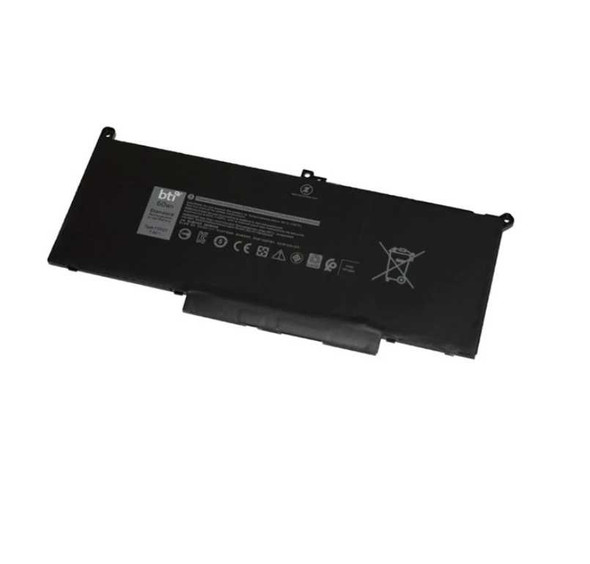
BTI 97Wh 6 cell XG4K6 compatible battery for DELL XPS 9710 XPS 9700 PRECISION 5760 XPS 17 9700 PRECISION 5750
- SKU:
- XG4K6-BTI
- MPN:
- XG4K6-BTI
- Availability:
- Free Click & Collect in Peterborough. UK delivery also available.

Description
BTI XG4K6 Compatible Battery for Dell XPS 17 9700 / 9710 and Precision 5750 / 5760 – 97Wh 11.4V 6-Cell
The BTI XG4K6 compatible battery is a high-capacity 97Wh replacement laptop battery designed for selected Dell XPS 17 and Dell Precision 17 mobile workstation models. With a 6-cell design, 11.4V output, and a large 97Wh capacity, it is built to restore reliable portable power for compatible Dell laptops used for work, study, creative tasks, and everyday computing.
This battery is a strong option for buyers searching for a Dell XPS 17 replacement battery, an XG4K6 battery, or a 97Wh battery for Dell Precision 5750 or 5760. It is especially useful when the original battery no longer holds charge properly, runs down too quickly, or needs replacing due to age or wear.
Key Features of the BTI XG4K6 Battery
- Replacement battery for selected Dell XPS 17 and Precision models
- 97Wh battery capacity
- 11.4V output
- 6-cell design
- Lithium-Ion battery technology
- BTI part number: XG4K6-BTI
- Black finish
- Designed for compatible Dell mobile workstation and laptop systems
Compatible Dell Laptop Models
This XG4K6 compatible replacement battery is listed for selected Dell laptop models including:
- Dell XPS 17 9700
- Dell XPS 17 9710
- Dell Precision 5750
- Dell Precision 5760
Important Compatibility Advice
Before ordering, match the original battery part number, voltage, watt-hour rating, and your exact laptop model. Some laptop series can use more than one battery version depending on the configuration, so checking the original battery label inside the device is the best way to confirm fit.
Designed for Dell XPS 17 and Precision Mobile Workstations
The Dell XPS 17 and Precision 17 mobile workstation families are often used for demanding tasks such as business work, creative applications, engineering software, and general high-performance computing. A 97Wh replacement battery helps restore the portable usability of these systems when the original battery begins to degrade over time.
If your laptop battery drains too quickly, struggles to charge fully, or no longer provides dependable runtime away from mains power, replacing it with the correct compatible battery can help bring the system back to more practical everyday use.
High-Capacity 97Wh Replacement Option
Dell’s own XPS 17 9700 specifications show that a 6-cell 97WHr 11.40V smart lithium-ion battery is a valid battery configuration for that model family, which makes this capacity and voltage combination highly relevant for compatible XPS 17 replacement searches.
Technical Specifications
- Brand: BTI
- MPN: XG4K6-BTI
- EAN / GTIN: 5059902025128
- Battery type: Lithium-Ion (Li-Ion)
- Battery capacity: 97Wh
- Voltage: 11.4V
- Cell count: 6-cell
- Capacity (reseller-listed): around 8500mAh / 8508mAh depending on listing format
- Colour: Black
- Quantity included: 1 battery
Who This Battery Is Best For
- Users searching for an XG4K6 battery replacement
- Owners of compatible Dell XPS 17 9700 / 9710 laptops
- Owners of compatible Dell Precision 5750 / 5760 mobile workstations
- Buyers wanting a 97Wh 11.4V 6-cell Dell laptop battery
- Users replacing a worn or aging original Dell internal battery
Buying Advice
Please check your laptop model and original battery code before purchase. The safest way to confirm compatibility is to compare the battery installed in your laptop with the details on this listing, especially the XG4K6 reference, 97Wh rating, and 11.4V output.
Specification
Return
FAQ: Frequently Asked Questions
BTI XG4K6 97Wh Battery for Dell XPS 17 and Precision FAQ
The BTI XG4K6 97Wh 6-cell compatible battery is an internal replacement laptop battery designed for selected Dell XPS 17 and Dell Precision mobile workstation models, including Dell XPS 17 9700, XPS 17 9710, Precision 5750, and Precision 5760. Below are the most common questions buyers ask before choosing this XG4K6 compatible Dell XPS 17 battery, including model compatibility, 97Wh capacity, installation, calibration, BIOS detection, battery health, runtime, safety, swollen battery warnings, and whether this is the right replacement battery for your Dell laptop.
1. What is the BTI XG4K6 battery?
The BTI XG4K6 is a compatible internal laptop battery designed as a replacement for selected Dell XPS 17 and Dell Precision mobile workstation models. It is a high-capacity 97Wh, 11.4V, 6-cell lithium-ion battery for laptops that originally use the XG4K6 battery type.
2. Which Dell laptops is this XG4K6 battery compatible with?
This battery is listed for selected Dell models including Dell XPS 17 9700, Dell XPS 17 9710, Dell Precision 5750, and Dell Precision 5760. Always check your original battery part number, laptop service tag, and battery shape before ordering.
3. Is this battery compatible with Dell XPS 17 9700?
Yes. This BTI XG4K6 compatible battery is listed for the Dell XPS 17 9700. Before fitting, compare the battery part number, connector, screw positions, and capacity with your original battery.
4. Is this battery compatible with Dell XPS 17 9710?
Yes. The battery is listed as compatible with the Dell XPS 17 9710. Compatibility should still be checked using your laptop service tag or original battery part number, especially if the laptop has been repaired or modified previously.
5. Is this battery compatible with Dell Precision 5750?
Yes. This XG4K6 battery is listed for the Dell Precision 5750. Because Precision laptops can have different configurations, confirm the battery type before installation.
6. Is this battery compatible with Dell Precision 5760?
Yes. The BTI XG4K6 compatible battery is listed for the Dell Precision 5760. Check your existing battery label and Dell service information before buying to avoid ordering the wrong battery.
7. Is this an original Dell battery?
No. This is a BTI compatible replacement battery, not an original Dell-branded battery. It is designed to replace the compatible Dell battery part number in supported laptops, but it is supplied under the BTI brand.
8. What does “compatible battery” mean?
A compatible battery is made by a third-party manufacturer to match the required battery type, voltage, connector, capacity class, and fitment for specific laptop models. It is intended to work as a replacement for the original battery where the model and part number match.
9. What capacity is this BTI XG4K6 battery?
This battery is listed as a 97Wh battery. Watt-hours indicate the energy capacity of the battery and help estimate potential runtime compared with smaller laptop batteries.
10. What voltage is this XG4K6 battery?
This BTI XG4K6 battery is listed as an 11.4V battery. The replacement battery voltage should match the compatible battery type required by the laptop.
11. How many cells does the XG4K6 battery have?
This battery is listed as a 6-cell battery. The 6-cell design is used to provide the high 97Wh capacity found in selected Dell XPS 17 and Precision models.
12. What battery chemistry does this battery use?
This type of laptop replacement battery is listed as a lithium-ion battery. Lithium-ion batteries are commonly used in modern laptops because they offer rechargeable power in a compact internal pack.
13. What part number should I check before buying?
Check for XG4K6 on your original battery label or Dell parts information. Some listings may also mention related Dell battery references. The safest method is to compare your original battery part number, laptop model, connector, and physical layout before ordering.
14. Will this battery fit every Dell XPS 17 laptop?
No. It is only for selected compatible models, such as XPS 17 9700 and XPS 17 9710. It is not automatically compatible with every XPS 17 generation. Always check the exact laptop model and original battery part number.
15. Will this battery fit Dell XPS 17 9720 or newer models?
This product is listed for XPS 17 9700 and 9710, not all later XPS 17 models. If you have a 9720, 9730, or another newer model, check the original battery part number and Dell service tag before buying.
16. Why does my Dell battery report around 95Wh instead of 97Wh?
Some Dell XPS users report that battery software may show a design capacity slightly below the rounded advertised 97Wh figure, such as around 95Wh. This can be due to reporting method, battery firmware, manufacturing tolerance, or how the system reads design capacity. A small difference in reported Wh does not always mean the battery is faulty.
17. How do I know if my Dell XPS battery needs replacing?
Common signs include very short runtime, sudden drops from high percentage to 0%, the laptop shutting down unexpectedly, battery health warnings in BIOS or Dell software, charging problems, swelling, or a much lower full charge capacity than the original design capacity.
18. Why does my Dell XPS battery suddenly drop from 40% or 80% to 0%?
Sudden percentage drops usually indicate battery wear, poor calibration, failing cells, or incorrect battery health reporting. If the laptop is several years old and the full charge capacity is much lower than design capacity, replacing the battery may be needed.
19. How can I check battery health on a Dell XPS or Precision laptop?
You can check battery health in the Dell BIOS, Dell Power Manager or MyDell software, and Windows battery report. In Windows, advanced users can generate a battery report using the command powercfg /batteryreport to compare design capacity and full charge capacity.
20. What is design capacity vs full charge capacity?
Design capacity is the original intended battery capacity when new. Full charge capacity is the amount the battery can currently hold. As batteries age, full charge capacity normally reduces. A large difference between the two can mean the battery is worn.
21. How long should a Dell XPS 17 battery last before replacement?
Laptop battery lifespan depends on usage, charging habits, heat, cycle count, workload, and age. Many users start noticing reduced runtime after a few years. Heavy use, gaming, high-performance workloads, and constant heat can shorten battery life.
22. Will replacing the battery restore my original battery life?
A new compatible battery can significantly improve runtime if the old battery is worn. However, final battery life still depends on screen brightness, CPU/GPU load, background apps, power mode, battery calibration, connected devices, and laptop condition.
23. How long will this 97Wh battery last on a full charge?
Runtime varies widely. Light browsing, documents, and low brightness may last much longer than video editing, CAD, gaming, or GPU-heavy workloads. The XPS 17 and Precision models can use a lot of power, especially with high-resolution displays and dedicated graphics.
24. Is this battery suitable for gaming on battery power?
It can power the laptop on battery, but gaming on battery usually drains power quickly and may reduce performance because many laptops limit CPU and GPU power when unplugged. For gaming or heavy work, mains power is normally recommended.
25. Can I install this XG4K6 battery myself?
It may be possible for experienced users, but internal laptop battery replacement requires careful disassembly. You must power off the laptop, disconnect the charger, open the bottom cover, handle the battery connector carefully, and avoid damaging cables, screws, or internal components. If unsure, use a professional technician.
26. Do I need special tools to replace the battery?
You may need suitable precision screwdrivers, a plastic pry tool, and anti-static precautions. Dell XPS and Precision laptops often use small screws and delicate internal connectors, so using the correct tools helps prevent damage.
27. Should I disconnect the charger before replacing the battery?
Yes. Before opening the laptop, shut it down completely and disconnect the AC adapter. Internal battery replacement should be done carefully with the laptop powered off. If you are not experienced with laptop repair, get professional help.
28. Should I let the battery drain before replacing it?
It is generally safer to work with the battery at a lower charge level rather than fully charged, but do not intentionally damage or deeply discharge a faulty battery. If the battery is swollen, overheating, leaking, or physically damaged, stop using the laptop and seek professional repair advice.
29. What should I do if my old battery is swollen?
Stop using the laptop, do not press on the battery, do not puncture it, and do not continue charging it. A swollen lithium-ion battery can be dangerous. Have it removed safely by a qualified technician and dispose of it through an approved battery recycling route.
30. Can a swollen battery damage my laptop?
Yes. A swollen battery can press against the touchpad, keyboard, bottom cover, internal cables, or motherboard. If you notice the touchpad lifting, case bulging, uneven base, or strange gaps, stop using the laptop and inspect it safely.
31. What should I do after installing the new battery?
After installation, check that the battery is detected in BIOS, boot into Windows, confirm charging status, check Dell battery health tools, and allow the system to complete a few normal charge/discharge cycles. Keep the charger connected during first setup if needed.
32. Does the new battery need calibration?
Battery calibration can help the laptop report percentage more accurately. After fitting, use the laptop normally, charge it fully, then let it discharge under normal use and recharge again. Avoid repeatedly draining lithium-ion batteries to 0% unless specifically required for calibration troubleshooting.
33. Why is the new battery not detected after installation?
Common causes include the battery connector not fully seated, BIOS needing a reset/update, residual power state issues, incorrect battery model, or a faulty battery. Power off, disconnect the charger, carefully recheck the connector, then check BIOS battery status. If unsure, use a technician.
34. What should I do if the laptop will not power on after battery replacement?
Check that the battery connector is properly seated, the AC adapter is connected, and no internal cables were disturbed. Some users perform a power reset by disconnecting power and battery, holding the power button briefly, then reconnecting. If the laptop still will not start, stop and seek professional repair support.
35. Should I update BIOS before or after replacing the battery?
If your current battery still works and the laptop is stable, updating BIOS before replacement may help compatibility and battery reporting. BIOS updates should only be done with reliable power connected and following Dell’s official instructions.
36. Can BIOS affect battery detection?
Yes. BIOS firmware can affect battery detection, charging behaviour, health reporting, and power management. If a replacement battery is not detected, checking BIOS version and Dell diagnostics can be useful troubleshooting steps.
37. Why does Dell BIOS say “battery not recognised”?
This can happen if the connector is not seated correctly, the battery is incompatible, BIOS needs updating, the battery electronics are not communicating correctly, or the battery is faulty. Recheck compatibility and installation before assuming the laptop motherboard is at fault.
38. Is it normal for a new battery to need a few cycles?
Yes. A new battery may need a few normal charge and discharge cycles before the system reports runtime and percentage accurately. However, it should still be detected correctly and charge normally after installation.
39. Why does the battery charge to 80% and stop?
Dell laptops may use battery charging modes such as adaptive charging, custom charge limits, or battery health settings that stop charging at a set percentage. Check Dell Power Manager, MyDell, or BIOS battery settings if charging stops around 80%.
40. Is charging to 80% better for battery life?
Limiting charge to around 80% can help reduce battery wear for laptops kept plugged in most of the time. If you need maximum runtime, charge to 100% before travel. For long-term battery health, avoid excessive heat and constant full-charge storage where possible.
41. Can I use this battery if my laptop is mostly plugged in?
Yes, but consider using Dell’s custom or adaptive charging settings to reduce long-term battery wear. Keeping a laptop hot and fully charged for long periods can age lithium-ion batteries faster.
42. Will this battery fix charger or AC adapter problems?
No. A replacement battery will not fix a faulty charger, USB-C charging port, DC-in issue, motherboard charging fault, or adapter recognition problem. If your Dell laptop does not recognise the AC adapter, troubleshoot the charger and charging circuit separately.
43. Will this battery improve laptop performance?
It may improve stability if the old battery was failing and causing sudden shutdowns, but it will not upgrade CPU, GPU, RAM, or SSD performance. For heavy workloads, the laptop may still perform best when plugged into the correct Dell power adapter.
44. Can a bad battery cause random shutdowns?
Yes. A worn or failing battery can cause sudden shutdowns, fast percentage drops, unexpected sleep, charging jumps, or power instability. However, overheating, charger issues, motherboard faults, or software problems can also cause shutdowns.
45. Can a bad battery cause the laptop to shut down even when percentage is high?
Yes. If the battery cells cannot deliver stable power, the laptop may shut down even when Windows still reports a high percentage. This is a common sign of a worn battery or inaccurate battery calibration.
46. How should I dispose of the old laptop battery?
Do not throw lithium-ion batteries in household waste. Use an approved battery recycling point, local council recycling facility, retailer battery recycling service, or professional repair shop disposal route. Tape exposed contacts if advised and handle damaged batteries carefully.
47. Can I travel with a 97Wh laptop battery?
A 97Wh laptop battery is below the common 100Wh airline threshold for many consumer electronics, but airline rules can vary. Keep the battery installed in the laptop where possible and check your airline’s lithium battery policy before travelling.
48. Is 97Wh close to the maximum laptop battery size for flights?
Yes. Many airlines use 100Wh as a common limit for standard carry-on lithium-ion batteries. This 97Wh battery is designed for high-capacity laptop runtime while staying under that common threshold, but travel rules should always be checked before flying.
49. BTI XG4K6 vs original Dell battery — which should I choose?
Choose an original Dell battery if you specifically require Dell-branded parts and can source the correct part reliably. Choose the BTI compatible XG4K6 battery if you need a compatible replacement for the supported Dell models and want a third-party alternative from a known battery accessory brand.
50. Who is the BTI XG4K6 97Wh battery best for?
This battery is best for Dell XPS 17 9700, XPS 17 9710, Precision 5750, and Precision 5760 users whose original 97Wh battery is worn, failing, swollen, no longer holding charge, or causing sudden shutdowns.
51. Who is this battery not for?
This battery is not for laptops that do not use the XG4K6 battery type, models outside the listed compatible Dell XPS/Precision range, users needing an original Dell-branded battery only, or anyone unsure about safely opening and repairing a laptop without professional help.
52. What should I check before buying this battery?
Before buying, check your Dell laptop model, service tag, original battery part number, battery voltage, connector shape, physical battery layout, and whether your existing battery is swollen or unsafe to remove. If you are unsure, ask a technician to confirm compatibility before fitting.
Related Products
Related Products

BTI 4-cell 57Wh 5K9CP compatible laptop battery for Dell XPS 13 9350
BTI

BTI PF06XL Compatible Battery for HP OMEN 17-W Series - 96Wh 11.55V 6-Cell
BTI
0F3YGT compatible 60Wh 4-cell battery for Dell Latitude 7280 7480
BTI

Dell Latitude 7310 / 7410 Battery 52Wh (4-Cell) – BTI Replacement for HRGYV, JHT2H, X825P
BTI

469-1496 compatible 84Wh 9-cell battery for DELL Latitude E5420 E6420 5430 6420 ATG
BTI
