
ANTEC
Antec VX310 ARGB Mid-Tower Gaming PC Case - Pre-Installed 4 x 120mm ARGB Fans, Tempered Glass Side Panel, High-Airflow Mesh Front - ATX/Micro-ATX/ITX
- SKU:
- CAANT-VX310
- UPC:
- 0761345102322
- MPN:
- 0-761345-10232-2
- Availability:
- Free Click & Collect in Peterborough. UK delivery also available.





Description
Antec VX310 ARGB Mid Tower Gaming PC Case – 4 x 120mm ARGB Fans, Mesh Front and Tempered Glass
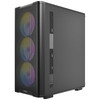
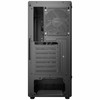
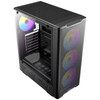
The Antec VX310 ARGB Mid Tower Gaming PC Case is a stylish and airflow-focused chassis designed for gaming PCs, upgrade builds and custom desktop systems. With a high-airflow mesh front panel, tempered glass side panel and 4 pre-installed 120mm ARGB fans, it gives builders a strong starting point for a modern gaming setup without needing to buy extra case fans separately.
This case is ideal for customers searching for an Antec VX310 ARGB case, mid tower gaming case with 4 ARGB fans, tempered glass PC case, mesh front airflow case, or an ATX gaming case for Micro-ATX and Mini-ITX builds. It supports ATX, Micro-ATX and ITX motherboards, graphics cards up to 320mm, CPU coolers up to 165mm, and up to 8 x 120mm fans for flexible cooling.
Key Features of the Antec VX310 ARGB
- Mid tower gaming PC case for ATX, Micro-ATX and ITX builds
- High-airflow mesh front panel to help improve intake cooling
- Tempered glass side panel to showcase your components and ARGB lighting
- 4 x 120mm ARGB fans pre-installed for cooling and visual style
- 3 x 120mm ARGB fans at the front and 1 x 120mm ARGB fan at the rear
- LED control button for lighting control
- Supports up to 8 x 120mm fans for expanded airflow
- CPU cooler clearance up to 165mm
- Graphics card clearance up to 320mm
- PSU length support up to 160mm with HDD installed or up to 325mm without HDD
- 1 x USB 3.0 and 2 x USB 2.0 front ports for everyday accessories
- Mic / HD-Audio front panel ports for headset and speaker connectivity
- 7 expansion slots for graphics cards and PCIe add-in cards
- 1 x 3.5-inch drive bay and 3 x 2.5-inch drive bays
- Top dust filter to help reduce dust entry from the upper ventilation area
High-Airflow Mesh Front for Gaming Builds
The Antec VX310 ARGB uses a mesh front design that helps fresh air reach the internal components. This is useful for gaming systems where the CPU and graphics card can generate extra heat during long sessions.
The case comes with three 120mm ARGB front fans already installed, helping provide front intake airflow straight out of the box. The included rear 120mm ARGB fan works as an exhaust, helping move warm air out of the case.
Pre-Installed ARGB Cooling
Many budget cases require extra fans to achieve good airflow. The VX310 ARGB already includes 4 x 120mm ARGB fans, making it a strong-value option for buyers who want cooling and lighting included from the start.
Tempered Glass Side Panel for Showcase PCs
The tempered glass side panel allows the internal components, ARGB fans, CPU cooler, graphics card and cable management to be visible. This makes the VX310 ARGB suitable for gaming desks, RGB-themed builds and systems where appearance matters as much as airflow.
The black exterior, mesh front and ARGB lighting create a modern gaming look while keeping the case practical for everyday builds.
Flexible Motherboard Support
The Antec VX310 ARGB supports ATX, Micro-ATX and ITX motherboards. This gives builders flexibility when choosing a motherboard size, whether they are building a full ATX gaming PC, a Micro-ATX value system, or a smaller ITX-based build inside a mid tower case.
Build Compatibility Checklist
- Check your motherboard is ATX, Micro-ATX or ITX
- Check your graphics card is no longer than 320mm
- Check your CPU cooler is no taller than 165mm
- Check your PSU length, especially if using the 3.5-inch HDD bay
- Check your storage needs against the 1 x 3.5-inch and 3 x 2.5-inch drive bays
Cooling and Fan Expansion Support
The VX310 ARGB supports several fan positions to help improve cooling. It supports 3 x 120mm fans at the front, 2 x 120mm or 2 x 140mm fans at the top, 2 x 120mm fans on the PSU shroud, and 1 x 120mm fan at the rear. This gives users the option to add more airflow later if the system uses warmer components.
Fan Support
- Front: 3 x 120mm
- Top: 2 x 140mm or 2 x 120mm
- Power Supply Shroud: 2 x 120mm
- Rear: 1 x 120mm
Component Clearance for Modern Hardware
The Antec VX310 ARGB supports graphics cards up to 320mm and CPU coolers up to 165mm, making it suitable for many mainstream gaming PC configurations. It also supports standard ATX power supplies, with PSU clearance up to 160mm with the HDD bay in use or up to 325mm without the HDD bay.
Before ordering, check the exact dimensions of your graphics card, CPU cooler, PSU and storage layout to make sure all parts fit comfortably.
Front I/O for Everyday Connectivity
The top/front I/O panel includes 1 x USB 3.0, 2 x USB 2.0, Mic / HD-Audio, power, reset and an LED control button. This gives convenient access for keyboards, mice, USB drives, headsets, controllers and other everyday PC accessories.
Storage and Expansion Support
The VX310 ARGB includes 1 x 3.5-inch drive bay and 3 x 2.5-inch drive bays, making it suitable for an SSD-focused gaming build with optional hard drive storage. It also includes 7 expansion slots for graphics cards and other PCIe add-in cards.
Who Is the Antec VX310 ARGB Best For?
- Gamers building an affordable ARGB desktop PC
- PC builders wanting 4 pre-installed fans included
- Users who want a mesh-front airflow case
- Customers who want tempered glass and RGB lighting
- ATX, Micro-ATX and ITX motherboard builds
- Budget and mid-range gaming PC upgrades
- Users who want a stylish case without buying extra case fans immediately
Who Is This Case Not For?
This case is not the best choice if you need E-ATX motherboard support, USB-C front I/O, a silent closed-front case, a large number of hard drive bays, vertical GPU mounting, or premium full-tower expansion space. It is designed as a value-focused ARGB mid tower gaming case with strong airflow and included fans.
Technical Specifications
- Brand: Antec
- Model: VX310 ARGB
- Product Type: Mid tower gaming PC case
- Colour: Black
- Form Factor: Mid Tower
- Case Materials: Steel + plastic
- Side Panel: Tempered glass side panel
- Front Panel: Mesh front panel
- Motherboard Support: ATX, Micro-ATX, ITX
- Expansion Slots: 7
- Drive Bays: 1 x 3.5-inch, 3 x 2.5-inch
- Front I/O: Power, Reset, LED control button, 1 x USB 3.0, 2 x USB 2.0, Mic / HD-Audio
- Included Fans: 4 x 120mm ARGB fans
- Included Front Fans: 3 x 120mm ARGB
- Included Rear Fan: 1 x 120mm ARGB
- Fan Support - Front: 3 x 120mm
- Fan Support - Top: 2 x 140mm or 2 x 120mm
- Fan Support - PSU Shroud: 2 x 120mm
- Fan Support - Rear: 1 x 120mm
- Maximum CPU Cooler Height: 165mm
- Maximum GPU Length: 320mm
- Maximum PSU Length: 160mm with HDD installed / 325mm without HDD
- Dust Filter: Top dust filter
- Case Dimensions: 370 x 205 x 450mm / D x W x H
- Box Dimensions: 480 x 240 x 414mm / D x W x H
- Net Weight: Approximately 3.62–3.65kg, depending on listing
- Gross Weight: Approximately 4.35–4.62kg, depending on listing
- Warranty: 1 year listed by several retailer/product data sources
Important Compatibility Note
Please check your components before purchase. The Antec VX310 ARGB supports graphics cards up to 320mm, CPU coolers up to 165mm, and ATX PSUs up to 160mm with the HDD bay installed or 325mm without the HDD bay. Large GPUs, tall air coolers, long power supplies and extra fans can affect available space.
Important Front I/O Note
This case includes 1 x USB 3.0 and 2 x USB 2.0. It does not list a front USB-C port, so avoid describing it as a USB-C case unless your physical stock confirms a different revision.
Important Product Positioning Note
The VX310 ARGB is a value-focused ARGB gaming case with mesh airflow, tempered glass and four included fans. It should not be described as E-ATX, full tower, silent-focused, vertical GPU ready or USB-C equipped unless a different verified revision confirms those features.
Why Buy the Antec VX310 ARGB?
The Antec VX310 ARGB is a strong choice for buyers who want a gaming case with airflow, ARGB lighting and good component support at a competitive price. With a mesh front panel, tempered glass side panel, four pre-installed 120mm ARGB fans, ATX/Micro-ATX/ITX motherboard support and useful clearance for mainstream gaming hardware, it gives PC builders a practical and stylish foundation for a gaming desktop.
Choose this case if you want an affordable mid tower gaming chassis with strong out-of-the-box airflow, ARGB style and support for popular PC hardware.
Specification
Antec VX310 ARGB Mid Tower Gaming PC Case Specifications
The Antec VX310 ARGB is a mid tower gaming PC case with a mesh front panel, tempered glass side panel and four pre-installed 120mm ARGB fans. It supports ATX, Micro-ATX and ITX motherboards, graphics cards up to 320mm, CPU coolers up to 165mm and standard ATX power supplies.
General Information
| Brand | Antec |
| Model | VX310 ARGB |
| Product Type | Mid tower gaming PC case |
| Case Colour | Black |
| Recommended Use | Gaming PCs, ARGB builds, airflow-focused desktop systems, ATX builds, Micro-ATX builds and ITX builds |
Case Design and Materials
| Case Form Factor | Mid Tower |
| Materials | Steel + plastic |
| Side Panel | Tempered glass side panel |
| Front Panel | High-airflow mesh front panel |
| Dust Filter | Top dust filter |
| ARGB Lighting | Yes, through the included ARGB fans |
Motherboard and Component Compatibility
| Motherboard Support | ATX, Micro-ATX, ITX |
| E-ATX Support | No, not listed for this model |
| Maximum Graphics Card Length | Up to 320mm |
| Maximum CPU Cooler Height | Up to 165mm |
| Maximum PSU Length | Up to 160mm with HDD installed / up to 325mm without HDD |
| Expansion Slots | 7 standard expansion slots |
Front I/O Ports and Controls
| USB 3.0 | 1 x USB 3.0 |
| USB 2.0 | 2 x USB 2.0 |
| USB-C | No, not listed for this model |
| Audio | Mic / HD-Audio |
| Buttons | Power, Reset and LED control button |
Drive Bays and Storage Support
| 3.5" Drive Bays | 1 |
| 2.5" Drive Bays | 3 |
| Storage Layout Note | Suitable for one 3.5" hard drive and up to three 2.5" SSDs, depending on final build layout |
Included Fans
| Total Pre-Installed Fans | 4 x 120mm ARGB fans |
| Front Fans Included | 3 x 120mm ARGB fans |
| Rear Fan Included | 1 x 120mm ARGB fan |
| Fan Lighting | ARGB |
Fan Support
| Front Fan Support | 3 x 120mm |
| Top Fan Support | 2 x 140mm or 2 x 120mm |
| PSU Shroud Fan Support | 2 x 120mm |
| Rear Fan Support | 1 x 120mm |
| Maximum 120mm Fan Support | Up to 8 x 120mm fans in total |
Radiator and Liquid Cooling Support
| Radiator Support | Not clearly listed in the checked supplier specifications |
| Recommendation | Use fan support data only unless Antec or your supplier confirms radiator compatibility for your exact stock |
Dimensions and Weight
| Case Dimensions | 370 x 205 x 450mm / D x W x H |
| Depth | 370mm |
| Width | 205mm |
| Height | 450mm |
| Box Dimensions | 480 x 240 x 414mm / D x W x H |
| Net Weight | Approximately 3.62–3.65kg, depending on listing |
| Gross Weight | Approximately 4.35–4.62kg, depending on listing |
Package Contents
| PC Case | 1 x Antec VX310 ARGB Mid Tower Case |
| Pre-Installed Fans | 4 x 120mm ARGB fans installed, 3 front and 1 rear |
| Power Supply | Not included |
| Accessories | Standard case accessory pack / screws, depending on retail package |
Warranty
| Warranty | 1 year listed by several retailer/product data sources |
Important Component Compatibility Notes
Please check your parts before purchase. The Antec VX310 ARGB supports graphics cards up to 320mm, CPU coolers up to 165mm, and power supplies up to 160mm with the HDD bay installed or 325mm without the HDD bay. Large GPUs, tall air coolers, long power supplies, extra fans and drive placement can affect available space.
Important Front I/O Note
This case includes 1 x USB 3.0 and 2 x USB 2.0. It does not list a front USB-C port, so avoid describing it as a USB-C case unless your physical stock confirms a different revision.
Important Product Positioning Note
The VX310 ARGB is a value-focused ARGB mid tower gaming case with a mesh front, tempered glass side panel and four pre-installed fans. It should not be described as E-ATX, full tower, USB-C equipped, vertical GPU ready or silent-focused unless a different verified revision confirms those features.
Return
FAQ: Frequenlty Asked Question
Antec VX310 ARGB Mid Tower Gaming PC Case FAQ
The Antec VX310 ARGB Mid Tower Gaming PC Case is a high-airflow gaming chassis designed for budget and mid-range PC builds, RGB gaming setups, first-time builders, and users who want a modern case with a mesh front, tempered glass side panel and four pre-installed ARGB fans. It supports ATX, Micro-ATX and ITX motherboards, graphics cards up to around 320mm, CPU air coolers up to around 165mm, and multiple fan positions for improved cooling. Below are the most common questions buyers ask before choosing this Antec VX310 ARGB gaming case, including motherboard compatibility, GPU clearance, airflow, ARGB fan control, radiator support, PSU clearance, storage support, cable management, and whether this case is right for your gaming PC build.
1. What is the Antec VX310 ARGB?
The Antec VX310 ARGB is a mid tower gaming PC case with a high-airflow mesh front panel, tempered glass side panel and four pre-installed 120mm ARGB fans. It is designed for ATX, Micro-ATX and ITX gaming PC builds.
2. Is the Antec VX310 ARGB good for a gaming PC?
Yes. The Antec VX310 ARGB is a good choice for budget and mid-range gaming PCs because it includes four ARGB fans, has a mesh front for airflow, supports full-size ATX motherboards and fits many modern graphics cards up to around 320mm long.
3. What motherboard sizes does the Antec VX310 ARGB support?
The Antec VX310 ARGB supports ATX, Micro-ATX and ITX motherboards. This makes it suitable for standard gaming builds, smaller motherboard builds and compact board layouts inside a mid tower case.
4. Does the Antec VX310 ARGB support ATX motherboards?
Yes. The case supports standard ATX motherboards, making it suitable for most mainstream gaming PC builds using ATX boards from ASUS, MSI, Gigabyte, ASRock and other motherboard brands.
5. Does the Antec VX310 ARGB support Micro-ATX motherboards?
Yes. Micro-ATX motherboards are supported. A Micro-ATX board can leave extra internal space inside the case for cable routing, airflow and easier installation.
6. Does the Antec VX310 ARGB support Mini-ITX motherboards?
Yes. ITX motherboards are supported, although the case itself is a mid tower rather than a small-form-factor chassis. An ITX board will fit with plenty of surrounding space.
7. Does the Antec VX310 ARGB include fans?
Yes. The Antec VX310 ARGB includes 4 x 120mm ARGB fans pre-installed, usually with three fans at the front and one fan at the rear. This gives the case strong out-of-the-box airflow and lighting.
8. How many fans are pre-installed?
The case comes with four pre-installed 120mm ARGB fans. This is useful for buyers who want a ready-made RGB airflow setup without buying extra fans separately.
9. Where are the included fans installed?
The typical fan layout is 3 x 120mm ARGB fans at the front and 1 x 120mm ARGB fan at the rear. This creates front-to-back airflow for cooling the motherboard, CPU and graphics card area.
10. Does the case have ARGB lighting?
Yes. The case includes pre-installed ARGB fans, giving the system a colourful gaming look. ARGB lighting can usually be controlled by the case LED button or by a compatible motherboard ARGB header, depending on how the fans are connected.
11. What is the difference between RGB and ARGB?
RGB lighting normally shows one colour across a device at a time, while ARGB, or addressable RGB, can show multiple colours and effects across individual LEDs. ARGB gives more advanced lighting effects when supported by the controller or motherboard.
12. Does the Antec VX310 ARGB have an LED control button?
Yes. The front I/O includes an LED control button. This is useful if you want to change lighting modes without relying only on motherboard RGB software.
13. Do I need a motherboard ARGB header?
Not always. The case has an LED control button for basic lighting control, but if you want motherboard software control through ASUS Aura Sync, MSI Mystic Light, Gigabyte RGB Fusion or ASRock Polychrome, your motherboard needs a compatible 5V 3-pin ARGB header.
14. Can I connect the ARGB fans to motherboard software?
Yes, if the included fan/controller setup supports motherboard sync and your motherboard has a compatible 5V 3-pin ARGB header. Do not connect 5V ARGB devices to a 12V 4-pin RGB header, as this can damage the lighting.
15. Can I use the fans without RGB software?
Yes. You can use the case LED button for basic lighting control if the fans are connected to the case lighting controller. This is helpful for users with motherboards that do not have ARGB headers.
16. Does the Antec VX310 ARGB have a mesh front panel?
Yes. The case has a high-airflow mesh front panel. Mesh front panels are popular because they allow more air into the case than solid-front designs, helping cool the CPU, graphics card and internal components.
17. Is airflow good in the Antec VX310 ARGB?
Yes. The mesh front and four pre-installed 120mm fans make it a strong airflow option for budget and mid-range gaming builds. Good airflow helps reduce heat build-up around the graphics card and CPU cooler.
18. Is this case better than a solid-front case?
For cooling, yes. A mesh-front case like the Antec VX310 ARGB usually allows better front intake airflow than many solid-front cases. This is useful for gaming PCs where the GPU and CPU produce more heat.
19. Does the Antec VX310 ARGB have tempered glass?
Yes. The case has a tempered glass side panel, allowing you to show the ARGB fans, motherboard, graphics card, CPU cooler and internal cable management.
20. Is the tempered glass side panel removable?
Yes. The tempered glass side panel can be removed for building, cleaning and upgrades. Handle it carefully, place it on a soft surface and avoid tightening screws too hard when reinstalling it.
21. How should I handle the tempered glass panel safely?
Remove the panel slowly, keep it away from hard tile or concrete floors, and place it on a soft cloth or cardboard while working. Tempered glass is strong, but it can shatter if dropped or hit on an edge.
22. What graphics card length does the Antec VX310 ARGB support?
The Antec VX310 ARGB supports graphics cards up to around 320mm long. Always check your exact GPU length and allow extra space for front fans, cables and power connectors.
23. Can the Antec VX310 ARGB fit an RTX graphics card?
Yes, many RTX graphics cards will fit if they are 320mm or shorter and your PSU has the correct power connectors. Large triple-fan RTX cards should be checked carefully for length, thickness and cable clearance.
24. Can this case fit an RTX 4060 or RTX 4060 Ti?
Yes, most RTX 4060 and RTX 4060 Ti cards should fit comfortably because many models are shorter than 320mm. Still, check the exact graphics card length before buying.
25. Can this case fit an RTX 4070 or RTX 4070 Super?
Many RTX 4070 and RTX 4070 Super cards can fit if the model length is within 320mm. Check the exact GPU specification, especially for large triple-fan versions.
26. Can this case fit an RTX 4080 or RTX 4090?
Some RTX 4080 or RTX 4090 cards may be too long or too thick for this case, depending on the exact model. You must check GPU length, slot thickness, PSU cable clearance and the 320mm maximum GPU clearance before buying.
27. Can this case fit AMD Radeon graphics cards?
Yes, many AMD Radeon graphics cards will fit if they are within the 320mm length limit. Always check the exact Radeon model length and power connector position before installing.
28. What CPU cooler height does the Antec VX310 ARGB support?
The case supports CPU air coolers up to around 165mm tall. This allows many popular tower air coolers to fit, but very large premium coolers should still be checked before purchase.
29. Can I use a tower air cooler in this case?
Yes, many tower air coolers will fit as long as they are 165mm or shorter. Check the cooler height and also consider RAM clearance if using a large dual-tower cooler.
30. Can I use the AMD or Intel stock cooler in this case?
Yes. Standard AMD and Intel stock coolers are much shorter than the 165mm limit, so they should fit easily inside the Antec VX310 ARGB.
31. Does the Antec VX310 ARGB support liquid cooling?
Yes, the case supports liquid cooling options depending on radiator size and mounting location. Always check the radiator support and clearance against your motherboard, RAM, GPU and fan layout before buying an AIO cooler.
32. Can I install a 240mm AIO in the Antec VX310 ARGB?
Yes, a 240mm AIO may be possible depending on the mounting position and internal clearance. Check whether you plan to mount it at the top or front and confirm there is no conflict with RAM, motherboard heatsinks or GPU length.
33. Can I install a 280mm AIO in this case?
Top fan support includes 2 x 140mm or 2 x 120mm fans, but radiator support can depend on case clearance. Before buying a 280mm AIO, check the case manual, radiator thickness, fan thickness and motherboard clearance.
34. Can I install a 360mm AIO in this case?
The front fan area supports 3 x 120mm fans, but 360mm radiator compatibility can depend on radiator thickness, tubing and GPU clearance. Check the official manual and measure your build before planning a 360mm AIO.
35. How many total fans can the Antec VX310 ARGB support?
The case can support up to 8 x 120mm fans in total, depending on component layout. Common fan positions include front, top, rear and PSU shroud fan mounts.
36. What fan positions does the case have?
The case supports front 3 x 120mm fans, top 2 x 120mm or 2 x 140mm fans, rear 1 x 120mm fan and PSU shroud 2 x 120mm fans, depending on your build layout and clearance.
37. Should I add more fans to the Antec VX310 ARGB?
For many builds, the four included fans are enough. Extra top exhaust fans may help if you are using a hotter CPU or GPU, but fan balance, noise and dust control should also be considered.
38. What is the best airflow setup for this case?
A good basic setup is three front intake fans and one rear exhaust fan, which is the typical included layout. Adding top exhaust fans can help remove hot air from the CPU and GPU area in higher-power builds.
39. Does the case have dust filters?
The Antec VX310 ARGB is commonly shown with a top dust filter. Dust filter availability can vary by position, so check the case layout and clean filters regularly to maintain airflow.
40. How often should I clean the dust filters and fans?
Clean the filters and fans every few months, or more often if the PC is on carpet, near pets or in a dusty room. Dust build-up can increase temperatures and fan noise.
41. What front ports does the Antec VX310 ARGB have?
The front I/O commonly includes a power button, reset button, LED control button, 1 x USB 3.0, 2 x USB 2.0, microphone and HD audio ports.
42. Does the Antec VX310 ARGB have USB-C?
No. The listed front I/O includes USB 3.0 and USB 2.0 ports, but not USB-C. If front USB-C is important, choose a case with a dedicated USB-C front panel connector.
43. Does the front USB 3.0 need a motherboard header?
Yes. To use the front USB 3.0 port, your motherboard needs a compatible internal USB 3.0 header. Without the correct header, the front USB 3.0 port cannot be connected normally.
44. Does the case have headphone and microphone ports?
Yes. The front I/O includes microphone and HD audio connections, making it easier to plug in a headset without reaching behind the PC.
45. How many expansion slots does the case have?
The Antec VX310 ARGB has 7 expansion slots. This is suitable for standard ATX builds and most graphics card installations.
46. How many drives can I install?
The case commonly supports 1 x 3.5-inch drive and 3 x 2.5-inch drives. This is suitable for a mix of SATA SSDs and a hard drive, depending on your storage needs.
47. Can I install 2.5-inch SSDs?
Yes. The case supports up to three 2.5-inch drives, which can be used for SATA SSDs. M.2 SSDs are installed directly on the motherboard and do not use case drive bays.
48. Can I install a 3.5-inch hard drive?
Yes. The case supports one 3.5-inch hard drive. This is useful if you want extra storage for games, media, backups or large files.
49. What PSU size does the Antec VX310 ARGB support?
The case supports standard ATX power supplies. PSU clearance is commonly listed up to around 160mm with the HDD area in use, or more space if the HDD cage area is not used. Always check PSU length and cable space before buying.
50. Does the Antec VX310 ARGB include a power supply?
No. The Antec VX310 ARGB is a PC case and does not normally include a PSU. You need to buy a suitable ATX power supply separately based on your CPU, GPU and system power requirements.
51. What PSU wattage should I use with this case?
The PSU wattage depends on your components, especially the graphics card and CPU. A budget gaming build may use 550W to 650W, while more powerful GPUs may need 750W, 850W or higher. Always follow the GPU manufacturer’s PSU recommendation.
52. Is cable management good in the Antec VX310 ARGB?
Yes, the case is suitable for tidy cable management in budget and mid-range builds. Good cable routing helps improve airflow and makes the tempered glass side panel look cleaner.
53. Is this case easy for first-time PC builders?
Yes. The Antec VX310 ARGB is a good option for first-time builders because it has a standard mid tower layout, pre-installed fans, common motherboard support and enough space for many mainstream components.
54. Is the Antec VX310 ARGB suitable for a budget gaming PC?
Yes. It is well suited to budget gaming PCs because it already includes four ARGB fans, supports common motherboard sizes and has a mesh front panel for airflow. This reduces the need to buy extra fans immediately.
55. Is the Antec VX310 ARGB suitable for a high-end gaming PC?
It can work for some high-performance builds, but very high-end PCs need careful checking. Large GPUs, thick radiators, big air coolers and high-wattage PSUs may need more clearance than this case provides.
56. Is this case good for a Ryzen gaming build?
Yes. The case can be used with AMD Ryzen builds as long as the motherboard form factor, CPU cooler, graphics card and PSU all fit. The case supports ATX, Micro-ATX and ITX motherboards, so it works with many AM4 and AM5 motherboard options.
57. Is this case good for an Intel gaming build?
Yes. The case can be used with Intel gaming builds as long as the motherboard size and cooling hardware fit. CPU compatibility depends on the motherboard and BIOS, not the case itself.
58. Can I build a quiet PC in this case?
Yes, but noise depends on fan speed, CPU cooler, GPU cooler, PSU fan and fan curves. Mesh cases cool well, but they may let more fan noise escape than closed silent-focused cases. Use balanced fan curves for quieter operation.
59. Why are my ARGB fans spinning but not lighting up?
This usually means the fan power cable is connected but the ARGB cable or controller connection is not. Check the ARGB controller, SATA power if required, LED button cable and motherboard ARGB header connection.
60. Why are the fans lighting up but not spinning?
This usually means the ARGB lighting is powered but the fan motor power cable is not connected correctly. Check the fan hub, motherboard fan headers and any SATA power connection required by the fan controller.
61. Can I replace the included fans?
Yes. You can replace the included fans with other 120mm fans if you want different noise levels, stronger airflow, different lighting or a different brand. Make sure the replacement fans match your motherboard or controller connections.
62. Can I turn off the RGB lighting?
Usually yes, depending on the controller or motherboard software. Many ARGB controllers include a lighting-off mode, or you can turn off lighting through motherboard RGB software if the case is connected to a compatible ARGB header.
63. Antec VX310 ARGB vs non-RGB case — which should I choose?
Choose the Antec VX310 ARGB if you want pre-installed ARGB fans, a tempered glass side panel and a gaming look. Choose a non-RGB case if you prefer a plain office-style PC, lower lighting complexity or a more minimalist build.
64. Antec VX310 ARGB vs solid-front case — which is better?
The Antec VX310 ARGB is usually better for airflow because of its mesh front panel. A solid-front case may look cleaner or quieter, but it can restrict intake airflow more than a mesh-front design.
65. Who is the Antec VX310 ARGB best for?
The Antec VX310 ARGB is best for gamers, first-time PC builders, students, budget PC builders and users who want a mesh-front mid tower case with tempered glass and four pre-installed ARGB fans without buying extra cooling immediately.
66. Who is this case not for?
This case is not the best choice if you need front USB-C, very large 360mm radiator clearance, oversized RTX 4090-style GPU clearance, E-ATX motherboard support, silent-focused foam panels or a workstation case with many 3.5-inch drive bays.
67. What should I check before buying the Antec VX310 ARGB?
Before buying, check your motherboard size, GPU length, CPU cooler height, PSU length, radiator size, ARGB header support, USB 3.0 motherboard header, storage needs and whether your case location has enough space for good airflow.
Related Products
Related Products


Antec VX320 ARGB Mid-Tower Gaming PC Case - Pre-Installed 4 x 120mm ARGB Fans, Tempered Glass Side Panel, High-Airflow Mesh Front - ATX/Micro-ATX/ITX
ANTEC
Antec AX26 RGB Elite Mid-Tower Gaming PC Case - Pre-Installed 4 x 120mm Fixed-RGB Fans, Tempered Glass Side Panel, High-Airflow Mesh Front - ATX/Micro-ATX/ITX
ANTEC

Antec AX67 ARGB Mid-Tower Gaming PC Case, Full Mesh Front, Tempered Glass, 4 x 120mm ARGB Fans, ATX/Micro-ATX/ITX Compatible
ANTEC

ANTEC CX800 Mid Tower Gaming Case, Black, 270 Full-view tempered glass, 3 x 120mm ARGB reverse fans, 1x USB 2.0 / 1x USB 3.0, ATX, Micro ATX, ITX
ANTEC