
ANTEC
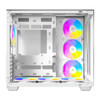
ANTEC Constellation C5 White ARGB Case, 270' Full-View Tempered Glass, Dual Chamber, Support Back-Connect Motherboards, 7 x ARGB PWM Fans With Built-In Fan Controller, ATX, Micro-ATX, ITX
- SKU:
- CAANT-C5WHITE
- UPC:
- 0761345100342
- MPN:
- 0-761345-10034-2
- Availability:
- Free Click & Collect in Peterborough. UK delivery also available.




Description
Antec Constellation C5 White ARGB Case – 270° Tempered Glass, Dual-Chamber Design and 7 x ARGB PWM Fans
The Antec Constellation C5 White ARGB is a premium mid-tower gaming PC case designed for showcase builds, high-airflow systems and modern white gaming setups. With a 270° full-view tempered glass design, dual-chamber layout, support for back-connect motherboards, vertical airflow cooling and 7 pre-installed 120mm ARGB PWM fans, it gives PC builders a clean panoramic look with strong cooling support straight out of the box.
This case is ideal for customers searching for an Antec C5 White ARGB case, white dual-chamber PC case, 270 degree tempered glass gaming case, case with 7 ARGB fans included, or a modern mid-tower chassis for ATX, Micro-ATX and ITX gaming builds. It is especially suitable for users who want a clean display-style PC with hidden cable routing, strong airflow and support for large graphics cards.
Key Features of the Antec Constellation C5 White ARGB
- 270° full-view tempered glass design for a panoramic showcase build
- White mid-tower gaming case for clean, modern PC setups
- Dual-chamber layout separates the power supply and cables from the main hardware area
- Supports back-connect motherboards for cleaner cable routing and a neater front view
- 7 x 120mm ARGB PWM fans pre-installed for strong cooling and lighting out of the box
- 6 reverse-blade intake fans installed on the side and bottom for improved airflow presentation
- Built-in ARGB PWM fan controller for easier lighting and fan connection management
- Supports up to 10 x 120mm fans for vertical bottom-to-top airflow
- Supports top and bottom 360mm radiators plus side 280mm radiator support
- Supports ATX, Micro-ATX and ITX motherboards
- Supports large graphics cards up to 410mm
- Supports CPU air coolers up to 160mm
- Supports power supplies up to 240mm including cable space
- USB-C 3.2 Gen 2 front port for fast modern device connectivity
- Top and bottom magnetic dust filters for easier maintenance
- UPC: 0-761345-10034-2
270° Full-View Tempered Glass for a Showcase PC Build
The Antec Constellation C5 White ARGB is built around presentation. The front and side tempered glass panels create a 270° panoramic view, allowing your motherboard, graphics card, cooler, memory, cable routing and ARGB lighting to be clearly visible from multiple angles.
Antec uses a seamless panel design with a 45° bevel technique to reduce the visible joint gap between the glass panels. This gives the case a cleaner display-style appearance, making it a strong option for white gaming PCs, RGB builds and custom showcase systems.
Premium Look for White Gaming Setups
The white finish, tempered glass layout and ARGB lighting make this case ideal for builders who want a bright, clean and modern gaming PC aesthetic. It is well suited to white components, ARGB fans, AIO liquid coolers, RGB memory and visually focused desktop setups.
Dual-Chamber Design with 95mm Cable Management Space
The C5 uses a dual-chamber layout, placing the power supply and much of the cable routing in the right-hand chamber. This helps keep the main hardware chamber cleaner and improves the visual appearance through the glass panels.
Antec lists 95mm cable management space in the right chamber, giving builders more room to route thicker PSU cables, fan controller wiring, SATA power and front-panel cables away from the main display area.
Back-Connect Motherboard Support
The Antec C5 ARGB supports next-generation back-connect motherboards, also known as rear-connector motherboards. These motherboards place many cable connectors on the back side of the board, helping reduce visible cables at the front and improving the clean showcase look.
The case is also compatible with standard ATX, Micro-ATX and ITX motherboards, so you do not need a back-connect motherboard to use the case. However, a back-connect board can make the final build look cleaner.
7 Pre-Installed ARGB PWM Fans with Built-In Fan Controller
The Antec Constellation C5 White ARGB includes 7 x 120mm ARGB PWM fans pre-installed. This includes 3 x 120mm PWM ARGB reverse fans at the bottom, 3 x 120mm PWM ARGB reverse fans on the right side, and 1 x 120mm PWM ARGB fan at the rear.
The reverse-blade side and bottom fans are designed to provide intake airflow while keeping the cleaner fan side visible inside the showcase chamber. This improves the appearance of the build without sacrificing intake airflow.
Built-In ARGB PWM Fan Controller
The built-in controller helps manage the included ARGB PWM fans. Lighting effects can be controlled through the case LED button or synchronised with a compatible motherboard ARGB header, depending on the final build setup and motherboard support.
Vertical Cooling with Up to 10 Fan Positions
The C5 supports a vertical airflow layout, moving air from the bottom and side intake positions toward the top and rear exhaust areas. This bottom-to-top airflow pattern is useful for modern gaming systems where the graphics card and CPU can generate significant heat.
The case supports up to 10 x 120mm fans depending on the chosen layout. This gives builders flexibility for air-cooled systems, AIO liquid cooling and high-airflow ARGB fan setups.
Fan Support
- Top: 3 x 120mm or 2 x 140mm
- Side: 3 x 120mm or 2 x 140mm
- Bottom: 3 x 120mm
- Rear: 1 x 120mm
Strong Liquid Cooling Support
The Antec C5 White ARGB gives builders plenty of water-cooling flexibility. It supports radiators up to 360mm at the top, up to 360mm at the bottom, up to 280mm at the side, and up to 120mm at the rear.
This makes it suitable for many popular AIO liquid coolers, including 240mm, 280mm and 360mm options, depending on the chosen mounting position and component clearance.
Radiator Support
- Top: 120 / 140 / 240 / 280 / 360mm
- Side: 120 / 140 / 240 / 280mm
- Bottom: 120 / 240 / 360mm
- Rear: 120mm
Spacious Component Compatibility
The C5 White ARGB supports ATX, Micro-ATX and ITX motherboards, making it suitable for a wide range of gaming and performance PC builds. It supports graphics cards up to 410mm, CPU coolers up to 160mm, and power supplies up to 240mm including cable space.
This makes it suitable for many modern graphics cards, tower air coolers, modular power supplies and high-performance desktop builds. As always, check the exact dimensions of your GPU, cooler, PSU and radiator before ordering.
Storage Support
The removable hard drive cage provides space for 1 x 3.5-inch HDD and 2 x 2.5-inch SSDs. Antec also notes that the case bottom can additionally accommodate a 3.5-inch HDD after removing the frontmost bottom fan, or a 2.5-inch SSD after removing the lowest side fan.
Modern Front I/O with USB-C
The front I/O panel includes 2 x USB 3.0 ports, 1 x USB Type-C 3.2 Gen 2 port, microphone input, HD audio, power button and LED control button. This gives convenient access to modern peripherals such as external SSDs, USB-C devices, gaming headsets, microphones, controllers and card readers.
Who Is the Antec C5 White ARGB Best For?
- Gamers building a white ARGB showcase PC
- Users who want a panoramic 270° tempered glass case
- Builders looking for a dual-chamber case with cleaner cable routing
- PC builders using ATX, Micro-ATX or ITX motherboards
- Users planning a back-connect motherboard build
- Builders who want 7 ARGB PWM fans included
- Users installing 240mm, 280mm or 360mm AIO liquid coolers
- Customers who want a case with strong airflow and modern USB-C front I/O
Who Is This Case Not For?
This case is not the best choice for users who need an ultra-compact small-form-factor PC case, a closed-front silent office chassis, E-ATX motherboard support, or a build with no glass and no lighting. It is designed for airflow, ARGB lighting and display-style gaming systems.
Technical Specifications
- Brand: Antec
- Series: Constellation
- Model: C5 White ARGB
- UPC: 0-761345-10034-2
- Case Type: Mid-Tower Gaming PC Case
- Colour: White
- Dimensions: 469 x 285 x 400mm / D x W x H
- Materials: Steel, plastic and glass
- Side Panel: 4mm tempered glass
- Motherboard Support: ATX, Micro-ATX, ITX
- Back-Connect Motherboard Support: Yes
- Front I/O: Power, LED control button, 2 x USB 3.0, 1 x USB-C 3.2 Gen 2, 1 x microphone, 1 x HD audio
- Expansion Slots: 7
- Drive Bays: 1 x 3.5-inch, 2 x 2.5-inch
- Fan Support - Top: 3 x 120mm or 2 x 140mm
- Fan Support - Side: 3 x 120mm or 2 x 140mm
- Fan Support - Bottom: 3 x 120mm
- Fan Support - Rear: 1 x 120mm
- Included Fans: 3 x 120mm PWM ARGB reverse fans at bottom, 3 x 120mm PWM ARGB reverse fans on right side, 1 x 120mm PWM ARGB rear fan
- Total Included Fans: 7 x 120mm ARGB PWM fans
- Fan Controller: Built-in ARGB PWM fan controller
- Radiator Support - Top: 120 / 140 / 240 / 280 / 360mm
- Radiator Support - Side: 120 / 140 / 240 / 280mm
- Radiator Support - Bottom: 120 / 240 / 360mm
- Radiator Support - Rear: 120mm
- Maximum GPU Length: Up to 410mm
- Maximum CPU Cooler Height: Up to 160mm
- Maximum PSU Length: Up to 240mm including cable
- Dust Filters: Top and bottom magnetic dust filters
- Net Weight: 7.6kg
- Gross Weight: 9.2kg
- Warranty: 2 years
Important Build Compatibility Notes
Before ordering, check your motherboard size, graphics card length, CPU cooler height, power supply length and radiator clearance. This case supports ATX, Micro-ATX and ITX motherboards, but Antec’s official C5 White specification does not list E-ATX support. If you need E-ATX compatibility, choose a case specifically listed for E-ATX.
Important Fan and Controller Notes
The included fan controller should be connected correctly for fan power and ARGB lighting control. User build discussions commonly mention that the hub needs power from the PSU and correct PWM / ARGB connections to the motherboard for motherboard control. Use a compatible 5V 3-pin ARGB header for lighting sync, not a 12V RGB header.
Why Buy the Antec Constellation C5 White ARGB?
The Antec Constellation C5 White ARGB is a strong choice for builders who want a clean white dual-chamber case with panoramic tempered glass, back-connect motherboard support, powerful vertical airflow, seven included ARGB PWM fans and strong liquid cooling support. It combines showcase styling with practical cooling capacity, making it ideal for modern gaming PCs and high-performance desktop builds.
Choose this case if you want a white ARGB display case with excellent included fan value, clean cable routing potential and room for modern gaming hardware.
Specification
Antec Constellation C5 White ARGB Case Specifications
The Antec Constellation C5 White ARGB is a dual-chamber mid-tower gaming PC case with 270° full-view tempered glass, back-connect motherboard support, vertical airflow cooling and 7 pre-installed 120mm ARGB PWM fans. It is designed for clean white showcase builds, gaming PCs and high-airflow desktop systems using ATX, Micro-ATX or ITX motherboards.
General Information
| Brand | Antec |
| Series | Constellation |
| Model | C5 White ARGB |
| Product Type | Mid-Tower Gaming PC Case |
| Colour | White |
| UPC | 0-761345-10034-2 |
| Recommended Use | White gaming PCs, ARGB showcase builds, dual-chamber systems, back-connect motherboard builds and liquid-cooled desktop PCs |
Case Design and Materials
| Case Design | Dual-chamber panoramic gaming case |
| Glass Design | 270° full-view tempered glass |
| Side Panel | 4mm tempered glass |
| Materials | Steel, plastic and glass |
| Front Panel | Tool-free front panel with ARGB lighting strip |
| Cable Management Space | 95mm in the right chamber |
| Back-Connect Motherboard Support | Yes, supports next-generation back-connect motherboards |
Motherboard and Component Compatibility
| Motherboard Support | ATX, Micro-ATX, ITX |
| E-ATX Support | Not listed in Antec's official C5 White specifications |
| Maximum Graphics Card Length | Up to 410mm |
| Maximum CPU Cooler Height | Up to 160mm |
| Maximum Power Supply Length | Up to 240mm, including cable space |
| Expansion Slots | 7 |
Front I/O Ports and Controls
| Power Button | Yes |
| LED Control Button | Yes |
| USB-A Ports | 2 x USB 3.0 |
| USB-C Port | 1 x USB Type-C 3.2 Gen 2 |
| Microphone Port | 1 x MIC |
| Audio Port | 1 x HD Audio |
Included Fans and Fan Controller
| Total Included Fans | 7 x 120mm ARGB PWM fans |
| Bottom Fans Included | 3 x 120mm PWM ARGB reverse fans |
| Right Side Fans Included | 3 x 120mm PWM ARGB reverse fans |
| Rear Fan Included | 1 x 120mm PWM ARGB fan |
| Fan Controller | Built-in ARGB PWM fan controller |
| Reverse Fan Note | The six side and bottom reverse fans are designed for intake airflow while keeping the cleaner fan side visible inside the case. |
Fan Support
| Top Fan Support | 3 x 120mm or 2 x 140mm |
| Side Fan Support | 3 x 120mm or 2 x 140mm |
| Bottom Fan Support | 3 x 120mm |
| Rear Fan Support | 1 x 120mm |
| Maximum Fan Positions | Up to 10 x 120mm fans |
Radiator and Liquid Cooling Support
| Top Radiator Support | 120mm, 140mm, 240mm, 280mm or 360mm |
| Side Radiator Support | 120mm, 140mm, 240mm or 280mm |
| Bottom Radiator Support | 120mm, 240mm or 360mm |
| Rear Radiator Support | 120mm |
| Cooling Layout | Vertical bottom-to-top airflow design |
Drive Bays and Storage Support
| Expansion Slots | 7 |
| 3.5" Drive Bays | 1 |
| 2.5" Drive Bays | 2 |
| Additional Storage Note | The case bottom can additionally support a 3.5" HDD after removing the frontmost bottom fan, or a 2.5" SSD after removing the lowest side fan. |
| Drive Cage | Removable hard drive cage |
Dust Filters and Maintenance
| Dust Filters | Top and bottom magnetic dust filters |
| Maintenance Design | Magnetic filters for easier cleaning and dust control |
Dimensions and Weight
| Dimensions | 469 x 285 x 400mm / D x W x H |
| Depth | 469mm |
| Width | 285mm |
| Height | 400mm |
| Net Weight | 7.6kg |
| Gross Weight | 9.2kg |
Package Contents
| PC Case | 1 x Antec Constellation C5 White ARGB Case |
| Included Fans | 7 x 120mm ARGB PWM fans pre-installed |
| Fan Controller | Built-in ARGB PWM fan controller |
| Accessories | Standard case accessory pack / screws, depending on retail package |
Warranty
| Manufacturer Warranty | 2 years |
Important Build Compatibility Notes
Please check your components before purchase. The Antec C5 White ARGB supports graphics cards up to 410mm, CPU coolers up to 160mm, and power supplies up to 240mm including cable space. Radiator, fan and storage configurations can affect available clearance, so always check your GPU, AIO radiator, PSU and drive layout before building.
Important Motherboard Compatibility Note
Antec's official C5 White specification lists ATX, Micro-ATX and ITX motherboard support. It does not list E-ATX support for this model. If your product title or specification mentions E-ATX, I recommend removing it unless your supplier has separate verified fitment data.
Important Fan Controller Note
The included ARGB PWM fan controller normally needs correct PSU power and motherboard PWM / ARGB connections for full fan and lighting control. For motherboard lighting sync, use a compatible 5V 3-pin ARGB header, not a 12V 4-pin RGB header.
Return
FAQ: Frequenlty Asked Questions
Antec Constellation C5 White ARGB Case FAQ
The Antec Constellation C5 White ARGB Case is a dual-chamber mid-tower gaming PC case with a 270° full-view tempered glass design, 7 pre-installed ARGB PWM fans, built-in fan controller, support for back-connect motherboards, and strong cooling support for modern gaming builds. Below are the most common questions buyers ask before choosing this Antec C5 White ARGB gaming case, including airflow, fan setup, radiator support, GPU clearance, motherboard compatibility, ARGB control, cable management, and build suitability.
1. What is the Antec Constellation C5 White ARGB?
The Antec Constellation C5 White ARGB is a mid-tower gaming PC case with a 270° panoramic tempered glass design, dual-chamber layout, white finish, 7 pre-installed ARGB PWM fans, built-in fan controller, and support for modern gaming components. It is designed for builders who want strong airflow, clean cable routing, and a showcase-style PC build.
2. What motherboard sizes does the Antec C5 White ARGB support?
The Antec C5 White ARGB supports ATX, Micro-ATX, and ITX motherboards. It does not list E-ATX support, so buyers using larger E-ATX motherboards should choose a different case with confirmed E-ATX compatibility.
3. Does the Antec C5 White support back-connect motherboards?
Yes. The Antec C5 White ARGB supports next-generation back-connect motherboards, allowing compatible motherboard cables to be routed from the rear of the case. This helps create a cleaner front view and can improve airflow by reducing visible cable clutter.
4. What is a back-connect motherboard?
A back-connect motherboard has many of its main power, fan, USB, and front-panel connectors on the rear side of the board instead of the front. When used with a compatible case like the Antec C5 White ARGB, it can make the front of the build look much cleaner.
5. Can I use a normal ATX motherboard in the Antec C5 White?
Yes. You do not need a back-connect motherboard to use this case. The Antec C5 White ARGB also supports standard ATX, Micro-ATX, and ITX motherboards, so it can be used for normal PC builds as well as back-connect builds.
6. How many fans come with the Antec C5 White ARGB?
The Antec C5 White ARGB comes with 7 pre-installed 120mm ARGB PWM fans. This includes 3 x 120mm reverse ARGB PWM fans at the bottom, 3 x 120mm reverse ARGB PWM fans on the side, and 1 x 120mm ARGB PWM fan at the rear.
7. What are reverse fans in the Antec C5 White?
Reverse fans are designed so the “clean” side of the fan can face into the case while still pulling air in the intended direction. In the Antec C5 White, the side and bottom reverse fans are used as intake fans, helping airflow while keeping the visible side of the build tidy and attractive.
8. Does the Antec C5 White include a fan controller?
Yes. The case includes a built-in fan controller for the pre-installed ARGB PWM fans. This helps simplify fan and lighting wiring, especially because the case includes seven fans out of the box.
9. Does the Antec C5 White have good airflow?
Yes. The Antec C5 White is designed around vertical cooling, with bottom-to-top airflow and multiple intake/exhaust positions. The six reverse fans on the side and bottom provide intake airflow, while the rear fan helps exhaust warm air from the case.
10. How many fans can the Antec C5 White support?
The Antec C5 White can support up to 10 x 120mm fans in total. Fan positions include top, side, bottom, and rear mounting areas, giving builders plenty of flexibility for airflow and radiator layouts.
11. What fan sizes are supported at the top?
The top of the Antec C5 White supports 3 x 120mm or 2 x 140mm fans. This area is also commonly used for a top-mounted AIO liquid cooler.
12. What fan sizes are supported on the side?
The side of the case supports 3 x 120mm or 2 x 140mm fans. The case already includes 3 x 120mm reverse ARGB PWM fans on the side for intake airflow.
13. What fan sizes are supported at the bottom?
The bottom supports 3 x 120mm fans. The Antec C5 White comes with 3 x 120mm reverse ARGB PWM fans installed at the bottom to help feed cool air upward toward the graphics card and main chamber.
14. What fan size is supported at the rear?
The rear of the Antec C5 White supports 1 x 120mm fan. A 120mm ARGB PWM fan is included at the rear as standard.
15. Can I install a 360mm AIO in the Antec C5 White?
Yes. The Antec C5 White supports up to a 360mm radiator at the top and up to a 360mm radiator at the bottom. This makes it suitable for many high-performance gaming and productivity builds using large AIO liquid coolers.
16. Does the Antec C5 White support a side radiator?
Yes. The side of the Antec C5 White supports radiators up to 280mm. This gives builders another cooling option, especially in dual-chamber showcase builds where side-mounted cooling can look very clean.
17. What radiator sizes does the Antec C5 White support?
The Antec C5 White supports top radiators up to 360mm, side radiators up to 280mm, bottom radiators up to 360mm, and a rear 120mm radiator. This provides strong cooling flexibility for AIO liquid coolers and custom-style airflow layouts.
18. Should I mount my AIO radiator at the top, side, or bottom?
For most builds, a top-mounted radiator is a simple and effective choice because it exhausts CPU heat upward. Side mounting can look clean and work well depending on airflow direction. Bottom radiator mounting can be possible, but builders should carefully consider pump position, tube routing, and AIO manufacturer recommendations.
19. What graphics card length does the Antec C5 White support?
The Antec C5 White supports graphics cards up to 410mm long. This is enough clearance for many large modern GPUs, including many RTX 40 Series and Radeon gaming graphics cards, depending on the exact card model and cooling layout.
20. Will the Antec C5 White fit large RTX graphics cards?
Yes, the case is designed with large graphics card support and offers up to 410mm GPU clearance. Always check the exact length and thickness of your graphics card, especially if you are adding extra radiators, bottom fans, or vertical GPU accessories.
21. What CPU cooler height does the Antec C5 White support?
The Antec C5 White supports CPU air coolers up to 160mm tall. If you plan to use a large tower air cooler, check the cooler height carefully before buying.
22. Is the Antec C5 White good for air cooling?
Yes. With 7 included ARGB PWM fans, vertical airflow, bottom intake, side intake, rear exhaust, and support for up to 10 fans, the Antec C5 White is a strong case for air-cooled gaming builds.
23. Is the Antec C5 White good for liquid cooling?
Yes. The case supports multiple radiator positions, including 360mm radiator support at the top and bottom, plus up to 280mm on the side. This makes it suitable for many AIO-cooled gaming PCs and visually focused liquid-cooling builds.
24. What power supply size does the Antec C5 White support?
The Antec C5 White supports power supplies up to 240mm long including cables. This is enough for many standard ATX power supplies, but always check PSU length and allow space for cable bends in the dual-chamber section.
25. Where is the power supply installed in the Antec C5 White?
The Antec C5 White uses a dual-chamber layout with the power supply mounted in the right-side chamber. This keeps the main display chamber cleaner and gives more room for airflow, cable routing, and a tidy front-facing build.
26. Is the Antec C5 White a dual-chamber case?
Yes. The C5 White uses a dual-chamber layout. The main chamber displays the motherboard, GPU, cooling, and fans, while the rear/right chamber houses the power supply, storage, and cable management area.
27. How much cable management space does the Antec C5 White have?
Antec lists the right chamber as having around 95mm of cable management space. This is one of the advantages of the dual-chamber layout, especially for builds with multiple ARGB fans, modular power supply cables, and back-connect motherboards.
28. Does the Antec C5 White have tempered glass?
Yes. The case features 270° full-view tempered glass with a seamless panoramic style. This is designed to show off the internal components, ARGB fans, GPU, cooler, and clean cable management.
29. What does 270° full-view tempered glass mean?
270° full-view means the case uses front and side glass styling to create a wide panoramic view of the internal build. This gives a more open showcase look than a traditional case with only one glass side panel.
30. Does the Antec C5 White have front USB-C?
Yes. The front I/O includes 1 x USB Type-C 3.2 Gen 2 port, along with 2 x USB 3.0 ports, power button, LED control button, microphone, and HD audio.
31. Will the front USB-C port work with every motherboard?
The front USB-C port requires a compatible internal USB-C front-panel header on your motherboard. If your motherboard does not have this header, the case can still be used, but the front USB-C port may not work unless you use a suitable adapter or expansion card.
32. Does the case have dust filters?
Yes. The Antec C5 White includes magnetic dust filters at the top and bottom. These help reduce dust build-up, but they should be cleaned regularly to maintain airflow and cooling performance.
33. How many storage drives can I install?
The Antec C5 White includes space for 1 x 3.5-inch HDD and 2 x 2.5-inch SSDs. Additional storage options may be possible by removing specific fans, but this can affect the cooling layout.
34. Does the Antec C5 White support hard drives?
Yes. The case includes support for a 3.5-inch hard drive through the removable hard drive cage. It also supports 2.5-inch SSDs for SATA storage builds.
35. Can I add more storage by removing fans?
Yes. Antec notes that the case bottom can accommodate an extra 3.5-inch HDD after removing the frontmost bottom fan, or an extra 2.5-inch SSD after removing the lowest side fan. However, removing fans may reduce airflow, so this should be planned carefully.
36. How many expansion slots does the Antec C5 White have?
The Antec C5 White has 7 expansion slots. This supports standard graphics cards and other PCIe expansion cards such as capture cards, sound cards, or Wi-Fi cards.
37. What are the dimensions of the Antec C5 White?
The Antec C5 White measures approximately 469 x 285 x 400mm. It is a wide dual-chamber mid-tower case, so check your desk or floor space before buying.
38. How heavy is the Antec C5 White?
The case has a listed net weight of approximately 7.6kg and a gross weight of approximately 9.2kg. The final PC will weigh more once the motherboard, PSU, GPU, cooler, fans, and storage are installed.
39. Is the Antec C5 White good for a first PC build?
Yes. The spacious dual-chamber layout, built-in fan controller, pre-installed fans, and strong cable management space can make it easier for first-time builders. However, because it has many fans and ARGB connections, beginners should take time to follow the manual carefully when wiring the fan hub and lighting.
40. Is the Antec C5 White good for gaming PCs?
Yes. The Antec C5 White is well suited to gaming PCs because it supports large graphics cards, strong airflow, multiple fans, large radiators, modern front I/O, and a clean panoramic glass design for RGB gaming builds.
41. Is the Antec C5 White suitable for workstation builds?
It can be suitable for many workstation-style builds if the motherboard, GPU, cooler, PSU, and storage requirements fit within the case limits. For heavy workstation builds, check CPU cooler height, radiator position, GPU length, and drive bay requirements carefully.
42. Does the Antec C5 White support vertical GPU mounting?
The official specification highlights standard 7 expansion slots and large GPU clearance, but it does not clearly list a built-in vertical GPU mount as standard. If you want vertical GPU mounting, check whether a compatible vertical GPU bracket and PCIe riser cable are required.
43. Are the included fans PWM fans?
Yes. The included fans are listed as ARGB PWM fans. PWM control allows fan speed to be adjusted through the fan controller and motherboard connection when wired and configured correctly.
44. Can I control the fan speed from the motherboard?
Yes, the fan speed can normally be controlled through the motherboard when the fan controller’s PWM cable is connected to a suitable motherboard fan header and the BIOS or fan software is configured correctly. If the fans run at full speed, check the PWM connection, SATA power, BIOS fan mode, and fan curve settings.
45. Why are my Antec C5 fans running at full speed?
If the fans run at full speed, the fan controller may not be receiving a proper PWM control signal, the BIOS fan mode may be set incorrectly, or the fan curve may need adjustment. Check that the controller is connected to SATA power and that the PWM cable is connected to a motherboard fan header set to PWM mode.
46. Why are the fans spinning but not showing individually in BIOS?
This is normal when several fans are connected through a hub or controller. The motherboard may only see the controller or one RPM signal rather than every individual fan. The fans can still be powered and controlled together through the controller setup.
47. Can I control the ARGB lighting with the case button?
Yes. The front I/O includes an LED control button, which can be used to change lighting modes through the built-in controller. This is useful if your motherboard does not have a compatible ARGB header or if you prefer simple case-button lighting control.
48. Can I sync the ARGB lighting with my motherboard?
Yes, motherboard sync is possible when the ARGB cable from the controller is connected to a compatible 5V 3-pin ARGB header. Some setups may require holding the case LED button for a few seconds to switch from case-button mode to motherboard-sync mode.
49. Why are my ARGB fans not showing in motherboard software?
If the fans do not appear in motherboard RGB software, check that the ARGB cable from the controller is connected to the correct 5V 3-pin ARGB header, not a 12V 4-pin RGB header. Also check whether the controller is in motherboard-sync mode rather than case-button mode.
50. What is the difference between ARGB and RGB?
ARGB usually uses a 5V 3-pin connection and allows individual LEDs to show different colours and effects. Standard RGB usually uses a 12V 4-pin connection where all LEDs show the same colour. These connector types are not interchangeable.
51. Can I connect the ARGB cable to a 12V RGB header?
No. Do not connect a 5V 3-pin ARGB cable to a 12V 4-pin RGB header. Doing this can damage the lighting components. Always check the motherboard manual and use the correct ARGB header.
52. Why are the ARGB lights working but the fans are not spinning?
Fan lighting and fan motor power are separate connections. If the lights work but the fans do not spin, check the PWM fan connectors, the fan controller power, SATA power cable, motherboard fan header cable, and BIOS fan settings.
53. Why are the fans spinning but the ARGB lights are off?
If the fans spin but the lighting is off, check the ARGB cable connections, controller power, LED button cable, motherboard ARGB header connection, and whether the lighting mode has been switched off. Also confirm that the ARGB cable is connected to a 5V 3-pin header if using motherboard sync.
54. Is the Antec C5 White quiet?
The case includes multiple PWM fans, so noise depends heavily on the fan curve, component temperature, radiator setup, and airflow configuration. With a sensible PWM fan curve, the included fans can be tuned for quieter everyday use and stronger cooling under gaming load.
55. Is the Antec C5 White better for RGB showcase builds or silent builds?
The Antec C5 White is better suited to airflow-focused RGB showcase builds. It can be made reasonably quiet with good fan tuning, but buyers wanting a heavily sound-dampened, closed-panel silent case may prefer a silence-focused case design.
56. Is the Antec C5 White good for white PC builds?
Yes. The white chassis, panoramic glass, ARGB fans, and clean dual-chamber design make it a strong choice for white gaming builds, RGB showcase setups, and themed builds using white motherboards, white GPUs, white coolers, and white cables.
57. Antec C5 White vs Antec C5 Black — which should I choose?
The main choice is the colour/theme of your build. Choose the C5 White for a bright white RGB showcase build, or the C5 Black for a darker stealth-style gaming setup. The core layout and specification are very similar across the C5 ARGB colour options.
58. Antec C5 White vs traditional mid-tower case — which is better?
Choose the Antec C5 White if you want a panoramic glass view, dual-chamber layout, many included ARGB fans, strong vertical airflow, and support for back-connect motherboards. A traditional mid-tower may be better if you want a smaller footprint, lower price, fewer RGB parts, or a simpler internal layout.
59. Who is the Antec C5 White ARGB best for?
The Antec C5 White ARGB is best for PC builders who want a white panoramic gaming case with 7 included ARGB PWM fans, strong airflow, back-connect motherboard support, large GPU clearance, 360mm radiator support, and a clean dual-chamber layout.
60. Who is the Antec C5 White ARGB not for?
This case is not the best choice if you need E-ATX motherboard support, a very compact case, a non-RGB office case, a low-cost basic case, a heavily sound-dampened silent case, or a case with lots of 3.5-inch hard drive bays.
61. What should I check before buying the Antec C5 White?
Before buying, check your motherboard size, whether you are using a standard or back-connect motherboard, GPU length, CPU cooler height, PSU length, radiator size, front USB-C header support, ARGB header support, storage needs, and available desk space. This helps avoid compatibility issues during the build.
Related Products
Related Products
ANTEC Constellation C3 Black ARGB Case, 270' Full-View Tempered Glass, Dual Chamber, Tool-Free Design, 4 x ARGB PWM Fns With Built-In Fan Controller, ATX, Micro-ATX, ITX
ANTEC