
Kingston
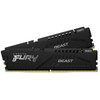
Kingston FURY Beast 32GB (2x16GB) DDR5 6000MT/s RAM – CL36, XMP 3.0 & EXPO
- SKU:
- SDKIN-K560C3E2K2
- UPC:
- 740617345841
- MPN:
- KF560C36BBE2K2-32
- Availability:
- Free Click & Collect in Peterborough. UK delivery also available.


Description
Kingston FURY Beast 32GB DDR5-6000 CL36 Desktop RAM – 2 x 16GB XMP 3.0 & AMD EXPO Kit
The Kingston FURY Beast 32GB DDR5-6000 memory kit is a high-performance desktop RAM upgrade designed for compatible DDR5 gaming PCs, enthusiast systems and productivity workstations. The exact KF560C36BBE2K2-32 kit contains two matched 16GB modules for a total capacity of 32GB, with an overclocked profile of 6000MT/s at CL36-44-44 and 1.35V.
Designed for modern Intel and AMD DDR5 platforms, this Kingston FURY Beast kit supports both Intel XMP 3.0 and AMD EXPO v1.1, allowing compatible motherboards to load pre-tested memory speed, timing and voltage profiles through the BIOS rather than requiring every value to be entered manually.
The modules use a standard 288-pin DDR5 UDIMM desktop format with 1Rx8 organisation, non-ECC unbuffered operation, on-die ECC, integrated DDR5 power management and compact black heat spreaders measuring only approximately 34.9mm high.
Model: Kingston FURY Beast | MPN: KF560C36BBE2K2-32 | Capacity: 32GB (2 x 16GB) | Speed: DDR5-6000 | Latency: CL36
Key Features of the Kingston FURY Beast 32GB DDR5-6000 Kit
- 32GB total capacity supplied as 2 x 16GB modules
- DDR5-6000 / 6000MT/s rated performance
- PC5-48000 memory classification
- CL36-44-44 primary profile timings
- 1.35V at the DDR5-6000 performance profile
- Intel XMP 3.0 support
- AMD EXPO v1.1 support
- Secondary DDR5-5600 profile at CL40-40-40 and 1.25V
- Default JEDEC DDR5-4800 CL40-39-39 at 1.1V
- 288-pin desktop UDIMM form factor
- 1Rx8 organisation per module
- Eight 2G x 8-bit FBGA components per 16GB module
- Non-ECC, unbuffered desktop memory
- DDR5 on-die ECC support
- On-module power management through DDR5 PMIC architecture
- Two independent 32-bit DDR5 subchannels per DIMM
- Compact 34.9mm low-profile heat spreader
- Black heat spreader and black PCB
- No RGB lighting
- Gold contact fingers
- Operating temperature from 0°C to 85°C
- Kingston limited lifetime manufacturer warranty
32GB Capacity with Two Matched 16GB Modules
This product contains two 16GB DDR5 memory modules, giving a total installed capacity of 32GB.
A 32GB configuration is well suited to modern gaming PCs and multitasking systems where applications such as web browsers, game launchers, streaming software, communication tools and background utilities may all be running at the same time.
It also provides useful capacity for creative and professional applications such as photo editing, video editing, software development, virtual machines and 3D workloads.
Is 32GB of DDR5 RAM Enough for Gaming?
32GB is a strong capacity for modern gaming PCs and provides additional headroom beyond entry-level 16GB configurations.
Actual memory requirements depend on the game, operating system, background software, mods, streaming applications and other tasks running simultaneously.
Is This One 32GB Module or Two 16GB Modules?
This exact KF560C36BBE2K2-32 product is a matched kit containing 2 x 16GB modules.
It should not be confused with Kingston part numbers representing a single 32GB DIMM.
DDR5-6000 Performance
The Kingston FURY Beast kit is tested by Kingston to operate at DDR5-6000 / 6000MT/s using its primary XMP or EXPO performance profile.
DDR5-6000 means the memory is capable of transferring data at up to approximately 6,000 million transfers per second under the supported profile and compatible system configuration.
Is DDR5-6000 the Same as 6000MHz?
The industry frequently markets DDR5-6000 as “6000MHz RAM”, but 6000MT/s is the more technically accurate description of the effective data-transfer rate.
Because DDR stands for Double Data Rate, data transfers occur more than once per underlying memory clock cycle.
PC5-48000 Memory Bandwidth Classification
DDR5-6000 is commonly classified as PC5-48000, corresponding to a theoretical peak transfer bandwidth of approximately 48GB/s per 64-bit DIMM data path before considering platform architecture and real-world overhead.
Actual application performance depends on the processor, memory controller, motherboard, channel configuration, timings and workload.
CL36-44-44 Low-Latency Performance Profile
The exact current KF560C36BBE2K2-32 kit is specified for:
DDR5-6000 CL36-44-44 at 1.35V
The first number, CL36, represents CAS latency in memory clock cycles. The following numbers represent additional primary memory timing values.
Is This Kit CL36-38-38 or CL36-44-44?
The current KF560C36BBE2K2-32 kit is CL36-44-44.
An earlier Kingston FURY Beast model, KF560C36BBEK2-32, used a different DDR5-6000 profile of CL36-38-38. Kingston has since replaced that older model with the current BBE2 version.
Because the two part numbers are very similar, specifications should always be matched to the exact product code rather than copied from an older Kingston listing.
Intel XMP 3.0 Support
The Kingston FURY Beast kit supports Intel Extreme Memory Profile 3.0.
XMP stores tested performance profiles directly on the memory module so that a compatible Intel motherboard can automatically configure appropriate memory speed, timings and voltage through BIOS settings.
Kingston specifies the following XMP profiles for this exact kit:
- XMP Profile 1: DDR5-6000 CL36-44-44 at 1.35V
- XMP Profile 2: DDR5-5600 CL40-40-40 at 1.25V
Will the RAM Automatically Run at 6000MT/s?
Not necessarily. Without an XMP or EXPO performance profile enabled, the modules may initially operate using their standard JEDEC settings.
Kingston programs this kit with a default DDR5-4800 CL40-39-39 profile at 1.1V.
To reach DDR5-6000, a compatible motherboard and processor must support the required memory configuration and the appropriate XMP or EXPO profile normally needs to be enabled in the system BIOS.
AMD EXPO v1.1 Support
The kit also supports AMD EXPO v1.1, AMD's Extended Profiles for Overclocking specification.
This makes the same memory kit suitable for compatible AMD DDR5 platforms as well as suitable Intel XMP systems.
Kingston specifies:
- EXPO Profile 0: DDR5-6000 CL36-44-44 at 1.35V
- EXPO Profile 1: DDR5-5600 CL40-40-40 at 1.25V
What Is AMD EXPO?
AMD EXPO stores tested memory-overclocking information such as speed, latency and voltage on the DIMM.
On a compatible motherboard, the profile can normally be selected through BIOS settings, simplifying configuration compared with manually entering every memory timing.
Compatible with Intel and AMD DDR5 Systems
The Kingston FURY Beast kit can be used with compatible Intel and AMD desktop platforms that support:
- DDR5 memory
- 288-pin unbuffered UDIMMs
- 16GB modules
- The required memory speed and configuration
For best results, check your motherboard manufacturer's memory compatibility list and your processor's supported memory specification before purchase.
Will This RAM Work with an AMD Ryzen PC?
Yes, on a compatible DDR5 AMD platform. The kit includes AMD EXPO profiles specifically for supported AMD systems.
It is not suitable for older AMD motherboards that use DDR4 memory.
Will This RAM Work with an Intel PC?
Yes, on compatible Intel DDR5 platforms. The modules support Intel XMP 3.0 profiles for suitable motherboards.
Some Intel processor generations are available with either DDR4 or DDR5 motherboards, so check the exact motherboard rather than relying only on the CPU model.
288-Pin Desktop UDIMM Memory
The modules use a 288-pin DDR5 UDIMM desktop-memory format.
This is full-size desktop RAM and is designed for compatible desktop motherboards with DDR5 DIMM slots.
Can This RAM Be Used in a Laptop?
No. This is full-size desktop UDIMM memory.
Most DDR5 laptops require shorter DDR5 SO-DIMM modules, which have a different physical form factor.
The FURY Beast desktop kit should not be confused with Kingston FURY Impact laptop memory.
DDR5 Is Not Compatible with DDR4 Slots
DDR5 and DDR4 memory use different electrical standards and different physical key positions.
This kit cannot be installed into a DDR4-only motherboard, even though both DDR4 and DDR5 desktop modules are described as DIMMs.
Can I Mix DDR4 and DDR5 RAM?
No. Consumer desktop motherboards do not use DDR4 and DDR5 modules interchangeably in the same memory slots.
Use the memory generation specified by your exact motherboard.
1Rx8 Memory Organisation
Kingston specifies each 16GB module in this kit as 1Rx8.
This means each DIMM uses a single memory rank with x8-organised DRAM devices.
Kingston states that each module is built from eight 2G x 8-bit FBGA components.
Is This Kit Single Rank or Dual Rank?
Each 16GB module is specified as 1Rx8, meaning single-rank x8 organisation.
The complete package contains two separate 1Rx8 memory modules.
Dual-Module Kit for Compatible Multi-Channel Platforms
The two DIMMs are supplied together as a tested Kingston kit. On a typical compatible dual-channel desktop platform, installing the modules in the motherboard manufacturer's recommended paired slots can allow the memory controller to operate across multiple memory channels.
Which Motherboard Slots Should I Use?
The correct slots depend on the motherboard.
Many four-slot desktop boards recommend the second and fourth DIMM slots from the CPU for a two-module configuration, often labelled A2 and B2, but you should always follow the installation diagram in the motherboard manual.
On-Die ECC for DDR5 Stability
The Kingston FURY Beast DDR5 modules support on-die error correction code (ODECC).
On-die ECC is built into DDR5 DRAM technology and helps correct certain errors internally within individual memory chips.
Is This ECC Server Memory?
No. Kingston specifies this kit as non-ECC unbuffered system memory.
DDR5 on-die ECC should not be confused with traditional system-level ECC memory used by supported servers and workstations. On-die ECC operates internally within DDR5 memory chips and does not provide the same end-to-end error-correction functionality as an ECC UDIMM or RDIMM platform.
DDR5 Dual 32-Bit Subchannels
DDR5 changes how data is organised compared with conventional DDR4 DIMMs.
Each DDR5 DIMM is divided into two independent 32-bit data subchannels, helping improve memory-access efficiency and allowing the memory controller to handle smaller data requests more effectively.
This architecture is one of the features Kingston highlights as contributing to DDR5's increased efficiency in modern workloads.
On-Module Power Management
DDR5 moves important power-management functions onto the memory module itself through a power management integrated circuit (PMIC).
This provides more localised management of the voltages required by the DRAM compared with earlier desktop-memory generations.
Kingston's XMP 3.0 implementation can also store advanced memory-profile information for compatible systems.
Low-Profile 34.9mm Heat Spreader
The Kingston FURY Beast uses a compact black heat spreader measuring approximately 34.9mm high.
Each module measures approximately:
- Length: 133.35mm
- Height: 34.9mm
- Thickness: 6.62mm
The relatively low height can make the memory easier to use alongside large CPU air coolers than taller RGB memory modules.
Is This the RGB Version?
No. KF560C36BBE2K2-32 is the standard black Kingston FURY Beast model without RGB lighting.
Kingston sells separate FURY Beast RGB variants with different part numbers and taller heat spreaders.
Suitable for Gaming PCs
The combination of 32GB capacity, DDR5-6000 speed and CL36 latency makes this kit suitable for modern gaming builds using compatible DDR5 processors and motherboards.
Memory performance can affect game behaviour differently depending on the title, processor, graphics card, resolution and system configuration.
Will DDR5-6000 Increase Gaming FPS?
Faster memory can improve performance in workloads that are sensitive to memory bandwidth and latency, but the size of the improvement varies substantially between games and systems.
Graphics-card performance, CPU architecture and game engine often have a greater influence on overall frame rate.
Suitable for Streaming and Content Creation
A 32GB memory capacity can provide useful headroom for demanding applications beyond gaming, including:
- 4K and high-resolution video editing
- Live streaming
- Photo editing
- 3D modelling
- Animation
- Software development
- Large spreadsheets and productivity workloads
- Virtual machines
- Heavy multitasking
The benefit of faster memory depends on how heavily the software relies on memory bandwidth, capacity and latency.
Default JEDEC DDR5-4800 Profile
If the performance profile is not enabled or supported, Kingston programs the modules with a standard DDR5-4800 CL40-39-39 profile at 1.1V.
This behaviour is normal and is not evidence that the memory is incorrectly specified.
Why Does My 6000MT/s RAM Show 4800MT/s?
If the system initially reports 4800MT/s, check whether XMP or EXPO is enabled in the motherboard BIOS.
The processor and motherboard must also support the selected profile. If the platform cannot operate reliably at DDR5-6000, the memory may use a lower supported speed.
Secondary DDR5-5600 Profile
In addition to the main DDR5-6000 profile, Kingston provides a secondary:
DDR5-5600 CL40-40-40 at 1.25V
This can provide another pre-defined operating option on compatible XMP or EXPO platforms.
Memory Overclocking and Compatibility
DDR5-6000 operation through XMP or EXPO is an overclocked memory profile relative to the module's standard JEDEC configuration.
Achieving the advertised profile depends on the entire memory subsystem, including:
- Processor memory controller
- Motherboard design
- BIOS version
- DIMM slot population
- CPU sample quality
- Memory training
- BIOS configuration
Kingston notes that not every motherboard or system configuration will operate at every published FURY speed or timing.
Is DDR5-6000 Guaranteed on Every DDR5 Motherboard?
No. The kit itself is tested by Kingston at its published specification, but the host system must also be capable of operating the memory at that profile.
Always check motherboard and processor compatibility before purchase, especially when using high-speed memory profiles.
Operating Temperature
Kingston specifies an operating temperature range of 0°C to 85°C and a storage temperature range of -55°C to 100°C for this memory module design.
Normal PC airflow around the memory area can help the heat spreaders dissipate heat during operation.
Kingston Limited Lifetime Warranty
Kingston FURY memory modules are covered by Kingston's limited lifetime manufacturer warranty, subject to Kingston's warranty terms and regional conditions.
The two modules in this product are sold as a matched kit and should be kept together. Kingston states that warranty coverage and returns for kits may be affected if the modules are separated and used or sold individually.
Who Is the Kingston FURY Beast 32GB DDR5-6000 Kit Best For?
- Modern DDR5 gaming PCs
- Compatible AMD systems using EXPO
- Compatible Intel systems using XMP 3.0
- Users upgrading from 16GB to 32GB system memory
- High-performance gaming and streaming PCs
- Creative workstations
- Video and photo editing systems
- 3D modelling and rendering PCs
- Developers running memory-intensive applications
- Users wanting low-profile DDR5 memory without RGB lighting
Important Things to Know Before Buying
- This is desktop DDR5 memory, not laptop SO-DIMM memory.
- The exact kit is KF560C36BBE2K2-32.
- The package contains 2 x 16GB modules.
- Total capacity is 32GB.
- The primary performance profile is DDR5-6000 CL36-44-44 at 1.35V.
- The older KF560C36BBEK2-32 used different CL36-38-38 timings.
- Default JEDEC operation is DDR5-4800 CL40-39-39 at 1.1V.
- XMP or EXPO normally needs to be enabled to achieve the 6000MT/s profile.
- Actual maximum speed depends on motherboard and CPU memory-controller support.
- Each module is 1Rx8.
- The modules are non-ECC unbuffered UDIMMs.
- On-die ECC does not make this conventional ECC server memory.
- The kit cannot be used in DDR4-only motherboards.
- The modules use a compact 34.9mm-high heat spreader.
- This exact model does not include RGB lighting.
- Use the motherboard manufacturer's recommended DIMM slots for a two-module installation.
Kingston FURY Beast KF560C36BBE2K2-32 Technical Highlights
- Brand: Kingston
- Series: Kingston FURY Beast
- Manufacturer Part Number: KF560C36BBE2K2-32
- UPC / Barcode: 740617345841 / 0740617345841
- Total Capacity: 32GB
- Kit Configuration: 2 x 16GB
- Memory Generation: DDR5
- Memory Type: DDR5 SDRAM
- Form Factor: 288-pin UDIMM
- Rated Speed: 6000MT/s
- Memory Classification: PC5-48000
- Primary CAS Latency: CL36
- DDR5-6000 Timings: 36-44-44
- DDR5-6000 Voltage: 1.35V
- Secondary Profile: DDR5-5600 CL40-40-40 at 1.25V
- JEDEC Default: DDR5-4800 CL40-39-39 at 1.1V
- Intel XMP: XMP 3.0
- AMD EXPO: EXPO v1.1
- Rank / Organisation: 1Rx8 per module
- DRAM Configuration: Eight 2G x 8-bit FBGA components per module
- Error Correction: Non-ECC system memory with DDR5 on-die ECC
- Buffering: Unbuffered
- Contact Fingers: Gold
- Heat Spreader: Low-profile black heat spreader
- RGB: No
- Module Length: 133.35mm
- Module Height: 34.9mm
- Module Thickness: 6.62mm
- Operating Temperature: 0°C to 85°C
- Storage Temperature: -55°C to 100°C
- Manufacturer Warranty: Limited lifetime
What's Included?
- 2 x Kingston FURY Beast 16GB DDR5-6000 desktop memory modules
- Total matched-kit capacity: 32GB
Why Choose Kingston FURY Beast 32GB DDR5-6000?
The Kingston FURY Beast KF560C36BBE2K2-32 provides a balanced combination of 32GB capacity, DDR5-6000 performance and broad Intel XMP / AMD EXPO profile support for modern desktop systems.
Its two matched 16GB modules are tested by Kingston for DDR5-6000 CL36-44-44 at 1.35V, while the secondary DDR5-5600 profile and standard JEDEC DDR5-4800 fallback provide additional flexibility for compatible platforms.
DDR5 features such as dual 32-bit subchannels, on-die ECC and on-module power management help improve efficiency and stability compared with earlier memory generations, while the compact 34.9mm heat spreaders provide a low-profile design that can be easier to accommodate beneath large CPU coolers.
The kit supports both Intel XMP 3.0 and AMD EXPO v1.1, making it suitable for a wide variety of compatible Intel and AMD DDR5 gaming PCs and workstations.
For users building or upgrading a modern desktop and looking for a 32GB DDR5-6000 CL36 kit with two matched 16GB modules, low-profile cooling and a Kingston limited lifetime warranty, the Kingston FURY Beast KF560C36BBE2K2-32 is a strong high-performance DDR5 option.
Specification
Kingston FURY Beast 32GB DDR5-6000 CL36 Memory Specifications
The Kingston FURY Beast KF560C36BBE2K2-32 is a matched 32GB desktop DDR5 memory kit consisting of two 16GB modules. It is rated for DDR5-6000 CL36-44-44 at 1.35V and supports both Intel XMP 3.0 and AMD EXPO v1.1. Each module uses a 288-pin UDIMM form factor with 1Rx8 organisation and a low-profile black heat spreader.
General Information
| Brand | Kingston |
| Product Range | Kingston FURY Beast |
| Manufacturer Part Number | KF560C36BBE2K2-32 |
| UPC | 740617345841 |
| GTIN / EAN | 0740617345841 |
| Product Type | Desktop DDR5 memory kit |
| Colour | Black |
| RGB Lighting | No |
Memory Capacity
| Total Capacity | 32GB |
| Number of Modules | 2 |
| Capacity per Module | 16GB |
| Kit Configuration | 2 x 16GB |
Memory Type & Form Factor
| Memory Generation | DDR5 |
| Memory Technology | DDR5 SDRAM |
| Form Factor | Desktop UDIMM |
| Pin Count | 288-pin |
| Buffered / Registered | No – unbuffered |
| System-Level ECC | No – non-ECC system memory |
| DDR5 On-Die ECC | Yes |
Memory Speed & Performance
| Rated Memory Speed | 6000MT/s |
| Commonly Marketed Speed | DDR5-6000 / 6000MHz |
| Memory Classification | PC5-48000 |
| Primary CAS Latency | CL36 |
| DDR5-6000 Primary Timings | 36-44-44 |
| DDR5-6000 Profile Voltage | 1.35V |
AMD EXPO Profiles
| AMD EXPO Support | Yes – AMD EXPO v1.1 |
| EXPO Profile #0 | DDR5-6000 CL36-44-44 @ 1.35V |
| EXPO Profile #1 | DDR5-5600 CL40-40-40 @ 1.25V |
Intel XMP Profiles
| Intel XMP Support | Yes – Intel XMP 3.0 |
| XMP Profile #1 | DDR5-6000 CL36-44-44 @ 1.35V |
| XMP Profile #2 | DDR5-5600 CL40-40-40 @ 1.25V |
Default JEDEC / SPD Profile
| Default JEDEC Speed | DDR5-4800 |
| Default Timings | CL40-39-39 |
| Default Voltage | 1.1V |
| Default CAS Latency | 40 cycles |
JEDEC Electrical Specifications
| VDD | 1.1V typical |
| VDDQ | 1.1V typical |
| VPP | 1.8V typical |
| VDDSPD | 1.8V to 2.0V |
JEDEC Default Timing Parameters
| CL(IDD) | 40 cycles |
| Row Cycle Time (tRCmin) | 48ns minimum |
| Refresh to Active / Refresh Command Time (tRFCmin) | 295ns minimum |
| Row Active Time (tRASmin) | 32ns minimum |
Module Organisation
| Rank / Organisation | 1Rx8 per module |
| Rank | Single rank per 16GB module |
| Module Configuration | 2G x 64-bit per 16GB module |
| DRAM Components | 8 x 2G x 8-bit FBGA components per module |
| DRAM Device Organisation | x8 |
| DRAM Density | 16Gbit components |
DDR5 Features
| On-Die ECC | Yes |
| On-Module Power Management | Yes – DDR5 PMIC architecture |
| DDR5 Subchannels | 2 independent 32-bit data subchannels per DIMM |
| Gold Contact Fingers | Yes |
Physical Specifications
| Module Length | 133.35mm |
| Module Height | 34.9mm |
| Module Thickness | 6.62mm |
| Dimensions per Module | 133.35 x 34.9 x 6.62mm |
| Heat Spreader | Low-profile Kingston FURY Beast heat spreader |
| Heat Spreader Colour | Black |
| Module Height with Heat Spreader | 34.9mm / 1.37 inches |
| RGB / LED Lighting | None |
Environmental Specifications
| Operating Temperature | 0°C to 85°C |
| Storage Temperature | -55°C to 100°C |
| UL Rating | 94 V-0 |
Desktop Compatibility
| Compatible Device Type | Desktop PC with compatible DDR5 UDIMM slots |
| Intel Platform Support | Compatible Intel DDR5 platforms supporting 288-pin unbuffered DIMMs and the required memory configuration |
| AMD Platform Support | Compatible AMD DDR5 platforms supporting 288-pin unbuffered DIMMs and the required memory configuration |
| DDR4 Motherboard Compatibility | No |
| Laptop SO-DIMM Compatibility | No – this is full-size desktop UDIMM memory |
| Registered Server DIMM Compatibility | No – this is unbuffered desktop memory |
Package Contents
| Kingston FURY Beast DDR5 Modules | 2 x 16GB |
| Total Memory Capacity | 32GB |
| Matched Memory Kit | Yes – two modules supplied together as one Kingston kit |
Manufacturer Warranty
| Kingston Warranty | Limited lifetime manufacturer warranty |
| Warranty Conditions | Subject to Kingston's applicable warranty terms and regional conditions |
| Kit Warranty Note | Kingston states that kits should remain together; warranty may be void and returns not accepted if kit modules are sold or used separately |
Important 6000MT/s Speed Note
The Kingston FURY Beast KF560C36BBE2K2-32 is tested by Kingston for DDR5-6000 CL36-44-44 at 1.35V. However, 6000MT/s is an XMP / EXPO performance profile and is not guaranteed on every DDR5 motherboard or processor.
Actual maximum memory speed depends on the processor's memory controller, motherboard design, BIOS version, DIMM population and system configuration.
Important Default Speed Note
If Intel XMP or AMD EXPO is not enabled, the memory may initially operate using its programmed JEDEC profile of DDR5-4800 CL40-39-39 at 1.1V. This is normal behaviour and does not mean the kit is incorrectly specified.
Important XMP & EXPO Profile Note
The kit contains both Intel XMP 3.0 and AMD EXPO v1.1 profiles. Its primary profile is DDR5-6000 CL36-44-44 at 1.35V, while a secondary DDR5-5600 CL40-40-40 profile at 1.25V is also programmed into the modules.
Important Current Model Revision Note
This product is KF560C36BBE2K2-32. It should not be confused with the older discontinued KF560C36BBEK2-32.
The older BBEK2 version used DDR5-6000 CL36-38-38, while this current BBE2 version is specified by Kingston as DDR5-6000 CL36-44-44.
Important Voltage Note
The correct voltage for the main DDR5-6000 performance profile is 1.35V. A 1.4V specification should not be used for this exact KF560C36BBE2K2-32 kit.
Important ECC Note
This kit is non-ECC system memory, although DDR5 incorporates on-die ECC inside the DRAM devices. On-die ECC is not equivalent to traditional system-level ECC memory and should not be advertised as a replacement for ECC UDIMMs or registered ECC server memory.
Important DDR4 / DDR5 Compatibility Note
This is DDR5 desktop memory. It cannot be installed in a DDR4-only motherboard. DDR4 and DDR5 use different electrical standards and physical key positions.
Important Laptop Compatibility Note
The KF560C36BBE2K2-32 uses a full-size 288-pin desktop UDIMM design. It is not DDR5 SO-DIMM laptop memory and will not fit notebooks requiring SO-DIMM modules.
Important DIMM Slot Installation Note
For a two-module kit, install the DIMMs in the motherboard manufacturer's recommended paired slots. On many four-slot desktop motherboards this is A2 and B2, but the exact configuration should always be confirmed in the motherboard manual.
Important Kit Warranty Note
The two modules are supplied as one matched Kingston kit. Kingston states that warranty may be void and returns may not be accepted if kit modules are sold or used separately, so the two DIMMs should be kept together as the original kit.
Return
FAQ: Frequenlty Asked Questions
Kingston FURY Beast 32GB DDR5-6000 CL36 FAQ
The Kingston FURY Beast KF560C36BBE2K2-32 is a 32GB desktop memory kit containing two matched 16GB DDR5 DIMMs. It is rated for DDR5-6000 at CL36-44-44 and 1.35V and supports both Intel XMP 3.0 and AMD EXPO profiles, making it suitable for compatible Intel and AMD DDR5 gaming PCs, workstations and high-performance desktop systems.
Below are answers to the most common questions buyers ask about Kingston FURY Beast DDR5-6000 compatibility, AMD EXPO, Intel XMP, Ryzen AM5 systems, Intel processors, 6000MT/s memory speed, CL36 latency, dual-channel installation, motherboard QVL compatibility, BIOS settings, memory training, upgrading to 64GB and DDR5 stability.
1. What is the Kingston FURY Beast KF560C36BBE2K2-32?
The Kingston FURY Beast KF560C36BBE2K2-32 is a high-performance desktop DDR5 memory kit with a total capacity of 32GB. It contains two matched 16GB modules rated for up to 6000MT/s at CL36-44-44 using the appropriate Intel XMP or AMD EXPO profile.
2. What is the exact Kingston part number of this RAM kit?
The exact manufacturer part number is KF560C36BBE2K2-32. Checking the full part number is important because Kingston produces several FURY Beast DDR5 kits with different capacities, speeds, timings, colours and RGB options.
3. How much memory is included in KF560C36BBE2K2-32?
The kit provides 32GB total capacity using two matched 16GB DDR5 modules. It is therefore sold as a 2 x 16GB kit rather than a single 32GB DIMM.
4. Is this desktop or laptop RAM?
This is desktop DDR5 DIMM memory. Each module uses a 288-pin DIMM design. It is not a laptop SODIMM and will not fit a normal laptop DDR5 memory slot.
5. What speed is the Kingston FURY Beast KF560C36BBE2K2-32?
The performance profile is rated at DDR5-6000 / 6000MT/s with timings of CL36-44-44 at 1.35V. Reaching 6000MT/s requires a compatible processor, motherboard and BIOS configuration and normally requires enabling XMP or EXPO.
6. Is DDR5-6000 the same as 6000MHz?
6000MT/s is the technically correct data-transfer rate. Because DDR means Double Data Rate, DDR5-6000 operates with an actual memory clock around 3000MHz while transferring data twice per clock cycle. Retail listings commonly call this “6000MHz RAM”, but 6000MT/s is more accurate.
7. What does PC5-48000 mean?
PC5-48000 is another way of identifying DDR5-6000 memory bandwidth. The figure represents approximately 48,000MB/s theoretical bandwidth per 64-bit memory channel before protocol overhead and other real-world limitations.
8. What are the timings of this Kingston FURY Beast kit?
The main DDR5-6000 performance profile is CL36-44-44 at 1.35V. Kingston also programs a DDR5-5600 CL40-40-40 profile at 1.25V and a default JEDEC DDR5-4800 CL40-39-39 configuration at 1.1V.
9. What does CL36 mean on DDR5 RAM?
CL36 refers to CAS Latency, measured in memory clock cycles. It is one part of the overall memory timing specification. Memory performance is determined by both transfer rate and timings, so CAS latency should not be considered in isolation.
10. What voltage does KF560C36BBE2K2-32 use?
The DDR5-6000 CL36 performance profile operates at 1.35V. The secondary DDR5-5600 CL40 profile operates at 1.25V, while the default JEDEC DDR5-4800 configuration operates at 1.1V.
11. Why does my Kingston DDR5-6000 RAM initially run at 4800MT/s?
This is normal. The modules contain a safe JEDEC default profile of DDR5-4800 CL40-39-39 at 1.1V. To use the tested 6000MT/s performance profile, you normally need to enable the appropriate XMP or EXPO profile in the motherboard BIOS.
12. Does this RAM automatically run at 6000MT/s after installation?
Not necessarily. Most systems initially boot using the JEDEC 4800MT/s profile. To reach 6000MT/s, enable the appropriate Intel XMP or AMD EXPO profile in BIOS and make sure your motherboard and CPU memory controller can support the selected configuration.
13. What memory profiles are programmed into this kit?
Kingston specifies a DDR5-6000 CL36-44-44 1.35V profile and a DDR5-5600 CL40-40-40 1.25V profile for both supported overclocking standards. The kit also includes a default DDR5-4800 CL40-39-39 1.1V JEDEC configuration.
14. Why does the Kingston kit include a 5600MT/s profile as well as 6000MT/s?
The secondary 5600MT/s profile provides another factory-programmed option for systems that cannot remain fully stable at 6000MT/s. Kingston specifies DDR5-5600 CL40-40-40 at 1.25V for this profile.
15. Does KF560C36BBE2K2-32 support Intel XMP 3.0?
Yes. Kingston officially specifies Intel XMP 3.0 support for this exact kit. XMP allows compatible Intel-based systems to load the tested memory speed, timings and voltage through the motherboard BIOS.
16. Does this Kingston FURY Beast kit support AMD EXPO?
Yes. The exact KF560C36BBE2K2-32 kit supports AMD EXPO and Kingston's datasheet lists AMD EXPO version 1.1 support.
17. Does this RAM support both XMP and EXPO on the same kit?
Yes. One of the useful features of KF560C36BBE2K2-32 is that the same kit contains profiles for both Intel XMP 3.0 and AMD EXPO. You do not need to buy separate Intel and AMD versions of this exact kit.
18. Is this Kingston DDR5 RAM compatible with AMD Ryzen processors?
Yes, when used with a compatible AMD platform and DDR5 motherboard. Because this model supports AMD EXPO, it is particularly suitable for compatible AM5 Ryzen systems. Always check the exact motherboard CPU and memory support information before purchasing.
19. Is KF560C36BBE2K2-32 compatible with AMD AM5 motherboards?
Yes, it can be used with compatible DDR5-based AMD AM5 motherboards including suitable A620, B650, B650E, X670, X670E, B850, X870 and X870E boards. Maximum stable memory speed depends on the CPU memory controller, motherboard design and BIOS.
20. Is Kingston FURY Beast DDR5-6000 suitable for Ryzen 7000 processors?
Yes, this EXPO-enabled kit can be used with compatible Ryzen 7000-series AM5 processors and motherboards. The ability to run the full 6000MT/s profile depends on the individual CPU, motherboard and BIOS configuration.
21. Is this RAM compatible with the Ryzen 7 7800X3D?
Yes, it can be used with a Ryzen 7 7800X3D when installed on a compatible DDR5 AM5 motherboard. DDR5-6000 is a commonly selected performance class for AM5 gaming systems, but the full EXPO speed is still an overclocked memory configuration and individual system stability must be confirmed.
22. Is the Kingston FURY Beast DDR5-6000 compatible with Ryzen 9000 processors?
Yes, it can be used with compatible Ryzen 9000-series processors on supported AM5 DDR5 motherboards. Check the motherboard memory QVL and use a current BIOS for the best chance of high-speed DDR5 compatibility.
23. Can I use this RAM with a Ryzen 7 9800X3D?
Yes, when paired with a compatible AM5 DDR5 motherboard. The KF560C36BBE2K2-32 supports AMD EXPO, although operation at 6000MT/s remains dependent on the motherboard, BIOS and individual CPU memory controller.
24. Is this memory compatible with Intel processors?
Yes. The kit supports Intel XMP 3.0 and can be used with compatible Intel desktop processors and DDR5 motherboards. Check that your motherboard is specifically a DDR5 model because some Intel motherboard generations were offered in separate DDR4 and DDR5 versions.
25. Can I use this Kingston RAM with Intel 12th, 13th or 14th Gen processors?
Yes, when the processor is installed on a compatible DDR5 motherboard. Examples include suitable DDR5 versions of Intel 600- and 700-series motherboards. Maximum memory speed varies according to the processor, motherboard topology, DIMM configuration and BIOS.
26. Can this RAM be used with an Intel Core Ultra desktop processor?
Potentially yes, provided the Core Ultra desktop platform uses standard DDR5 UDIMMs and the motherboard supports this memory kit or equivalent specifications. Always check the motherboard's memory compatibility list because high-speed DDR5 support varies between boards and processor generations.
27. How do I check whether my motherboard supports KF560C36BBE2K2-32?
Check that the motherboard uses desktop DDR5 DIMMs and then search its memory QVL or compatibility list for KF560C36BBE2K2-32. Kingston also provides a compatible-system search. A kit not appearing on a motherboard QVL is not automatically incompatible, but a QVL listing provides additional validation.
28. What is a motherboard RAM QVL?
QVL means Qualified Vendor List. Motherboard manufacturers test selected memory kits and publish the models and configurations they have validated. Checking the QVL is particularly useful when aiming for high DDR5 speeds such as 6000MT/s or when planning high-capacity configurations.
29. Should I update my motherboard BIOS before enabling EXPO or XMP?
It is often worthwhile, particularly on newer DDR5 platforms. BIOS updates can include memory compatibility, training and stability improvements. Follow the motherboard manufacturer's BIOS update instructions carefully and use a stable official BIOS version appropriate for your board.
30. Which RAM slots should I use for this 2x16GB kit?
Most four-slot motherboards recommend installing a two-DIMM kit in A2 and B2, usually the second and fourth slots away from the CPU. However, always follow the specific installation diagram in your motherboard manual because slot recommendations can vary.
31. Does this 2x16GB kit run in dual-channel mode?
Yes, when the two modules are installed in the correct paired memory slots on a dual-channel desktop platform. Using the motherboard's recommended slots allows one DIMM to operate on each memory channel.
32. Is 2x16GB better than one 32GB stick?
For most dual-channel desktop systems, a matched 2x16GB kit allows both memory channels to be populated immediately. A single 32GB DIMM leaves one channel without a module, although it may offer a simpler future capacity upgrade path.
33. Can I install four of these 16GB modules and run 64GB at 6000MT/s?
Four DDR5 DIMMs place substantially more electrical load on the CPU memory controller than two DIMMs. A system that runs two modules at 6000MT/s may therefore require a lower memory speed when all four slots are populated. Do not assume that four modules will retain the original 6000MT/s profile.
34. Can I buy another identical 2x16GB kit later to make 64GB?
You can physically install another compatible kit if your motherboard provides four DIMM slots, but two separately packaged kits are not validated as one matched four-module set. Running four DDR5 modules also places more load on the memory controller, so 6000MT/s operation may no longer be stable.
35. What is the better way to upgrade from 32GB to 64GB DDR5?
If maintaining a high DDR5 memory speed is important, a factory-matched 2x32GB 64GB kit is generally easier for the processor memory controller than filling all four DIMM slots with 4x16GB. Check the selected 64GB kit against your motherboard QVL.
36. Can I mix this Kingston RAM with another brand of DDR5?
Mixing different memory kits is not recommended when maximum compatibility and performance are important. Modules with similar advertised speed may use different ICs, timings, subtimings or SPD programming. A factory-matched kit provides a more predictable configuration.
37. Can I mix this 6000MT/s kit with slower DDR5 memory?
The system may attempt to operate all installed memory at settings that every module can support, which can reduce speed and may still cause compatibility issues. For best results, use one matched memory kit rather than mixing modules with different specifications.
38. Is 32GB of DDR5 enough for gaming?
For many current gaming PCs, 32GB provides substantial capacity for games, Windows, browsers, launchers, voice chat and background applications. Certain simulation games, heavily modded titles and professional workloads can benefit from more memory, but requirements vary considerably.
39. Is 32GB enough for gaming and streaming?
For many gaming and streaming systems, 32GB is a practical capacity. Streaming software, browser sources, game launchers and voice applications can run alongside the game without the tight memory limits associated with smaller configurations, although particularly demanding workflows may use more.
40. Is this Kingston RAM suitable for video editing and content creation?
Yes. A 32GB DDR5-6000 kit can suit photo editing, video editing, music production, programming and general content creation. Complex 4K/8K projects, large virtual machines, professional 3D workloads and very large datasets may benefit from 64GB or more.
41. Can this DDR5 memory be installed in a DDR4 motherboard?
No. DDR5 and DDR4 DIMMs use different electrical specifications and physical key positions. A DDR5 module cannot be installed in a DDR4 memory slot even if the processor family is available with both DDR4 and DDR5 motherboards.
42. Can this RAM be used in a laptop?
No. KF560C36BBE2K2-32 uses full-size 288-pin desktop DIMMs. Laptops normally use the physically smaller SODIMM format, so you would need a compatible Kingston DDR5 SODIMM product for an upgradeable laptop.
43. Is KF560C36BBE2K2-32 ECC memory?
It is a non-ECC unbuffered desktop DIMM kit. Like DDR5 memory generally, the DRAM chips include on-die ECC for internal error correction, but this is not the same as system-level ECC memory used by servers and workstations.
44. What is DDR5 on-die ECC?
On-die ECC is error-correction functionality built into DDR5 DRAM chips to improve the integrity of data stored within the individual memory device. It does not provide the same end-to-end error detection and correction as a true ECC DIMM and should not be advertised as server ECC memory.
45. Is this registered or unbuffered memory?
The modules are unbuffered DIMMs, or UDIMMs. They are intended for compatible consumer and enthusiast desktop motherboards rather than server platforms requiring Registered DIMMs or RDIMMs.
46. What does 1Rx8 mean?
Kingston specifies each 16GB module as 1Rx8. 1R means single-rank, while x8 describes the organisation of the DRAM components used to construct the module.
47. Does the Kingston FURY Beast have a heat spreader?
Yes. The modules use Kingston's black FURY Beast heat spreader, which provides a low-profile design while helping dissipate heat from the memory components during operation.
48. How tall is the Kingston FURY Beast KF560C36BBE2K2-32?
Kingston specifies a module height of approximately 34.9mm including the heat spreader. This relatively low-profile design can help with compatibility under large air CPU coolers.
49. What are the dimensions of each RAM module?
Each module is approximately 133.35mm long, 34.9mm high and around 6.6mm deep. The low-profile height is especially useful when checking clearance with large tower CPU coolers.
50. Will this RAM fit underneath a large CPU air cooler?
Its approximately 34.9mm height makes it relatively low profile compared with many tall RGB memory modules. However, CPU cooler clearance varies considerably, so check the cooler manufacturer's RAM-height specification before installation.
51. Does KF560C36BBE2K2-32 have RGB lighting?
No. This exact model is the non-RGB black FURY Beast version. Kingston sells separate FURY Beast RGB products for users who want illuminated memory.
52. What colour are the modules?
This version has a black heat spreader and is designed to suit a wide range of gaming and workstation builds without integrated RGB lighting.
53. What is the operating temperature range?
Kingston specifies an operating temperature range of approximately 0°C to 85°C and a storage temperature range of approximately -55°C to 100°C.
54. What warranty does Kingston FURY Beast memory have?
Kingston FURY memory is supplied with a limited lifetime manufacturer warranty, subject to Kingston's applicable warranty terms and conditions. Keep proof of purchase for warranty support.
55. Is enabling XMP or EXPO considered memory overclocking?
Yes. XMP and EXPO profiles configure memory above standard JEDEC settings and are therefore performance or overclocking profiles. Kingston tests the kit at its specified profile settings, but operation at the advertised profile also depends on the CPU memory controller, motherboard and BIOS.
56. Is 6000MT/s guaranteed on every compatible PC?
No. Kingston tests the memory kit for its 6000MT/s profile, but the complete memory subsystem includes the CPU's integrated memory controller, motherboard signal layout, BIOS and number of installed DIMMs. These factors determine whether a particular PC can operate the profile reliably.
57. Why does my PC take longer to boot after enabling EXPO?
DDR5 platforms may perform memory training when settings change. During training the motherboard tests memory parameters before completing POST, so the first boot after enabling EXPO, updating BIOS or changing RAM can take noticeably longer. The exact behaviour varies by motherboard and BIOS.
58. Is a long AM5 boot time with DDR5 always a faulty RAM kit?
No. AM5 systems can spend additional time training DDR5, particularly after memory or BIOS changes. However, repeated boot failures, errors, blue screens or inability to complete POST should be investigated by checking BIOS version, memory slots, QVL compatibility and profile settings.
59. What should I do if the PC will not POST after enabling EXPO or XMP?
Allow sufficient time for initial DDR5 memory training. If the system still does not boot, return to safe BIOS settings using the motherboard's recommended CMOS-reset procedure, confirm the modules are in the recommended slots, update BIOS if appropriate and try the secondary 5600MT/s profile before assuming the memory is defective.
60. What should I do if DDR5-6000 causes crashes or blue screens?
First test the system at its default JEDEC settings. If it is stable at 4800MT/s but unstable with the 6000MT/s profile, check motherboard BIOS updates and memory compatibility, verify that the modules are installed in the recommended slots and test the secondary 5600MT/s profile. Memory stability depends on the complete CPU, motherboard and RAM combination.
61. How can I test whether the RAM is stable?
Memory-testing utilities such as MemTest86 or other reputable RAM stability tests can help identify memory errors. For meaningful testing, allow the test to complete multiple passes or follow the software developer's recommended procedure. A system that appears stable on the Windows desktop can still produce memory errors under heavy load.
62. Why does the BIOS show around 3000MHz when I bought 6000MT/s RAM?
This can be completely normal. DDR stands for Double Data Rate. An effective DDR5-6000 data rate corresponds to an underlying memory clock of approximately 3000MHz, with data transferred twice per clock cycle.
63. Kingston DDR5-6000 CL36 vs DDR5-5600 CL40 - what is the difference?
The 6000MT/s CL36 profile provides a higher transfer rate and tighter primary CAS latency than the secondary 5600MT/s CL40 profile, but 5600MT/s may be easier for some CPU and motherboard combinations to operate reliably. This Kingston kit includes both options.
64. DDR5-6000 CL36 vs DDR5-6000 CL30 - what is the difference?
At the same 6000MT/s transfer rate, CL30 has a lower primary CAS latency than CL36. However, overall application and gaming performance also depends on secondary timings, CPU architecture, memory controller, motherboard and workload. CL36 remains a high-speed DDR5 configuration and may offer different pricing and compatibility characteristics.
65. Will DDR5-6000 improve gaming performance compared with slower RAM?
Faster memory can improve performance in workloads that are sensitive to memory bandwidth and latency, but the size of the difference varies significantly by processor, graphics card, resolution and game. GPU-limited games may show little change, while CPU-sensitive workloads can benefit more.
66. Do I need drivers or Kingston software for this RAM?
No special Windows driver is required for normal operation. XMP or EXPO is configured in the motherboard BIOS. Because this exact kit has no RGB lighting, RGB-control software is not required for the modules.
67. Who should NOT buy the Kingston KF560C36BBE2K2-32?
This kit is not suitable for DDR4-only motherboards, laptops requiring SODIMMs, servers requiring registered or system-level ECC memory, or users needing more than 32GB from a single matched kit. It may also be unnecessary if your processor or motherboard cannot benefit from high-speed DDR5 and you do not plan to enable XMP or EXPO.
68. What is included in the Kingston FURY Beast KF560C36BBE2K2-32 package?
The package contains two matched 16GB Kingston FURY Beast DDR5 desktop DIMMs, providing 32GB total capacity. Kingston treats the two modules as one matched memory kit and they are intended to be used together.
Related Products
Related Products


Kingston FURY Beast 64GB (2x32GB) DDR5 6000MT/s RGB RAM – CL36, XMP & EXPO
Kingston

Kingston FURY Beast KF560C36BBEK2-64 64GB (2x 32GB) DIMM System Memory, 6000MHz, DDR5, CL36, Black, Intel XMP, AMD EXPO
Kingston