
TP-LINK
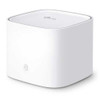
TP-LINK Aginet HX510 X3000 Dual Band Whole Home Mesh Wi-Fi 6 System, Remote Management, 3-Port, AP Mode
- SKU:
- HX5101-PACK
- UPC:
- 4897098686027
- MPN:
- HX510(1-PACK)


Description
TP-Link Aginet HX510 X3000 Dual-Band Wi-Fi 6 Mesh System – Whole-Home Coverage, EasyMesh, Remote Management
The TP-Link Aginet HX510 is a powerful Wi-Fi 6 (802.11ax) mesh networking system designed to deliver fast, stable wireless coverage throughout your home or office. With combined wireless speeds up to 3000 Mbps and support for EasyMesh™ technology, the HX510 eliminates Wi-Fi dead zones while providing seamless roaming between nodes for uninterrupted connectivity.
Built for modern smart homes and broadband connections, the HX510 supports advanced Wi-Fi 6 technologies such as OFDMA, MU-MIMO and improved efficiency for multiple connected devices. It also includes remote management capabilities for service providers and advanced users.
Summary
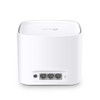
The TP-Link Aginet HX510 is a dual-band Wi-Fi 6 mesh router system delivering up to AX3000 wireless speeds (574 Mbps on 2.4GHz and 2402 Mbps on 5GHz). It supports EasyMesh whole-home networking, MU-MIMO, OFDMA, and includes 3 Gigabit Ethernet ports for wired connections. Designed for flexible deployment, it can operate in router or access point (AP) mode and supports remote cloud management via the Aginet platform.
Key Features & Benefits
- Wi-Fi 6 AX3000 Speeds – Up to 2402 Mbps (5GHz) + 574 Mbps (2.4GHz)
- Whole-Home Mesh Wi-Fi – Eliminates dead zones with seamless roaming
- EasyMesh Compatible – Expand coverage with additional mesh nodes
- MU-MIMO & OFDMA – Efficient performance for many connected devices
- 3× Gigabit LAN Ports – High-speed wired connections
- Remote Cloud Management – Designed for ISP and advanced network control
- Flexible Operation Modes – Router mode or Access Point (AP) mode
Fast & Reliable Wi-Fi 6 Performance
AX3000 Dual-Band Wireless
With combined wireless speeds up to 3000 Mbps, the HX510 supports modern bandwidth-intensive activities such as 4K streaming, online gaming and smart home connectivity.
Advanced Wi-Fi 6 Technologies
Wi-Fi 6 introduces technologies like OFDMA and MU-MIMO that allow the router to communicate with multiple devices simultaneously, reducing latency and improving network efficiency.
Whole-Home Mesh Coverage
Seamless Roaming
EasyMesh technology allows multiple nodes to work together as a single network, automatically switching devices to the strongest signal as you move around your home.
Expandable Mesh Network
Add additional EasyMesh compatible devices to extend coverage to larger homes or multi-floor properties.
Flexible Deployment
Router or Access Point Mode
The HX510 can operate as a standalone router or be configured in AP mode to extend an existing network, making it suitable for many different setups.
Remote Management
The Aginet platform allows ISPs or network administrators to manage and monitor devices remotely, simplifying network deployment and maintenance.
Technical Specifications
- Wi-Fi Standard: Wi-Fi 6 (802.11ax)
- Speed Class: AX3000
- Wireless Speeds: 2402 Mbps (5GHz) + 574 Mbps (2.4GHz)
- Ethernet Ports: 3× Gigabit LAN
- Mesh Support: EasyMesh
- Technologies: MU-MIMO, OFDMA
- Operating Modes: Router / Access Point
- Management: Aginet Remote Management
Compatibility Notes
- Works with standard broadband routers or modems.
- For full mesh coverage, additional EasyMesh compatible devices may be required.
- Maximum speeds depend on ISP bandwidth and connected device capabilities.
Ideal For
- Whole-home Wi-Fi coverage
- Smart homes with many connected devices
- High-speed fibre broadband connections
- Businesses or ISPs requiring remote management
Short Product Summary
TP-Link Aginet HX510 – AX3000 Wi-Fi 6 dual-band mesh system with EasyMesh support, 3 Gigabit ports and remote management for fast, reliable whole-home wireless coverage.
Specification
| Interface | 3× Gigabit Ports *Per Unit 1 Port supports WAN/LAN auto-sensing |
|---|---|
| Button | Reset Button WPS Button |
| External Power Supply | 12 V ⎓ 1.5 A |
| Dimensions ( W x D x H ) | 4.7 x 4.7 x 3.8 in (120 x 120 x 96.5 mm) |
| Wireless Standards | Wi-Fi 6 IEEE 802.11a/n/ac/ax 5 GHz IEEE 802.11b/g/n/ax 2.4 GHz |
|---|---|
| Frequency | 2.4 GHz and 5 GHz |
| Signal Rate | AX3000 5 GHz: Up to 2402 Mbps 2.4 GHz: Up to 574 Mbps |
| Wireless Security | WPA-PSK/WPA2-PSK/WPA3 Personal encryptions |
| Transmission Power | FCC: <30 dBm (2.4 GHz), <30 dBm (5 GHz) CE: <20 dBm (2.4 GHz), <23 dBm (5 GHz) |
| Multi-SSID | 2× 5 GHz Multi-SSID 2× 2.4 GHz Multi-SSID |
| Quality of Service | WMM |
|---|---|
| Advanced Features | Parental Controls, QoS (Quality of Service), Address Reservation, Port Forwarding, WiFi Schedule |
| WAN Type | Dynamic IP/Static IP/PPPoE |
| Management Features | Local Management, TAUC Cloud Management, TR-069 (TR-098/TR-181), TR-111, TR-143 |
| Firewall Security | SPI Firewall |
| Protocols | IPv4 IPv6 |
| Working Modes | Router Mode Access Point Mode |
| Package Content | HX510 (2-pack) 2 HX510 Units 1 RJ45 Ethernet Cable 2 Power Adapters 1 Quick Installation Guide HX510 (1-pack) 1 HX510 Unit 1 RJ45 Ethernet Cable 1 Power Adapter 1 Quick Installation Guide |
|---|---|
| Smartphone/Tablet Requirements | Android 4.4 or later iOS 9.0 or later |
| Certifications | CE, FCC, Wi-Fi CERTIFIED 6™, Wi-Fi CERTIFIED EasyMesh™ |
| Environment | Operating Temperature: 0℃–40℃ (32℉–104℉) Storage Temperature: -40℃–60℃ (-40℉–140℉) Operating Humidity: 10%–90% non-condensing Storage Humidity: 5%–90% non-condensing |
Return
FAQ: Frequently Asked Questions
TP-Link Aginet HX510 (AX3000 / X3000) Mesh Wi-Fi 6 — FAQ
What is the TP-Link Aginet HX510?
How fast is “AX3000 / X3000”?
Does it support Wi-Fi 6 (OFDMA, MU-MIMO, 160MHz)?
How many Ethernet ports does each unit have?
Can I use Ethernet backhaul between mesh nodes?
Router mode vs Access Point (AP) mode — which should I use?
- Router mode: use if HX510 is your main router (handles PPPoE/DHCP, NAT, firewall).
- AP mode: use if you already have an ISP router and you want HX510 to provide Wi-Fi/mesh only.
Does it support WPA3 and guest networks?
Can I manage it remotely?
Which app do I use to set it up?
Can I add extra nodes or expand coverage?
User question: “Can I mesh HX510 with Deco extenders / random TP-Link repeaters?”
Why are my speeds much lower in another room?
- Node placement (too far / too many walls)
- Backhaul running over 2.4GHz due to weak 5GHz signal
- Client device limitations (some devices are 1×1 Wi-Fi, older standards)
- Congestion/interference (especially on 2.4GHz)