
MSI
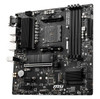
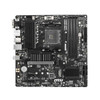
MSI B550M PRO-VDH Motherboard AMD B550 Socket AM4 Micro ATX
- SKU:
- 4719072758417
- UPC:
- 4719072758417
- MPN:
- B550M PRO-VDH


Description
MSI B550M PRO-VDH Micro-ATX Motherboard – AMD B550, AM4 Socket, DDR4, PCIe 4.0, Dual M.2
Build a powerful and reliable AMD system with the MSI B550M PRO-VDH, a feature-rich Micro-ATX AM4 motherboard based on the AMD B550 chipset. Designed for Ryzen 5000 / 4000 G-Series / 3000 Series processors, this board combines PCIe 4.0 support, dual M.2 storage, DDR4 memory compatibility and stable power delivery — making it ideal for gaming PCs, home office builds and everyday performance systems.
Summary
The MSI B550M PRO-VDH is an AMD B550 chipset Micro-ATX motherboard for the AM4 socket, supporting Ryzen 5000, 4000 G-Series and 3000 Series CPUs. It offers up to 128GB DDR4 (4 DIMM slots), 1× PCIe 4.0 x16 (CPU dependent), 2× M.2 slots (1× PCIe 4.0 x4 + 1× PCIe 3.0 x4), Realtek Gigabit LAN, and display outputs including HDMI, DVI-D and VGA (iGPU required).
Key Features & Benefits
- AM4 Socket: Supports AMD Ryzen™ 5000, 4000 G-Series & 3000 Series processors
- PCIe 4.0 Ready: Primary PCIe x16 slot supports Gen4 (with compatible Ryzen CPU)
- Dual M.2 Storage: 1× PCIe 4.0 x4 + 1× PCIe 3.0 x4 for fast NVMe SSDs
- 4× DDR4 DIMM Slots: Up to 128GB, dual-channel, supports high memory speeds (OC dependent)
- Realtek Gigabit LAN: Stable wired networking
- Multiple Display Outputs: HDMI, DVI-D, VGA (with APU/iGPU CPU)
- Core Boost & Digital Power Design: Optimised power delivery for stable CPU performance
- EZ Debug LED: Quick troubleshooting during builds
Performance & Expansion
PCIe 4.0 Graphics Support
The primary PCIe x16 slot supports PCIe 4.0 when paired with a compatible Ryzen 3000/5000 CPU. This ensures full bandwidth for modern GPUs and future upgrade flexibility.
Memory Support up to 128GB
With 4× DDR4 DIMM slots, the B550M PRO-VDH supports up to 128GB of memory in dual-channel mode, making it suitable for gaming, multitasking, and productivity workloads. Memory overclocking support depends on CPU and RAM compatibility.
Storage & Connectivity
Dual M.2 + SATA Expansion
- M2_1: PCIe 4.0 x4 (CPU dependent)
- M2_2: PCIe 3.0 x4
- 4× SATA 6Gb/s for HDDs and SATA SSDs
Enjoy fast boot times and game loading speeds with NVMe drives while keeping extra storage via SATA ports.
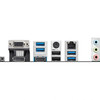
Rear I/O Connectivity
- 1× HDMI
- 1× DVI-D
- 1× VGA (D-Sub)
- USB 3.2 Gen 1 ports
- USB 2.0 ports
- Realtek Gigabit LAN (RJ-45)
- Audio jacks
Cooling & Build Features
- Heatsinks on VRM & chipset for stable thermal performance
- Fan headers with smart control for efficient cooling setup
- EZ Debug LED to help identify CPU, RAM, VGA or boot issues quickly
Compatibility Notes
1) AM4 CPU Required
This motherboard supports AMD AM4 processors only. It is not compatible with AM5 CPUs.
2) Display Ports Require an APU
HDMI, DVI and VGA outputs work only if you use a Ryzen CPU with integrated graphics (e.g. Ryzen “G” series). If using a standard Ryzen CPU without iGPU, a dedicated graphics card is required.
3) PCIe 4.0 CPU Requirement
PCIe 4.0 support depends on installing a compatible Ryzen 3000 or 5000 processor. Older CPUs may operate at PCIe 3.0 speeds.
Ideal For
- Budget and mid-range AMD gaming PCs
- Office and productivity builds
- Compact Micro-ATX cases
- Upgrading existing AM4 systems
The MSI B550M PRO-VDH delivers reliable AMD AM4 performance with PCIe 4.0 support, dual M.2 NVMe storage, 128GB DDR4 capacity, and solid connectivity — making it a strong value choice for Ryzen-based Micro-ATX builds.
Specification
Chipset: AMD® B550 Chipset
Memory Channel: Dual
Dimm Slots: 4
Max Memory (GB): 128
PCI-E X16: 1
PCI-E Gen: Gen4/ Gen3
PCI-E X1: 2
SATAIII: 4
M.2 Slot: 2
Raid: 0/1/10
TPM (Header): 1
USB 3.2 Ports (Front): 1(Gen 1, Type C), 2(Gen 1, Type A)
USB 3.2 Ports (Rear): 4(Gen 1, Type A)
USB 2.0 Ports (Front): 4
USB 2.0 Ports (Rear): 2
Serial Ports (Front): 1
Audio Ports (Rear): Realtek® ALC892/ALC897 Codec
Displayport: 1
VGA: 1
HDMI: 1
DirectX: 12
CPU Support: Support for Windows® 10 64-bit
Form Factor: MATX
Return
FAQ: Frequently asked Questions
MSI B550M PRO-VDH (AM4) — FAQ
What is the MSI B550M PRO-VDH?
Which CPUs are supported?
Do I need to update the BIOS for Ryzen 5000?
How much RAM does it support and what type?
Does it support XMP (A-XMP) and higher RAM speeds?
Costumer question: “A-XMP causes reboot loops / crashes” — what should I do?
- Update BIOS to the latest stable version (improves RAM compatibility).
- Start with 2 sticks in the recommended slots (A2/B2) before using 4 sticks.
- If 3600MHz is unstable, drop to 3200MHz or increase DRAM voltage to the kit rating (often 1.35V).
How many M.2 slots and SATA ports does it have?
Does it support PCIe 4.0?
Does the MSI B550M PRO-VDH have Wi-Fi?
Does it have USB-C?
Question: “Flash BIOS button keeps blinking forever” — common fixes
- Use a small USB 2.0 stick, format FAT32, and use the correct Flash BIOS USB port.
- Ensure the BIOS file is renamed exactly as MSI requires (commonly MSI.ROM).
- Try another USB stick/port if the LED never stops or the USB activity LED never flashes.
Troubleshooting: no display / won’t POST
- Confirm your CPU has graphics if you’re using motherboard video outputs (many Ryzen CPUs need a dedicated GPU; Ryzen “G” models include iGPU).
- Reseat RAM and try one stick first.
- Clear CMOS and update BIOS (Flash BIOS can help if the CPU isn’t supported by current BIOS).