
LOGITECH
Logitech MK540 Advanced Wireless Keyboard and Mouse Combo UK Layout Unifying Receiver
- SKU:
- KELOG-920008684
- UPC:
- 5099206077454
- MPN:
- 920-008684






Description
Logitech MK540 Advanced Wireless Keyboard and Mouse Combo – Full-Size UK Layout for PC and Laptop
The Logitech MK540 Advanced Wireless Keyboard and Mouse Combo is a comfortable and reliable wireless keyboard and mouse set designed for everyday home, office, and business use. With a full-size QWERTY UK keyboard, a contoured ambidextrous mouse, and 2.4GHz wireless connectivity through the Logitech Unifying USB receiver, this combo is built for users who want dependable performance and familiar everyday comfort.
The keyboard includes a numeric keypad, integrated palm rest, and adjustable tilt legs, while the mouse is shaped for comfortable use in either hand. This makes the MK540 Advanced a strong choice for buyers looking for a wireless keyboard and mouse combo for Windows, a UK layout office keyboard and mouse, or a practical Logitech set for desktop and laptop use.
Key Features of the Logitech MK540 Advanced
- Wireless keyboard and mouse combo
- QWERTY UK full-size keyboard layout
- 2.4GHz wireless connection
- Logitech Unifying USB receiver
- Integrated palm rest
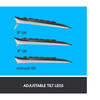
- Adjustable keyboard tilt legs
- Contoured ambidextrous wireless mouse
- Multimedia and programmable function keys
- Encrypted wireless connection
- Long battery life
Designed for Comfort and Everyday Productivity
The MK540 Advanced is designed to feel familiar straight away, with a full-size layout and quiet, optimised keys intended for accuracy and comfortable long-term use. Logitech describes the keyboard as having a familiar key shape and layout, helping make it a good fit for users working on documents, spreadsheets, admin tasks, email, and everyday browsing.
The integrated palm rest and adjustable tilt legs help improve desk comfort, especially for longer typing sessions. That makes this combo particularly suitable for office workers, home users, students, and anyone looking for a practical full-size keyboard and mouse set.
Full-Size UK Keyboard with Number Pad
This combo is a strong option for buyers who want a proper full-size wireless keyboard rather than a smaller compact layout. The included numeric keypad is especially useful for office work, data entry, finance tasks, and general productivity.
Wireless Convenience with Logitech Unifying Receiver
The keyboard and mouse connect using a single Logitech Unifying USB receiver, helping keep setup simple and reducing cable clutter. Logitech also highlights the combo as a plug-and-play solution with a reliable and encrypted wireless connection, making it a practical option for both home and business users.
Reliable 2.4GHz Wireless for PC and Laptop Use
With a wireless range listed by Logitech and resellers at up to 10 metres in typical conditions, the MK540 Advanced is well suited to desk use with desktops, laptops, and office workstations. It is especially useful for users who want a cleaner workspace without a wired keyboard and mouse.
Comfortable Ambidextrous Mouse
The included wireless mouse has a contoured shape with soft rubber side grips and is designed to fit comfortably in either the right or left hand. Logitech also describes it as offering improved tracking and precise cursor control for everyday navigation.
Good for Left- and Right-Handed Users
Because the mouse is designed for ambidextrous comfort, it works well in shared desks, family setups, and general office environments where different users may need to use the same device.
Battery Life and Durability
One of the major selling points of the MK540 Advanced is its long battery life. Logitech states that the keyboard battery can last up to 36 months, while the mouse can last up to 18 months, depending on usage. Logitech and retailers also describe the keyboard as spill resistant up to 60ml and featuring abrasion-resistant key printing to help the keys stay legible over time.
Built for Everyday Long-Term Use
For users who want a low-maintenance wireless keyboard and mouse set, the long battery life and durability features make this combo a practical everyday choice for work and home use.
Technical Specifications
- Brand: Logitech
- Model: MK540 Advanced
- Type: Wireless keyboard and mouse combo
- Keyboard layout: QWERTY UK
- Wireless technology: 2.4GHz
- Receiver: Logitech Unifying USB receiver
- Maximum wireless range: up to 10m
- Keyboard battery life: up to 36 months
- Mouse battery life: up to 18 months
- Keyboard features: palm rest, numeric keypad, multimedia controls, adjustable tilt
- Mouse features: ambidextrous design, contoured shape, soft rubber grips
- Colour: Black
Who the Logitech MK540 Advanced Is Best For
- Office and home users wanting a wireless keyboard and mouse combo
- Buyers looking for a full-size UK layout keyboard
- Users who prefer a comfortable mouse for either hand
- People wanting a Logitech Unifying receiver keyboard and mouse set
- Laptop and PC users looking for a reliable everyday desktop input combo
Buying Advice
Before ordering, make sure your computer has a compatible USB-A port for the included Unifying receiver. If you are using a USB-C-only laptop, you may need a suitable adapter. This combo is primarily positioned for Windows PCs, so buyers using other platforms should confirm key-layout and software-feature compatibility before purchase.
Specification
| DESIGN | |
|---|---|
| LED indicators | Battery |
| Product colour | Black, White |
| Backlight | No |
| Battery LED indicator | Yes |
| Full-size keyboard | Yes |
| Protection features | Spill resistant, Abrasion resistant |
| Wrist rest | Yes |
| Surface coloration | Monochromatic |
| Adjustable keyboard height | Yes |
| Keyboard style | Straight |
| ENERGY MANAGEMENT | |
| Battery technology | Alkaline |
| Battery type | AA |
| Battery capacity | 2000 mAh |
| Number of batteries supported | 3 |
| Power source type | Battery |
| Number of batteries (keyboard) | 2 |
| Keyboard battery type | AA |
| Service life of battery | 36 month(s) |
| FEATURES | |
| Plug and Play | Yes |
| Wireless range | 10 m |
| KEYBOARD | |
| Pointing device | No |
| Windows keys | Yes |
| Numeric keypad | Yes |
| Hot keys | Yes |
| Keyboard layout | QWERTY |
| Connectivity technology | Wireless |
| Frequency band | 2.4 GHz |
| Purpose | Universal |
| Fingerprint reader | No |
| On/off switch | Yes |
| Number of height positions | 3 |
| Recommended usage | Universal |
| Device interface | RF Wireless |
| Keyboard language | UK English |
| Keyboard form factor | Full-size (100%) |
| Programmable hot keys | Yes |
| USB hub | No |
| Multimedia keys | Yes |
| Keyboard key switch | Membrane |
| Silent keys | Yes |
| Spill-resistant up to | 60 ml |
| Angle adjustment (max) | 8° |
| Angle adjustment (min) | 4° |
| LOGISTICS DATA | |
| Products per pallet | 140 pc(s) |
| Master (outer) case height | 242 mm |
| Master (outer) case width | 301 mm |
| Master (outer) case gross weight | 4.44 kg |
| Master (outer) case gross weight | 5 kg |
| Master (outer) case length | 372 mm |
| Master (outer) case GTIN (EAN/UPC) | 50992060774517 |
| Products per intermodal container (20ft) | 3320 pc(s) |
| Products per intermodal container (40ft) | 7040 pc(s) |
| Harmonized System (HS) code | 84716060 |
| MOUSE | |
| Form factor | Ambidextrous |
| Buttons quantity | 3 |
| Movement detection technology | Optical |
| Mouse included | Yes |
| Scroll | Yes |
| Rubber grips | Yes |
| Number of scroll wheels | 1 |
| Scrolling directions | Vertical |
| Scroll type | Wheel |
| Number of batteries (mouse) | 1 |
| Mouse battery type | AA |
| Buttons type | Pressed buttons |
| Mouse battery life | 18 month(s) |
| PACKAGING CONTENT | |
| Batteries included | Yes |
| User guide | Yes |
| Wireless receiver interface | USB Type-A |
| Receiver type | Unifying receiver |
| Receiver included | Yes |
| Unifying receiver | Yes |
| PACKAGING DATA | |
| Package weight | 1.02 kg |
| Package depth | 530 mm |
| Package height | 200 mm |
| Package width | 48 mm |
| Package type | Box |
| Batteries included | Yes |
| User guide | Yes |
| Wireless receiver interface | USB Type-A |
| Receiver type | Unifying receiver |
| Receiver included | Yes |
| Unifying receiver | Yes |
| SYSTEM REQUIREMENTS | |
| Windows operating systems supported | Yes |
| Other operating systems supported | ChromeOS |
| TECHNICAL DETAILS | |
| Harmonized System (HS) code | 84716060 |
| WEIGHT & DIMENSIONS | |
| Mouse dimensions (WxDxH) | 39.2 x 111.5 x 61.8 mm |
| Mouse weight | 73.5 g |
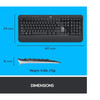
| Keyboard dimensions (WxDxH) | 457.3 x 24 x 193.5 mm |
| Keyboard weight | 805 g |
Return
FAQ: Frequently Asked Questions
Logitech MK540 Advanced Wireless Keyboard and Mouse Combo FAQ
The Logitech MK540 Advanced is a full-size wireless keyboard and mouse combo with UK layout, designed for comfortable everyday use at home or in the office. Below are the most common questions buyers ask before choosing this Logitech wireless keyboard and mouse set.
1. What is the Logitech MK540 Advanced?
The Logitech MK540 Advanced is a wireless keyboard and mouse combo designed for comfort, precision, and reliability. It includes a full-size keyboard with number pad and palm rest, plus a wireless mouse, and both connect through one Logitech Unifying USB receiver.
2. Does the Logitech MK540 come with a UK keyboard layout?
Yes. This version is the UK layout model, which is suitable for users who want a QWERTY UK keyboard layout for typing, office work, study, and general daily use.
3. Does the Logitech MK540 include both the keyboard and mouse?
Yes. The MK540 Advanced is a complete combo package that includes the keyboard, the mouse, and the Logitech Unifying USB receiver needed for wireless connection.
4. Does the Logitech MK540 use Bluetooth?
No. The Logitech MK540 Advanced uses Logitech 2.4GHz wireless technology through a Logitech Unifying USB receiver. It is not a Bluetooth keyboard and mouse combo.
5. Does the Logitech MK540 come with a Unifying receiver?
Yes. The keyboard and mouse connect through one tiny Logitech Unifying USB receiver included in the box. This is one of the most common questions buyers ask, especially when replacing an older combo set.
6. Can both the keyboard and mouse work from the same USB receiver?
Yes. Both devices are designed to connect through a single Logitech Unifying receiver, which helps save USB ports on your PC or laptop.
7. Can I pair other Logitech devices to the same Unifying receiver?
If the other Logitech device is also Unifying-compatible, it may be possible to pair it to a Logitech Unifying receiver. Buyers often ask this when replacing a mouse or keyboard, or when trying to use fewer USB receivers across multiple Logitech devices.
8. Is the Logitech MK540 plug and play?
Yes. The MK540 is designed as a plug-and-play wireless combo. In most cases, you insert the Unifying receiver, switch on the keyboard and mouse, and begin using them without complicated setup.
9. What devices is the Logitech MK540 compatible with?
Logitech’s datasheet lists compatibility with Windows 7, Windows 8, Windows 10 or later, and Chrome OS. Buyers sometimes ask about Mac use, but official compatibility for this model is primarily advertised around Windows and Chrome OS.
10. Will the Logitech MK540 work with Mac?
Some users may get basic keyboard and mouse functionality on certain Macs through the USB receiver, but Logitech’s official datasheet for the MK540 mainly lists Windows and Chrome OS compatibility. Mac-specific key behaviour and software features may vary.
11. Is the Logitech MK540 keyboard full-size?
Yes. The keyboard is a full-size layout and includes a number pad, making it a good choice for office work, accounts, spreadsheets, admin use, and users who prefer a traditional desktop keyboard layout.
12. Does the Logitech MK540 keyboard have a palm rest?
Yes. The keyboard includes an integrated palm rest to improve comfort during longer typing sessions. It also has adjustable tilt legs for a more familiar typing position.
13. Is the Logitech MK540 keyboard quiet to type on?
Yes. Logitech describes the keys as optimized for improved accuracy and reduced noise, and the business datasheet also refers to a familiar key feel with whisper-quiet typing. This makes it well suited to home offices and shared workspaces.
14. Is the keyboard spill resistant?
Yes. Logitech describes the keyboard as spill resistant, which is useful for everyday office and home environments where accidental liquid splashes can happen.
15. Does the Logitech MK540 have shortcut keys or multimedia keys?
Yes. The MK540 includes convenient hotkeys for media and other everyday functions. Logitech also notes that preset Fn keys can be personalized using compatible Logitech software.
16. What software works with the Logitech MK540?
Logitech’s business datasheet lists Logitech Options support, while Logitech Support now recommends Logi Options+ for supported devices because older Logitech Options software has reached end of support. Software-based customization can depend on the operating system and supported features.
17. Is the Logitech MK540 mouse right-handed or ambidextrous?
The included mouse is described as ambidextrous, and Logitech also highlights its contoured shape and soft rubber side grips for everyday comfort.
18. What DPI is the Logitech MK540 mouse?
The mouse uses a 1000 DPI optical sensor, which is suitable for general desktop use, office work, browsing, and productivity tasks.
19. Is the Logitech MK540 good for gaming?
The MK540 is designed for productivity, comfort, and general computing rather than competitive gaming. It is a better fit for office work, home use, studying, and everyday PC tasks.
20. What is the wireless range of the Logitech MK540?
Logitech specifies a wireless range of up to 10 metres, giving users flexibility for desk setups and typical home or office use.
21. How long do the batteries last in the Logitech MK540?
Logitech specifies up to 36 months of battery life for the keyboard and up to 18 months for the mouse, depending on usage conditions.
22. What batteries does the Logitech MK540 use?
The keyboard uses 2 x AA batteries and the mouse uses 1 x AA battery according to Logitech’s datasheet.
23. Does the Logitech MK540 have battery indicators?
Yes. Logitech’s datasheet lists battery indicators for both the keyboard and the mouse, which helps users monitor battery status more easily.
24. What should I do if the Logitech MK540 stops pairing or disconnects?
Common troubleshooting steps include checking the batteries, trying another USB port, turning the keyboard and mouse off and on again, and re-pairing through compatible Logitech software if needed. Community posts often mention these as the first things to test when a Unifying setup stops responding.
25. Can wireless lag or interference affect the Logitech MK540?
Yes. As with many 2.4GHz wireless peripherals, some users report occasional lag, interference, or receiver-related issues depending on USB port placement, nearby wireless devices, battery condition, or environmental factors.
26. Can I replace the receiver if I lose it?
Buyers often ask this because the combo relies on the Unifying receiver. If you lose the original receiver, a compatible Logitech Unifying receiver may allow re-pairing, provided the devices support Unifying connection properly.
27. Is the Logitech MK540 a good office keyboard and mouse combo?
Yes. The MK540 is a strong choice for office and home users who want a full-size keyboard with number pad, a comfortable mouse, long battery life, quiet typing, and reliable wireless connectivity from one USB receiver.
28. Who is the Logitech MK540 Advanced best for?
This combo is best for users who want a dependable full-size wireless keyboard and mouse for work, study, admin, spreadsheets, and everyday desktop use. It suits people who value comfort, familiar layout, long battery life, and a simple plug-and-play setup.
Related Products
Related Products

Logitech M185 Wireless Black & Grey Mouse
LOGITECH