
GIGABYTE
Gigabyte GC-WBAX210 Intel WiFi 6E AX200 2400Mbps Bluetooth 5.2 Wireless PCI-Express Card
- SKU:
- NPGIG-GCWBAX210
- UPC:
- 4719331814953
- MPN:
- GC-WBAX210
- Availability:
- In Stock



Description
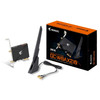
GIGABYTE GC-WBAX210 Wi-Fi 6E PCIe Card – Intel AX210, Tri-Band 2.4/5/6GHz, Up to 2400Mbps + Bluetooth 5.2
Summary: The GIGABYTE GC-WBAX210 is a PCIe x1 desktop Wi-Fi upgrade card built around the Intel® Wi-Fi 6E AX210 module. It delivers tri-band Wi-Fi (2.4GHz / 5GHz / 6GHz) with 2×2 MU-MIMO and 160MHz channel support for up to 2.4Gbps peak wireless speed, plus Bluetooth 5.2 for peripherals.
Upgrade a desktop PC to modern wireless with the GC-WBAX210. Wi-Fi 6E adds access to the 6GHz band (where available), helping reduce congestion compared to busy 2.4/5GHz networks. With dual-stream connectivity, the card is ideal for fast downloads, low-latency gaming, streaming, and stable video calls—especially when paired with a Wi-Fi 6E router.
Key benefits
- Intel AX210 Wi-Fi 6E module built-in (802.11ax) with tri-band support: 2.4GHz / 5GHz / 6GHz
- Up to 2400Mbps peak wireless rate (2×2, 160MHz, 1024-QAM; real-world speeds depend on your router, ISP and environment)
- MU-MIMO TX/RX for better performance with multiple connected devices
- WPA3 security + enterprise authentication options (802.1X methods listed) for modern network protection
- Bluetooth 5.2 for headsets, controllers, keyboards, mice and more
- AORUS 2Tx2R external antenna with magnetic base for easier placement and improved signal direction
Important installation note
- Bluetooth requires a spare internal USB 2.0 header on your motherboard. The Wi-Fi runs via PCIe, but Bluetooth typically connects through the included USB header cable.
Specifications
- Model: GC-WBAX210 (rev. 1.0)
- Chipset: Intel® Wi-Fi 6E AX210
- Interface: PCI Express x1 (Wi-Fi); USB 2.0 header connection used for Bluetooth
- Wi-Fi bands: Tri-band 2.4GHz / 5GHz / 6GHz (6GHz availability varies by country/OS)
- Max wireless speed: up to 2400Mbps
- Bluetooth: 5.2
- Security: WPA2/WPA3 + 802.1X authentication methods (as listed)
- EAN: 4719331814953
Note: Wi-Fi 6E (6GHz) support can be region/OS dependent, and certifications/features may vary by operating system.
In the box
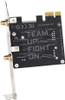
- GC-WBAX210 PCIe Wi-Fi/Bluetooth card
- AORUS external antenna
- USB 2.0 internal header cable (for Bluetooth)
- Quick installation guide
Specification
| DESIGN | |
|---|---|
| Internal | Yes |
| Chipset | Intel Wi-Fi 6E AX210 |
| Antenna type | 2x2 |
| Product colour | Black |
| Antenna | Yes |
| Component for | PC |
| Antenna design | External |
| LOGISTICS DATA | |
| Harmonized System (HS) code | 85176990 |
| NETWORKING | |
| Wi-Fi standards | 802.11a, 802.11b, 802.11g, Wi-Fi 4 (802.11n), Wi-Fi 5 (802.11ac), Wi-Fi 6E (802.11ax) |
| Security algorithms | EAP-AKA, EAP-SIM, EAP-TLS, EAP-TTLS, MSCHAPv2, PEAP, WPA2, WPA3 |
| Maximum data transfer rate | 2400 Mbit/s |
| Bluetooth version | 5.2 |
| Networking standards | IEEE 802.11a, IEEE 802.11ac, IEEE 802.11ax, IEEE 802.11b, IEEE 802.11d, IEEE 802.11e, IEEE 802.11g, IEEE 802.11h, IEEE 802.11i, IEEE 802.11k, IEEE 802.11n, IEEE 802.11r, IEEE 802.11u, IEEE 802.11v, IEEE 802.11w |
| Bluetooth | Yes |
| LAN controller | Intel AX210 |
| Wi-Fi | Yes |
| Frequency range | 2.4 - 6 GHz |
| Wi-Fi band | Tri-band (2.4 GHz / 5 GHz / 6 GHz) |
| Top Wi-Fi standard | Wi-Fi 6 (802.11ax) |
| OTHER FEATURES | |
| Harmonized System (HS) code | 85176990 |
| PACKAGING CONTENT | |
| Quick installation guide | Yes |
| PORTS & INTERFACES | |
| Interface | WLAN / Bluetooth |
| Connectivity technology | Wireless |
| Host interface | PCI Express |
Return
FAQ: Frequently Asked Questions
GIGABYTE GC-WBAX210 (Intel® AX210 Wi-Fi 6E + Bluetooth) — FAQ
What is the Gigabyte GC-WBAX210?
What Wi-Fi chipset does this card use?
How fast is it?
Does it support 6 GHz (Wi-Fi 6E) in the UK?
Do I need Windows 11 for Wi-Fi 6E to work?
Why can’t I see my 6 GHz network?
• Hidden 6 GHz SSID or same SSID as 5 GHz → separate/enable the 6 GHz SSID
• 160 MHz/DFS limits → try different channel width/channel
• Outdated Intel drivers → update Wi-Fi driver
• Windows not updated → apply latest Windows feature updates (preferably Win 11)
• Router firmware bugs → update firmware and reboot router/PC