
EVO LABS
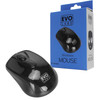
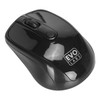
EVO Labs MO-234WBLK Wireless Mouse 2.4GHz USB Mouse for PC, Mac & Laptop
- SKU:
- MIEVO-MO234WBLK
- UPC:
- 5053118586930
- MPN:
- MO-234W BLACK


Description
EVO Labs MO-234WBLK Wireless Mouse – 2.4GHz USB Mouse for PC, Mac and Laptop
The EVO Labs MO-234WBLK wireless mouse is a simple and practical 2.4GHz wireless mouse designed for everyday use with a PC, Mac, or laptop. With 800 DPI optical tracking, a USB mini receiver, and an ambidextrous design, it is a convenient choice for home, office, and general computing.
Finished in gloss black, this wireless mouse is a good option for buyers looking for a straightforward budget wireless mouse for browsing, schoolwork, office tasks, and daily use. Its compact wireless setup helps reduce cable clutter and makes it easy to use with desktops and portable devices.
Key Features of the EVO Labs MO-234WBLK
- 2.4GHz wireless connection
- USB mini receiver
- 800 DPI optical tracking
- Ambidextrous design
- Compatible with PC, Mac and laptop use
- Gloss black finish
- Plug-and-play style setup
- 4-button layout
Designed for Everyday Home and Office Use
The EVO Labs wireless mouse is designed for users who want a simple mouse for everyday computing. It is well suited to web browsing, document work, online study, admin tasks, and general desktop navigation.
Because it uses a 2.4GHz wireless connection with a USB receiver, it is a practical alternative to a wired mouse for buyers who want a tidier desk setup or a convenient mouse for laptop use.
Good for Left- or Right-Handed Use
The ambidextrous shape makes this mouse suitable for either hand, which is useful for shared workspaces, classrooms, and everyday office environments.
Wireless Convenience with USB Mini Receiver
This mouse connects using a USB mini receiver, making setup simple on compatible devices with a USB port. Reseller listings also describe it as a plug-and-play mouse, helping users get started without a complicated installation process.
Ideal for PC, Mac and Laptop Users
If you are looking for a basic wireless mouse for laptop, office mouse for PC, or USB receiver mouse for Mac-compatible use, this model covers those core everyday requirements in a straightforward design.
Optical Tracking and Button Layout
The mouse uses an optical sensor with 800 DPI resolution, which is suitable for standard desktop navigation and routine computing tasks. Matching reseller listings also describe a 4-button design, including left, right, middle/scroll, and CPI-related control wording.
Built for Simple Everyday Control
This is a practical choice for buyers who do not need advanced gaming features and simply want a reliable wireless mouse for daily tasks.
Technical Specifications
- Brand: EVO Labs
- Model: MO-234WBLK
- Connection type: 2.4GHz wireless
- Receiver type: USB mini receiver
- Tracking method: Optical
- Resolution: 800 DPI
- Design: Ambidextrous
- Colour: Gloss Black
- Buttons: 4
- Power: 2 x AAA batteries (not included)
Who This Mouse Is Best For
- Users looking for a budget wireless mouse
- Home and office users needing a simple 2.4GHz mouse
- Laptop users wanting a wireless mouse with USB receiver
- Buyers searching for an ambidextrous office mouse
- Customers looking for the exact EVO Labs MO-234WBLK model
Buying Advice
Before ordering, make sure your device has a compatible USB port for the receiver. If you are using a newer laptop with USB-C only, you may need a suitable USB adapter. Also note that reseller listings indicate this mouse uses 2 x AAA batteries, which may not be included.
Specification
| DESIGN | |
|---|---|
| Form factor | Ambidextrous |
| Product colour | Black |
| Surface coloration | Monochromatic |
| ENERGY MANAGEMENT | |
| Battery type | AAA |
| Number of batteries supported | 2 |
| Power source | Batteries |
| MOUSE | |
| Buttons quantity | 4 |
| Frequency band | 2.4 GHz |
| Movement detection technology | Optical |
| Movement resolution | 800 DPI |
| Purpose | Office |
| Device interface | RF Wireless + USB Type-A |
| Number of scroll wheels | 1 |
| Scroll type | Wheel |
| Buttons type | Pressed buttons |
| PACKAGING DATA | |
| Quantity | 1 |
| Quantity per pack | 1 pc(s) |
| SYSTEM REQUIREMENTS | |
| Windows operating systems supported | Yes |
| WEIGHT & DIMENSIONS | |
| Weight | 63 g |
Return
FAQ: Frequently Asked Questions
EVO Labs MO-234WBLK Wireless Mouse FAQ
The EVO Labs MO-234WBLK is a simple 2.4GHz wireless USB mouse designed for everyday use with PCs, laptops, and compatible Macs. Below are the most common questions buyers ask before choosing this budget wireless mouse.
1. What is the EVO Labs MO-234WBLK wireless mouse?
The EVO Labs MO-234WBLK is a 2.4GHz wireless optical mouse designed for everyday home, office, and laptop use. It uses a USB mini receiver, has 800 DPI optical tracking, an ambidextrous shape, and a 4-button layout in a gloss black finish.
2. Is the EVO Labs MO-234WBLK compatible with PC, Mac, and laptops?
Yes. This mouse is suitable for use with PCs, laptops, and many Macs that support USB input devices. Because it uses a USB mini receiver, your device needs a standard USB-A port or a compatible USB-C to USB-A adapter if your laptop only has USB-C ports.
3. Does this wireless mouse work with MacBook models that only have USB-C ports?
Yes, but you will normally need a USB-C to USB-A adapter or hub because this mouse connects through a USB mini receiver rather than Bluetooth. This is one of the most common things MacBook users ask before buying a 2.4GHz USB mouse.
4. Is the EVO Labs MO-234WBLK Bluetooth?
No. This is a 2.4GHz wireless mouse that connects using its USB receiver. It does not rely on Bluetooth pairing, so setup is usually quick and straightforward on compatible devices.
5. Does the EVO Labs MO-234WBLK come with a USB receiver?
Yes. This mouse uses a USB mini receiver for its wireless connection. The receiver is required for normal operation, so it is important to keep it safe when travelling or storing the mouse.
6. Is this a plug-and-play wireless mouse?
Yes. The EVO Labs MO-234WBLK is generally a plug-and-play style mouse. In most cases, you simply insert the USB receiver, fit the batteries, and start using the mouse without complicated setup.
7. What DPI is the EVO Labs MO-234WBLK mouse?
This mouse uses 800 DPI optical tracking. That makes it suitable for standard desktop navigation, schoolwork, office tasks, web browsing, and general everyday computing.
8. Is 800 DPI good enough for normal everyday use?
Yes. For browsing, spreadsheets, emails, homework, admin work, and routine computer use, 800 DPI is usually perfectly suitable. Buyers looking for a simple budget wireless mouse often prefer this kind of straightforward setup over gaming-style high-DPI models.
9. Is the EVO Labs MO-234WBLK good for gaming?
This mouse is best for everyday home and office use rather than competitive gaming. Its 800 DPI optical sensor and simple 4-button layout make it a practical budget mouse for general computing, not a specialist gaming mouse.
10. Is this mouse left-handed or right-handed?
The EVO Labs MO-234WBLK has an ambidextrous design, which means it can be used comfortably by both left-handed and right-handed users for normal everyday tasks.
11. How many buttons does the EVO Labs MO-234WBLK have?
This model is listed as a 4-button wireless mouse. That includes the standard left click, right click, scroll/middle click functions, plus CPI-related control wording in reseller descriptions.
12. What batteries does the EVO Labs MO-234WBLK use?
This wireless mouse uses 2 x AAA batteries, which are typically not included. It is a good idea to have spare AAA batteries ready before setup.
13. Are batteries included with this wireless mouse?
Usually, no. Matching reseller specifications describe the EVO Labs MO-234WBLK as requiring 2 x AAA batteries that are not included.
14. Is the EVO Labs MO-234WBLK rechargeable?
No evidence from the available product listings suggests that this is a rechargeable mouse. It is described as a battery-powered wireless mouse that runs on 2 AAA batteries.
15. What should I do if the mouse is not working after setup?
First, check that the USB receiver is inserted correctly, the batteries are fitted properly, and the batteries still have charge. If the mouse still does not respond, try another USB port and restart the computer. On laptops or newer Macs, also check that any USB-C adapter or hub is working correctly.
16. Can 2.4GHz wireless mouse receivers suffer from interference?
Yes. Forum discussions often mention that 2.4GHz wireless dongles can sometimes be affected by interference, especially when placed close to busy USB 3.0 ports or other wireless devices. If you notice lag or stutter, trying a different USB port or using a short adapter can sometimes help.
17. Why is my wireless mouse lagging or stuttering sometimes?
Possible causes include weak batteries, USB receiver placement, signal interference, or a crowded wireless environment. A common troubleshooting step is to move the receiver to another port, especially away from USB 3.0 interference sources, and replace the batteries if needed.
18. Can I use this mouse without the USB receiver?
No. Because this is not a Bluetooth mouse, it normally needs its original USB mini receiver to connect wirelessly. If the receiver is lost, the mouse may no longer be usable unless a compatible replacement is available from the manufacturer.
19. Is this a good budget wireless mouse for school, office, and home use?
Yes. The EVO Labs MO-234WBLK is a practical choice for buyers who want a low-cost wireless mouse for schoolwork, office tasks, internet browsing, and general desktop use without paying extra for gaming or premium productivity features.
20. Who is the EVO Labs MO-234WBLK best for?
This mouse is best for users who want a simple and affordable wireless USB mouse for a PC, Mac, or laptop. It suits home users, office users, students, and anyone looking for a straightforward 2.4GHz mouse with ambidextrous design and everyday optical tracking.